

Migration approaches for FDMEE
The Heart of the Matter
Francisco Amores & Tony Scalese
Infratects & Edgewater Ranzal
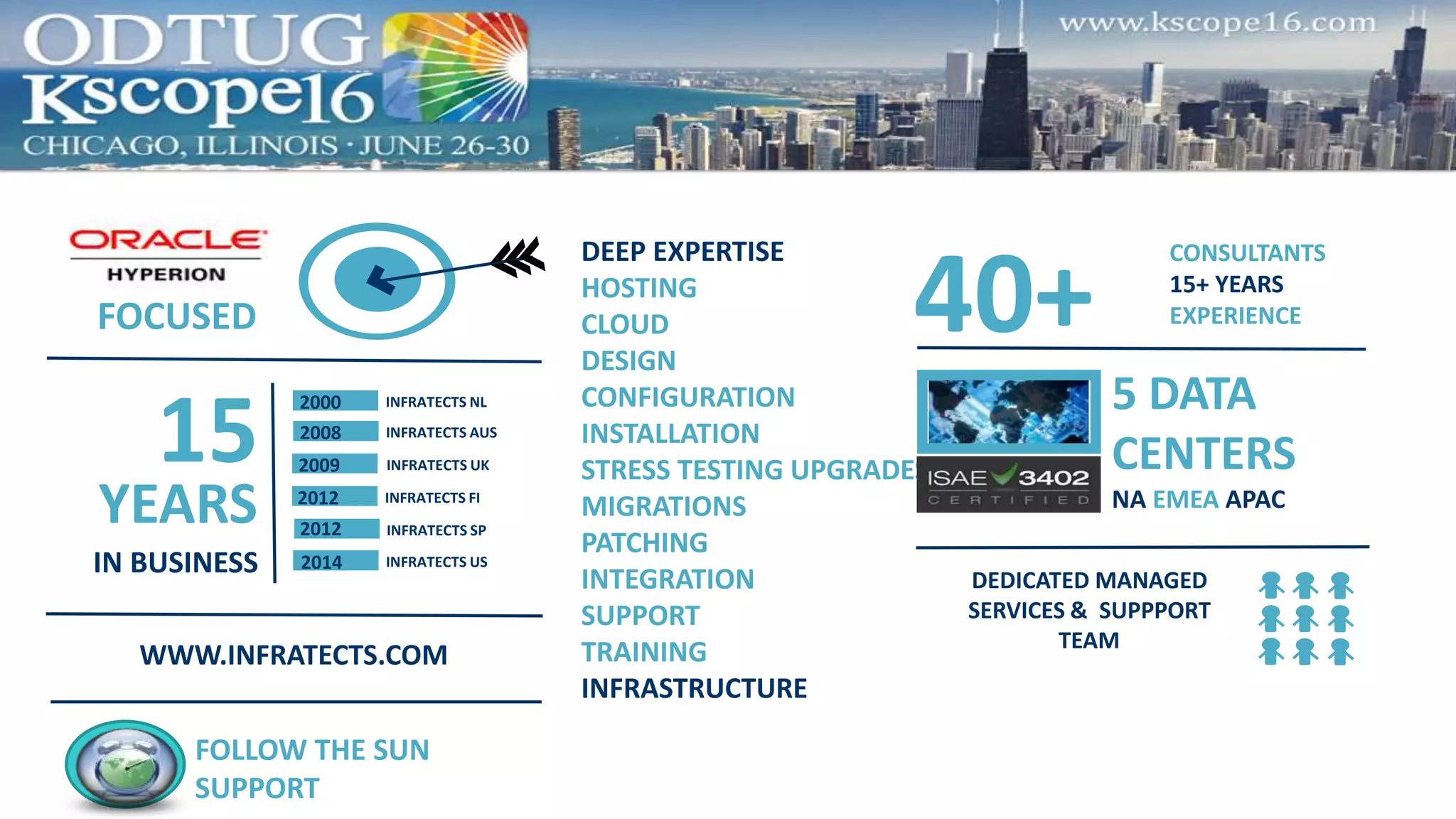
DEEP EXPERTISE
HOSTING
CLOUD
DESIGN
CONFIGURATION
INSTALLATION
STRESS TESTING UPGRADES
MIGRATIONS
PATCHING
INTEGRATION
SUPPORT
TRAINING
INFRASTRUCTURE
FOLLOW THE SUN
SUPPORT
40+
CONSULTANTS
15+ YEARS
EXPERIENCE
5 DATA
CENTERS
NA EMEA APAC
DEDICATED MANAGED
SERVICES & SUPPPORT
TEAM
FOCUSED
15
IN BUSINESS
YEARS INFRATECTS FI
INFRATECTS UK
INFRATECTS NL2000
INFRATECTS AUS2008
2009
2012
INFRATECTS US2014
INFRATECTS SP2012
WWW.INFRATECTS.COM
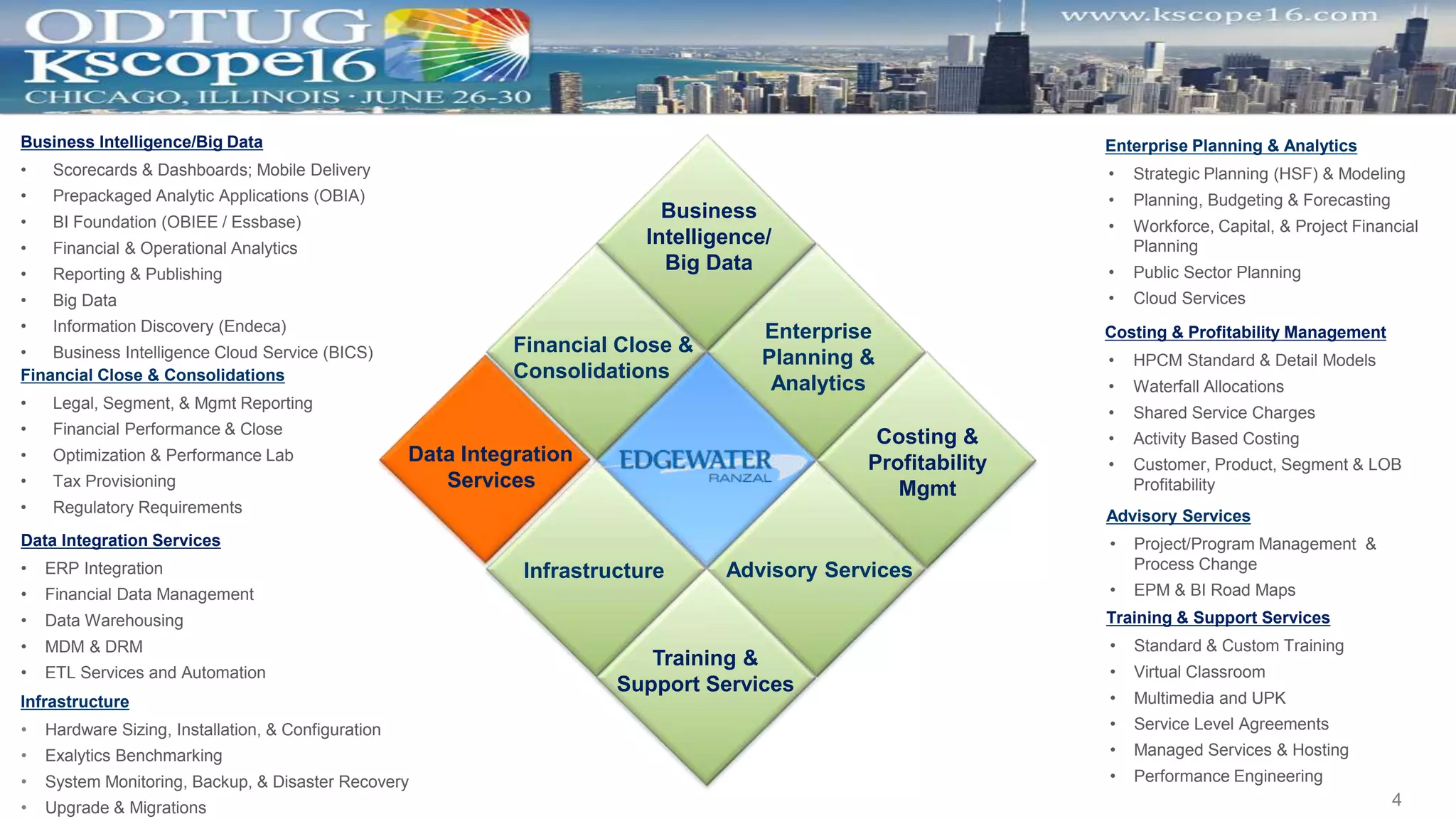
Financial Close &
Consolidations
Business
Intelligence/
Big Data
Enterprise
Planning &
Analytics
Data Integration
Services
Training &
Support Services
Advisory ServicesInfrastructure
Costing &
Profitability
Mgmt
Business Intelligence/Big Data
• Scorecards & Dashboards; Mobile Delivery
• Prepackaged Analytic Applications (OBIA)
• BI Foundation (OBIEE / Essbase)
• Financial & Operational Analytics
• Reporting & Publishing
• Big Data
• Information Discovery (Endeca)
• Business Intelligence Cloud Service (BICS)
Financial Close & Consolidations
• Legal, Segment, & Mgmt Reporting
• Financial Performance & Close
• Optimization & Performance Lab
• Tax Provisioning
• Regulatory Requirements
Data Integration Services
• ERP Integration
• Financial Data Management
• Data Warehousing
• MDM & DRM
• ETL Services and Automation
Infrastructure
• Hardware Sizing, Installation, & Configuration
• Exalytics Benchmarking
• System Monitoring, Backup, & Disaster Recovery
• Upgrade & Migrations
Advisory Services
• Project/Program Management &
Process Change
• EPM & BI Road Maps
Training & Support Services
• Standard & Custom Training
• Virtual Classroom
• Multimedia and UPK
• Service Level Agreements
• Managed Services & Hosting
• Performance Engineering
Enterprise Planning & Analytics
• Strategic Planning (HSF) & Modeling
• Planning, Budgeting & Forecasting
• Workforce, Capital, & Project Financial
Planning
• Public Sector Planning
• Cloud Services
Costing & Profitability Management
• HPCM Standard & Detail Models
• Waterfall Allocations
• Shared Service Charges
• Activity Based Costing
• Customer, Product, Segment & LOB
Profitability
4
Safe Harbor
 The following is intended for information purposes only on behalf of
Infratects and Edgewater Ranzal, and may not be incorporated into
any contract. It is not a commitment to deliver any services or
functionality, and should not be relied upon in making purchasing
decisions. This provides no warranties with respect to the offerings
described within. The development, release, and timing of any
features or functionality described for Oracle’s products remains at
the sole discretion of Oracle. Any third-party names, trademarks and
copyrights contained in this document are the property of their
respective owners
 FDMEE Vs. FDM
 Migration Utility
 Rebuild Vs. Migration Utility
 Best Practices
 Discussion Panel & Questions
Agenda
Let’s Engage in Lively Discussion
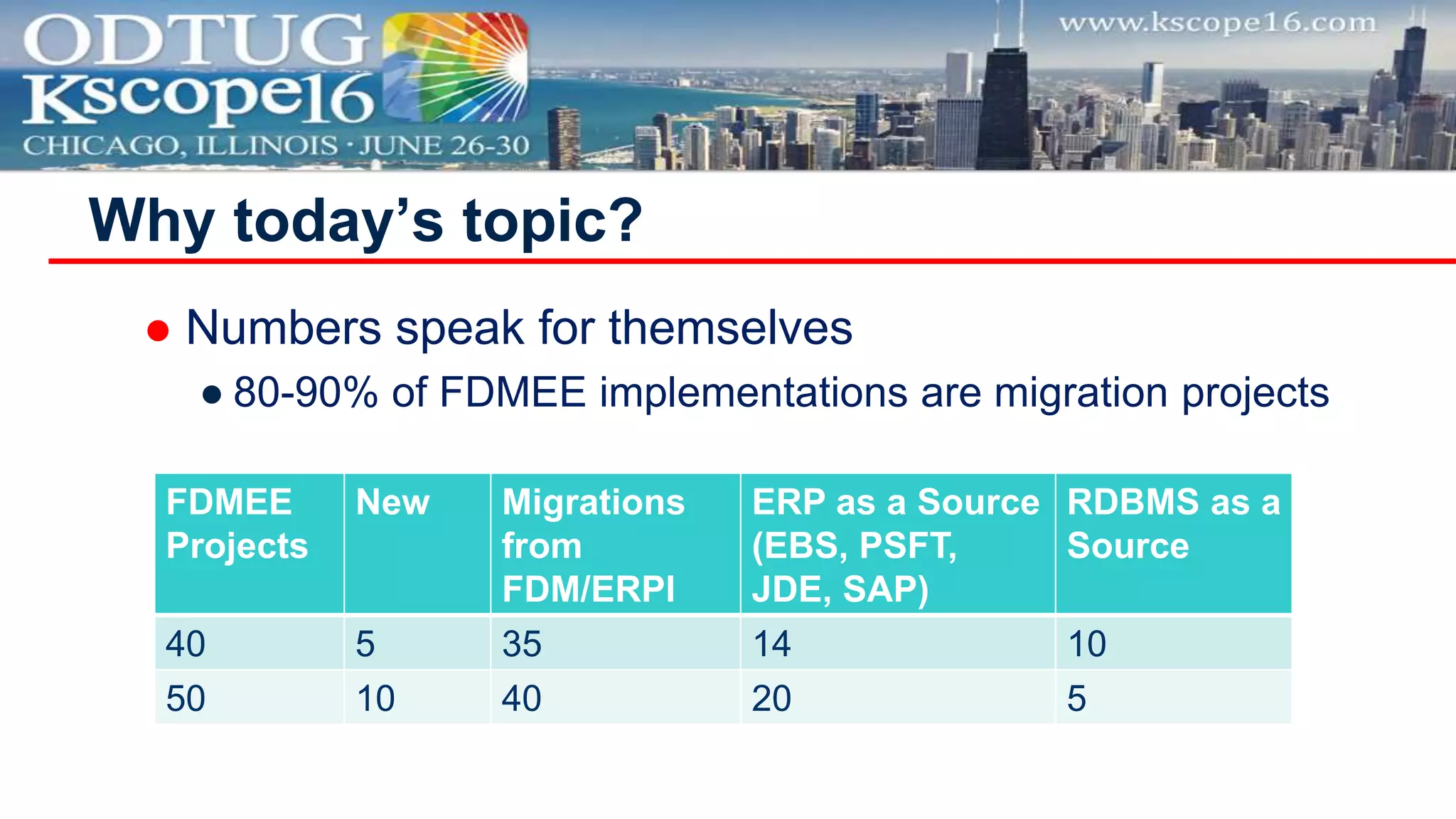
 Numbers speak for themselves
● 80-90% of FDMEE implementations are migration projects
Why today’s topic?
FDMEE
Projects
New Migrations
from
FDM/ERPI
ERP as a Source
(EBS, PSFT,
JDE, SAP)
RDBMS as a
Source
40 5 35 14 10
50 10 40 20 5
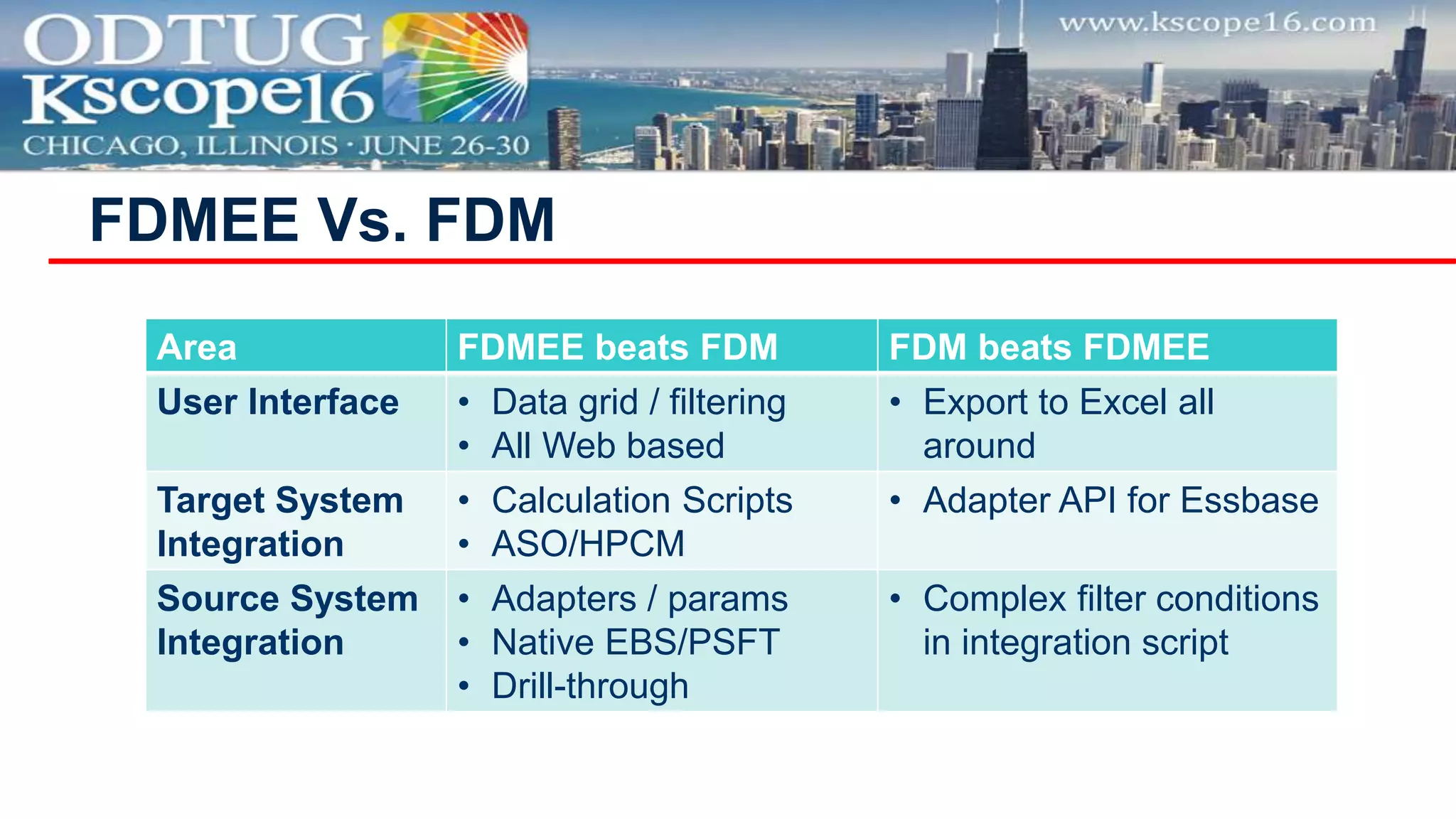
FDMEE Vs. FDM
Area FDMEE beats FDM FDM beats FDMEE
User Interface • Data grid / filtering
• All Web based
• Export to Excel all
around
Target System
Integration
• Calculation Scripts
• ASO/HPCM
• Adapter API for Essbase
Source System
Integration
• Adapters / params
• Native EBS/PSFT
• Drill-through
• Complex filter conditions
in integration script
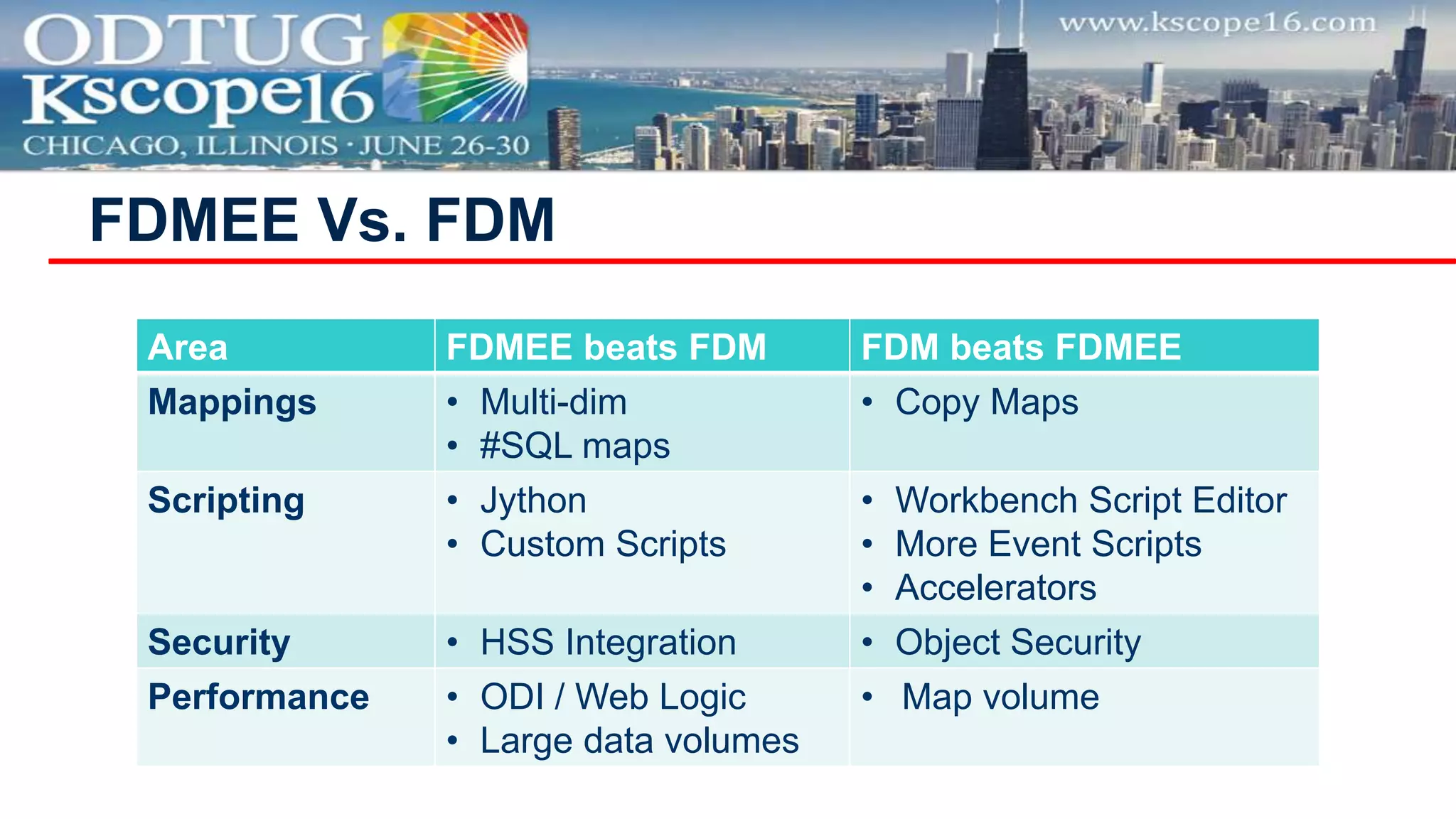
FDMEE Vs. FDM
Area FDMEE beats FDM FDM beats FDMEE
Mappings • Multi-dim
• #SQL maps
• Copy Maps
Scripting • Jython
• Custom Scripts
• Workbench Script Editor
• More Event Scripts
• Accelerators
Security • HSS Integration • Object Security
Performance • ODI / Web Logic
• Large data volumes
• Map volume
FDMEE Vs. FDM
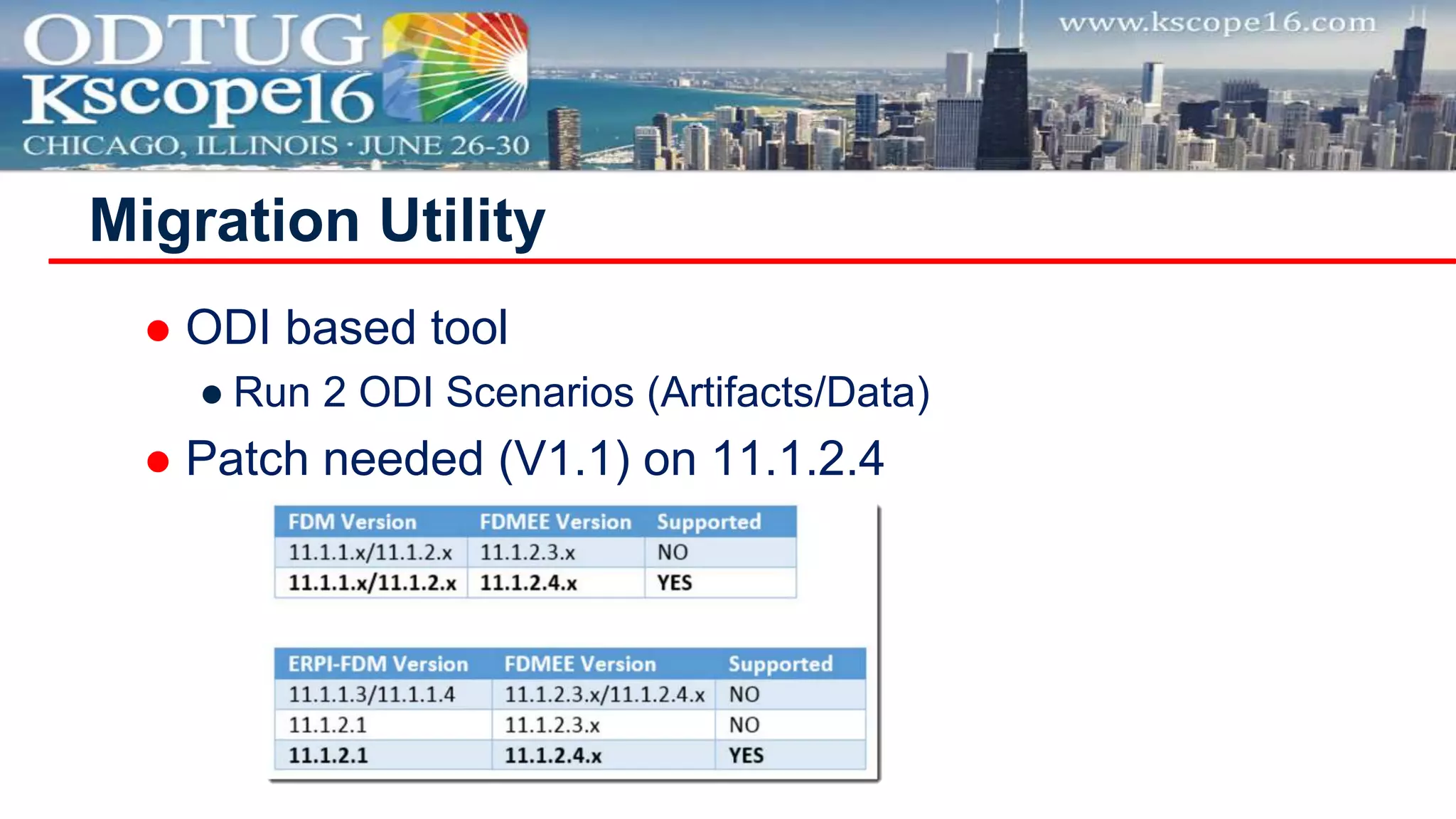
 ODI based tool
● Run 2 ODI Scenarios (Artifacts/Data)
 Patch needed (V1.1) on 11.1.2.4
Migration Utility
Migration Utility
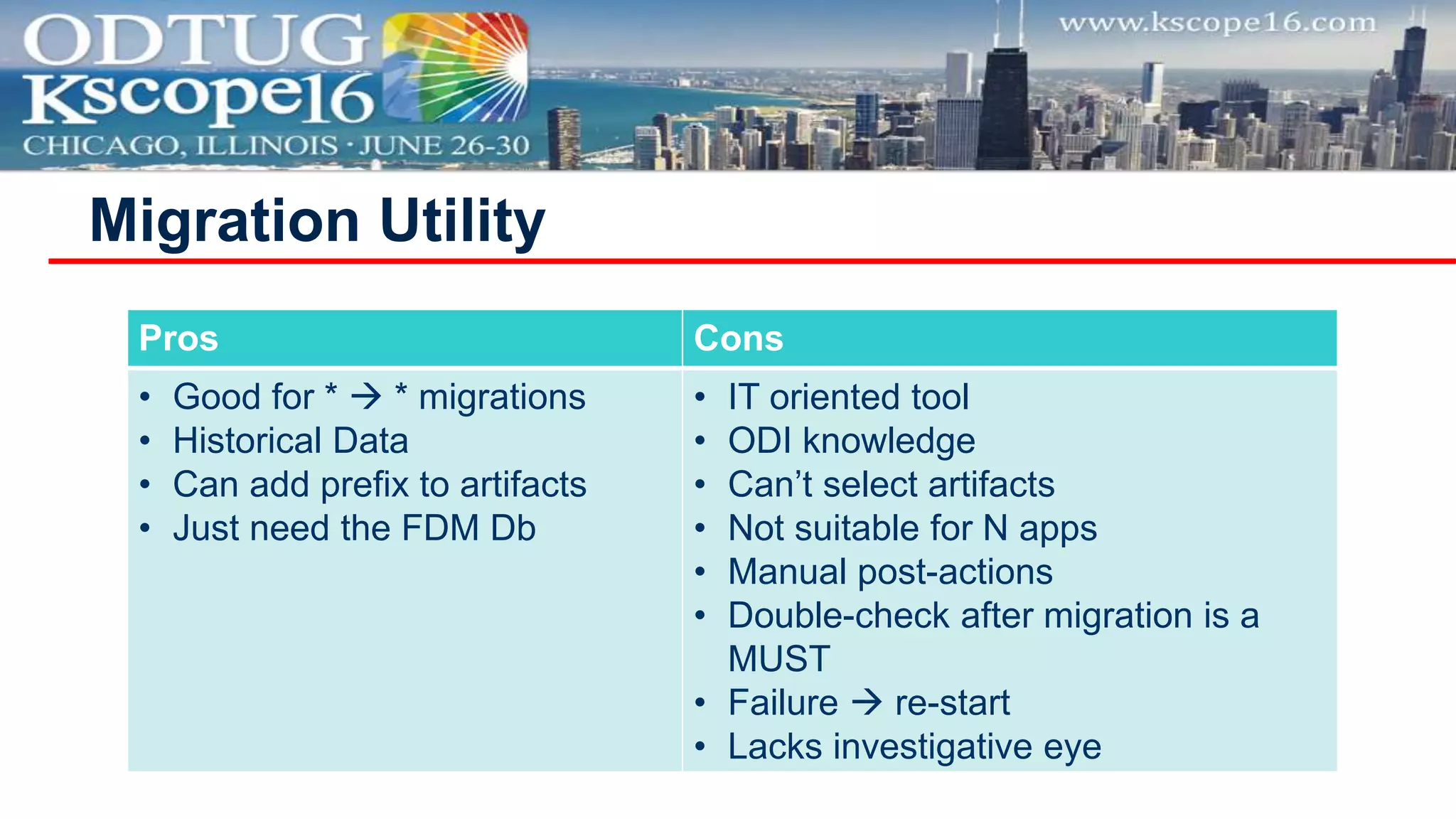
Pros Cons
• Good for *  * migrations
• Historical Data
• Can add prefix to artifacts
• Just need the FDM Db
• IT oriented tool
• ODI knowledge
• Can’t select artifacts
• Not suitable for N apps
• Manual post-actions
• Double-check after migration is a
MUST
• Failure  re-start
• Lacks investigative eye
Migration Utility
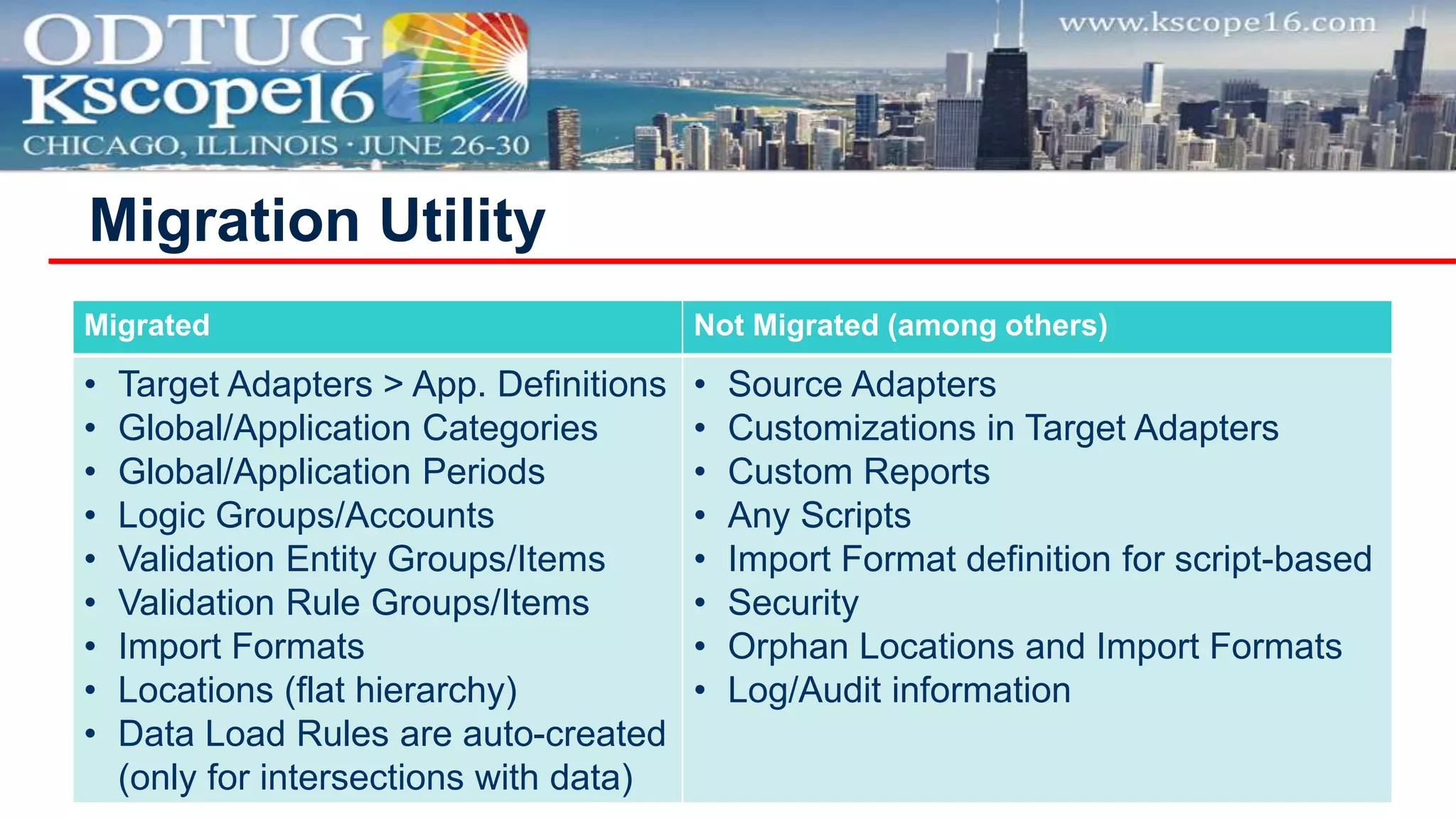
Migrated Not Migrated (among others)
• Target Adapters > App. Definitions
• Global/Application Categories
• Global/Application Periods
• Logic Groups/Accounts
• Validation Entity Groups/Items
• Validation Rule Groups/Items
• Import Formats
• Locations (flat hierarchy)
• Data Load Rules are auto-created
(only for intersections with data)
• Source Adapters
• Customizations in Target Adapters
• Custom Reports
• Any Scripts
• Import Format definition for script-based
• Security
• Orphan Locations and Import Formats
• Log/Audit information
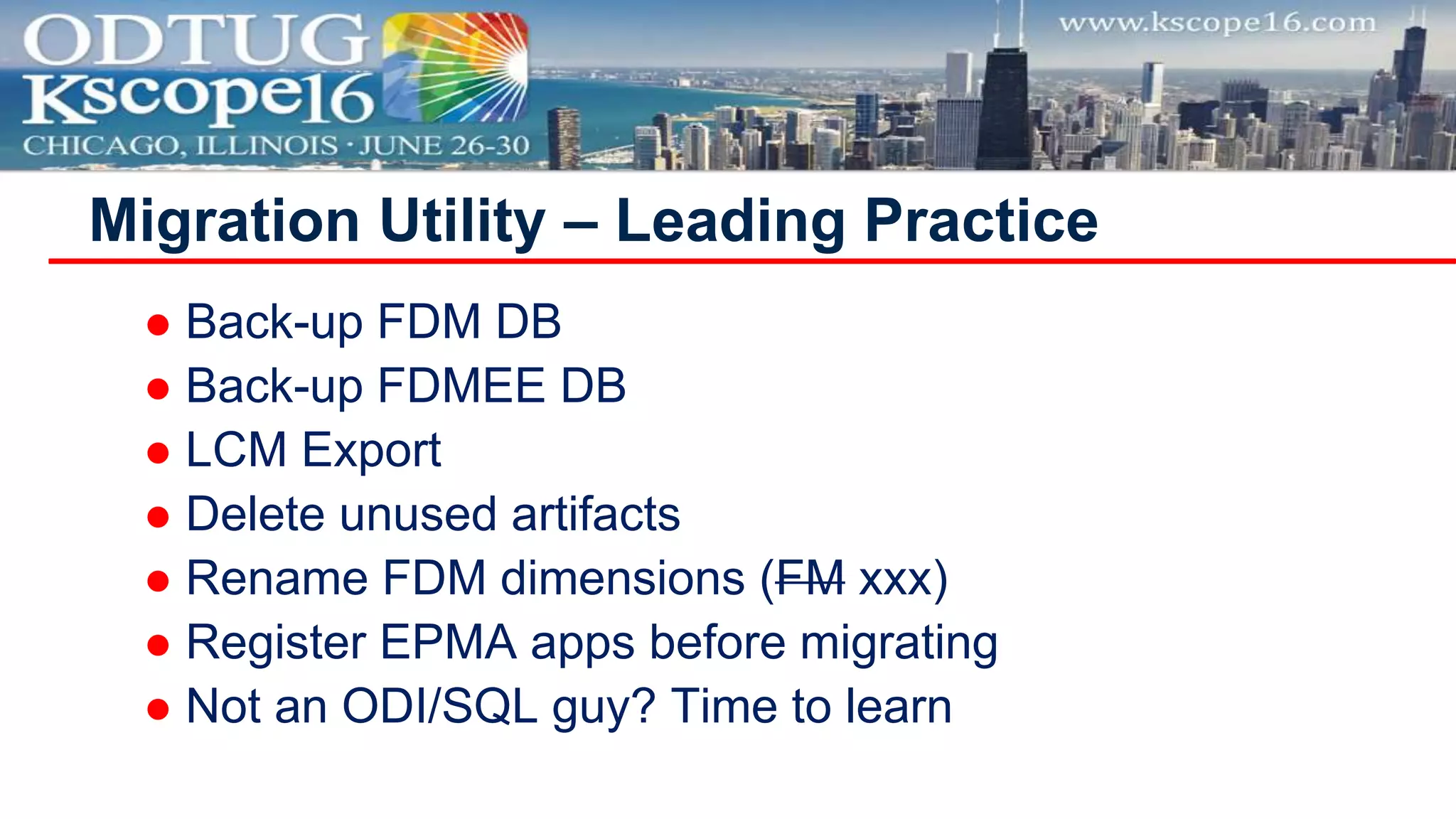
 Back-up FDM DB
 Back-up FDMEE DB
 LCM Export
 Delete unused artifacts
 Rename FDM dimensions (FM xxx)
 Register EPMA apps before migrating
 Not an ODI/SQL guy? Time to learn
Migration Utility – Leading Practice
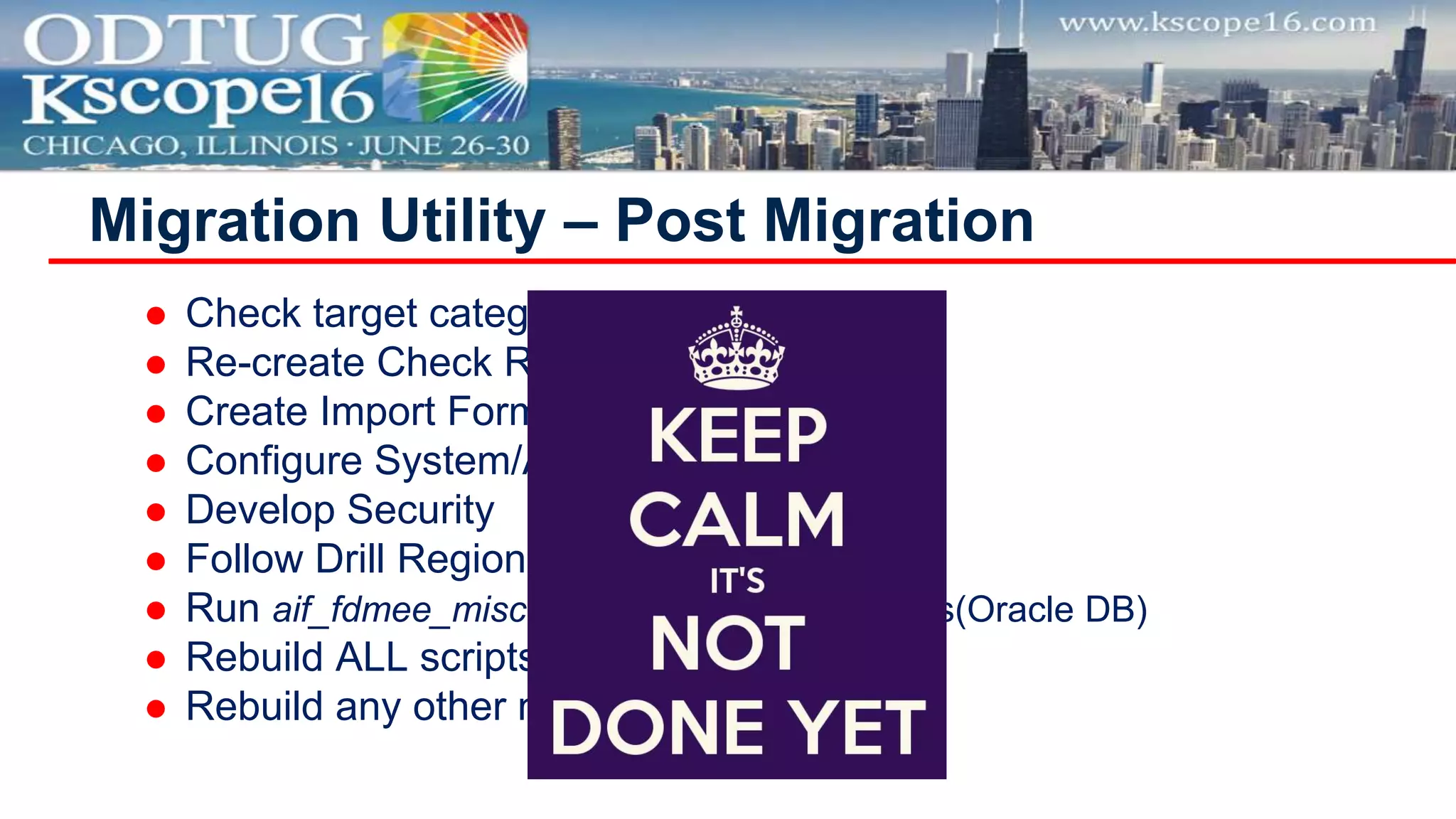
 Check target category and period maps
 Re-create Check Rules
 Create Import Formats for MP files
 Configure System/Application Settings
 Develop Security
 Follow Drill Region post migration steps
 Run aif_fdmee_misc.sql  Fix CS in Mappings(Oracle DB)
 Rebuild ALL scripts 
 Rebuild any other not migrated artifact
Migration Utility – Post Migration
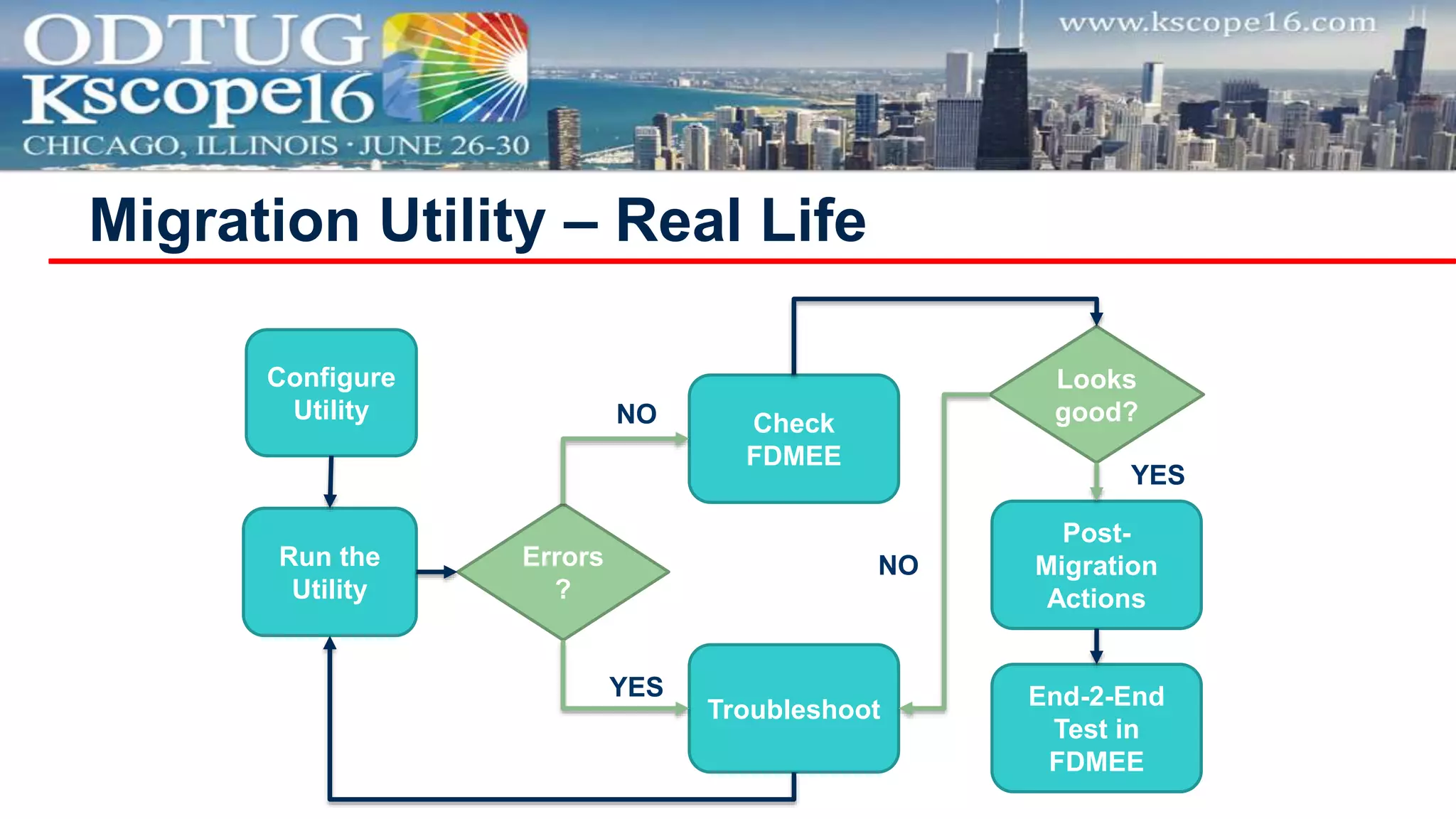
Migration Utility – Real Life
Configure
Utility
Run the
Utility
Check
FDMEE
Troubleshoot
Errors
?
Post-
Migration
Actions
End-2-End
Test in
FDMEE
NO
YES
Looks
good?
YES
NO
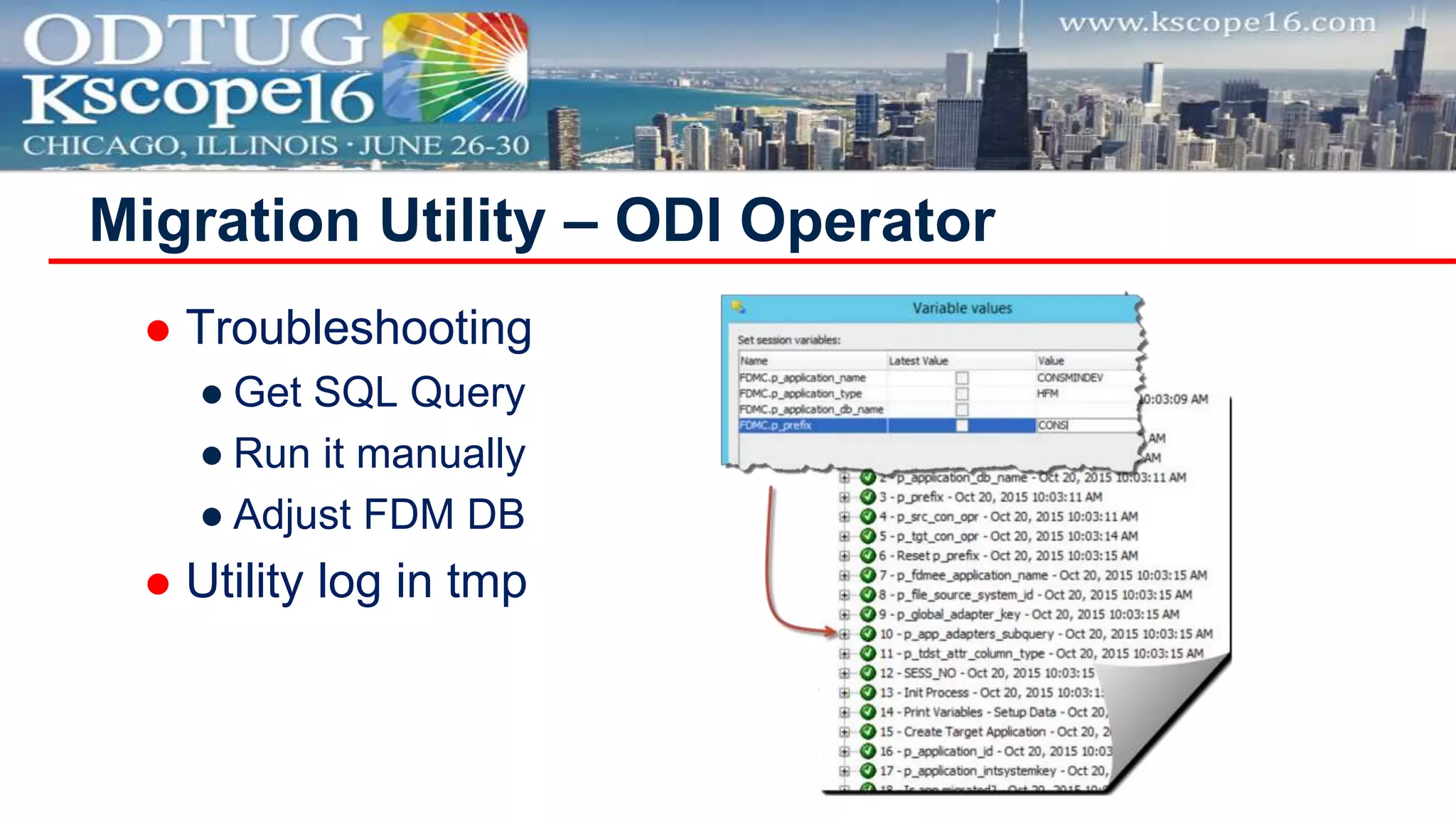
 Troubleshooting
● Get SQL Query
● Run it manually
● Adjust FDM DB
 Utility log in tmp
Migration Utility – ODI Operator
Did you run it with no issues?
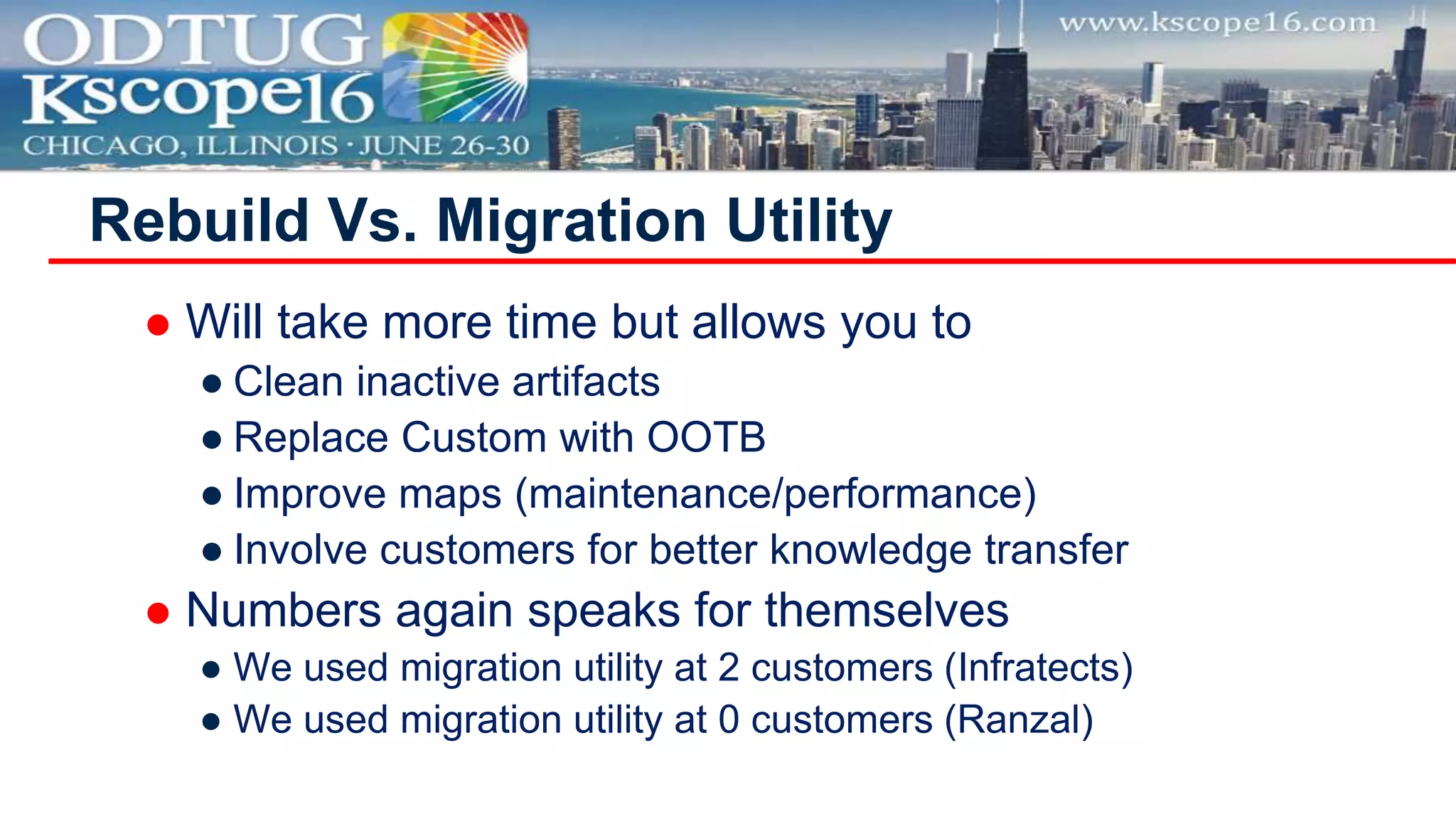
 Will take more time but allows you to
● Clean inactive artifacts
● Replace Custom with OOTB
● Improve maps (maintenance/performance)
● Involve customers for better knowledge transfer
 Numbers again speaks for themselves
● We used migration utility at 2 customers (Infratects)
● We used migration utility at 0 customers (Ranzal)
Rebuild Vs. Migration Utility
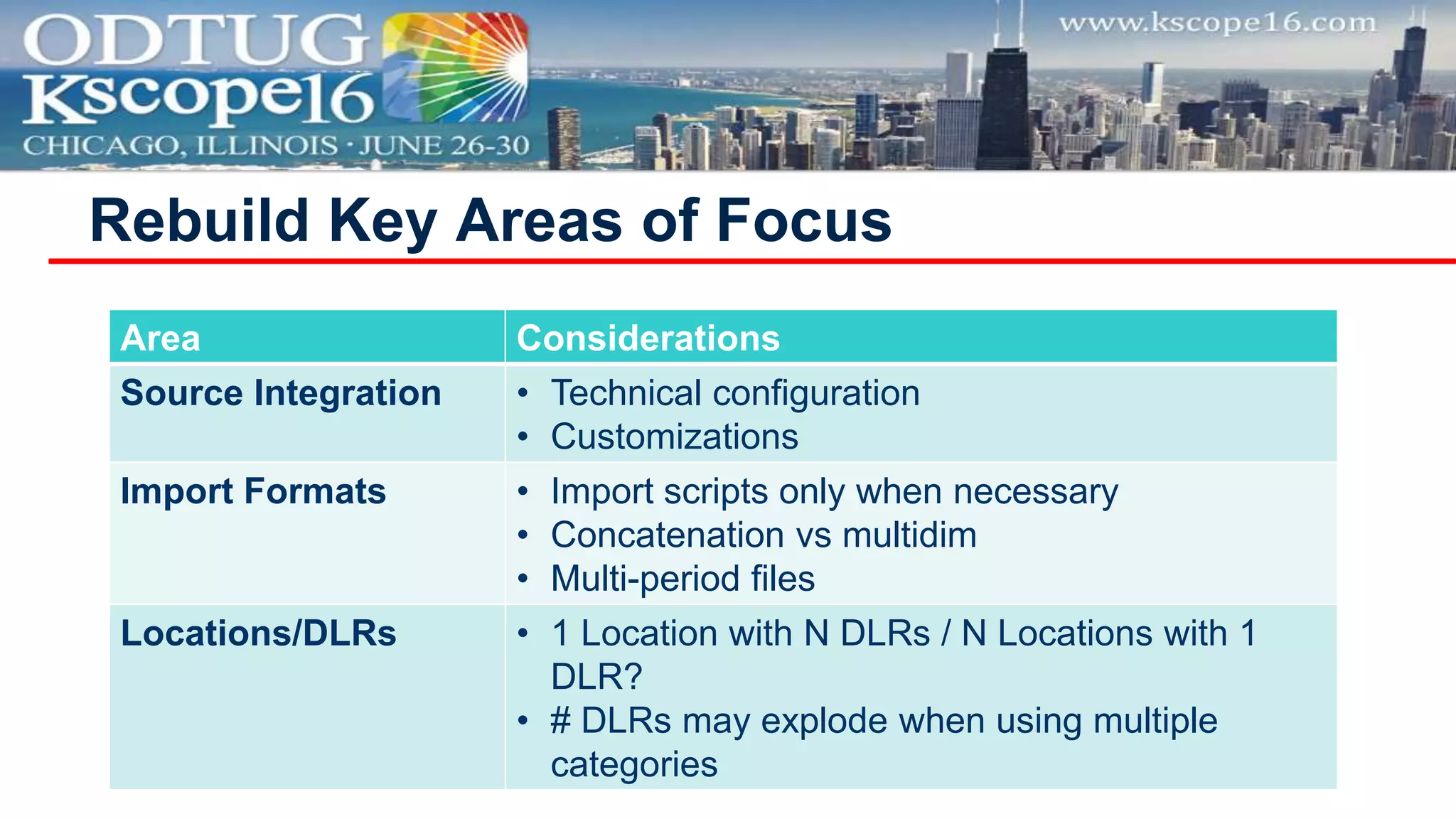
Rebuild Key Areas of Focus
Area Considerations
Source Integration • Technical configuration
• Customizations
Import Formats • Import scripts only when necessary
• Concatenation vs multidim
• Multi-period files
Locations/DLRs • 1 Location with N DLRs / N Locations with 1
DLR?
• # DLRs may explode when using multiple
categories
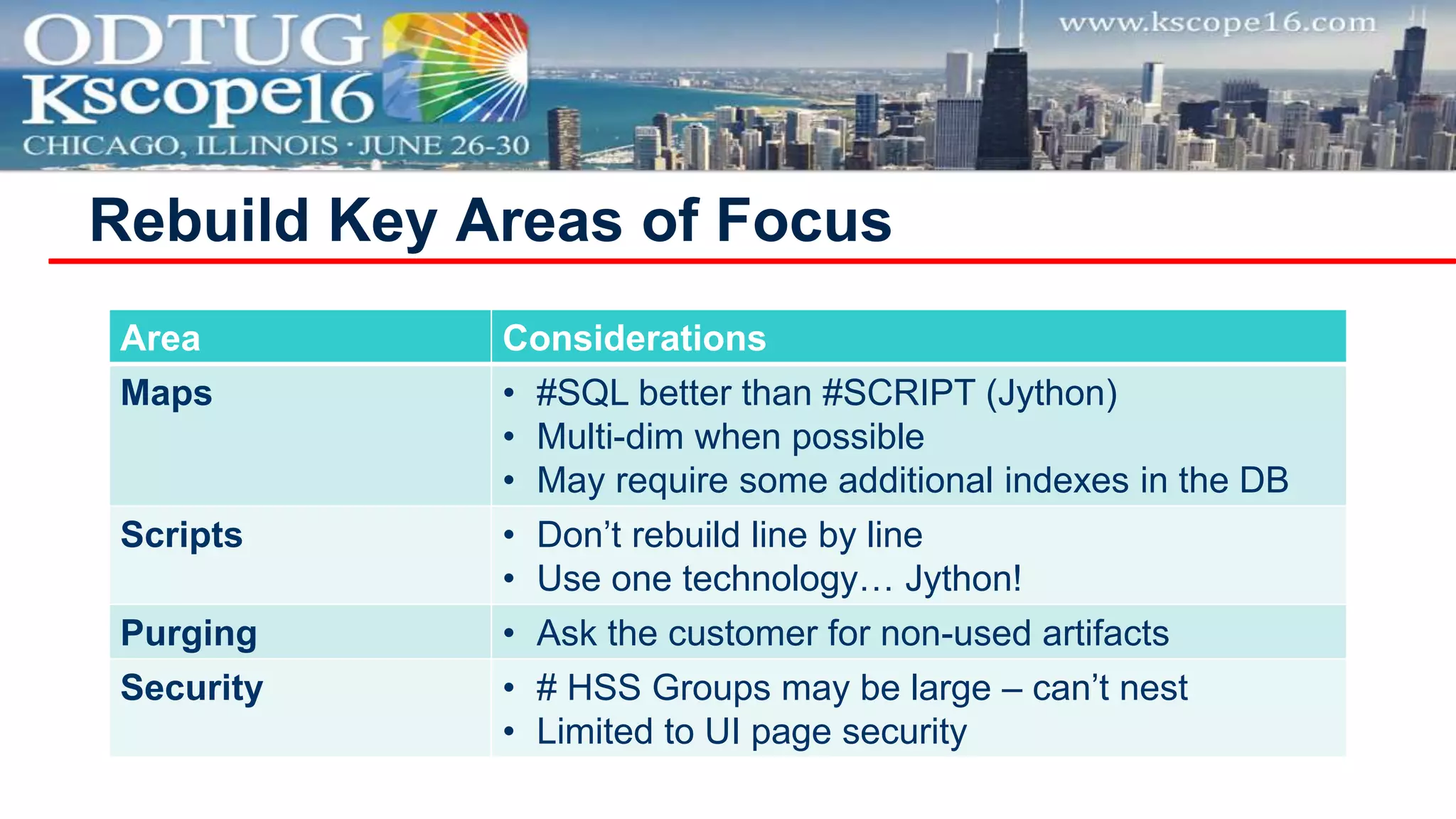
Rebuild Key Areas of Focus
Area Considerations
Maps • #SQL better than #SCRIPT (Jython)
• Multi-dim when possible
• May require some additional indexes in the DB
Scripts • Don’t rebuild line by line
• Use one technology… Jython!
Purging • Ask the customer for non-used artifacts
Security • # HSS Groups may be large – can’t nest
• Limited to UI page security
 Excel Interface
● Based on keys
● Very poor validation
 What helped us
● Custom utility to generate LCM files
● Custom SQL utility with validations
● Custom Excel Template for maps
Mixed Approach
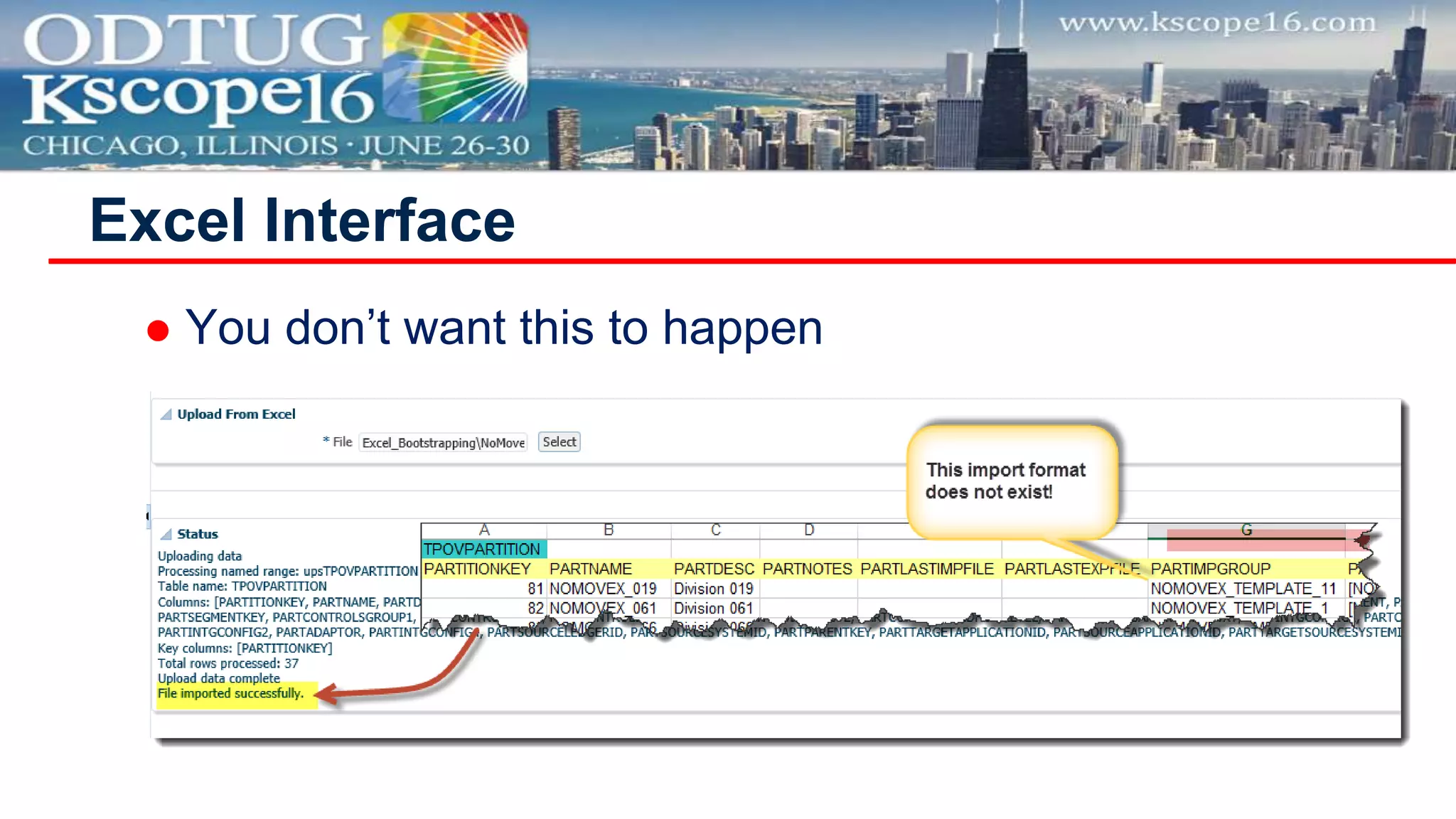
 You don’t want this to happen
Excel Interface
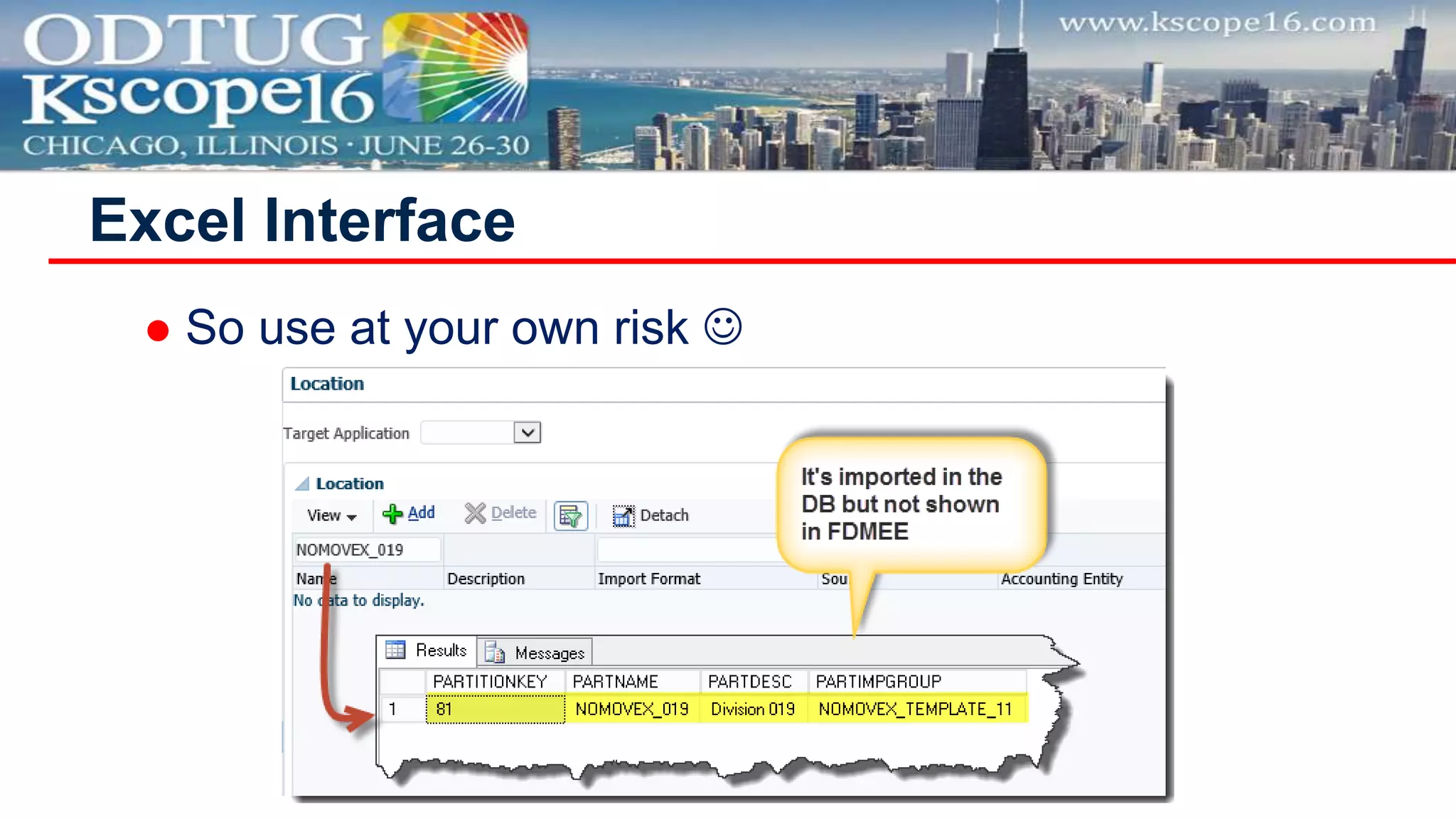
 So use at your own risk 
Excel Interface
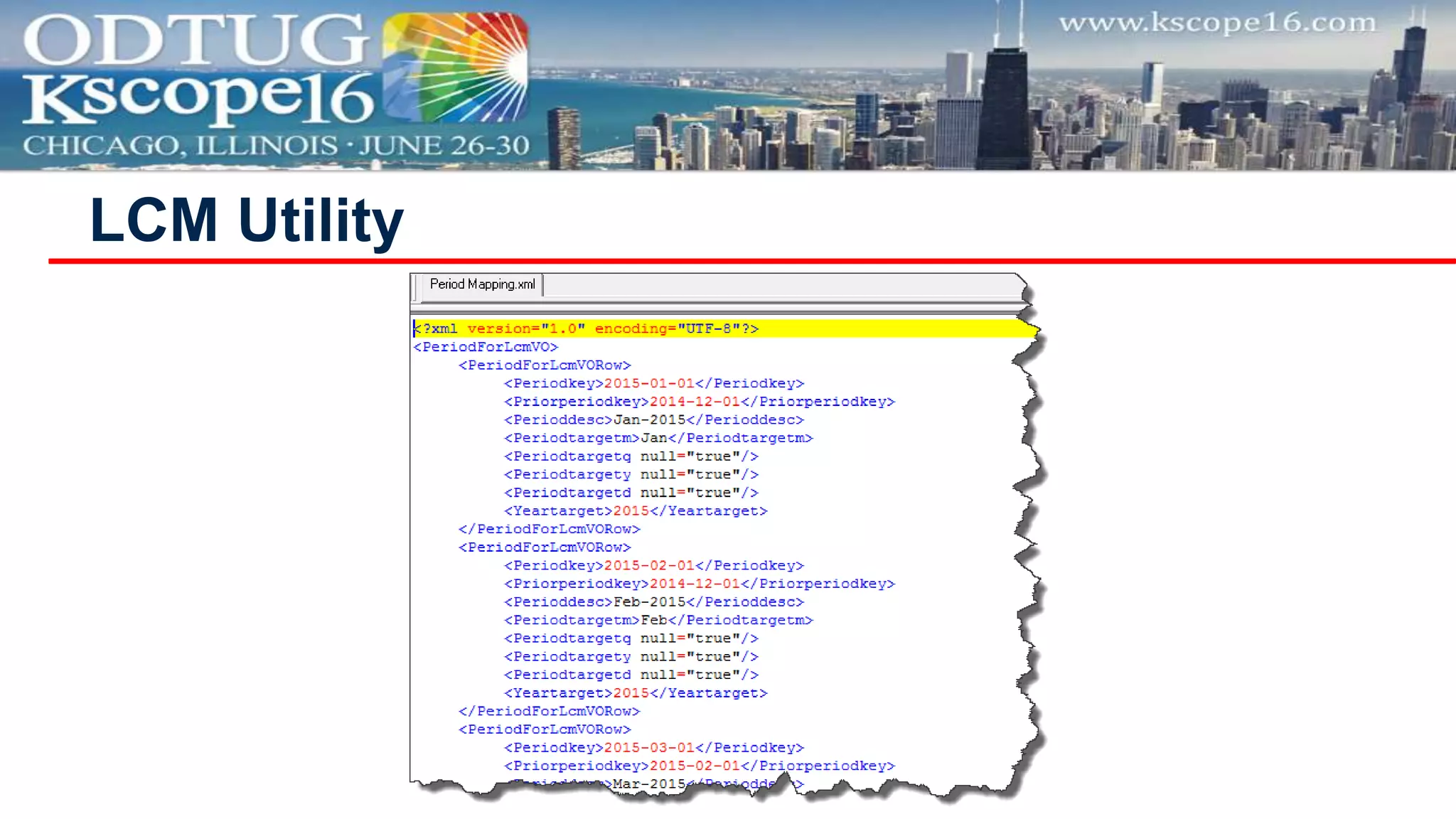
LCM Utility
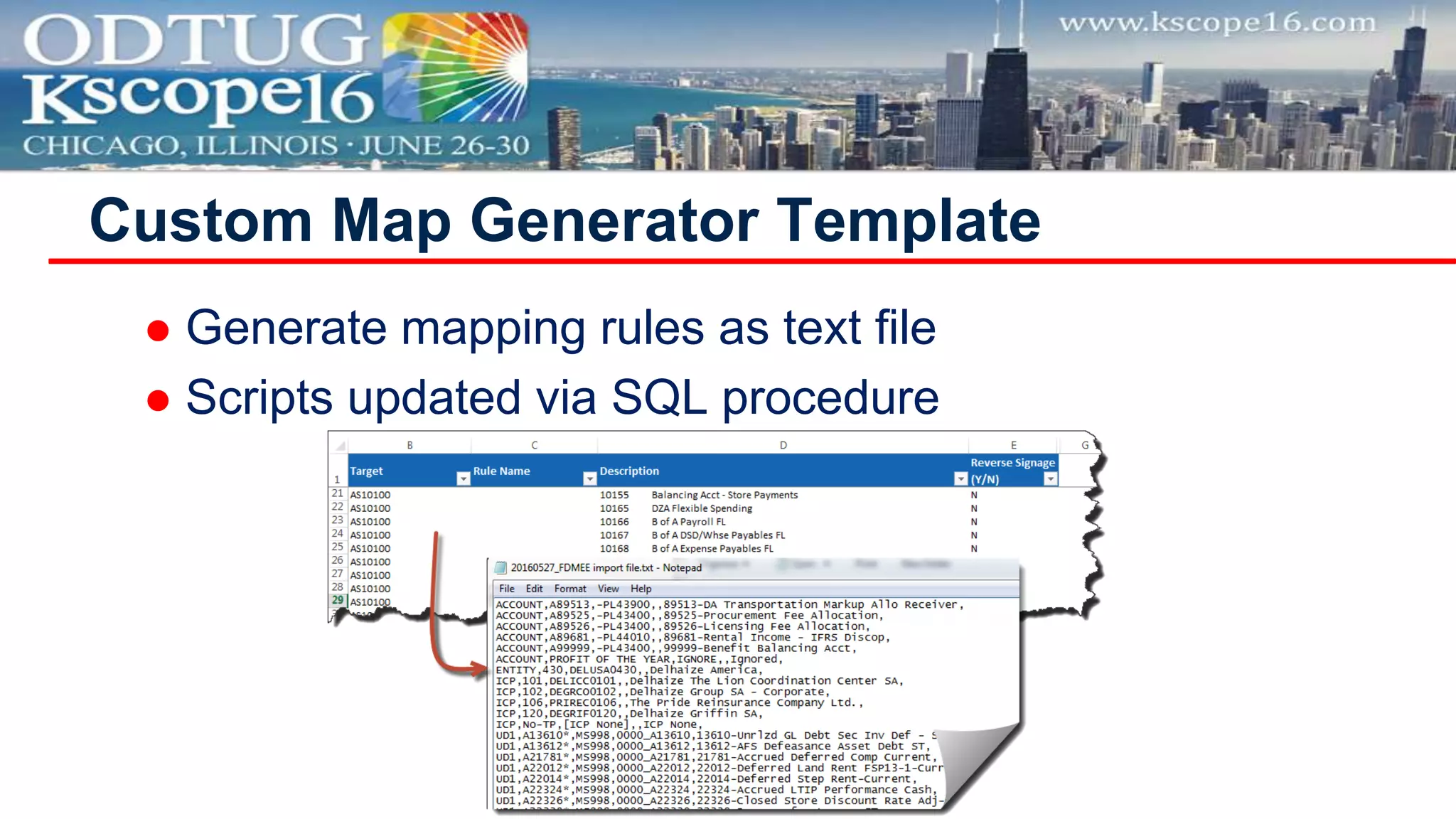
 Generate mapping rules as text file
 Scripts updated via SQL procedure
Custom Map Generator Template
 Migration Workshop
● Analysis of FDM apps
● Skip/Migrate/New
 Take your time for design
● Locations
● Maps
● Scripts
 Unit Testing before End-2-End
Best Practices
 Use Jython
 All imports at the top, only required
 fdmAPI.logxxxx
 Use inline comments/doc strings
 try….except….finally
 Make it work then make it Jythonic
 Create a framework (code reusability)
Best Practices for Rebuilding Scripts
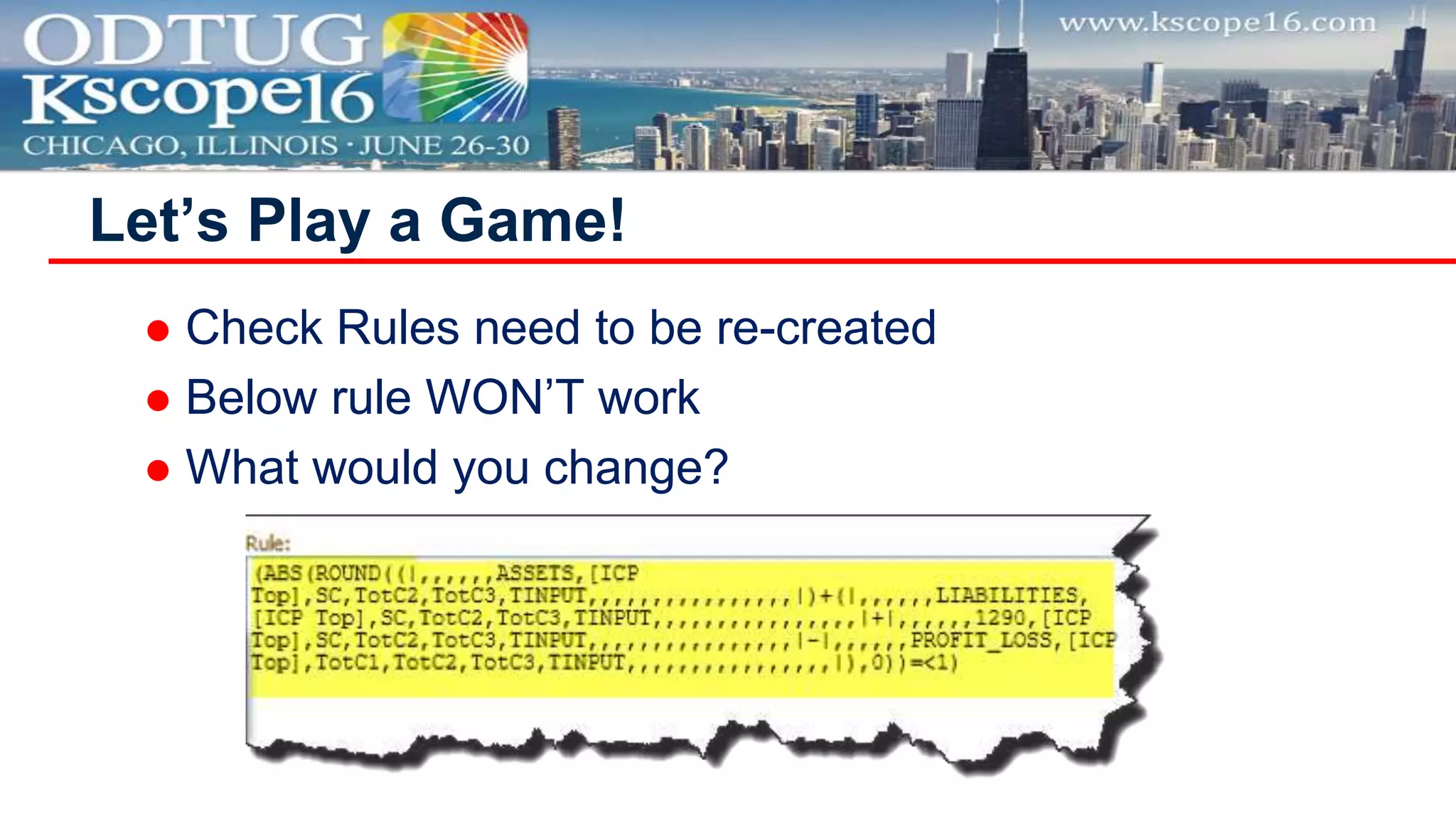
 Check Rules need to be re-created
 Below rule WON’T work
 What would you change?
Let’s Play a Game!
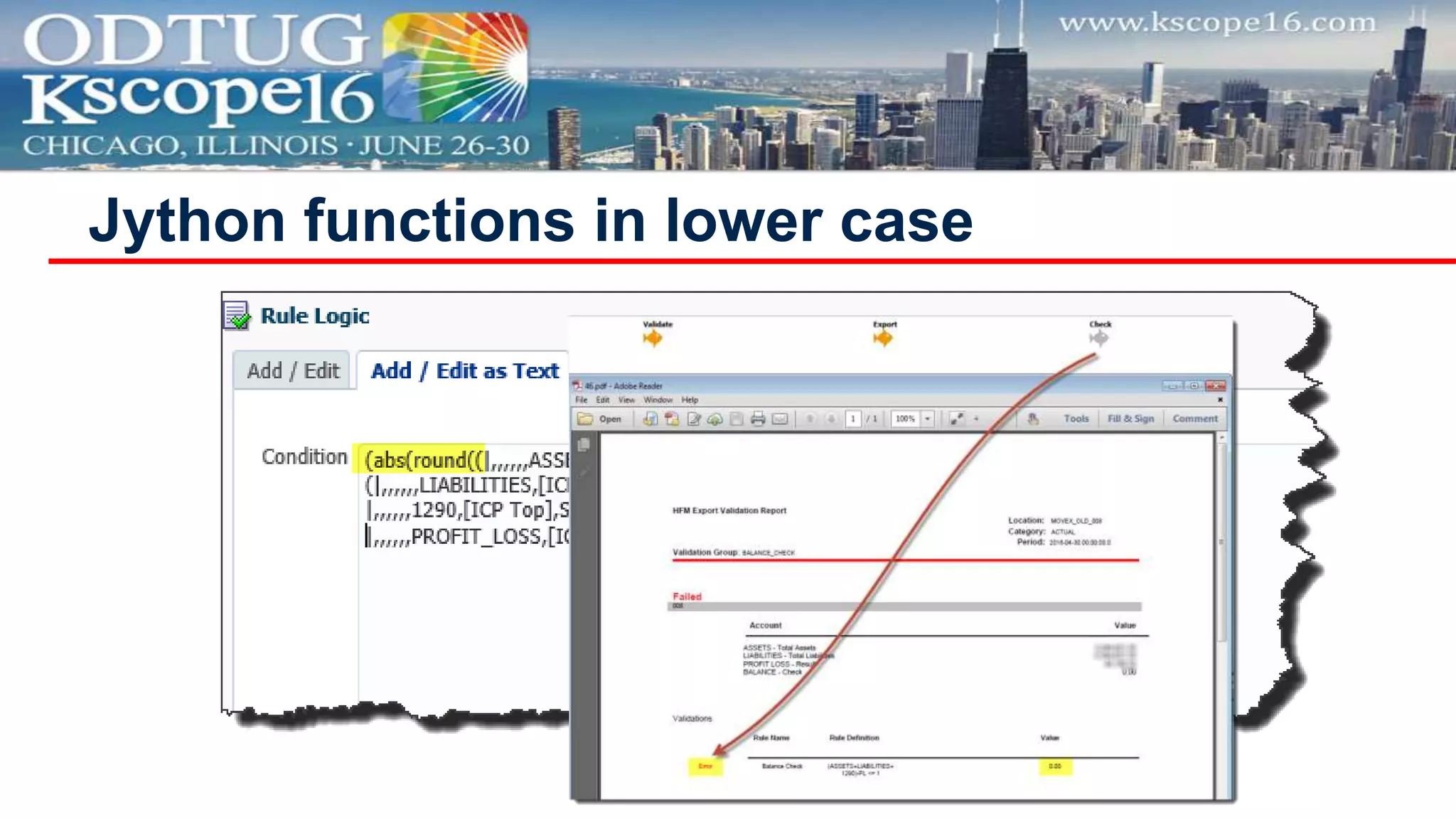
Jython functions in lower case
After couple of hours…
Discussion Panel
Francisco Amores Torres
Infratects
francisco.amores@infratects.com
@akafdmee
Tony Scalese
Edgewater Ranzal
ascalese@ranzal.com
@fdmeeguru
Questions
Infratects
2401 Internet Blvd., Suite 101
Frisco, Texas 75034
Tel (214) 436-8987
Email: info@infratects.com
Co-Presenter
Francisco Amores Torres, Integration Specialist
Herculesplein 32-34
Utrecht 3584 AA
The Netherlands
Tel +31 (0)88 238 08 00
Horton House
Exchange Flags
Liverpool L2 3PF
Tel +44 (0) 7833 444717
Tekniikantie 14
Espoo 02150
Finland
Tel +358 (0)40 559 2630
Edgewater Ranzal
108 Corporate Park Drive, Suite 105
White Plains, NY 10604
Tel (914) 253-6600
Email: info@ranzal.com
Co-Presenter
Tony Scalese, Integration Practice Director
45 Beech Street, Suite
109
London EC2Y 8AD
United Kingdom
Tel +44 (0) 2033 717 174
150 North Michigan
Ave.
Suite 2800
Chicago, IL 60601
Tel (312) 624-7738
200 Harvard Mill
Square
Suite 210
Wakefield, MA 01880
Tel (781) 246-3343
Migration Approaches for FDMEE

Migration Approaches for FDMEE

  • 2.
    Migration approaches forFDMEE The Heart of the Matter Francisco Amores & Tony Scalese Infratects & Edgewater Ranzal
  • 3.
    DEEP EXPERTISE HOSTING CLOUD DESIGN CONFIGURATION INSTALLATION STRESS TESTINGUPGRADES MIGRATIONS PATCHING INTEGRATION SUPPORT TRAINING INFRASTRUCTURE FOLLOW THE SUN SUPPORT 40+ CONSULTANTS 15+ YEARS EXPERIENCE 5 DATA CENTERS NA EMEA APAC DEDICATED MANAGED SERVICES & SUPPPORT TEAM FOCUSED 15 IN BUSINESS YEARS INFRATECTS FI INFRATECTS UK INFRATECTS NL2000 INFRATECTS AUS2008 2009 2012 INFRATECTS US2014 INFRATECTS SP2012 WWW.INFRATECTS.COM
  • 4.
    Financial Close & Consolidations Business Intelligence/ BigData Enterprise Planning & Analytics Data Integration Services Training & Support Services Advisory ServicesInfrastructure Costing & Profitability Mgmt Business Intelligence/Big Data • Scorecards & Dashboards; Mobile Delivery • Prepackaged Analytic Applications (OBIA) • BI Foundation (OBIEE / Essbase) • Financial & Operational Analytics • Reporting & Publishing • Big Data • Information Discovery (Endeca) • Business Intelligence Cloud Service (BICS) Financial Close & Consolidations • Legal, Segment, & Mgmt Reporting • Financial Performance & Close • Optimization & Performance Lab • Tax Provisioning • Regulatory Requirements Data Integration Services • ERP Integration • Financial Data Management • Data Warehousing • MDM & DRM • ETL Services and Automation Infrastructure • Hardware Sizing, Installation, & Configuration • Exalytics Benchmarking • System Monitoring, Backup, & Disaster Recovery • Upgrade & Migrations Advisory Services • Project/Program Management & Process Change • EPM & BI Road Maps Training & Support Services • Standard & Custom Training • Virtual Classroom • Multimedia and UPK • Service Level Agreements • Managed Services & Hosting • Performance Engineering Enterprise Planning & Analytics • Strategic Planning (HSF) & Modeling • Planning, Budgeting & Forecasting • Workforce, Capital, & Project Financial Planning • Public Sector Planning • Cloud Services Costing & Profitability Management • HPCM Standard & Detail Models • Waterfall Allocations • Shared Service Charges • Activity Based Costing • Customer, Product, Segment & LOB Profitability 4
  • 5.
    Safe Harbor  Thefollowing is intended for information purposes only on behalf of Infratects and Edgewater Ranzal, and may not be incorporated into any contract. It is not a commitment to deliver any services or functionality, and should not be relied upon in making purchasing decisions. This provides no warranties with respect to the offerings described within. The development, release, and timing of any features or functionality described for Oracle’s products remains at the sole discretion of Oracle. Any third-party names, trademarks and copyrights contained in this document are the property of their respective owners
  • 6.
     FDMEE Vs.FDM  Migration Utility  Rebuild Vs. Migration Utility  Best Practices  Discussion Panel & Questions Agenda
  • 7.
    Let’s Engage inLively Discussion
  • 8.
     Numbers speakfor themselves ● 80-90% of FDMEE implementations are migration projects Why today’s topic? FDMEE Projects New Migrations from FDM/ERPI ERP as a Source (EBS, PSFT, JDE, SAP) RDBMS as a Source 40 5 35 14 10 50 10 40 20 5
  • 9.
    FDMEE Vs. FDM AreaFDMEE beats FDM FDM beats FDMEE User Interface • Data grid / filtering • All Web based • Export to Excel all around Target System Integration • Calculation Scripts • ASO/HPCM • Adapter API for Essbase Source System Integration • Adapters / params • Native EBS/PSFT • Drill-through • Complex filter conditions in integration script
  • 10.
    FDMEE Vs. FDM AreaFDMEE beats FDM FDM beats FDMEE Mappings • Multi-dim • #SQL maps • Copy Maps Scripting • Jython • Custom Scripts • Workbench Script Editor • More Event Scripts • Accelerators Security • HSS Integration • Object Security Performance • ODI / Web Logic • Large data volumes • Map volume
  • 11.
  • 12.
     ODI basedtool ● Run 2 ODI Scenarios (Artifacts/Data)  Patch needed (V1.1) on 11.1.2.4 Migration Utility
  • 13.
    Migration Utility Pros Cons •Good for *  * migrations • Historical Data • Can add prefix to artifacts • Just need the FDM Db • IT oriented tool • ODI knowledge • Can’t select artifacts • Not suitable for N apps • Manual post-actions • Double-check after migration is a MUST • Failure  re-start • Lacks investigative eye
  • 14.
    Migration Utility Migrated NotMigrated (among others) • Target Adapters > App. Definitions • Global/Application Categories • Global/Application Periods • Logic Groups/Accounts • Validation Entity Groups/Items • Validation Rule Groups/Items • Import Formats • Locations (flat hierarchy) • Data Load Rules are auto-created (only for intersections with data) • Source Adapters • Customizations in Target Adapters • Custom Reports • Any Scripts • Import Format definition for script-based • Security • Orphan Locations and Import Formats • Log/Audit information
  • 15.
     Back-up FDMDB  Back-up FDMEE DB  LCM Export  Delete unused artifacts  Rename FDM dimensions (FM xxx)  Register EPMA apps before migrating  Not an ODI/SQL guy? Time to learn Migration Utility – Leading Practice
  • 16.
     Check targetcategory and period maps  Re-create Check Rules  Create Import Formats for MP files  Configure System/Application Settings  Develop Security  Follow Drill Region post migration steps  Run aif_fdmee_misc.sql  Fix CS in Mappings(Oracle DB)  Rebuild ALL scripts   Rebuild any other not migrated artifact Migration Utility – Post Migration
  • 17.
    Migration Utility –Real Life Configure Utility Run the Utility Check FDMEE Troubleshoot Errors ? Post- Migration Actions End-2-End Test in FDMEE NO YES Looks good? YES NO
  • 18.
     Troubleshooting ● GetSQL Query ● Run it manually ● Adjust FDM DB  Utility log in tmp Migration Utility – ODI Operator
  • 19.
    Did you runit with no issues?
  • 20.
     Will takemore time but allows you to ● Clean inactive artifacts ● Replace Custom with OOTB ● Improve maps (maintenance/performance) ● Involve customers for better knowledge transfer  Numbers again speaks for themselves ● We used migration utility at 2 customers (Infratects) ● We used migration utility at 0 customers (Ranzal) Rebuild Vs. Migration Utility
  • 21.
    Rebuild Key Areasof Focus Area Considerations Source Integration • Technical configuration • Customizations Import Formats • Import scripts only when necessary • Concatenation vs multidim • Multi-period files Locations/DLRs • 1 Location with N DLRs / N Locations with 1 DLR? • # DLRs may explode when using multiple categories
  • 22.
    Rebuild Key Areasof Focus Area Considerations Maps • #SQL better than #SCRIPT (Jython) • Multi-dim when possible • May require some additional indexes in the DB Scripts • Don’t rebuild line by line • Use one technology… Jython! Purging • Ask the customer for non-used artifacts Security • # HSS Groups may be large – can’t nest • Limited to UI page security
  • 23.
     Excel Interface ●Based on keys ● Very poor validation  What helped us ● Custom utility to generate LCM files ● Custom SQL utility with validations ● Custom Excel Template for maps Mixed Approach
  • 24.
     You don’twant this to happen Excel Interface
  • 25.
     So useat your own risk  Excel Interface
  • 26.
  • 27.
     Generate mappingrules as text file  Scripts updated via SQL procedure Custom Map Generator Template
  • 28.
     Migration Workshop ●Analysis of FDM apps ● Skip/Migrate/New  Take your time for design ● Locations ● Maps ● Scripts  Unit Testing before End-2-End Best Practices
  • 29.
     Use Jython All imports at the top, only required  fdmAPI.logxxxx  Use inline comments/doc strings  try….except….finally  Make it work then make it Jythonic  Create a framework (code reusability) Best Practices for Rebuilding Scripts
  • 30.
     Check Rulesneed to be re-created  Below rule WON’T work  What would you change? Let’s Play a Game!
  • 31.
  • 32.
  • 33.
  • 34.
    Francisco Amores Torres Infratects francisco.amores@infratects.com @akafdmee TonyScalese Edgewater Ranzal ascalese@ranzal.com @fdmeeguru Questions
  • 35.
    Infratects 2401 Internet Blvd.,Suite 101 Frisco, Texas 75034 Tel (214) 436-8987 Email: info@infratects.com Co-Presenter Francisco Amores Torres, Integration Specialist Herculesplein 32-34 Utrecht 3584 AA The Netherlands Tel +31 (0)88 238 08 00 Horton House Exchange Flags Liverpool L2 3PF Tel +44 (0) 7833 444717 Tekniikantie 14 Espoo 02150 Finland Tel +358 (0)40 559 2630
  • 36.
    Edgewater Ranzal 108 CorporatePark Drive, Suite 105 White Plains, NY 10604 Tel (914) 253-6600 Email: info@ranzal.com Co-Presenter Tony Scalese, Integration Practice Director 45 Beech Street, Suite 109 London EC2Y 8AD United Kingdom Tel +44 (0) 2033 717 174 150 North Michigan Ave. Suite 2800 Chicago, IL 60601 Tel (312) 624-7738 200 Harvard Mill Square Suite 210 Wakefield, MA 01880 Tel (781) 246-3343