
Advanced Apache
Cordova
Hazem Saleh
About me
experience
More than eleven years of experience in Java
enterprise and mobile solutions.
Apache Committer.
Author of four technical books.
DeveloperWorks Contributing author.
Technical Speaker (JavaOne, ApacheCon,
Geecon,JavaLand …etc)
Advisory Software Engineer in IBM.
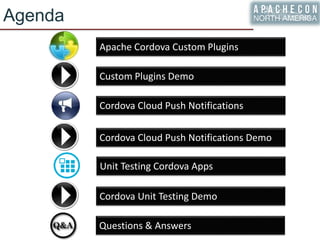
Agenda
Apache Cordova Custom Plugins
Custom Plugins Demo
Cordova Cloud Push Notifications Demo
Cordova Unit Testing Demo
Cordova Cloud Push Notifications
Unit Testing Cordova Apps
Questions & Answers
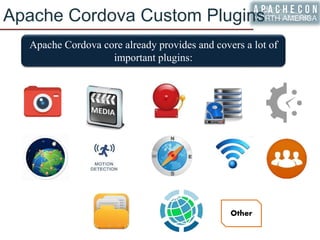
Apache Cordova Custom Plugins
Apache Cordova core already provides and covers a lot of
important plugins:
Other
Apache Cordova Custom Plugins
Apache Cordova plugin is a package of injected code
that allows the Cordova Webview to communicate with
the native platform on which it runs.
All the main Cordova API features are implemented as
plugins.
In many cases, you do not need to develop your own
custom plugin since many quality plugins are available
in Apache Cordova Plugin registry website:
https://cordova.apache.org/plugins/
Apache Cordova Custom Plugins
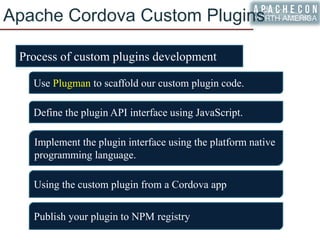
Process of custom plugins development
Use Plugman to scaffold our custom plugin code.
Define the plugin API interface using JavaScript.
Implement the plugin interface using the platform native
programming language.
Publish your plugin to NPM registry
Using the custom plugin from a Cordova app
Apache Cordova Custom Plugins
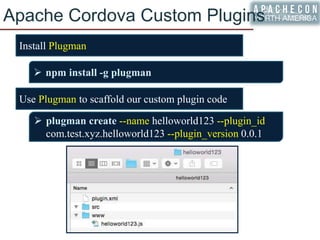
Use Plugman to scaffold our custom plugin code
 plugman create --name helloworld123 --plugin_id
com.test.xyz.helloworld123 --plugin_version 0.0.1
 npm install -g plugman
Install Plugman
Apache Cordova Custom Plugins
Use Plugman to scaffold our custom plugin code (Adding
platforms):
 plugman platform add --platform_name android
 plugman platform add --platform_name ios
Apache Cordova Custom Plugins
Define the plugin API interface using JavaScript
Apache Cordova Custom Plugins
Implement the plugin interface using the platform native
programming language
Apache Cordova Custom Plugins
Using the custom plugin from a Cordova app
 cordova create testApp
 cordova platform add android
 plugman install --platform android --project
/path/to/my/project/platform --plugin /path/to/my/plugin
Apache Cordova Custom Plugins
Publish your plugin to NPM registry
 npm adduser # If you don't have an account yet
 npm publish /path/to/your/plugin
 plugman createpackagejson /path/to/your/plugin
Agenda
Apache Cordova Custom Plugins
Custom Plugins Demo
Cordova Cloud Push Notifications Demo
Cordova Unit Testing Demo
Cordova Cloud Push Notifications
Unit Testing Cordova Apps
Questions & Answers
CREATING CORDOVA PLUGIN
DEMO
Agenda
Apache Cordova Custom Plugins
Custom Plugins Demo
Cordova Cloud Push Notifications Demo
Cordova Unit Testing Demo
Cordova Cloud Push Notifications
Unit Testing Cordova Apps
Questions & Answers
Cordova Cloud Push Notification
In Apache Cordova plugins store, there are many plugins
to integrate Cordova apps with Push Notifications.
Usually, Cloud PaaS provides a unified platform for
managing Push Notifications on the mobile platforms.
As an example of integrated Push Notification Cloud
providers with Apache Cordova is the IBM Bluemix
thanks to ibm-mfp-push plugin:
https://www.npmjs.com/package/ibm-mfp-push
Implementing Push Notifications is a common
requirement in mobile apps.
Cordova Cloud Push Notification
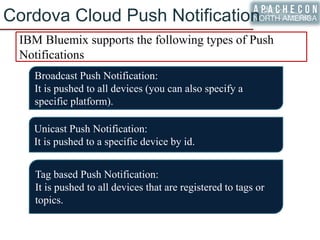
IBM Bluemix supports the following types of Push
Notifications
Broadcast Push Notification:
It is pushed to all devices (you can also specify a
specific platform).
Unicast Push Notification:
It is pushed to a specific device by id.
Tag based Push Notification:
It is pushed to all devices that are registered to tags or
topics.
Cordova Cloud Push Notification
Steps for having IBM Bluemix Push Notification in
Actions for Cordova Apps:
1. Setup push notification in Bluemix
2. Install Bluemix Push Notification Plugin
3. In JavaScript code
1. Register Device for Push Notifications
2. Optionally subscribe in or unsubscribe from
tags
3. Receive notifications
4. Test Push Notifications
Cordova Cloud Push Notification
Setup push notification in Bluemix
Android iOS
Cordova Cloud Push Notification
Install Bluemix Push Notification Plugin
 cordova plugin add ibm-mfp-push
Configure plugin for Android and iOS
Cordova Cloud Push Notification
Register Device for Push Notifications
Cordova Cloud Push Notification
Subscribe in or unsubscribe from tags
Receive notifications
Cordova Cloud Push Notification
Testing Cloud Push Notifications
Agenda
Apache Cordova Custom Plugins
Custom Plugins Demo
Cordova Cloud Push Notifications Demo
Cordova Unit Testing Demo
Cordova Cloud Push Notifications
Unit Testing Cordova Apps
Questions & Answers
CORDOVA PUSH
NOTIFICATION DEMO
Demo Source: https://github.com/hazems/cordova-bmx-push
Agenda
Apache Cordova Custom Plugins
Custom Plugins Demo
Cordova Cloud Push Notifications Demo
Cordova Unit Testing Demo
Cordova Cloud Push Notifications
Unit Testing Cordova Apps
Questions & Answers
Unit Testing Cordova Apps
Since Cordova Apps are based on JavaScript, we need to
pick a suitable JavaScript unit testing framework for
testing Cordova apps logic.
Requirements for picking a good JavaScript unit testing
framework
Executable across browsers (Automated preferred)
Easy to setup
Fast Execution
Easy to configure
Integrated
Provides a good testing mechanism for Asynchronous code
Unit Testing Cordova Apps
Jasmine is a powerful JavaScript unit testing framework
Jasmine describes its tests in a simple natural language
Jasmine tests can be read by Non-programmers
Jasmine provides a clean mechanism for testing
synchronous and asynchronous code
Unit Testing Cordova Apps
Sample Jasmine Test
describe("A sample suite", function() {
it("contains a spec with an expectation", function() {
expect(true).toEqual(true);
});
});
Main Jasmine Constructs
Testsuite begins with a call to describe()
Testcase “or spec” begins with a call to it()
Testcase can contain one or more matcher(s)
Unit Testing Cordova Apps
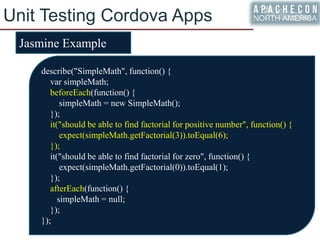
Jasmine Example
describe("SimpleMath", function() {
var simpleMath;
beforeEach(function() {
simpleMath = new SimpleMath();
});
it("should be able to find factorial for positive number", function() {
expect(simpleMath.getFactorial(3)).toEqual(6);
});
it("should be able to find factorial for zero", function() {
expect(simpleMath.getFactorial(0)).toEqual(1);
});
afterEach(function() {
simpleMath = null;
});
});
Unit Testing Cordova Apps
Async Jasmine Tests
Asynchronous JavaScript code refers to the code whose
caller will NOT to wait until the execution completes.
In order to get the results, the caller should pass
callbacks which will be called with data result
parameters in case of operation success or failure.
Asynchronous JavaScript code mainly refers to Ajax
code.
In order to support Asynchronous operation testing, Jasmine provides:
1. An optional single parameter for its single spec.
2. This parameter has to be called if the asynchronous operation
completes.
3. If this parameter is not called for by default 5 seconds then the test
will fail (means operation timeout).
Unit Testing Cordova Apps
Async Jasmine Example
describe("when doing asynchronous operation", function() {
it("should be able to do the asynchronous operation", function(done) {
var data = {};
var successCallBack = function(result) {
console.log("success");
/* validate result parameter */
done();
};
var failureCallBack = function() {
console.log("failure");
expect("Operation").toBe("passing"); /* force failing test */
done();
};
AsyncObject.asyncOperation(data, successCallBack, failureCallBack);
});
});
Agenda
Apache Cordova Custom Plugins
Custom Plugins Demo
Cordova Cloud Push Notifications Demo
Cordova Unit Testing Demo
Cordova Cloud Push Notifications
Unit Testing Cordova Apps
Questions & Answers
CORDOVA UNIT TESTING
DEMO
Demo Source: https://github.com/hazems/cordova-js-unit-testing
Agenda
Apache Cordova Custom Plugins
Custom Plugins Demo
Cordova Cloud Push Notifications Demo
Cordova Unit Testing Demo
Cordova Cloud Push Notifications
Unit Testing Cordova Apps
Questions & Answers
Questions
Twitter: @hazems
Blog: http://www.technicaladvices.com
Email: hazems@apache.org

[ApacheCon 2016] Advanced Apache Cordova

  • 1.
  • 2.
    About me experience More thaneleven years of experience in Java enterprise and mobile solutions. Apache Committer. Author of four technical books. DeveloperWorks Contributing author. Technical Speaker (JavaOne, ApacheCon, Geecon,JavaLand …etc) Advisory Software Engineer in IBM.
  • 3.
    Agenda Apache Cordova CustomPlugins Custom Plugins Demo Cordova Cloud Push Notifications Demo Cordova Unit Testing Demo Cordova Cloud Push Notifications Unit Testing Cordova Apps Questions & Answers
  • 4.
    Apache Cordova CustomPlugins Apache Cordova core already provides and covers a lot of important plugins: Other
  • 5.
    Apache Cordova CustomPlugins Apache Cordova plugin is a package of injected code that allows the Cordova Webview to communicate with the native platform on which it runs. All the main Cordova API features are implemented as plugins. In many cases, you do not need to develop your own custom plugin since many quality plugins are available in Apache Cordova Plugin registry website: https://cordova.apache.org/plugins/
  • 6.
    Apache Cordova CustomPlugins Process of custom plugins development Use Plugman to scaffold our custom plugin code. Define the plugin API interface using JavaScript. Implement the plugin interface using the platform native programming language. Publish your plugin to NPM registry Using the custom plugin from a Cordova app
  • 7.
    Apache Cordova CustomPlugins Use Plugman to scaffold our custom plugin code  plugman create --name helloworld123 --plugin_id com.test.xyz.helloworld123 --plugin_version 0.0.1  npm install -g plugman Install Plugman
  • 8.
    Apache Cordova CustomPlugins Use Plugman to scaffold our custom plugin code (Adding platforms):  plugman platform add --platform_name android  plugman platform add --platform_name ios
  • 9.
    Apache Cordova CustomPlugins Define the plugin API interface using JavaScript
  • 10.
    Apache Cordova CustomPlugins Implement the plugin interface using the platform native programming language
  • 11.
    Apache Cordova CustomPlugins Using the custom plugin from a Cordova app  cordova create testApp  cordova platform add android  plugman install --platform android --project /path/to/my/project/platform --plugin /path/to/my/plugin
  • 12.
    Apache Cordova CustomPlugins Publish your plugin to NPM registry  npm adduser # If you don't have an account yet  npm publish /path/to/your/plugin  plugman createpackagejson /path/to/your/plugin
  • 13.
    Agenda Apache Cordova CustomPlugins Custom Plugins Demo Cordova Cloud Push Notifications Demo Cordova Unit Testing Demo Cordova Cloud Push Notifications Unit Testing Cordova Apps Questions & Answers
  • 14.
  • 15.
    Agenda Apache Cordova CustomPlugins Custom Plugins Demo Cordova Cloud Push Notifications Demo Cordova Unit Testing Demo Cordova Cloud Push Notifications Unit Testing Cordova Apps Questions & Answers
  • 16.
    Cordova Cloud PushNotification In Apache Cordova plugins store, there are many plugins to integrate Cordova apps with Push Notifications. Usually, Cloud PaaS provides a unified platform for managing Push Notifications on the mobile platforms. As an example of integrated Push Notification Cloud providers with Apache Cordova is the IBM Bluemix thanks to ibm-mfp-push plugin: https://www.npmjs.com/package/ibm-mfp-push Implementing Push Notifications is a common requirement in mobile apps.
  • 17.
    Cordova Cloud PushNotification IBM Bluemix supports the following types of Push Notifications Broadcast Push Notification: It is pushed to all devices (you can also specify a specific platform). Unicast Push Notification: It is pushed to a specific device by id. Tag based Push Notification: It is pushed to all devices that are registered to tags or topics.
  • 18.
    Cordova Cloud PushNotification Steps for having IBM Bluemix Push Notification in Actions for Cordova Apps: 1. Setup push notification in Bluemix 2. Install Bluemix Push Notification Plugin 3. In JavaScript code 1. Register Device for Push Notifications 2. Optionally subscribe in or unsubscribe from tags 3. Receive notifications 4. Test Push Notifications
  • 19.
    Cordova Cloud PushNotification Setup push notification in Bluemix Android iOS
  • 20.
    Cordova Cloud PushNotification Install Bluemix Push Notification Plugin  cordova plugin add ibm-mfp-push Configure plugin for Android and iOS
  • 21.
    Cordova Cloud PushNotification Register Device for Push Notifications
  • 22.
    Cordova Cloud PushNotification Subscribe in or unsubscribe from tags Receive notifications
  • 23.
    Cordova Cloud PushNotification Testing Cloud Push Notifications
  • 24.
    Agenda Apache Cordova CustomPlugins Custom Plugins Demo Cordova Cloud Push Notifications Demo Cordova Unit Testing Demo Cordova Cloud Push Notifications Unit Testing Cordova Apps Questions & Answers
  • 25.
    CORDOVA PUSH NOTIFICATION DEMO DemoSource: https://github.com/hazems/cordova-bmx-push
  • 26.
    Agenda Apache Cordova CustomPlugins Custom Plugins Demo Cordova Cloud Push Notifications Demo Cordova Unit Testing Demo Cordova Cloud Push Notifications Unit Testing Cordova Apps Questions & Answers
  • 27.
    Unit Testing CordovaApps Since Cordova Apps are based on JavaScript, we need to pick a suitable JavaScript unit testing framework for testing Cordova apps logic. Requirements for picking a good JavaScript unit testing framework Executable across browsers (Automated preferred) Easy to setup Fast Execution Easy to configure Integrated Provides a good testing mechanism for Asynchronous code
  • 28.
    Unit Testing CordovaApps Jasmine is a powerful JavaScript unit testing framework Jasmine describes its tests in a simple natural language Jasmine tests can be read by Non-programmers Jasmine provides a clean mechanism for testing synchronous and asynchronous code
  • 29.
    Unit Testing CordovaApps Sample Jasmine Test describe("A sample suite", function() { it("contains a spec with an expectation", function() { expect(true).toEqual(true); }); }); Main Jasmine Constructs Testsuite begins with a call to describe() Testcase “or spec” begins with a call to it() Testcase can contain one or more matcher(s)
  • 30.
    Unit Testing CordovaApps Jasmine Example describe("SimpleMath", function() { var simpleMath; beforeEach(function() { simpleMath = new SimpleMath(); }); it("should be able to find factorial for positive number", function() { expect(simpleMath.getFactorial(3)).toEqual(6); }); it("should be able to find factorial for zero", function() { expect(simpleMath.getFactorial(0)).toEqual(1); }); afterEach(function() { simpleMath = null; }); });
  • 31.
    Unit Testing CordovaApps Async Jasmine Tests Asynchronous JavaScript code refers to the code whose caller will NOT to wait until the execution completes. In order to get the results, the caller should pass callbacks which will be called with data result parameters in case of operation success or failure. Asynchronous JavaScript code mainly refers to Ajax code. In order to support Asynchronous operation testing, Jasmine provides: 1. An optional single parameter for its single spec. 2. This parameter has to be called if the asynchronous operation completes. 3. If this parameter is not called for by default 5 seconds then the test will fail (means operation timeout).
  • 32.
    Unit Testing CordovaApps Async Jasmine Example describe("when doing asynchronous operation", function() { it("should be able to do the asynchronous operation", function(done) { var data = {}; var successCallBack = function(result) { console.log("success"); /* validate result parameter */ done(); }; var failureCallBack = function() { console.log("failure"); expect("Operation").toBe("passing"); /* force failing test */ done(); }; AsyncObject.asyncOperation(data, successCallBack, failureCallBack); }); });
  • 33.
    Agenda Apache Cordova CustomPlugins Custom Plugins Demo Cordova Cloud Push Notifications Demo Cordova Unit Testing Demo Cordova Cloud Push Notifications Unit Testing Cordova Apps Questions & Answers
  • 34.
    CORDOVA UNIT TESTING DEMO DemoSource: https://github.com/hazems/cordova-js-unit-testing
  • 35.
    Agenda Apache Cordova CustomPlugins Custom Plugins Demo Cordova Cloud Push Notifications Demo Cordova Unit Testing Demo Cordova Cloud Push Notifications Unit Testing Cordova Apps Questions & Answers
  • 36.

Editor's Notes

  • #2 Make sure that two emulators are running before starting / ATOM is started with the workspaces / Bluemix is opened … Hello everyone, my name is (Hazem Saleh) [Advisory engineer in IBM and Apache committer]. Today, I will be talking about advanced aspects of Apache Cordova.
  • #3 Before going into the details of this presentation, I would like to introduce myself in more details …
  • #4 So, today, I will be talking about some of the advanced aspects of Apache Cordova: We will know how to extend the capabilities of Apache Cordova by creating custom plugins. 2. We will empower Apache Cordova apps by using Cloud Push notifications. 3. We will understand how to unit test Cordova apps’ logic. We will also see their demos for each of these topics.
  • #5 Before going into Cordova custom plugins details, it is important to refresh our knowledge about Apache Cordova. Apache Cordova is a complete platform which allows us to develop cross-mobile platform apps using common web technologies (HTML, CSS and JavaScript) In order to do this, Apache Cordova uses a native component called WebView which hosts the Cordova app web files. Apache Cordova also allows accessing device hardware features using plugins. Apache Cordova provides the following core plugins: Camera, Media, Notifications, Storage, Events Geo-location, Device motion, compass, connection, contacts Files, Globalization and others
  • #6 1. Although the core plugins of Apache Cordova covers a lot of business scenarios, you may need to have a plugin that is performing something which is not provided by Cordova core plugins. 2. One of the recommendations is to first search in Apache Cordova plugin registry for the feature that you are looking for since in 80% of the cases, you will find good plugins that are covering that the features that you are looking for. 3. If you do not find what you want in the plugin registry then you can start developing your own plugin
  • #7 This is the process of creating custom plugins in Apache Cordova …
  • #8 Read it …
  • #9 Read it …
  • #10 Then we define the plugin JavaScript API as follows: 1. We define our API parameters. 2. Map our parameters to cordova exec() method communicates your API parameters to native code, it has the following signature: 2.1. Success callback. 2.2. Failure callback. 2.3. Native Class Name. 2.4. Operation name. 2.5. Arguments.
  • #11 In the android native part (For example): 1. Our plugin class must extend CordovaPlugin and implement the execute() method. 2. The execute() method has the following parameters: 2.1. action parameter which maps to the sent action name. 2.2. JSONArray parameter which maps to the sent action parameters. 2.3. CallbackContext parameter which maps to the callback handler that will be called in success or failure. 2.4. Operation name. 2.5. Arguments.
  • #12 After defining the plugin interface and implementing the plugin, we can then start testing the plugin by: 1. Create a new Cordova app. 2. Add a platform to the Cordova app. 3. Install the plugin using plugman install command.
  • #13 Finally publish the plugin to npm registry.
  • #14 Checking Custom Plugins Demo.
  • #15 Demo steps: 1. Create a plugin skeleton using Plugman: > plugman create --name helloworld123 --plugin_id com.test.xyz.helloworld123 --plugin_version 0.0.1 2. Add android platform to the generated plugin: > plugman platform add --platform_name android 3. Edit Android generated code: > As you wish, do not forget to access any device information in the returned message. 4. Do not forget to define the accessing object name in the plugin’s plugin.xml as follows: <clobbers target="coolObj" /> 5. Create a Cordova project and add android support to it (build and run the project). 6. Add the plugin to the Cordova project as follows from the Cordova project root (then edit the code to call the plugin then Build and run): > plugman install --platform android --project platforms/android/ --plugin ../helloworld123/ 7. Call the plugin from your test Cordova app. 8. Do not forget to generate plugin package.json file for npm (totally optional): > plugman createpackagejson /path/to/your/plugin
  • #16 Now, let’s see how to empower Apache Cordova apps by using Cloud Push Notification.
  • #17 Read it as is …
  • #18 Read it as is …
  • #19 https://cordova.apache.org/docs/en/latest/guide/hybrid/plugins/index.html#integrating-with-plugin-search 1. Create bluemix mobile app. 2. Setup push notification for iOS and Android. 3. Create your Cordova app. 4. Add the push plugin to it (for android + iOS) 5. Show the code that can register the mobile client and receive push notifications. 6. Show how to receive push by tags. 7. Finally, show the panel from which you can send push notifications.
  • #20 Explain it using GCM or APNs.
  • #21 Add Bluemix Cordova Push plugin and configure them for both Android and iOS.
  • #22 Register device for Push notification by using registerDevice() of MFPPush.
  • #23 Use registerNotificationsCallback() to register the callback for receiving notifications. For receiving notifications on specific tags, we can subscribe in tags using subscribe() method of MFPPush. We can also un-subscribe from tags using unsubscribe() method of MFPPush.
  • #24 Test sending push notifications from Bluemix administration.
  • #25 Now, let’s see the push demo.
  • #26 Push Notification Demo steps: 1. Demonstrate the code. 2. Send to all devices. 3. Send to a specific tag "Tag1", no devices will receive. 4. Subscribe in "Tag1". 5. Send to a specific tag "Tag1" to receive push notifications.
  • #27 Now, let’s see how to unit test Cordova apps logic.
  • #28 Read as is …
  • #29 Read as is …
  • #30 Read as is …
  • #31 Just highlight the usage of beforeEach() and afterEach().
  • #32 Read as is …
  • #33 Read as is …
  • #34 Now, let’s see the Cordova unit testing Demo.
  • #35 Jasmine Demo steps: 1. Explain briefly UserServiceSpec.js and WeatherServiceSpec.js files. 2. Run SpecRunner.html 3. Show how Jasmine can be integrated with JavaScript test runners like Karma by explaining config.js. 4. Run silentTests.sh file. 5. Check code coverage HTML report to show the amount of code that is tested. Jasmine is integrated with JavaScript test runners which allows it to be part of CI tools that can automate running JavaScript Tests.
  • #36 Questions and answers