Apache Server Configuration
    Apache is one of the most popular web servers, it's free. It is a server that is used for
everything from personal web pages to enterprise level sites.

Now we can see the configuration of Apache server.

Install the Apache packages:


Default path:


Configuration file


Go to last line and add lines

Ex:


Note:

443-https & 80-http

ServerName – Hostname of server

DocumentRoot- Path

DirectoryIndex-HTML file name

You need to create a folder(ex:thamizh) inside of /var/www/html

Please find above mentioned doc.Then add the HTML file(thamizh.html) to that particular folder.

Restart the service


                                Apache server Configuration – Thamizharasan P
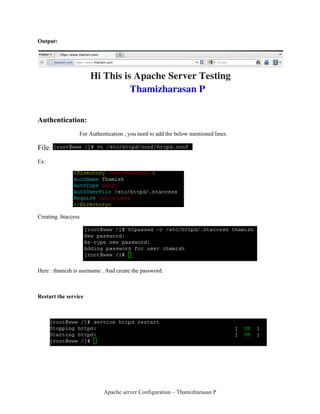
Output:


Authentication:
                 For Authentication , you need to add the below mentioned lines.

File:
Ex:


Creating .htaccess


Here : thamizh is username . And create the password.


Restart the service


                           Apache server Configuration – Thamizharasan P
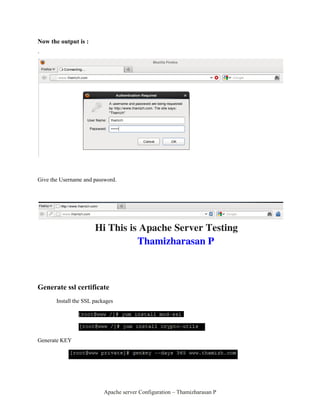
Now the output is :

`


Give the Username and password.


Generate ssl certificate
       Install the SSL packages


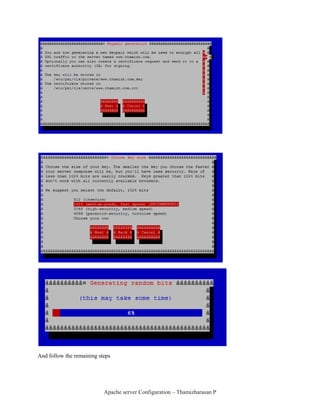
Generate KEY


                           Apache server Configuration – Thamizharasan P
And follow the remaining steps


                           Apache server Configuration – Thamizharasan P
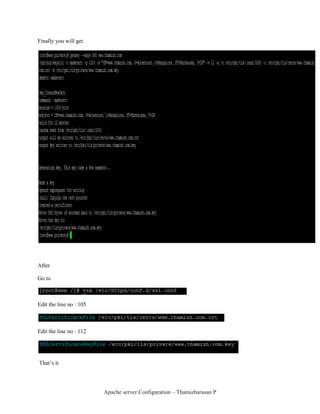
Finally you will get


After

Go to


Edit the line no : 105


Edit the line no : 112


That’s it


                         Apache server Configuration – Thamizharasan P
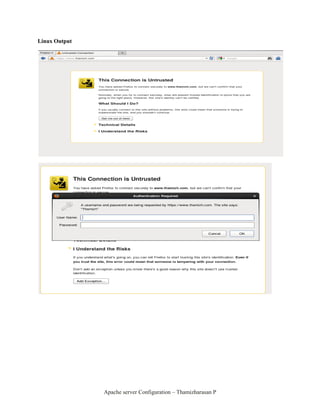
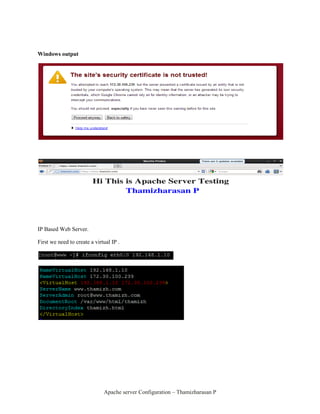
Linux Output


               Apache server Configuration – Thamizharasan P
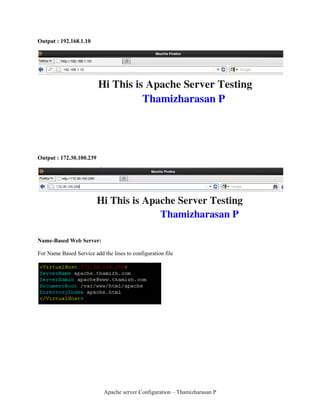
Windows output


IP Based Web Server.

First we need to create a virtual IP .


                              Apache server Configuration – Thamizharasan P
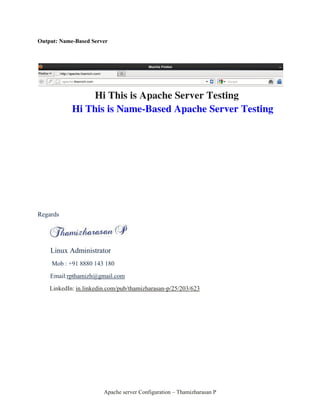
Output : 192.168.1.10


Output : 172.30.100.239


Name-Based Web Server:

For Name Based Service add the lines to configuration file


                            Apache server Configuration – Thamizharasan P
Output: Name-Based Server


Regards


    Linux Administrator
     Mob : +91 8880 143 180
    Email:rpthamizh@gmail.com
    LinkedIn: in.linkedin.com/pub/thamizharasan-p/25/203/623


                        Apache server Configuration – Thamizharasan P

Apache server configuration

  • 1.
    Apache Server Configuration Apache is one of the most popular web servers, it's free. It is a server that is used for everything from personal web pages to enterprise level sites. Now we can see the configuration of Apache server. Install the Apache packages: Default path: Configuration file Go to last line and add lines Ex: Note: 443-https & 80-http ServerName – Hostname of server DocumentRoot- Path DirectoryIndex-HTML file name You need to create a folder(ex:thamizh) inside of /var/www/html Please find above mentioned doc.Then add the HTML file(thamizh.html) to that particular folder. Restart the service Apache server Configuration – Thamizharasan P
  • 2.
    Output: Authentication: For Authentication , you need to add the below mentioned lines. File: Ex: Creating .htaccess Here : thamizh is username . And create the password. Restart the service Apache server Configuration – Thamizharasan P
  • 3.
    Now the outputis : ` Give the Username and password. Generate ssl certificate Install the SSL packages Generate KEY Apache server Configuration – Thamizharasan P
  • 4.
    And follow theremaining steps Apache server Configuration – Thamizharasan P
  • 5.
    Finally you willget After Go to Edit the line no : 105 Edit the line no : 112 That’s it Apache server Configuration – Thamizharasan P
  • 6.
    Linux Output Apache server Configuration – Thamizharasan P
  • 7.
    Windows output IP BasedWeb Server. First we need to create a virtual IP . Apache server Configuration – Thamizharasan P
  • 8.
    Output : 192.168.1.10 Output: 172.30.100.239 Name-Based Web Server: For Name Based Service add the lines to configuration file Apache server Configuration – Thamizharasan P
  • 9.
    Output: Name-Based Server Regards Linux Administrator Mob : +91 8880 143 180 Email:rpthamizh@gmail.com LinkedIn: in.linkedin.com/pub/thamizharasan-p/25/203/623 Apache server Configuration – Thamizharasan P