March 2012
Apache Flume (NG)
Alexander Lorenz | Customer Operations Engineer
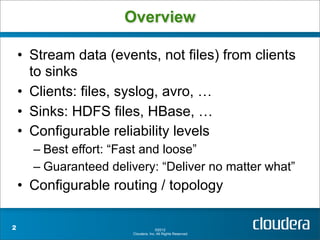
Overview

    • Stream data (events, not files) from clients
      to sinks
    • Clients: files, syslog, avro, …
    • Sinks: HDFS files, HBase, …
    • Configurable reliability levels
      – Best effort: “Fast and loose”
      – Guaranteed delivery: “Deliver no matter what”
    • Configurable routing / topology

2                                    ©2012
                       Cloudera, Inc. All Rights Reserved.
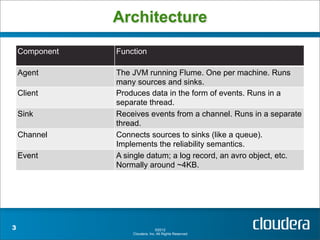
Architecture
    Component   Function

    Agent       The JVM running Flume. One per machine. Runs
                many sources and sinks.
    Client      Produces data in the form of events. Runs in a
                separate thread.
    Sink        Receives events from a channel. Runs in a separate
                thread.
    Channel     Connects sources to sinks (like a queue).
                Implements the reliability semantics.
    Event       A single datum; a log record, an avro object, etc.
                Normally around ~4KB.


3                                 ©2012
                    Cloudera, Inc. All Rights Reserved.
Agent

    • Runs many clients and sinks
    • Java properties-based configuration
    • Low overhead (-Xmx20m)
      – But adding RAM increases performance


4                                   ©2012
                      Cloudera, Inc. All Rights Reserved.
Sources

    • Plugin interface
    • Managed by a SourceRunner that controls
      threading and execution model (e.g. polling
      vs. event-based)
    • Included: exec, avro, syslog, …


5                                   ©2012
                      Cloudera, Inc. All Rights Reserved.
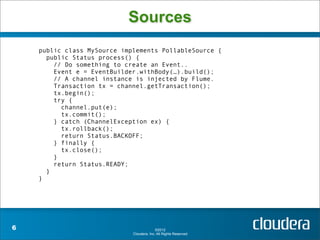
Sources
    public class MySource implements PollableSource {
      public Status process() {
        // Do something to create an Event..
        Event e = EventBuilder.withBody(…).build();
        // A channel instance is injected by Flume.
        Transaction tx = channel.getTransaction();
        tx.begin();
        try {
          channel.put(e);
          tx.commit();
        } catch (ChannelException ex) {
          tx.rollback();
          return Status.BACKOFF;
        } finally {
          tx.close();
        }
        return Status.READY;
      }
    }


6                                          ©2012
                             Cloudera, Inc. All Rights Reserved.
Channel

    •   Plugin interface
    •   Transactional
    •   Provide queuing between source / sink
    •   Provide reliability semantics
        – MemoryChannel: Basically a Java
          BlockingQueue.
        – JDBC
        – WAL


7                                     ©2012
                        Cloudera, Inc. All Rights Reserved.
Sinks

    • Plugin interface
    • Managed by a SinkRunner that controls
      threading and execution model
    • Included: HDFS files (various formats)


8                                  ©2012
                     Cloudera, Inc. All Rights Reserved.
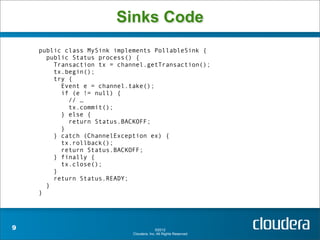
Sinks Code
    public class MySink implements PollableSink {
      public Status process() {
        Transaction tx = channel.getTransaction();
        tx.begin();
        try {
          Event e = channel.take();
          if (e != null) {
            // …
            tx.commit();
          } else {
            return Status.BACKOFF;
          }
        } catch (ChannelException ex) {
          tx.rollback();
          return Status.BACKOFF;
        } finally {
          tx.close();
        }
        return Status.READY;
      }
    }


9                                          ©2012
                             Cloudera, Inc. All Rights Reserved.
Tiered collection

 • Send events from agents to another tier of
   agents to aggregate
 • Use an Avro sink (really just a client) to
   send events to an Avro source (really just a
   server) in another machine
 • Failover supported
 • Load balancing (soon)
 • Transactions guarantee handoff

10                               ©2012
                   Cloudera, Inc. All Rights Reserved.
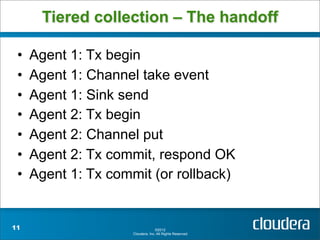
Tiered collection – The handoff

 •   Agent 1: Tx begin
 •   Agent 1: Channel take event
 •   Agent 1: Sink send
 •   Agent 2: Tx begin
 •   Agent 2: Channel put
 •   Agent 2: Tx commit, respond OK
 •   Agent 1: Tx commit (or rollback)


11                                 ©2012
                     Cloudera, Inc. All Rights Reserved.
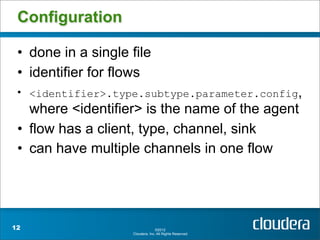
Configuration

 • done in a single file
 • identifier for flows
 • <identifier>.type.subtype.parameter.config,
   where <identifier> is the name of the agent
 • flow has a client, type, channel, sink
 • can have multiple channels in one flow


12                                ©2012
                    Cloudera, Inc. All Rights Reserved.
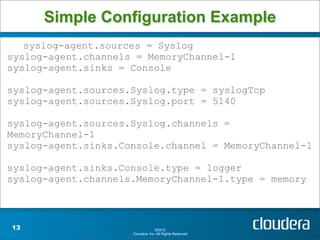
Simple Configuration Example
   syslog-agent.sources = Syslog
syslog-agent.channels = MemoryChannel-1
syslog-agent.sinks = Console

syslog-agent.sources.Syslog.type = syslogTcp
syslog-agent.sources.Syslog.port = 5140

syslog-agent.sources.Syslog.channels =
MemoryChannel-1
syslog-agent.sinks.Console.channel = MemoryChannel-1

syslog-agent.sinks.Console.type = logger
syslog-agent.channels.MemoryChannel-1.type = memory


13                                 ©2012
                     Cloudera, Inc. All Rights Reserved.
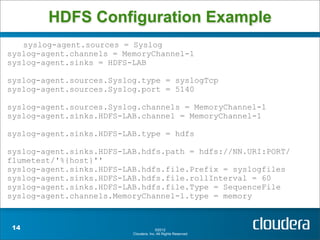
HDFS Configuration Example
   syslog-agent.sources = Syslog
syslog-agent.channels = MemoryChannel-1
syslog-agent.sinks = HDFS-LAB

syslog-agent.sources.Syslog.type = syslogTcp
syslog-agent.sources.Syslog.port = 5140

syslog-agent.sources.Syslog.channels = MemoryChannel-1
syslog-agent.sinks.HDFS-LAB.channel = MemoryChannel-1

syslog-agent.sinks.HDFS-LAB.type = hdfs

syslog-agent.sinks.HDFS-LAB.hdfs.path = hdfs://NN.URI:PORT/
flumetest/'%{host}''
syslog-agent.sinks.HDFS-LAB.hdfs.file.Prefix = syslogfiles
syslog-agent.sinks.HDFS-LAB.hdfs.file.rollInterval = 60
syslog-agent.sinks.HDFS-LAB.hdfs.file.Type = SequenceFile
syslog-agent.channels.MemoryChannel-1.type = memory


 14                                     ©2012
                          Cloudera, Inc. All Rights Reserved.
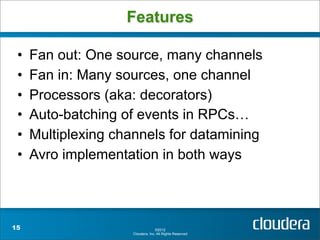
Features

 •   Fan out: One source, many channels
 •   Fan in: Many sources, one channel
 •   Processors (aka: decorators)
 •   Auto-batching of events in RPCs…
 •   Multiplexing channels for datamining
 •   Avro implementation in both ways


15                                 ©2012
                     Cloudera, Inc. All Rights Reserved.
Thank You

 • Web: https://cwiki.apache.org/FLUME/
   getting-started.html
 • ML: flume-user@incubator.apache.org

 • Mail: alexander@cloudera.com
 • Blog: mapredit.blogspot.com
 • Twitter: @mapredit


16                              ©2012
                  Cloudera, Inc. All Rights Reserved.

Apache Flume (NG)

  • 1.
    March 2012 Apache Flume(NG) Alexander Lorenz | Customer Operations Engineer
  • 2.
    Overview • Stream data (events, not files) from clients to sinks • Clients: files, syslog, avro, … • Sinks: HDFS files, HBase, … • Configurable reliability levels – Best effort: “Fast and loose” – Guaranteed delivery: “Deliver no matter what” • Configurable routing / topology 2 ©2012 Cloudera, Inc. All Rights Reserved.
  • 3.
    Architecture Component Function Agent The JVM running Flume. One per machine. Runs many sources and sinks. Client Produces data in the form of events. Runs in a separate thread. Sink Receives events from a channel. Runs in a separate thread. Channel Connects sources to sinks (like a queue). Implements the reliability semantics. Event A single datum; a log record, an avro object, etc. Normally around ~4KB. 3 ©2012 Cloudera, Inc. All Rights Reserved.
  • 4.
    Agent • Runs many clients and sinks • Java properties-based configuration • Low overhead (-Xmx20m) – But adding RAM increases performance 4 ©2012 Cloudera, Inc. All Rights Reserved.
  • 5.
    Sources • Plugin interface • Managed by a SourceRunner that controls threading and execution model (e.g. polling vs. event-based) • Included: exec, avro, syslog, … 5 ©2012 Cloudera, Inc. All Rights Reserved.
  • 6.
    Sources public class MySource implements PollableSource { public Status process() { // Do something to create an Event.. Event e = EventBuilder.withBody(…).build(); // A channel instance is injected by Flume. Transaction tx = channel.getTransaction(); tx.begin(); try { channel.put(e); tx.commit(); } catch (ChannelException ex) { tx.rollback(); return Status.BACKOFF; } finally { tx.close(); } return Status.READY; } } 6 ©2012 Cloudera, Inc. All Rights Reserved.
  • 7.
    Channel • Plugin interface • Transactional • Provide queuing between source / sink • Provide reliability semantics – MemoryChannel: Basically a Java BlockingQueue. – JDBC – WAL 7 ©2012 Cloudera, Inc. All Rights Reserved.
  • 8.
    Sinks • Plugin interface • Managed by a SinkRunner that controls threading and execution model • Included: HDFS files (various formats) 8 ©2012 Cloudera, Inc. All Rights Reserved.
  • 9.
    Sinks Code public class MySink implements PollableSink { public Status process() { Transaction tx = channel.getTransaction(); tx.begin(); try { Event e = channel.take(); if (e != null) { // … tx.commit(); } else { return Status.BACKOFF; } } catch (ChannelException ex) { tx.rollback(); return Status.BACKOFF; } finally { tx.close(); } return Status.READY; } } 9 ©2012 Cloudera, Inc. All Rights Reserved.
  • 10.
    Tiered collection •Send events from agents to another tier of agents to aggregate • Use an Avro sink (really just a client) to send events to an Avro source (really just a server) in another machine • Failover supported • Load balancing (soon) • Transactions guarantee handoff 10 ©2012 Cloudera, Inc. All Rights Reserved.
  • 11.
    Tiered collection –The handoff • Agent 1: Tx begin • Agent 1: Channel take event • Agent 1: Sink send • Agent 2: Tx begin • Agent 2: Channel put • Agent 2: Tx commit, respond OK • Agent 1: Tx commit (or rollback) 11 ©2012 Cloudera, Inc. All Rights Reserved.
  • 12.
    Configuration • donein a single file • identifier for flows • <identifier>.type.subtype.parameter.config, where <identifier> is the name of the agent • flow has a client, type, channel, sink • can have multiple channels in one flow 12 ©2012 Cloudera, Inc. All Rights Reserved.
  • 13.
    Simple Configuration Example syslog-agent.sources = Syslog syslog-agent.channels = MemoryChannel-1 syslog-agent.sinks = Console syslog-agent.sources.Syslog.type = syslogTcp syslog-agent.sources.Syslog.port = 5140 syslog-agent.sources.Syslog.channels = MemoryChannel-1 syslog-agent.sinks.Console.channel = MemoryChannel-1 syslog-agent.sinks.Console.type = logger syslog-agent.channels.MemoryChannel-1.type = memory 13 ©2012 Cloudera, Inc. All Rights Reserved.
  • 14.
    HDFS Configuration Example syslog-agent.sources = Syslog syslog-agent.channels = MemoryChannel-1 syslog-agent.sinks = HDFS-LAB syslog-agent.sources.Syslog.type = syslogTcp syslog-agent.sources.Syslog.port = 5140 syslog-agent.sources.Syslog.channels = MemoryChannel-1 syslog-agent.sinks.HDFS-LAB.channel = MemoryChannel-1 syslog-agent.sinks.HDFS-LAB.type = hdfs syslog-agent.sinks.HDFS-LAB.hdfs.path = hdfs://NN.URI:PORT/ flumetest/'%{host}'' syslog-agent.sinks.HDFS-LAB.hdfs.file.Prefix = syslogfiles syslog-agent.sinks.HDFS-LAB.hdfs.file.rollInterval = 60 syslog-agent.sinks.HDFS-LAB.hdfs.file.Type = SequenceFile syslog-agent.channels.MemoryChannel-1.type = memory 14 ©2012 Cloudera, Inc. All Rights Reserved.
  • 15.
    Features • Fan out: One source, many channels • Fan in: Many sources, one channel • Processors (aka: decorators) • Auto-batching of events in RPCs… • Multiplexing channels for datamining • Avro implementation in both ways 15 ©2012 Cloudera, Inc. All Rights Reserved.
  • 16.
    Thank You •Web: https://cwiki.apache.org/FLUME/ getting-started.html • ML: flume-user@incubator.apache.org • Mail: alexander@cloudera.com • Blog: mapredit.blogspot.com • Twitter: @mapredit 16 ©2012 Cloudera, Inc. All Rights Reserved.