Apache Ant
Presented By,
Vinod Kumar V H
Build Tools
• Dependency Management
• Version
• Compile java code, build jars
• Custom Control
Why do we need build tools
• Creating a product from source may take
several steps: compile, link, copy files to
various directories, remove intermediate files,
generate documentation.
• The objective should be an automated tool that
does all the work for you. Type or click one
command and create a final product.
• There are a couple of ways this can be done:
– Write a batch file or script
• The scripts tend to be hard to maintain
– Use a tool designed for the task
• Ant
What is ANT
• Java based free build tool from
Apache - Build IN Java, USING
Java, and FOR Java
• ANT uses XML based configuration
“Build” file to drive its actions.
• To create powerful Ant build files to
compile and bundle applications in
.jar, .ear, or .war files, and to deploy
J2EE software applications
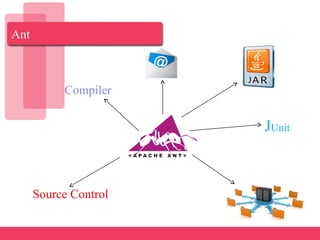
Ant
Compiler
JUnit
Source Control
Why ANT
• Written in Java so it’s a Cross-Platform build tool
– Cross platform build files support developers working
on different operating systems
• Instead of writing shell commands, the
configuration files are XML based which are
easy to read and modify.
• Faster since each command is executed from
within JVM.
• One-time setup hassle provides easy building of
a project
• Ant's Debug Options are very helpful
Installing Ant
• Download Ant binary distribution from:
http://ant.apache.org/bindownload.cgi
• Set ANT_HOME to where you installed Ant
• Include $ANT_HOME/bin in PATH
• Make sure JAVA_HOME is set to point to JDK
• Assume Ant is installed in c:ant. The
following sets up the environment:
set ANT_HOME=c:ant
set JAVA_HOME=c:j2sdk1.6.0_24
set PATH=%PATH%;%ANT_HOME%bin
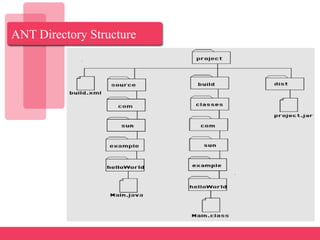
ANT Directory Structure
How ANT works
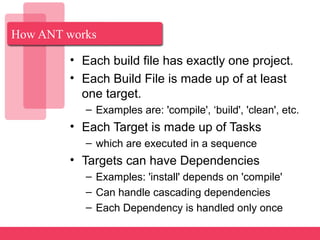
• Each build file has exactly one project.
• Each Build File is made up of at least
one target.
– Examples are: 'compile', ‘build', 'clean', etc.
• Each Target is made up of Tasks
– which are executed in a sequence
• Targets can have Dependencies
– Examples: 'install' depends on 'compile'
– Can handle cascading dependencies
– Each Dependency is handled only once
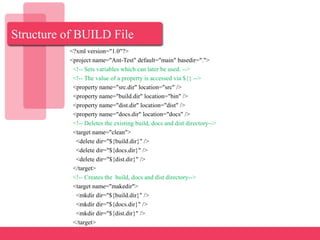
Structure of BUILD File
<?xml version="1.0"?>
<project name="Ant-Test" default="main" basedir=".">
<!-- Sets variables which can later be used. -->
<!-- The value of a property is accessed via ${} -->
<property name="src.dir" location="src" />
<property name="build.dir" location="bin" />
<property name="dist.dir" location="dist" />
<property name="docs.dir" location="docs" />
<!-- Deletes the existing build, docs and dist directory-->
<target name="clean">
<delete dir="${build.dir}" />
<delete dir="${docs.dir}" />
<delete dir="${dist.dir}" />
</target>
<!-- Creates the build, docs and dist directory-->
<target name="makedir">
<mkdir dir="${build.dir}" />
<mkdir dir="${docs.dir}" />
<mkdir dir="${dist.dir}" />
</target>
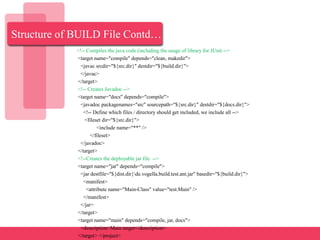
Structure of BUILD File Contd…
<!-- Compiles the java code (including the usage of library for JUnit -->
<target name="compile" depends="clean, makedir">
<javac srcdir="${src.dir}" destdir="${build.dir}">
</javac>
</target>
<!-- Creates Javadoc -->
<target name="docs" depends="compile">
<javadoc packagenames="src" sourcepath="${src.dir}" destdir="${docs.dir}">
<!-- Define which files / directory should get included, we include all -->
<fileset dir="${src.dir}">
<include name="**" />
</fileset>
</javadoc>
</target>
<!--Creates the deployable jar file -->
<target name="jar" depends="compile">
<jar destfile="${dist.dir}de.vogella.build.test.ant.jar" basedir="${build.dir}">
<manifest>
<attribute name="Main-Class" value="test.Main" />
</manifest>
</jar>
</target>
<target name="main" depends="compile, jar, docs">
<description>Main target</description>
</target> </project>
Useful Target Definitions
 Init : Sets up properties that will be used
throughout the build file. Properties can be
set directly or by specifying a properties
file.
 Prepare : Create any directory structure
which is needed.
 Clean : clean is useful for enabling clean
builds. Generally just deletes stuff from
previous runs. (ant clean build)
 Compile : Compile some/all of your source
files in this target
 Jar : Creates a jar file from the stuff you’ve
built
Tasks Contd…
• javac - The javac task compiles Java
source into class files,just as the javac
command-line tool does. Ant will recompile
only those files that have changed.
• java - Execute a Java class
• javadoc - Generates JavaDoc from your
source files
• jar (and war) - Create JAR files
• mkdir - Makes a directory
• copy - Copies files to specified location
• exec - allows different commands to be
executed based on the OS it is executing
on.
Tasks Contd…
• delete - Deletes specified files
• parallel - Runs two or more Ant tasks (not
targets) simultaneously in separate threads
• Import - Includes another build file into the
current file
• echo - Prints a message to the console
(default) or a file
• antcall - Calls another target within the same
build file
• ant - Calls another target on a different build
file
• FTP - lists, gets, puts and deletes files on an
FTP server
Note : You can also write your own tasks.
Summary
• Ant is a cross-platform build tool for
Java.
• Ant uses XML based configuration
file typically named 'build.xml'.
• Project, Targets and Tasks
- A build.xml would contain 1 project
with one or more targets and each of
the target containing one or more
tasks.
Thank ‘U’

Apache Ant

  • 1.
  • 2.
    Build Tools • DependencyManagement • Version • Compile java code, build jars • Custom Control
  • 3.
    Why do weneed build tools • Creating a product from source may take several steps: compile, link, copy files to various directories, remove intermediate files, generate documentation. • The objective should be an automated tool that does all the work for you. Type or click one command and create a final product. • There are a couple of ways this can be done: – Write a batch file or script • The scripts tend to be hard to maintain – Use a tool designed for the task • Ant
  • 4.
    What is ANT •Java based free build tool from Apache - Build IN Java, USING Java, and FOR Java • ANT uses XML based configuration “Build” file to drive its actions. • To create powerful Ant build files to compile and bundle applications in .jar, .ear, or .war files, and to deploy J2EE software applications
  • 5.
  • 6.
    Why ANT • Writtenin Java so it’s a Cross-Platform build tool – Cross platform build files support developers working on different operating systems • Instead of writing shell commands, the configuration files are XML based which are easy to read and modify. • Faster since each command is executed from within JVM. • One-time setup hassle provides easy building of a project • Ant's Debug Options are very helpful
  • 7.
    Installing Ant • DownloadAnt binary distribution from: http://ant.apache.org/bindownload.cgi • Set ANT_HOME to where you installed Ant • Include $ANT_HOME/bin in PATH • Make sure JAVA_HOME is set to point to JDK • Assume Ant is installed in c:ant. The following sets up the environment: set ANT_HOME=c:ant set JAVA_HOME=c:j2sdk1.6.0_24 set PATH=%PATH%;%ANT_HOME%bin
  • 8.
  • 9.
    How ANT works •Each build file has exactly one project. • Each Build File is made up of at least one target. – Examples are: 'compile', ‘build', 'clean', etc. • Each Target is made up of Tasks – which are executed in a sequence • Targets can have Dependencies – Examples: 'install' depends on 'compile' – Can handle cascading dependencies – Each Dependency is handled only once
  • 10.
    Structure of BUILDFile <?xml version="1.0"?> <project name="Ant-Test" default="main" basedir="."> <!-- Sets variables which can later be used. --> <!-- The value of a property is accessed via ${} --> <property name="src.dir" location="src" /> <property name="build.dir" location="bin" /> <property name="dist.dir" location="dist" /> <property name="docs.dir" location="docs" /> <!-- Deletes the existing build, docs and dist directory--> <target name="clean"> <delete dir="${build.dir}" /> <delete dir="${docs.dir}" /> <delete dir="${dist.dir}" /> </target> <!-- Creates the build, docs and dist directory--> <target name="makedir"> <mkdir dir="${build.dir}" /> <mkdir dir="${docs.dir}" /> <mkdir dir="${dist.dir}" /> </target>
  • 11.
    Structure of BUILDFile Contd… <!-- Compiles the java code (including the usage of library for JUnit --> <target name="compile" depends="clean, makedir"> <javac srcdir="${src.dir}" destdir="${build.dir}"> </javac> </target> <!-- Creates Javadoc --> <target name="docs" depends="compile"> <javadoc packagenames="src" sourcepath="${src.dir}" destdir="${docs.dir}"> <!-- Define which files / directory should get included, we include all --> <fileset dir="${src.dir}"> <include name="**" /> </fileset> </javadoc> </target> <!--Creates the deployable jar file --> <target name="jar" depends="compile"> <jar destfile="${dist.dir}de.vogella.build.test.ant.jar" basedir="${build.dir}"> <manifest> <attribute name="Main-Class" value="test.Main" /> </manifest> </jar> </target> <target name="main" depends="compile, jar, docs"> <description>Main target</description> </target> </project>
  • 12.
    Useful Target Definitions Init : Sets up properties that will be used throughout the build file. Properties can be set directly or by specifying a properties file.  Prepare : Create any directory structure which is needed.  Clean : clean is useful for enabling clean builds. Generally just deletes stuff from previous runs. (ant clean build)  Compile : Compile some/all of your source files in this target  Jar : Creates a jar file from the stuff you’ve built
  • 13.
    Tasks Contd… • javac- The javac task compiles Java source into class files,just as the javac command-line tool does. Ant will recompile only those files that have changed. • java - Execute a Java class • javadoc - Generates JavaDoc from your source files • jar (and war) - Create JAR files • mkdir - Makes a directory • copy - Copies files to specified location • exec - allows different commands to be executed based on the OS it is executing on.
  • 14.
    Tasks Contd… • delete- Deletes specified files • parallel - Runs two or more Ant tasks (not targets) simultaneously in separate threads • Import - Includes another build file into the current file • echo - Prints a message to the console (default) or a file • antcall - Calls another target within the same build file • ant - Calls another target on a different build file • FTP - lists, gets, puts and deletes files on an FTP server Note : You can also write your own tasks.
  • 15.
    Summary • Ant isa cross-platform build tool for Java. • Ant uses XML based configuration file typically named 'build.xml'. • Project, Targets and Tasks - A build.xml would contain 1 project with one or more targets and each of the target containing one or more tasks.
  • 16.