Airflow
Workflow management system
Index
- Workflows Management Systems
- Architecture
- Building blocks
- More features
- User Interface
- Security
- CLI
- Demo
WTH is a Workflow Management System ?
A worflow Management system
is:
Is a data-centric software (framework) for :
- Settingup
- Performing
- Monitoring
of a defined sequenceofprocesses and tasks
Popular Workflow Management Systems
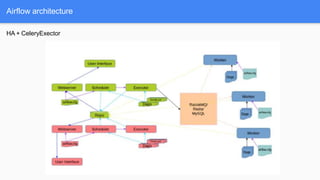
Airflow Architecture
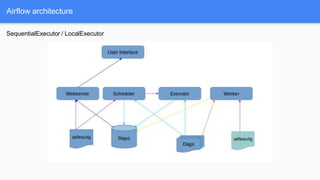
Airflow architecture
SequentialExecutor / LocalExecutor
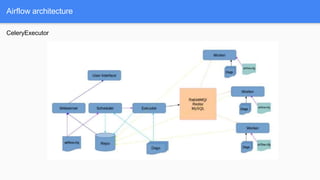
Airflow architecture
CeleryExecutor
Airflow architecture
HA + CeleryExector
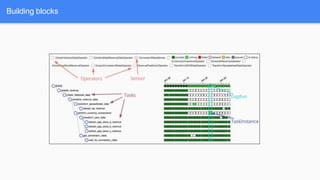
Building blocks
Building blocks
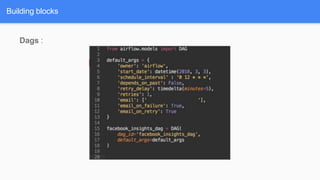
Dags :
- Directed Acyclic Graph
- Is a collection of all the tasks you want to run
- DAGs describe how to run a workflow
Building blocks
Dags :
Building blocks
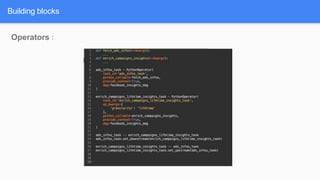
Operators :
- Describes a singletaskin a workflow.
- Determine what actually gets done
- Operators generally run independently (atomic)
- The DAG make sure that operators run in the correct certain order
- They may run on completely different machines
Building blocks
Operators : There are 3 main types of operators:
● Operators that performs an action,or tell another system to perform an action
● Transferoperators move data from one system to another
● Sensorsare a certain type of operator that will keeprunninguntil a certain criterionis met.
○ Examples include a specific file landing in HDFS or S3.
○ A partition appearing in Hive.
○ A specific time of the day.
Operators
: - Operators :
- BashOperator
- PythonOperator
- EmailOperator
- HTTPOperator
- MySqlOperator
- SqliteOperator
- PostgresOperator
- MsSqlOperator
- OracleOperator
- JdbcOperator
- DockerOperator
- HiveOperator
- SlackOperator
Building blocks
Operators
: - Transfers :
- S3FileTransferOperator
- PrestoToMysqlOperator
- MySqlToHiveTransfer
- S3ToHiveTransfer
- BigQueryToCloudStorageOperator
- GenericTransfer
- HiveToDruidTransfer
- HiveToMySqlTransfer
Building blocks
Operators
: - Sensors :
- ExternalTaskSensor
- HdfsSensor
- HttpSensor
- MetastorePartitionSensor
- HivePartitionSensor
- S3KeySensor
- S3PrefixSensor
- SqlSensor
- TimeDeltaSensor
- TimeSensor
- WebHdfsSensor
Building blocks
Building blocks
Operators :
Tasks : a parameterized instance of an
operator
Building blocks
Building blocks
Task Instance : Dag + Task + point in time
- Specific run of a Task
- A task assigned to a DAG
- Has State associated with a specific run of the DAG
- States : it could be
- running
- success,
- failed
- skipped
- upfor retry
- …
Building blocks
Workflows :
● DAG: a description of the order in which work should take place
● Operator: a class that acts as a template for carrying out some work
● Task: a parameterized instance of an operator
● Task Instance: a task that
○ Has been assigned to a DAG
○ Has a state associated with a specific run of the DAG
● By combining DAGs and Operators to create TaskInstances, you can build complex workflows.
Building blocks
More features
- Features :
- Hooks
- Connections
- Variables
- XComs
- SLA
- Pools
- Queues
- Trigger Rules
- Branchings
- SubDags
More features
- Interface to external platforms and databases :
- Hive
- S3
- MySQL
- PostgreSQL
- HDFS
- Hive
- Pig
- …
- Act as building block for Operators
- Use Connection to retrieve authentication informations
- Keep authentication infos out of pipelines.
More features
Hooks :
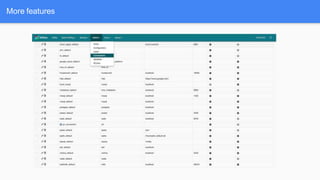
Connections
:
Connection informations to external systems are stored in the airflow metadata Database and managed in the UI
More features
More features
More features
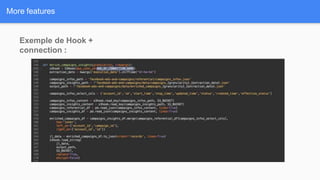
Exemple de Hook +
connection :
More features
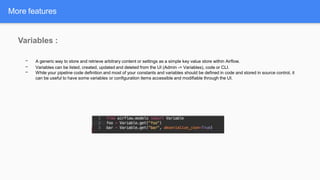
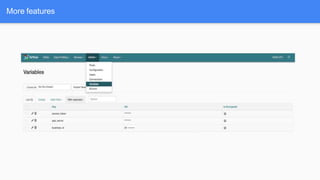
Variables :
- A generic way to store and retrieve arbitrary content or settings as a simple key value store within Airflow.
- Variables can be listed, created, updated and deleted from the UI (Admin -> Variables), code or CLI.
- While your pipeline code definition and most of your constants and variables should be defined in code and stored in source control, it
can be useful to have some variables or configuration items accessible and modifiable through the UI.
More features
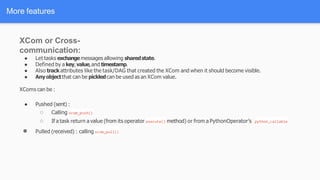
XCom or Cross-
communication:
● Let tasks exchangemessages allowing sharedstate.
● Defined by a key,value,and timestamp.
● Also trackattributes like the task/DAG that created the XCom and when it should become visible.
● Any objectthat can be pickledcan be used as an XCom value.
XComs can be :
● Pushed (sent) :
○ Calling xcom_push()
○ If a task return a value (from its operator execute() method) or from a PythonOperator’s python_callable
● Pulled (received) : calling xcom_pull()
More features
More features
SLA :
- Service Level Agreements, or time by which a task or DAG should have succeeded,
- Can be set at a task level as a timedelta.
- An alert email is sent detailing the list of tasks that missed their SLA.
More features
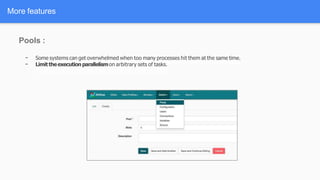
Pools :
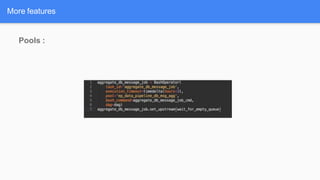
- Some systems can get overwhelmed when too many processes hit them at the same time.
- Limittheexecutionparallelismon arbitrary sets of tasks.
More features
Pools :
Queues : (only on CeleryExecutors) :
- Every Task can be assigned a specific queue name
- By default, both worker and tasks are assigned with the default_queue queue
- Workers can be assigned multiple queues
- Very useful feature when specialized workers are needed (GPU, Spark…)
More features
More features
Trigger Rules:
Though the normal workflow behavior is to trigger tasks when all their directly upstream tasks have succeeded, Airflow allows for more complex
dependency settings.
All operators have a trigger_rule argument which defines the rule by which the generated task get triggered. The default value for trigger_rule is
all_success and can be defined as “trigger this task when all directly upstream tasks have succeeded”. All other rules described here are based
on direct parent tasks and are values that can be passed to any operator while creating tasks:
● all_success: (default) all parents have succeeded
● all_failed: all parents are in a failed or upstream_failed state
● all_done: all parents are done with their execution
● one_failed: fires as soon as at least one parent has failed, it does not wait for all parents to be done • one_success: fires as soon as at
least one parent succeeds, it does not wait for all parents to be done • dummy: dependencies are just for show, trigger at will.
User Interface
User Interface
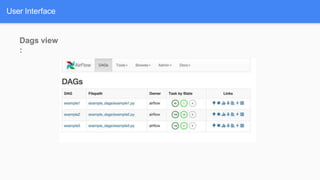
Dags view
:
User Interface
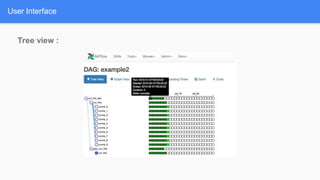
Tree view :
User Interface
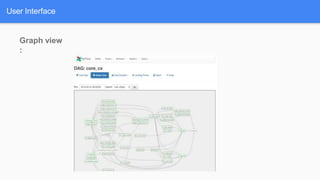
Graph view
:
User Interface
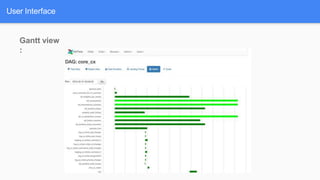
Gantt view
:
User Interface
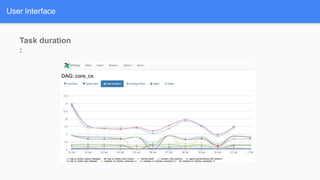
Task duration
:
User Interface
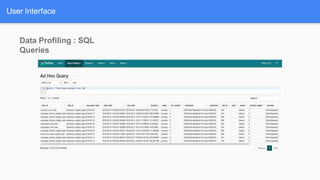
Data Profiling : SQL
Queries
User Interface
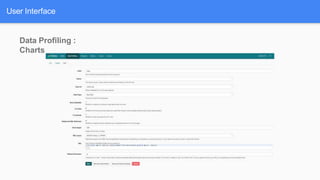
Data Profiling :
Charts
User Interface
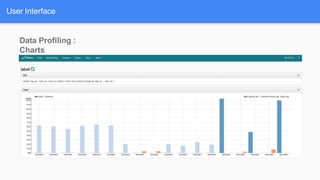
Data Profiling :
Charts
CL
I
CL
I
https://airflow.apache.org/cli.html
airflow variables [-h] [-s KEY VAL] [-g KEY] [-j] [-d VAL] [-i FILEPATH] [-e FILEPATH] [-x
KEY]
airflow connections [-h] [-l] [-a] [-d] [--conn_id CONN_ID]
[--conn_uri CONN_URI] [--conn_extra CONN_EXTRA]
[--conn_type CONN_TYPE] [--conn_host CONN_HOST]
[--conn_login CONN_LOGIN] [--conn_password CONN_PASSWORD]
[--conn_schema CONN_SCHEMA] [--conn_port CONN_PORT]
airflow pause [-h] [-sd SUBDIR] dag_id
airflow test [-h] [-sd SUBDIR] [-dr] [-tp TASK_PARAMS] dag_id task_id execution_date
airflow backfill dag_id task_id -s START_DATE -e END_DATE
airflow clear DAG_ID
airflow resetdb [-h] [-y]
...
Security
Security
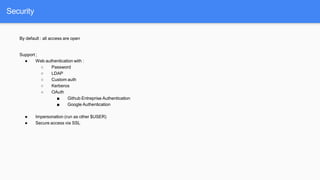
By default : all access are open
Support ;
● Web authentication with :
○ Password
○ LDAP
○ Custom auth
○ Kerberos
○ OAuth
■ Github Entreprise Authentication
■ Google Authentication
● Impersonation (run as other $USER)
● Secure access via SSL
Demo
Demo
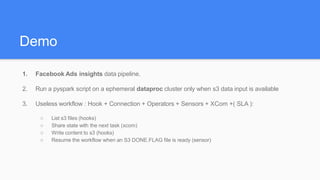
1. Facebook Ads insights data pipeline.
2. Run a pyspark script on a ephemeral dataproc cluster only when s3 data input is available
3. Useless workflow : Hook + Connection + Operators + Sensors + XCom +( SLA ):
○ List s3 files (hooks)
○ Share state with the next task (xcom)
○ Write content to s3 (hooks)
○ Resume the workflow when an S3 DONE.FLAG file is ready (sensor)
Resources
https://airflow.apache.org
http://www.clairvoyantsoft.com/assets/whitepapers/GuideToApacheAirflow.pdf
https://speakerdeck.com/artwr/apache-airflow-at-airbnb-introduction-and-lessons-learned
https://www.slideshare.net/sumitmaheshwari007/apache-airflow
Thanks

airflow web UI and CLI.pptx

  • 1.
  • 2.
    Index - Workflows ManagementSystems - Architecture - Building blocks - More features - User Interface - Security - CLI - Demo
  • 3.
    WTH is aWorkflow Management System ? A worflow Management system is: Is a data-centric software (framework) for : - Settingup - Performing - Monitoring of a defined sequenceofprocesses and tasks
  • 4.
  • 5.
  • 6.
  • 7.
  • 8.
  • 9.
  • 10.
    Building blocks Dags : -Directed Acyclic Graph - Is a collection of all the tasks you want to run - DAGs describe how to run a workflow
  • 11.
  • 12.
    Building blocks Operators : -Describes a singletaskin a workflow. - Determine what actually gets done - Operators generally run independently (atomic) - The DAG make sure that operators run in the correct certain order - They may run on completely different machines
  • 13.
    Building blocks Operators :There are 3 main types of operators: ● Operators that performs an action,or tell another system to perform an action ● Transferoperators move data from one system to another ● Sensorsare a certain type of operator that will keeprunninguntil a certain criterionis met. ○ Examples include a specific file landing in HDFS or S3. ○ A partition appearing in Hive. ○ A specific time of the day.
  • 14.
    Operators : - Operators: - BashOperator - PythonOperator - EmailOperator - HTTPOperator - MySqlOperator - SqliteOperator - PostgresOperator - MsSqlOperator - OracleOperator - JdbcOperator - DockerOperator - HiveOperator - SlackOperator Building blocks
  • 15.
    Operators : - Transfers: - S3FileTransferOperator - PrestoToMysqlOperator - MySqlToHiveTransfer - S3ToHiveTransfer - BigQueryToCloudStorageOperator - GenericTransfer - HiveToDruidTransfer - HiveToMySqlTransfer Building blocks
  • 16.
    Operators : - Sensors: - ExternalTaskSensor - HdfsSensor - HttpSensor - MetastorePartitionSensor - HivePartitionSensor - S3KeySensor - S3PrefixSensor - SqlSensor - TimeDeltaSensor - TimeSensor - WebHdfsSensor Building blocks
  • 17.
  • 18.
    Tasks : aparameterized instance of an operator Building blocks
  • 19.
    Building blocks Task Instance: Dag + Task + point in time - Specific run of a Task - A task assigned to a DAG - Has State associated with a specific run of the DAG - States : it could be - running - success, - failed - skipped - upfor retry - …
  • 20.
    Building blocks Workflows : ●DAG: a description of the order in which work should take place ● Operator: a class that acts as a template for carrying out some work ● Task: a parameterized instance of an operator ● Task Instance: a task that ○ Has been assigned to a DAG ○ Has a state associated with a specific run of the DAG ● By combining DAGs and Operators to create TaskInstances, you can build complex workflows.
  • 21.
  • 22.
  • 23.
    - Features : -Hooks - Connections - Variables - XComs - SLA - Pools - Queues - Trigger Rules - Branchings - SubDags More features
  • 24.
    - Interface toexternal platforms and databases : - Hive - S3 - MySQL - PostgreSQL - HDFS - Hive - Pig - … - Act as building block for Operators - Use Connection to retrieve authentication informations - Keep authentication infos out of pipelines. More features Hooks :
  • 25.
    Connections : Connection informations toexternal systems are stored in the airflow metadata Database and managed in the UI More features
  • 26.
  • 27.
    More features Exemple deHook + connection :
  • 28.
    More features Variables : -A generic way to store and retrieve arbitrary content or settings as a simple key value store within Airflow. - Variables can be listed, created, updated and deleted from the UI (Admin -> Variables), code or CLI. - While your pipeline code definition and most of your constants and variables should be defined in code and stored in source control, it can be useful to have some variables or configuration items accessible and modifiable through the UI.
  • 29.
  • 30.
    XCom or Cross- communication: ●Let tasks exchangemessages allowing sharedstate. ● Defined by a key,value,and timestamp. ● Also trackattributes like the task/DAG that created the XCom and when it should become visible. ● Any objectthat can be pickledcan be used as an XCom value. XComs can be : ● Pushed (sent) : ○ Calling xcom_push() ○ If a task return a value (from its operator execute() method) or from a PythonOperator’s python_callable ● Pulled (received) : calling xcom_pull() More features
  • 31.
    More features SLA : -Service Level Agreements, or time by which a task or DAG should have succeeded, - Can be set at a task level as a timedelta. - An alert email is sent detailing the list of tasks that missed their SLA.
  • 32.
    More features Pools : -Some systems can get overwhelmed when too many processes hit them at the same time. - Limittheexecutionparallelismon arbitrary sets of tasks.
  • 33.
  • 34.
    Queues : (onlyon CeleryExecutors) : - Every Task can be assigned a specific queue name - By default, both worker and tasks are assigned with the default_queue queue - Workers can be assigned multiple queues - Very useful feature when specialized workers are needed (GPU, Spark…) More features
  • 35.
    More features Trigger Rules: Thoughthe normal workflow behavior is to trigger tasks when all their directly upstream tasks have succeeded, Airflow allows for more complex dependency settings. All operators have a trigger_rule argument which defines the rule by which the generated task get triggered. The default value for trigger_rule is all_success and can be defined as “trigger this task when all directly upstream tasks have succeeded”. All other rules described here are based on direct parent tasks and are values that can be passed to any operator while creating tasks: ● all_success: (default) all parents have succeeded ● all_failed: all parents are in a failed or upstream_failed state ● all_done: all parents are done with their execution ● one_failed: fires as soon as at least one parent has failed, it does not wait for all parents to be done • one_success: fires as soon as at least one parent succeeds, it does not wait for all parents to be done • dummy: dependencies are just for show, trigger at will.
  • 36.
  • 37.
  • 38.
  • 39.
  • 40.
  • 41.
  • 42.
  • 43.
  • 44.
  • 45.
  • 46.
    CL I https://airflow.apache.org/cli.html airflow variables [-h][-s KEY VAL] [-g KEY] [-j] [-d VAL] [-i FILEPATH] [-e FILEPATH] [-x KEY] airflow connections [-h] [-l] [-a] [-d] [--conn_id CONN_ID] [--conn_uri CONN_URI] [--conn_extra CONN_EXTRA] [--conn_type CONN_TYPE] [--conn_host CONN_HOST] [--conn_login CONN_LOGIN] [--conn_password CONN_PASSWORD] [--conn_schema CONN_SCHEMA] [--conn_port CONN_PORT] airflow pause [-h] [-sd SUBDIR] dag_id airflow test [-h] [-sd SUBDIR] [-dr] [-tp TASK_PARAMS] dag_id task_id execution_date airflow backfill dag_id task_id -s START_DATE -e END_DATE airflow clear DAG_ID airflow resetdb [-h] [-y] ...
  • 47.
  • 48.
    Security By default :all access are open Support ; ● Web authentication with : ○ Password ○ LDAP ○ Custom auth ○ Kerberos ○ OAuth ■ Github Entreprise Authentication ■ Google Authentication ● Impersonation (run as other $USER) ● Secure access via SSL
  • 49.
  • 50.
    Demo 1. Facebook Adsinsights data pipeline. 2. Run a pyspark script on a ephemeral dataproc cluster only when s3 data input is available 3. Useless workflow : Hook + Connection + Operators + Sensors + XCom +( SLA ): ○ List s3 files (hooks) ○ Share state with the next task (xcom) ○ Write content to s3 (hooks) ○ Resume the workflow when an S3 DONE.FLAG file is ready (sensor)
  • 51.
  • 52.