
Airflow Best Practises &
Roadmap to Airflow 2.0
Kaxil Naik - Airflow PMC, Core Committer & Release
Manager. Senior Data Engineer @ Astronomer.io
What’s new in Airflow 1.10.8 / 1.10.9 ?
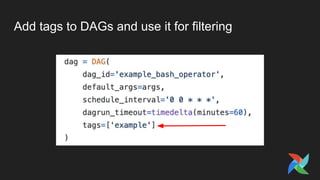
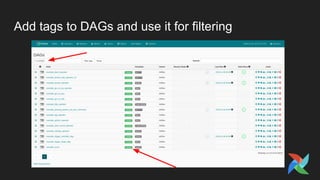
Add tags to DAGs and use it for filtering
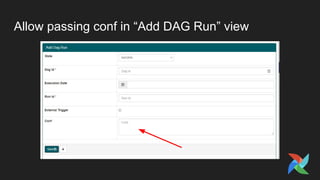
Allow passing conf in “Add DAG Run” view
Allow dags to run for future execution dates
● Only works for DAGs with no schedule_interval
● Useful for companies working on several timezones and relying on External
Triggers
● Enable this feature with the following Env variable:
AIRFLOW__SCHEDULER__ALLOW_TRIGGER_IN_FUTURE=True
And much more..
● Several bug fixes
● Docs Improvements
● Complete changelog at https://github.com/apache/airflow/blob/1.10.8/CHANGELOG.txt
Tips & Best Practises
Writing DAGs
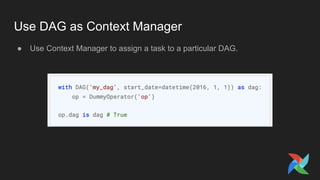
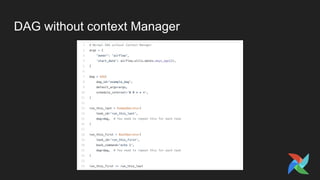
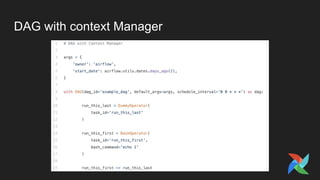
Use DAG as Context Manager
● Use Context Manager to assign a task to a particular DAG.
DAG without context Manager
DAG with context Manager
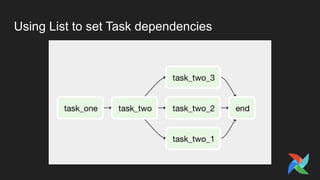
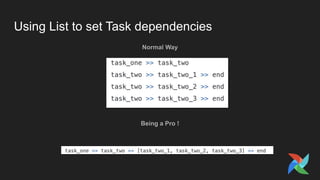
Using List to set Task dependencies
Normal Way
Being a Pro !
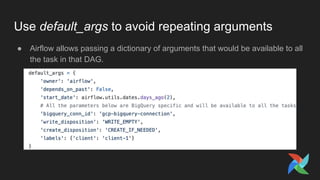
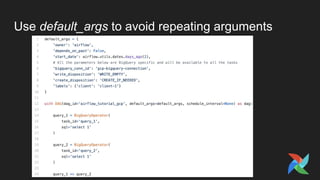
Use default_args to avoid repeating arguments
● Airflow allows passing a dictionary of arguments that would be available to all
the task in that DAG.
Use default_args to avoid repeating arguments
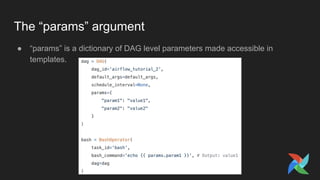
The “params” argument
● “params” is a dictionary of DAG level parameters made accessible in
templates.
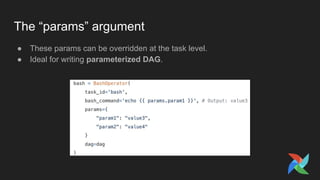
The “params” argument
● These params can be overridden at the task level.
● Ideal for writing parameterized DAG.
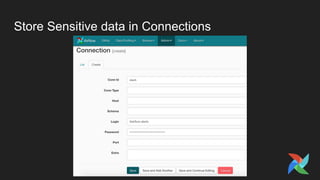
Store Sensitive data in Connections
● Don’t put passwords in your DAG files!
● Use Airflow connections to store any kind of sensitive data like Passwords,
private keys, etc
● Airflow stores the connections data in Airflow MetadataDB
● If you install “crypto” package (“pip install apache-airflow[crypto]”), password
field in Connections would be encrypted in DB too.
Store Sensitive data in Connections
Restrict the number of Airflow variables in your DAG
● Any call to variables would mean a connection to Metadata DB.
● Your DAG files are parsed every X seconds. Using a large number of variable
in your DAG may mean you might end up saturating the number of allowed
connections to your database.
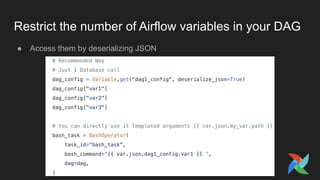
Restrict the number of Airflow variables in your DAG
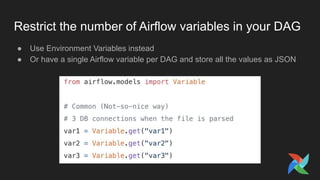
● Use Environment Variables instead
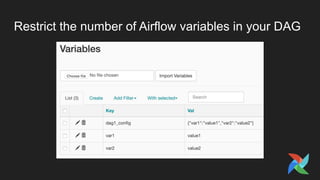
● Or have a single Airflow variable per DAG and store all the values as JSON
Restrict the number of Airflow variables in your DAG
● Access them by deserializing JSON
Avoid code outside of an operator in your DAG files
● Airflow will parse your DAG many times over and over (and more often than
your schedule interval), and any code at the top level of the file will get run.
● Can cause Scheduler to be slow and hence task might end up being delayed
Stop using Python 2
● Python 2 reached end of its life on Jan 2020
● We have dropped Python 2 support on Airflow Master branch
● Airflow 1.10.* is the last series to support Python 2
Use Flask-Appbuilder based UI
● Enabled using “rbac=True” under “[webserver]”
● Airflow ships with a set of roles by default: Admin, User, Op, Viewer, and
Public
● Creating custom roles is possible
● DAG Level Access Control. User can declare the read or write permission
inside the DAG file as shown below
Use Flask-Appbuilder based UI
● Flask-Appbuilder based UI would be the default UI from Airflow 2.0
● Old Flask-admin based UI will be removed in 2.0. It is already removed on
Airflow Master
Configuring Airflow for Production
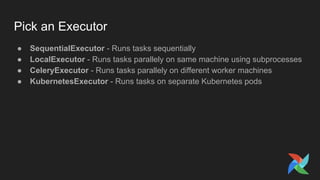
Pick an Executor
● SequentialExecutor - Runs tasks sequentially
● LocalExecutor - Runs tasks parallely on same machine using subprocesses
● CeleryExecutor - Runs tasks parallely on different worker machines
● KubernetesExecutor - Runs tasks on separate Kubernetes pods
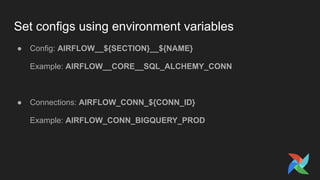
Set configs using environment variables
● Config: AIRFLOW__${SECTION}__${NAME}
Example: AIRFLOW__CORE__SQL_ALCHEMY_CONN
● Connections: AIRFLOW_CONN_${CONN_ID}
Example: AIRFLOW_CONN_BIGQUERY_PROD
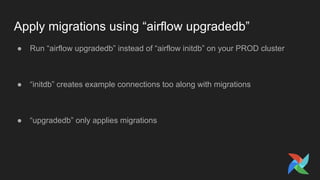
Apply migrations using “airflow upgradedb”
● Run “airflow upgradedb” instead of “airflow initdb” on your PROD cluster
● “initdb” creates example connections too along with migrations
● “upgradedb” only applies migrations
Enforce Policies
● To define policy, add a airflow_local_settings module to your
PYTHONPATH that defines this policy function.
● It receives a TaskInstance object and can alter it where needed.
● Example Usages:
○ Enforce a specific queue (say the spark queue) for tasks using the SparkOperator to make
sure that these task instances get wired to the right workers
○ Force all task instances running on an execution_date older than a week old to run in a
backfil` pool.
Airflow 2.0 Roadmap
Airflow 2.0 Roadmap
● Dag Serialization
● Revamped real-time UI
● Production-grade modern API
● Official Docker Image & Helm chart
● Scheduler Improvements
● Data Lineage
Dag Serialization
Dag Serialization
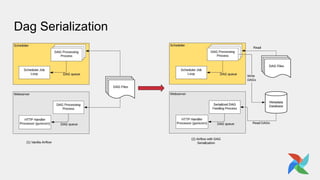
● Make Webserver stateless
● DAGs parsed by Scheduler and stored in DB from where Webserver reads
● Phase-1 implemented and released in Airflow >= 1.10.7
● For Airflow 2.0 we want the Scheduler to read from DB as well and pass on
the responsibility of parsing DAG and saving it to DB to “Serializer” or some
other component.
Revamped real-time UI
● No refreshing the page manually to check the status !!
● Modern design
● Planning to use React to build the UI
● Use APIs for communication not DB/file access
Production-grade modern API
● API has been experimental since a long time
● CLI & webserver should be using the API instead of duplicating code
● Better Authentication/Authorization
● Conform to OpenAPI standards
Official Docker Image & Helm chart
● Currently the popular solution is “puckel-airflow” docker image and the stable
Airflow chart in Helm Repo.
● However, we want to support all features and make the official image and
Helm chart and support it.
Thanks
We are Hiring !
Visit https://careers.astronomer.io/

Airflow Best Practises & Roadmap to Airflow 2.0

  • 1.
    Airflow Best Practises& Roadmap to Airflow 2.0 Kaxil Naik - Airflow PMC, Core Committer & Release Manager. Senior Data Engineer @ Astronomer.io
  • 3.
    What’s new inAirflow 1.10.8 / 1.10.9 ?
  • 4.
    Add tags toDAGs and use it for filtering
  • 5.
    Add tags toDAGs and use it for filtering
  • 6.
    Allow passing confin “Add DAG Run” view
  • 7.
    Allow dags torun for future execution dates ● Only works for DAGs with no schedule_interval ● Useful for companies working on several timezones and relying on External Triggers ● Enable this feature with the following Env variable: AIRFLOW__SCHEDULER__ALLOW_TRIGGER_IN_FUTURE=True
  • 8.
    And much more.. ●Several bug fixes ● Docs Improvements ● Complete changelog at https://github.com/apache/airflow/blob/1.10.8/CHANGELOG.txt
  • 9.
    Tips & BestPractises
  • 10.
  • 11.
    Use DAG asContext Manager ● Use Context Manager to assign a task to a particular DAG.
  • 12.
  • 13.
  • 14.
    Using List toset Task dependencies
  • 15.
    Using List toset Task dependencies Normal Way Being a Pro !
  • 16.
    Use default_args toavoid repeating arguments ● Airflow allows passing a dictionary of arguments that would be available to all the task in that DAG.
  • 17.
    Use default_args toavoid repeating arguments
  • 18.
    The “params” argument ●“params” is a dictionary of DAG level parameters made accessible in templates.
  • 19.
    The “params” argument ●These params can be overridden at the task level. ● Ideal for writing parameterized DAG.
  • 20.
    Store Sensitive datain Connections ● Don’t put passwords in your DAG files! ● Use Airflow connections to store any kind of sensitive data like Passwords, private keys, etc ● Airflow stores the connections data in Airflow MetadataDB ● If you install “crypto” package (“pip install apache-airflow[crypto]”), password field in Connections would be encrypted in DB too.
  • 21.
    Store Sensitive datain Connections
  • 22.
    Restrict the numberof Airflow variables in your DAG ● Any call to variables would mean a connection to Metadata DB. ● Your DAG files are parsed every X seconds. Using a large number of variable in your DAG may mean you might end up saturating the number of allowed connections to your database.
  • 23.
    Restrict the numberof Airflow variables in your DAG ● Use Environment Variables instead ● Or have a single Airflow variable per DAG and store all the values as JSON
  • 24.
    Restrict the numberof Airflow variables in your DAG
  • 25.
    Restrict the numberof Airflow variables in your DAG ● Access them by deserializing JSON
  • 26.
    Avoid code outsideof an operator in your DAG files ● Airflow will parse your DAG many times over and over (and more often than your schedule interval), and any code at the top level of the file will get run. ● Can cause Scheduler to be slow and hence task might end up being delayed
  • 27.
    Stop using Python2 ● Python 2 reached end of its life on Jan 2020 ● We have dropped Python 2 support on Airflow Master branch ● Airflow 1.10.* is the last series to support Python 2
  • 28.
    Use Flask-Appbuilder basedUI ● Enabled using “rbac=True” under “[webserver]” ● Airflow ships with a set of roles by default: Admin, User, Op, Viewer, and Public ● Creating custom roles is possible ● DAG Level Access Control. User can declare the read or write permission inside the DAG file as shown below
  • 29.
    Use Flask-Appbuilder basedUI ● Flask-Appbuilder based UI would be the default UI from Airflow 2.0 ● Old Flask-admin based UI will be removed in 2.0. It is already removed on Airflow Master
  • 30.
  • 31.
    Pick an Executor ●SequentialExecutor - Runs tasks sequentially ● LocalExecutor - Runs tasks parallely on same machine using subprocesses ● CeleryExecutor - Runs tasks parallely on different worker machines ● KubernetesExecutor - Runs tasks on separate Kubernetes pods
  • 32.
    Set configs usingenvironment variables ● Config: AIRFLOW__${SECTION}__${NAME} Example: AIRFLOW__CORE__SQL_ALCHEMY_CONN ● Connections: AIRFLOW_CONN_${CONN_ID} Example: AIRFLOW_CONN_BIGQUERY_PROD
  • 33.
    Apply migrations using“airflow upgradedb” ● Run “airflow upgradedb” instead of “airflow initdb” on your PROD cluster ● “initdb” creates example connections too along with migrations ● “upgradedb” only applies migrations
  • 34.
    Enforce Policies ● Todefine policy, add a airflow_local_settings module to your PYTHONPATH that defines this policy function. ● It receives a TaskInstance object and can alter it where needed. ● Example Usages: ○ Enforce a specific queue (say the spark queue) for tasks using the SparkOperator to make sure that these task instances get wired to the right workers ○ Force all task instances running on an execution_date older than a week old to run in a backfil` pool.
  • 35.
  • 36.
    Airflow 2.0 Roadmap ●Dag Serialization ● Revamped real-time UI ● Production-grade modern API ● Official Docker Image & Helm chart ● Scheduler Improvements ● Data Lineage
  • 37.
  • 38.
    Dag Serialization ● MakeWebserver stateless ● DAGs parsed by Scheduler and stored in DB from where Webserver reads ● Phase-1 implemented and released in Airflow >= 1.10.7 ● For Airflow 2.0 we want the Scheduler to read from DB as well and pass on the responsibility of parsing DAG and saving it to DB to “Serializer” or some other component.
  • 39.
    Revamped real-time UI ●No refreshing the page manually to check the status !! ● Modern design ● Planning to use React to build the UI ● Use APIs for communication not DB/file access
  • 40.
    Production-grade modern API ●API has been experimental since a long time ● CLI & webserver should be using the API instead of duplicating code ● Better Authentication/Authorization ● Conform to OpenAPI standards
  • 41.
    Official Docker Image& Helm chart ● Currently the popular solution is “puckel-airflow” docker image and the stable Airflow chart in Helm Repo. ● However, we want to support all features and make the official image and Helm chart and support it.
  • 42.
  • 43.
    We are Hiring! Visit https://careers.astronomer.io/