Building Automated Data Pipelines with Airflow
Apache Airflow is a workflow engine that will easily schedule and run your complex data pipelines.
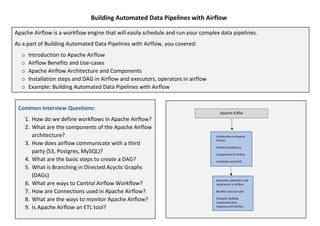
As a part of Building Automated Data Pipelines with Airflow, you covered:
o Introduction to Apache Airflow
o Airflow Benefits and Use-cases
o Apache Airflow Architecture and Components
o Installation steps and DAG in Airflow and executors, operators in airflow
o Example: Building Automated Data Pipelines with Airflow
Common Interview Questions:
1. How do we define workflows in Apache Airflow?
2. What are the components of the Apache Airflow
architecture?
3. How does airflow communicate with a third
party (S3, Postgres, MySQL)?
4. What are the basic steps to create a DAG?
5. What is Branching in Directed Acyclic Graphs
(DAGs)
6. What are ways to Control Airflow Workflow?
7. How are Connections used in Apache Airflow?
8. What are the ways to monitor Apache Airflow?
9. Is Apache Airflow an ETL tool?
Apache Kafka
Executors, operators, and
some terms in airflow.
Benefits and Use-case
Example: Building
Automated Data
Pipelines with Airflow
Kafka
Introduction to Apache
Airflow
Airflow Architecture
Components of Airflow
Installation and DAG
Building Automated Data Pipelines with Airflow
Apache Airflow:
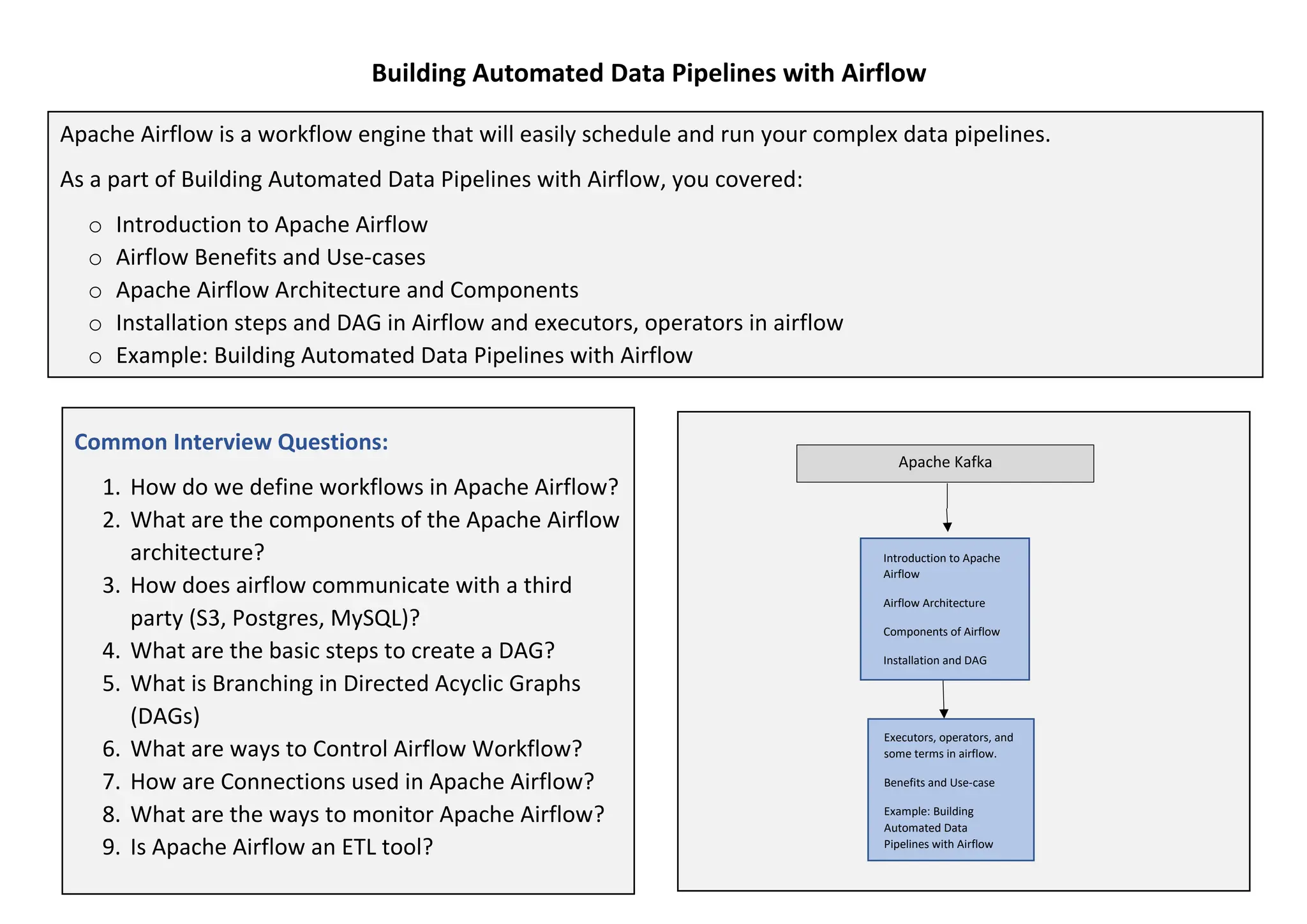
Apache Airflow is a workflow engine that will easily schedule and run your complex data pipelines. It will make
sure that each task of your data pipeline will get executed in the correct order and each task gets the required
resources.
Data pipelines in Airflow are:
• Implemented in the form of Directed Acyclic Graphs (DAGs);
• Created using Python code; and
• Can be generated dynamically.
Features
Building Automated Data Pipelines with Airflow
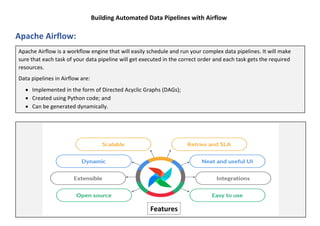
Apache Airflow Architecture:
Building Automated Data Pipelines with Airflow
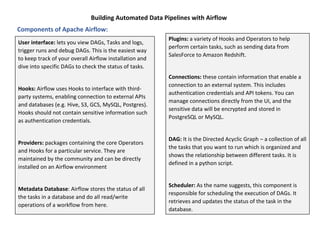
User interface: lets you view DAGs, Tasks and logs,
trigger runs and debug DAGs. This is the easiest way
to keep track of your overall Airflow installation and
dive into specific DAGs to check the status of tasks.
Hooks: Airflow uses Hooks to interface with third-
party systems, enabling connection to external APIs
and databases (e.g. Hive, S3, GCS, MySQL, Postgres).
Hooks should not contain sensitive information such
as authentication credentials.
Providers: packages containing the core Operators
and Hooks for a particular service. They are
maintained by the community and can be directly
installed on an Airflow environment
Metadata Database: Airflow stores the status of all
the tasks in a database and do all read/write
operations of a workflow from here.
Components of Apache Airflow:
Plugins: a variety of Hooks and Operators to help
perform certain tasks, such as sending data from
SalesForce to Amazon Redshift.
Connections: these contain information that enable a
connection to an external system. This includes
authentication credentials and API tokens. You can
manage connections directly from the UI, and the
sensitive data will be encrypted and stored in
PostgreSQL or MySQL.
DAG: It is the Directed Acyclic Graph – a collection of all
the tasks that you want to run which is organized and
shows the relationship between different tasks. It is
defined in a python script.
Scheduler: As the name suggests, this component is
responsible for scheduling the execution of DAGs. It
retrieves and updates the status of the task in the
database.
Building Automated Data Pipelines with Airflow
Apache Airflow benefits:
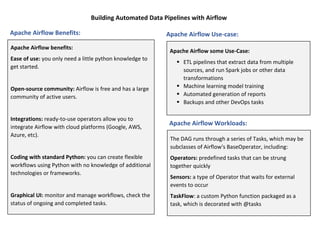
Ease of use: you only need a little python knowledge to
get started.
Open-source community: Airflow is free and has a large
community of active users.
Integrations: ready-to-use operators allow you to
integrate Airflow with cloud platforms (Google, AWS,
Azure, etc).
Coding with standard Python: you can create flexible
workflows using Python with no knowledge of additional
technologies or frameworks.
Graphical UI: monitor and manage workflows, check the
status of ongoing and completed tasks.
The DAG runs through a series of Tasks, which may be
subclasses of Airflow's BaseOperator, including:
Operators: predefined tasks that can be strung
together quickly
Sensors: a type of Operator that waits for external
events to occur
TaskFlow: a custom Python function packaged as a
task, which is decorated with @tasks
Apache Airflow Benefits: Apache Airflow Use-case:
Apache Airflow some Use-Case:
▪ ETL pipelines that extract data from multiple
sources, and run Spark jobs or other data
transformations
▪ Machine learning model training
▪ Automated generation of reports
▪ Backups and other DevOps tasks
Apache Airflow Workloads:
Building Automated Data Pipelines with Airflow
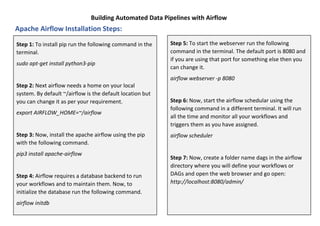
Step 1: To install pip run the following command in the
terminal.
sudo apt-get install python3-pip
Step 2: Next airflow needs a home on your local
system. By default ~/airflow is the default location but
you can change it as per your requirement.
export AIRFLOW_HOME=~/airflow
Step 3: Now, install the apache airflow using the pip
with the following command.
pip3 install apache-airflow
Step 4: Airflow requires a database backend to run
your workflows and to maintain them. Now, to
initialize the database run the following command.
airflow initdb
Step 5: To start the webserver run the following
command in the terminal. The default port is 8080 and
if you are using that port for something else then you
can change it.
airflow webserver -p 8080
Step 6: Now, start the airflow schedular using the
following command in a different terminal. It will run
all the time and monitor all your workflows and
triggers them as you have assigned.
airflow scheduler
Step 7: Now, create a folder name dags in the airflow
directory where you will define your workflows or
DAGs and open the web browser and go open:
http://localhost:8080/admin/
Apache Airflow Installation Steps:
Building Automated Data Pipelines with Airflow
In Apache Airflow, DAG stands for Directed Acyclic Graph. DAG is a collection of tasks organized in such a way that
their relationships and dependencies are reflected. One of the advantages of this DAG model is that it gives a
reasonably simple technique for executing the pipeline. Another advantage is that it clearly divides pipelines into
discrete incremental tasks rather than relying on a single monolithic script to perform all the work.
The properties of a DAG are as follows:
• DAGs are graph structures (i.e., a collection of vertices and edges).
• It should be directed (i.e., the edges all have a direction indicating which task is dependent on which).
• It must be acyclic (i.e., it cannot contain cycles).
DAG in Apache Airflow:
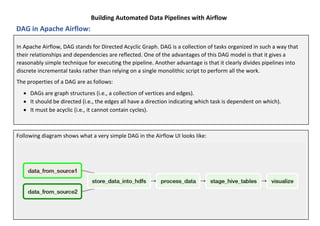
Following diagram shows what a very simple DAG in the Airflow UI looks like:
Building Automated Data Pipelines with Airflow
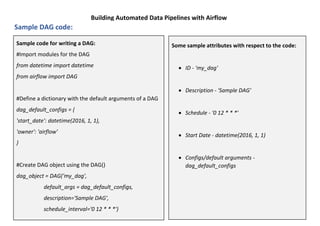
Sample code for writing a DAG:
#Import modules for the DAG
from datetime import datetime
from airflow import DAG
#Define a dictionary with the default arguments of a DAG
dag_default_configs = {
'start_date': datetime(2016, 1, 1),
'owner': 'airflow'
}
#Create DAG object using the DAG()
dag_object = DAG('my_dag',
default_args = dag_default_configs,
description='Sample DAG',
schedule_interval='0 12 * * *')
Some sample attributes with respect to the code:
• ID - 'my_dag'
• Description - 'Sample DAG'
• Schedule - '0 12 * * *'
• Start Date - datetime(2016, 1, 1)
• Configs/default arguments -
dag_default_configs
Sample DAG code:
Building Automated Data Pipelines with Airflow
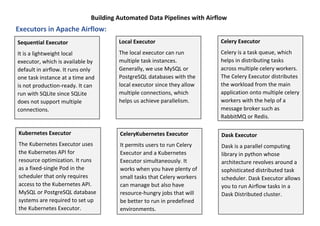
Sequential Executor
It is a lightweight local
executor, which is available by
default in airflow. It runs only
one task instance at a time and
is not production-ready. It can
run with SQLite since SQLite
does not support multiple
connections.
Kubernetes Executor
The Kubernetes Executor uses
the Kubernetes API for
resource optimization. It runs
as a fixed-single Pod in the
scheduler that only requires
access to the Kubernetes API.
MySQL or PostgreSQL database
systems are required to set up
the Kubernetes Executor.
Local Executor
The local executor can run
multiple task instances.
Generally, we use MySQL or
PostgreSQL databases with the
local executor since they allow
multiple connections, which
helps us achieve parallelism.
CeleryKubernetes Executor
It permits users to run Celery
Executor and a Kubernetes
Executor simultaneously. It
works when you have plenty of
small tasks that Celery workers
can manage but also have
resource-hungry jobs that will
be better to run in predefined
environments.
Celery Executor
Celery is a task queue, which
helps in distributing tasks
across multiple celery workers.
The Celery Executor distributes
the workload from the main
application onto multiple celery
workers with the help of a
message broker such as
RabbitMQ or Redis.
Dask Executor
Dask is a parallel computing
library in python whose
architecture revolves around a
sophisticated distributed task
scheduler. Dask Executor allows
you to run Airflow tasks in a
Dask Distributed cluster.
Executors in Apache Airflow:
Building Automated Data Pipelines with Airflow
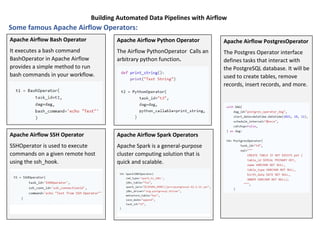
Apache Airflow Bash Operator
It executes a bash command
BashOperator in Apache Airflow
provides a simple method to run
bash commands in your workflow.
Apache Airflow SSH Operator
SSHOperator is used to execute
commands on a given remote host
using the ssh_hook.
Apache Airflow Python Operator
The Airflow PythonOperator Calls an
arbitrary python function.
Apache Airflow Spark Operators
Apache Spark is a general-purpose
cluster computing solution that is
quick and scalable.
Apache Airflow PostgresOperator
The Postgres Operator interface
defines tasks that interact with
the PostgreSQL database. It will be
used to create tables, remove
records, insert records, and more.
Some famous Apache Airflow Operators:
Building Automated Data Pipelines with Airflow
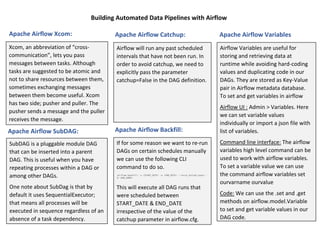
Xcom, an abbreviation of “cross-
communication”, lets you pass
messages between tasks. Although
tasks are suggested to be atomic and
not to share resources between them,
sometimes exchanging messages
between them become useful. Xcom
has two side; pusher and puller. The
pusher sends a message and the puller
receives the message.
SubDAG is a pluggable module DAG
that can be inserted into a parent
DAG. This is useful when you have
repeating processes within a DAG or
among other DAGs.
One note about SubDag is that by
default it uses SequentialExecutor;
that means all processes will be
executed in sequence regardless of an
absence of a task dependency.
Airflow will run any past scheduled
intervals that have not been run. In
order to avoid catchup, we need to
explicitly pass the parameter
catchup=False in the DAG definition.
If for some reason we want to re-run
DAGs on certain schedules manually
we can use the following CLI
command to do so.
This will execute all DAG runs that
were scheduled between
START_DATE & END_DATE
irrespective of the value of the
catchup parameter in airflow.cfg.
Airflow Variables are useful for
storing and retrieving data at
runtime while avoiding hard-coding
values and duplicating code in our
DAGs. They are stored as Key-Value
pair in Airflow metadata database.
To set and get variables in airflow
Airflow UI : Admin > Variables. Here
we can set variable values
individually or import a json file with
list of variables.
Command line interface: The airflow
variables high level command can be
used to work with airflow variables.
To set a variable value we can use
the command airflow variables set
ourvarname ourvalue
Code: We can use the .set and .get
methods on airflow.model.Variable
to set and get variable values in our
DAG code.
Apache Airflow Xcom: Apache Airflow Catchup:
Apache Airflow Variables
Apache Airflow SubDAG: Apache Airflow Backfill:
Building Automated Data Pipelines with Airflow
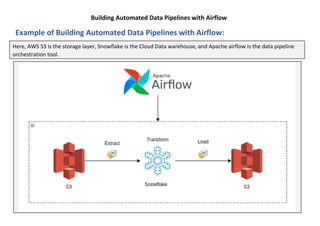
Example of Building Automated Data Pipelines with Airflow:
Here, AWS S3 is the storage layer, Snowflake is the Cloud Data warehouse, and Apache airflow is the data pipeline
orchestration tool.

Building Automated Data Pipelines with Airflow.pdf

  • 1.
    Building Automated DataPipelines with Airflow Apache Airflow is a workflow engine that will easily schedule and run your complex data pipelines. As a part of Building Automated Data Pipelines with Airflow, you covered: o Introduction to Apache Airflow o Airflow Benefits and Use-cases o Apache Airflow Architecture and Components o Installation steps and DAG in Airflow and executors, operators in airflow o Example: Building Automated Data Pipelines with Airflow Common Interview Questions: 1. How do we define workflows in Apache Airflow? 2. What are the components of the Apache Airflow architecture? 3. How does airflow communicate with a third party (S3, Postgres, MySQL)? 4. What are the basic steps to create a DAG? 5. What is Branching in Directed Acyclic Graphs (DAGs) 6. What are ways to Control Airflow Workflow? 7. How are Connections used in Apache Airflow? 8. What are the ways to monitor Apache Airflow? 9. Is Apache Airflow an ETL tool? Apache Kafka Executors, operators, and some terms in airflow. Benefits and Use-case Example: Building Automated Data Pipelines with Airflow Kafka Introduction to Apache Airflow Airflow Architecture Components of Airflow Installation and DAG
  • 2.
    Building Automated DataPipelines with Airflow Apache Airflow: Apache Airflow is a workflow engine that will easily schedule and run your complex data pipelines. It will make sure that each task of your data pipeline will get executed in the correct order and each task gets the required resources. Data pipelines in Airflow are: • Implemented in the form of Directed Acyclic Graphs (DAGs); • Created using Python code; and • Can be generated dynamically. Features
  • 3.
    Building Automated DataPipelines with Airflow Apache Airflow Architecture:
  • 4.
    Building Automated DataPipelines with Airflow User interface: lets you view DAGs, Tasks and logs, trigger runs and debug DAGs. This is the easiest way to keep track of your overall Airflow installation and dive into specific DAGs to check the status of tasks. Hooks: Airflow uses Hooks to interface with third- party systems, enabling connection to external APIs and databases (e.g. Hive, S3, GCS, MySQL, Postgres). Hooks should not contain sensitive information such as authentication credentials. Providers: packages containing the core Operators and Hooks for a particular service. They are maintained by the community and can be directly installed on an Airflow environment Metadata Database: Airflow stores the status of all the tasks in a database and do all read/write operations of a workflow from here. Components of Apache Airflow: Plugins: a variety of Hooks and Operators to help perform certain tasks, such as sending data from SalesForce to Amazon Redshift. Connections: these contain information that enable a connection to an external system. This includes authentication credentials and API tokens. You can manage connections directly from the UI, and the sensitive data will be encrypted and stored in PostgreSQL or MySQL. DAG: It is the Directed Acyclic Graph – a collection of all the tasks that you want to run which is organized and shows the relationship between different tasks. It is defined in a python script. Scheduler: As the name suggests, this component is responsible for scheduling the execution of DAGs. It retrieves and updates the status of the task in the database.
  • 5.
    Building Automated DataPipelines with Airflow Apache Airflow benefits: Ease of use: you only need a little python knowledge to get started. Open-source community: Airflow is free and has a large community of active users. Integrations: ready-to-use operators allow you to integrate Airflow with cloud platforms (Google, AWS, Azure, etc). Coding with standard Python: you can create flexible workflows using Python with no knowledge of additional technologies or frameworks. Graphical UI: monitor and manage workflows, check the status of ongoing and completed tasks. The DAG runs through a series of Tasks, which may be subclasses of Airflow's BaseOperator, including: Operators: predefined tasks that can be strung together quickly Sensors: a type of Operator that waits for external events to occur TaskFlow: a custom Python function packaged as a task, which is decorated with @tasks Apache Airflow Benefits: Apache Airflow Use-case: Apache Airflow some Use-Case: ▪ ETL pipelines that extract data from multiple sources, and run Spark jobs or other data transformations ▪ Machine learning model training ▪ Automated generation of reports ▪ Backups and other DevOps tasks Apache Airflow Workloads:
  • 6.
    Building Automated DataPipelines with Airflow Step 1: To install pip run the following command in the terminal. sudo apt-get install python3-pip Step 2: Next airflow needs a home on your local system. By default ~/airflow is the default location but you can change it as per your requirement. export AIRFLOW_HOME=~/airflow Step 3: Now, install the apache airflow using the pip with the following command. pip3 install apache-airflow Step 4: Airflow requires a database backend to run your workflows and to maintain them. Now, to initialize the database run the following command. airflow initdb Step 5: To start the webserver run the following command in the terminal. The default port is 8080 and if you are using that port for something else then you can change it. airflow webserver -p 8080 Step 6: Now, start the airflow schedular using the following command in a different terminal. It will run all the time and monitor all your workflows and triggers them as you have assigned. airflow scheduler Step 7: Now, create a folder name dags in the airflow directory where you will define your workflows or DAGs and open the web browser and go open: http://localhost:8080/admin/ Apache Airflow Installation Steps:
  • 7.
    Building Automated DataPipelines with Airflow In Apache Airflow, DAG stands for Directed Acyclic Graph. DAG is a collection of tasks organized in such a way that their relationships and dependencies are reflected. One of the advantages of this DAG model is that it gives a reasonably simple technique for executing the pipeline. Another advantage is that it clearly divides pipelines into discrete incremental tasks rather than relying on a single monolithic script to perform all the work. The properties of a DAG are as follows: • DAGs are graph structures (i.e., a collection of vertices and edges). • It should be directed (i.e., the edges all have a direction indicating which task is dependent on which). • It must be acyclic (i.e., it cannot contain cycles). DAG in Apache Airflow: Following diagram shows what a very simple DAG in the Airflow UI looks like:
  • 8.
    Building Automated DataPipelines with Airflow Sample code for writing a DAG: #Import modules for the DAG from datetime import datetime from airflow import DAG #Define a dictionary with the default arguments of a DAG dag_default_configs = { 'start_date': datetime(2016, 1, 1), 'owner': 'airflow' } #Create DAG object using the DAG() dag_object = DAG('my_dag', default_args = dag_default_configs, description='Sample DAG', schedule_interval='0 12 * * *') Some sample attributes with respect to the code: • ID - 'my_dag' • Description - 'Sample DAG' • Schedule - '0 12 * * *' • Start Date - datetime(2016, 1, 1) • Configs/default arguments - dag_default_configs Sample DAG code:
  • 9.
    Building Automated DataPipelines with Airflow Sequential Executor It is a lightweight local executor, which is available by default in airflow. It runs only one task instance at a time and is not production-ready. It can run with SQLite since SQLite does not support multiple connections. Kubernetes Executor The Kubernetes Executor uses the Kubernetes API for resource optimization. It runs as a fixed-single Pod in the scheduler that only requires access to the Kubernetes API. MySQL or PostgreSQL database systems are required to set up the Kubernetes Executor. Local Executor The local executor can run multiple task instances. Generally, we use MySQL or PostgreSQL databases with the local executor since they allow multiple connections, which helps us achieve parallelism. CeleryKubernetes Executor It permits users to run Celery Executor and a Kubernetes Executor simultaneously. It works when you have plenty of small tasks that Celery workers can manage but also have resource-hungry jobs that will be better to run in predefined environments. Celery Executor Celery is a task queue, which helps in distributing tasks across multiple celery workers. The Celery Executor distributes the workload from the main application onto multiple celery workers with the help of a message broker such as RabbitMQ or Redis. Dask Executor Dask is a parallel computing library in python whose architecture revolves around a sophisticated distributed task scheduler. Dask Executor allows you to run Airflow tasks in a Dask Distributed cluster. Executors in Apache Airflow:
  • 10.
    Building Automated DataPipelines with Airflow Apache Airflow Bash Operator It executes a bash command BashOperator in Apache Airflow provides a simple method to run bash commands in your workflow. Apache Airflow SSH Operator SSHOperator is used to execute commands on a given remote host using the ssh_hook. Apache Airflow Python Operator The Airflow PythonOperator Calls an arbitrary python function. Apache Airflow Spark Operators Apache Spark is a general-purpose cluster computing solution that is quick and scalable. Apache Airflow PostgresOperator The Postgres Operator interface defines tasks that interact with the PostgreSQL database. It will be used to create tables, remove records, insert records, and more. Some famous Apache Airflow Operators:
  • 11.
    Building Automated DataPipelines with Airflow Xcom, an abbreviation of “cross- communication”, lets you pass messages between tasks. Although tasks are suggested to be atomic and not to share resources between them, sometimes exchanging messages between them become useful. Xcom has two side; pusher and puller. The pusher sends a message and the puller receives the message. SubDAG is a pluggable module DAG that can be inserted into a parent DAG. This is useful when you have repeating processes within a DAG or among other DAGs. One note about SubDag is that by default it uses SequentialExecutor; that means all processes will be executed in sequence regardless of an absence of a task dependency. Airflow will run any past scheduled intervals that have not been run. In order to avoid catchup, we need to explicitly pass the parameter catchup=False in the DAG definition. If for some reason we want to re-run DAGs on certain schedules manually we can use the following CLI command to do so. This will execute all DAG runs that were scheduled between START_DATE & END_DATE irrespective of the value of the catchup parameter in airflow.cfg. Airflow Variables are useful for storing and retrieving data at runtime while avoiding hard-coding values and duplicating code in our DAGs. They are stored as Key-Value pair in Airflow metadata database. To set and get variables in airflow Airflow UI : Admin > Variables. Here we can set variable values individually or import a json file with list of variables. Command line interface: The airflow variables high level command can be used to work with airflow variables. To set a variable value we can use the command airflow variables set ourvarname ourvalue Code: We can use the .set and .get methods on airflow.model.Variable to set and get variable values in our DAG code. Apache Airflow Xcom: Apache Airflow Catchup: Apache Airflow Variables Apache Airflow Variables Apache Airflow SubDAG: Apache Airflow Backfill:
  • 12.
    Building Automated DataPipelines with Airflow Example of Building Automated Data Pipelines with Airflow: Here, AWS S3 is the storage layer, Snowflake is the Cloud Data warehouse, and Apache airflow is the data pipeline orchestration tool.