Brand Guidelines
January 2016
Our brand reflects the ideas, values, and behaviors that
define and differentiate us. It’s our DNA, what we stand
for as a business, and the impression we make at every
touch point. We have developed these graphic standards to
promote brand consistency across all our materials. Strict
adherence to these graphic standards will create a unified
look, which helps build and maintain brand recognition and
awareness in the marketplace.
Brand Overview
Contents Logo01
Typography03
Photography04
Color02
Applications05
04
12
14
09
16
AnyClip 03
Logo
AnyClip 04
Logo
The Symbol and The Wordmark
The AnyClip Logo is the touchstone of the brand and
one of its most valuable assets—it acts as a universal
signature across all AnyClip communications.
The identity is a unique piece of artwork that must
be reproduced and applied with consistency and care
in every application. It must never be altered in any
way, under any circumstance.
Only approved digital art files should be used.
Refer to the below files:
logo_pms_C.ai
logo_pms_U.ai
logo_cmyk.ai
AnyClip 05
Logo
Logo Variations
In certain instances, “knocked-out” or “reversed-out”
versions of the logo will be required. The designs at
left allow for creative flexibility in applying the logo in
these situations, while ensuring they do not stray too
far from the brand’s visual identity.
AnyClip 06
Area of Isolation
All logo applications are governed by an area of
isolation, rules that define a “clear space” around
the symbol and wordmark, inside of which no copy or
imagery can appear. Adhered to, the area of isolation
creates a halo around the logotype, reinforcing its
importance in every communication.
Logo
AnyClip 07
Misuse
The rules on the preceding pages detail the correct
application of the AnyClip logo, the most important
elements of our brand. Whether the logo is used in
a PowerPoint presentation or a national advertising
campaign, we all bear responsibility for its proper
treatment. At left are some of the more obvious
ways that the logo can be mistreated in visual
communications; these are situations to be avoided.
Logo
DO NOT stretch or manipulate
the mark or wordmark
DO NOT use the wordmark
without the mark
DO NOT add custom effects or
rotate the logo in any way
DO NOT outline the mark
or the wordmark
DO NOT change the amount of space
between the mark and the wordmark
DO NOT change the color of
the mark or the wordmark
AnyClip 08
Color
AnyClip 09
Color
Our Palette
The AnyClip color palette is composed of three
palettes: a primary, a secondary and a tertiary. The
primary palette represents the two key colors of
the mark. Most communications pieces that need to
carry the message of the brand — business cards, for
example — rely on the primary palette.
The secondary palette is designed as a complement
to the primary, and is the main palette used in
broader communication, like white papers, print
advertising, etc., where the message is key and the
brand is represented mainly by the appearance of the
logotype.
The tertiary palette contains the brand’s neutral
tones, used for copy and chosen for legibility.
Refer to the below files:
anyclip-cmyk.ase
anyclip-rgb.ase
anyclip-MS-C.ase
anyclip-PMS-U.ase
SECONDARY: To be used sparingly as complements to the Primary Palette
PMS UNCOATED: 2995 U
PMS COATED: 2995 C
CMYK: 69, 3, 3, 0
RGB: 0, 185, 231
HEX: #00B9E7
PMS UNCOATED: 375 U
PMS COATED: 7488 C
CMYK: 55, 0, 100, 0
RGB: 112, 213, 73
HEX: #70D549
PMS UNCOATED: 395 U
PMS COATED: 388 C
CMYK: 15, 0, 91, 0
RGB: 227, 231, 48
HEX: #E3E730
PMS UNCOATED: ORANGE 021 U
PMS COATED: ORANGE 021 C
CMYK: 0, 80, 96, 0
RGB: 249, 89, 33
HEX: #F95921
PMS UNCOATED: 268 U
PMS COATED: 268 C
CMYK: 82, 98, 5, 1
RGB: 87, 48, 139
HEX: #57308B
PRIMARY
TERTIARY: For text only
PMS UNCOATED: BLACK 6 U
PMS COATED: BLACK 6 C
CMYK: 0, 0, 0, 100
RGB: 0, 0, 0
HEX: #000000
AnyClip 10
Color
Patterns
To infuse backgrounds, photos, and graphics with a
sense of energy, we’ve provided the current palette
of patterns derived from the triangular shape of
the wordmark. Use these elements in backgrounds,
embedded as part of your artwork, or infused in
photography to lend a overall sense of consistency to
your work.
AnyClip 11
Typography
AnyClip 12
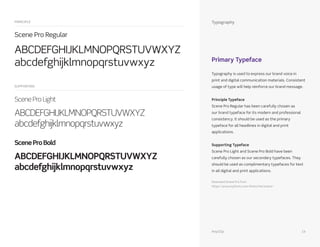
Typography is used to express our brand voice in
print and digital communication materials. Consistent
usage of type will help reinforce our brand message.
Principle Typeface
Scene Pro Regular has been carefully chosen as
our brand typeface for its modern and professional
consistency. It should be used as the primary
typeface for all headlines in digital and print
applications.
Supporting Typeface
Scene Pro Light and Scene Pro Bold have been
carefully chosen as our secondary typefaces. They
should be used as complimentary typefaces for text
in all digital and print applications.
Download Scene Pro from
https://www.myfonts.com/fonts/mti/scene/
Typography
Primary Typeface
Scene Pro Regular
ABCDEFGHIJKLMNOPQRSTUVWXYZ
abcdefghijklmnopqrstuvwxyz
Scene Pro Light
ABCDEFGHIJKLMNOPQRSTUVWXYZ
abcdefghijklmnopqrstuvwxyz
SceneProBold
ABCDEFGHIJKLMNOPQRSTUVWXYZ
abcdefghijklmnopqrstuvwxyz
PRINCIPLE
SUPPORTING
AnyClip 13
Photography
AnyClip 14
Photography
Our imagery operates along
the full spectrum of our
impact.
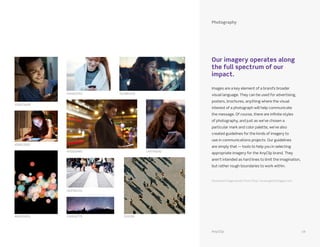
Images are a key element of a brand’s broader
visual language. They can be used for advertising,
posters, brochures, anything where the visual
interest of a photograph will help communicate
the message. Of course, there are infinite styles
of photography, and just as we’ve chosen a
particular mark and color palette, we’ve also
created guidelines for the kinds of imagery to
use in communications projects. Our guidelines
are simply that — tools to help you in selecting
appropriate imagery for the AnyClip brand. They
aren’t intended as hard lines to limit the imagination,
but rather rough boundaries to work within.
Download image assets from http://www.gettyimages.com
558271609
474455353
470283495
183782155
150952775 216335499031655
551985335
143759242
458912005
AnyClip 15
Applications
AnyClip 16
White Paper
A white paper presents an in-depth, strategically
written analysis of the market and AnyClip’s approach
from a business perspective, based on research and
experience. White papers can provide valuable post-
conversation information as leave-behinds.
Applications
AnyClip 17
PowerPoint
Applications
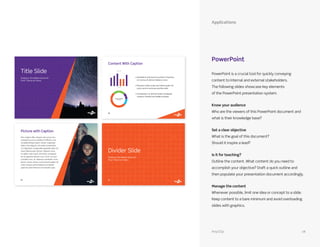
PowerPoint is a crucial tool for quickly conveying
content to Internal and external stakeholders.
The following slides showcase key elements
of the PowerPoint presentation system.
Know your audience
Who are the viewers of this PowerPoint document and
what is their knowledge base?
Set a clear objective
What is the goal of this document?
Should it inspire a lead?
Is it for teaching?
Outline the content. What content do you need to
accomplish your objective? Draft a quick outline and
then populate your presentation document accordingly.
Manage the content
Whenever possible, limit one idea or concept to a slide.
Keep content to a bare minimum and avoid overloading
slides with graphics.
AnyClip 18
Website
Applications
Our website has been designed to provide relevant
information to our audience in a dynamic and clear
conversation by highlighting the connection between
the end-user and their particular moments of interaction
with the AnyClip content.
AnyClip 19
Iconography
Applications
These seven icons help users navigate AnyClip’s
capabilities with intuition, speed, and ease and help
inform the icon style for the rest of the AnyClip brand.
The icons are meant to be abstract representations
and should be used repeatedly to reinforce AnyClip’s
capabilities.
Two versions of the iconography have been designed.
The stroked versions of the icons are to be used at
larger sizes, while the solid purple icons are a simplified
version to be used in all other situations.
STROKED
SOLID
Refer to the below files:
anyclip_iconography.ai
AnyClip 20
For More Information
For any and all questions regarding the new
brand, including brand migration and product
naming issues, please contact the Marketing
Communications team:
Lena Brook
lena@anyclip.com
© 2016 AnyClip Media, Ltd 2016, All Rights Reserved.
AnyClip. 10 Ahaliav St., Ramat-GanTel Aviv, Israel.
AnyClip 21

anyclip_brand_guide

  • 1.
  • 2.
    Our brand reflectsthe ideas, values, and behaviors that define and differentiate us. It’s our DNA, what we stand for as a business, and the impression we make at every touch point. We have developed these graphic standards to promote brand consistency across all our materials. Strict adherence to these graphic standards will create a unified look, which helps build and maintain brand recognition and awareness in the marketplace. Brand Overview
  • 3.
  • 4.
  • 5.
    Logo The Symbol andThe Wordmark The AnyClip Logo is the touchstone of the brand and one of its most valuable assets—it acts as a universal signature across all AnyClip communications. The identity is a unique piece of artwork that must be reproduced and applied with consistency and care in every application. It must never be altered in any way, under any circumstance. Only approved digital art files should be used. Refer to the below files: logo_pms_C.ai logo_pms_U.ai logo_cmyk.ai AnyClip 05
  • 6.
    Logo Logo Variations In certaininstances, “knocked-out” or “reversed-out” versions of the logo will be required. The designs at left allow for creative flexibility in applying the logo in these situations, while ensuring they do not stray too far from the brand’s visual identity. AnyClip 06
  • 7.
    Area of Isolation Alllogo applications are governed by an area of isolation, rules that define a “clear space” around the symbol and wordmark, inside of which no copy or imagery can appear. Adhered to, the area of isolation creates a halo around the logotype, reinforcing its importance in every communication. Logo AnyClip 07
  • 8.
    Misuse The rules onthe preceding pages detail the correct application of the AnyClip logo, the most important elements of our brand. Whether the logo is used in a PowerPoint presentation or a national advertising campaign, we all bear responsibility for its proper treatment. At left are some of the more obvious ways that the logo can be mistreated in visual communications; these are situations to be avoided. Logo DO NOT stretch or manipulate the mark or wordmark DO NOT use the wordmark without the mark DO NOT add custom effects or rotate the logo in any way DO NOT outline the mark or the wordmark DO NOT change the amount of space between the mark and the wordmark DO NOT change the color of the mark or the wordmark AnyClip 08
  • 9.
  • 10.
    Color Our Palette The AnyClipcolor palette is composed of three palettes: a primary, a secondary and a tertiary. The primary palette represents the two key colors of the mark. Most communications pieces that need to carry the message of the brand — business cards, for example — rely on the primary palette. The secondary palette is designed as a complement to the primary, and is the main palette used in broader communication, like white papers, print advertising, etc., where the message is key and the brand is represented mainly by the appearance of the logotype. The tertiary palette contains the brand’s neutral tones, used for copy and chosen for legibility. Refer to the below files: anyclip-cmyk.ase anyclip-rgb.ase anyclip-MS-C.ase anyclip-PMS-U.ase SECONDARY: To be used sparingly as complements to the Primary Palette PMS UNCOATED: 2995 U PMS COATED: 2995 C CMYK: 69, 3, 3, 0 RGB: 0, 185, 231 HEX: #00B9E7 PMS UNCOATED: 375 U PMS COATED: 7488 C CMYK: 55, 0, 100, 0 RGB: 112, 213, 73 HEX: #70D549 PMS UNCOATED: 395 U PMS COATED: 388 C CMYK: 15, 0, 91, 0 RGB: 227, 231, 48 HEX: #E3E730 PMS UNCOATED: ORANGE 021 U PMS COATED: ORANGE 021 C CMYK: 0, 80, 96, 0 RGB: 249, 89, 33 HEX: #F95921 PMS UNCOATED: 268 U PMS COATED: 268 C CMYK: 82, 98, 5, 1 RGB: 87, 48, 139 HEX: #57308B PRIMARY TERTIARY: For text only PMS UNCOATED: BLACK 6 U PMS COATED: BLACK 6 C CMYK: 0, 0, 0, 100 RGB: 0, 0, 0 HEX: #000000 AnyClip 10
  • 11.
    Color Patterns To infuse backgrounds,photos, and graphics with a sense of energy, we’ve provided the current palette of patterns derived from the triangular shape of the wordmark. Use these elements in backgrounds, embedded as part of your artwork, or infused in photography to lend a overall sense of consistency to your work. AnyClip 11
  • 12.
  • 13.
    Typography is usedto express our brand voice in print and digital communication materials. Consistent usage of type will help reinforce our brand message. Principle Typeface Scene Pro Regular has been carefully chosen as our brand typeface for its modern and professional consistency. It should be used as the primary typeface for all headlines in digital and print applications. Supporting Typeface Scene Pro Light and Scene Pro Bold have been carefully chosen as our secondary typefaces. They should be used as complimentary typefaces for text in all digital and print applications. Download Scene Pro from https://www.myfonts.com/fonts/mti/scene/ Typography Primary Typeface Scene Pro Regular ABCDEFGHIJKLMNOPQRSTUVWXYZ abcdefghijklmnopqrstuvwxyz Scene Pro Light ABCDEFGHIJKLMNOPQRSTUVWXYZ abcdefghijklmnopqrstuvwxyz SceneProBold ABCDEFGHIJKLMNOPQRSTUVWXYZ abcdefghijklmnopqrstuvwxyz PRINCIPLE SUPPORTING AnyClip 13
  • 14.
  • 15.
    Photography Our imagery operatesalong the full spectrum of our impact. Images are a key element of a brand’s broader visual language. They can be used for advertising, posters, brochures, anything where the visual interest of a photograph will help communicate the message. Of course, there are infinite styles of photography, and just as we’ve chosen a particular mark and color palette, we’ve also created guidelines for the kinds of imagery to use in communications projects. Our guidelines are simply that — tools to help you in selecting appropriate imagery for the AnyClip brand. They aren’t intended as hard lines to limit the imagination, but rather rough boundaries to work within. Download image assets from http://www.gettyimages.com 558271609 474455353 470283495 183782155 150952775 216335499031655 551985335 143759242 458912005 AnyClip 15
  • 16.
  • 17.
    White Paper A whitepaper presents an in-depth, strategically written analysis of the market and AnyClip’s approach from a business perspective, based on research and experience. White papers can provide valuable post- conversation information as leave-behinds. Applications AnyClip 17
  • 18.
    PowerPoint Applications PowerPoint is acrucial tool for quickly conveying content to Internal and external stakeholders. The following slides showcase key elements of the PowerPoint presentation system. Know your audience Who are the viewers of this PowerPoint document and what is their knowledge base? Set a clear objective What is the goal of this document? Should it inspire a lead? Is it for teaching? Outline the content. What content do you need to accomplish your objective? Draft a quick outline and then populate your presentation document accordingly. Manage the content Whenever possible, limit one idea or concept to a slide. Keep content to a bare minimum and avoid overloading slides with graphics. AnyClip 18
  • 19.
    Website Applications Our website hasbeen designed to provide relevant information to our audience in a dynamic and clear conversation by highlighting the connection between the end-user and their particular moments of interaction with the AnyClip content. AnyClip 19
  • 20.
    Iconography Applications These seven iconshelp users navigate AnyClip’s capabilities with intuition, speed, and ease and help inform the icon style for the rest of the AnyClip brand. The icons are meant to be abstract representations and should be used repeatedly to reinforce AnyClip’s capabilities. Two versions of the iconography have been designed. The stroked versions of the icons are to be used at larger sizes, while the solid purple icons are a simplified version to be used in all other situations. STROKED SOLID Refer to the below files: anyclip_iconography.ai AnyClip 20
  • 21.
    For More Information Forany and all questions regarding the new brand, including brand migration and product naming issues, please contact the Marketing Communications team: Lena Brook lena@anyclip.com © 2016 AnyClip Media, Ltd 2016, All Rights Reserved. AnyClip. 10 Ahaliav St., Ramat-GanTel Aviv, Israel. AnyClip 21