Brand
Guidelines
V 1
the brandThese guidelines describe the visual and verbal elements that represent
our corporate identity, including name, logo, color, type, and graphics.
Sending a consistent and controlled message of who we are is essential
to presenting a strong, unified image of our company.
We commit to quality, consistency & style and want the managerslides
brand to become a valuable assets. Each of us is responsible for
protecting its interests by preventing unauthorized or incorrect use of
our name and marks.
P R O F E S S I O N A L
D Y N A M I C
B O L D
M O D E R N
S U C C E S S F U L
We make our clients shine, by improve the
content, design & delivery of their presentation!
our mission
Our strategy of how to approach our
mission in simple: We want to follow good
values and focus on the important things.
strategy
M A K E A D I F F E R E N C E I N O U R C L I E N T ’ S L I F E
B E H O N E S T, C A R I N G & F U N
T H I N K E N T R E P R E N E U R I A L
F O C U S O N C L I E N T S
K E E P I T S I M P L E
To effectively build our brand personality, we have to define
what and especially how we communicate with our clients.
tone of voice
Keep the message
easy & honest
Simple
Colloquialism & being bold
is okay if you make’em smile
Saucy!
Get to the point,your client
will appreciate it
Direct
adapt to your client!
color schemeColors play an important role in our corporate identity program. The
colors below are recommendations for various media. The consistent
application of our color palette will contribute to the cohesive and
harmonious look of the managerslides brand identity across all media.
color scheme
Our two primary colors Yellow & Red have become a recognizable identifier
for our brand. They reflect our bold corporate identity and help crafting eye-
catching visuals. Mixed with our Greyscale, they form a fresh and appealing
blend of colors chosen for their strong combination: modern and exciting.
PRIMARY COLORS SECONDARY COLORS
How to use
Use them as the dominant attention
grabbing visual for all internal & external
visual presentations. They should be
limited to under 30%.
How to use
Secondary colors should be used mainly for copy and as guiding
visual elements such as dividers. Use them to create visual hierarchy
and to build a trustworthy, professional and modern image.
I II III IV V VI VII VIII IX
feb308 b0004 000000 292929 515151 7a7a7a a6a6a6 d3d3d3 ffffff
254 176 000 41 81 122 166 211 255
179 0 000 41 81 122 166 211 255
8 4 000 41 81 122 166 211 255
gradients
Our gradients – always fading from Bright to Dark - have two possible
directions: Either diagonal from Top Left to Bottom Right or linear from Left
to Right. They are limited to the following color pairs: Yellow (I) & Red (II) or
Light Grey (VIII) & Dark Grey (IV).
PRIMARY GRADIENT SECONDARY GRADIENT
How to use
Color I: Position 5%, Transparency 0%, Brightness 0%
Color II: Position 80%, Transparency 25%, Brightness 0%
Apply on white background only.
How to use
Color VIII: Position 0%, Transparency 0%, Brightness 50%
Color IV: Position 80%, Transparency 0%, Brightness 0%
Apply on all backgrounds.
I
II
VIII
IV
Our logo is the key building block of our identity, the primary
visual element that identifies us. The signature is a combination
of the symbol itself and our company name – they have a fixed
relationship that should never be changed in any way.
logo
D Y N A M I C
P R O F E S S I O N A L
B O L D
M O D E R N
E X C I T I N G
logo type
PRIMARY (TRANSPARENT) VARIATIONS (EMBED)
Our full logotype comprises two elements, the logo symbol and logo type. The Logo Type has been carefully chosen for its
bold and yet highly legible style, which has been further enhanced by the use of upper case letters. The typefaces are
Lobster Two Bold Italic and Helvetica Neue Light, and have also been chosen to compliment and balance perfectly with our
logo symbol.
1 2
1) The logo symbol
Consists of a powerful element evoking
the culture of design services by
representing a presentation deck.
2) The logo title
Carefully chosen for its modern and yet
refined, highly legible style, which has
been further mixed with an extrovert
bold font.
How to use
The main logo is the white logo used on
coloured or dark backround. For a lighter
backround the black logo is used.
Attention
Use of any stylized, animated, hand drawn or
other versions of an unofficial logo is not
permitted. This undermines the logo system and
brand consistency.
Recommended formats
.svg |.png | .jpg | .ai
logo symbol
The logo symbol – representing a slide deck – is a powerful image evoking
the culture of design services and organization. It has a particular relationship
with the managerslides name.
PRIMARY TRANSPARENT VARIATIONS (EMBED)
How to use
The main logo symbol is the white logo used on
a coloured or dark backround. For a lighter
backround the black logo is used.
Recommended formats
.svg |.png | .jpg | .ai
Attention
Use of any stylized, animated, hand drawn or
other versions of an unofficial logo is not
permitted. This undermines the logo system
and brand consistency.
logo computation
It’s important to keep our corporate marks clear of any other graphic
elements. The exclusion zone around the logo indicates the closest point any
other graphic element or message can be positioned in relation to the mark
of the the symbol itself and our company name – they have a fixed
relationship that must not be changed in any way.
FULL LOGOTYPE LOGO SYMBOL
2.5
0
0.5
0.5
5
1.25
1.25
1.25
1.25
2.5
5
1.25
2.5
Construction
To work out the clearspace take the height of the logo and divide
it in half. (Clearspace = Height / 2).
Ratio
Manager: Lobster Two Bold Italic, 199
Slides: Helvetica Neue, 88
How to use
Whenever you use the logo, it should be surrounded with clear
space to ensure its visibility and impact. No graphic elements of
any kind should invade this zone.
We want to display the most important words with the most
impact so users can scan text for key information quickly.
Typographic hierarchy helps in creating contrast between
elements and thus forming a sense of hierarchy. Here are some
of our most common techniques for managerslides layouts.
typography
typography
Our two official fonts are Lobster Two Bold Italics – a lovely condensed script –
and Helvetica Neue Light – a neutral sans serif font. The later has stood the
test of time and set new standards in design. It can be used for all types of
communication, while Lobster Two is limited to headings and eye-catching
expressions.
HELVETICA NEUE LIGHT & BOLD
A B C D E F G H I J K L M N O P Q R S T U V W X Y Z Bold
a b c d e f g h i j k l m n o p q r s t u v w x y z
A B C D E F G H I J K L M N O P Q R S T U V W X Y Z Light
a b c d e f g h i j k l m n o p q r s t u v w x y z
Special Characters
Figures
0 1 2 3 4 5 6 7 8 9 0
! “ § $ % & / ( ) = ? ` ; : ¡ “ ¶ ¢ [ ] | { } ≠ ¿ ‘
« ∑ € ® † Ω ¨ ⁄ ø π • ± ‘ æ œ @ ∆ º ª © ƒ ∂ ‚ å ¥
≈ ç
Lobster Two Bold Italic
A B C D E F G H I J K L M N O P Q R S T U V W X Y Z Bold Italic
a b c d e f g h i j k l m n o p q r s t u v w x y z
Special Characters
Figures
0 1 2 3 4 5 6 7 8 9 0
! “ § $ % & / ( ) = ? ` ; : ¡ “ ¶ ¢ [ ] | { } ≠ ¿ ‘
« ∑ € ® † Ω ¨ ⁄ ø π • ± ‘ æ œ @ ∆ º ª © ƒ ∂ ‚ å ¥ ≈ ç
ARIAL REGULAR & BOLD
A B C D E F G H I J K L M N O P Q R S T U V W X Y Z Bold
a b c d e f g h i j k l m n o p q r s t u v w x y z
A B C D E F G H I J K L M N O P Q R S T U V W X Y Z Regular
a b c d e f g h i j k l m n o p q r s t u v w x y z
Special
Characters
Figures
0 1 2 3 4 5 6 7 8 9 0
! “ § $ % & / ( ) = ? ` ; : ¡ “ ¶ ¢ [ ] | { } ≠ ¿ ‘
« ∑ € ® † Ω ¨ ⁄ ø π • ± ‘ æ œ @ ∆ º ª © ƒ ∂ ‚ å ¥
≈ ç
Usage:
First-choice for heading
& copy in print, ppt,
web, NL & mail.
Usage
First-choice for titles in print, ppt,
web, NL & mail.
Always bold, italics & lower case.
Headings limited to 10 words.
Usage:
Second-choice for
heading & body in print,
ppt, web, NL & mail.
text hierarchy
CONTEXT TEXT
& INNER HEADLINES
HEADLINES &
TYPOBREAKS
Caption Text
Copy Text
Headlines Copytext
Sublines Sections
managerslides
Helvetica Neue Light/Bold / 9 pt
managerslides
Helvetica Neue Light - Sentence Case / 11 pt
MANAGERSLIDES
Helvetica Neue Light- Capital Letters / 10pt
DESIGN.INC TYPO
Helvetica Neue Medium- Capital Letters / 16pt
MANAGERSLIDESHelvetica Neue Bold- Capital Letters / 30 pt
managerslidesLobster Two - Bold Italics Lower case 48 pt
Big Headlines & Title
Sequencer & Title for Marketing
Font sizes Web Mobile Print .ppt Mail
News-
letter
Caption 10
Copy 14 12 12 24 12 16
Headline Copytext 14B 12/14 12B 24B 12C 16B
Sublines Sections 24 18 14 28 12B 18
Big Headlines & Titles 48 32 18 38 12B 22
Sequencer & Title 80 55 62 66 14 43
The pictures we use are expressive, show real emotions of
real people in real situations or inspiring equipment, and are
cropped for maximum effect. Every used image should have
a relevant contextual meaning. We expect all images to be
in high resolution and show high contrast and saturation.
imagery
O P T I M I S T I C
P R O F E S S I O N A L
B O L D
E X C I T I N G
S U C C E S S F U L
imagery
You can retrieve images from the following sources. Please ensure that they
are either public domain or that we hold the commercial licenses. It is crucial
for our brand, that they are aligned with our defined guidelines.
Stock Photography
• pixabay.com
• isorepublic.com/
• webdonut.net/products.html
• thestocks.im/
• kaboompics.com/
• imgur.com
image composition
Ideally images should display a consistent composition with a focus or main
element, highlighted below as the crossings. However, we value adaptability
over consistency.
COLOURED IMAGES: BLACK & WHITE IMAGES:
blending
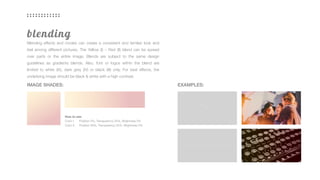
Blending effects and modes can create a consistent and familiar look and
feel among different pictures. The Yellow (I) – Red (II) blend can be spread
over parts or the entire image. Blends are subject to the same design
guidelines as gradients blends. Also, font or logos within the blend are
limited to white (IX), dark grey (IV) or black (III) only. For best effects, the
underlying image should be black & white with a high contrast.
IMAGE SHADES:
How to use:
Color I: Position 5%, Transparency 25%, Brightness 0%
Color II: Position 80%, Transparency 25%, Brightness 0%
EXAMPLES:
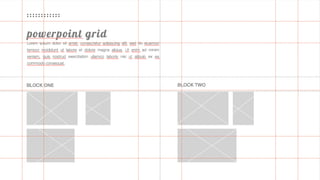
A grid is a structure made up to structure content. The grid
serves as an structure to organize content and graphic elements
in a rational, easy to absorb manner.
grid system
print & digital grid
IMAGE SHADES: EXAMPLES:
Our grids focus on grabbing attention and presenting information clearly.
While blends at the top grab the attention, the layout and font hierarchy then
guide’s the reader’s eye and defines the next element to focus on.
Our icons serve as a quick intuitive representation, in
order to help the user navigate through the content easier.
iconography
frequently used icons
FREQUENTLY USED ICONS
All applied icons must show the same sizes, color, style and frame. Ideally
matching the logo’s color on the respective background. Icons can be
sourced from the internal icon portfolio or online if an open source and or
commercial license is included.
How to use
• only use transparent, round-shaped or rectangle
• only use icon with a background
• minimum stroke size: 0.5 pt
• upscale only proportional
Download Link
iconmonstr.com
envato.elements.com
We mostly communicate and sell online. Web design has to
encourage purchase and remove barriers and we must always
be thinking from our client’s perspective. The layout has to
provide information in a clear, consistent and concise manner.
.com
managerslides.com
The benefit should focus on the experiences and
achievements that managerslides can bring. This is
done through descriptive headlines and photography of
the businesses, the achievement, or benefit in action.
advertising
banners
Shading modes raise the concision and the recognizability of a brand. In the
same way they support the statement of the used images. Shades are
subject to the same design guidelines as gradients and blends. Also, font or
logos within the blend are limited to white (IX), dark grey (IV) or black (III) only.
How to use
Color I: Position 5%, Transparency 25%, Brightness 0%
Color II: Position 80%, Transparency 25%, Brightness 0%
SHADES
How to use
Color I: Position 5%, Transparency 0%, Brightness 0%
Color II: Position 80%, Transparency 25%, Brightness 0%
BACKGROUND
PR is set to become one of our key growth drivers.
It’s effective, cheaper than advertising and we can control it!
public relations
The most effective communication is where our customers
don’t think of business. This is where we bring our service
alive through identifiable images and stories. We focus on
lifestyle. This can be done with either humor or aspiration.
social media
instagram.com/managerslides
pinterest.com/managerslides
You know the drill.
presentations
look & feel
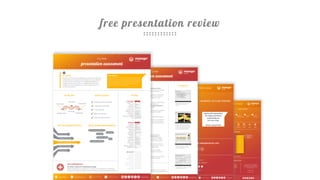
This shows typical cases of how we have been
using the brand. Try to stick to the below styles.
examples
free presentation review
+971 55 948 2350 Düsseldorf, Germanyinfo@managerslides.com @managerslidesmanagerslides.com

Brand Guidelines | managerslides

  • 1.
  • 2.
    the brandThese guidelinesdescribe the visual and verbal elements that represent our corporate identity, including name, logo, color, type, and graphics. Sending a consistent and controlled message of who we are is essential to presenting a strong, unified image of our company. We commit to quality, consistency & style and want the managerslides brand to become a valuable assets. Each of us is responsible for protecting its interests by preventing unauthorized or incorrect use of our name and marks.
  • 3.
    P R OF E S S I O N A L D Y N A M I C B O L D M O D E R N S U C C E S S F U L
  • 4.
    We make ourclients shine, by improve the content, design & delivery of their presentation! our mission
  • 5.
    Our strategy ofhow to approach our mission in simple: We want to follow good values and focus on the important things. strategy
  • 6.
    M A KE A D I F F E R E N C E I N O U R C L I E N T ’ S L I F E B E H O N E S T, C A R I N G & F U N T H I N K E N T R E P R E N E U R I A L F O C U S O N C L I E N T S K E E P I T S I M P L E
  • 7.
    To effectively buildour brand personality, we have to define what and especially how we communicate with our clients. tone of voice
  • 8.
    Keep the message easy& honest Simple Colloquialism & being bold is okay if you make’em smile Saucy! Get to the point,your client will appreciate it Direct adapt to your client!
  • 9.
    color schemeColors playan important role in our corporate identity program. The colors below are recommendations for various media. The consistent application of our color palette will contribute to the cohesive and harmonious look of the managerslides brand identity across all media.
  • 10.
    color scheme Our twoprimary colors Yellow & Red have become a recognizable identifier for our brand. They reflect our bold corporate identity and help crafting eye- catching visuals. Mixed with our Greyscale, they form a fresh and appealing blend of colors chosen for their strong combination: modern and exciting. PRIMARY COLORS SECONDARY COLORS How to use Use them as the dominant attention grabbing visual for all internal & external visual presentations. They should be limited to under 30%. How to use Secondary colors should be used mainly for copy and as guiding visual elements such as dividers. Use them to create visual hierarchy and to build a trustworthy, professional and modern image. I II III IV V VI VII VIII IX feb308 b0004 000000 292929 515151 7a7a7a a6a6a6 d3d3d3 ffffff 254 176 000 41 81 122 166 211 255 179 0 000 41 81 122 166 211 255 8 4 000 41 81 122 166 211 255
  • 11.
    gradients Our gradients –always fading from Bright to Dark - have two possible directions: Either diagonal from Top Left to Bottom Right or linear from Left to Right. They are limited to the following color pairs: Yellow (I) & Red (II) or Light Grey (VIII) & Dark Grey (IV). PRIMARY GRADIENT SECONDARY GRADIENT How to use Color I: Position 5%, Transparency 0%, Brightness 0% Color II: Position 80%, Transparency 25%, Brightness 0% Apply on white background only. How to use Color VIII: Position 0%, Transparency 0%, Brightness 50% Color IV: Position 80%, Transparency 0%, Brightness 0% Apply on all backgrounds. I II VIII IV
  • 12.
    Our logo isthe key building block of our identity, the primary visual element that identifies us. The signature is a combination of the symbol itself and our company name – they have a fixed relationship that should never be changed in any way. logo
  • 13.
    D Y NA M I C P R O F E S S I O N A L B O L D M O D E R N E X C I T I N G
  • 14.
    logo type PRIMARY (TRANSPARENT)VARIATIONS (EMBED) Our full logotype comprises two elements, the logo symbol and logo type. The Logo Type has been carefully chosen for its bold and yet highly legible style, which has been further enhanced by the use of upper case letters. The typefaces are Lobster Two Bold Italic and Helvetica Neue Light, and have also been chosen to compliment and balance perfectly with our logo symbol. 1 2 1) The logo symbol Consists of a powerful element evoking the culture of design services by representing a presentation deck. 2) The logo title Carefully chosen for its modern and yet refined, highly legible style, which has been further mixed with an extrovert bold font. How to use The main logo is the white logo used on coloured or dark backround. For a lighter backround the black logo is used. Attention Use of any stylized, animated, hand drawn or other versions of an unofficial logo is not permitted. This undermines the logo system and brand consistency. Recommended formats .svg |.png | .jpg | .ai
  • 15.
    logo symbol The logosymbol – representing a slide deck – is a powerful image evoking the culture of design services and organization. It has a particular relationship with the managerslides name. PRIMARY TRANSPARENT VARIATIONS (EMBED) How to use The main logo symbol is the white logo used on a coloured or dark backround. For a lighter backround the black logo is used. Recommended formats .svg |.png | .jpg | .ai Attention Use of any stylized, animated, hand drawn or other versions of an unofficial logo is not permitted. This undermines the logo system and brand consistency.
  • 16.
    logo computation It’s importantto keep our corporate marks clear of any other graphic elements. The exclusion zone around the logo indicates the closest point any other graphic element or message can be positioned in relation to the mark of the the symbol itself and our company name – they have a fixed relationship that must not be changed in any way. FULL LOGOTYPE LOGO SYMBOL 2.5 0 0.5 0.5 5 1.25 1.25 1.25 1.25 2.5 5 1.25 2.5 Construction To work out the clearspace take the height of the logo and divide it in half. (Clearspace = Height / 2). Ratio Manager: Lobster Two Bold Italic, 199 Slides: Helvetica Neue, 88 How to use Whenever you use the logo, it should be surrounded with clear space to ensure its visibility and impact. No graphic elements of any kind should invade this zone.
  • 17.
    We want todisplay the most important words with the most impact so users can scan text for key information quickly. Typographic hierarchy helps in creating contrast between elements and thus forming a sense of hierarchy. Here are some of our most common techniques for managerslides layouts. typography
  • 18.
    typography Our two officialfonts are Lobster Two Bold Italics – a lovely condensed script – and Helvetica Neue Light – a neutral sans serif font. The later has stood the test of time and set new standards in design. It can be used for all types of communication, while Lobster Two is limited to headings and eye-catching expressions. HELVETICA NEUE LIGHT & BOLD A B C D E F G H I J K L M N O P Q R S T U V W X Y Z Bold a b c d e f g h i j k l m n o p q r s t u v w x y z A B C D E F G H I J K L M N O P Q R S T U V W X Y Z Light a b c d e f g h i j k l m n o p q r s t u v w x y z Special Characters Figures 0 1 2 3 4 5 6 7 8 9 0 ! “ § $ % & / ( ) = ? ` ; : ¡ “ ¶ ¢ [ ] | { } ≠ ¿ ‘ « ∑ € ® † Ω ¨ ⁄ ø π • ± ‘ æ œ @ ∆ º ª © ƒ ∂ ‚ å ¥ ≈ ç Lobster Two Bold Italic A B C D E F G H I J K L M N O P Q R S T U V W X Y Z Bold Italic a b c d e f g h i j k l m n o p q r s t u v w x y z Special Characters Figures 0 1 2 3 4 5 6 7 8 9 0 ! “ § $ % & / ( ) = ? ` ; : ¡ “ ¶ ¢ [ ] | { } ≠ ¿ ‘ « ∑ € ® † Ω ¨ ⁄ ø π • ± ‘ æ œ @ ∆ º ª © ƒ ∂ ‚ å ¥ ≈ ç ARIAL REGULAR & BOLD A B C D E F G H I J K L M N O P Q R S T U V W X Y Z Bold a b c d e f g h i j k l m n o p q r s t u v w x y z A B C D E F G H I J K L M N O P Q R S T U V W X Y Z Regular a b c d e f g h i j k l m n o p q r s t u v w x y z Special Characters Figures 0 1 2 3 4 5 6 7 8 9 0 ! “ § $ % & / ( ) = ? ` ; : ¡ “ ¶ ¢ [ ] | { } ≠ ¿ ‘ « ∑ € ® † Ω ¨ ⁄ ø π • ± ‘ æ œ @ ∆ º ª © ƒ ∂ ‚ å ¥ ≈ ç Usage: First-choice for heading & copy in print, ppt, web, NL & mail. Usage First-choice for titles in print, ppt, web, NL & mail. Always bold, italics & lower case. Headings limited to 10 words. Usage: Second-choice for heading & body in print, ppt, web, NL & mail.
  • 19.
    text hierarchy CONTEXT TEXT &INNER HEADLINES HEADLINES & TYPOBREAKS Caption Text Copy Text Headlines Copytext Sublines Sections managerslides Helvetica Neue Light/Bold / 9 pt managerslides Helvetica Neue Light - Sentence Case / 11 pt MANAGERSLIDES Helvetica Neue Light- Capital Letters / 10pt DESIGN.INC TYPO Helvetica Neue Medium- Capital Letters / 16pt MANAGERSLIDESHelvetica Neue Bold- Capital Letters / 30 pt managerslidesLobster Two - Bold Italics Lower case 48 pt Big Headlines & Title Sequencer & Title for Marketing Font sizes Web Mobile Print .ppt Mail News- letter Caption 10 Copy 14 12 12 24 12 16 Headline Copytext 14B 12/14 12B 24B 12C 16B Sublines Sections 24 18 14 28 12B 18 Big Headlines & Titles 48 32 18 38 12B 22 Sequencer & Title 80 55 62 66 14 43
  • 20.
    The pictures weuse are expressive, show real emotions of real people in real situations or inspiring equipment, and are cropped for maximum effect. Every used image should have a relevant contextual meaning. We expect all images to be in high resolution and show high contrast and saturation. imagery
  • 21.
    O P TI M I S T I C P R O F E S S I O N A L B O L D E X C I T I N G S U C C E S S F U L
  • 22.
    imagery You can retrieveimages from the following sources. Please ensure that they are either public domain or that we hold the commercial licenses. It is crucial for our brand, that they are aligned with our defined guidelines. Stock Photography • pixabay.com • isorepublic.com/ • webdonut.net/products.html • thestocks.im/ • kaboompics.com/ • imgur.com
  • 23.
    image composition Ideally imagesshould display a consistent composition with a focus or main element, highlighted below as the crossings. However, we value adaptability over consistency. COLOURED IMAGES: BLACK & WHITE IMAGES:
  • 24.
    blending Blending effects andmodes can create a consistent and familiar look and feel among different pictures. The Yellow (I) – Red (II) blend can be spread over parts or the entire image. Blends are subject to the same design guidelines as gradients blends. Also, font or logos within the blend are limited to white (IX), dark grey (IV) or black (III) only. For best effects, the underlying image should be black & white with a high contrast. IMAGE SHADES: How to use: Color I: Position 5%, Transparency 25%, Brightness 0% Color II: Position 80%, Transparency 25%, Brightness 0% EXAMPLES:
  • 25.
    A grid isa structure made up to structure content. The grid serves as an structure to organize content and graphic elements in a rational, easy to absorb manner. grid system
  • 26.
    print & digitalgrid IMAGE SHADES: EXAMPLES: Our grids focus on grabbing attention and presenting information clearly. While blends at the top grab the attention, the layout and font hierarchy then guide’s the reader’s eye and defines the next element to focus on.
  • 27.
    Our icons serveas a quick intuitive representation, in order to help the user navigate through the content easier. iconography
  • 28.
    frequently used icons FREQUENTLYUSED ICONS All applied icons must show the same sizes, color, style and frame. Ideally matching the logo’s color on the respective background. Icons can be sourced from the internal icon portfolio or online if an open source and or commercial license is included. How to use • only use transparent, round-shaped or rectangle • only use icon with a background • minimum stroke size: 0.5 pt • upscale only proportional Download Link iconmonstr.com envato.elements.com
  • 29.
    We mostly communicateand sell online. Web design has to encourage purchase and remove barriers and we must always be thinking from our client’s perspective. The layout has to provide information in a clear, consistent and concise manner. .com
  • 30.
  • 31.
    The benefit shouldfocus on the experiences and achievements that managerslides can bring. This is done through descriptive headlines and photography of the businesses, the achievement, or benefit in action. advertising
  • 32.
    banners Shading modes raisethe concision and the recognizability of a brand. In the same way they support the statement of the used images. Shades are subject to the same design guidelines as gradients and blends. Also, font or logos within the blend are limited to white (IX), dark grey (IV) or black (III) only. How to use Color I: Position 5%, Transparency 25%, Brightness 0% Color II: Position 80%, Transparency 25%, Brightness 0% SHADES How to use Color I: Position 5%, Transparency 0%, Brightness 0% Color II: Position 80%, Transparency 25%, Brightness 0% BACKGROUND
  • 33.
    PR is setto become one of our key growth drivers. It’s effective, cheaper than advertising and we can control it! public relations
  • 34.
    The most effectivecommunication is where our customers don’t think of business. This is where we bring our service alive through identifiable images and stories. We focus on lifestyle. This can be done with either humor or aspiration. social media
  • 35.
  • 36.
  • 37.
    You know thedrill. presentations
  • 39.
  • 40.
    This shows typicalcases of how we have been using the brand. Try to stick to the below styles. examples
  • 42.
  • 43.
    +971 55 9482350 Düsseldorf, Germanyinfo@managerslides.com @managerslidesmanagerslides.com