Unit 2 Network and Internet Security
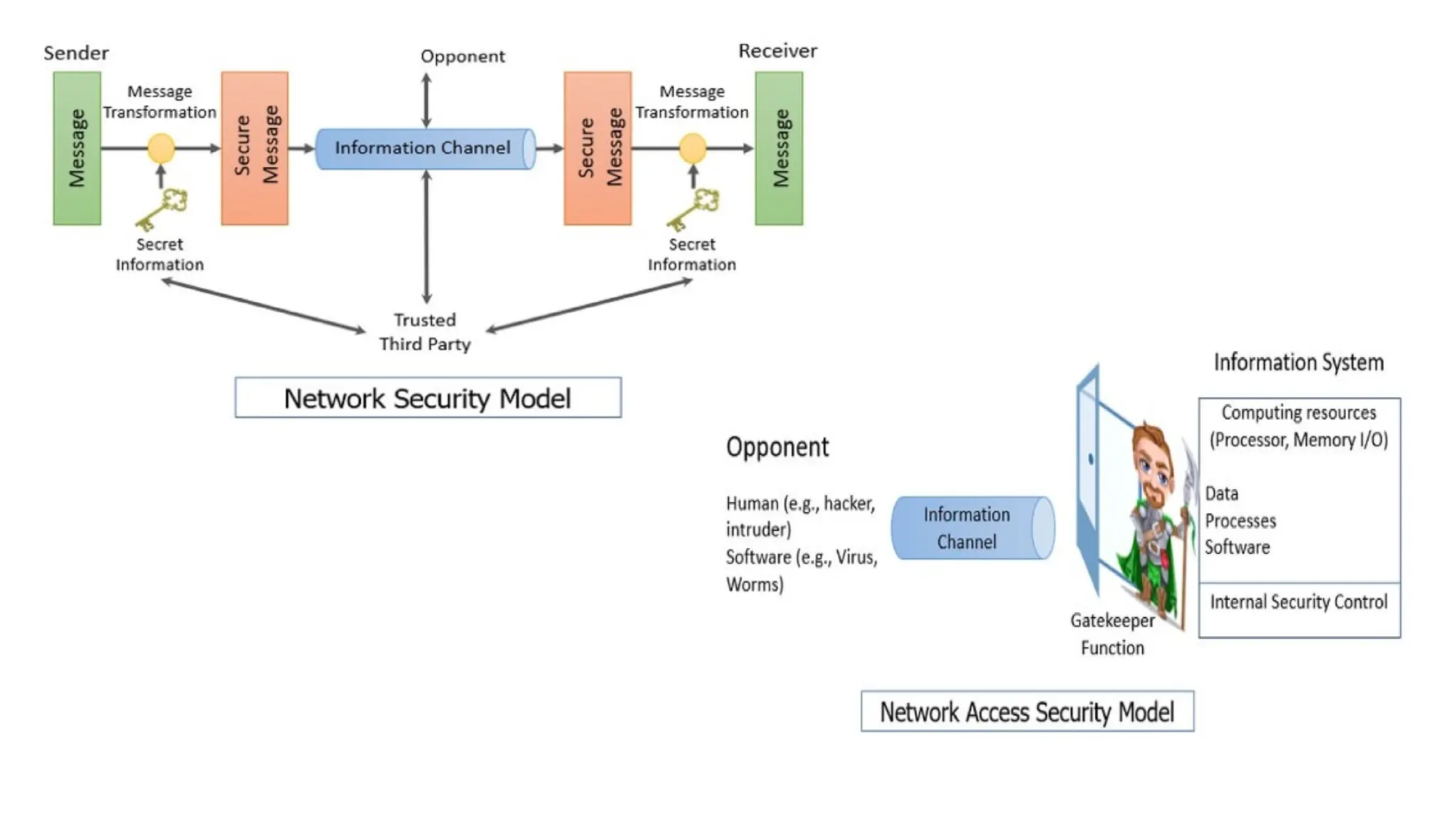
• A Network Security Model exhibits how the security service has been designed over the network to prevent the
opponent from causing a threat to the confidentiality or authenticity of the information that is being transmitted
through the network.
We are concerned about the security of the message over the network when the message has some confidential or
authentic information which has a threat from an opponent present at the information channel. Any security service
would have the three components discussed below:
• 1. Transformation of the information which has to be sent to the receiver. So, that any opponent present at the
information channel is unable to read the message. This indicates the encryption of the message.
• It also includes the addition of code during the transformation of the information which will be used in verifying
the identity of the authentic receiver.
• 2. Sharing of the secret information between sender and receiver of which the opponent must not any clue. Yes,
we are talking of the encryption key which is used during the encryption of the message at the sender’s end and
also during the decryption of message at receiver’s end.
• 3. There must be a trusted third party which should take the responsibility of distributing the secret
information (key) to both the communicating parties and also prevent it from any opponent.
• The network security model presents the two communicating parties sender and receiver who mutually agrees to exchange the
information. The sender has information to share with the receiver.
Designing a Network Security Model
• Perimeter Security :Perimeter security is first line of defense against cyber-attacks. It involves implementing firewalls,
intrusion detection systems, and other security measures to protect network from external threats.
• Access Control :Access control is used to manage who has access to network and what they can do once they are connected.
This includes implementing password policies, role-based access control, and other security measures to prevent unauthorized
access.
• Data Protection: Data protection involves implementing measures to ensure confidentiality, integrity, and availability of data.
This includes encryption, backup and recovery, and other security measures to protect data from unauthorized access,
modification, or destruction.
• Monitoring and Response : Monitoring and response involves use of security tools to detect and respond to security incidents
in real-time. This includes implementing security information and event management (SIEM) systems, intrusion detection
systems, and other security tools to monitor network activity and identify potential threats.
Email Security (Domain Key Identified Mail (DKIM))
• The SPF, DMARC and DKIM email validation and authentication protocols work together as follows:
• The SPF protocol enables an email-sending organization to identify the email servers authorized to send email on
behalf of the organization's domain. SPF records information about authorized email servers in the sender's
domain name system (DNS) records, which are accessible to any internet-connected system. SPF is especially
important for email service providers -- notably, Google Gmail, Yahoo email services and others -- that send and
receive email for many different organizations.
• The DKIM protocol enables an email-sending organization to digitally sign each individual message sent by an
authorized email server. DKIM relies on SPF to identify whether a message was sent by an authorized email
server and relies on DMARC to determine the appropriate policy when an email message fails authentication.
• The DMARC protocol enables an email-sending organization to specify the procedures receivers should take
when they receive email that has not been authenticated. When an email server not listed in the SPF record
attempts to send a message or when DKIM authentication fails, DMARC policies provide guidance to the receiver
as to whether the message should be delivered, quarantined -- i.e., sent to spam folder -- or rejected entirely.
• DKIM, SPF and DMARC publish all the information used to authenticate email in DNS TXT records. DKIM
publishes the public key used to do DKIM authentication of individual emails. SPF publishes information about
the email servers authorized to send email for a domain, and DMARC publishes its policies for unauthenticated
email.
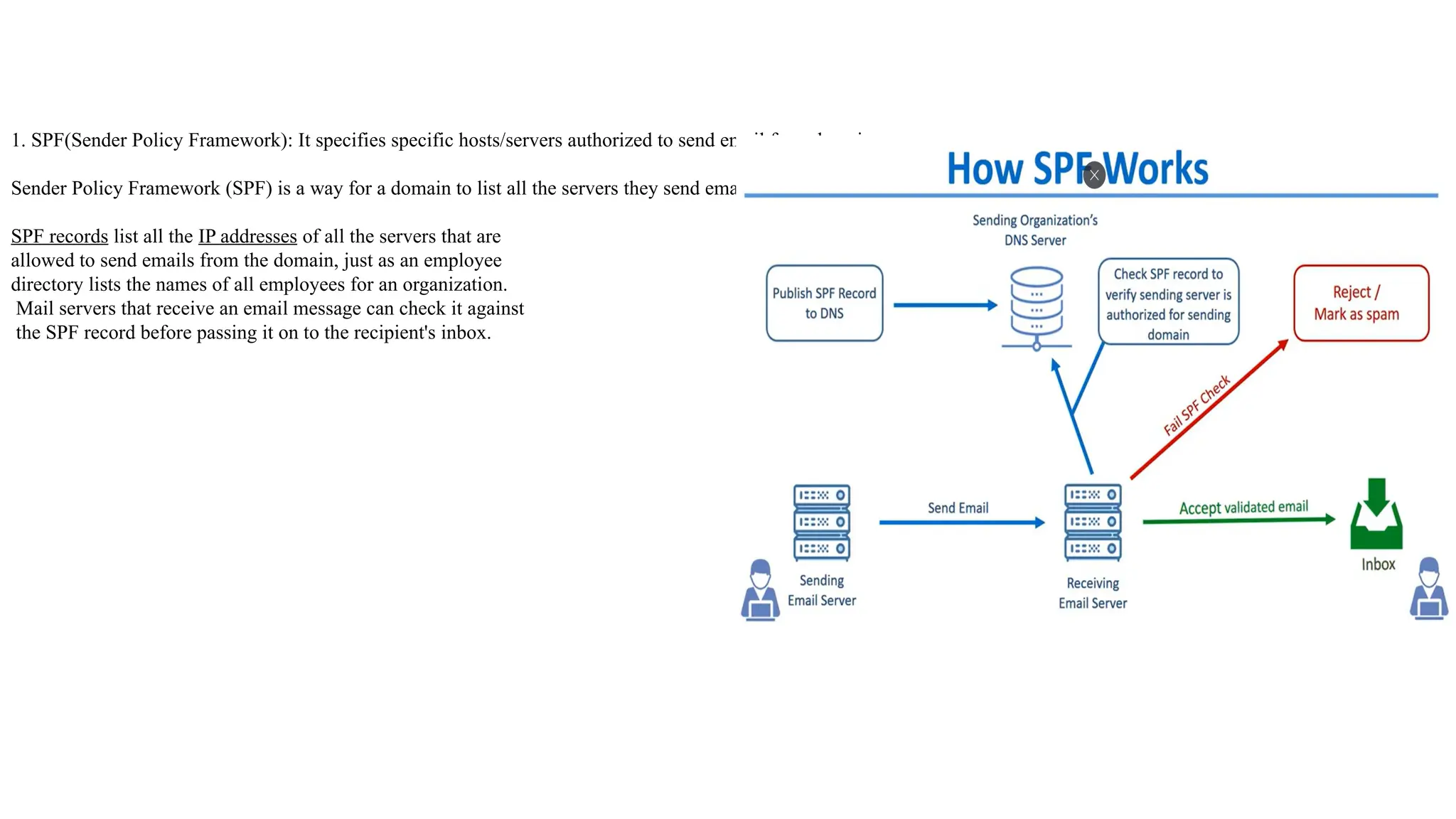
1. SPF(Sender Policy Framework): It specifies specific hosts/servers authorized to send email for a domain
Sender Policy Framework (SPF) is a way for a domain to list all the servers they send emails from.
SPF records list all the IP addresses of all the servers that are
allowed to send emails from the domain, just as an employee
directory lists the names of all employees for an organization.
Mail servers that receive an email message can check it against
the SPF record before passing it on to the recipient's inbox.
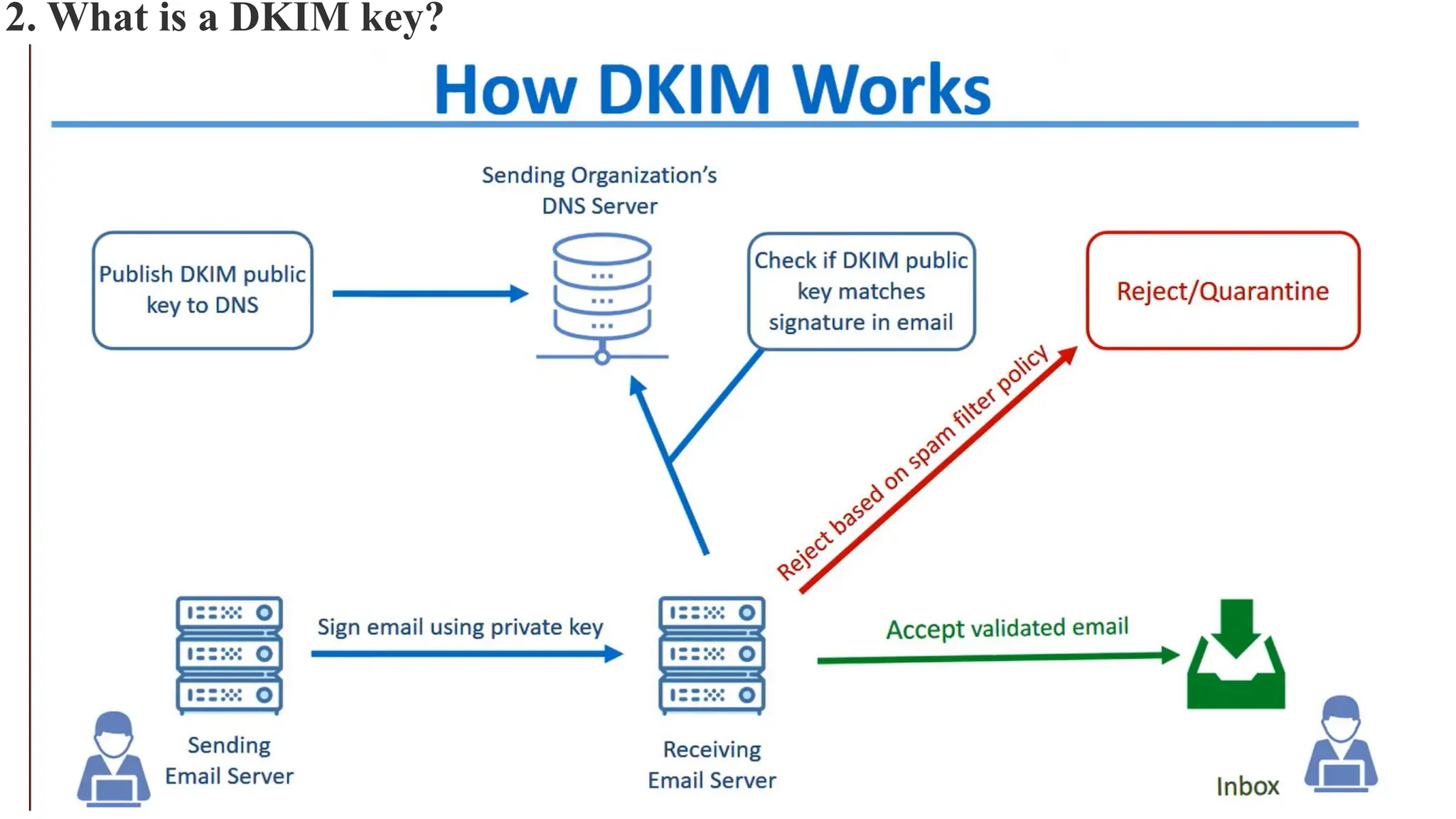
2. What is a DKIM key?
• DKIM enables email senders to publish the public key of the domain owner's public key pair.
• Email senders using DKIM publish their public key to a DNS TXT record associated with the domain from which email is
being sent. The receiving mail server uses this public key to authenticate the digital signatures added to email headers from the
sending domain.
• DKIM, or DomainKeys Identified Mail, is a protocol that establishes your emails’ authenticity. It works by adding a unique
DKIM signature to every email, which is verified using a public key stored in your domain’s DNS (Domain Name System).
• This process helps email providers confirm that the message comes from you and hasn’t been altered during delivery.
• To understand how DKIM works, let’s break it down into its key components:
 DKIM signature
 DKIM record.
DKIM signature
• DKIM signature is a unique seal on every email you send to prove it’s genuinely from you. This signature, automatically
added to your email’s header, is created using encryption techniques and includes a hash of the email’s content.
• When your email reaches the recipient’s inbox, their email provider uses the public key stored in your DNS to verify the
signature. If the signature checks out, it confirms two things:
• Your domain sent the email (authenticity).
• The content remained unaltered during delivery (integrity).
• This verification reduces the chances of your emails being flagged as spam or rejected outright.
DKIM record
• The DKIM record is a small but mighty piece of information stored in your domain’s DNS settings. It acts as the foundation
of DKIM by providing the public key that email providers use to validate your email signatures.
• Each DKIM record includes:
• Version (v). Specifies the DKIM version.
• Key type (k). Defines the encryption type.
• Public key (p). The actual key used to verify your email signature.
• The DKIM record also uses a “selector,” which helps distinguish between multiple DKIM configurations, such as when you
use different email services.
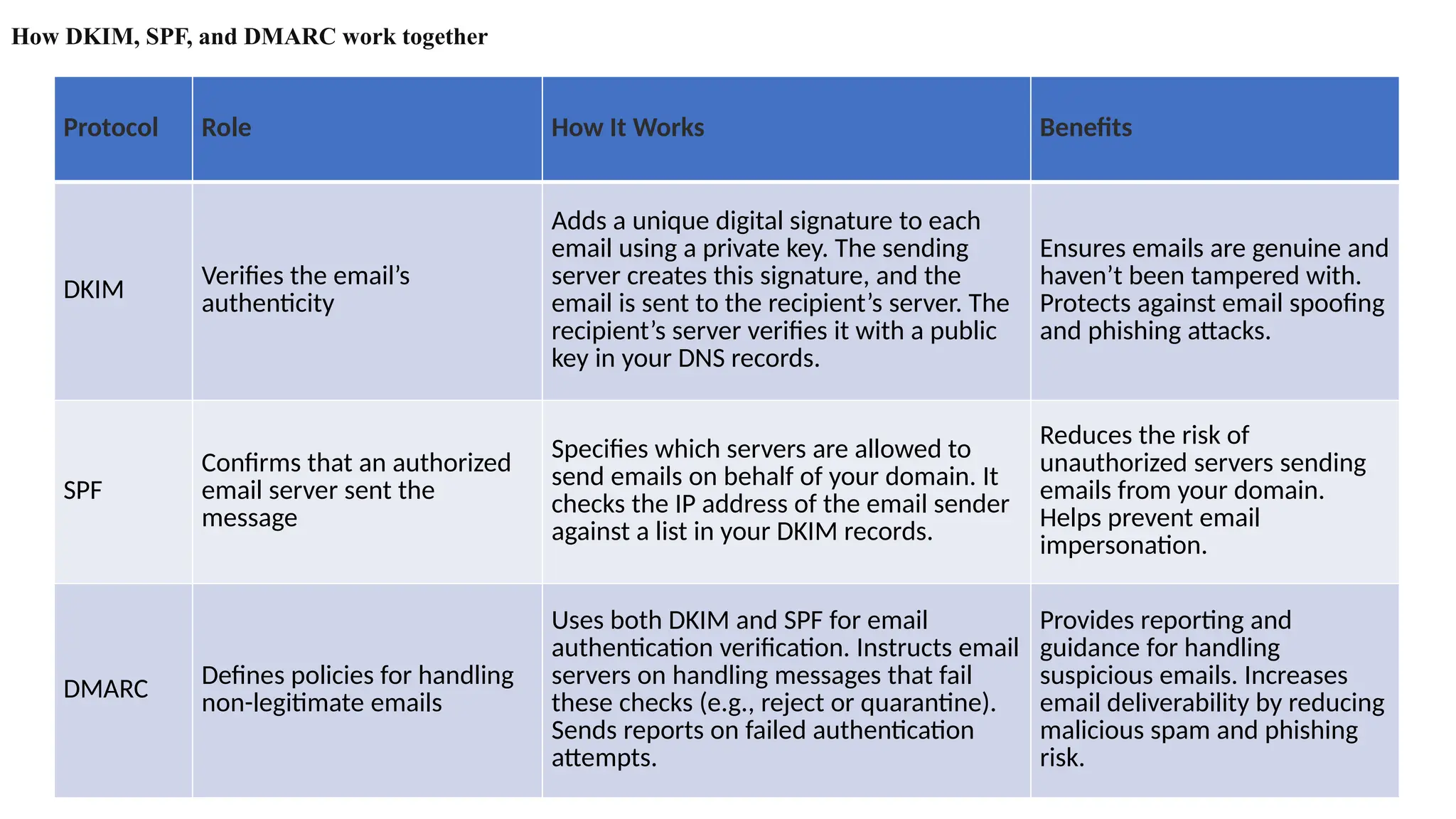
How DKIM, SPF, and DMARC work together
Protocol Role How It Works Benefits
DKIM
Verifies the email’s
authenticity
Adds a unique digital signature to each
email using a private key. The sending
server creates this signature, and the
email is sent to the recipient’s server. The
recipient’s server verifies it with a public
key in your DNS records.
Ensures emails are genuine and
haven’t been tampered with.
Protects against email spoofing
and phishing attacks.
SPF
Confirms that an authorized
email server sent the
message
Specifies which servers are allowed to
send emails on behalf of your domain. It
checks the IP address of the email sender
against a list in your DKIM records.
Reduces the risk of
unauthorized servers sending
emails from your domain.
Helps prevent email
impersonation.
DMARC Defines policies for handling
non-legitimate emails
Uses both DKIM and SPF for email
authentication verification. Instructs email
servers on handling messages that fail
these checks (e.g., reject or quarantine).
Sends reports on failed authentication
attempts.
Provides reporting and
guidance for handling
suspicious emails. Increases
email deliverability by reducing
malicious spam and phishing
risk.
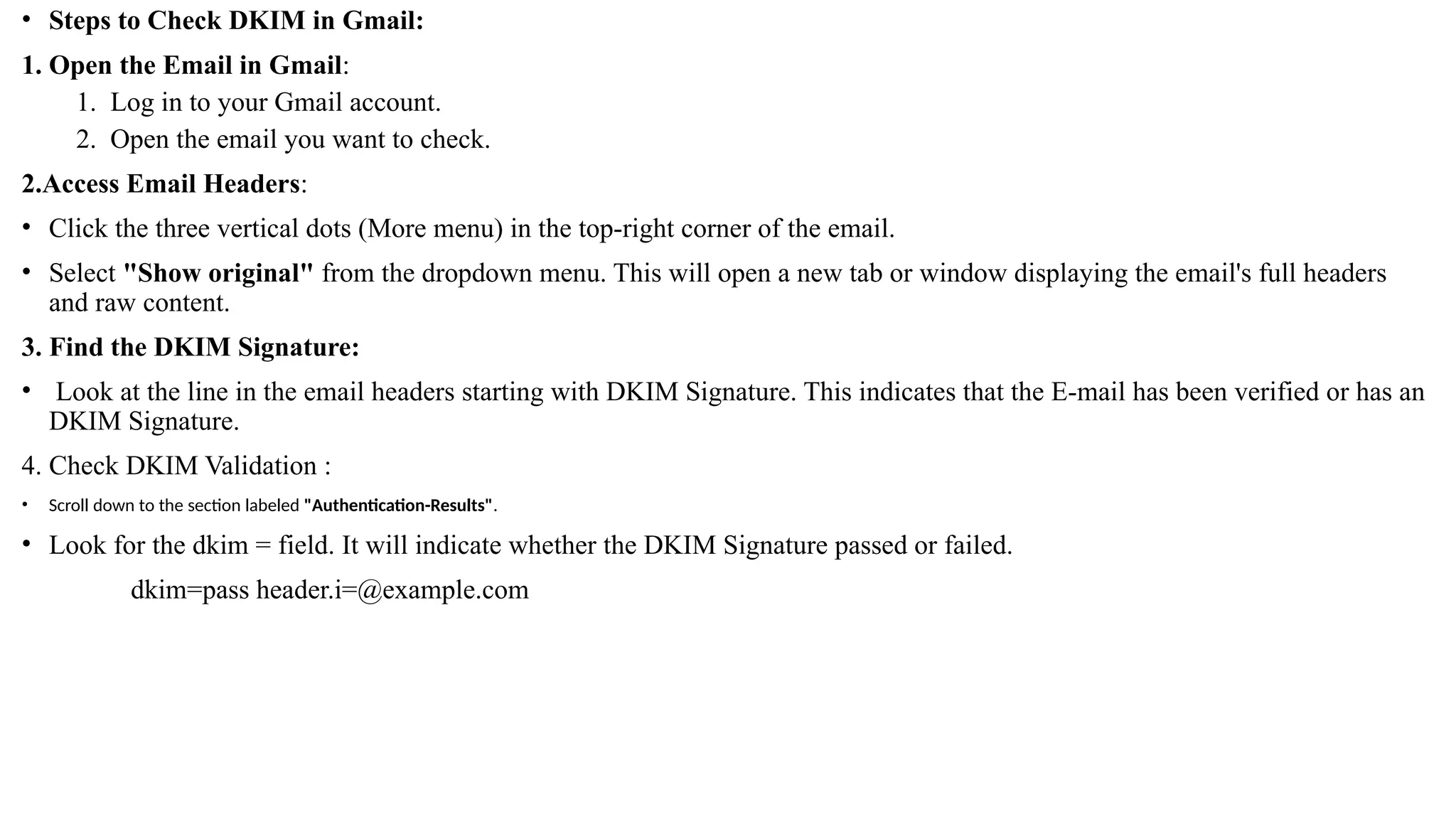
• Steps to Check DKIM in Gmail:
1. Open the Email in Gmail:
1. Log in to your Gmail account.
2. Open the email you want to check.
2.Access Email Headers:
• Click the three vertical dots (More menu) in the top-right corner of the email.
• Select "Show original" from the dropdown menu. This will open a new tab or window displaying the email's full headers
and raw content.
3. Find the DKIM Signature:
• Look at the line in the email headers starting with DKIM Signature. This indicates that the E-mail has been verified or has an
DKIM Signature.
4. Check DKIM Validation :
• Scroll down to the section labeled "Authentication-Results".
• Look for the dkim = field. It will indicate whether the DKIM Signature passed or failed.
dkim=pass header.i=@example.com
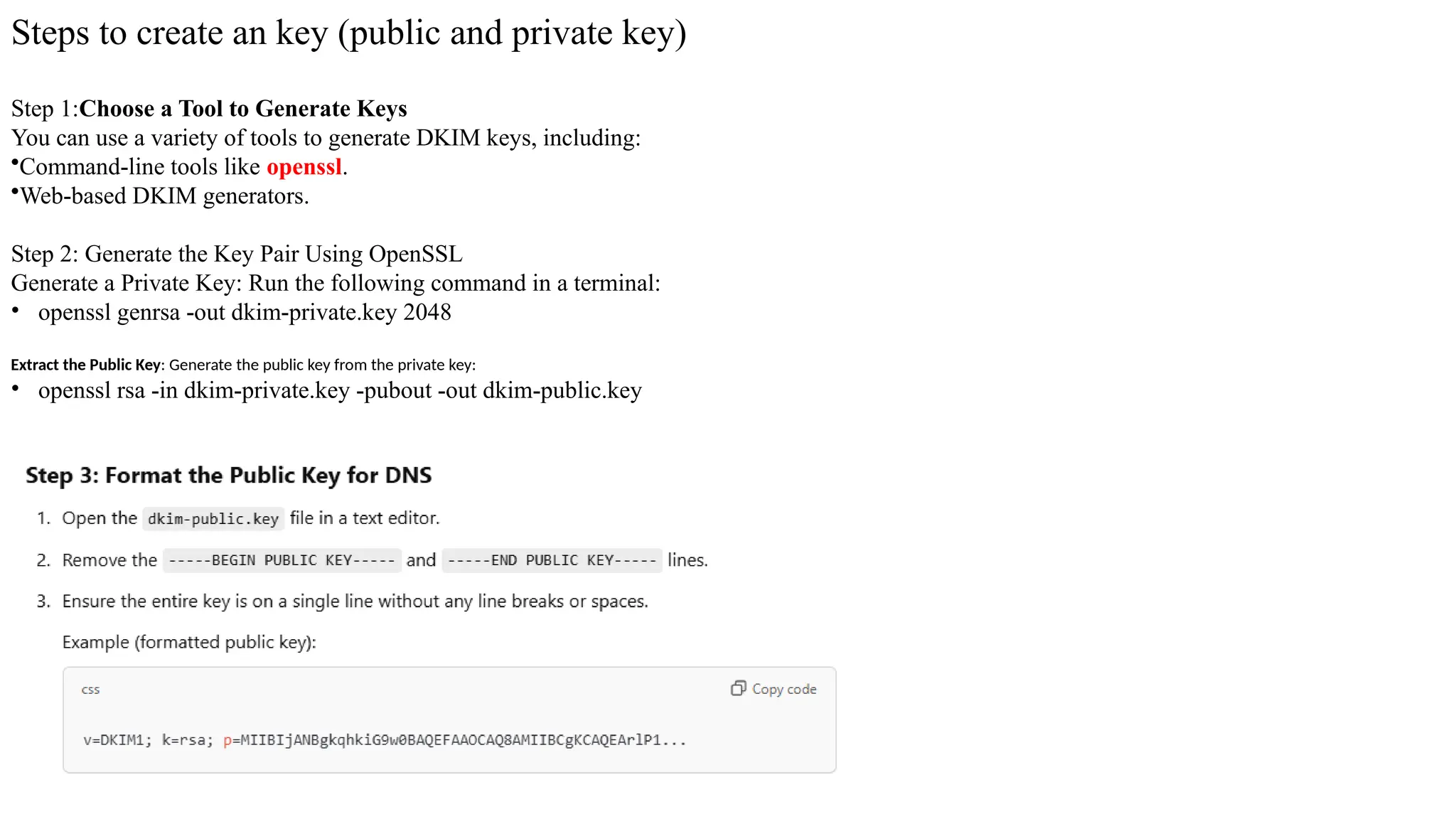
Steps to create an key (public and private key)
Step 1:Choose a Tool to Generate Keys
You can use a variety of tools to generate DKIM keys, including:
•Command-line tools like openssl.
•Web-based DKIM generators.
Step 2: Generate the Key Pair Using OpenSSL
Generate a Private Key: Run the following command in a terminal:
• openssl genrsa -out dkim-private.key 2048
Extract the Public Key: Generate the public key from the private key:
• openssl rsa -in dkim-private.key -pubout -out dkim-public.key
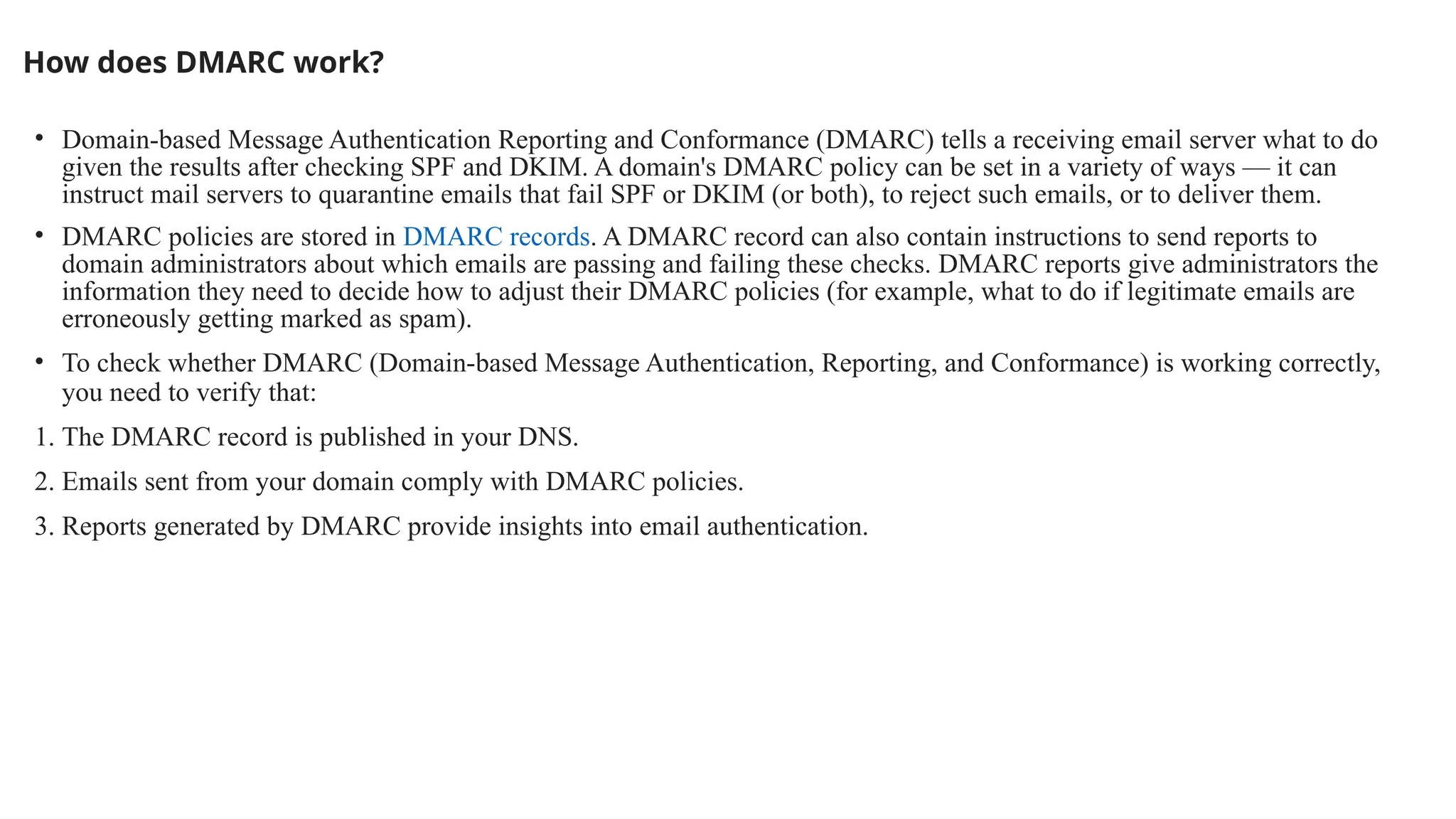
How does DMARC work?
• Domain-based Message Authentication Reporting and Conformance (DMARC) tells a receiving email server what to do
given the results after checking SPF and DKIM. A domain's DMARC policy can be set in a variety of ways — it can
instruct mail servers to quarantine emails that fail SPF or DKIM (or both), to reject such emails, or to deliver them.
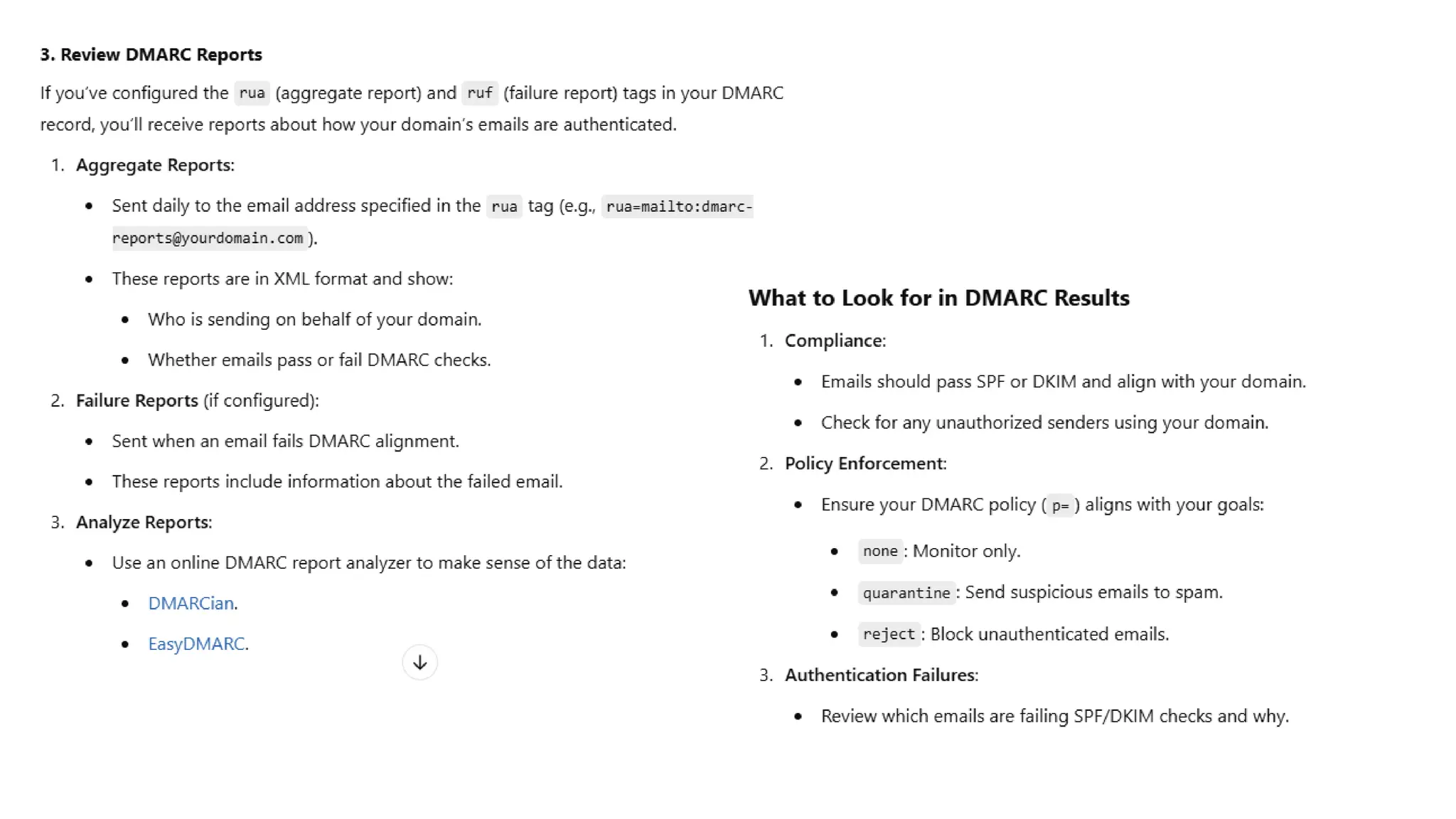
• DMARC policies are stored in DMARC records. A DMARC record can also contain instructions to send reports to
domain administrators about which emails are passing and failing these checks. DMARC reports give administrators the
information they need to decide how to adjust their DMARC policies (for example, what to do if legitimate emails are
erroneously getting marked as spam).
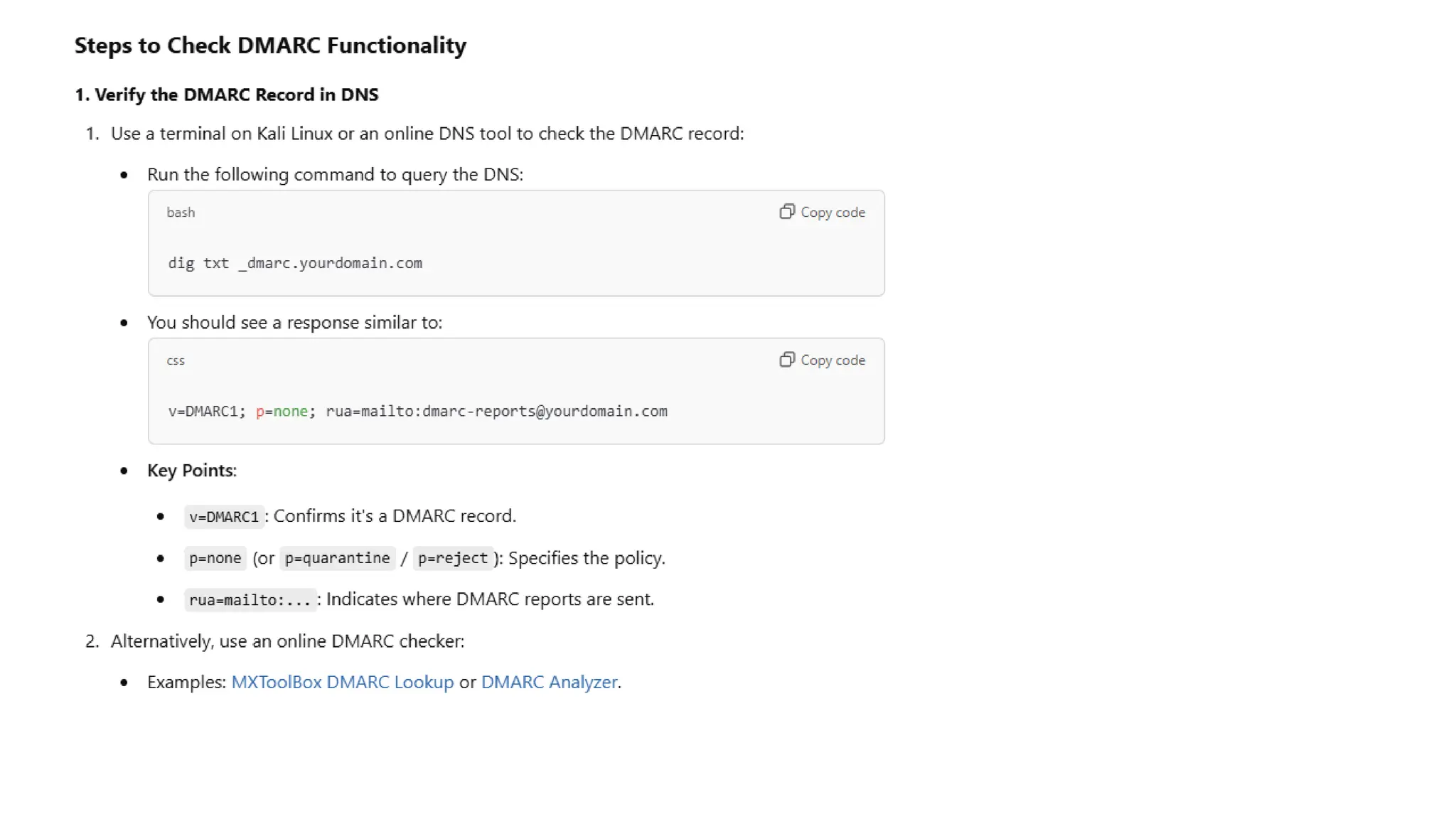
• To check whether DMARC (Domain-based Message Authentication, Reporting, and Conformance) is working correctly,
you need to verify that:
1. The DMARC record is published in your DNS.
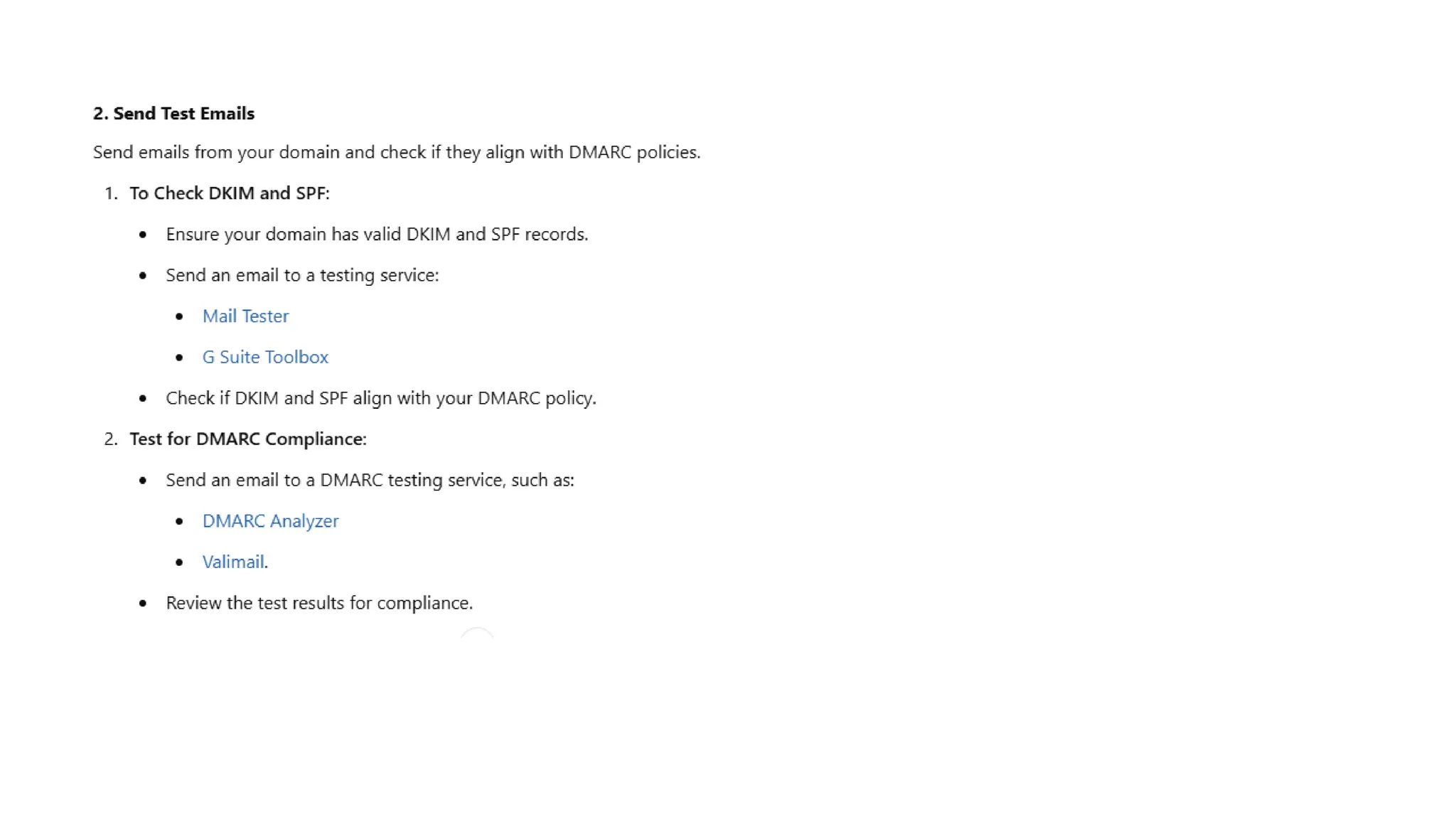
2. Emails sent from your domain comply with DMARC policies.
3. Reports generated by DMARC provide insights into email authentication.
Transport Level Security (Web Security Issues, HTTPS, Secure Shell SSH)
Transport Layer Securities (TLS) are designed to provide security at the transport layer. TLS was derived from a security
protocol called Secure Socket Layer (SSL). TLS ensures that no third party may eavesdrop or tampers with any message.
• There are several benefits of TLS:
• Encryption:
TLS/SSL can help to secure transmitted data using encryption.
• Interoperability:
TLS/SSL works with most web browsers, including Microsoft Internet Explorer and on most operating systems and
web servers.
• Algorithm flexibility:
TLS/SSL provides operations for authentication mechanism, encryption algorithms and hashing algorithm that are used
during the secure session.
• Ease of Deployment:
Many applications TLS/SSL temporarily on a windows server 2003 operating systems.
• Ease of Use:
Because we implement TLS/SSL beneath the application layer, most of its operations are completely invisible to client.
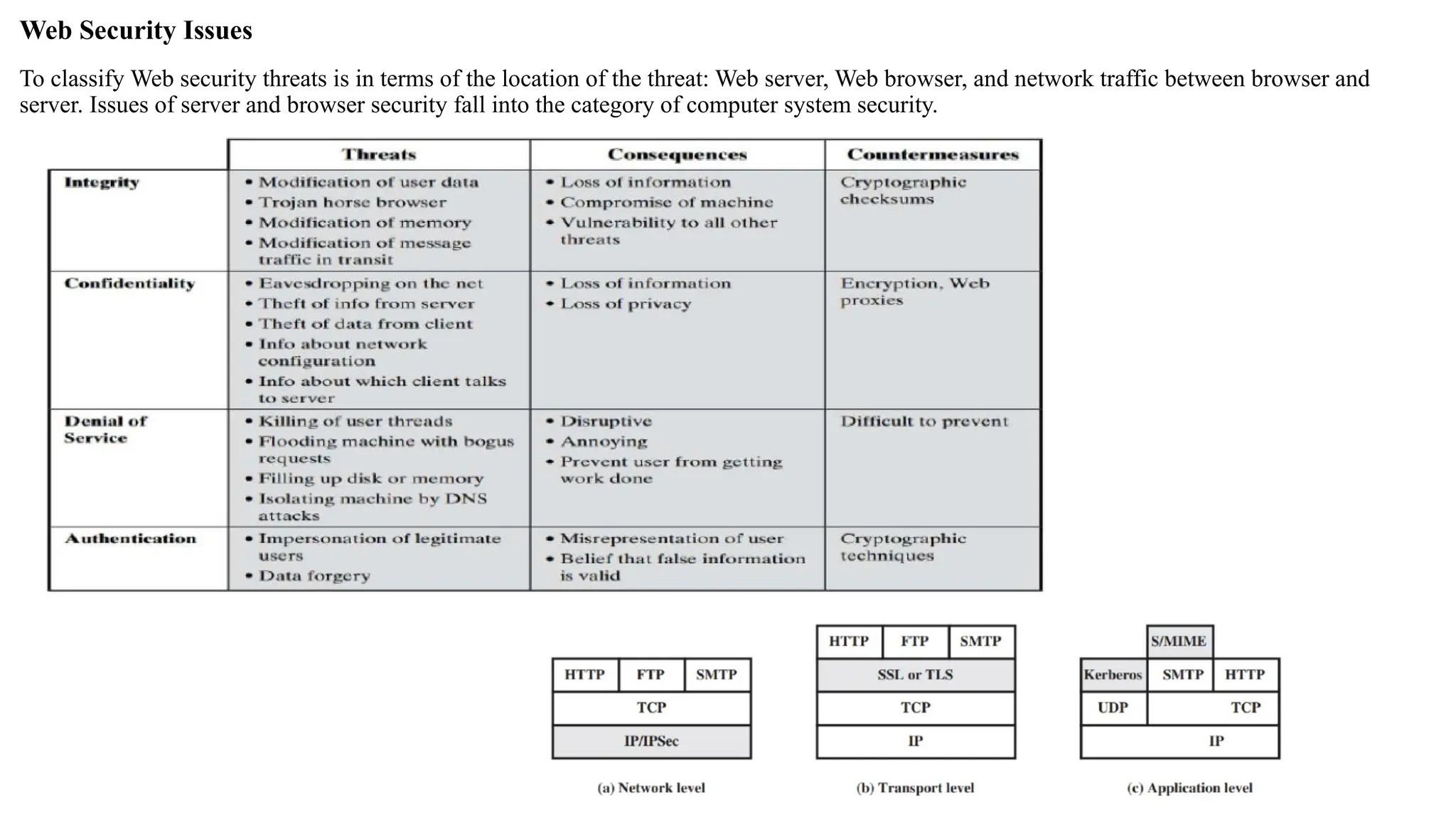
Web Security Issues
To classify Web security threats is in terms of the location of the threat: Web server, Web browser, and network traffic between browser and
server. Issues of server and browser security fall into the category of computer system security.
• Web Security Issues
• Common Threats:
• Cross-Site Scripting (XSS)
• SQL Injection
• Man-in-the-Middle (MITM) attacks
• Phishing
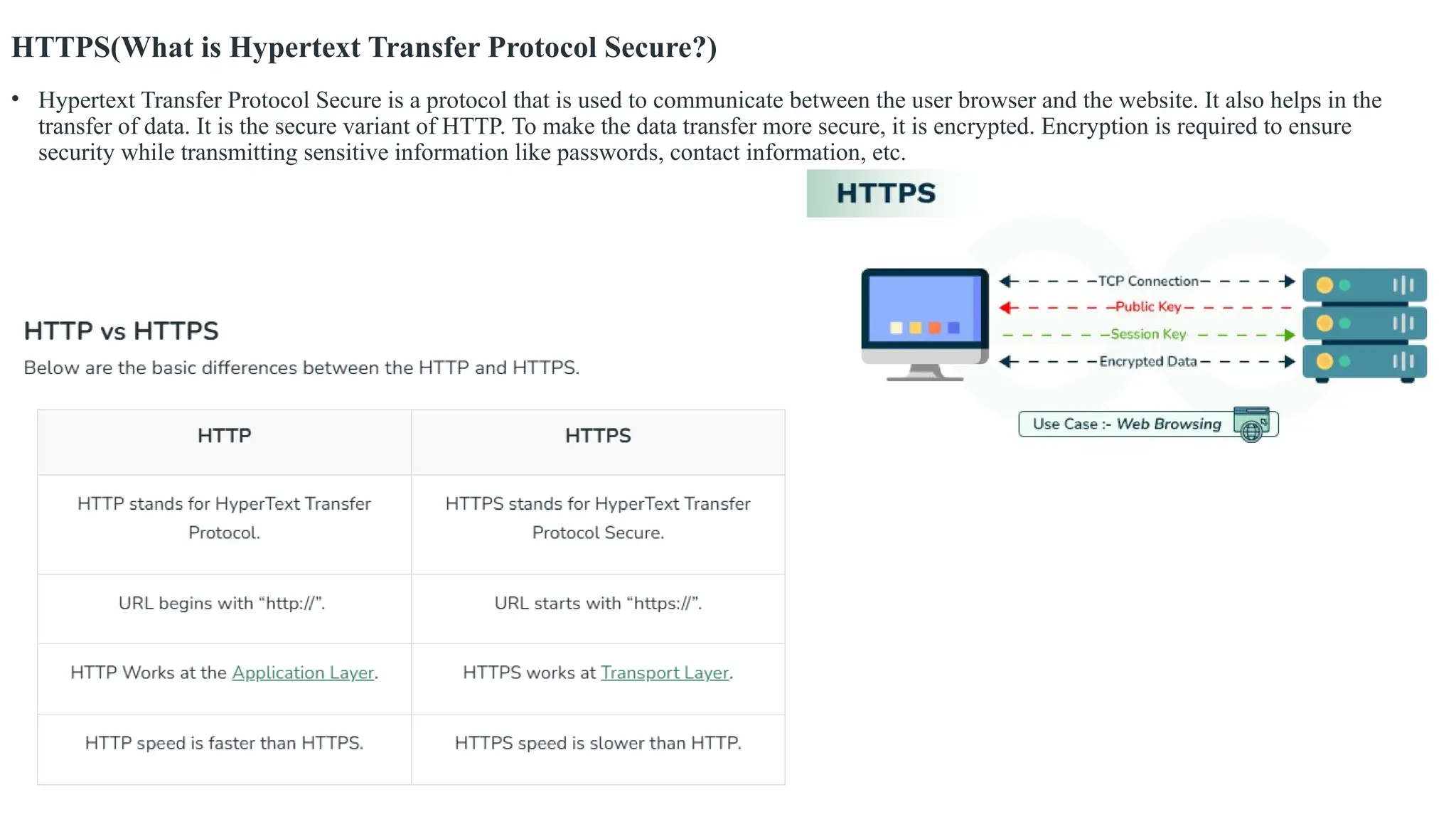
HTTPS(What is Hypertext Transfer Protocol Secure?)
• Hypertext Transfer Protocol Secure is a protocol that is used to communicate between the user browser and the website. It also helps in the
transfer of data. It is the secure variant of HTTP. To make the data transfer more secure, it is encrypted. Encryption is required to ensure
security while transmitting sensitive information like passwords, contact information, etc.
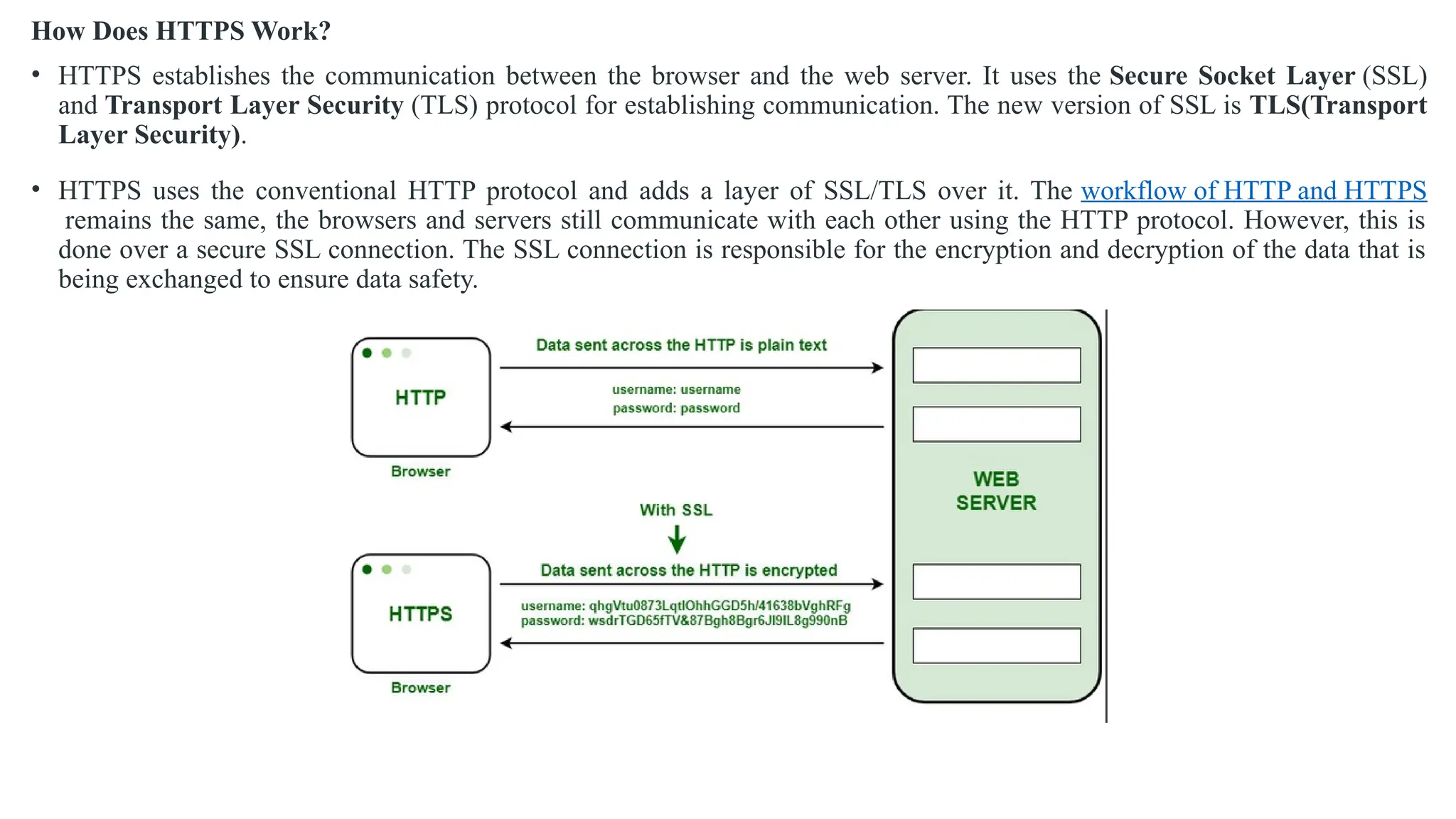
How Does HTTPS Work?
• HTTPS establishes the communication between the browser and the web server. It uses the Secure Socket Layer (SSL)
and Transport Layer Security (TLS) protocol for establishing communication. The new version of SSL is TLS(Transport
Layer Security).
• HTTPS uses the conventional HTTP protocol and adds a layer of SSL/TLS over it. The workflow of HTTP and HTTPS
remains the same, the browsers and servers still communicate with each other using the HTTP protocol. However, this is
done over a secure SSL connection. The SSL connection is responsible for the encryption and decryption of the data that is
being exchanged to ensure data safety.
Secure Shell SSH
• It provides protection to the data that are aligned between the web browser and server. SSL encrypts the link between a web server and a
browser which ensures that all data passed between them stay private and separate from attack.
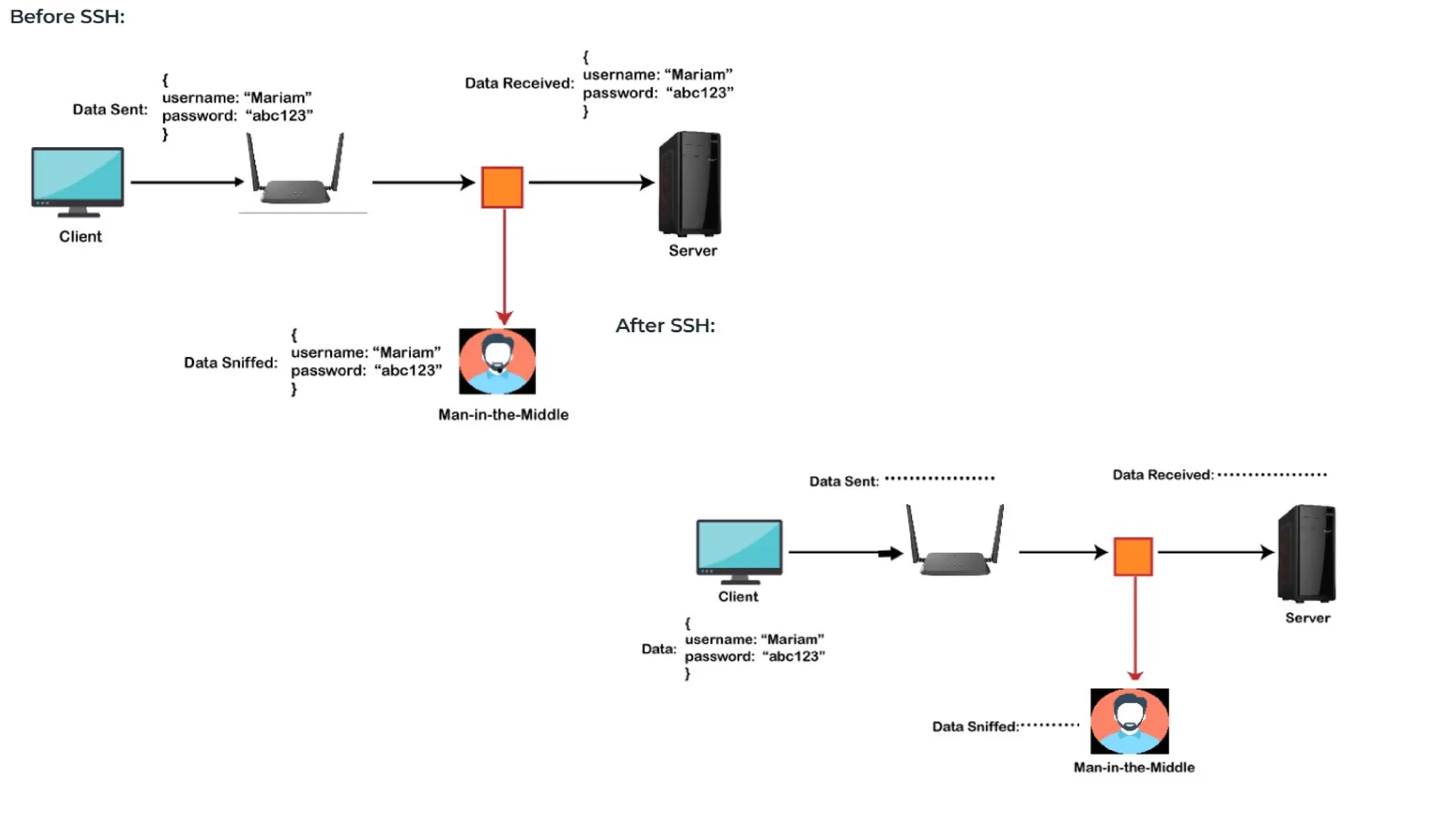
• SSH (Secure Shell) is a network protocol used to securely access and manage devices over an unsecured network, like the internet. It is most
commonly used to log into remote systems (like servers) and execute commands, transfer files, or administer remote systems securely.
• SSH uses encryption to ensure that all data transmitted over the network is secure, preventing interception by unauthorized users. This makes it
a highly secure alternative to older protocols like Telnet and FTP.
1. It is a scientific discipline network protocol for operative network services over an unsecured network.
2. It is designed to replace the unsecured protocol like -telnet and insecure file transfer methods(like FTP).
3. It uses a consumer server design.
4. It uses public-key cryptography/asymmetric key cryptography to demonstrate the remote server. i.e. to verify its identity to the remote server.
Secure Socket Layer Protocols:
• SSL record protocol
• Handshake protocol
• Change-cipher spec protocol
• Alert protocol
• Key Features of SSH:
1. Encryption: All communication is encrypted, protecting sensitive data from being intercepted.
2. Authentication: SSH ensures that the remote system is who it claims to be, using methods like password-based authentication, key-based
authentication, or even two-factor authentication.
3. Secure File Transfer: It supports secure file transfer protocols like SFTP (SSH File Transfer Protocol) and SCP (Secure Copy).
4. Port Forwarding: SSH can securely forward network traffic, allowing you to tunnel other protocols through the encrypted connection.
5. Remote Execution: Allows execution of commands on a remote machine, which is essential for remote administration and system
management.
• SSH stands for Secure Shell or Secure Socket Shell. It is a cryptographic network protocol that allows two computers to communicate and
share the data over an insecure network such as the internet. It is used to login to a remote server to execute commands and data transfer from
one machine to another machine.
• The SSH protocol was developed by SSH communication security Ltd to safely communicate with the remote machine.
• Secure communication provides a strong password authentication and encrypted communication with a public key over an insecure channel. It
is used to replace unprotected remote login protocols such as Telnet, rlogin, rsh, etc., and insecure file transfer protocol FTP.
• Its security features are widely used by network administrators for managing systems and applications remotely.
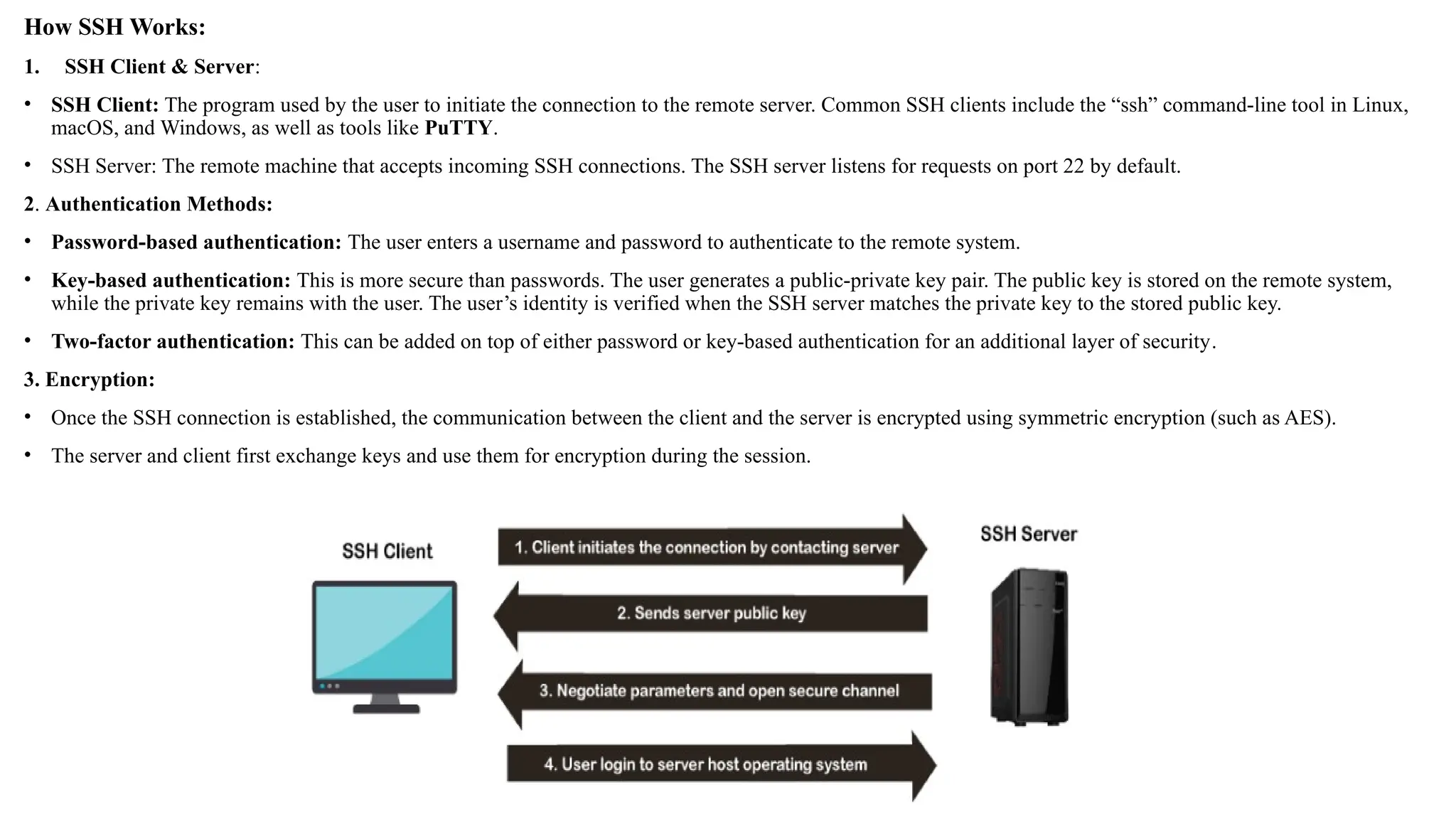
How SSH Works:
1. SSH Client & Server:
• SSH Client: The program used by the user to initiate the connection to the remote server. Common SSH clients include the “ssh” command-line tool in Linux,
macOS, and Windows, as well as tools like PuTTY.
• SSH Server: The remote machine that accepts incoming SSH connections. The SSH server listens for requests on port 22 by default.
2. Authentication Methods:
• Password-based authentication: The user enters a username and password to authenticate to the remote system.
• Key-based authentication: This is more secure than passwords. The user generates a public-private key pair. The public key is stored on the remote system,
while the private key remains with the user. The user’s identity is verified when the SSH server matches the private key to the stored public key.
• Two-factor authentication: This can be added on top of either password or key-based authentication for an additional layer of security.
3. Encryption:
• Once the SSH connection is established, the communication between the client and the server is encrypted using symmetric encryption (such as AES).
• The server and client first exchange keys and use them for encryption during the session.
Usages of SSH protocol:
• The popular usages of SSH protocol are given below:
• It provides secure access to users and automated processes.
• It is an easy and secure way to transfer files from one system to another over an insecure network.
• It also issues remote commands to the users.
• It helps the users to manage the network infrastructure and other critical system components.
• It is used to log in to shell on a remote system (Host), which replaces Telnet and rlogin and is used to execute a
single command on the host, which replaces rsh.
• It combines with rsync utility to backup, copy, and mirror files with complete security and efficiency.
• It can be used for forwarding a port.
• By using SSH, we can set up the automatic login to a remote server such as OpenSSH.
• We can securely browse the web through the encrypted proxy connection with the SSH client, supporting the
SOCKS protocol.
The architecture of SSH Protocol
• The SSH architecture is made-up of three well-separated layers. These layers are:
1. Transport Layer
2. User-authentication layer
3. Connection Layer
• The SSH protocol architecture is an open architecture; hence it provides great flexibility and enables SSH use for many other purposes instead
of only a secure shell. In the architecture, the transport layer is similar to the transport layer security (TLS). The User-authentication layer can
be used with the custom authentication methods, and the connection layer allows multiplexing different secondary sessions into a single SSH
connection.
Transport Layer
• The transport layer is the top layer of the TCP/IP protocol suite. For SSH-2, this layer is responsible for handling initial key exchange, server
authentication, set up encryption, compression, and integrity verification. It works as an interface for sending and receiving plaintext packets
with sizes up to 32, 768bytes.
User authentication Layer
• As its name suggests, the user authentication layer is responsible for handling client authentication and provides various
authentication methods. The authentication is done at the client-side; hence when a prompt occurs for a password, it usually for
an SSH client rather than a server, and the server responds to these authentications.
• This layer includes various methods of authentication; these methods are:
• Password: Password authentication is a straightforward way of authentication. It includes the feature to change the password
for easy access. But it is not used by all the applications.
• Public-key: The public-key is a public key-based authentication method, which supports DSA, ECDSA, or RSA keypairs.
• Keyboard-interactive: It is one of the versatile authentication methods. In this, the server sends a prompt to enter information
& the client sends it back with keyed-in responses by the user. It is used to provide a one-time password or OTP authentication.
• GSSAPI: In this method, the authentication is performed by external methods such as Kerberos 5 or NTLM, which provide the
single sign-on capability to SSH sessions.
Connection Layer
• The connection layer defines various channels through which SSH services are provided. It defines the concept of
channels, channel requests, and global requests. One SSH connection can host different channels simultaneously
and can also transfer data in both directions simultaneously. Channel requests are used in the connection layer to
relay out-of-band channel-specific data, for example, the altered size of a terminal window or the exit code of a
server-side process. The standard channel types of connection layer are:
• shell: It is used for terminal shells, SFTP, and exec requests.
• direct-tcpip: It is used for the client-to-server forwarded connections.
• forwarded-tcpip: It is used for the server-to-client forwarded connections.
What can be transferred with SSH protocol?
• The SSH protocol can transfer the following:
• Data
• Text
• Commands
• Files
IP Security (Policy, Security Payload and Associations, Internet Key Exchange, Cryptographic Suits)
• IP Security (IPSec) refers to a collection of communication rules or protocols used to establish secure network connections.
Internet Protocol (IP) is the common standard that controls how data is transmitted across the internet. IPSec enhances the
protocol security by introducing encryption and authentication. IPSec encrypts data at the source and then decrypts it at the
destination. It also verifies the source of the data.
• Features of IPSec
• Authentication: IPSec provides authentication of IP packets using digital signatures or shared secrets. This helps ensure that
the packets are not tampered with or forged.
• Confidentiality: IPSec provides confidentiality by encrypting IP packets, preventing eavesdropping on the network traffic.
• Integrity: IPSec provides integrity by ensuring that IP packets have not been modified or corrupted during transmission.
• Key management: IPSec provides key management services, including key exchange and key revocation, to ensure that
cryptographic keys are securely managed.
• Tunneling: IPSec supports tunneling, allowing IP packets to be encapsulated within another protocol, such as GRE (Generic
Routing Encapsulation) or L2TP (Layer 2 Tunneling Protocol).
• Flexibility: IPSec can be configured to provide security for a wide range of network topologies, including point-to-point,
site-to-site, and remote access connections.
• Interoperability: IPSec is an open standard protocol, which means that it is supported by a wide range of vendors and can be
used in heterogeneous environments.
IP Security (Policy, Security Payload and Associations, Internet Key Exchange, Cryptographic Suits)
• IP Security (IPSec) refers to a collection of communication rules or protocols used to establish secure network connections. Internet Protocol
(IP) is the common standard that controls how data is transmitted across the internet. IPSec enhances the protocol security by
introducing encryption and authentication. IPSec encrypts data at the source and then decrypts it at the destination. It also verifies the
source of the data.
Why is IPSec Important?
• IPSec protects the data through Data Encryption.
• IPSec provides Data Integrity.
• IPSec is often used in Virtual Private Networks (VPNs) to create secure, private connections.
• IPSec protects from Cyber Attacks.
Features of IPSec
• Authentication: IPSec provides authentication of IP packets using digital signatures or shared
secrets. This helps ensure that the packets are not tampered with or forged.
• Confidentiality: IPSec provides confidentiality by encrypting IP packets, preventing
eavesdropping on the network traffic.
• Integrity: IPSec provides integrity by ensuring that IP packets have not been modified or
corrupted during transmission.
• Key management: IPSec provides key management services, including key exchange and key
revocation, to ensure that cryptographic keys are securely managed.
• Tunneling: IPSec supports tunneling, allowing IP packets to be encapsulated within another
protocol, such as GRE (Generic Routing Encapsulation) or L2TP (Layer 2 Tunneling Protocol).
• Flexibility: IPSec can be configured to provide security for a wide range of network topologies,
including point-to-point, site-to-site, and remote access connections.
• Interoperability: IPSec is an open standard protocol, which means that it is supported by a wide
range of vendors and can be used in heterogeneous environments.
IPSec Policy
• An IPSec policy defines the rules and settings applied to secure communication between
endpoints. It governs how IPSec is used for authentication, encryption, and key exchange.
• Components of IPSec Policy:
• Filter Lists: Define the traffic types that need to be secured.
• Filter Actions: Specify the action for traffic (e.g., permit, block, or secure).
• Connection Types: Can include LAN, WAN, or VPN-specific connections.
• Key Exchange Settings: Configure parameters for negotiating secure keys.
• Authentication Methods: Common methods include pre-shared keys, certificates, or Kerberos.
How Does IPSec Work?
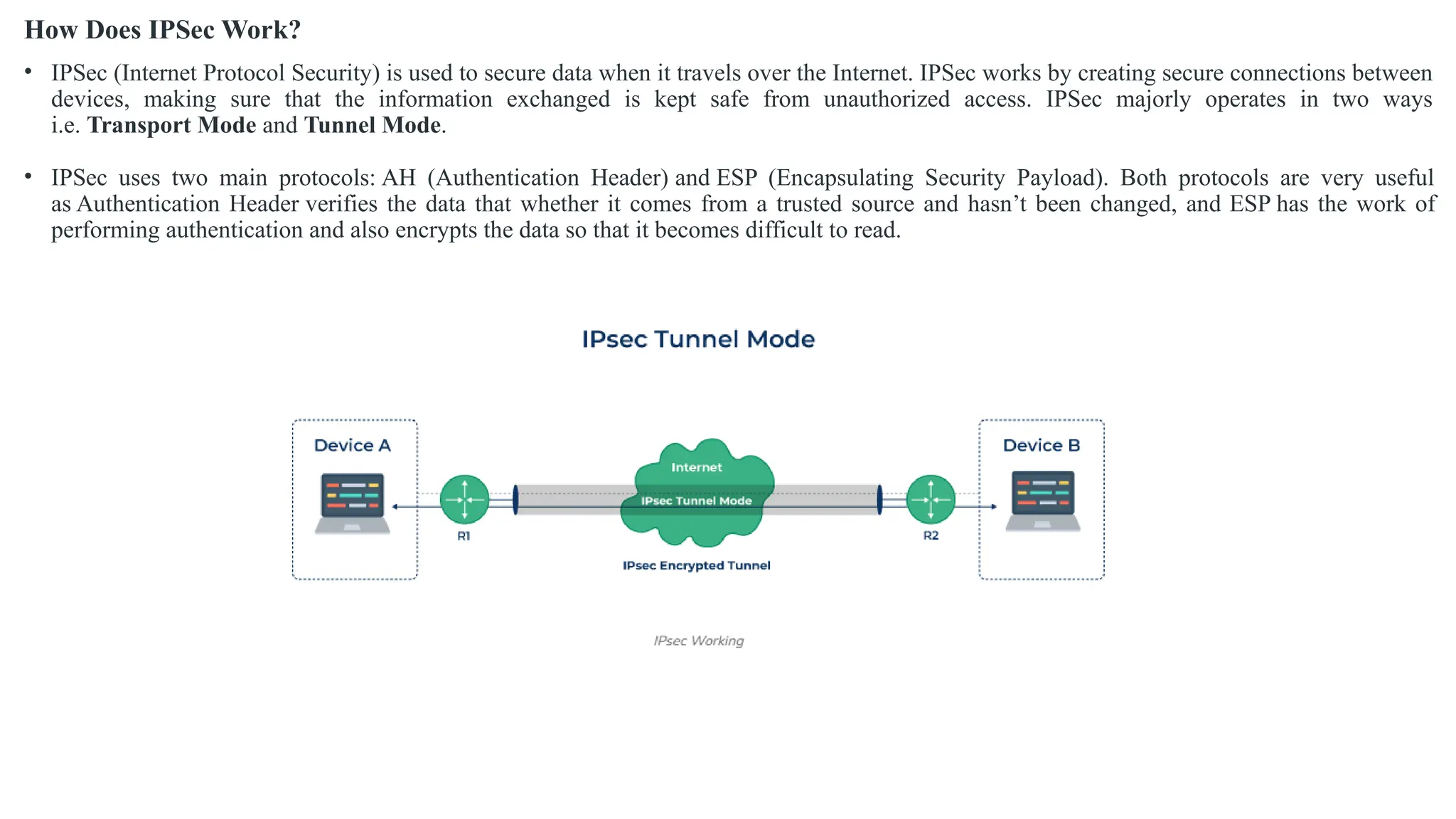
• IPSec (Internet Protocol Security) is used to secure data when it travels over the Internet. IPSec works by creating secure connections between
devices, making sure that the information exchanged is kept safe from unauthorized access. IPSec majorly operates in two ways
i.e. Transport Mode and Tunnel Mode.
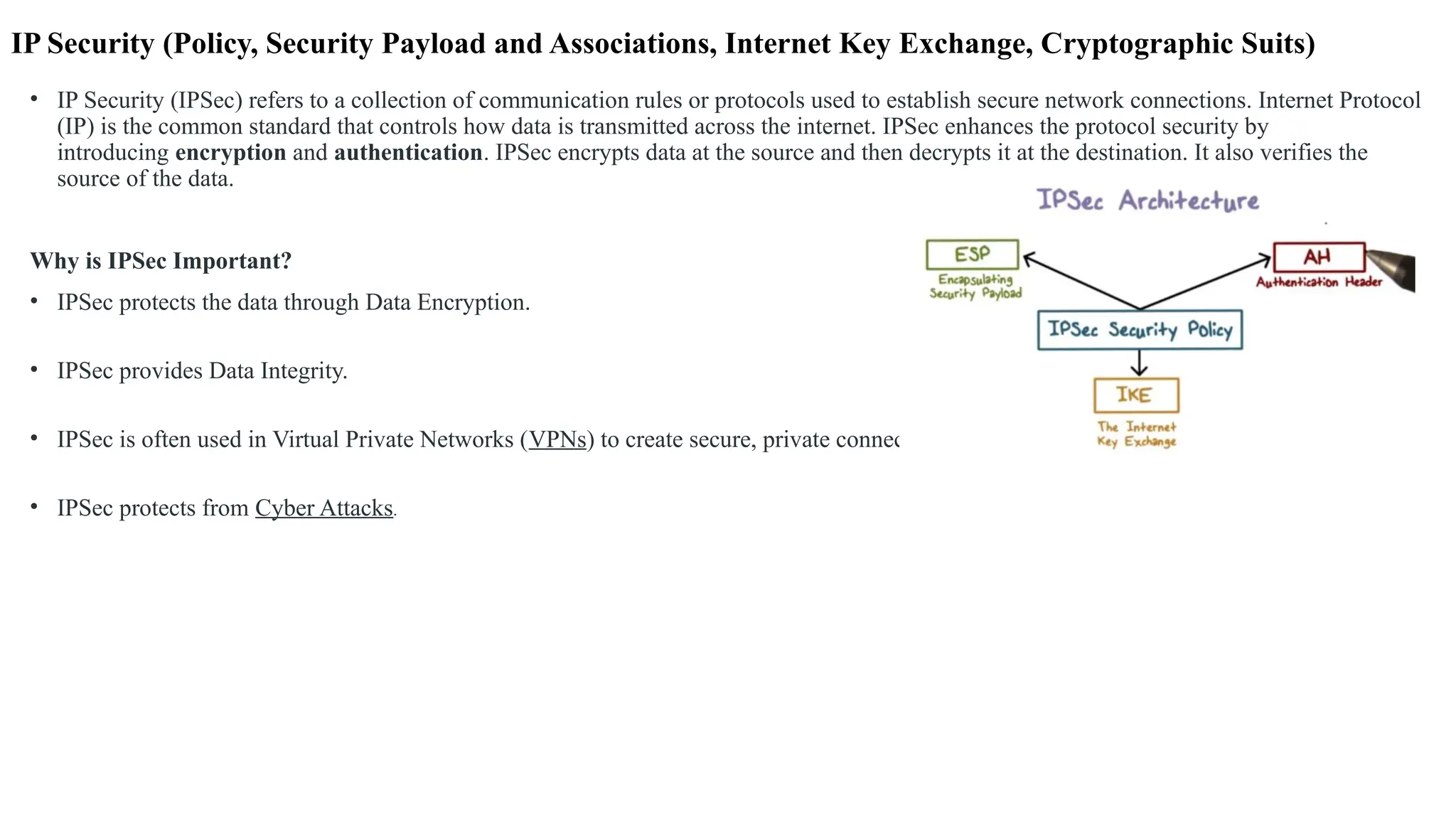
• IPSec uses two main protocols: AH (Authentication Header) and ESP (Encapsulating Security Payload). Both protocols are very useful
as Authentication Header verifies the data that whether it comes from a trusted source and hasn’t been changed, and ESP has the work of
performing authentication and also encrypts the data so that it becomes difficult to read.
Security Payload
• The security payloads are the building blocks of IPSec, providing confidentiality, authentication, and integrity.
• Encapsulating Security Payload (ESP):
• Provides confidentiality through encryption.
• Ensures integrity and authentication of the payload using hashing techniques.
• Operates in two modes:
• Transport Mode: Encrypts only the payload of the IP packet.
• Tunnel Mode: Encrypts the entire IP packet, including the header.
• Authentication Header (AH):
• Offers packet integrity and authentication but no encryption.
• Protects against replay attacks by including a sequence number.
IPSec Connection Establishment Process : IPSec is a protocol suite used in securing communication using the Internet Protocol such that each packet communicated in the course
of a particular session is authenticated and encrypted. The process of establishing an IPSec connection involves two main phases:
Phase 1: Establishing the IKE (Internet Key Exchange) Tunnel
• In phase 1, the main aim is to establish the secure channel the IKE tunnel, which is used to further
negotiations. Phase 1 can operate in one of two modes:
• Main Mode: Main Mode is a six-message exchange procedure that is more secure than Basic Mode,
although at the cost of a longer session, since identity information is transmitted during negotiations.
• Aggressive Mode: Aggressive Mode takes lesser time with the exchange of three messages and is less secure
since more information like identity is disclosed during the course of negotiation.
Phase 2: Establishing the IPSec Tunnel
• Phase 2 is called Quick Mode and its aim is to negotiate the IPSec Security Associations after the
construction of a secure IKE tunnel has been made. There are two modes in Phase 2.
• Tunnel Mode: This mode encapsulates the whole of the original IP packet including the header and data. It
is mostly deployed in the site to site VPNs.
• Transport Mode: By this mode, only the actual data to be transmitted is encrypted and the header part of the
IP packets remain unaltered. It is mainly employed in end to end communication between hosts
Difference Between IPSec Tunnel Mode and IPSec Transport Mode
• Tunnel: The IPSec tunnel mode is appropriate for sending data over public networks because it improves data security against
unauthorised parties. The computer encrypts all data, including the payload and header, and adds a new header to it.
• Transport: IPSec transport mode encrypts only the data packet’s payload while leaving the IP header unchanged. The
unencrypted packet header enables routers to determine the destination address of each data packet. As a result, IPSec
transport is utilized in a closed and trusted network, such as to secure a direct link between two computers.
Protocols Used in IPSec
• It has the following components:
• Encapsulating Security Payload (ESP)
• Authentication Header (AH)
• Internet Key Exchange (IKE)
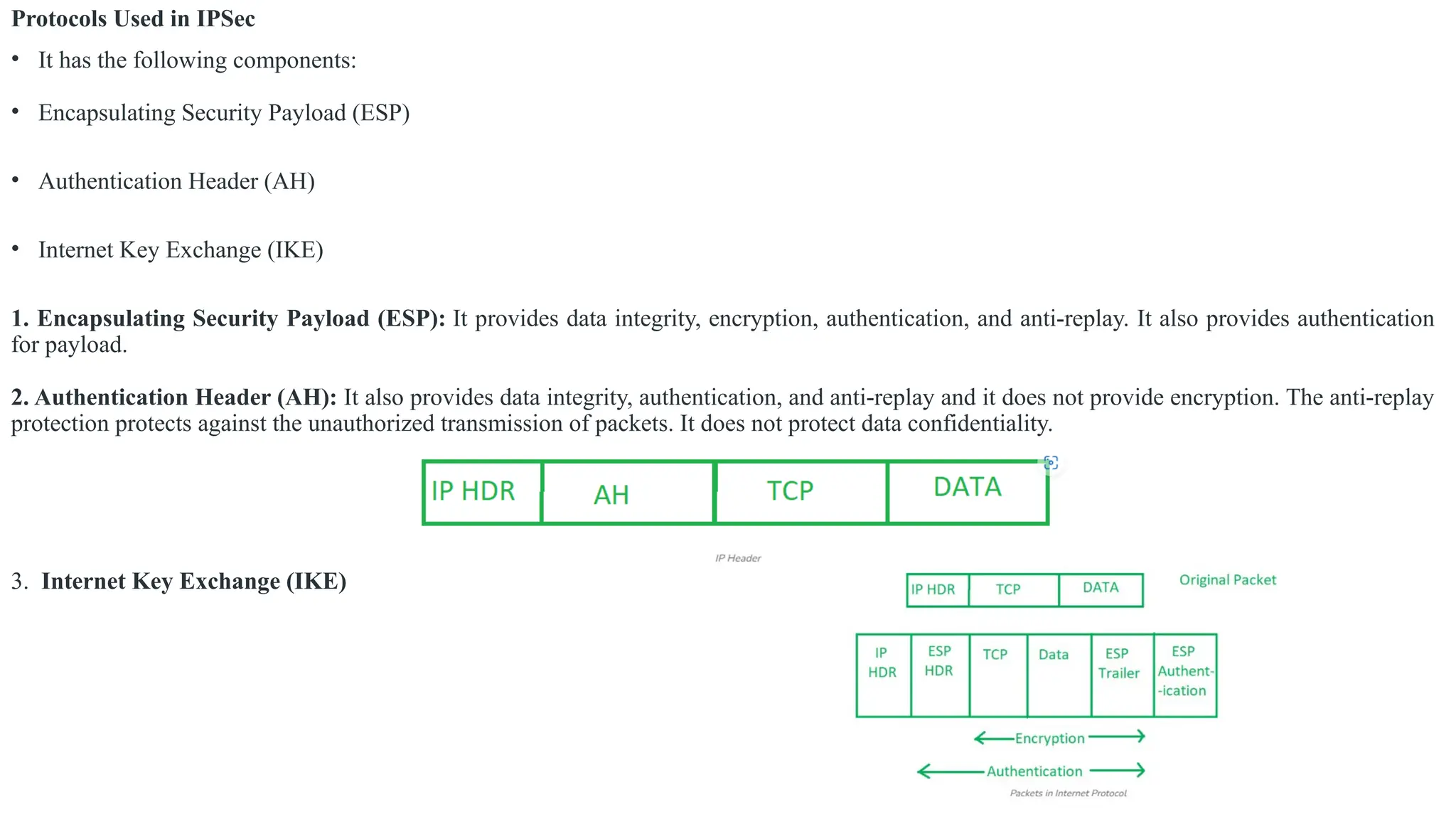
1. Encapsulating Security Payload (ESP): It provides data integrity, encryption, authentication, and anti-replay. It also provides authentication
for payload.
2. Authentication Header (AH): It also provides data integrity, authentication, and anti-replay and it does not provide encryption. The anti-replay
protection protects against the unauthorized transmission of packets. It does not protect data confidentiality.
3. Internet Key Exchange (IKE)
IP Security Architecture
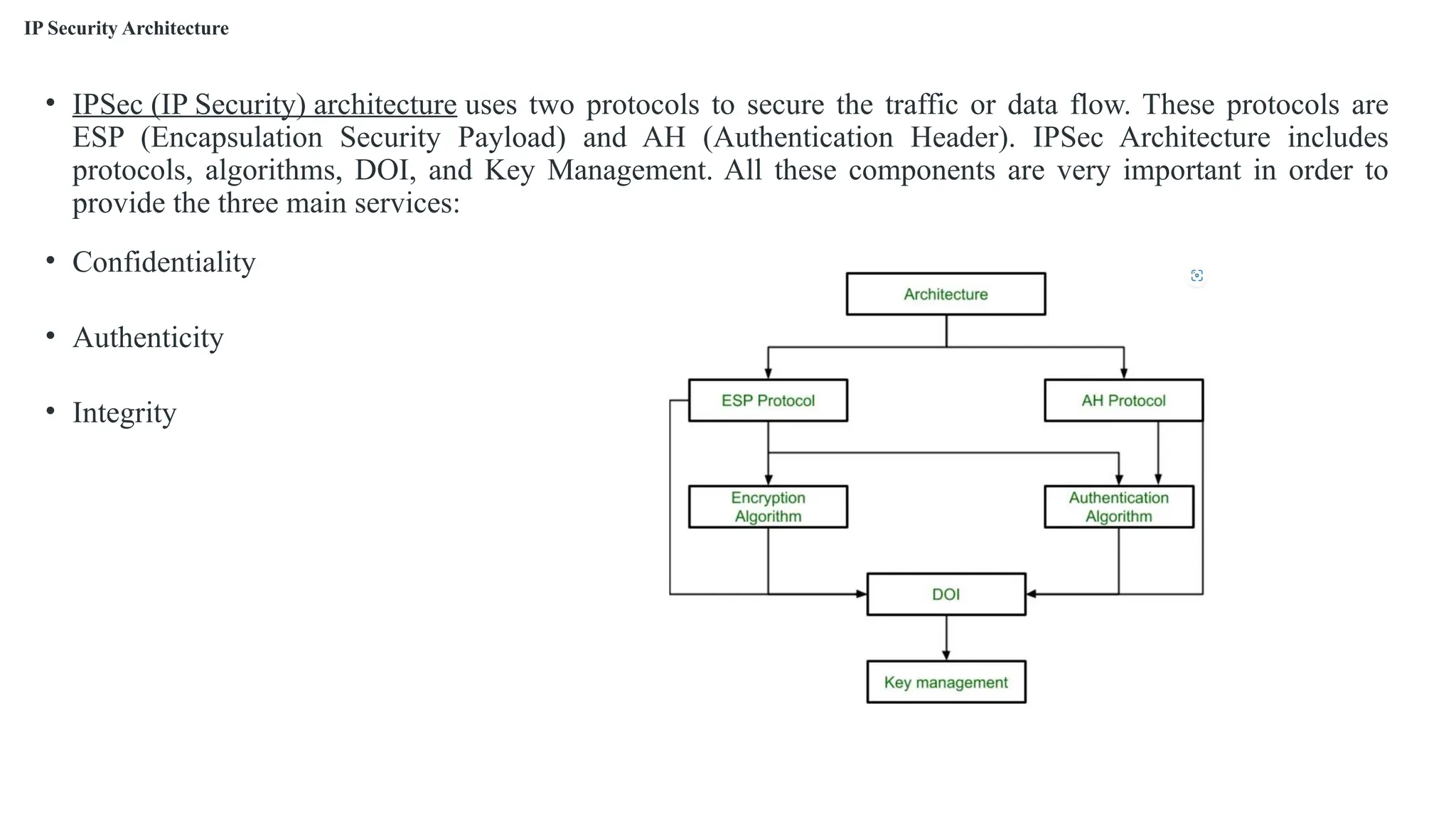
• IPSec (IP Security) architecture uses two protocols to secure the traffic or data flow. These protocols are
ESP (Encapsulation Security Payload) and AH (Authentication Header). IPSec Architecture includes
protocols, algorithms, DOI, and Key Management. All these components are very important in order to
provide the three main services:
• Confidentiality
• Authenticity
• Integrity
Advantages of IPSec
• Strong security: IPSec provides strong cryptographic security services that help protect sensitive data and ensure network privacy and integrity.
• Wide compatibility: IPSec is an open standard protocol that is widely supported by vendors and can be used in heterogeneous environments.
• Flexibility: IPSec can be configured to provide security for a wide range of network topologies, including point-to-point, site-to-site, and remote
access connections.
• Scalability: IPSec can be used to secure large-scale networks and can be scaled up or down as needed.
• Improved network performance: IPSec can help improve network performance by reducing network congestion and improving network efficiency.
Disadvantages of IPSec
• Configuration Complexity: IPSec can be complex to configure and requires specialized knowledge and skills.
• Compatibility Issues: IPSec can have compatibility issues with some network devices and applications, which can lead to interoperability problems.
• Performance Impact: IPSec can impact network performance due to the overhead of encryption and decryption of IP packets.
• Key Management: IPSec requires effective key management to ensure the security of the cryptographic keys used for encryption and authentication.
• Limited Protection: IPSec only provides protection for IP traffic, and other protocols such as ICMP, DNS, and routing protocols may still be
vulnerable to attacks.

Network and Internet Security.pptx

  • 1.
    Unit 2 Networkand Internet Security
  • 2.
    • A NetworkSecurity Model exhibits how the security service has been designed over the network to prevent the opponent from causing a threat to the confidentiality or authenticity of the information that is being transmitted through the network. We are concerned about the security of the message over the network when the message has some confidential or authentic information which has a threat from an opponent present at the information channel. Any security service would have the three components discussed below: • 1. Transformation of the information which has to be sent to the receiver. So, that any opponent present at the information channel is unable to read the message. This indicates the encryption of the message. • It also includes the addition of code during the transformation of the information which will be used in verifying the identity of the authentic receiver. • 2. Sharing of the secret information between sender and receiver of which the opponent must not any clue. Yes, we are talking of the encryption key which is used during the encryption of the message at the sender’s end and also during the decryption of message at receiver’s end. • 3. There must be a trusted third party which should take the responsibility of distributing the secret information (key) to both the communicating parties and also prevent it from any opponent.
  • 4.
    • The networksecurity model presents the two communicating parties sender and receiver who mutually agrees to exchange the information. The sender has information to share with the receiver. Designing a Network Security Model • Perimeter Security :Perimeter security is first line of defense against cyber-attacks. It involves implementing firewalls, intrusion detection systems, and other security measures to protect network from external threats. • Access Control :Access control is used to manage who has access to network and what they can do once they are connected. This includes implementing password policies, role-based access control, and other security measures to prevent unauthorized access. • Data Protection: Data protection involves implementing measures to ensure confidentiality, integrity, and availability of data. This includes encryption, backup and recovery, and other security measures to protect data from unauthorized access, modification, or destruction. • Monitoring and Response : Monitoring and response involves use of security tools to detect and respond to security incidents in real-time. This includes implementing security information and event management (SIEM) systems, intrusion detection systems, and other security tools to monitor network activity and identify potential threats.
  • 5.
    Email Security (DomainKey Identified Mail (DKIM)) • The SPF, DMARC and DKIM email validation and authentication protocols work together as follows: • The SPF protocol enables an email-sending organization to identify the email servers authorized to send email on behalf of the organization's domain. SPF records information about authorized email servers in the sender's domain name system (DNS) records, which are accessible to any internet-connected system. SPF is especially important for email service providers -- notably, Google Gmail, Yahoo email services and others -- that send and receive email for many different organizations. • The DKIM protocol enables an email-sending organization to digitally sign each individual message sent by an authorized email server. DKIM relies on SPF to identify whether a message was sent by an authorized email server and relies on DMARC to determine the appropriate policy when an email message fails authentication. • The DMARC protocol enables an email-sending organization to specify the procedures receivers should take when they receive email that has not been authenticated. When an email server not listed in the SPF record attempts to send a message or when DKIM authentication fails, DMARC policies provide guidance to the receiver as to whether the message should be delivered, quarantined -- i.e., sent to spam folder -- or rejected entirely. • DKIM, SPF and DMARC publish all the information used to authenticate email in DNS TXT records. DKIM publishes the public key used to do DKIM authentication of individual emails. SPF publishes information about the email servers authorized to send email for a domain, and DMARC publishes its policies for unauthenticated email.
  • 6.
    1. SPF(Sender PolicyFramework): It specifies specific hosts/servers authorized to send email for a domain Sender Policy Framework (SPF) is a way for a domain to list all the servers they send emails from. SPF records list all the IP addresses of all the servers that are allowed to send emails from the domain, just as an employee directory lists the names of all employees for an organization. Mail servers that receive an email message can check it against the SPF record before passing it on to the recipient's inbox.
  • 7.
    2. What isa DKIM key?
  • 8.
    • DKIM enablesemail senders to publish the public key of the domain owner's public key pair. • Email senders using DKIM publish their public key to a DNS TXT record associated with the domain from which email is being sent. The receiving mail server uses this public key to authenticate the digital signatures added to email headers from the sending domain. • DKIM, or DomainKeys Identified Mail, is a protocol that establishes your emails’ authenticity. It works by adding a unique DKIM signature to every email, which is verified using a public key stored in your domain’s DNS (Domain Name System). • This process helps email providers confirm that the message comes from you and hasn’t been altered during delivery. • To understand how DKIM works, let’s break it down into its key components:  DKIM signature  DKIM record.
  • 9.
    DKIM signature • DKIMsignature is a unique seal on every email you send to prove it’s genuinely from you. This signature, automatically added to your email’s header, is created using encryption techniques and includes a hash of the email’s content. • When your email reaches the recipient’s inbox, their email provider uses the public key stored in your DNS to verify the signature. If the signature checks out, it confirms two things: • Your domain sent the email (authenticity). • The content remained unaltered during delivery (integrity). • This verification reduces the chances of your emails being flagged as spam or rejected outright. DKIM record • The DKIM record is a small but mighty piece of information stored in your domain’s DNS settings. It acts as the foundation of DKIM by providing the public key that email providers use to validate your email signatures. • Each DKIM record includes: • Version (v). Specifies the DKIM version. • Key type (k). Defines the encryption type. • Public key (p). The actual key used to verify your email signature. • The DKIM record also uses a “selector,” which helps distinguish between multiple DKIM configurations, such as when you use different email services.
  • 10.
    How DKIM, SPF,and DMARC work together Protocol Role How It Works Benefits DKIM Verifies the email’s authenticity Adds a unique digital signature to each email using a private key. The sending server creates this signature, and the email is sent to the recipient’s server. The recipient’s server verifies it with a public key in your DNS records. Ensures emails are genuine and haven’t been tampered with. Protects against email spoofing and phishing attacks. SPF Confirms that an authorized email server sent the message Specifies which servers are allowed to send emails on behalf of your domain. It checks the IP address of the email sender against a list in your DKIM records. Reduces the risk of unauthorized servers sending emails from your domain. Helps prevent email impersonation. DMARC Defines policies for handling non-legitimate emails Uses both DKIM and SPF for email authentication verification. Instructs email servers on handling messages that fail these checks (e.g., reject or quarantine). Sends reports on failed authentication attempts. Provides reporting and guidance for handling suspicious emails. Increases email deliverability by reducing malicious spam and phishing risk.
  • 11.
    • Steps toCheck DKIM in Gmail: 1. Open the Email in Gmail: 1. Log in to your Gmail account. 2. Open the email you want to check. 2.Access Email Headers: • Click the three vertical dots (More menu) in the top-right corner of the email. • Select "Show original" from the dropdown menu. This will open a new tab or window displaying the email's full headers and raw content. 3. Find the DKIM Signature: • Look at the line in the email headers starting with DKIM Signature. This indicates that the E-mail has been verified or has an DKIM Signature. 4. Check DKIM Validation : • Scroll down to the section labeled "Authentication-Results". • Look for the dkim = field. It will indicate whether the DKIM Signature passed or failed. dkim=pass header.i=@example.com
  • 12.
    Steps to createan key (public and private key) Step 1:Choose a Tool to Generate Keys You can use a variety of tools to generate DKIM keys, including: •Command-line tools like openssl. •Web-based DKIM generators. Step 2: Generate the Key Pair Using OpenSSL Generate a Private Key: Run the following command in a terminal: • openssl genrsa -out dkim-private.key 2048 Extract the Public Key: Generate the public key from the private key: • openssl rsa -in dkim-private.key -pubout -out dkim-public.key
  • 13.
    How does DMARCwork? • Domain-based Message Authentication Reporting and Conformance (DMARC) tells a receiving email server what to do given the results after checking SPF and DKIM. A domain's DMARC policy can be set in a variety of ways — it can instruct mail servers to quarantine emails that fail SPF or DKIM (or both), to reject such emails, or to deliver them. • DMARC policies are stored in DMARC records. A DMARC record can also contain instructions to send reports to domain administrators about which emails are passing and failing these checks. DMARC reports give administrators the information they need to decide how to adjust their DMARC policies (for example, what to do if legitimate emails are erroneously getting marked as spam). • To check whether DMARC (Domain-based Message Authentication, Reporting, and Conformance) is working correctly, you need to verify that: 1. The DMARC record is published in your DNS. 2. Emails sent from your domain comply with DMARC policies. 3. Reports generated by DMARC provide insights into email authentication.
  • 17.
    Transport Level Security(Web Security Issues, HTTPS, Secure Shell SSH) Transport Layer Securities (TLS) are designed to provide security at the transport layer. TLS was derived from a security protocol called Secure Socket Layer (SSL). TLS ensures that no third party may eavesdrop or tampers with any message. • There are several benefits of TLS: • Encryption: TLS/SSL can help to secure transmitted data using encryption. • Interoperability: TLS/SSL works with most web browsers, including Microsoft Internet Explorer and on most operating systems and web servers. • Algorithm flexibility: TLS/SSL provides operations for authentication mechanism, encryption algorithms and hashing algorithm that are used during the secure session. • Ease of Deployment: Many applications TLS/SSL temporarily on a windows server 2003 operating systems. • Ease of Use: Because we implement TLS/SSL beneath the application layer, most of its operations are completely invisible to client.
  • 18.
    Web Security Issues Toclassify Web security threats is in terms of the location of the threat: Web server, Web browser, and network traffic between browser and server. Issues of server and browser security fall into the category of computer system security.
  • 19.
    • Web SecurityIssues • Common Threats: • Cross-Site Scripting (XSS) • SQL Injection • Man-in-the-Middle (MITM) attacks • Phishing
  • 20.
    HTTPS(What is HypertextTransfer Protocol Secure?) • Hypertext Transfer Protocol Secure is a protocol that is used to communicate between the user browser and the website. It also helps in the transfer of data. It is the secure variant of HTTP. To make the data transfer more secure, it is encrypted. Encryption is required to ensure security while transmitting sensitive information like passwords, contact information, etc.
  • 21.
    How Does HTTPSWork? • HTTPS establishes the communication between the browser and the web server. It uses the Secure Socket Layer (SSL) and Transport Layer Security (TLS) protocol for establishing communication. The new version of SSL is TLS(Transport Layer Security). • HTTPS uses the conventional HTTP protocol and adds a layer of SSL/TLS over it. The workflow of HTTP and HTTPS remains the same, the browsers and servers still communicate with each other using the HTTP protocol. However, this is done over a secure SSL connection. The SSL connection is responsible for the encryption and decryption of the data that is being exchanged to ensure data safety.
  • 22.
    Secure Shell SSH •It provides protection to the data that are aligned between the web browser and server. SSL encrypts the link between a web server and a browser which ensures that all data passed between them stay private and separate from attack. • SSH (Secure Shell) is a network protocol used to securely access and manage devices over an unsecured network, like the internet. It is most commonly used to log into remote systems (like servers) and execute commands, transfer files, or administer remote systems securely. • SSH uses encryption to ensure that all data transmitted over the network is secure, preventing interception by unauthorized users. This makes it a highly secure alternative to older protocols like Telnet and FTP. 1. It is a scientific discipline network protocol for operative network services over an unsecured network. 2. It is designed to replace the unsecured protocol like -telnet and insecure file transfer methods(like FTP). 3. It uses a consumer server design. 4. It uses public-key cryptography/asymmetric key cryptography to demonstrate the remote server. i.e. to verify its identity to the remote server. Secure Socket Layer Protocols: • SSL record protocol • Handshake protocol • Change-cipher spec protocol • Alert protocol
  • 23.
    • Key Featuresof SSH: 1. Encryption: All communication is encrypted, protecting sensitive data from being intercepted. 2. Authentication: SSH ensures that the remote system is who it claims to be, using methods like password-based authentication, key-based authentication, or even two-factor authentication. 3. Secure File Transfer: It supports secure file transfer protocols like SFTP (SSH File Transfer Protocol) and SCP (Secure Copy). 4. Port Forwarding: SSH can securely forward network traffic, allowing you to tunnel other protocols through the encrypted connection. 5. Remote Execution: Allows execution of commands on a remote machine, which is essential for remote administration and system management. • SSH stands for Secure Shell or Secure Socket Shell. It is a cryptographic network protocol that allows two computers to communicate and share the data over an insecure network such as the internet. It is used to login to a remote server to execute commands and data transfer from one machine to another machine. • The SSH protocol was developed by SSH communication security Ltd to safely communicate with the remote machine. • Secure communication provides a strong password authentication and encrypted communication with a public key over an insecure channel. It is used to replace unprotected remote login protocols such as Telnet, rlogin, rsh, etc., and insecure file transfer protocol FTP. • Its security features are widely used by network administrators for managing systems and applications remotely.
  • 24.
    How SSH Works: 1.SSH Client & Server: • SSH Client: The program used by the user to initiate the connection to the remote server. Common SSH clients include the “ssh” command-line tool in Linux, macOS, and Windows, as well as tools like PuTTY. • SSH Server: The remote machine that accepts incoming SSH connections. The SSH server listens for requests on port 22 by default. 2. Authentication Methods: • Password-based authentication: The user enters a username and password to authenticate to the remote system. • Key-based authentication: This is more secure than passwords. The user generates a public-private key pair. The public key is stored on the remote system, while the private key remains with the user. The user’s identity is verified when the SSH server matches the private key to the stored public key. • Two-factor authentication: This can be added on top of either password or key-based authentication for an additional layer of security. 3. Encryption: • Once the SSH connection is established, the communication between the client and the server is encrypted using symmetric encryption (such as AES). • The server and client first exchange keys and use them for encryption during the session.
  • 26.
    Usages of SSHprotocol: • The popular usages of SSH protocol are given below: • It provides secure access to users and automated processes. • It is an easy and secure way to transfer files from one system to another over an insecure network. • It also issues remote commands to the users. • It helps the users to manage the network infrastructure and other critical system components. • It is used to log in to shell on a remote system (Host), which replaces Telnet and rlogin and is used to execute a single command on the host, which replaces rsh. • It combines with rsync utility to backup, copy, and mirror files with complete security and efficiency. • It can be used for forwarding a port. • By using SSH, we can set up the automatic login to a remote server such as OpenSSH. • We can securely browse the web through the encrypted proxy connection with the SSH client, supporting the SOCKS protocol.
  • 27.
    The architecture ofSSH Protocol • The SSH architecture is made-up of three well-separated layers. These layers are: 1. Transport Layer 2. User-authentication layer 3. Connection Layer • The SSH protocol architecture is an open architecture; hence it provides great flexibility and enables SSH use for many other purposes instead of only a secure shell. In the architecture, the transport layer is similar to the transport layer security (TLS). The User-authentication layer can be used with the custom authentication methods, and the connection layer allows multiplexing different secondary sessions into a single SSH connection. Transport Layer • The transport layer is the top layer of the TCP/IP protocol suite. For SSH-2, this layer is responsible for handling initial key exchange, server authentication, set up encryption, compression, and integrity verification. It works as an interface for sending and receiving plaintext packets with sizes up to 32, 768bytes.
  • 28.
    User authentication Layer •As its name suggests, the user authentication layer is responsible for handling client authentication and provides various authentication methods. The authentication is done at the client-side; hence when a prompt occurs for a password, it usually for an SSH client rather than a server, and the server responds to these authentications. • This layer includes various methods of authentication; these methods are: • Password: Password authentication is a straightforward way of authentication. It includes the feature to change the password for easy access. But it is not used by all the applications. • Public-key: The public-key is a public key-based authentication method, which supports DSA, ECDSA, or RSA keypairs. • Keyboard-interactive: It is one of the versatile authentication methods. In this, the server sends a prompt to enter information & the client sends it back with keyed-in responses by the user. It is used to provide a one-time password or OTP authentication. • GSSAPI: In this method, the authentication is performed by external methods such as Kerberos 5 or NTLM, which provide the single sign-on capability to SSH sessions.
  • 29.
    Connection Layer • Theconnection layer defines various channels through which SSH services are provided. It defines the concept of channels, channel requests, and global requests. One SSH connection can host different channels simultaneously and can also transfer data in both directions simultaneously. Channel requests are used in the connection layer to relay out-of-band channel-specific data, for example, the altered size of a terminal window or the exit code of a server-side process. The standard channel types of connection layer are: • shell: It is used for terminal shells, SFTP, and exec requests. • direct-tcpip: It is used for the client-to-server forwarded connections. • forwarded-tcpip: It is used for the server-to-client forwarded connections. What can be transferred with SSH protocol? • The SSH protocol can transfer the following: • Data • Text • Commands • Files
  • 30.
    IP Security (Policy,Security Payload and Associations, Internet Key Exchange, Cryptographic Suits) • IP Security (IPSec) refers to a collection of communication rules or protocols used to establish secure network connections. Internet Protocol (IP) is the common standard that controls how data is transmitted across the internet. IPSec enhances the protocol security by introducing encryption and authentication. IPSec encrypts data at the source and then decrypts it at the destination. It also verifies the source of the data.
  • 31.
    • Features ofIPSec • Authentication: IPSec provides authentication of IP packets using digital signatures or shared secrets. This helps ensure that the packets are not tampered with or forged. • Confidentiality: IPSec provides confidentiality by encrypting IP packets, preventing eavesdropping on the network traffic. • Integrity: IPSec provides integrity by ensuring that IP packets have not been modified or corrupted during transmission. • Key management: IPSec provides key management services, including key exchange and key revocation, to ensure that cryptographic keys are securely managed. • Tunneling: IPSec supports tunneling, allowing IP packets to be encapsulated within another protocol, such as GRE (Generic Routing Encapsulation) or L2TP (Layer 2 Tunneling Protocol). • Flexibility: IPSec can be configured to provide security for a wide range of network topologies, including point-to-point, site-to-site, and remote access connections. • Interoperability: IPSec is an open standard protocol, which means that it is supported by a wide range of vendors and can be used in heterogeneous environments.
  • 32.
    IP Security (Policy,Security Payload and Associations, Internet Key Exchange, Cryptographic Suits) • IP Security (IPSec) refers to a collection of communication rules or protocols used to establish secure network connections. Internet Protocol (IP) is the common standard that controls how data is transmitted across the internet. IPSec enhances the protocol security by introducing encryption and authentication. IPSec encrypts data at the source and then decrypts it at the destination. It also verifies the source of the data. Why is IPSec Important? • IPSec protects the data through Data Encryption. • IPSec provides Data Integrity. • IPSec is often used in Virtual Private Networks (VPNs) to create secure, private connections. • IPSec protects from Cyber Attacks.
  • 33.
    Features of IPSec •Authentication: IPSec provides authentication of IP packets using digital signatures or shared secrets. This helps ensure that the packets are not tampered with or forged. • Confidentiality: IPSec provides confidentiality by encrypting IP packets, preventing eavesdropping on the network traffic. • Integrity: IPSec provides integrity by ensuring that IP packets have not been modified or corrupted during transmission. • Key management: IPSec provides key management services, including key exchange and key revocation, to ensure that cryptographic keys are securely managed. • Tunneling: IPSec supports tunneling, allowing IP packets to be encapsulated within another protocol, such as GRE (Generic Routing Encapsulation) or L2TP (Layer 2 Tunneling Protocol). • Flexibility: IPSec can be configured to provide security for a wide range of network topologies, including point-to-point, site-to-site, and remote access connections. • Interoperability: IPSec is an open standard protocol, which means that it is supported by a wide range of vendors and can be used in heterogeneous environments.
  • 34.
    IPSec Policy • AnIPSec policy defines the rules and settings applied to secure communication between endpoints. It governs how IPSec is used for authentication, encryption, and key exchange. • Components of IPSec Policy: • Filter Lists: Define the traffic types that need to be secured. • Filter Actions: Specify the action for traffic (e.g., permit, block, or secure). • Connection Types: Can include LAN, WAN, or VPN-specific connections. • Key Exchange Settings: Configure parameters for negotiating secure keys. • Authentication Methods: Common methods include pre-shared keys, certificates, or Kerberos.
  • 35.
    How Does IPSecWork? • IPSec (Internet Protocol Security) is used to secure data when it travels over the Internet. IPSec works by creating secure connections between devices, making sure that the information exchanged is kept safe from unauthorized access. IPSec majorly operates in two ways i.e. Transport Mode and Tunnel Mode. • IPSec uses two main protocols: AH (Authentication Header) and ESP (Encapsulating Security Payload). Both protocols are very useful as Authentication Header verifies the data that whether it comes from a trusted source and hasn’t been changed, and ESP has the work of performing authentication and also encrypts the data so that it becomes difficult to read.
  • 36.
    Security Payload • Thesecurity payloads are the building blocks of IPSec, providing confidentiality, authentication, and integrity. • Encapsulating Security Payload (ESP): • Provides confidentiality through encryption. • Ensures integrity and authentication of the payload using hashing techniques. • Operates in two modes: • Transport Mode: Encrypts only the payload of the IP packet. • Tunnel Mode: Encrypts the entire IP packet, including the header. • Authentication Header (AH): • Offers packet integrity and authentication but no encryption. • Protects against replay attacks by including a sequence number.
  • 37.
    IPSec Connection EstablishmentProcess : IPSec is a protocol suite used in securing communication using the Internet Protocol such that each packet communicated in the course of a particular session is authenticated and encrypted. The process of establishing an IPSec connection involves two main phases: Phase 1: Establishing the IKE (Internet Key Exchange) Tunnel • In phase 1, the main aim is to establish the secure channel the IKE tunnel, which is used to further negotiations. Phase 1 can operate in one of two modes: • Main Mode: Main Mode is a six-message exchange procedure that is more secure than Basic Mode, although at the cost of a longer session, since identity information is transmitted during negotiations. • Aggressive Mode: Aggressive Mode takes lesser time with the exchange of three messages and is less secure since more information like identity is disclosed during the course of negotiation. Phase 2: Establishing the IPSec Tunnel • Phase 2 is called Quick Mode and its aim is to negotiate the IPSec Security Associations after the construction of a secure IKE tunnel has been made. There are two modes in Phase 2. • Tunnel Mode: This mode encapsulates the whole of the original IP packet including the header and data. It is mostly deployed in the site to site VPNs. • Transport Mode: By this mode, only the actual data to be transmitted is encrypted and the header part of the IP packets remain unaltered. It is mainly employed in end to end communication between hosts
  • 38.
    Difference Between IPSecTunnel Mode and IPSec Transport Mode • Tunnel: The IPSec tunnel mode is appropriate for sending data over public networks because it improves data security against unauthorised parties. The computer encrypts all data, including the payload and header, and adds a new header to it. • Transport: IPSec transport mode encrypts only the data packet’s payload while leaving the IP header unchanged. The unencrypted packet header enables routers to determine the destination address of each data packet. As a result, IPSec transport is utilized in a closed and trusted network, such as to secure a direct link between two computers.
  • 39.
    Protocols Used inIPSec • It has the following components: • Encapsulating Security Payload (ESP) • Authentication Header (AH) • Internet Key Exchange (IKE) 1. Encapsulating Security Payload (ESP): It provides data integrity, encryption, authentication, and anti-replay. It also provides authentication for payload. 2. Authentication Header (AH): It also provides data integrity, authentication, and anti-replay and it does not provide encryption. The anti-replay protection protects against the unauthorized transmission of packets. It does not protect data confidentiality. 3. Internet Key Exchange (IKE)
  • 40.
    IP Security Architecture •IPSec (IP Security) architecture uses two protocols to secure the traffic or data flow. These protocols are ESP (Encapsulation Security Payload) and AH (Authentication Header). IPSec Architecture includes protocols, algorithms, DOI, and Key Management. All these components are very important in order to provide the three main services: • Confidentiality • Authenticity • Integrity
  • 41.
    Advantages of IPSec •Strong security: IPSec provides strong cryptographic security services that help protect sensitive data and ensure network privacy and integrity. • Wide compatibility: IPSec is an open standard protocol that is widely supported by vendors and can be used in heterogeneous environments. • Flexibility: IPSec can be configured to provide security for a wide range of network topologies, including point-to-point, site-to-site, and remote access connections. • Scalability: IPSec can be used to secure large-scale networks and can be scaled up or down as needed. • Improved network performance: IPSec can help improve network performance by reducing network congestion and improving network efficiency. Disadvantages of IPSec • Configuration Complexity: IPSec can be complex to configure and requires specialized knowledge and skills. • Compatibility Issues: IPSec can have compatibility issues with some network devices and applications, which can lead to interoperability problems. • Performance Impact: IPSec can impact network performance due to the overhead of encryption and decryption of IP packets. • Key Management: IPSec requires effective key management to ensure the security of the cryptographic keys used for encryption and authentication. • Limited Protection: IPSec only provides protection for IP traffic, and other protocols such as ICMP, DNS, and routing protocols may still be vulnerable to attacks.