1 Anti missile diffusion system through MATLAB with Image Processing
Department of Electronics & Instrumentation, Shri G.S. Institute of Technology And Science, Indore
INTRODUCTION
2 Anti missile diffusion system through MATLAB with Image Processing
Department of Electronics & Instrumentation, Shri G.S. Institute of Technology And Science, Indore
1. INTRODUCTION
In the field of industrial robotics, the interaction between man and machine typically
consists of the Programming and maintaining the machine by the human operator. For
safety reasons, a direct contact between the working robot and the human has to be
preveented. As long as the robots act out preprogrammed behaviors only, a direct
interaction between man and machine is not necessary anyway. However,if the robot is
to assist a human e.g. in a complex assembly task, it is necessary to have means of
exchanging information about the current scenario between man and machine in real
time. For this purpose, the classical computer devices like keyboard, mouse and monitor
are not the best choice as they require an encoding and decoding of information: if, for
instance, the human operator wants the robot to grasp an object, he would have to type
in the object’s coordinates (if these are known at all) or move the mouse pointer to an
image of the object on a computer screen to specify it. This way of transmitting
information to the machine is not only unnatural but also error prone.If the robot is
equipped with a camera system, it would be much more intuitive to just point to the
object to grasp and let the robot detect its position visually.Therefore, the movement of
the head fulfills two functions: first, it is an efficient exploitation of the sensor
equipment by shifting the interesting objects into the focus of view. Second, it can be
used as a communication channel to provide information about the current behavioural
state. In a robot system, this function can be implemented by providing the robot with a
dynamic camera head that actively tracks the EMERGING LIGHT SOURCE. To
guarantee a smooth interaction between man and machine a task like this requires that
the visual processing, the transmission of the position information to the camera
mechanics and the movement of the camera head itself are very fast. In the following,
we will describe a system which full fills these requirements
3 Anti missile diffusion system through MATLAB with Image Processing
Department of Electronics & Instrumentation, Shri G.S. Institute of Technology And Science, Indore
HARDWARE
4 Anti missile diffusion system through MATLAB with Image Processing
Department of Electronics & Instrumentation, Shri G.S. Institute of Technology And Science, Indore
3.1 ROBOT CONSTRUCTION :
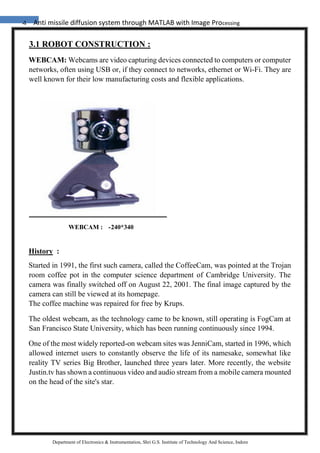
WEBCAM: Webcams are video capturing devices connected to computers or computer
networks, often using USB or, if they connect to networks, ethernet or Wi-Fi. They are
well known for their low manufacturing costs and flexible applications.
History :
Started in 1991, the first such camera, called the CoffeeCam, was pointed at the Trojan
room coffee pot in the computer science department of Cambridge University. The
camera was finally switched off on August 22, 2001. The final image captured by the
camera can still be viewed at its homepage.
The coffee machine was repaired for free by Krups.
The oldest webcam, as the technology came to be known, still operating is FogCam at
San Francisco State University, which has been running continuously since 1994.
One of the most widely reported-on webcam sites was JenniCam, started in 1996, which
allowed internet users to constantly observe the life of its namesake, somewhat like
reality TV series Big Brother, launched three years later. More recently, the website
Justin.tv has shown a continuous video and audio stream from a mobile camera mounted
on the head of the site's star.
WEBCAM : -240*340
5 Anti missile diffusion system through MATLAB with Image Processing
Department of Electronics & Instrumentation, Shri G.S. Institute of Technology And Science, Indore
Recently, Apple and other computer hardware manufactures began building webcams
directly into laptop and desktop screens. This eliminates the need to use an external USB
or Firewire webcam.
Videoconferencing :
As webcam capabilities have been added to instant messaging text chat services such as
AOL Instant Messenger, one-to-one live video communication over the internet has now
reached millions of mainstream PC users worldwide. Increased video quality has helped
webcams encroach on traditional video conferencing systems. New features such as
lighting, real-time enhancements (retouching, wrinkle smoothing and vertical stretch)
can make users more comfortable, further increasing popularity. Features and
performance vary between programs.
Videoconferencing support is included in programs as Yahoo Messenger, AOL Instant
Messenger (AIM), Windows Live Messenger, Skype, iChat, Paltalk (now
PaltalkScene), Ekiga , Stickam ,Tokbox, Camfrog and meetcam.
Some online video broadcasting sites have taken advantage of this technology to create
internet television programs centered around two (or more) people "diavlogging" with
each other from two different places. Among others, BloggingHeads.tv uses this
technology to set up conversations between prominent journalists, scientists, bloggers,
and philosophers.
Video security
Webcams are being used for security purposes. Software is available allowing
PCconnected cameras to watch for movement and sound, recording both when they are
detected; these recordings can be saved to the computer, e-mailed or uploaded to the
internet. In one well-publicised case, a computer e-mailed out images as the burglar
stole it, allowing the owner to give police a clear picture of the burglar's face even after
the computer had been stolen.
As a control input device
Special software can use the video stream from a webcam to assist or enhance a user's
control of applications and games. Video features, including faces, shapes, models and
colors can be observed and tracked to produce a corresponding form of control. For
example, the position of a single light source can be tracked and used to emulate a mouse
pointer, a head mounted light would allow hands-free computing and would greatly
6 Anti missile diffusion system through MATLAB with Image Processing
Department of Electronics & Instrumentation, Shri G.S. Institute of Technology And Science, Indore
improve computer accessibility. This can also be applied to games, providing additional
control, improved interactivity and immersiveness.
FreeTrack is a free webcam motion tracking application for Microsoft Windows that
can track a special head mounted model in up to six degrees of freedom and output data
to mouse, keyboard, joystick and FreeTrack supported games.
The EyeToy for the PlayStation 2 (The updated PlayStation 3 equivalent is the
PlayStation Eye) and similarly the Xbox Live Vision Camera for the Xbox 360 and
Xbox Live are color digital cameras that have been used as control input devices by
some games.
Small webcam-based PC games are available as either standalone executables or inside
web browser windows using Adobe Flash.
RS 232 CABLE LAYOUT :
Almost nothing in computer interfacing is more confusing than selecting the right
RS232 serial cable. These pages are intended to provide information about the most
common serial RS232 cables in normal computer use, or in more common language
"How do I connect devices and computers using RS232?"
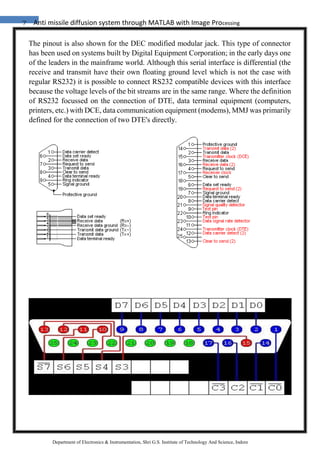
RS232 serial connector pin assignment
The RS232 connector was originally developed to use 25 pins. In this DB25 connector
pinout provisions were made for a secondary serial RS232 communication channel. In
practice, only one serial communication channel with accompanying handshaking is
present. Only very few computers have been manufactured where both serial RS232
channels are implemented. Examples of this are the Sun SparcStation 10 and 20 models
and the Dec Alpha Multia. Also on a number of Telebit modem models the secondary
channel is present. It can be used to query the modem status while the modem is on-line
and busy communicating. On personal computers, the smaller DB9 version is more
commonly used today. The diagrams show the signals common to both connector types
in black. The defined pins only present on the larger connector are shown in red. Note,
that the protective ground is assigned to a pin at the large connector where the connector
outside is used for that purpose with the DB9 connector version.
7 Anti missile diffusion system through MATLAB with Image Processing
Department of Electronics & Instrumentation, Shri G.S. Institute of Technology And Science, Indore
The pinout is also shown for the DEC modified modular jack. This type of connector
has been used on systems built by Digital Equipment Corporation; in the early days one
of the leaders in the mainframe world. Although this serial interface is differential (the
receive and transmit have their own floating ground level which is not the case with
regular RS232) it is possible to connect RS232 compatible devices with this interface
because the voltage levels of the bit streams are in the same range. Where the definition
of RS232 focussed on the connection of DTE, data terminal equipment (computers,
printers, etc.) with DCE, data communication equipment (modems), MMJ was primarily
defined for the connection of two DTE's directly.
8 Anti missile diffusion system through MATLAB with Image Processing
Department of Electronics & Instrumentation, Shri G.S. Institute of Technology And Science, Indore
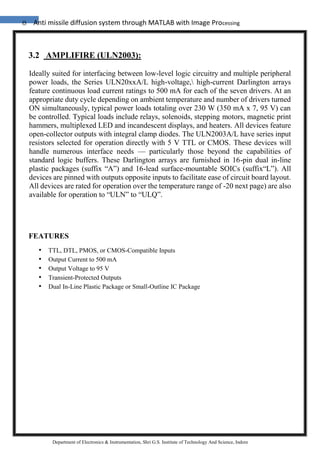
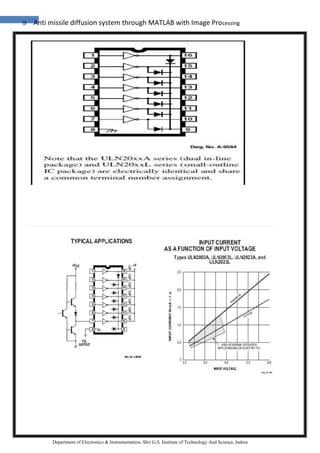
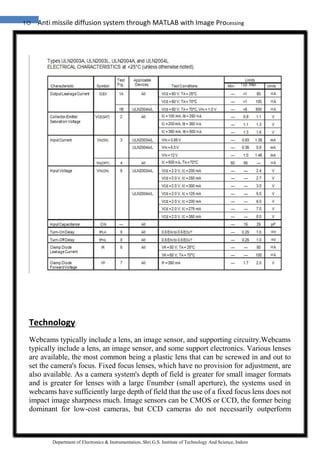
3.2 AMPLIFIRE (ULN2003):
Ideally suited for interfacing between low-level logic circuitry and multiple peripheral
power loads, the Series ULN20xxA/L high-voltage, high-current Darlington arrays
feature continuous load current ratings to 500 mA for each of the seven drivers. At an
appropriate duty cycle depending on ambient temperature and number of drivers turned
ON simultaneously, typical power loads totaling over 230 W (350 mA x 7, 95 V) can
be controlled. Typical loads include relays, solenoids, stepping motors, magnetic print
hammers, multiplexed LED and incandescent displays, and heaters. All devices feature
open-collector outputs with integral clamp diodes. The ULN2003A/L have series input
resistors selected for operation directly with 5 V TTL or CMOS. These devices will
handle numerous interface needs — particularly those beyond the capabilities of
standard logic buffers. These Darlington arrays are furnished in 16-pin dual in-line
plastic packages (suffix “A”) and 16-lead surface-mountable SOICs (suffix“L”). All
devices are pinned with outputs opposite inputs to facilitate ease of circuit board layout.
All devices are rated for operation over the temperature range of -20 next page) are also
available for operation to “ULN” to “ULQ”.
FEATURES
• TTL, DTL, PMOS, or CMOS-Compatible Inputs
• Output Current to 500 mA
• Output Voltage to 95 V
• Transient-Protected Outputs
• Dual In-Line Plastic Package or Small-Outline IC Package
9 Anti missile diffusion system through MATLAB with Image Processing
Department of Electronics & Instrumentation, Shri G.S. Institute of Technology And Science, Indore
10 Anti missile diffusion system through MATLAB with Image Processing
Department of Electronics & Instrumentation, Shri G.S. Institute of Technology And Science, Indore
Technology:
Webcams typically include a lens, an image sensor, and supporting circuitry.Webcams
typically include a lens, an image sensor, and some support electronics. Various lenses
are available, the most common being a plastic lens that can be screwed in and out to
set the camera's focus. Fixed focus lenses, which have no provision for adjustment, are
also available. As a camera system's depth of field is greater for small imager formats
and is greater for lenses with a large f/number (small aperture), the systems used in
webcams have sufficiently large depth of field that the use of a fixed focus lens does not
impact image sharpness much. Image sensors can be CMOS or CCD, the former being
dominant for low-cost cameras, but CCD cameras do not necessarily outperform
11 Anti missile diffusion system through MATLAB with Image Processing
Department of Electronics & Instrumentation, Shri G.S. Institute of Technology And Science, Indore
CMOS-based cameras in the low cost price range. Most consumer webcams are capable
of providing VGA-resolution video at a frame rate of 30 frames per second. Many newer
devices can produce video in multi-megapixel resolutions, and a few can run at high
frame rates such as the PlayStation Eye, which can produce 320×240 video at 120
frames per second.
Support electronics are present to read the image from the sensor and transmit it to the
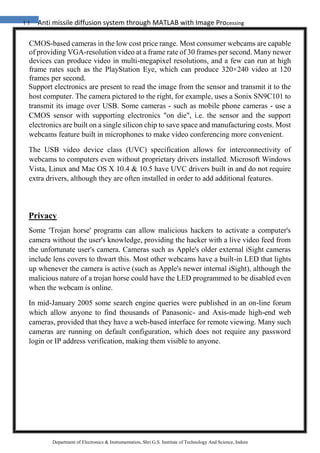
host computer. The camera pictured to the right, for example, uses a Sonix SN9C101 to
transmit its image over USB. Some cameras - such as mobile phone cameras - use a
CMOS sensor with supporting electronics "on die", i.e. the sensor and the support
electronics are built on a single silicon chip to save space and manufacturing costs. Most
webcams feature built in microphones to make video conferencing more convenient.
The USB video device class (UVC) specification allows for interconnectivity of
webcams to computers even without proprietary drivers installed. Microsoft Windows
Vista, Linux and Mac OS X 10.4 & 10.5 have UVC drivers built in and do not require
extra drivers, although they are often installed in order to add additional features.
Privacy
Some 'Trojan horse' programs can allow malicious hackers to activate a computer's
camera without the user's knowledge, providing the hacker with a live video feed from
the unfortunate user's camera. Cameras such as Apple's older external iSight cameras
include lens covers to thwart this. Most other webcams have a built-in LED that lights
up whenever the camera is active (such as Apple's newer internal iSight), although the
malicious nature of a trojan horse could have the LED programmed to be disabled even
when the webcam is online.
In mid-January 2005 some search engine queries were published in an on-line forum
which allow anyone to find thousands of Panasonic- and Axis-made high-end web
cameras, provided that they have a web-based interface for remote viewing. Many such
cameras are running on default configuration, which does not require any password
login or IP address verification, making them visible to anyone.
12 Anti missile diffusion system through MATLAB with Image Processing
Department of Electronics & Instrumentation, Shri G.S. Institute of Technology And Science, Indore
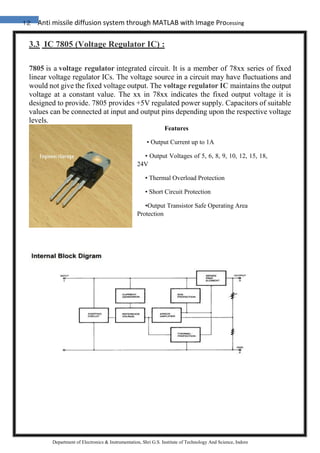
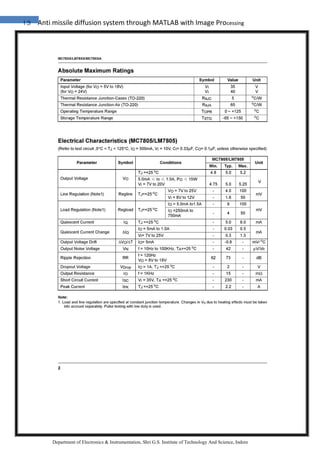
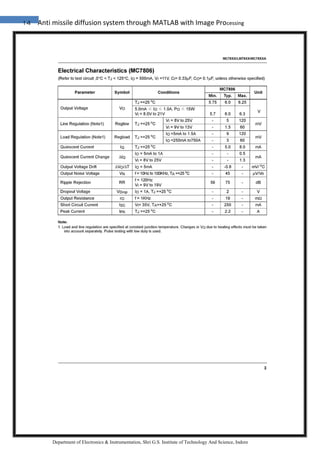
3.3 IC 7805 (Voltage Regulator IC) :
7805 is a voltage regulator integrated circuit. It is a member of 78xx series of fixed
linear voltage regulator ICs. The voltage source in a circuit may have fluctuations and
would not give the fixed voltage output. The voltage regulator IC maintains the output
voltage at a constant value. The xx in 78xx indicates the fixed output voltage it is
designed to provide. 7805 provides +5V regulated power supply. Capacitors of suitable
values can be connected at input and output pins depending upon the respective voltage
levels.
Features
• Output Current up to 1A
• Output Voltages of 5, 6, 8, 9, 10, 12, 15, 18,
24V
• Thermal Overload Protection
• Short Circuit Protection
•Output Transistor Safe Operating Area
Protection
13 Anti missile diffusion system through MATLAB with Image Processing
Department of Electronics & Instrumentation, Shri G.S. Institute of Technology And Science, Indore
14 Anti missile diffusion system through MATLAB with Image Processing
Department of Electronics & Instrumentation, Shri G.S. Institute of Technology And Science, Indore
15 Anti missile diffusion system through MATLAB with Image Processing
Department of Electronics & Instrumentation, Shri G.S. Institute of Technology And Science, Indore
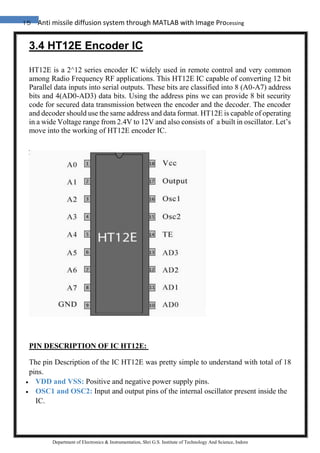
3.4 HT12E Encoder IC
HT12E is a 2^12 series encoder IC widely used in remote control and very common
among Radio Frequency RF applications. This HT12E IC capable of converting 12 bit
Parallel data inputs into serial outputs. These bits are classified into 8 (A0-A7) address
bits and 4(AD0-AD3) data bits. Using the address pins we can provide 8 bit security
code for secured data transmission between the encoder and the decoder. The encoder
and decoder should use the same address and data format. HT12E is capable of operating
in a wide Voltage range from 2.4V to 12V and also consists of a built in oscillator. Let’s
move into the working of HT12E encoder IC.
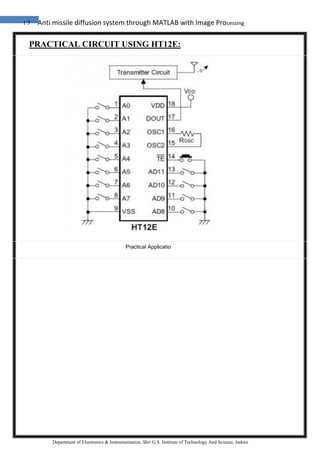
PIN DESCRIPTION OF IC HT12E:
The pin Description of the IC HT12E was pretty simple to understand with total of 18
pins.
 VDD and VSS: Positive and negative power supply pins.
 OSC1 and OSC2: Input and output pins of the internal oscillator present inside the
IC.
16 Anti missile diffusion system through MATLAB with Image Processing
Department of Electronics & Instrumentation, Shri G.S. Institute of Technology And Science, Indore
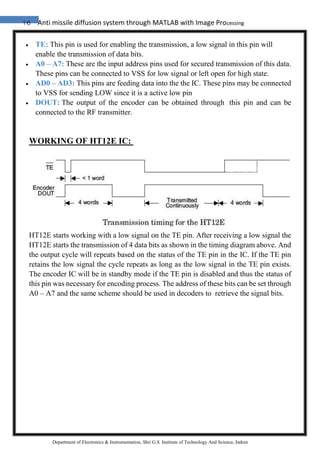
 TE: This pin is used for enabling the transmission, a low signal in this pin will
enable the transmission of data bits.
 A0 – A7: These are the input address pins used for secured transmission of this data.
These pins can be connected to VSS for low signal or left open for high state.
 AD0 – AD3: This pins are feeding data into the the IC. These pins may be connected
to VSS for sending LOW since it is a active low pin
 DOUT: The output of the encoder can be obtained through this pin and can be
connected to the RF transmitter.
WORKING OF HT12E IC:
HT12E starts working with a low signal on the TE pin. After receiving a low signal the
HT12E starts the transmission of 4 data bits as shown in the timing diagram above. And
the output cycle will repeats based on the status of the TE pin in the IC. If the TE pin
retains the low signal the cycle repeats as long as the low signal in the TE pin exists.
The encoder IC will be in standby mode if the TE pin is disabled and thus the status of
this pin was necessary for encoding process. The address of these bits can be set through
A0 – A7 and the same scheme should be used in decoders to retrieve the signal bits.
17 Anti missile diffusion system through MATLAB with Image Processing
Department of Electronics & Instrumentation, Shri G.S. Institute of Technology And Science, Indore
PRACTICAL CIRCUIT USING HT12E:
Practical Applicatio
18 Anti missile diffusion system through MATLAB with Image Processing
Department of Electronics & Instrumentation, Shri G.S. Institute of Technology And Science, Indore
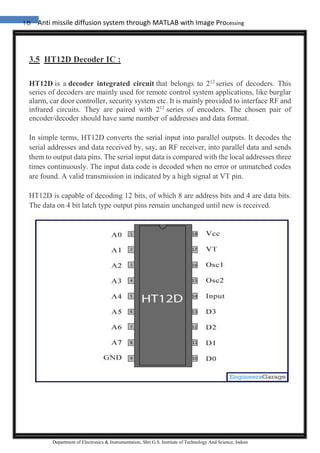
3.5 HT12D Decoder IC :
HT12D is a decoder integrated circuit that belongs to 212
series of decoders. This
series of decoders are mainly used for remote control system applications, like burglar
alarm, car door controller, security system etc. It is mainly provided to interface RF and
infrared circuits. They are paired with 212
series of encoders. The chosen pair of
encoder/decoder should have same number of addresses and data format.
In simple terms, HT12D converts the serial input into parallel outputs. It decodes the
serial addresses and data received by, say, an RF receiver, into parallel data and sends
them to output data pins. The serial input data is compared with the local addresses three
times continuously. The input data code is decoded when no error or unmatched codes
are found. A valid transmission in indicated by a high signal at VT pin.
HT12D is capable of decoding 12 bits, of which 8 are address bits and 4 are data bits.
The data on 4 bit latch type output pins remain unchanged until new is received.
19 Anti missile diffusion system through MATLAB with Image Processing
Department of Electronics & Instrumentation, Shri G.S. Institute of Technology And Science, Indore
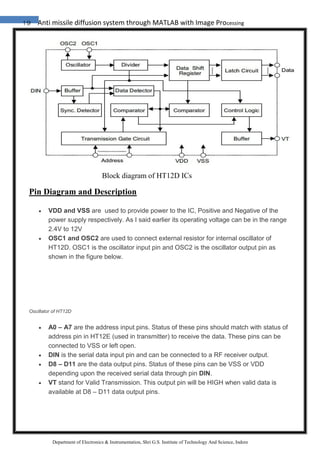
Block diagram of HT12D ICs
Pin Diagram and Description
 VDD and VSS are used to provide power to the IC, Positive and Negative of the
power supply respectively. As I said earlier its operating voltage can be in the range
2.4V to 12V
 OSC1 and OSC2 are used to connect external resistor for internal oscillator of
HT12D. OSC1 is the oscillator input pin and OSC2 is the oscillator output pin as
shown in the figure below.
Oscillator of HT12D
 A0 – A7 are the address input pins. Status of these pins should match with status of
address pin in HT12E (used in transmitter) to receive the data. These pins can be
connected to VSS or left open.
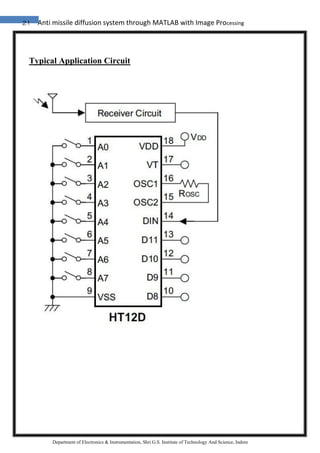
 DIN is the serial data input pin and can be connected to a RF receiver output.
 D8 – D11 are the data output pins. Status of these pins can be VSS or VDD
depending upon the received serial data through pin DIN.
 VT stand for Valid Transmission. This output pin will be HIGH when valid data is
available at D8 – D11 data output pins.
20 Anti missile diffusion system through MATLAB with Image Processing
Department of Electronics & Instrumentation, Shri G.S. Institute of Technology And Science, Indore
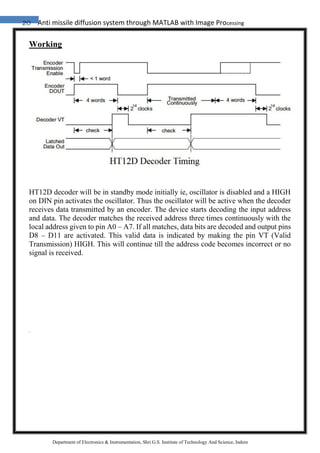
Working
HT12D decoder will be in standby mode initially ie, oscillator is disabled and a HIGH
on DIN pin activates the oscillator. Thus the oscillator will be active when the decoder
receives data transmitted by an encoder. The device starts decoding the input address
and data. The decoder matches the received address three times continuously with the
local address given to pin A0 – A7. If all matches, data bits are decoded and output pins
D8 – D11 are activated. This valid data is indicated by making the pin VT (Valid
Transmission) HIGH. This will continue till the address code becomes incorrect or no
signal is received.
21 Anti missile diffusion system through MATLAB with Image Processing
Department of Electronics & Instrumentation, Shri G.S. Institute of Technology And Science, Indore
Typical Application Circuit
22 Anti missile diffusion system through MATLAB with Image Processing
Department of Electronics & Instrumentation, Shri G.S. Institute of Technology And Science, Indore
3.6 MICROCONTROLLER :
8-bit Atmel with 8KBytes In System Programmable Flash :
Features
• High-performance, Low-power Atmel®AVR® 8-bit Microcontroller
• Advanced RISC Architecture
– 130 Powerful Instructions – Most Single-clock Cycle Execution
– 32 × 8 General Purpose Working Registers
– Fully Static Operation
– Up to 16MIPS Throughput at 16MHz
– On-chip 2-cycle Multiplier
• High Endurance Non-volatile Memory segments
– 8Kbytes of In-System Self-programmable Flash program memory
– 512Bytes EEPROM
– 1Kbyte Internal SRAM
– Write/Erase Cycles: 10,000 Flash/1 00,000 EEPROM
– Data retention: 20 years at 85°C/100 years at 25°C(1)
– Optional Boot Code Section with Independent Lock Bits
In-System Programming by On-chip Boot Program
True Read-While-Write Operation
– Programming Lock for Software Security
• Peripheral Features
– Two 8-bit Timer/Counters with Separate Prescaler, one Compare Mode
– One 16-bit Timer/Counter with Separate Prescaler, Compare Mode, and
Capture
Mode
– Real Time Counter with Separate Oscillator
– Three PWM Channels
– 8-channel ADC in TQFP and QFN/MLF package
Eight Channels 10-bit Accuracy
– 6-channel ADC in PDIP package
Six Channels 10-bit Accuracy
– Byte-oriented Two-wire Serial Interface
– Programmable Serial USART
– Master/Slave SPI Serial Interface
23 Anti missile diffusion system through MATLAB with Image Processing
Department of Electronics & Instrumentation, Shri G.S. Institute of Technology And Science, Indore
– Programmable Watchdog Timer with Separate On-chip Oscillator
– On-chip Analog Comparator
• Special Microcontroller Features
– Power-on Reset and Programmable Brown-out Detection
– Internal Calibrated RC Oscillator
– External and Internal Interrupt Sources
– Five Sleep Modes: Idle, ADC Noise Reduction, Power-save, Power-down,
and
Standby
• I/O and Packages
– 23 Programmable I/O Lines
– 28-lead PDIP, 32-lead TQFP, and 32-pad QFN/MLF
• Operating Voltages
– 2.7V - 5.5V (ATmega8L)
– 4.5V - 5.5V (ATmega8)
• Speed Grades
– 0 - 8MHz (ATmega8L)
– 0 - 16MHz (ATmega8)
• Power Consumption at 4Mhz, 3V, 25C
– Active: 3.6mA
– Idle Mode: 1.0mA
– Power-down Mode: 0.5µA
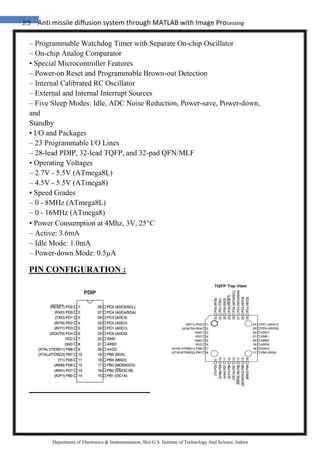
PIN CONFIGURATION :
24 Anti missile diffusion system through MATLAB with Image Processing
Department of Electronics & Instrumentation, Shri G.S. Institute of Technology And Science, Indore
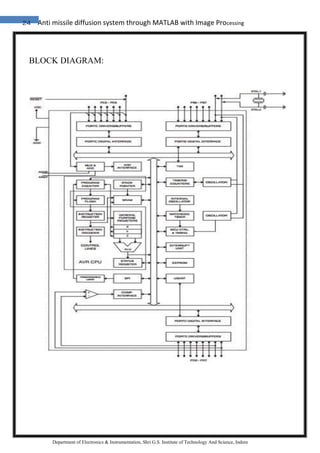
BLOCK DIAGRAM:
25 Anti missile diffusion system through MATLAB with Image Processing
Department of Electronics & Instrumentation, Shri G.S. Institute of Technology And Science, Indore
The Atmel®AVR® core combines a rich instruction set with 32 general purpose
working registers. All the 32 registers are directly connected to the Arithmetic Logic
Unit (ALU), allowing two independent registers to be accessed in one single instruction
executed in one clock cycle. The resulting architecture is more code efficient while
achieving throughputs up to ten times faster than conventional CISC microcontrollers.
The ATmega8 provides the following features: 8 Kbytes of In-System Programmable
Flash with Read-While-Write capabilities, 512 bytes of EEPROM, 1 Kbyte of SRAM,
23 general purpose I/O lines, 32 general purpose working registers, three flexible
Timer/Counters with compare modes, internal and external interrupts, a serial
programmable USART, a byte oriented Twowire Serial Interface, a 6 channel ADC
(eight channels in TQFP and QFN/MLF packages) with 10-bit accuracy, a
programmable Watchdog Timer with Internal Oscillator, an SPI serial port, and five
software selectable power saving modes. The Idle mode stops the CPU while allowing
the SRAM, Timer/Counters, SPI port, and interrupt system to continue functioning. The
Powerdown mode saves the register contents but freezes the Oscillator, disabling all
other chip functions until the next Interrupt or Hardware Reset. In Power-save mode,
the asynchronous timer continues to run, allowing the user to maintain a timer base
while the rest of the device is sleeping. The ADC Noise Reduction mode stops the CPU
and all I/O modules except asynchronous
timer and ADC, to minimize switching noise during ADC conversions. In Standby
mode, the crystal/resonator Oscillator is running while the rest of the device is sleeping.
This allows very fast start-up combined with low-power consumption. The device is
manufactured using Atmel’s high density non-volatile memory technology. The Flash
Program memory can be reprogrammed In-System through an SPI serial interface, by a
conventional non-volatile memory programmer, or by an On-chip boot program running
on the AVR core. The boot program can use any interface to download the application
program in the Application Flash memory. Software in the Boot Flash Section will
continue to run while the Application Flash Section is updated, providing true Read-
While-Write operation. By combining an 8-bit RISC CPU with In-System Self-
Programmable Flash on a monolithic chip, the Atmel ATmega8 is a powerful
microcontroller that provides a highly-flexible and cost-effective solution to many
embedded control applications. The ATmega8 is supported with a full suite of program
and system development tools, including C compilers, macro assemblers, program
simulators, and evaluation kits.
26 Anti missile diffusion system through MATLAB with Image Processing
Department of Electronics & Instrumentation, Shri G.S. Institute of Technology And Science, Indore
Pin Descriptions :
VCC :
Digital supply voltage.
GND : Ground.
Port B (PB7..PB0)
XTAL1/XTAL2/TOSC1/ TOSC2
Port B is an 8-bit bi-directional I/O port with internal pull-up resistors (selected for each
bit). The Port B output buffers have symmetrical drive characteristics with both high
sink and source capability. As inputs, Port B pins that are externally pulled low will
source current if the pull-up resistors are activated. The Port B pins are tri-stated when
a reset condition becomes active, if the clock is not running. Depending on the clock
selection fuse settings, PB6 can be used as input to the inverting Oscillator amplifier
and input to the internal clock operating circuit. Depending on the clock selection fuse
settings, PB7 can be used as output from the inverting Oscillator amplifier. If the
Internal Calibrated RC Oscillator is used as chip clock source, PB7..6 is used as
TOSC2..1 input for the Asynchronous Timer/Counter2 if the AS2 bit in ASSR is set.
The various special features of Port B are elaborated in “Alternate Functions of Port B”
.
Port C (PC5..PC0) :
Port C is an 7-bit bi-directional I/O port with internal pull-up resistors (selected for each
bit). The Port C output buffers have symmetrical drive characteristics with both high
sink and source capability. As inputs, Port C pins that are externally pulled low will
source current if the pull-up resistors are activated. The Port C pins are tri-stated when
a reset condition becomes active, even if the clock is not running.
PC6/RESET :
If the RSTDISBL Fuse is programmed, PC6 is used as an I/O pin. Note that the
electrical characteristics of PC6 differ from those of the other pins of Port C.
If the RSTDISBL Fuse is unprogrammed, PC6 is used as a Reset input. A low level on
this pin for longer than the minimum pulse length will generate a Reset, even if the clock
27 Anti missile diffusion system through MATLAB with Image Processing
Department of Electronics & Instrumentation, Shri G.S. Institute of Technology And Science, Indore
is not running. The minimum pulse length is given. Shorter pulses are not guaranteed to
generate a Reset. The various special features of Port C are elaborated.
Port D (PD7..PD0) :
Port D is an 8-bit bi-directional I/O port with internal pull-up resistors (selected for each
bit). The Port D output buffers have symmetrical drive characteristics with both high
sink and source capability. As inputs, Port D pins that are externally pulled low will
source current if the pull-up resistors are activated. The Port D pins are tri-stated when
a reset condition becomes active, even if the clock is not running. Port D also serves the
functions of various special features of the ATmega8 as listed.
RESET :
Reset input. A low level on this pin for longer than the minimum pulse length
will generate a reset, even if the clock is not running. The minimum pulse length
is given.
28 Anti missile diffusion system through MATLAB with Image Processing
Department of Electronics & Instrumentation, Shri G.S. Institute of Technology And Science, Indore
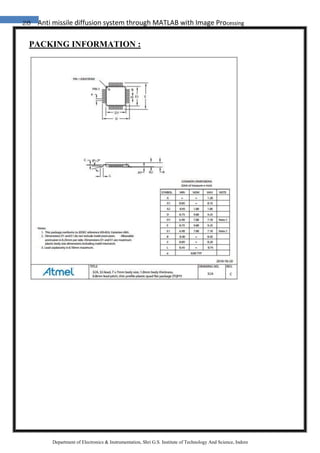
PACKING INFORMATION :
29 Anti missile diffusion system through MATLAB with Image Processing
Department of Electronics & Instrumentation, Shri G.S. Institute of Technology And Science, Indore
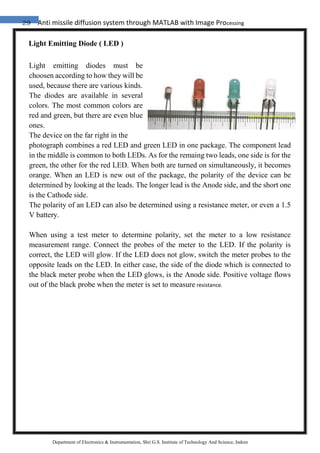
Light Emitting Diode ( LED )
Light emitting diodes must be
choosen according to how they will be
used, because there are various kinds.
The diodes are available in several
colors. The most common colors are
red and green, but there are even blue
ones.
The device on the far right in the
photograph combines a red LED and green LED in one package. The component lead
in the middle is common to both LEDs. As for the remaing two leads, one side is for the
green, the other for the red LED. When both are turned on simultaneously, it becomes
orange. When an LED is new out of the package, the polarity of the device can be
determined by looking at the leads. The longer lead is the Anode side, and the short one
is the Cathode side.
The polarity of an LED can also be determined using a resistance meter, or even a 1.5
V battery.
When using a test meter to determine polarity, set the meter to a low resistance
measurement range. Connect the probes of the meter to the LED. If the polarity is
correct, the LED will glow. If the LED does not glow, switch the meter probes to the
opposite leads on the LED. In either case, the side of the diode which is connected to
the black meter probe when the LED glows, is the Anode side. Positive voltage flows
out of the black probe when the meter is set to measure resistance.
30 Anti missile diffusion system through MATLAB with Image Processing
Department of Electronics & Instrumentation, Shri G.S. Institute of Technology And Science, Indore
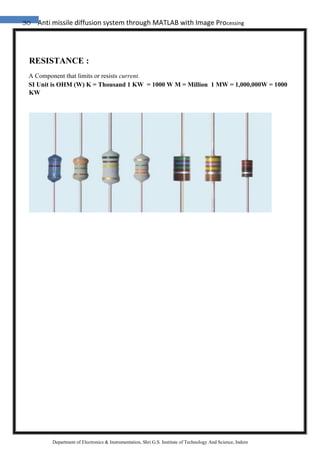
RESISTANCE :
A Component that limits or resists current.
SI Unit is OHM (W) K = Thousand 1 KW = 1000 W M = Million 1 MW = 1,000,000W = 1000
KW
31 Anti missile diffusion system through MATLAB with Image Processing
Department of Electronics & Instrumentation, Shri G.S. Institute of Technology And Science, Indore
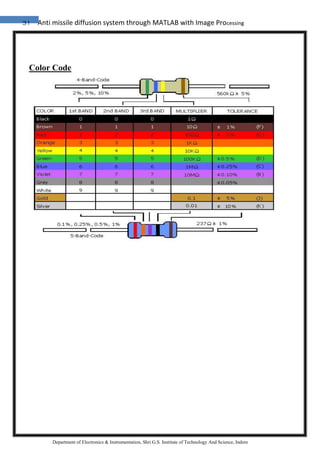
Color Code
32 Anti missile diffusion system through MATLAB with Image Processing
Department of Electronics & Instrumentation, Shri G.S. Institute of Technology And Science, Indore
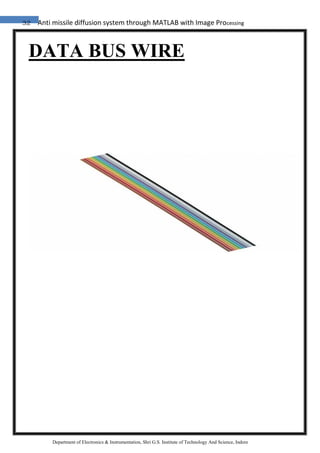
DATA BUS WIRE
33 Anti missile diffusion system through MATLAB with Image Processing
Department of Electronics & Instrumentation, Shri G.S. Institute of Technology And Science, Indore
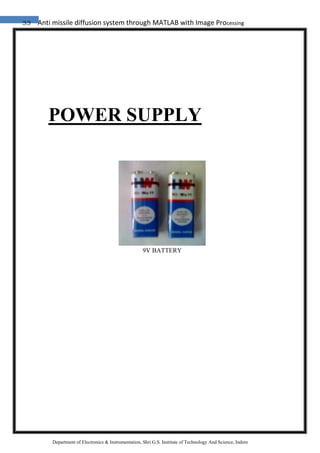
POWER SUPPLY
9V BATTERY
34 Anti missile diffusion system through MATLAB with Image Processing
Department of Electronics & Instrumentation, Shri G.S. Institute of Technology And Science, Indore
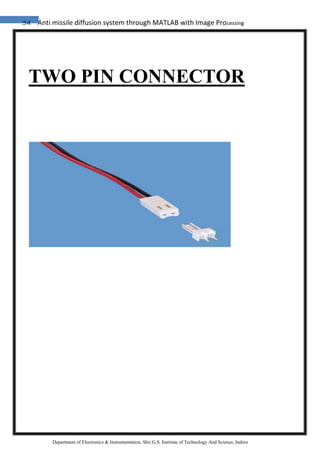
TWO PIN CONNECTOR
35 Anti missile diffusion system through MATLAB with Image Processing
Department of Electronics & Instrumentation, Shri G.S. Institute of Technology And Science, Indore
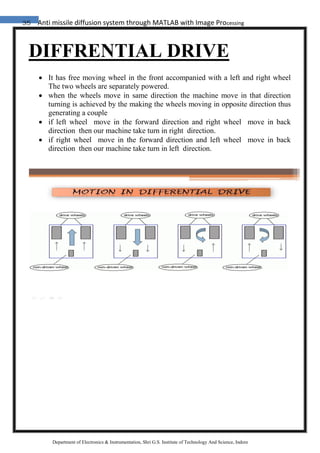
DIFFRENTIAL DRIVE
 It has free moving wheel in the front accompanied with a left and right wheel
The two wheels are separately powered.
 when the wheels move in same direction the machine move in that direction
turning is achieved by the making the wheels moving in opposite direction thus
generating a couple
 if left wheel move in the forward direction and right wheel move in back
direction then our machine take turn in right direction.
 if right wheel move in the forward direction and left wheel move in back
direction then our machine take turn in left direction.
36 Anti missile diffusion system through MATLAB with Image Processing
Department of Electronics & Instrumentation, Shri G.S. Institute of Technology And Science, Indore
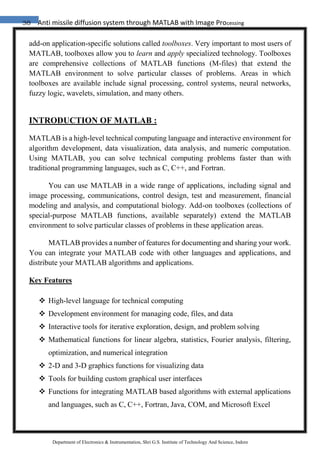
SOFTWARE
37 Anti missile diffusion system through MATLAB with Image Processing
Department of Electronics & Instrumentation, Shri G.S. Institute of Technology And Science, Indore
4.1 MATLAB:
Overview of MATLAB
For matrix computation. MATLAB has evolved over a period of years with input
MATLAB is a high-performance language for technical computing. It integrates
computation, visualization, and programming in an easy-to-use environment where
problems and solutions are expressed in familiar mathematical notation. Typical uses
include
• Math and computation
• Algorithm development
• Data acquisition
• Modeling, simulation, and prototyping
• Data analysis, exploration, and visualization
• Scientific and engineering graphics
• Application development, including graphical user interface building
MATLAB is an interactive system whose basic data element is an array that does not
require dimensioning. This allows you to solve many technical computing problems,
especially those with matrix and vector formulations ,in a fraction of the time it would
take to write a program in a scalar non interactive language such as C or Fortran .The
name MATLAB stands for matrix laboratory. MATLAB was originally written to
provide easy access to matrix software developed by the LINPACK and EISPACK
projects. Today, MATLAB engines incorporate the LAPACK and BLAS libraries,
embedding the state of the art in software from many users. In university environments,
it is the standard instructional tool for introductory and advanced courses in
mathematics, engineering, and science. In industry, MATLAB is the tool of choice for
high-productivity research, development, and analysis. MATLAB features a family of
38 Anti missile diffusion system through MATLAB with Image Processing
Department of Electronics & Instrumentation, Shri G.S. Institute of Technology And Science, Indore
add-on application-specific solutions called toolboxes. Very important to most users of
MATLAB, toolboxes allow you to learn and apply specialized technology. Toolboxes
are comprehensive collections of MATLAB functions (M-files) that extend the
MATLAB environment to solve particular classes of problems. Areas in which
toolboxes are available include signal processing, control systems, neural networks,
fuzzy logic, wavelets, simulation, and many others.
INTRODUCTION OF MATLAB :
MATLAB is a high-level technical computing language and interactive environment for
algorithm development, data visualization, data analysis, and numeric computation.
Using MATLAB, you can solve technical computing problems faster than with
traditional programming languages, such as C, C++, and Fortran.
You can use MATLAB in a wide range of applications, including signal and
image processing, communications, control design, test and measurement, financial
modeling and analysis, and computational biology. Add-on toolboxes (collections of
special-purpose MATLAB functions, available separately) extend the MATLAB
environment to solve particular classes of problems in these application areas.
MATLAB provides a number of features for documenting and sharing your work.
You can integrate your MATLAB code with other languages and applications, and
distribute your MATLAB algorithms and applications.
Key Features
 High-level language for technical computing
 Development environment for managing code, files, and data
 Interactive tools for iterative exploration, design, and problem solving
 Mathematical functions for linear algebra, statistics, Fourier analysis, filtering,
optimization, and numerical integration
 2-D and 3-D graphics functions for visualizing data
 Tools for building custom graphical user interfaces
 Functions for integrating MATLAB based algorithms with external applications
and languages, such as C, C++, Fortran, Java, COM, and Microsoft Excel
39 Anti missile diffusion system through MATLAB with Image Processing
Department of Electronics & Instrumentation, Shri G.S. Institute of Technology And Science, Indore
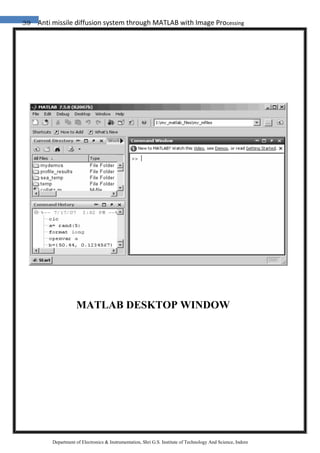
MATLAB DESKTOP WINDOW
40 Anti missile diffusion system through MATLAB with Image Processing
Department of Electronics & Instrumentation, Shri G.S. Institute of Technology And Science, Indore
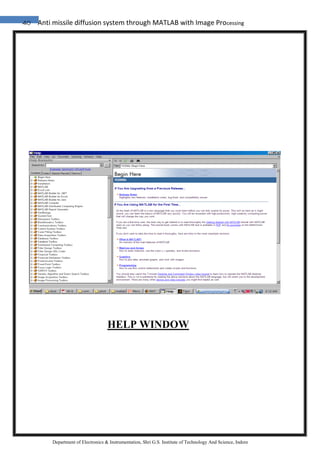
HELP WINDOW
41 Anti missile diffusion system through MATLAB with Image Processing
Department of Electronics & Instrumentation, Shri G.S. Institute of Technology And Science, Indore
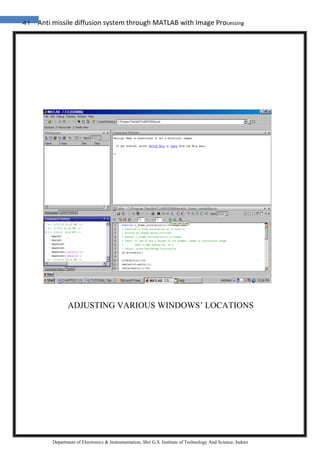
ADJUSTING VARIOUS WINDOWS’ LOCATIONS
42 Anti missile diffusion system through MATLAB with Image Processing
Department of Electronics & Instrumentation, Shri G.S. Institute of Technology And Science, Indore
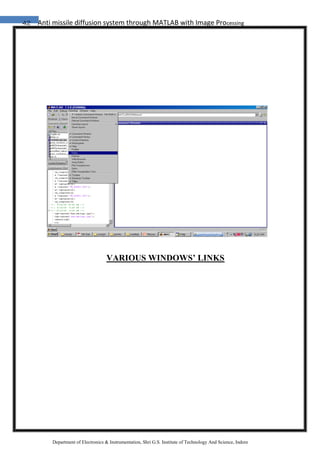
VARIOUS WINDOWS’ LINKS
43 Anti missile diffusion system through MATLAB with Image Processing
Department of Electronics & Instrumentation, Shri G.S. Institute of Technology And Science, Indore
DATA ACQUISITION TOOLBOX
DATA Acquisition:
Data acquisition is the process by which events in the real world are sampled and
translated into machine-readable signals. Data acquisition typically involves sensors,
transmitters and other instruments to collect signals, waveforms etc. to be processed and
various functions can be performed and analyzed in practical world. The components of
data acquisition systems include appropriate sensors that convert any measurement
parameter to an electrical signal, which is acquired by data acquisition hardware.
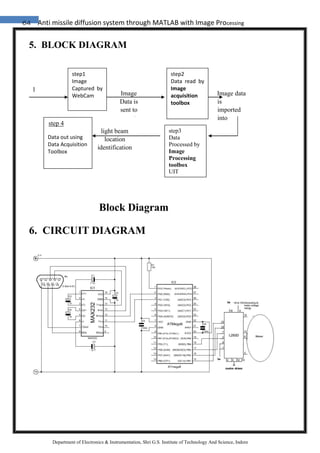
MATLAB has a dedicated toolbox on DATA Acquisition, however we are using this
toolbox to send data to our robot rather than acquiring data. However this process also
comes under data acquisition.
Image Acquisition:
Given the complexity involved in acquisition of images, MATLAB has introduced
separate toolbox for image acquisition. So data acquisition toolbox doesn’t include
image acquisition facility. Image acquisition process involves capturing a visual data in
the form of images converting it into a digital form and then importing it on the
computer for processing and analysis.
Image Processing:
Image processing is any form of signal processing for which the input is an image, such
as photographs or frames of video; the output of image processing can be either an
image or a set of characteristics or parameters related to the image.
Digital image processing is the use of computer algorithms to perform image
processing on digital images. The field of digital image processing refers to processing
digital images by means of a digital computer.
MATLAB has a dedicated toolbox for image processing. We are using this toolbox to
do our color image processing part of our project.
The MATLAB System :
The MATLAB system consists of these main parts:
44 Anti missile diffusion system through MATLAB with Image Processing
Department of Electronics & Instrumentation, Shri G.S. Institute of Technology And Science, Indore
1. Desktop Tools and Development Environment :
This is the set of tools and facilities that help you use MATLAB functions and files.
Many of these tools are graphical user interfaces. It includes the MATLAB desktop
and Command Window, a command history, an editor and debugger, a code analyzer
and other reports, and browsers for viewing help, the workspace, files, and the search
path.
2. The MATLAB Mathematical Function Library :
This is a vast collection of computational algorithms ranging from elementary
functions, like sum, sine, cosine, and complex arithmetic, to more sophisticated
functions like matrix inverse, matrix eigenvalues, Bessel functions, and fast Fourier
transforms.
3. The MATLAB Language
This is a high-level matrix/array language with control flow statements,functions,
data structures, input/output, and object-oriented programming features. It allows
both “programming in the small” to rapidly create quick and dirty throw-away
programs, and “programming in the large” to create large and complex application
programs.
Graphics :
MATLAB has extensive facilities for displaying vectors and matrices as graphs, as well
as annotating and printing these graphs. It includes high-level functions for two
dimensional and three-dimensional data visualization, image processing, animation, and
presentation graphics. It also includes low-level functions that allow you to fully
customize the appearance of graphics as well as to build complete graphical user
interfaces on your MATLAB applications.
MATLAB External Interfaces:
This is a library that allows you to write C and Fortran programs that interact with
MATLAB. It includes facilities for calling routines from MATLAB (dynamic linking),
calling MATLAB as a computational engine, and for reading and writing MAT-files.
45 Anti missile diffusion system through MATLAB with Image Processing
Department of Electronics & Instrumentation, Shri G.S. Institute of Technology And Science, Indore
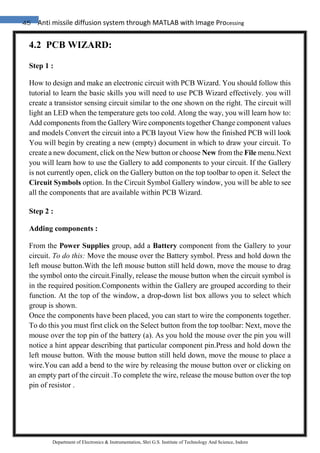
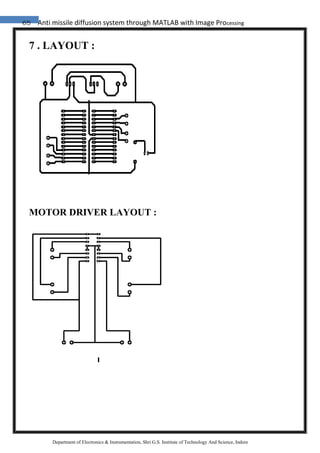
4.2 PCB WIZARD:
Step 1 :
How to design and make an electronic circuit with PCB Wizard. You should follow this
tutorial to learn the basic skills you will need to use PCB Wizard effectively. you will
create a transistor sensing circuit similar to the one shown on the right. The circuit will
light an LED when the temperature gets too cold. Along the way, you will learn how to:
Add components from the Gallery Wire components together Change component values
and models Convert the circuit into a PCB layout View how the finished PCB will look
You will begin by creating a new (empty) document in which to draw your circuit. To
create a new document, click on the New button or choose New from the File menu.Next
you will learn how to use the Gallery to add components to your circuit. If the Gallery
is not currently open, click on the Gallery button on the top toolbar to open it. Select the
Circuit Symbols option. In the Circuit Symbol Gallery window, you will be able to see
all the components that are available within PCB Wizard.
Step 2 :
Adding components :
From the Power Supplies group, add a Battery component from the Gallery to your
circuit. To do this: Move the mouse over the Battery symbol. Press and hold down the
left mouse button.With the left mouse button still held down, move the mouse to drag
the symbol onto the circuit.Finally, release the mouse button when the circuit symbol is
in the required position.Components within the Gallery are grouped according to their
function. At the top of the window, a drop-down list box allows you to select which
group is shown.
Once the components have been placed, you can start to wire the components together.
To do this you must first click on the Select button from the top toolbar: Next, move the
mouse over the top pin of the battery (a). As you hold the mouse over the pin you will
notice a hint appear describing that particular component pin.Press and hold down the
left mouse button. With the mouse button still held down, move the mouse to place a
wire.You can add a bend to the wire by releasing the mouse button over or clicking on
an empty part of the circuit .To complete the wire, release the mouse button over the top
pin of resistor .
46 Anti missile diffusion system through MATLAB with Image Processing
Department of Electronics & Instrumentation, Shri G.S. Institute of Technology And Science, Indore
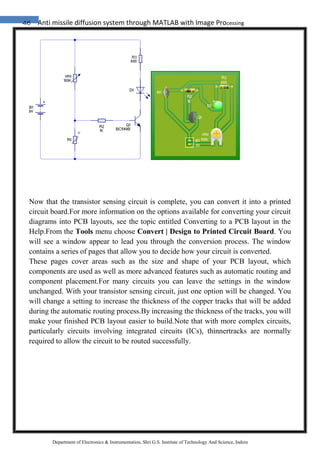
Now that the transistor sensing circuit is complete, you can convert it into a printed
circuit board.For more information on the options available for converting your circuit
diagrams into PCB layouts, see the topic entitled Converting to a PCB layout in the
Help.From the Tools menu choose Convert | Design to Printed Circuit Board. You
will see a window appear to lead you through the conversion process. The window
contains a series of pages that allow you to decide how your circuit is converted.
These pages cover areas such as the size and shape of your PCB layout, which
components are used as well as more advanced features such as automatic routing and
component placement.For many circuits you can leave the settings in the window
unchanged. With your transistor sensing circuit, just one option will be changed. You
will change a setting to increase the thickness of the copper tracks that will be added
during the automatic routing process.By increasing the thickness of the tracks, you will
make your finished PCB layout easier to build.Note that with more complex circuits,
particularly circuits involving integrated circuits (ICs), thinnertracks are normally
required to allow the circuit to be routed successfully.
47 Anti missile diffusion system through MATLAB with Image Processing
Department of Electronics & Instrumentation, Shri G.S. Institute of Technology And Science, Indore
TECHNICAL DESCRIPTION
48 Anti missile diffusion system through MATLAB with Image Processing
Department of Electronics & Instrumentation, Shri G.S. Institute of Technology And Science, Indore
ROBOT:
DEFINATION:
The reprogrammable ,multifunctional,manipulater designed to
moveematerial,parts,tools,or specified devices through various programmed motion for
the performance of variety of task.
(according to the ROBOT INSTITUTE OF AMERICA)
or
A man made mechanical device that can move by themselves ,whose motion must be
modelled ,planned, sensed,actuated and controlled and whose motion or behaviour can
be influence by programming.
TYPE:-
1) MANUAL ROBOTICS
2) SEMI AUTONOMOUS ROBOTICS
3) AUTONOMOUS ROBOTICS
1)MANUAL ROBOTICS:
A manual robot is a robot which is fully controlled by the human.
2)AUTONOMOUS ROBOTICS :
Autonomous robotics are robot which can perform desired tasks in unstructured
environments without any continous human guidance.
3)SEMI AUTONOMOUS ROBOTICS:
Semi autonomous robotics are that robots which are partially guided by some
other peripheral devices like computer etc. By semi-autonomous behavior, it is
understood that a human supervision is always necessary although the robot can
also make its own decisions. Basically the robot is driven by an operator who
receives pictures from the robot’s environment, broadcasted through the
Internet.
49 Anti missile diffusion system through MATLAB with Image Processing
Department of Electronics & Instrumentation, Shri G.S. Institute of Technology And Science, Indore
Controlling motors through Computer :
• Parallel Ports: It’s the easiest way to control the motors from computer. No
complicated intermediate circuits are required
• Serial/USB ports
• Bluetooth
• Theory and Applications of Digital Image Processing
• The Image Processing System
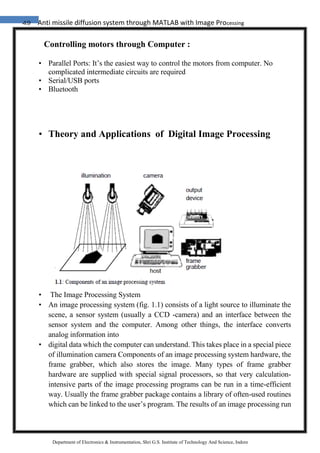
• An image processing system (fig. 1.1) consists of a light source to illuminate the
scene, a sensor system (usually a CCD -camera) and an interface between the
sensor system and the computer. Among other things, the interface converts
analog information into
• digital data which the computer can understand. This takes place in a special piece
of illumination camera Components of an image processing system hardware, the
frame grabber, which also stores the image. Many types of frame grabber
hardware are supplied with special signal processors, so that very calculation-
intensive parts of the image processing programs can be run in a time-efficient
way. Usually the frame grabber package contains a library of often-used routines
which can be linked to the user’s program. The results of an image processing run
50 Anti missile diffusion system through MATLAB with Image Processing
Department of Electronics & Instrumentation, Shri G.S. Institute of Technology And Science, Indore
will be transferred to the outside world by one or more I/O interfaces, the screen
and the normal output devices like printer, disks etc. The classical configuration
of image processing hardware is not a stand-alone system but has to be directed
by a host computer. However, the newest developments are able to integrate the
complete image processing system into the camera. In this module we will talk
about the hardware components of image processing systems. You will receive
the basics which will enable you to conceptualize an image processing system
along with the knowledge necessary to be able to compare the capability and the
compatibility of components offered by different companies You should be
familiar with the terminology in the field of personal computers
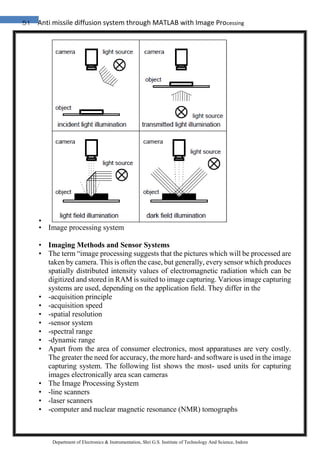
• Illuminating the Scene
• An important aspect of image processing is the proper choice of light source,
which has to be appropriate to the system’s working environment. A good choice
of illumination will allow the image processing system to receive the best image
under the circumstances and the number of procedures necessary for image
restoration will be minimized. The goal is to optimize the dynamics and the
contrast of an image. This means that an object has to be photographed with a
maximum number of intensity steps and should, at the same time, have the best
possible contrast with its background.By the choice of the
• light source
• the features of the radiation (e.g. wavelength, direction of oscillation, spatial
intensity distribution), can be selected depending on the
• requirements of the object’s surface (i.e. structure, color, transparency etc.). In any
case, however, the aim is to establish a homogenous and temporally constant
illumination over the whole area of interest.
• Daylight
• is usually not very well suited to illuminating a scene for image processing
because the color and the intensity of the light depend on the time of day, the time
of year and the weather conditions. Similarly ill-suited is the uncontrollable lightin
a production line in a factory hall. Situations where uncontrolled light cannotbe
avoided, for example in the environment of autonomous moving vehicles, will
always provide challenges for the image processing system.
•
51 Anti missile diffusion system through MATLAB with Image Processing
Department of Electronics & Instrumentation, Shri G.S. Institute of Technology And Science, Indore
•
• Image processing system
• Imaging Methods and Sensor Systems
• The term “image processing suggests that the pictures which will be processed are
taken by camera. This is often the case, but generally, every sensor which produces
spatially distributed intensity values of electromagnetic radiation which can be
digitized and stored in RAM is suited to image capturing. Various image capturing
systems are used, depending on the application field. They differ in the
• -acquisition principle
• -acquisition speed
• -spatial resolution
• -sensor system
• -spectral range
• -dynamic range
• Apart from the area of consumer electronics, most apparatuses are very costly.
The greater the need for accuracy, the more hard- and software is used in the image
capturing system. The following list shows the most- used units for capturing
images electronically area scan cameras
• The Image Processing System
• -line scanners
• -laser scanners
• -computer and nuclear magnetic resonance (NMR) tomographs
52 Anti missile diffusion system through MATLAB with Image Processing
Department of Electronics & Instrumentation, Shri G.S. Institute of Technology And Science, Indore
• -thermographic sensor systems (e.g. infrared cameras)
• -ultrasonic devices
• CCD sensors play a central role in most image processing systems. They are part
of a complex system which makes it possible to take images in problematic
environments with the necessary quality and accuracy. Sensors can be categorized
into the following classes according to their sensitivity ranges: Electromagnetic
sensors for
• -gamma radiation
• -X-ray radiation
• -the visual spectrum
• -the infrared spectrum
• -the radio wave range
• Each electromagnetic sensor is only sensitive to a certain range of electromagnetic
radiation. Other sensors like ultrasonic sensors, magnetic sensors may also be used
for imaging.
• The Frame Grabber
• The electical voltage signal produced by the sensor system will now be transferred
to the frame grabber. The frame grabber is not identical to the graphic card in
normal computers. It has to meet many more requirements. A frame grabber
should be able to process the information from various image sources store image
information quickly and efficiently offer a graphics user interface (GUI) be exible
concerning various applications
• The Image Processing System Depending on the type and the price a user is
willing to pay, a frame grabber might include fast DSPs with RISC architectures
and multiple processor systems for parallel processing, large RAM storage
capacities, sophisticated software libraries, interactive user interfaces and
comfortable programming tools. Nowadays the frame grabber board
• is still the main component in an image processing system, although with the
increasing availability of CMOS sensors, the image processing routines will be
increasingly moved directly into the camera (see section 1.2.1). On the other hand,
image processing algo rithms can be programmed directly in the host computer.
Time-critical applications, however, require a hardware frame grabber unit, either
in the camera or as a hardwareunit added to the host PC or workstation.To meet
the numerous requirements, most frame grabbers have a modular structure,
• so that the components can be configured according to the needs of the user.
Modern frame grabbers usually consist of the components (fig.
• video input unit (VIU)
• frame buffer (FB)
• digital signal processors (DSP)
• video output unit (VOU)
53 Anti missile diffusion system through MATLAB with Image Processing
Department of Electronics & Instrumentation, Shri G.S. Institute of Technology And Science, Indore
•
• Hardware components of an image processing
• system: video input unit(VIU), frame buffer (FB),
• signal processors (DSP) and video output (VOU).
• The frame buffer, as well as various digital signal processors, will be called the
image processing unit. Since the market offers a very large spectrum of frame
grabber types, it is difficult to describe a typical structure. The following sections
can therefore only give an overwiew.
• The Video Input Unit
• The video input unit is the interface between the sensor system (i.e. a CCD
camera) and the image storage unit. Like cameras, frame grabbers offer several
features which exceed the video norm. Some types can be connected to almost any
signal or image source (fig. 1.34). Basically,
• the different kinds of data sources can be named:
• -analog normed data (from video cameras, video recorders, etc.),
• -analog unnormed data (from computer tomographs, electron microscopes,
linecameras, etc.)
• digital data (from CDs, CMOS image sensors, etc.)
• Because of the required exibility, a frame grabber board has to be configurable
by the user. With any of these models, the video input unit has to be able to
multiplex the input sources synchronize the incoming signal with the
RAM,digitize analog data,transfer digital data,pre-process data,
• The Frame Buffer:-
• Data can be stored either in the frame buffer of the image processing board or in
the PC’s local storage. Modern PCI-bus computers provide sufficiently high data
transfer rates to reach an acceptable processing speed. If the PC itself is equipped
with sufficient storage space, it’s even possible to do without the frame buffer.
Indeed, in time-critical tasks, all processing steps, including the storage of the
image, take place in the image processing board. Regardless of where the frame
buffer is located, it has a different administrative structure and access possibilities
than normal RAM storage. While normal PC RAM is continuously addressed,
with the frame buffer, the user has the impression of working on a a matrix with
x- and y- coordinates. The conversion from continuous to two- dimensional
addressing and to the configurations described below is peformed by the image
processing system’s program library. Therefore, we define a frame buffer as a
RAM area (which can be physically manifested anywhere in the system) in
connection with a library, which, among other things,administers the addresses.It
54 Anti missile diffusion system through MATLAB with Image Processing
Department of Electronics & Instrumentation, Shri G.S. Institute of Technology And Science, Indore
allows the possibility of configuring the frame buffer freely to store images with
different sizes and depths. A frame buffer of 1 MByte can, for example, be
• used to store an image with dimensions of 1024 1024 pixels and 8 bit depth, but
also for a real-color image of 3 512 512 pixels (and 512 512 bytes to store
intermediate results). A pixel in a real-color image is addressed the same way as
pixels from monochromatic images, i.e. with a storage address,although in reality
it consists of three bytes (one each for R, G, and B) which x,y might be stored
physically in totally different parts of the buffer. A 1 MByte frame buffer might
also be used for an image file of 512 1024 pixels and additional overlay levels (up
to 8 bit) to display text or marks from the mouse, or to store an image sequence of
256 images, 64 64 pixels each. If the image processing system uses a CMOS
camera (section 1.2.2) the image buffer must have a pixel depth of 20 pixels
because of the large dynamic range of this camera
• type. The image buffer of 1 MByte will in this case be able to hold two images of
512 512 pixels each. However, in any of these configurations the user will want
to address an image like a two- or, in the case of an image sequence, a three-
dimensional matrix without having to think about pixel depth or addressing
algorithms It provides several access modes. For example, an image line or
column can
• be addressed with a single command; likewise, bit levels can be individually
addressed.The concept of a dual-ported memory makes it possible to address the
frame buffer in parallel from two sides. As a result, images can be read into the
frame grabber and, at the same time, be displayed on a monitor.
• The Signal Processor:-
• As mentioned previously, high end performance frame grabbers have the
possibility of capturing data from various input channels in parallel. Processing
this amount of data can only be performed by customized signal processors.
Therefore, some frame grabbers contain one or several DSPs, for example the
model TMS320C80 (Texas Instruments), which is a 32 bit DSP, to perform
complex image processing algorithms
• like filters, convolutions, data transforms or data compression. For special tasks
like neighborhood operations, specific ASIC modules can be customized. As an
example,a3 3 convolution of an image with 512 lines and 512 columns takes about
1.8 ms,a convolution over 5 5 neighborhoods of the same image will take 4.8 ms.
These tasks exceed the functions of a basic frame grabber; therefore, these boards
are called image processing systems. The DSPs may be located on the frame
grabber board or on separate boards, which communicate via the PCI bus or
internal bus systems. Some applications even distribute the signal processors
among various computer systems and are able to communicate via LANs.
• The Video Output Unit:-
• The video output unit of an image processing system makes it possible to display
an image from the frame buffer on the screen. It has to transform the image
55 Anti missile diffusion system through MATLAB with Image Processing
Department of Electronics & Instrumentation, Shri G.S. Institute of Technology And Science, Indore
datainto transferred into an analog signal, which conforms to a video norm
(SVGA, CCIR etc.).
The video output unit consists of two functional groups: the output lookup table the DA
converter As mentioned previously, lookup tables are memory areas which make it
possible to modify pixel values deliberately. Output lookup tables generally have the
same principle as input lookup tables, although an output lookup table usually has three
components: a red, a green and a blue component. Therefore, any value from the frame
buffer can be converted into three values which provide the three basic colors necessary
for a color display of an image, although the image was originally captured by a
monochrome camera. This way the values of an 8 bit pixel can be transformed into 256
colors; a pixel with more bits into respectively more colors.The digitized values from
the frame buffer have to be converted into an analog signal.This is provided by the DA
converter. In addition, depending on the video norm used, a certain number of pixels
has to be transformed in a certain time frame. The time basis information is given by
the video input unit if frames are captured and displayed under the same video
norm.New sync signals have to be generated if the input and the output video norms are
not identical. Decoupling of the input and output frequencies is done via a graphic
processor, which produces new horizonal and vertical sync signals as well as the scan
frequency for the DA converter.As mentioned above, images in the frame buffer can
differ in width and height but also in the number of bits per pixel. This means that the
image information in the frame buffer has to be transformed according to the display
parameters of the video norm used. This is also done by the graphic processor.
56 Anti missile diffusion system through MATLAB with Image Processing
Department of Electronics & Instrumentation, Shri G.S. Institute of Technology And Science, Indore
RGB COLOUR MODEL
57 Anti missile diffusion system through MATLAB with Image Processing
Department of Electronics & Instrumentation, Shri G.S. Institute of Technology And Science, Indore
4.3 The RGB color model is an additive color model in which red, green, and blue
light are added together in various ways to reproduce a broad array of colors. The name
of the model comes from the initials of the three additive primary colors , red, green,
and blue.
The main purpose of the RGB color model is for the sensing, representation, and display
of images in electronic systems, such as televisions and computers, though it has also
been used in conventional photography. Before the electronic age, the RGB color model
already had a solid theory behind it, based in human perception of colors.
Typical RGB input devices are color TV and video cameras, image scanners, and digital
cameras. Typical RGB output devices are TV sets of various technologies (CRT, LCD,
plasma, etc.), computer and mobile phone displays, video projectors, multicolor LED
displays, and large screens as JumboTron, etc. Color printers, on the other hand, are not
RGB devices, but subtractive color devices (typically CMYK color model). This article
discusses concepts common to all the different color spaces that use the RGB color
model, which are used in one implementation or another in color image-producing
technology.
To form a color with RGB, three colored light beams (one red, one green, and one blue)
must be superimposed (for example by emission from a black screen, or by reflection
from a white screen). Each of the three beams is called a component of that color, and
each of them can have an arbitrary intensity, from fully off to fully on, in the mixture.
The RGB color model is additive in the sense that the three light beams are added
together, and their light spectra add, wavelength for wavelength, to make the final
color's spectrum.[1][2]
Zero intensity for each component gives the darkest color (no light, considered the
black), and full intensity of each gives a white; the quality of this white depends on the
nature of the primary light sources, but if they are properly balanced, the result is a
58 Anti missile diffusion system through MATLAB with Image Processing
Department of Electronics & Instrumentation, Shri G.S. Institute of Technology And Science, Indore
neutral white matching the system's white point. When the intensities for all the
components are the same, the result is a shade of gray, darker or lighter depending on
the intensity. When the intensities are different, the result is a colorized hue, more or
less saturated depending on the difference of the strongest and weakest of the intensities
of the primary colors employed.
When one of the components has the strongest intensity, the color is a hue near this
primary color (reddish, greenish, or bluish), and when two components have the same
strongest intensity, then the color is a hue of a secondary color (a shade of cyan, magenta
or yellow). A secondary color is formed by the sum of two primary colors of equal
intensity: cyan is green+blue, magenta is red+blue, and yellow is red+green. Every
secondary color is the complement of one primary color; when a primary and its
complementary secondary color are added together, the result is white: cyan
complements red, magenta complements green, and yellow complements blue.
The RGB color model itself does not define what is meant by red, green, and blue
colorimetrically, and so the results of mixing them are not specified as absolute, but
relative to the primary colors. When the exact chromaticities of the red, green, and blue
primaries are defined, the color model then becomes an absolute color space, such as
sRGB or Adobe RGB; see RGB color spaces for more details.
RGB and cameras
obtained by interpolation in the demosaicing process to build up the complete image.
Also, other processes used to be applied in order to map the camera RGB measurements
into
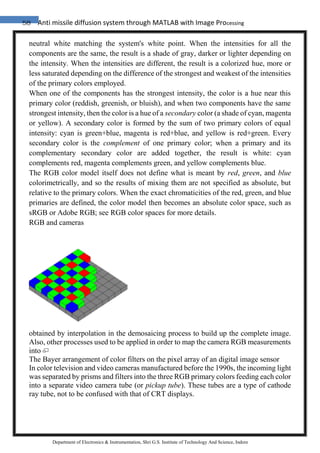
The Bayer arrangement of color filters on the pixel array of an digital image sensor
In color television and video cameras manufactured before the 1990s, the incoming light
was separated by prisms and filters into the three RGB primary colors feeding each color
into a separate video camera tube (or pickup tube). These tubes are a type of cathode
ray tube, not to be confused with that of CRT displays.
59 Anti missile diffusion system through MATLAB with Image Processing
Department of Electronics & Instrumentation, Shri G.S. Institute of Technology And Science, Indore
With the arriving of commercially viable charge-coupled device (CCD) technology in
the 1980s, first the pickup tubes were replaced with this kind of sensors. Later, higher
scale integration electronics was applied (mainly by Sony), simplifying and even
removing the intermediate opticals, up to a point to reduce the size of video cameras for
domestic use until convert them in handy and full camcorders. Current webcams and
mobile phones with cameras are the most miniaturized commercial forms of such
technology.
Photographic digital cameras that use a CMOS or CCD image sensor often operate with
some variation of the RGB model. In a Bayer filter arrangement, green is given twice
as many detectors as red and blue (ratio 1:2:1) in order to achieve higher luminance
resolution than chrominance resolution. The sensor has a grid of red, green, and blue
detectors arranged so that the first row is RGRGRGRG, the next is GBGBGBGB, and
that sequence is repeated in subsequent rows. For every channel, missing pixels are a
standard RGB color space as sRGB.
60 Anti missile diffusion system through MATLAB with Image Processing
Department of Electronics & Instrumentation, Shri G.S. Institute of Technology And Science, Indore
4.4 GREY
Grey (international and some parts of the U.S.) or gray (some U.S. only – see spelling
differences) describes the tints and shades ranging from black to white. These, including
white and black, are known as achromatic colors or neutral colors. In recent years,
"neutral colors" had been reclassified. These "new" neutrals have low colorfulness
and/or chroma on the color wheel.
Greys are seen commonly in nature and fashion. Grey paints can be created by mixing
complementary colors (that is colors directly opposite on the color wheel, e.g. yellow
and violet). In the RGB color model used by computer displays, it is created by mixing
equal amounts of red, green, and blue light. Images which consist wholly of neutral
colors are called monochrome, black-and-white or greyscale.
Hex triplet #808080
sRGBB
(r, g, b) (128, 128, 128)
B: Normalized to [0–255] (byte)
61 Anti missile diffusion system through MATLAB with Image Processing
Department of Electronics & Instrumentation, Shri G.S. Institute of Technology And Science, Indore
4.5 Pixels:
This article is about the picture element. For other uses, see Pixel (disambiguation).
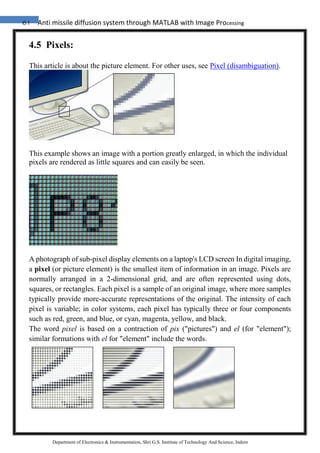
This example shows an image with a portion greatly enlarged, in which the individual
pixels are rendered as little squares and can easily be seen.
A photograph of sub-pixel display elements on a laptop's LCD screen In digital imaging,
a pixel (or picture element) is the smallest item of information in an image. Pixels are
normally arranged in a 2-dimensional grid, and are often represented using dots,
squares, or rectangles. Each pixel is a sample of an original image, where more samples
typically provide more-accurate representations of the original. The intensity of each
pixel is variable; in color systems, each pixel has typically three or four components
such as red, green, and blue, or cyan, magenta, yellow, and black.
The word pixel is based on a contraction of pix ("pictures") and el (for "element");
similar formations with el for "element" include the words.
62 Anti missile diffusion system through MATLAB with Image Processing
Department of Electronics & Instrumentation, Shri G.S. Institute of Technology And Science, Indore
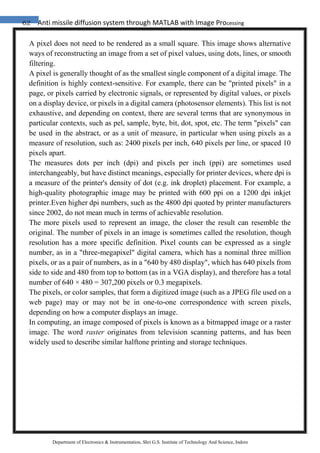
A pixel does not need to be rendered as a small square. This image shows alternative
ways of reconstructing an image from a set of pixel values, using dots, lines, or smooth
filtering.
A pixel is generally thought of as the smallest single component of a digital image. The
definition is highly context-sensitive. For example, there can be "printed pixels" in a
page, or pixels carried by electronic signals, or represented by digital values, or pixels
on a display device, or pixels in a digital camera (photosensor elements). This list is not
exhaustive, and depending on context, there are several terms that are synonymous in
particular contexts, such as pel, sample, byte, bit, dot, spot, etc. The term "pixels" can
be used in the abstract, or as a unit of measure, in particular when using pixels as a
measure of resolution, such as: 2400 pixels per inch, 640 pixels per line, or spaced 10
pixels apart.
The measures dots per inch (dpi) and pixels per inch (ppi) are sometimes used
interchangeably, but have distinct meanings, especially for printer devices, where dpi is
a measure of the printer's density of dot (e.g. ink droplet) placement. For example, a
high-quality photographic image may be printed with 600 ppi on a 1200 dpi inkjet
printer.Even higher dpi numbers, such as the 4800 dpi quoted by printer manufacturers
since 2002, do not mean much in terms of achievable resolution.
The more pixels used to represent an image, the closer the result can resemble the
original. The number of pixels in an image is sometimes called the resolution, though
resolution has a more specific definition. Pixel counts can be expressed as a single
number, as in a "three-megapixel" digital camera, which has a nominal three million
pixels, or as a pair of numbers, as in a "640 by 480 display", which has 640 pixels from
side to side and 480 from top to bottom (as in a VGA display), and therefore has a total
number of 640 × 480 = 307,200 pixels or 0.3 megapixels.
The pixels, or color samples, that form a digitized image (such as a JPEG file used on a
web page) may or may not be in one-to-one correspondence with screen pixels,
depending on how a computer displays an image.
In computing, an image composed of pixels is known as a bitmapped image or a raster
image. The word raster originates from television scanning patterns, and has been
widely used to describe similar halftone printing and storage techniques.
63 Anti missile diffusion system through MATLAB with Image Processing
Department of Electronics & Instrumentation, Shri G.S. Institute of Technology And Science, Indore
4.6 IMAGE :
An image (from Latin imago) is an artefact , or has to do with a two-dimensional (a
picture), that has a similar appearance to some subject—usually a physical object or a
person.
Images may be two-dimensional, such as a photograph, screen display, and as well as a
three-dimensional, such as a statue. They may be captured by optical devices—such as
cameras, mirrors, lenses, telescopes, microscopes, etc. and natural objects and
phenomena, such as the human eye or water surfaces.
The word image is also used in the broader sense of any two-dimensional figure such
as a map, a graph, a pie chart, or an abstract painting. In this wider sense, images can
also be rendered manually, such as by drawing, painting, carving, rendered
automatically by printing or computer graphics technology, or developed by a
combination of methods, especially in a pseudo-photograph .
A volatile image is one that exists only for a short period of time. This may be a
reflection of an object by a mirror, a projection of a camera obscura, or a scene displayed
on a cathode ray tube. A fixed image, also called a hard copy, is one that has been
recorded on a material object, such as paper or textile by photography or digital
processes.
64 Anti missile diffusion system through MATLAB with Image Processing
Department of Electronics & Instrumentation, Shri G.S. Institute of Technology And Science, Indore
5. BLOCK DIAGRAM
6. CIRCUIT DIAGRAM
step1
Image
Captured by
WebCam Image
Data is
sent to
computer
Image data
is
imported
into
MATLAB
step3
Data
Processed by
Image
Processing
toolbox
UIT
step 4
Data out using
Data Acquisition
Toolbox
Block Diagram
light beam
location
identification
step2
Data read by
Image
acquisition
toolbox
l
i
65 Anti missile diffusion system through MATLAB with Image Processing
Department of Electronics & Instrumentation, Shri G.S. Institute of Technology And Science, Indore
7 . LAYOUT :
MOTOR DRIVER LAYOUT :
66 Anti missile diffusion system through MATLAB with Image Processing
Department of Electronics & Instrumentation, Shri G.S. Institute of Technology And Science, Indore
8. ALGORITHM FOR IMPLEMANTATION :
1) Initialize image input:
vid= videoinput (‘winvideo’ ,1 );
2) Initialize parallel port (input/output lines)
dio = digitalio('parallel','LPT1');
3) Declaration of variables
4) Get snapshot:
frame = getsnapshot (vid);
5) Locate the position of light.
6) Taking rgb colours as input & change in gray format
7) weight=(gray1(i,j)/256)^25+weight;
x=i*(gray1(i,j)/256)^25 +x;
y=j*(gray1(i,j)/256)^25 +y;
rgb1=double(rgb);
for i=-5:5;
for j=-5:5;
rgb_sum = rgb_sum + gray1(X+i,Y+j);
rgb1(X+i,Y+j,1)=256;
rgb1(X+i,Y+j,2)=0
rgb1(X+i,Y+j,3)=0
[a b intensity]=locate_light(frame);
display(intensity);
8) If intensity > reference value
9) then: light detected,
pause (0.1s)
else
light not detected: pause (0.1 s)
default set right turn;
end;
67 Anti missile diffusion system through MATLAB with Image Processing
Department of Electronics & Instrumentation, Shri G.S. Institute of Technology And Science, Indore
9. APPLICATIONS:
1. Most frequently used in automation industries.
2. Used in VISION Based Robotics applications
3. Automated surveillances systems.
4. Remote automated light based Object recognition
5. Can be extended to HUMANOID (Robots which look like humans)
Robots.
6. Can be used for appliances control.
68 Anti missile diffusion system through MATLAB with Image Processing
Department of Electronics & Instrumentation, Shri G.S. Institute of Technology And Science, Indore
10. FUTURE WORK :
a. ACCURACY IMPROVEMENT
Accuracy can be further be improved with slight differences kept at some angle
or better response can be achieved .
b. A MORE HANDY DEVICE
This whole system can be employed in a DSP processor so that we can develop
a more portable device to carry along. Computer system can be removed.
69 Anti missile diffusion system through MATLAB with Image Processing
Department of Electronics & Instrumentation, Shri G.S. Institute of Technology And Science, Indore
BIBLIOGRAPHY
BOOKS
1. Getting started with MATLAB 7
2. Digital image processing using MATLAB by Gonzalez
WEBSITES
1. www.google.com
2. www.wikipedia.org
3. www.mathworks.com
4. www.mathworks.com/matlabcentral/fileexchange
5. www.centrovision.com/tech2.htm

Anti missile diffusion system through MATLAB with Image Processing

  • 1.
    1 Anti missilediffusion system through MATLAB with Image Processing Department of Electronics & Instrumentation, Shri G.S. Institute of Technology And Science, Indore INTRODUCTION
  • 2.
    2 Anti missilediffusion system through MATLAB with Image Processing Department of Electronics & Instrumentation, Shri G.S. Institute of Technology And Science, Indore 1. INTRODUCTION In the field of industrial robotics, the interaction between man and machine typically consists of the Programming and maintaining the machine by the human operator. For safety reasons, a direct contact between the working robot and the human has to be preveented. As long as the robots act out preprogrammed behaviors only, a direct interaction between man and machine is not necessary anyway. However,if the robot is to assist a human e.g. in a complex assembly task, it is necessary to have means of exchanging information about the current scenario between man and machine in real time. For this purpose, the classical computer devices like keyboard, mouse and monitor are not the best choice as they require an encoding and decoding of information: if, for instance, the human operator wants the robot to grasp an object, he would have to type in the object’s coordinates (if these are known at all) or move the mouse pointer to an image of the object on a computer screen to specify it. This way of transmitting information to the machine is not only unnatural but also error prone.If the robot is equipped with a camera system, it would be much more intuitive to just point to the object to grasp and let the robot detect its position visually.Therefore, the movement of the head fulfills two functions: first, it is an efficient exploitation of the sensor equipment by shifting the interesting objects into the focus of view. Second, it can be used as a communication channel to provide information about the current behavioural state. In a robot system, this function can be implemented by providing the robot with a dynamic camera head that actively tracks the EMERGING LIGHT SOURCE. To guarantee a smooth interaction between man and machine a task like this requires that the visual processing, the transmission of the position information to the camera mechanics and the movement of the camera head itself are very fast. In the following, we will describe a system which full fills these requirements
  • 3.
    3 Anti missilediffusion system through MATLAB with Image Processing Department of Electronics & Instrumentation, Shri G.S. Institute of Technology And Science, Indore HARDWARE
  • 4.
    4 Anti missilediffusion system through MATLAB with Image Processing Department of Electronics & Instrumentation, Shri G.S. Institute of Technology And Science, Indore 3.1 ROBOT CONSTRUCTION : WEBCAM: Webcams are video capturing devices connected to computers or computer networks, often using USB or, if they connect to networks, ethernet or Wi-Fi. They are well known for their low manufacturing costs and flexible applications. History : Started in 1991, the first such camera, called the CoffeeCam, was pointed at the Trojan room coffee pot in the computer science department of Cambridge University. The camera was finally switched off on August 22, 2001. The final image captured by the camera can still be viewed at its homepage. The coffee machine was repaired for free by Krups. The oldest webcam, as the technology came to be known, still operating is FogCam at San Francisco State University, which has been running continuously since 1994. One of the most widely reported-on webcam sites was JenniCam, started in 1996, which allowed internet users to constantly observe the life of its namesake, somewhat like reality TV series Big Brother, launched three years later. More recently, the website Justin.tv has shown a continuous video and audio stream from a mobile camera mounted on the head of the site's star. WEBCAM : -240*340
  • 5.
    5 Anti missilediffusion system through MATLAB with Image Processing Department of Electronics & Instrumentation, Shri G.S. Institute of Technology And Science, Indore Recently, Apple and other computer hardware manufactures began building webcams directly into laptop and desktop screens. This eliminates the need to use an external USB or Firewire webcam. Videoconferencing : As webcam capabilities have been added to instant messaging text chat services such as AOL Instant Messenger, one-to-one live video communication over the internet has now reached millions of mainstream PC users worldwide. Increased video quality has helped webcams encroach on traditional video conferencing systems. New features such as lighting, real-time enhancements (retouching, wrinkle smoothing and vertical stretch) can make users more comfortable, further increasing popularity. Features and performance vary between programs. Videoconferencing support is included in programs as Yahoo Messenger, AOL Instant Messenger (AIM), Windows Live Messenger, Skype, iChat, Paltalk (now PaltalkScene), Ekiga , Stickam ,Tokbox, Camfrog and meetcam. Some online video broadcasting sites have taken advantage of this technology to create internet television programs centered around two (or more) people "diavlogging" with each other from two different places. Among others, BloggingHeads.tv uses this technology to set up conversations between prominent journalists, scientists, bloggers, and philosophers. Video security Webcams are being used for security purposes. Software is available allowing PCconnected cameras to watch for movement and sound, recording both when they are detected; these recordings can be saved to the computer, e-mailed or uploaded to the internet. In one well-publicised case, a computer e-mailed out images as the burglar stole it, allowing the owner to give police a clear picture of the burglar's face even after the computer had been stolen. As a control input device Special software can use the video stream from a webcam to assist or enhance a user's control of applications and games. Video features, including faces, shapes, models and colors can be observed and tracked to produce a corresponding form of control. For example, the position of a single light source can be tracked and used to emulate a mouse pointer, a head mounted light would allow hands-free computing and would greatly
  • 6.
    6 Anti missilediffusion system through MATLAB with Image Processing Department of Electronics & Instrumentation, Shri G.S. Institute of Technology And Science, Indore improve computer accessibility. This can also be applied to games, providing additional control, improved interactivity and immersiveness. FreeTrack is a free webcam motion tracking application for Microsoft Windows that can track a special head mounted model in up to six degrees of freedom and output data to mouse, keyboard, joystick and FreeTrack supported games. The EyeToy for the PlayStation 2 (The updated PlayStation 3 equivalent is the PlayStation Eye) and similarly the Xbox Live Vision Camera for the Xbox 360 and Xbox Live are color digital cameras that have been used as control input devices by some games. Small webcam-based PC games are available as either standalone executables or inside web browser windows using Adobe Flash. RS 232 CABLE LAYOUT : Almost nothing in computer interfacing is more confusing than selecting the right RS232 serial cable. These pages are intended to provide information about the most common serial RS232 cables in normal computer use, or in more common language "How do I connect devices and computers using RS232?" RS232 serial connector pin assignment The RS232 connector was originally developed to use 25 pins. In this DB25 connector pinout provisions were made for a secondary serial RS232 communication channel. In practice, only one serial communication channel with accompanying handshaking is present. Only very few computers have been manufactured where both serial RS232 channels are implemented. Examples of this are the Sun SparcStation 10 and 20 models and the Dec Alpha Multia. Also on a number of Telebit modem models the secondary channel is present. It can be used to query the modem status while the modem is on-line and busy communicating. On personal computers, the smaller DB9 version is more commonly used today. The diagrams show the signals common to both connector types in black. The defined pins only present on the larger connector are shown in red. Note, that the protective ground is assigned to a pin at the large connector where the connector outside is used for that purpose with the DB9 connector version.
  • 7.
    7 Anti missilediffusion system through MATLAB with Image Processing Department of Electronics & Instrumentation, Shri G.S. Institute of Technology And Science, Indore The pinout is also shown for the DEC modified modular jack. This type of connector has been used on systems built by Digital Equipment Corporation; in the early days one of the leaders in the mainframe world. Although this serial interface is differential (the receive and transmit have their own floating ground level which is not the case with regular RS232) it is possible to connect RS232 compatible devices with this interface because the voltage levels of the bit streams are in the same range. Where the definition of RS232 focussed on the connection of DTE, data terminal equipment (computers, printers, etc.) with DCE, data communication equipment (modems), MMJ was primarily defined for the connection of two DTE's directly.
  • 8.
    8 Anti missilediffusion system through MATLAB with Image Processing Department of Electronics & Instrumentation, Shri G.S. Institute of Technology And Science, Indore 3.2 AMPLIFIRE (ULN2003): Ideally suited for interfacing between low-level logic circuitry and multiple peripheral power loads, the Series ULN20xxA/L high-voltage, high-current Darlington arrays feature continuous load current ratings to 500 mA for each of the seven drivers. At an appropriate duty cycle depending on ambient temperature and number of drivers turned ON simultaneously, typical power loads totaling over 230 W (350 mA x 7, 95 V) can be controlled. Typical loads include relays, solenoids, stepping motors, magnetic print hammers, multiplexed LED and incandescent displays, and heaters. All devices feature open-collector outputs with integral clamp diodes. The ULN2003A/L have series input resistors selected for operation directly with 5 V TTL or CMOS. These devices will handle numerous interface needs — particularly those beyond the capabilities of standard logic buffers. These Darlington arrays are furnished in 16-pin dual in-line plastic packages (suffix “A”) and 16-lead surface-mountable SOICs (suffix“L”). All devices are pinned with outputs opposite inputs to facilitate ease of circuit board layout. All devices are rated for operation over the temperature range of -20 next page) are also available for operation to “ULN” to “ULQ”. FEATURES • TTL, DTL, PMOS, or CMOS-Compatible Inputs • Output Current to 500 mA • Output Voltage to 95 V • Transient-Protected Outputs • Dual In-Line Plastic Package or Small-Outline IC Package
  • 9.
    9 Anti missilediffusion system through MATLAB with Image Processing Department of Electronics & Instrumentation, Shri G.S. Institute of Technology And Science, Indore
  • 10.
    10 Anti missilediffusion system through MATLAB with Image Processing Department of Electronics & Instrumentation, Shri G.S. Institute of Technology And Science, Indore Technology: Webcams typically include a lens, an image sensor, and supporting circuitry.Webcams typically include a lens, an image sensor, and some support electronics. Various lenses are available, the most common being a plastic lens that can be screwed in and out to set the camera's focus. Fixed focus lenses, which have no provision for adjustment, are also available. As a camera system's depth of field is greater for small imager formats and is greater for lenses with a large f/number (small aperture), the systems used in webcams have sufficiently large depth of field that the use of a fixed focus lens does not impact image sharpness much. Image sensors can be CMOS or CCD, the former being dominant for low-cost cameras, but CCD cameras do not necessarily outperform
  • 11.
    11 Anti missilediffusion system through MATLAB with Image Processing Department of Electronics & Instrumentation, Shri G.S. Institute of Technology And Science, Indore CMOS-based cameras in the low cost price range. Most consumer webcams are capable of providing VGA-resolution video at a frame rate of 30 frames per second. Many newer devices can produce video in multi-megapixel resolutions, and a few can run at high frame rates such as the PlayStation Eye, which can produce 320×240 video at 120 frames per second. Support electronics are present to read the image from the sensor and transmit it to the host computer. The camera pictured to the right, for example, uses a Sonix SN9C101 to transmit its image over USB. Some cameras - such as mobile phone cameras - use a CMOS sensor with supporting electronics "on die", i.e. the sensor and the support electronics are built on a single silicon chip to save space and manufacturing costs. Most webcams feature built in microphones to make video conferencing more convenient. The USB video device class (UVC) specification allows for interconnectivity of webcams to computers even without proprietary drivers installed. Microsoft Windows Vista, Linux and Mac OS X 10.4 & 10.5 have UVC drivers built in and do not require extra drivers, although they are often installed in order to add additional features. Privacy Some 'Trojan horse' programs can allow malicious hackers to activate a computer's camera without the user's knowledge, providing the hacker with a live video feed from the unfortunate user's camera. Cameras such as Apple's older external iSight cameras include lens covers to thwart this. Most other webcams have a built-in LED that lights up whenever the camera is active (such as Apple's newer internal iSight), although the malicious nature of a trojan horse could have the LED programmed to be disabled even when the webcam is online. In mid-January 2005 some search engine queries were published in an on-line forum which allow anyone to find thousands of Panasonic- and Axis-made high-end web cameras, provided that they have a web-based interface for remote viewing. Many such cameras are running on default configuration, which does not require any password login or IP address verification, making them visible to anyone.
  • 12.
    12 Anti missilediffusion system through MATLAB with Image Processing Department of Electronics & Instrumentation, Shri G.S. Institute of Technology And Science, Indore 3.3 IC 7805 (Voltage Regulator IC) : 7805 is a voltage regulator integrated circuit. It is a member of 78xx series of fixed linear voltage regulator ICs. The voltage source in a circuit may have fluctuations and would not give the fixed voltage output. The voltage regulator IC maintains the output voltage at a constant value. The xx in 78xx indicates the fixed output voltage it is designed to provide. 7805 provides +5V regulated power supply. Capacitors of suitable values can be connected at input and output pins depending upon the respective voltage levels. Features • Output Current up to 1A • Output Voltages of 5, 6, 8, 9, 10, 12, 15, 18, 24V • Thermal Overload Protection • Short Circuit Protection •Output Transistor Safe Operating Area Protection
  • 13.
    13 Anti missilediffusion system through MATLAB with Image Processing Department of Electronics & Instrumentation, Shri G.S. Institute of Technology And Science, Indore
  • 14.
    14 Anti missilediffusion system through MATLAB with Image Processing Department of Electronics & Instrumentation, Shri G.S. Institute of Technology And Science, Indore
  • 15.
    15 Anti missilediffusion system through MATLAB with Image Processing Department of Electronics & Instrumentation, Shri G.S. Institute of Technology And Science, Indore 3.4 HT12E Encoder IC HT12E is a 2^12 series encoder IC widely used in remote control and very common among Radio Frequency RF applications. This HT12E IC capable of converting 12 bit Parallel data inputs into serial outputs. These bits are classified into 8 (A0-A7) address bits and 4(AD0-AD3) data bits. Using the address pins we can provide 8 bit security code for secured data transmission between the encoder and the decoder. The encoder and decoder should use the same address and data format. HT12E is capable of operating in a wide Voltage range from 2.4V to 12V and also consists of a built in oscillator. Let’s move into the working of HT12E encoder IC. PIN DESCRIPTION OF IC HT12E: The pin Description of the IC HT12E was pretty simple to understand with total of 18 pins.  VDD and VSS: Positive and negative power supply pins.  OSC1 and OSC2: Input and output pins of the internal oscillator present inside the IC.
  • 16.
    16 Anti missilediffusion system through MATLAB with Image Processing Department of Electronics & Instrumentation, Shri G.S. Institute of Technology And Science, Indore  TE: This pin is used for enabling the transmission, a low signal in this pin will enable the transmission of data bits.  A0 – A7: These are the input address pins used for secured transmission of this data. These pins can be connected to VSS for low signal or left open for high state.  AD0 – AD3: This pins are feeding data into the the IC. These pins may be connected to VSS for sending LOW since it is a active low pin  DOUT: The output of the encoder can be obtained through this pin and can be connected to the RF transmitter. WORKING OF HT12E IC: HT12E starts working with a low signal on the TE pin. After receiving a low signal the HT12E starts the transmission of 4 data bits as shown in the timing diagram above. And the output cycle will repeats based on the status of the TE pin in the IC. If the TE pin retains the low signal the cycle repeats as long as the low signal in the TE pin exists. The encoder IC will be in standby mode if the TE pin is disabled and thus the status of this pin was necessary for encoding process. The address of these bits can be set through A0 – A7 and the same scheme should be used in decoders to retrieve the signal bits.
  • 17.
    17 Anti missilediffusion system through MATLAB with Image Processing Department of Electronics & Instrumentation, Shri G.S. Institute of Technology And Science, Indore PRACTICAL CIRCUIT USING HT12E: Practical Applicatio
  • 18.
    18 Anti missilediffusion system through MATLAB with Image Processing Department of Electronics & Instrumentation, Shri G.S. Institute of Technology And Science, Indore 3.5 HT12D Decoder IC : HT12D is a decoder integrated circuit that belongs to 212 series of decoders. This series of decoders are mainly used for remote control system applications, like burglar alarm, car door controller, security system etc. It is mainly provided to interface RF and infrared circuits. They are paired with 212 series of encoders. The chosen pair of encoder/decoder should have same number of addresses and data format. In simple terms, HT12D converts the serial input into parallel outputs. It decodes the serial addresses and data received by, say, an RF receiver, into parallel data and sends them to output data pins. The serial input data is compared with the local addresses three times continuously. The input data code is decoded when no error or unmatched codes are found. A valid transmission in indicated by a high signal at VT pin. HT12D is capable of decoding 12 bits, of which 8 are address bits and 4 are data bits. The data on 4 bit latch type output pins remain unchanged until new is received.
  • 19.
    19 Anti missilediffusion system through MATLAB with Image Processing Department of Electronics & Instrumentation, Shri G.S. Institute of Technology And Science, Indore Block diagram of HT12D ICs Pin Diagram and Description  VDD and VSS are used to provide power to the IC, Positive and Negative of the power supply respectively. As I said earlier its operating voltage can be in the range 2.4V to 12V  OSC1 and OSC2 are used to connect external resistor for internal oscillator of HT12D. OSC1 is the oscillator input pin and OSC2 is the oscillator output pin as shown in the figure below. Oscillator of HT12D  A0 – A7 are the address input pins. Status of these pins should match with status of address pin in HT12E (used in transmitter) to receive the data. These pins can be connected to VSS or left open.  DIN is the serial data input pin and can be connected to a RF receiver output.  D8 – D11 are the data output pins. Status of these pins can be VSS or VDD depending upon the received serial data through pin DIN.  VT stand for Valid Transmission. This output pin will be HIGH when valid data is available at D8 – D11 data output pins.
  • 20.
    20 Anti missilediffusion system through MATLAB with Image Processing Department of Electronics & Instrumentation, Shri G.S. Institute of Technology And Science, Indore Working HT12D decoder will be in standby mode initially ie, oscillator is disabled and a HIGH on DIN pin activates the oscillator. Thus the oscillator will be active when the decoder receives data transmitted by an encoder. The device starts decoding the input address and data. The decoder matches the received address three times continuously with the local address given to pin A0 – A7. If all matches, data bits are decoded and output pins D8 – D11 are activated. This valid data is indicated by making the pin VT (Valid Transmission) HIGH. This will continue till the address code becomes incorrect or no signal is received.
  • 21.
    21 Anti missilediffusion system through MATLAB with Image Processing Department of Electronics & Instrumentation, Shri G.S. Institute of Technology And Science, Indore Typical Application Circuit
  • 22.
    22 Anti missilediffusion system through MATLAB with Image Processing Department of Electronics & Instrumentation, Shri G.S. Institute of Technology And Science, Indore 3.6 MICROCONTROLLER : 8-bit Atmel with 8KBytes In System Programmable Flash : Features • High-performance, Low-power Atmel®AVR® 8-bit Microcontroller • Advanced RISC Architecture – 130 Powerful Instructions – Most Single-clock Cycle Execution – 32 × 8 General Purpose Working Registers – Fully Static Operation – Up to 16MIPS Throughput at 16MHz – On-chip 2-cycle Multiplier • High Endurance Non-volatile Memory segments – 8Kbytes of In-System Self-programmable Flash program memory – 512Bytes EEPROM – 1Kbyte Internal SRAM – Write/Erase Cycles: 10,000 Flash/1 00,000 EEPROM – Data retention: 20 years at 85°C/100 years at 25°C(1) – Optional Boot Code Section with Independent Lock Bits In-System Programming by On-chip Boot Program True Read-While-Write Operation – Programming Lock for Software Security • Peripheral Features – Two 8-bit Timer/Counters with Separate Prescaler, one Compare Mode – One 16-bit Timer/Counter with Separate Prescaler, Compare Mode, and Capture Mode – Real Time Counter with Separate Oscillator – Three PWM Channels – 8-channel ADC in TQFP and QFN/MLF package Eight Channels 10-bit Accuracy – 6-channel ADC in PDIP package Six Channels 10-bit Accuracy – Byte-oriented Two-wire Serial Interface – Programmable Serial USART – Master/Slave SPI Serial Interface
  • 23.
    23 Anti missilediffusion system through MATLAB with Image Processing Department of Electronics & Instrumentation, Shri G.S. Institute of Technology And Science, Indore – Programmable Watchdog Timer with Separate On-chip Oscillator – On-chip Analog Comparator • Special Microcontroller Features – Power-on Reset and Programmable Brown-out Detection – Internal Calibrated RC Oscillator – External and Internal Interrupt Sources – Five Sleep Modes: Idle, ADC Noise Reduction, Power-save, Power-down, and Standby • I/O and Packages – 23 Programmable I/O Lines – 28-lead PDIP, 32-lead TQFP, and 32-pad QFN/MLF • Operating Voltages – 2.7V - 5.5V (ATmega8L) – 4.5V - 5.5V (ATmega8) • Speed Grades – 0 - 8MHz (ATmega8L) – 0 - 16MHz (ATmega8) • Power Consumption at 4Mhz, 3V, 25C – Active: 3.6mA – Idle Mode: 1.0mA – Power-down Mode: 0.5µA PIN CONFIGURATION :
  • 24.
    24 Anti missilediffusion system through MATLAB with Image Processing Department of Electronics & Instrumentation, Shri G.S. Institute of Technology And Science, Indore BLOCK DIAGRAM:
  • 25.
    25 Anti missilediffusion system through MATLAB with Image Processing Department of Electronics & Instrumentation, Shri G.S. Institute of Technology And Science, Indore The Atmel®AVR® core combines a rich instruction set with 32 general purpose working registers. All the 32 registers are directly connected to the Arithmetic Logic Unit (ALU), allowing two independent registers to be accessed in one single instruction executed in one clock cycle. The resulting architecture is more code efficient while achieving throughputs up to ten times faster than conventional CISC microcontrollers. The ATmega8 provides the following features: 8 Kbytes of In-System Programmable Flash with Read-While-Write capabilities, 512 bytes of EEPROM, 1 Kbyte of SRAM, 23 general purpose I/O lines, 32 general purpose working registers, three flexible Timer/Counters with compare modes, internal and external interrupts, a serial programmable USART, a byte oriented Twowire Serial Interface, a 6 channel ADC (eight channels in TQFP and QFN/MLF packages) with 10-bit accuracy, a programmable Watchdog Timer with Internal Oscillator, an SPI serial port, and five software selectable power saving modes. The Idle mode stops the CPU while allowing the SRAM, Timer/Counters, SPI port, and interrupt system to continue functioning. The Powerdown mode saves the register contents but freezes the Oscillator, disabling all other chip functions until the next Interrupt or Hardware Reset. In Power-save mode, the asynchronous timer continues to run, allowing the user to maintain a timer base while the rest of the device is sleeping. The ADC Noise Reduction mode stops the CPU and all I/O modules except asynchronous timer and ADC, to minimize switching noise during ADC conversions. In Standby mode, the crystal/resonator Oscillator is running while the rest of the device is sleeping. This allows very fast start-up combined with low-power consumption. The device is manufactured using Atmel’s high density non-volatile memory technology. The Flash Program memory can be reprogrammed In-System through an SPI serial interface, by a conventional non-volatile memory programmer, or by an On-chip boot program running on the AVR core. The boot program can use any interface to download the application program in the Application Flash memory. Software in the Boot Flash Section will continue to run while the Application Flash Section is updated, providing true Read- While-Write operation. By combining an 8-bit RISC CPU with In-System Self- Programmable Flash on a monolithic chip, the Atmel ATmega8 is a powerful microcontroller that provides a highly-flexible and cost-effective solution to many embedded control applications. The ATmega8 is supported with a full suite of program and system development tools, including C compilers, macro assemblers, program simulators, and evaluation kits.
  • 26.
    26 Anti missilediffusion system through MATLAB with Image Processing Department of Electronics & Instrumentation, Shri G.S. Institute of Technology And Science, Indore Pin Descriptions : VCC : Digital supply voltage. GND : Ground. Port B (PB7..PB0) XTAL1/XTAL2/TOSC1/ TOSC2 Port B is an 8-bit bi-directional I/O port with internal pull-up resistors (selected for each bit). The Port B output buffers have symmetrical drive characteristics with both high sink and source capability. As inputs, Port B pins that are externally pulled low will source current if the pull-up resistors are activated. The Port B pins are tri-stated when a reset condition becomes active, if the clock is not running. Depending on the clock selection fuse settings, PB6 can be used as input to the inverting Oscillator amplifier and input to the internal clock operating circuit. Depending on the clock selection fuse settings, PB7 can be used as output from the inverting Oscillator amplifier. If the Internal Calibrated RC Oscillator is used as chip clock source, PB7..6 is used as TOSC2..1 input for the Asynchronous Timer/Counter2 if the AS2 bit in ASSR is set. The various special features of Port B are elaborated in “Alternate Functions of Port B” . Port C (PC5..PC0) : Port C is an 7-bit bi-directional I/O port with internal pull-up resistors (selected for each bit). The Port C output buffers have symmetrical drive characteristics with both high sink and source capability. As inputs, Port C pins that are externally pulled low will source current if the pull-up resistors are activated. The Port C pins are tri-stated when a reset condition becomes active, even if the clock is not running. PC6/RESET : If the RSTDISBL Fuse is programmed, PC6 is used as an I/O pin. Note that the electrical characteristics of PC6 differ from those of the other pins of Port C. If the RSTDISBL Fuse is unprogrammed, PC6 is used as a Reset input. A low level on this pin for longer than the minimum pulse length will generate a Reset, even if the clock
  • 27.
    27 Anti missilediffusion system through MATLAB with Image Processing Department of Electronics & Instrumentation, Shri G.S. Institute of Technology And Science, Indore is not running. The minimum pulse length is given. Shorter pulses are not guaranteed to generate a Reset. The various special features of Port C are elaborated. Port D (PD7..PD0) : Port D is an 8-bit bi-directional I/O port with internal pull-up resistors (selected for each bit). The Port D output buffers have symmetrical drive characteristics with both high sink and source capability. As inputs, Port D pins that are externally pulled low will source current if the pull-up resistors are activated. The Port D pins are tri-stated when a reset condition becomes active, even if the clock is not running. Port D also serves the functions of various special features of the ATmega8 as listed. RESET : Reset input. A low level on this pin for longer than the minimum pulse length will generate a reset, even if the clock is not running. The minimum pulse length is given.
  • 28.
    28 Anti missilediffusion system through MATLAB with Image Processing Department of Electronics & Instrumentation, Shri G.S. Institute of Technology And Science, Indore PACKING INFORMATION :
  • 29.
    29 Anti missilediffusion system through MATLAB with Image Processing Department of Electronics & Instrumentation, Shri G.S. Institute of Technology And Science, Indore Light Emitting Diode ( LED ) Light emitting diodes must be choosen according to how they will be used, because there are various kinds. The diodes are available in several colors. The most common colors are red and green, but there are even blue ones. The device on the far right in the photograph combines a red LED and green LED in one package. The component lead in the middle is common to both LEDs. As for the remaing two leads, one side is for the green, the other for the red LED. When both are turned on simultaneously, it becomes orange. When an LED is new out of the package, the polarity of the device can be determined by looking at the leads. The longer lead is the Anode side, and the short one is the Cathode side. The polarity of an LED can also be determined using a resistance meter, or even a 1.5 V battery. When using a test meter to determine polarity, set the meter to a low resistance measurement range. Connect the probes of the meter to the LED. If the polarity is correct, the LED will glow. If the LED does not glow, switch the meter probes to the opposite leads on the LED. In either case, the side of the diode which is connected to the black meter probe when the LED glows, is the Anode side. Positive voltage flows out of the black probe when the meter is set to measure resistance.
  • 30.
    30 Anti missilediffusion system through MATLAB with Image Processing Department of Electronics & Instrumentation, Shri G.S. Institute of Technology And Science, Indore RESISTANCE : A Component that limits or resists current. SI Unit is OHM (W) K = Thousand 1 KW = 1000 W M = Million 1 MW = 1,000,000W = 1000 KW
  • 31.
    31 Anti missilediffusion system through MATLAB with Image Processing Department of Electronics & Instrumentation, Shri G.S. Institute of Technology And Science, Indore Color Code
  • 32.
    32 Anti missilediffusion system through MATLAB with Image Processing Department of Electronics & Instrumentation, Shri G.S. Institute of Technology And Science, Indore DATA BUS WIRE
  • 33.
    33 Anti missilediffusion system through MATLAB with Image Processing Department of Electronics & Instrumentation, Shri G.S. Institute of Technology And Science, Indore POWER SUPPLY 9V BATTERY
  • 34.
    34 Anti missilediffusion system through MATLAB with Image Processing Department of Electronics & Instrumentation, Shri G.S. Institute of Technology And Science, Indore TWO PIN CONNECTOR
  • 35.
    35 Anti missilediffusion system through MATLAB with Image Processing Department of Electronics & Instrumentation, Shri G.S. Institute of Technology And Science, Indore DIFFRENTIAL DRIVE  It has free moving wheel in the front accompanied with a left and right wheel The two wheels are separately powered.  when the wheels move in same direction the machine move in that direction turning is achieved by the making the wheels moving in opposite direction thus generating a couple  if left wheel move in the forward direction and right wheel move in back direction then our machine take turn in right direction.  if right wheel move in the forward direction and left wheel move in back direction then our machine take turn in left direction.
  • 36.
    36 Anti missilediffusion system through MATLAB with Image Processing Department of Electronics & Instrumentation, Shri G.S. Institute of Technology And Science, Indore SOFTWARE
  • 37.
    37 Anti missilediffusion system through MATLAB with Image Processing Department of Electronics & Instrumentation, Shri G.S. Institute of Technology And Science, Indore 4.1 MATLAB: Overview of MATLAB For matrix computation. MATLAB has evolved over a period of years with input MATLAB is a high-performance language for technical computing. It integrates computation, visualization, and programming in an easy-to-use environment where problems and solutions are expressed in familiar mathematical notation. Typical uses include • Math and computation • Algorithm development • Data acquisition • Modeling, simulation, and prototyping • Data analysis, exploration, and visualization • Scientific and engineering graphics • Application development, including graphical user interface building MATLAB is an interactive system whose basic data element is an array that does not require dimensioning. This allows you to solve many technical computing problems, especially those with matrix and vector formulations ,in a fraction of the time it would take to write a program in a scalar non interactive language such as C or Fortran .The name MATLAB stands for matrix laboratory. MATLAB was originally written to provide easy access to matrix software developed by the LINPACK and EISPACK projects. Today, MATLAB engines incorporate the LAPACK and BLAS libraries, embedding the state of the art in software from many users. In university environments, it is the standard instructional tool for introductory and advanced courses in mathematics, engineering, and science. In industry, MATLAB is the tool of choice for high-productivity research, development, and analysis. MATLAB features a family of
  • 38.
    38 Anti missilediffusion system through MATLAB with Image Processing Department of Electronics & Instrumentation, Shri G.S. Institute of Technology And Science, Indore add-on application-specific solutions called toolboxes. Very important to most users of MATLAB, toolboxes allow you to learn and apply specialized technology. Toolboxes are comprehensive collections of MATLAB functions (M-files) that extend the MATLAB environment to solve particular classes of problems. Areas in which toolboxes are available include signal processing, control systems, neural networks, fuzzy logic, wavelets, simulation, and many others. INTRODUCTION OF MATLAB : MATLAB is a high-level technical computing language and interactive environment for algorithm development, data visualization, data analysis, and numeric computation. Using MATLAB, you can solve technical computing problems faster than with traditional programming languages, such as C, C++, and Fortran. You can use MATLAB in a wide range of applications, including signal and image processing, communications, control design, test and measurement, financial modeling and analysis, and computational biology. Add-on toolboxes (collections of special-purpose MATLAB functions, available separately) extend the MATLAB environment to solve particular classes of problems in these application areas. MATLAB provides a number of features for documenting and sharing your work. You can integrate your MATLAB code with other languages and applications, and distribute your MATLAB algorithms and applications. Key Features  High-level language for technical computing  Development environment for managing code, files, and data  Interactive tools for iterative exploration, design, and problem solving  Mathematical functions for linear algebra, statistics, Fourier analysis, filtering, optimization, and numerical integration  2-D and 3-D graphics functions for visualizing data  Tools for building custom graphical user interfaces  Functions for integrating MATLAB based algorithms with external applications and languages, such as C, C++, Fortran, Java, COM, and Microsoft Excel
  • 39.
    39 Anti missilediffusion system through MATLAB with Image Processing Department of Electronics & Instrumentation, Shri G.S. Institute of Technology And Science, Indore MATLAB DESKTOP WINDOW
  • 40.
    40 Anti missilediffusion system through MATLAB with Image Processing Department of Electronics & Instrumentation, Shri G.S. Institute of Technology And Science, Indore HELP WINDOW
  • 41.
    41 Anti missilediffusion system through MATLAB with Image Processing Department of Electronics & Instrumentation, Shri G.S. Institute of Technology And Science, Indore ADJUSTING VARIOUS WINDOWS’ LOCATIONS
  • 42.
    42 Anti missilediffusion system through MATLAB with Image Processing Department of Electronics & Instrumentation, Shri G.S. Institute of Technology And Science, Indore VARIOUS WINDOWS’ LINKS
  • 43.
    43 Anti missilediffusion system through MATLAB with Image Processing Department of Electronics & Instrumentation, Shri G.S. Institute of Technology And Science, Indore DATA ACQUISITION TOOLBOX DATA Acquisition: Data acquisition is the process by which events in the real world are sampled and translated into machine-readable signals. Data acquisition typically involves sensors, transmitters and other instruments to collect signals, waveforms etc. to be processed and various functions can be performed and analyzed in practical world. The components of data acquisition systems include appropriate sensors that convert any measurement parameter to an electrical signal, which is acquired by data acquisition hardware. MATLAB has a dedicated toolbox on DATA Acquisition, however we are using this toolbox to send data to our robot rather than acquiring data. However this process also comes under data acquisition. Image Acquisition: Given the complexity involved in acquisition of images, MATLAB has introduced separate toolbox for image acquisition. So data acquisition toolbox doesn’t include image acquisition facility. Image acquisition process involves capturing a visual data in the form of images converting it into a digital form and then importing it on the computer for processing and analysis. Image Processing: Image processing is any form of signal processing for which the input is an image, such as photographs or frames of video; the output of image processing can be either an image or a set of characteristics or parameters related to the image. Digital image processing is the use of computer algorithms to perform image processing on digital images. The field of digital image processing refers to processing digital images by means of a digital computer. MATLAB has a dedicated toolbox for image processing. We are using this toolbox to do our color image processing part of our project. The MATLAB System : The MATLAB system consists of these main parts:
  • 44.
    44 Anti missilediffusion system through MATLAB with Image Processing Department of Electronics & Instrumentation, Shri G.S. Institute of Technology And Science, Indore 1. Desktop Tools and Development Environment : This is the set of tools and facilities that help you use MATLAB functions and files. Many of these tools are graphical user interfaces. It includes the MATLAB desktop and Command Window, a command history, an editor and debugger, a code analyzer and other reports, and browsers for viewing help, the workspace, files, and the search path. 2. The MATLAB Mathematical Function Library : This is a vast collection of computational algorithms ranging from elementary functions, like sum, sine, cosine, and complex arithmetic, to more sophisticated functions like matrix inverse, matrix eigenvalues, Bessel functions, and fast Fourier transforms. 3. The MATLAB Language This is a high-level matrix/array language with control flow statements,functions, data structures, input/output, and object-oriented programming features. It allows both “programming in the small” to rapidly create quick and dirty throw-away programs, and “programming in the large” to create large and complex application programs. Graphics : MATLAB has extensive facilities for displaying vectors and matrices as graphs, as well as annotating and printing these graphs. It includes high-level functions for two dimensional and three-dimensional data visualization, image processing, animation, and presentation graphics. It also includes low-level functions that allow you to fully customize the appearance of graphics as well as to build complete graphical user interfaces on your MATLAB applications. MATLAB External Interfaces: This is a library that allows you to write C and Fortran programs that interact with MATLAB. It includes facilities for calling routines from MATLAB (dynamic linking), calling MATLAB as a computational engine, and for reading and writing MAT-files.
  • 45.
    45 Anti missilediffusion system through MATLAB with Image Processing Department of Electronics & Instrumentation, Shri G.S. Institute of Technology And Science, Indore 4.2 PCB WIZARD: Step 1 : How to design and make an electronic circuit with PCB Wizard. You should follow this tutorial to learn the basic skills you will need to use PCB Wizard effectively. you will create a transistor sensing circuit similar to the one shown on the right. The circuit will light an LED when the temperature gets too cold. Along the way, you will learn how to: Add components from the Gallery Wire components together Change component values and models Convert the circuit into a PCB layout View how the finished PCB will look You will begin by creating a new (empty) document in which to draw your circuit. To create a new document, click on the New button or choose New from the File menu.Next you will learn how to use the Gallery to add components to your circuit. If the Gallery is not currently open, click on the Gallery button on the top toolbar to open it. Select the Circuit Symbols option. In the Circuit Symbol Gallery window, you will be able to see all the components that are available within PCB Wizard. Step 2 : Adding components : From the Power Supplies group, add a Battery component from the Gallery to your circuit. To do this: Move the mouse over the Battery symbol. Press and hold down the left mouse button.With the left mouse button still held down, move the mouse to drag the symbol onto the circuit.Finally, release the mouse button when the circuit symbol is in the required position.Components within the Gallery are grouped according to their function. At the top of the window, a drop-down list box allows you to select which group is shown. Once the components have been placed, you can start to wire the components together. To do this you must first click on the Select button from the top toolbar: Next, move the mouse over the top pin of the battery (a). As you hold the mouse over the pin you will notice a hint appear describing that particular component pin.Press and hold down the left mouse button. With the mouse button still held down, move the mouse to place a wire.You can add a bend to the wire by releasing the mouse button over or clicking on an empty part of the circuit .To complete the wire, release the mouse button over the top pin of resistor .
  • 46.
    46 Anti missilediffusion system through MATLAB with Image Processing Department of Electronics & Instrumentation, Shri G.S. Institute of Technology And Science, Indore Now that the transistor sensing circuit is complete, you can convert it into a printed circuit board.For more information on the options available for converting your circuit diagrams into PCB layouts, see the topic entitled Converting to a PCB layout in the Help.From the Tools menu choose Convert | Design to Printed Circuit Board. You will see a window appear to lead you through the conversion process. The window contains a series of pages that allow you to decide how your circuit is converted. These pages cover areas such as the size and shape of your PCB layout, which components are used as well as more advanced features such as automatic routing and component placement.For many circuits you can leave the settings in the window unchanged. With your transistor sensing circuit, just one option will be changed. You will change a setting to increase the thickness of the copper tracks that will be added during the automatic routing process.By increasing the thickness of the tracks, you will make your finished PCB layout easier to build.Note that with more complex circuits, particularly circuits involving integrated circuits (ICs), thinnertracks are normally required to allow the circuit to be routed successfully.
  • 47.
    47 Anti missilediffusion system through MATLAB with Image Processing Department of Electronics & Instrumentation, Shri G.S. Institute of Technology And Science, Indore TECHNICAL DESCRIPTION
  • 48.
    48 Anti missilediffusion system through MATLAB with Image Processing Department of Electronics & Instrumentation, Shri G.S. Institute of Technology And Science, Indore ROBOT: DEFINATION: The reprogrammable ,multifunctional,manipulater designed to moveematerial,parts,tools,or specified devices through various programmed motion for the performance of variety of task. (according to the ROBOT INSTITUTE OF AMERICA) or A man made mechanical device that can move by themselves ,whose motion must be modelled ,planned, sensed,actuated and controlled and whose motion or behaviour can be influence by programming. TYPE:- 1) MANUAL ROBOTICS 2) SEMI AUTONOMOUS ROBOTICS 3) AUTONOMOUS ROBOTICS 1)MANUAL ROBOTICS: A manual robot is a robot which is fully controlled by the human. 2)AUTONOMOUS ROBOTICS : Autonomous robotics are robot which can perform desired tasks in unstructured environments without any continous human guidance. 3)SEMI AUTONOMOUS ROBOTICS: Semi autonomous robotics are that robots which are partially guided by some other peripheral devices like computer etc. By semi-autonomous behavior, it is understood that a human supervision is always necessary although the robot can also make its own decisions. Basically the robot is driven by an operator who receives pictures from the robot’s environment, broadcasted through the Internet.
  • 49.
    49 Anti missilediffusion system through MATLAB with Image Processing Department of Electronics & Instrumentation, Shri G.S. Institute of Technology And Science, Indore Controlling motors through Computer : • Parallel Ports: It’s the easiest way to control the motors from computer. No complicated intermediate circuits are required • Serial/USB ports • Bluetooth • Theory and Applications of Digital Image Processing • The Image Processing System • An image processing system (fig. 1.1) consists of a light source to illuminate the scene, a sensor system (usually a CCD -camera) and an interface between the sensor system and the computer. Among other things, the interface converts analog information into • digital data which the computer can understand. This takes place in a special piece of illumination camera Components of an image processing system hardware, the frame grabber, which also stores the image. Many types of frame grabber hardware are supplied with special signal processors, so that very calculation- intensive parts of the image processing programs can be run in a time-efficient way. Usually the frame grabber package contains a library of often-used routines which can be linked to the user’s program. The results of an image processing run
  • 50.
    50 Anti missilediffusion system through MATLAB with Image Processing Department of Electronics & Instrumentation, Shri G.S. Institute of Technology And Science, Indore will be transferred to the outside world by one or more I/O interfaces, the screen and the normal output devices like printer, disks etc. The classical configuration of image processing hardware is not a stand-alone system but has to be directed by a host computer. However, the newest developments are able to integrate the complete image processing system into the camera. In this module we will talk about the hardware components of image processing systems. You will receive the basics which will enable you to conceptualize an image processing system along with the knowledge necessary to be able to compare the capability and the compatibility of components offered by different companies You should be familiar with the terminology in the field of personal computers • Illuminating the Scene • An important aspect of image processing is the proper choice of light source, which has to be appropriate to the system’s working environment. A good choice of illumination will allow the image processing system to receive the best image under the circumstances and the number of procedures necessary for image restoration will be minimized. The goal is to optimize the dynamics and the contrast of an image. This means that an object has to be photographed with a maximum number of intensity steps and should, at the same time, have the best possible contrast with its background.By the choice of the • light source • the features of the radiation (e.g. wavelength, direction of oscillation, spatial intensity distribution), can be selected depending on the • requirements of the object’s surface (i.e. structure, color, transparency etc.). In any case, however, the aim is to establish a homogenous and temporally constant illumination over the whole area of interest. • Daylight • is usually not very well suited to illuminating a scene for image processing because the color and the intensity of the light depend on the time of day, the time of year and the weather conditions. Similarly ill-suited is the uncontrollable lightin a production line in a factory hall. Situations where uncontrolled light cannotbe avoided, for example in the environment of autonomous moving vehicles, will always provide challenges for the image processing system. •
  • 51.
    51 Anti missilediffusion system through MATLAB with Image Processing Department of Electronics & Instrumentation, Shri G.S. Institute of Technology And Science, Indore • • Image processing system • Imaging Methods and Sensor Systems • The term “image processing suggests that the pictures which will be processed are taken by camera. This is often the case, but generally, every sensor which produces spatially distributed intensity values of electromagnetic radiation which can be digitized and stored in RAM is suited to image capturing. Various image capturing systems are used, depending on the application field. They differ in the • -acquisition principle • -acquisition speed • -spatial resolution • -sensor system • -spectral range • -dynamic range • Apart from the area of consumer electronics, most apparatuses are very costly. The greater the need for accuracy, the more hard- and software is used in the image capturing system. The following list shows the most- used units for capturing images electronically area scan cameras • The Image Processing System • -line scanners • -laser scanners • -computer and nuclear magnetic resonance (NMR) tomographs
  • 52.
    52 Anti missilediffusion system through MATLAB with Image Processing Department of Electronics & Instrumentation, Shri G.S. Institute of Technology And Science, Indore • -thermographic sensor systems (e.g. infrared cameras) • -ultrasonic devices • CCD sensors play a central role in most image processing systems. They are part of a complex system which makes it possible to take images in problematic environments with the necessary quality and accuracy. Sensors can be categorized into the following classes according to their sensitivity ranges: Electromagnetic sensors for • -gamma radiation • -X-ray radiation • -the visual spectrum • -the infrared spectrum • -the radio wave range • Each electromagnetic sensor is only sensitive to a certain range of electromagnetic radiation. Other sensors like ultrasonic sensors, magnetic sensors may also be used for imaging. • The Frame Grabber • The electical voltage signal produced by the sensor system will now be transferred to the frame grabber. The frame grabber is not identical to the graphic card in normal computers. It has to meet many more requirements. A frame grabber should be able to process the information from various image sources store image information quickly and efficiently offer a graphics user interface (GUI) be exible concerning various applications • The Image Processing System Depending on the type and the price a user is willing to pay, a frame grabber might include fast DSPs with RISC architectures and multiple processor systems for parallel processing, large RAM storage capacities, sophisticated software libraries, interactive user interfaces and comfortable programming tools. Nowadays the frame grabber board • is still the main component in an image processing system, although with the increasing availability of CMOS sensors, the image processing routines will be increasingly moved directly into the camera (see section 1.2.1). On the other hand, image processing algo rithms can be programmed directly in the host computer. Time-critical applications, however, require a hardware frame grabber unit, either in the camera or as a hardwareunit added to the host PC or workstation.To meet the numerous requirements, most frame grabbers have a modular structure, • so that the components can be configured according to the needs of the user. Modern frame grabbers usually consist of the components (fig. • video input unit (VIU) • frame buffer (FB) • digital signal processors (DSP) • video output unit (VOU)
  • 53.
    53 Anti missilediffusion system through MATLAB with Image Processing Department of Electronics & Instrumentation, Shri G.S. Institute of Technology And Science, Indore • • Hardware components of an image processing • system: video input unit(VIU), frame buffer (FB), • signal processors (DSP) and video output (VOU). • The frame buffer, as well as various digital signal processors, will be called the image processing unit. Since the market offers a very large spectrum of frame grabber types, it is difficult to describe a typical structure. The following sections can therefore only give an overwiew. • The Video Input Unit • The video input unit is the interface between the sensor system (i.e. a CCD camera) and the image storage unit. Like cameras, frame grabbers offer several features which exceed the video norm. Some types can be connected to almost any signal or image source (fig. 1.34). Basically, • the different kinds of data sources can be named: • -analog normed data (from video cameras, video recorders, etc.), • -analog unnormed data (from computer tomographs, electron microscopes, linecameras, etc.) • digital data (from CDs, CMOS image sensors, etc.) • Because of the required exibility, a frame grabber board has to be configurable by the user. With any of these models, the video input unit has to be able to multiplex the input sources synchronize the incoming signal with the RAM,digitize analog data,transfer digital data,pre-process data, • The Frame Buffer:- • Data can be stored either in the frame buffer of the image processing board or in the PC’s local storage. Modern PCI-bus computers provide sufficiently high data transfer rates to reach an acceptable processing speed. If the PC itself is equipped with sufficient storage space, it’s even possible to do without the frame buffer. Indeed, in time-critical tasks, all processing steps, including the storage of the image, take place in the image processing board. Regardless of where the frame buffer is located, it has a different administrative structure and access possibilities than normal RAM storage. While normal PC RAM is continuously addressed, with the frame buffer, the user has the impression of working on a a matrix with x- and y- coordinates. The conversion from continuous to two- dimensional addressing and to the configurations described below is peformed by the image processing system’s program library. Therefore, we define a frame buffer as a RAM area (which can be physically manifested anywhere in the system) in connection with a library, which, among other things,administers the addresses.It
  • 54.
    54 Anti missilediffusion system through MATLAB with Image Processing Department of Electronics & Instrumentation, Shri G.S. Institute of Technology And Science, Indore allows the possibility of configuring the frame buffer freely to store images with different sizes and depths. A frame buffer of 1 MByte can, for example, be • used to store an image with dimensions of 1024 1024 pixels and 8 bit depth, but also for a real-color image of 3 512 512 pixels (and 512 512 bytes to store intermediate results). A pixel in a real-color image is addressed the same way as pixels from monochromatic images, i.e. with a storage address,although in reality it consists of three bytes (one each for R, G, and B) which x,y might be stored physically in totally different parts of the buffer. A 1 MByte frame buffer might also be used for an image file of 512 1024 pixels and additional overlay levels (up to 8 bit) to display text or marks from the mouse, or to store an image sequence of 256 images, 64 64 pixels each. If the image processing system uses a CMOS camera (section 1.2.2) the image buffer must have a pixel depth of 20 pixels because of the large dynamic range of this camera • type. The image buffer of 1 MByte will in this case be able to hold two images of 512 512 pixels each. However, in any of these configurations the user will want to address an image like a two- or, in the case of an image sequence, a three- dimensional matrix without having to think about pixel depth or addressing algorithms It provides several access modes. For example, an image line or column can • be addressed with a single command; likewise, bit levels can be individually addressed.The concept of a dual-ported memory makes it possible to address the frame buffer in parallel from two sides. As a result, images can be read into the frame grabber and, at the same time, be displayed on a monitor. • The Signal Processor:- • As mentioned previously, high end performance frame grabbers have the possibility of capturing data from various input channels in parallel. Processing this amount of data can only be performed by customized signal processors. Therefore, some frame grabbers contain one or several DSPs, for example the model TMS320C80 (Texas Instruments), which is a 32 bit DSP, to perform complex image processing algorithms • like filters, convolutions, data transforms or data compression. For special tasks like neighborhood operations, specific ASIC modules can be customized. As an example,a3 3 convolution of an image with 512 lines and 512 columns takes about 1.8 ms,a convolution over 5 5 neighborhoods of the same image will take 4.8 ms. These tasks exceed the functions of a basic frame grabber; therefore, these boards are called image processing systems. The DSPs may be located on the frame grabber board or on separate boards, which communicate via the PCI bus or internal bus systems. Some applications even distribute the signal processors among various computer systems and are able to communicate via LANs. • The Video Output Unit:- • The video output unit of an image processing system makes it possible to display an image from the frame buffer on the screen. It has to transform the image
  • 55.
    55 Anti missilediffusion system through MATLAB with Image Processing Department of Electronics & Instrumentation, Shri G.S. Institute of Technology And Science, Indore datainto transferred into an analog signal, which conforms to a video norm (SVGA, CCIR etc.). The video output unit consists of two functional groups: the output lookup table the DA converter As mentioned previously, lookup tables are memory areas which make it possible to modify pixel values deliberately. Output lookup tables generally have the same principle as input lookup tables, although an output lookup table usually has three components: a red, a green and a blue component. Therefore, any value from the frame buffer can be converted into three values which provide the three basic colors necessary for a color display of an image, although the image was originally captured by a monochrome camera. This way the values of an 8 bit pixel can be transformed into 256 colors; a pixel with more bits into respectively more colors.The digitized values from the frame buffer have to be converted into an analog signal.This is provided by the DA converter. In addition, depending on the video norm used, a certain number of pixels has to be transformed in a certain time frame. The time basis information is given by the video input unit if frames are captured and displayed under the same video norm.New sync signals have to be generated if the input and the output video norms are not identical. Decoupling of the input and output frequencies is done via a graphic processor, which produces new horizonal and vertical sync signals as well as the scan frequency for the DA converter.As mentioned above, images in the frame buffer can differ in width and height but also in the number of bits per pixel. This means that the image information in the frame buffer has to be transformed according to the display parameters of the video norm used. This is also done by the graphic processor.
  • 56.
    56 Anti missilediffusion system through MATLAB with Image Processing Department of Electronics & Instrumentation, Shri G.S. Institute of Technology And Science, Indore RGB COLOUR MODEL
  • 57.
    57 Anti missilediffusion system through MATLAB with Image Processing Department of Electronics & Instrumentation, Shri G.S. Institute of Technology And Science, Indore 4.3 The RGB color model is an additive color model in which red, green, and blue light are added together in various ways to reproduce a broad array of colors. The name of the model comes from the initials of the three additive primary colors , red, green, and blue. The main purpose of the RGB color model is for the sensing, representation, and display of images in electronic systems, such as televisions and computers, though it has also been used in conventional photography. Before the electronic age, the RGB color model already had a solid theory behind it, based in human perception of colors. Typical RGB input devices are color TV and video cameras, image scanners, and digital cameras. Typical RGB output devices are TV sets of various technologies (CRT, LCD, plasma, etc.), computer and mobile phone displays, video projectors, multicolor LED displays, and large screens as JumboTron, etc. Color printers, on the other hand, are not RGB devices, but subtractive color devices (typically CMYK color model). This article discusses concepts common to all the different color spaces that use the RGB color model, which are used in one implementation or another in color image-producing technology. To form a color with RGB, three colored light beams (one red, one green, and one blue) must be superimposed (for example by emission from a black screen, or by reflection from a white screen). Each of the three beams is called a component of that color, and each of them can have an arbitrary intensity, from fully off to fully on, in the mixture. The RGB color model is additive in the sense that the three light beams are added together, and their light spectra add, wavelength for wavelength, to make the final color's spectrum.[1][2] Zero intensity for each component gives the darkest color (no light, considered the black), and full intensity of each gives a white; the quality of this white depends on the nature of the primary light sources, but if they are properly balanced, the result is a
  • 58.
    58 Anti missilediffusion system through MATLAB with Image Processing Department of Electronics & Instrumentation, Shri G.S. Institute of Technology And Science, Indore neutral white matching the system's white point. When the intensities for all the components are the same, the result is a shade of gray, darker or lighter depending on the intensity. When the intensities are different, the result is a colorized hue, more or less saturated depending on the difference of the strongest and weakest of the intensities of the primary colors employed. When one of the components has the strongest intensity, the color is a hue near this primary color (reddish, greenish, or bluish), and when two components have the same strongest intensity, then the color is a hue of a secondary color (a shade of cyan, magenta or yellow). A secondary color is formed by the sum of two primary colors of equal intensity: cyan is green+blue, magenta is red+blue, and yellow is red+green. Every secondary color is the complement of one primary color; when a primary and its complementary secondary color are added together, the result is white: cyan complements red, magenta complements green, and yellow complements blue. The RGB color model itself does not define what is meant by red, green, and blue colorimetrically, and so the results of mixing them are not specified as absolute, but relative to the primary colors. When the exact chromaticities of the red, green, and blue primaries are defined, the color model then becomes an absolute color space, such as sRGB or Adobe RGB; see RGB color spaces for more details. RGB and cameras obtained by interpolation in the demosaicing process to build up the complete image. Also, other processes used to be applied in order to map the camera RGB measurements into The Bayer arrangement of color filters on the pixel array of an digital image sensor In color television and video cameras manufactured before the 1990s, the incoming light was separated by prisms and filters into the three RGB primary colors feeding each color into a separate video camera tube (or pickup tube). These tubes are a type of cathode ray tube, not to be confused with that of CRT displays.
  • 59.
    59 Anti missilediffusion system through MATLAB with Image Processing Department of Electronics & Instrumentation, Shri G.S. Institute of Technology And Science, Indore With the arriving of commercially viable charge-coupled device (CCD) technology in the 1980s, first the pickup tubes were replaced with this kind of sensors. Later, higher scale integration electronics was applied (mainly by Sony), simplifying and even removing the intermediate opticals, up to a point to reduce the size of video cameras for domestic use until convert them in handy and full camcorders. Current webcams and mobile phones with cameras are the most miniaturized commercial forms of such technology. Photographic digital cameras that use a CMOS or CCD image sensor often operate with some variation of the RGB model. In a Bayer filter arrangement, green is given twice as many detectors as red and blue (ratio 1:2:1) in order to achieve higher luminance resolution than chrominance resolution. The sensor has a grid of red, green, and blue detectors arranged so that the first row is RGRGRGRG, the next is GBGBGBGB, and that sequence is repeated in subsequent rows. For every channel, missing pixels are a standard RGB color space as sRGB.
  • 60.
    60 Anti missilediffusion system through MATLAB with Image Processing Department of Electronics & Instrumentation, Shri G.S. Institute of Technology And Science, Indore 4.4 GREY Grey (international and some parts of the U.S.) or gray (some U.S. only – see spelling differences) describes the tints and shades ranging from black to white. These, including white and black, are known as achromatic colors or neutral colors. In recent years, "neutral colors" had been reclassified. These "new" neutrals have low colorfulness and/or chroma on the color wheel. Greys are seen commonly in nature and fashion. Grey paints can be created by mixing complementary colors (that is colors directly opposite on the color wheel, e.g. yellow and violet). In the RGB color model used by computer displays, it is created by mixing equal amounts of red, green, and blue light. Images which consist wholly of neutral colors are called monochrome, black-and-white or greyscale. Hex triplet #808080 sRGBB (r, g, b) (128, 128, 128) B: Normalized to [0–255] (byte)
  • 61.
    61 Anti missilediffusion system through MATLAB with Image Processing Department of Electronics & Instrumentation, Shri G.S. Institute of Technology And Science, Indore 4.5 Pixels: This article is about the picture element. For other uses, see Pixel (disambiguation). This example shows an image with a portion greatly enlarged, in which the individual pixels are rendered as little squares and can easily be seen. A photograph of sub-pixel display elements on a laptop's LCD screen In digital imaging, a pixel (or picture element) is the smallest item of information in an image. Pixels are normally arranged in a 2-dimensional grid, and are often represented using dots, squares, or rectangles. Each pixel is a sample of an original image, where more samples typically provide more-accurate representations of the original. The intensity of each pixel is variable; in color systems, each pixel has typically three or four components such as red, green, and blue, or cyan, magenta, yellow, and black. The word pixel is based on a contraction of pix ("pictures") and el (for "element"); similar formations with el for "element" include the words.
  • 62.
    62 Anti missilediffusion system through MATLAB with Image Processing Department of Electronics & Instrumentation, Shri G.S. Institute of Technology And Science, Indore A pixel does not need to be rendered as a small square. This image shows alternative ways of reconstructing an image from a set of pixel values, using dots, lines, or smooth filtering. A pixel is generally thought of as the smallest single component of a digital image. The definition is highly context-sensitive. For example, there can be "printed pixels" in a page, or pixels carried by electronic signals, or represented by digital values, or pixels on a display device, or pixels in a digital camera (photosensor elements). This list is not exhaustive, and depending on context, there are several terms that are synonymous in particular contexts, such as pel, sample, byte, bit, dot, spot, etc. The term "pixels" can be used in the abstract, or as a unit of measure, in particular when using pixels as a measure of resolution, such as: 2400 pixels per inch, 640 pixels per line, or spaced 10 pixels apart. The measures dots per inch (dpi) and pixels per inch (ppi) are sometimes used interchangeably, but have distinct meanings, especially for printer devices, where dpi is a measure of the printer's density of dot (e.g. ink droplet) placement. For example, a high-quality photographic image may be printed with 600 ppi on a 1200 dpi inkjet printer.Even higher dpi numbers, such as the 4800 dpi quoted by printer manufacturers since 2002, do not mean much in terms of achievable resolution. The more pixels used to represent an image, the closer the result can resemble the original. The number of pixels in an image is sometimes called the resolution, though resolution has a more specific definition. Pixel counts can be expressed as a single number, as in a "three-megapixel" digital camera, which has a nominal three million pixels, or as a pair of numbers, as in a "640 by 480 display", which has 640 pixels from side to side and 480 from top to bottom (as in a VGA display), and therefore has a total number of 640 × 480 = 307,200 pixels or 0.3 megapixels. The pixels, or color samples, that form a digitized image (such as a JPEG file used on a web page) may or may not be in one-to-one correspondence with screen pixels, depending on how a computer displays an image. In computing, an image composed of pixels is known as a bitmapped image or a raster image. The word raster originates from television scanning patterns, and has been widely used to describe similar halftone printing and storage techniques.
  • 63.
    63 Anti missilediffusion system through MATLAB with Image Processing Department of Electronics & Instrumentation, Shri G.S. Institute of Technology And Science, Indore 4.6 IMAGE : An image (from Latin imago) is an artefact , or has to do with a two-dimensional (a picture), that has a similar appearance to some subject—usually a physical object or a person. Images may be two-dimensional, such as a photograph, screen display, and as well as a three-dimensional, such as a statue. They may be captured by optical devices—such as cameras, mirrors, lenses, telescopes, microscopes, etc. and natural objects and phenomena, such as the human eye or water surfaces. The word image is also used in the broader sense of any two-dimensional figure such as a map, a graph, a pie chart, or an abstract painting. In this wider sense, images can also be rendered manually, such as by drawing, painting, carving, rendered automatically by printing or computer graphics technology, or developed by a combination of methods, especially in a pseudo-photograph . A volatile image is one that exists only for a short period of time. This may be a reflection of an object by a mirror, a projection of a camera obscura, or a scene displayed on a cathode ray tube. A fixed image, also called a hard copy, is one that has been recorded on a material object, such as paper or textile by photography or digital processes.
  • 64.
    64 Anti missilediffusion system through MATLAB with Image Processing Department of Electronics & Instrumentation, Shri G.S. Institute of Technology And Science, Indore 5. BLOCK DIAGRAM 6. CIRCUIT DIAGRAM step1 Image Captured by WebCam Image Data is sent to computer Image data is imported into MATLAB step3 Data Processed by Image Processing toolbox UIT step 4 Data out using Data Acquisition Toolbox Block Diagram light beam location identification step2 Data read by Image acquisition toolbox l i
  • 65.
    65 Anti missilediffusion system through MATLAB with Image Processing Department of Electronics & Instrumentation, Shri G.S. Institute of Technology And Science, Indore 7 . LAYOUT : MOTOR DRIVER LAYOUT :
  • 66.
    66 Anti missilediffusion system through MATLAB with Image Processing Department of Electronics & Instrumentation, Shri G.S. Institute of Technology And Science, Indore 8. ALGORITHM FOR IMPLEMANTATION : 1) Initialize image input: vid= videoinput (‘winvideo’ ,1 ); 2) Initialize parallel port (input/output lines) dio = digitalio('parallel','LPT1'); 3) Declaration of variables 4) Get snapshot: frame = getsnapshot (vid); 5) Locate the position of light. 6) Taking rgb colours as input & change in gray format 7) weight=(gray1(i,j)/256)^25+weight; x=i*(gray1(i,j)/256)^25 +x; y=j*(gray1(i,j)/256)^25 +y; rgb1=double(rgb); for i=-5:5; for j=-5:5; rgb_sum = rgb_sum + gray1(X+i,Y+j); rgb1(X+i,Y+j,1)=256; rgb1(X+i,Y+j,2)=0 rgb1(X+i,Y+j,3)=0 [a b intensity]=locate_light(frame); display(intensity); 8) If intensity > reference value 9) then: light detected, pause (0.1s) else light not detected: pause (0.1 s) default set right turn; end;
  • 67.
    67 Anti missilediffusion system through MATLAB with Image Processing Department of Electronics & Instrumentation, Shri G.S. Institute of Technology And Science, Indore 9. APPLICATIONS: 1. Most frequently used in automation industries. 2. Used in VISION Based Robotics applications 3. Automated surveillances systems. 4. Remote automated light based Object recognition 5. Can be extended to HUMANOID (Robots which look like humans) Robots. 6. Can be used for appliances control.
  • 68.
    68 Anti missilediffusion system through MATLAB with Image Processing Department of Electronics & Instrumentation, Shri G.S. Institute of Technology And Science, Indore 10. FUTURE WORK : a. ACCURACY IMPROVEMENT Accuracy can be further be improved with slight differences kept at some angle or better response can be achieved . b. A MORE HANDY DEVICE This whole system can be employed in a DSP processor so that we can develop a more portable device to carry along. Computer system can be removed.
  • 69.
    69 Anti missilediffusion system through MATLAB with Image Processing Department of Electronics & Instrumentation, Shri G.S. Institute of Technology And Science, Indore BIBLIOGRAPHY BOOKS 1. Getting started with MATLAB 7 2. Digital image processing using MATLAB by Gonzalez WEBSITES 1. www.google.com 2. www.wikipedia.org 3. www.mathworks.com 4. www.mathworks.com/matlabcentral/fileexchange 5. www.centrovision.com/tech2.htm