Virtual Smartphone over IP
using Cloud computing
From,
G.HEMANTH KUMAR
ghemanthkumar@outlook.com
E.akhil charan
m.mahash
R.M.K engineering college
Abstract— The number of smartphone users
and mobile application offerings are
growing rapidly. A smartphone is often
expected to offer PC-like functionality. In
this paper, we present Virtual Smartphone
over IP system that allows users to create
virtual smartphone images in the mobile
cloud and to customize each image to meet
different needs. Users can easily and freely
tap into the power of the data center by
installing the desired mobile applications
remotely in one of these images. Because the
mobile applications are controlled remotely,
they are not constrained by the limit of
processing power, memory and battery life
of a physical smartphone.
Keywords-Smartphone;Android;
virtualization; cloud
I. INTRODUCTION
The number of smartphone users and
mobile application offerings are growing
rapidly. Smartphones are often expected to
offer PC-like functionality, which requires
powerful processors, abundant memory
and long-lasting battery life. However,
their hardware today is still very limited
and application developers are forced to
take these limitations into consideration. A
number of service providers such Dropbox
and Zumodrive provides online storage
services to smartphone users in attempt to
alleviate the limitations of smartphone
storages. However, to the best of our
knowledge, there is still no service that
offers full computation resources to
smartphone users. In this paper, we
propose Virtual Smartphone over IP,
which provides cloud computing
environment specifically tailored for
smartphone users. It allows users to create
virtual smartphone images in the cloud and
to remotely run their mobile applications
in these images as they would locally. The
motivation is to allow smartphone users to
more easily tap into the power of the cloud
and to free themselves from the limit of
processing power, memory and battery life
of a physical smartphone. Using our
system, smartphone users can choose to
install their mobile applications either
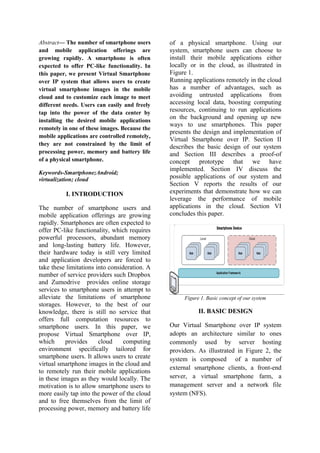
locally or in the cloud, as illustrated in
Figure 1.
Running applications remotely in the cloud
has a number of advantages, such as
avoiding untrusted applications from
accessing local data, boosting computing
resources, continuing to run applications
on the background and opening up new
ways to use smartphones. This paper
presents the design and implementation of
Virtual Smartphone over IP. Section II
describes the basic design of our system
and Section III describes a proof-of
concept prototype that we have
implemented. Section IV discuss the
possible applications of our system and
Section V reports the results of our
experiments that demonstrate how we can
leverage the performance of mobile
applications in the cloud. Section VI
concludes this paper.
Figure 1. Basic concept of our system
II. BASIC DESIGN
Our Virtual Smartphone over IP system
adopts an architecture similar to ones
commonly used by server hosting
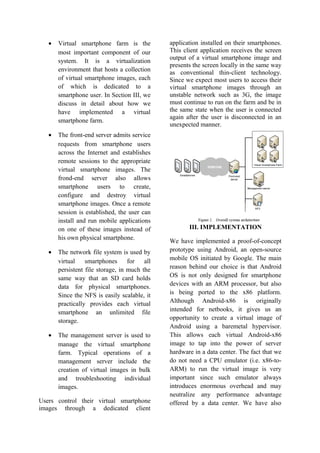
providers. As illustrated in Figure 2, the
system is composed of a number of
external smartphone clients, a front-end
server, a virtual smartphone farm, a
management server and a network file
system (NFS).
• Virtual smartphone farm is the
most important component of our
system. It is a virtualization
environment that hosts a collection
of virtual smartphone images, each
of which is dedicated to a
smartphone user. In Section III, we
discuss in detail about how we
have implemented a virtual
smartphone farm.
• The front-end server admits service
requests from smartphone users
across the Internet and establishes
remote sessions to the appropriate
virtual smartphone images. The
frond-end server also allows
smartphone users to create,
configure and destroy virtual
smartphone images. Once a remote
session is established, the user can
install and run mobile applications
on one of these images instead of
his own physical smartphone.
• The network file system is used by
virtual smartphones for all
persistent file storage, in much the
same way that an SD card holds
data for physical smartphones.
Since the NFS is easily scalable, it
practically provides each virtual
smartphone an unlimited file
storage.
• The management server is used to
manage the virtual smartphone
farm. Typical operations of a
management server include the
creation of virtual images in bulk
and troubleshooting individual
images.
Users control their virtual smartphone
images through a dedicated client
application installed on their smartphones.
This client application receives the screen
output of a virtual smartphone image and
presents the screen locally in the same way
as conventional thin-client technology.
Since we expect most users to access their
virtual smartphone images through an
unstable network such as 3G, the image
must continue to run on the farm and be in
the same state when the user is connected
again after the user is disconnected in an
unexpected manner.
III. IMPLEMENTATION
We have implemented a proof-of-concept
prototype using Android, an open-source
mobile OS initiated by Google. The main
reason behind our choice is that Android
OS is not only designed for smartphone
devices with an ARM processor, but also
is being ported to the x86 platform.
Although Android-x86 is originally
intended for netbooks, it gives us an
opportunity to create a virtual image of
Android using a baremetal hypervisor.
This allows each virtual Android-x86
image to tap into the power of server
hardware in a data center. The fact that we
do not need a CPU emulator (i.e. x86-to-
ARM) to run the virtual image is very
important since such emulator always
introduces enormous overhead and may
neutralize any performance advantage
offered by a data center. We have also
chosen to implement our client application
on an Android smartphone. Although our
system does not require the physical and
the virtual smartphones to be on the same
platform, this particular setting allows us
to more tightly integrate both
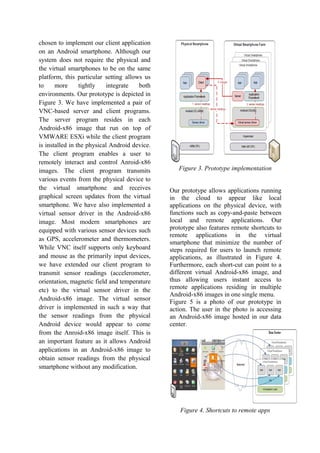
environments. Our prototype is depicted in
Figure 3. We have implemented a pair of
VNC-based server and client programs.
The server program resides in each
Android-x86 image that run on top of
VMWARE ESXi while the client program
is installed in the physical Android device.
The client program enables a user to
remotely interact and control Anroid-x86
images. The client program transmits
various events from the physical device to
the virtual smartphone and receives
graphical screen updates from the virtual
smartphone. We have also implemented a
virtual sensor driver in the Android-x86
image. Most modern smartphones are
equipped with various sensor devices such
as GPS, accelerometer and thermometers.
While VNC itself supports only keyboard
and mouse as the primarily input devices,
we have extended our client program to
transmit sensor readings (accelerometer,
orientation, magnetic field and temperature
etc) to the virtual sensor driver in the
Android-x86 image. The virtual sensor
driver is implemented in such a way that
the sensor readings from the physical
Android device would appear to come
from the Anroid-x86 image itself. This is
an important feature as it allows Android
applications in an Android-x86 image to
obtain sensor readings from the physical
smartphone without any modification.
Figure 3. Prototype implementation
Our prototype allows applications running
in the cloud to appear like local
applications on the physical device, with
functions such as copy-and-paste between
local and remote applications. Our
prototype also features remote shortcuts to
remote applications in the virtual
smartphone that minimize the number of
steps required for users to launch remote
applications, as illustrated in Figure 4.
Furthermore, each short-cut can point to a
different virtual Android-x86 image, and
thus allowing users instant access to
remote applications residing in multiple
Android-x86 images in one single menu.
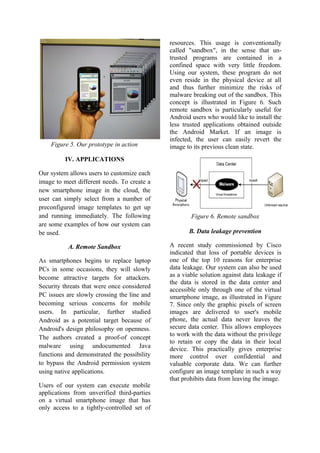
Figure 5 is a photo of our prototype in
action. The user in the photo is accessing
an Android-x86 image hosted in our data
center.
Figure 4. Shortcuts to remote apps
Figure 5. Our prototype in action
IV. APPLICATIONS
Our system allows users to customize each
image to meet different needs. To create a
new smartphone image in the cloud, the
user can simply select from a number of
preconfigured image templates to get up
and running immediately. The following
are some examples of how our system can
be used.
A. Remote Sandbox
As smartphones begins to replace laptop
PCs in some occasions, they will slowly
become attractive targets for attackers.
Security threats that were once considered
PC issues are slowly crossing the line and
becoming serious concerns for mobile
users. In particular, further studied
Android as a potential target because of
Android's design philosophy on openness.
The authors created a proof-of concept
malware using undocumented Java
functions and demonstrated the possibility
to bypass the Android permission system
using native applications.
Users of our system can execute mobile
applications from unverified third-parties
on a virtual smartphone image that has
only access to a tightly-controlled set of
resources. This usage is conventionally
called "sandbox", in the sense that un-
trusted programs are contained in a
confined space with very little freedom.
Using our system, these program do not
even reside in the physical device at all
and thus further minimize the risks of
malware breaking out of the sandbox. This
concept is illustrated in Figure 6. Such
remote sandbox is particularly useful for
Android users who would like to install the
less trusted applications obtained outside
the Android Market. If an image is
infected, the user can easily revert the
image to its previous clean state.
Figure 6. Remote sandbox
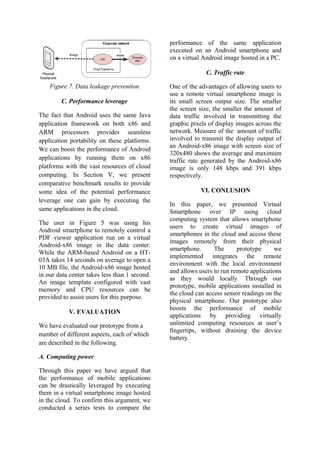
B. Data leakage prevention
A recent study commissioned by Cisco
indicated that loss of portable devices is
one of the top 10 reasons for enterprise
data leakage. Our system can also be used
as a viable solution against data leakage if
the data is stored in the data center and
accessible only through one of the virtual
smartphone image, as illustrated in Figure
7. Since only the graphic pixels of screen
images are delivered to user's mobile
phone, the actual data never leaves the
secure data center. This allows employees
to work with the data without the privilege
to retain or copy the data in their local
device. This practically gives enterprise
more control over confidential and
valuable corporate data. We can further
configure an image template in such a way
that prohibits data from leaving the image.
Figure 7. Data leakage prevention
C. Performance leverage
The fact that Android uses the same Java
application framework on both x86 and
ARM processors provides seamless
application portability on these platforms.
We can boost the performance of Android
applications by running them on x86
platforms with the vast resources of cloud
computing. In Section V, we present
comparative benchmark results to provide
some idea of the potential performance
leverage one can gain by executing the
same applications in the cloud.
The user in Figure 5 was using his
Android smartphone to remotely control a
PDF viewer application run on a virtual
Android-x86 image in the data center.
While the ARM-based Android on a HT-
03A takes 14 seconds on average to open a
10 MB file, the Android-x86 image hosted
in our data center takes less than 1 second.
An image template configured with vast
memory and CPU resources can be
provided to assist users for this purpose.
V. EVALUATION
We have evaluated our prototype from a
number of different aspects, each of which
are described in the following.
A. Computing power
Through this paper we have argued that
the performance of mobile applications
can be drastically leveraged by executing
them in a virtual smartphone image hosted
in the cloud. To confirm this argument, we
conducted a series tests to compare the
performance of the same application
executed on an Android smartphone and
on a virtual Android image hosted in a PC.
C. Traffic rate
One of the advantages of allowing users to
use a remote virtual smartphone image is
its small screen output size. The smaller
the screen size, the smaller the amount of
data traffic involved in transmitting the
graphic pixels of display images across the
network. Measure of the amount of traffic
involved to transmit the display output of
an Android-x86 image with screen size of
320x480 shows the average and maximum
traffic rate generated by the Android-x86
image is only 148 kbps and 391 kbps
respectively.
VI. CONLUSION
In this paper, we presented Virtual
Smartphone over IP using cloud
computing system that allows smartphone
users to create virtual images of
smartphones in the cloud and access these
images remotely from their physical
smartphone. The prototype we
implemented integrates the remote
environment with the local environment
and allows users to run remote applications
as they would locally. Through our
prototype, mobile applications installed in
the cloud can access sensor readings on the
physical smartphone. Our prototype also
boosts the performance of mobile
applications by providing virtually
unlimited computing resources at user’s
fingertips, without draining the device
battery.
VIII. REFERENCES
[1] “Dropbox - Home - Online backup, file
sync and sharing made easy.,”
http://www.dropbox.com/.
[2] “ZumoDrive - Enjoy your media and
documents from every device,”
http://www.zumodrive.com/.
[3] “Android Developers,”
http://developer.android.com/index.html.
[4] “Android-x86 Project - Run Android
on Your PC (Android-x86 - Porting
Android to x86 ),” http://www.android-
x86.org/.
[5] S. Töyssy and M. Helenius, “About
malicious software in smartphones,”
Journal in Computer Virology, vol. 2,
Nov. 2006, pp. 109-119.
[6] C. Fleizach, M. Liljenstam, P.
Johansson, G.M. Voelker, and A. Mehes,
“Can you infect me now?: malware
propagation in mobile phone networks,”
Proceedings of the 2007 ACM workshop
on Recurring malcode, Alexandria,
Virginia, USA: ACM, 2007, pp. 61-68.
[7] A. Schmidt and S. Albayrak,
“Malicious software for smartphones,”
Technische Universität Berlin, DAILabor,
Tech. Rep. TUB-DAI, vol. 2, 2008, pp. 08–
01.
[8] M. Becher, F.C. Freiling, and B.
Leider, “On the Effort to Create
Smartphone Worms in Windows Mobile,”
Information Assurance and Security
Workshop, 2007. IAW '07. IEEE SMC,
2007, pp. 199 -206.
[9] A.-. Schmidt, H.-. Schmidt, L. Batyuk,
J.H. Clausen, S.A. Camtepe, S. Albayrak,
and C. Yildizli, “Smartphone malware
evolution revisited: Android next target?,”
Malicious and Unwanted Software
(MALWARE), 2009 4th International
Conference on, 2009, pp. 1 -7.
[10] E.Y. Chen and M. Ito, “Using end-to-
middle security to protect against evil twin
access points,” 2009 IEEE International
Symposium on a World of Wireless,
Mobile and Multimedia Networks &
Workshops, Kos, Greece: 2009, pp. 1-6.
[11] “SmartphoneBench 1.5 (for
Android),”
http://www.lusterworks.co.jp/cgi
bin/tt03.pl?id=A000.
[12] M. Satyanarayanan, V. Bahl, R.
Caceres, and N. Davies, “The Case for
VM-based Cloudlets in Mobile
Computing,” IEEE Pervasive Computing,
2009.
[13] R.A. Baratto, S. Potter, G. Su, and J.
Nieh, “MobiDesk: mobile virtual desktop
computing,” Proceedings of the 10th
annual international conference on Mobile
computing and networking, Philadelphia,
PA, USA: ACM, 2004, pp. 1-15.
[14] S. Potter and J. Nieh, “Highly
Reliable Mobile Desktop Computing in
Your Pocket,” Computer Software and
Applications Conference, 2006.
COMPSAC '06. 30th
Annual International,
2006, pp. 247 -254.
[15] B.G. Chun and P. Maniatis,
“Augmented Smartphone Applications
Through Clone Cloud Execution.”

Virtual Smart-phone (1) (1)

  • 1.
    Virtual Smartphone overIP using Cloud computing From, G.HEMANTH KUMAR ghemanthkumar@outlook.com E.akhil charan m.mahash R.M.K engineering college
  • 2.
    Abstract— The numberof smartphone users and mobile application offerings are growing rapidly. A smartphone is often expected to offer PC-like functionality. In this paper, we present Virtual Smartphone over IP system that allows users to create virtual smartphone images in the mobile cloud and to customize each image to meet different needs. Users can easily and freely tap into the power of the data center by installing the desired mobile applications remotely in one of these images. Because the mobile applications are controlled remotely, they are not constrained by the limit of processing power, memory and battery life of a physical smartphone. Keywords-Smartphone;Android; virtualization; cloud I. INTRODUCTION The number of smartphone users and mobile application offerings are growing rapidly. Smartphones are often expected to offer PC-like functionality, which requires powerful processors, abundant memory and long-lasting battery life. However, their hardware today is still very limited and application developers are forced to take these limitations into consideration. A number of service providers such Dropbox and Zumodrive provides online storage services to smartphone users in attempt to alleviate the limitations of smartphone storages. However, to the best of our knowledge, there is still no service that offers full computation resources to smartphone users. In this paper, we propose Virtual Smartphone over IP, which provides cloud computing environment specifically tailored for smartphone users. It allows users to create virtual smartphone images in the cloud and to remotely run their mobile applications in these images as they would locally. The motivation is to allow smartphone users to more easily tap into the power of the cloud and to free themselves from the limit of processing power, memory and battery life of a physical smartphone. Using our system, smartphone users can choose to install their mobile applications either locally or in the cloud, as illustrated in Figure 1. Running applications remotely in the cloud has a number of advantages, such as avoiding untrusted applications from accessing local data, boosting computing resources, continuing to run applications on the background and opening up new ways to use smartphones. This paper presents the design and implementation of Virtual Smartphone over IP. Section II describes the basic design of our system and Section III describes a proof-of concept prototype that we have implemented. Section IV discuss the possible applications of our system and Section V reports the results of our experiments that demonstrate how we can leverage the performance of mobile applications in the cloud. Section VI concludes this paper. Figure 1. Basic concept of our system II. BASIC DESIGN Our Virtual Smartphone over IP system adopts an architecture similar to ones commonly used by server hosting providers. As illustrated in Figure 2, the system is composed of a number of external smartphone clients, a front-end server, a virtual smartphone farm, a management server and a network file system (NFS).
  • 3.
    • Virtual smartphonefarm is the most important component of our system. It is a virtualization environment that hosts a collection of virtual smartphone images, each of which is dedicated to a smartphone user. In Section III, we discuss in detail about how we have implemented a virtual smartphone farm. • The front-end server admits service requests from smartphone users across the Internet and establishes remote sessions to the appropriate virtual smartphone images. The frond-end server also allows smartphone users to create, configure and destroy virtual smartphone images. Once a remote session is established, the user can install and run mobile applications on one of these images instead of his own physical smartphone. • The network file system is used by virtual smartphones for all persistent file storage, in much the same way that an SD card holds data for physical smartphones. Since the NFS is easily scalable, it practically provides each virtual smartphone an unlimited file storage. • The management server is used to manage the virtual smartphone farm. Typical operations of a management server include the creation of virtual images in bulk and troubleshooting individual images. Users control their virtual smartphone images through a dedicated client application installed on their smartphones. This client application receives the screen output of a virtual smartphone image and presents the screen locally in the same way as conventional thin-client technology. Since we expect most users to access their virtual smartphone images through an unstable network such as 3G, the image must continue to run on the farm and be in the same state when the user is connected again after the user is disconnected in an unexpected manner. III. IMPLEMENTATION We have implemented a proof-of-concept prototype using Android, an open-source mobile OS initiated by Google. The main reason behind our choice is that Android OS is not only designed for smartphone devices with an ARM processor, but also is being ported to the x86 platform. Although Android-x86 is originally intended for netbooks, it gives us an opportunity to create a virtual image of Android using a baremetal hypervisor. This allows each virtual Android-x86 image to tap into the power of server hardware in a data center. The fact that we do not need a CPU emulator (i.e. x86-to- ARM) to run the virtual image is very important since such emulator always introduces enormous overhead and may neutralize any performance advantage offered by a data center. We have also
  • 4.
    chosen to implementour client application on an Android smartphone. Although our system does not require the physical and the virtual smartphones to be on the same platform, this particular setting allows us to more tightly integrate both environments. Our prototype is depicted in Figure 3. We have implemented a pair of VNC-based server and client programs. The server program resides in each Android-x86 image that run on top of VMWARE ESXi while the client program is installed in the physical Android device. The client program enables a user to remotely interact and control Anroid-x86 images. The client program transmits various events from the physical device to the virtual smartphone and receives graphical screen updates from the virtual smartphone. We have also implemented a virtual sensor driver in the Android-x86 image. Most modern smartphones are equipped with various sensor devices such as GPS, accelerometer and thermometers. While VNC itself supports only keyboard and mouse as the primarily input devices, we have extended our client program to transmit sensor readings (accelerometer, orientation, magnetic field and temperature etc) to the virtual sensor driver in the Android-x86 image. The virtual sensor driver is implemented in such a way that the sensor readings from the physical Android device would appear to come from the Anroid-x86 image itself. This is an important feature as it allows Android applications in an Android-x86 image to obtain sensor readings from the physical smartphone without any modification. Figure 3. Prototype implementation Our prototype allows applications running in the cloud to appear like local applications on the physical device, with functions such as copy-and-paste between local and remote applications. Our prototype also features remote shortcuts to remote applications in the virtual smartphone that minimize the number of steps required for users to launch remote applications, as illustrated in Figure 4. Furthermore, each short-cut can point to a different virtual Android-x86 image, and thus allowing users instant access to remote applications residing in multiple Android-x86 images in one single menu. Figure 5 is a photo of our prototype in action. The user in the photo is accessing an Android-x86 image hosted in our data center. Figure 4. Shortcuts to remote apps
  • 5.
    Figure 5. Ourprototype in action IV. APPLICATIONS Our system allows users to customize each image to meet different needs. To create a new smartphone image in the cloud, the user can simply select from a number of preconfigured image templates to get up and running immediately. The following are some examples of how our system can be used. A. Remote Sandbox As smartphones begins to replace laptop PCs in some occasions, they will slowly become attractive targets for attackers. Security threats that were once considered PC issues are slowly crossing the line and becoming serious concerns for mobile users. In particular, further studied Android as a potential target because of Android's design philosophy on openness. The authors created a proof-of concept malware using undocumented Java functions and demonstrated the possibility to bypass the Android permission system using native applications. Users of our system can execute mobile applications from unverified third-parties on a virtual smartphone image that has only access to a tightly-controlled set of resources. This usage is conventionally called "sandbox", in the sense that un- trusted programs are contained in a confined space with very little freedom. Using our system, these program do not even reside in the physical device at all and thus further minimize the risks of malware breaking out of the sandbox. This concept is illustrated in Figure 6. Such remote sandbox is particularly useful for Android users who would like to install the less trusted applications obtained outside the Android Market. If an image is infected, the user can easily revert the image to its previous clean state. Figure 6. Remote sandbox B. Data leakage prevention A recent study commissioned by Cisco indicated that loss of portable devices is one of the top 10 reasons for enterprise data leakage. Our system can also be used as a viable solution against data leakage if the data is stored in the data center and accessible only through one of the virtual smartphone image, as illustrated in Figure 7. Since only the graphic pixels of screen images are delivered to user's mobile phone, the actual data never leaves the secure data center. This allows employees to work with the data without the privilege to retain or copy the data in their local device. This practically gives enterprise more control over confidential and valuable corporate data. We can further configure an image template in such a way that prohibits data from leaving the image.
  • 6.
    Figure 7. Dataleakage prevention C. Performance leverage The fact that Android uses the same Java application framework on both x86 and ARM processors provides seamless application portability on these platforms. We can boost the performance of Android applications by running them on x86 platforms with the vast resources of cloud computing. In Section V, we present comparative benchmark results to provide some idea of the potential performance leverage one can gain by executing the same applications in the cloud. The user in Figure 5 was using his Android smartphone to remotely control a PDF viewer application run on a virtual Android-x86 image in the data center. While the ARM-based Android on a HT- 03A takes 14 seconds on average to open a 10 MB file, the Android-x86 image hosted in our data center takes less than 1 second. An image template configured with vast memory and CPU resources can be provided to assist users for this purpose. V. EVALUATION We have evaluated our prototype from a number of different aspects, each of which are described in the following. A. Computing power Through this paper we have argued that the performance of mobile applications can be drastically leveraged by executing them in a virtual smartphone image hosted in the cloud. To confirm this argument, we conducted a series tests to compare the performance of the same application executed on an Android smartphone and on a virtual Android image hosted in a PC. C. Traffic rate One of the advantages of allowing users to use a remote virtual smartphone image is its small screen output size. The smaller the screen size, the smaller the amount of data traffic involved in transmitting the graphic pixels of display images across the network. Measure of the amount of traffic involved to transmit the display output of an Android-x86 image with screen size of 320x480 shows the average and maximum traffic rate generated by the Android-x86 image is only 148 kbps and 391 kbps respectively. VI. CONLUSION In this paper, we presented Virtual Smartphone over IP using cloud computing system that allows smartphone users to create virtual images of smartphones in the cloud and access these images remotely from their physical smartphone. The prototype we implemented integrates the remote environment with the local environment and allows users to run remote applications as they would locally. Through our prototype, mobile applications installed in the cloud can access sensor readings on the physical smartphone. Our prototype also boosts the performance of mobile applications by providing virtually unlimited computing resources at user’s fingertips, without draining the device battery.
  • 7.
    VIII. REFERENCES [1] “Dropbox- Home - Online backup, file sync and sharing made easy.,” http://www.dropbox.com/. [2] “ZumoDrive - Enjoy your media and documents from every device,” http://www.zumodrive.com/. [3] “Android Developers,” http://developer.android.com/index.html. [4] “Android-x86 Project - Run Android on Your PC (Android-x86 - Porting Android to x86 ),” http://www.android- x86.org/. [5] S. Töyssy and M. Helenius, “About malicious software in smartphones,” Journal in Computer Virology, vol. 2, Nov. 2006, pp. 109-119. [6] C. Fleizach, M. Liljenstam, P. Johansson, G.M. Voelker, and A. Mehes, “Can you infect me now?: malware propagation in mobile phone networks,” Proceedings of the 2007 ACM workshop on Recurring malcode, Alexandria, Virginia, USA: ACM, 2007, pp. 61-68. [7] A. Schmidt and S. Albayrak, “Malicious software for smartphones,” Technische Universität Berlin, DAILabor, Tech. Rep. TUB-DAI, vol. 2, 2008, pp. 08– 01. [8] M. Becher, F.C. Freiling, and B. Leider, “On the Effort to Create Smartphone Worms in Windows Mobile,” Information Assurance and Security Workshop, 2007. IAW '07. IEEE SMC, 2007, pp. 199 -206. [9] A.-. Schmidt, H.-. Schmidt, L. Batyuk, J.H. Clausen, S.A. Camtepe, S. Albayrak, and C. Yildizli, “Smartphone malware evolution revisited: Android next target?,” Malicious and Unwanted Software (MALWARE), 2009 4th International Conference on, 2009, pp. 1 -7. [10] E.Y. Chen and M. Ito, “Using end-to- middle security to protect against evil twin access points,” 2009 IEEE International Symposium on a World of Wireless, Mobile and Multimedia Networks & Workshops, Kos, Greece: 2009, pp. 1-6. [11] “SmartphoneBench 1.5 (for Android),” http://www.lusterworks.co.jp/cgi bin/tt03.pl?id=A000. [12] M. Satyanarayanan, V. Bahl, R. Caceres, and N. Davies, “The Case for VM-based Cloudlets in Mobile Computing,” IEEE Pervasive Computing, 2009. [13] R.A. Baratto, S. Potter, G. Su, and J. Nieh, “MobiDesk: mobile virtual desktop computing,” Proceedings of the 10th annual international conference on Mobile computing and networking, Philadelphia, PA, USA: ACM, 2004, pp. 1-15. [14] S. Potter and J. Nieh, “Highly Reliable Mobile Desktop Computing in Your Pocket,” Computer Software and Applications Conference, 2006. COMPSAC '06. 30th Annual International, 2006, pp. 247 -254. [15] B.G. Chun and P. Maniatis, “Augmented Smartphone Applications Through Clone Cloud Execution.”