AngularJS
Maurice de Beijer
 Maurice de Beijer
 The Problem Solver

 Microsoft Integration MVP

Who am I?

 Freelance developer
 DevelopMentor instructor
 Twitter:

@mauricedb

 Blog:

http://msmvps.com/blogs/TheProblemSolver/

 Web:

http://www.TheProblemSolver.nl

 E-mail:

maurice.de.beijer@gmail.com
 What is AngularJS?

Objectives

 Getting started
 Directives
 Routing
 Services
 AngularJS is an MVC framework for browser based apps
 Open source and originally developed at Google

 The clean architecture has attracted a large following quickly

What is
AngularJS?

 Version 1.0 was released in June 2012
 Currently at 1.2.0-rc-3

 The goal is building CRUD style business applications
 Not as suitable for games etc

 Use declarative programming for UI and imperative
programming for the logic

 The application is wired together in a declarative way

 Supports modern desktop and mobile browsers
 Internet Explorer version 8 and above
 Model View Controller architecture

 A well known and proven architecture

 Declarative two way data binding

 Automatically synchronizes values between Model and View

 Dynamic templates

Key features

 Makes it very easy to update the user interface

 Dependency injections

 Code dependencies are automatically injected where needed

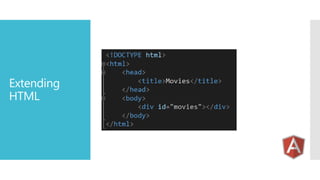
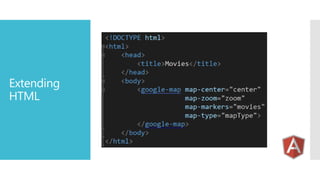
 Extends HTML with directives

 Lots of powerful standard directives or create your own

 Build with testing in mind

 Makes it much easier to unit test different parts
Extending
HTML
Extending
HTML
 Visual Studio 2012

 Several ways to get IntelliSense

 Visual Studio 2013

Tooling

 Understands directives and provides IntelliSense

 WebStorm

 Including support for Live Edit

 Batarang

 Chrome plugin

 Karma Test Runner
 Automatic bootstrapping

Bootstrapping

 Add a reference to AngularJS
 Add the ngApp attribute

 Manual bootstrapping is also possible

 Gives you more control
 For example when using AMD/RequireJS
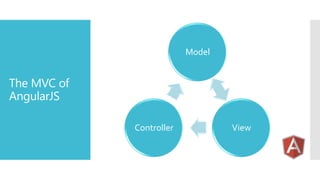
Model

The MVC of
AngularJS
Controller

View
Model

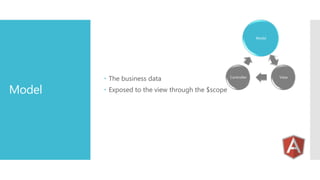
Model

 The business data
 Exposed to the view through the $scope

Controller

View
Model

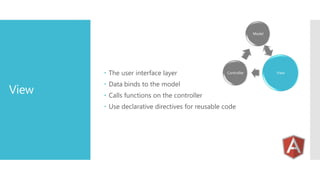
 The user interface layer

View

Controller

 Data binds to the model
 Calls functions on the controller

 Use declarative directives for reusable code

View
Model

Controller

Controller

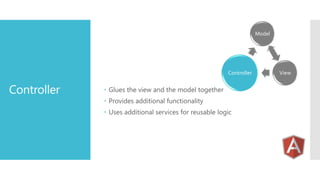
 Glues the view and the model together
 Provides additional functionality
 Uses additional services for reusable logic

View
Model

Services

View

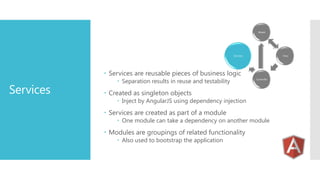
 Services are reusable pieces of business logic

Services

 Separation results in reuse and testability

Controller

 Created as singleton objects

 Inject by AngularJS using dependency injection

 Services are created as part of a module

 One module can take a dependency on another module

 Modules are groupings of related functionality
 Also used to bootstrap the application
Model

Controller

$scope

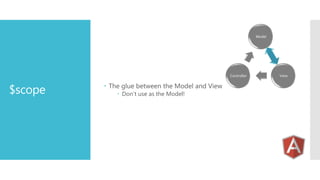
 The glue between the Model and View
 Don’t use as the Model!

View
 Many general purpose services provided by AngularJS
 $http

 Used for XMLHttpRequest handling

 $location

Standard
Services

 Provide information about the current URL

 $q
 A promise/deferred module for asynchronous requests

 $routeProvider
 Configure routes in an SPA

 $log
 Logging service

 Many more
 AngularJS uses dependency injection to decouple modules

Dependency
injection

 Dependencies are automatically injected by the framework

 Based on the parameter name
 JavaScript is often minified in production

 Need to provide AngularJS with some extra hints
 Directives allow you to enhance HTML with new capabilities
 Start using HTML as a domain specific language

 AngularJS comes with a long list of standard directives

Standard
directives











ngApp
ngBind
ngModel
ngRepeat
ngClick
ngEnable/ngDisable
ngHide/ngShow
ngView
…
 Turn HTML into your Domain Specific Language

Custom
directives

 Use templates to embed complete blocks

 Can use either attributes, elements, CSS classes or comments
 Directives let you interact with the DOM
 The place for jQuery code
 Used to create SPA style application

 The page can change without using the server

 The ngView is often used to render a template

Routing

 HTML templates loaded when needed
 Can also be pre loaded as script with type="text/ng-template"

 The $routeProvider service is used to configure the route
 The $location service can be used to navigate
 Using an anchor tag is also possible

 The $routeParams service can be used to retrieve parameters
 Properties named in the route URL template
 The basic service for doing all HTTP requests
 The building block for all AJAX requests

 Can be used as a function
 $http(config)

$http service

 Provides a number of shortcut methods





$http.post(url, config)
$http.get(url, config)
$http.put(url, config)
$http.delete(url, config)

 Uses the promises API as the result
 Provided by the $q service
 Creates a service for working with RESTful services
 Much easier than using the $http object

$resource

 Standard functions are already preconfigured
 Only the common HTTP PUT is missing

 Requires a dependency on ngResource
 Located in angular-resource.js
 The $httpBackend is the service that is responsible

Unit testing
AJAX code

 Use the XMLHttpRequest object

 There is a second version in the ngMock module

 Used for unit testing code that does HTTP requests

 Can be configured to fake HTTP requests
 Or verify that HTTP calls where made
 AngularJS is a complete framework for client side applications
 Based on the standard MVC design pattern

Summary

 Two way data binding makes it easy to build data entry forms
 Dependency injection makes it easy to separate modules
 Build with testing in mind
The code

 Check http://msmvps.com/blogs/theproblemsolver/

AngularJS

  • 1.
  • 2.
     Maurice deBeijer  The Problem Solver  Microsoft Integration MVP Who am I?  Freelance developer  DevelopMentor instructor  Twitter: @mauricedb  Blog: http://msmvps.com/blogs/TheProblemSolver/  Web: http://www.TheProblemSolver.nl  E-mail: maurice.de.beijer@gmail.com
  • 3.
     What isAngularJS? Objectives  Getting started  Directives  Routing  Services
  • 4.
     AngularJS isan MVC framework for browser based apps  Open source and originally developed at Google  The clean architecture has attracted a large following quickly What is AngularJS?  Version 1.0 was released in June 2012  Currently at 1.2.0-rc-3  The goal is building CRUD style business applications  Not as suitable for games etc  Use declarative programming for UI and imperative programming for the logic  The application is wired together in a declarative way  Supports modern desktop and mobile browsers  Internet Explorer version 8 and above
  • 5.
     Model ViewController architecture  A well known and proven architecture  Declarative two way data binding  Automatically synchronizes values between Model and View  Dynamic templates Key features  Makes it very easy to update the user interface  Dependency injections  Code dependencies are automatically injected where needed  Extends HTML with directives  Lots of powerful standard directives or create your own  Build with testing in mind  Makes it much easier to unit test different parts
  • 6.
  • 7.
  • 8.
     Visual Studio2012  Several ways to get IntelliSense  Visual Studio 2013 Tooling  Understands directives and provides IntelliSense  WebStorm  Including support for Live Edit  Batarang  Chrome plugin  Karma Test Runner
  • 9.
     Automatic bootstrapping Bootstrapping Add a reference to AngularJS  Add the ngApp attribute  Manual bootstrapping is also possible  Gives you more control  For example when using AMD/RequireJS
  • 10.
  • 11.
    Model Model  The businessdata  Exposed to the view through the $scope Controller View
  • 12.
    Model  The userinterface layer View Controller  Data binds to the model  Calls functions on the controller  Use declarative directives for reusable code View
  • 13.
    Model Controller Controller  Glues theview and the model together  Provides additional functionality  Uses additional services for reusable logic View
  • 14.
    Model Services View  Services arereusable pieces of business logic Services  Separation results in reuse and testability Controller  Created as singleton objects  Inject by AngularJS using dependency injection  Services are created as part of a module  One module can take a dependency on another module  Modules are groupings of related functionality  Also used to bootstrap the application
  • 15.
    Model Controller $scope  The gluebetween the Model and View  Don’t use as the Model! View
  • 16.
     Many generalpurpose services provided by AngularJS  $http  Used for XMLHttpRequest handling  $location Standard Services  Provide information about the current URL  $q  A promise/deferred module for asynchronous requests  $routeProvider  Configure routes in an SPA  $log  Logging service  Many more
  • 17.
     AngularJS usesdependency injection to decouple modules Dependency injection  Dependencies are automatically injected by the framework  Based on the parameter name  JavaScript is often minified in production  Need to provide AngularJS with some extra hints
  • 18.
     Directives allowyou to enhance HTML with new capabilities  Start using HTML as a domain specific language  AngularJS comes with a long list of standard directives Standard directives          ngApp ngBind ngModel ngRepeat ngClick ngEnable/ngDisable ngHide/ngShow ngView …
  • 19.
     Turn HTMLinto your Domain Specific Language Custom directives  Use templates to embed complete blocks  Can use either attributes, elements, CSS classes or comments  Directives let you interact with the DOM  The place for jQuery code
  • 20.
     Used tocreate SPA style application  The page can change without using the server  The ngView is often used to render a template Routing  HTML templates loaded when needed  Can also be pre loaded as script with type="text/ng-template"  The $routeProvider service is used to configure the route  The $location service can be used to navigate  Using an anchor tag is also possible  The $routeParams service can be used to retrieve parameters  Properties named in the route URL template
  • 21.
     The basicservice for doing all HTTP requests  The building block for all AJAX requests  Can be used as a function  $http(config) $http service  Provides a number of shortcut methods     $http.post(url, config) $http.get(url, config) $http.put(url, config) $http.delete(url, config)  Uses the promises API as the result  Provided by the $q service
  • 22.
     Creates aservice for working with RESTful services  Much easier than using the $http object $resource  Standard functions are already preconfigured  Only the common HTTP PUT is missing  Requires a dependency on ngResource  Located in angular-resource.js
  • 23.
     The $httpBackendis the service that is responsible Unit testing AJAX code  Use the XMLHttpRequest object  There is a second version in the ngMock module  Used for unit testing code that does HTTP requests  Can be configured to fake HTTP requests  Or verify that HTTP calls where made
  • 24.
     AngularJS isa complete framework for client side applications  Based on the standard MVC design pattern Summary  Two way data binding makes it easy to build data entry forms  Dependency injection makes it easy to separate modules  Build with testing in mind
  • 25.
    The code  Checkhttp://msmvps.com/blogs/theproblemsolver/