AngularJS
Fundamentals
Aviran Cohen
Hello!
I am Aviran Cohen
Full-stack Developer
7 years experience in web development
blog.avirancohen.com
facebook.com/MEvsWEB
What we’ll cover
1.A brief history of web development
2.Introduction
3.Architecture
4.Getting Started
5.Directives
6.HTML Compiler
1.
A Brief History
Of Web
Development
Once upon a time
jQuery (2006)
jQuery
▣ Started as DOM manipulation tool
▣ Became an all-in-one javascript library
□ without much forethoughts
▣ Our best friend back then, until..
The Era of Web
Apps
jQuery + Webapp = Headaches
▣ Structureless spaghetti code
□ Total code mess
▣ Selectors creating tight coupling
□ Non-reusable code
▣ Not enough high level abstractions
□ A lot of code required to be written
= TOTAL MESS
Backbone.js (2010)
backbone.js
▣ It brings structures to our code
▣ but still uses jQuery to handle the views
backbone.js
▣ Solved
□ No more spaghetti code
▣ NOT Solved
□ Selectors creating tight coupling
□ Not enough high level abstractions
What about High Level Abstractions?
▣ Backbone is unopinionated.
▣ It lacks the necessary tools to easily manage
any webapp above a certain threshold in
complexity
▣ The bottom line - Backbone asks you to write

A Lot More Code to get what you want
And the earth was without form,
and void; and darkness wasupon
the face of the deep
‘’
And the earth was without
form, and void; and darkness
wasupon the face of the deep
And God said:
Let there be light..
‘’
And the earth was without
form, and void; and darkness
wasupon the face of the deep
And God said:
Let there be light..
...and there was light
AngularJS
Initial release in 2009
Faster development
Quality code (structure and robustness)
Developed by Google
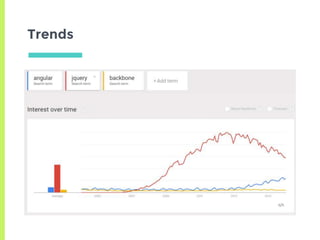
Trends
How come jQuery is still way more popular
than angular?
It’s not one or another
▣ Angular does not replace jQuery!
▣ jQuery library is the undoubted king of a DOM
manipulation
Angular’s Role
▣ Angular offers a comprehensive framework to
develop front-end applications
▣ Actually Angular provides jqLite out of the
box
□ a jQuery-like library that provides a subset of
jQuery functionality
2.
Introduction
What
AngularJS is all
about
‘’
AngularJS is:
1.a powerful Front-end
JavaScript framework
1.Extends HTML to build
complex web applications
1.Organizes JavaScript code
into reusable components
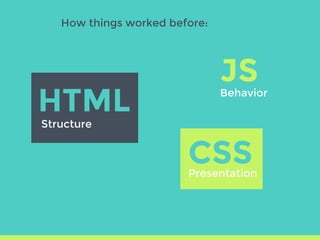
How things worked before:
JS
HTML
Structure
Behavior
CSSPresentation
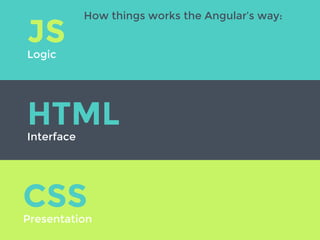
HTMLInterface
CSSPresentation
JSLogic
How things works the Angular’s way:
Why Angular
▣ Component based - Code reuse
▣ Extends HTML by adding directives, custom
tags, attributes, expressions, templates within
HTML
▣ Data Binding and Dependency Injection
□ Everything is communicated automatically
▣ Dependency-injected code for easy testing
and TDD
The major features of AngularJS
▣ Easy Data Binding: Two way Data Binding
▣ Reusable Components - Directives
▣ Dependency injection
▣ Routing
▣ Templating
▣ Modules
▣ Controllers
▣ Services
▣ Expressions
▣ Filters
▣ Form Validation
▣ $scope, $http, $routeProvides..
3.
Architecture
What kind of
architecture
Angular use?
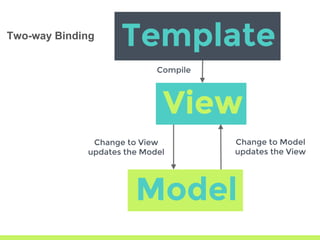
Template
Model
View
Compile
Change to View
updates the Model
Change to Model
updates the View
Two-way Binding
Two-way Binding
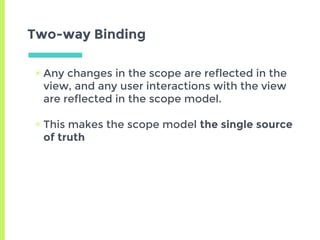
▣ Any changes in the scope are reflected in the
view, and any user interactions with the view
are reflected in the scope model.
▣ This makes the scope model the single source
of truth
MVC? MVVM?
Model-View-Controller?
Model-View-ViewModel?
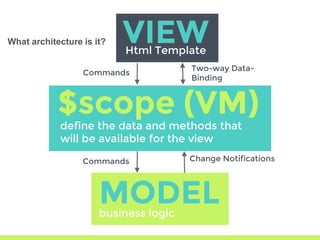
VIEW
define the data and methods that

will be available for the view
MODELbusiness logic
Html Template
$scope (VM)
Two-way Data-
Binding
Commands
Commands Change Notifications
What architecture is it?
MVW
Model View Whatever - Whatever works for you
4.
Getting Started
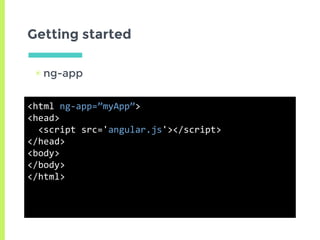
Getting started
▣ ng-app
<html ng-app=”myApp”>
<head>
<script src='angular.js'></script>
</head>
<body>
</body>
</html>
ng-app
▣ Use this directive to bootstrap an application
▣ Only one ng-app directive can be used per
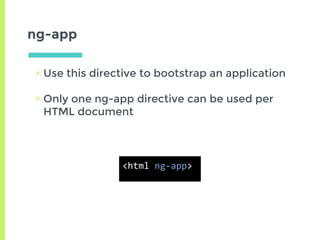
HTML document
<html ng-app>
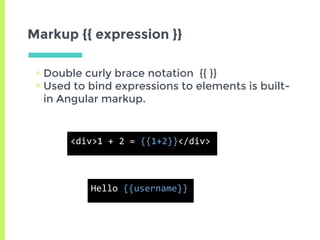
Markup {{ expression }}
▣ Double curly brace notation {{ }}
▣ Used to bind expressions to elements is built-
in Angular markup.
<div>1 + 2 = {{1+2}}</div>
Hello {{username}}
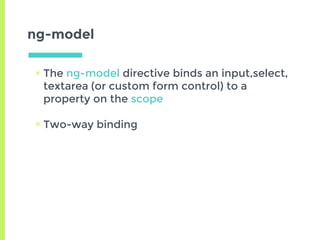
ng-model
▣ The ng-model directive binds an input,select,
textarea (or custom form control) to a
property on the scope
▣ Two-way binding
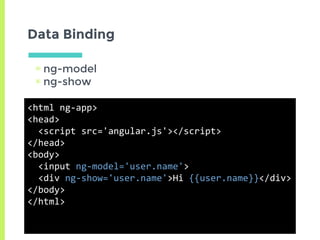
Data Binding
▣ ng-model
▣ ng-show
<html ng-app>
<head>
<script src='angular.js'></script>
</head>
<body>
<input ng-model='user.name'>
<div ng-show='user.name'>Hi {{user.name}}</div>
</body>
</html>
Modules (HTML side)
▣ All AngularJS JavaScript code is stored in
modules
▣ And a module is attached to a page
var app = angular.module('myApp', ['otherModule', 'anotherModule']);
<html ng-app="myApp"> ... </html>
Modules (Javascript)
▣ Modules are used to define services, controllers,
directives and filters
▣ Each module member is a constructor which can
inject other services
app.factory('myValues', function() {
return function() {
return [1,2,3,4,5,6];
};
});
app.filter('skipFirstValue', function() {
return function(data) {
return data.slice(1);
}
});
app.run(function($rootScope, myValues, skipFirstValueFilter) {
//this is called when the page is loaded
$rootScope.values = skipFirstValue(myValues());
});
$scope
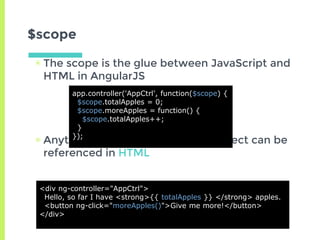
▣ The scope is the glue between JavaScript and
HTML in AngularJS
▣ Anything placed on the $scope object can be
referenced in HTML
<div ng-controller="AppCtrl">
Hello, so far I have <strong>{{ totalApples }} </strong> apples.
<button ng-click="moreApples()">Give me more!</button>
</div>
app.controller('AppCtrl', function($scope) {
$scope.totalApples = 0;
$scope.moreApples = function() {
$scope.totalApples++;
}
});
$scope
Think of the scope as the memory for your HTML
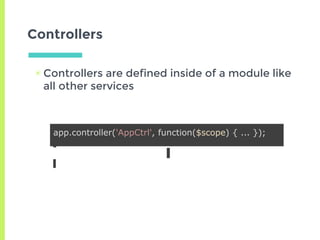
Controllers
▣ Controllers are defined inside of a module like
all other services
app.controller('AppCtrl', function($scope) { ... });
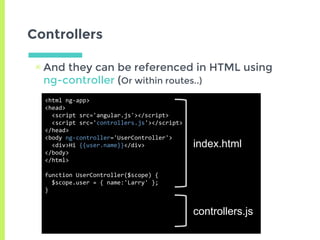
Controllers
▣ And they can be referenced in HTML using
ng-controller (Or within routes..)
<html ng-app>
<head>
<script src='angular.js'></script>
<script src='controllers.js'></script>
</head>
<body ng-controller='UserController'>
<div>Hi {{user.name}}</div>
</body>
</html>
function UserController($scope) {
$scope.user = { name:'Larry' };
}
index.html
controllers.js
Ajax
AJAX using $http
▣ Use $http to perform an AJAX request
▣ The scope will automatically update itself
when $http returns gets a response
var app = angular.module('myApp', []);
app.controller('ColorsCtrl', function($scope, $http) {
$scope.colors = $http.get('/api/colors.json');
});
5.
Directives
The Magic
Begins..
No more HTML mess
Today’s websites have giant series of <div> with
extensive and exhaustive CSS, causing little
semantic clarity.
With Angular you can create your own tags and
attributes using Directives.
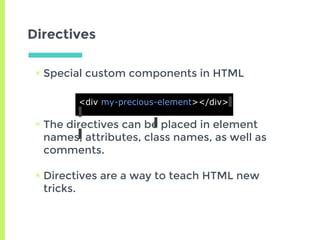
Directives
▣ Special custom components in HTML
▣ The directives can be placed in element
names, attributes, class names, as well as
comments.
▣ Directives are a way to teach HTML new
tricks.
<div my-precious-element></div>
Directives
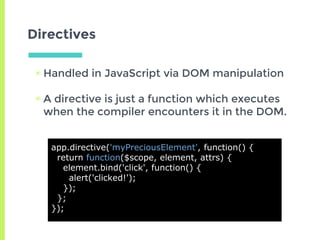
▣ Handled in JavaScript via DOM manipulation
▣ A directive is just a function which executes
when the compiler encounters it in the DOM.
app.directive('myPreciousElement', function() {
return function($scope, element, attrs) {
element.bind('click', function() {
alert('clicked!');
});
};
});
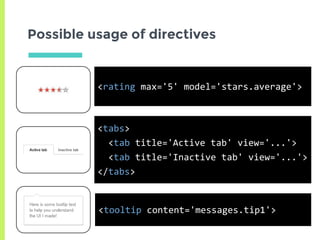
Possible usage of directives
<rating max='5' model='stars.average'>
<tabs>
<tab title='Active tab' view='...'>
<tab title='Inactive tab' view='...'>
</tabs>
<tooltip content='messages.tip1'>
Built-in Directives
▣ AngularJS provides series of predefined HTML
components
▣ These components reduce much of the
JavaScript required to make HTML appear
dynamic
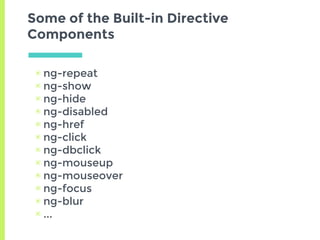
Some of the Built-in Directive
Components
▣ ng-repeat
▣ ng-show
▣ ng-hide
▣ ng-disabled
▣ ng-href
▣ ng-click
▣ ng-dbclick
▣ ng-mouseup
▣ ng-mouseover
▣ ng-focus
▣ ng-blur
▣ ...
6.
HTML Compiler
HTML Compiler
▣ Angular’s HTML compiler allows the
developer to teach the browser new HTML
syntax.
▣ The compiler allows you to attach behavior to
any HTML element or attribute and even
create new HTML elements or attributes with
custom behavior.
▣ Angular calls these behavior extensions
directives.
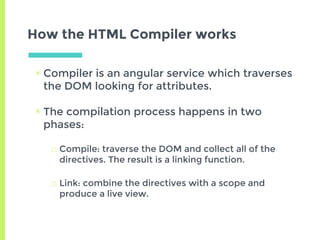
How the HTML Compiler works
▣ Compiler is an angular service which traverses
the DOM looking for attributes.
▣ The compilation process happens in two
phases:
□ Compile: traverse the DOM and collect all of the
directives. The result is a linking function.
□ Link: combine the directives with a scope and
produce a live view.
Exercise
http://www.learn-angular.org
Thanks!
Any questions?
You can find me at:
blog.avirancohen.com
facebook.com/MEvsWEB
Credits
▣ http://slides.com/gsklee/angularjs-a-brief-
introduction
▣ https://docs.google.com/presentation/d/1H
9u9xd0OE0W1o_5Aeug7uSR0AXXPidtWBQN
mpi_ZP9I

ME vs WEB - AngularJS Fundamentals

  • 1.
  • 2.
    Hello! I am AviranCohen Full-stack Developer 7 years experience in web development blog.avirancohen.com facebook.com/MEvsWEB
  • 3.
    What we’ll cover 1.Abrief history of web development 2.Introduction 3.Architecture 4.Getting Started 5.Directives 6.HTML Compiler
  • 4.
    1. A Brief History OfWeb Development
  • 5.
  • 6.
  • 7.
    jQuery ▣ Started asDOM manipulation tool ▣ Became an all-in-one javascript library □ without much forethoughts ▣ Our best friend back then, until..
  • 8.
    The Era ofWeb Apps
  • 9.
    jQuery + Webapp= Headaches ▣ Structureless spaghetti code □ Total code mess ▣ Selectors creating tight coupling □ Non-reusable code ▣ Not enough high level abstractions □ A lot of code required to be written
  • 10.
  • 11.
  • 12.
    backbone.js ▣ It bringsstructures to our code ▣ but still uses jQuery to handle the views
  • 13.
    backbone.js ▣ Solved □ Nomore spaghetti code ▣ NOT Solved □ Selectors creating tight coupling □ Not enough high level abstractions
  • 14.
    What about HighLevel Abstractions? ▣ Backbone is unopinionated. ▣ It lacks the necessary tools to easily manage any webapp above a certain threshold in complexity ▣ The bottom line - Backbone asks you to write A Lot More Code to get what you want
  • 15.
    And the earthwas without form, and void; and darkness wasupon the face of the deep
  • 16.
    ‘’ And the earthwas without form, and void; and darkness wasupon the face of the deep And God said: Let there be light..
  • 17.
    ‘’ And the earthwas without form, and void; and darkness wasupon the face of the deep And God said: Let there be light..
  • 18.
  • 19.
    AngularJS Initial release in2009 Faster development Quality code (structure and robustness) Developed by Google
  • 20.
  • 21.
    How come jQueryis still way more popular than angular?
  • 22.
    It’s not oneor another ▣ Angular does not replace jQuery! ▣ jQuery library is the undoubted king of a DOM manipulation
  • 23.
    Angular’s Role ▣ Angularoffers a comprehensive framework to develop front-end applications ▣ Actually Angular provides jqLite out of the box □ a jQuery-like library that provides a subset of jQuery functionality
  • 24.
  • 25.
    ‘’ AngularJS is: 1.a powerfulFront-end JavaScript framework 1.Extends HTML to build complex web applications 1.Organizes JavaScript code into reusable components
  • 26.
    How things workedbefore: JS HTML Structure Behavior CSSPresentation
  • 27.
  • 28.
    Why Angular ▣ Componentbased - Code reuse ▣ Extends HTML by adding directives, custom tags, attributes, expressions, templates within HTML ▣ Data Binding and Dependency Injection □ Everything is communicated automatically ▣ Dependency-injected code for easy testing and TDD
  • 29.
    The major featuresof AngularJS ▣ Easy Data Binding: Two way Data Binding ▣ Reusable Components - Directives ▣ Dependency injection ▣ Routing ▣ Templating ▣ Modules ▣ Controllers ▣ Services ▣ Expressions ▣ Filters ▣ Form Validation ▣ $scope, $http, $routeProvides..
  • 30.
  • 31.
    Template Model View Compile Change to View updatesthe Model Change to Model updates the View Two-way Binding
  • 32.
    Two-way Binding ▣ Anychanges in the scope are reflected in the view, and any user interactions with the view are reflected in the scope model. ▣ This makes the scope model the single source of truth
  • 33.
  • 34.
    VIEW define the dataand methods that will be available for the view MODELbusiness logic Html Template $scope (VM) Two-way Data- Binding Commands Commands Change Notifications What architecture is it?
  • 35.
    MVW Model View Whatever- Whatever works for you
  • 36.
  • 37.
    Getting started ▣ ng-app <htmlng-app=”myApp”> <head> <script src='angular.js'></script> </head> <body> </body> </html>
  • 38.
    ng-app ▣ Use thisdirective to bootstrap an application ▣ Only one ng-app directive can be used per HTML document <html ng-app>
  • 39.
    Markup {{ expression}} ▣ Double curly brace notation {{ }} ▣ Used to bind expressions to elements is built- in Angular markup. <div>1 + 2 = {{1+2}}</div> Hello {{username}}
  • 40.
    ng-model ▣ The ng-modeldirective binds an input,select, textarea (or custom form control) to a property on the scope ▣ Two-way binding
  • 41.
    Data Binding ▣ ng-model ▣ng-show <html ng-app> <head> <script src='angular.js'></script> </head> <body> <input ng-model='user.name'> <div ng-show='user.name'>Hi {{user.name}}</div> </body> </html>
  • 42.
    Modules (HTML side) ▣All AngularJS JavaScript code is stored in modules ▣ And a module is attached to a page var app = angular.module('myApp', ['otherModule', 'anotherModule']); <html ng-app="myApp"> ... </html>
  • 43.
    Modules (Javascript) ▣ Modulesare used to define services, controllers, directives and filters ▣ Each module member is a constructor which can inject other services app.factory('myValues', function() { return function() { return [1,2,3,4,5,6]; }; }); app.filter('skipFirstValue', function() { return function(data) { return data.slice(1); } }); app.run(function($rootScope, myValues, skipFirstValueFilter) { //this is called when the page is loaded $rootScope.values = skipFirstValue(myValues()); });
  • 44.
    $scope ▣ The scopeis the glue between JavaScript and HTML in AngularJS ▣ Anything placed on the $scope object can be referenced in HTML <div ng-controller="AppCtrl"> Hello, so far I have <strong>{{ totalApples }} </strong> apples. <button ng-click="moreApples()">Give me more!</button> </div> app.controller('AppCtrl', function($scope) { $scope.totalApples = 0; $scope.moreApples = function() { $scope.totalApples++; } });
  • 45.
    $scope Think of thescope as the memory for your HTML
  • 46.
    Controllers ▣ Controllers aredefined inside of a module like all other services app.controller('AppCtrl', function($scope) { ... });
  • 47.
    Controllers ▣ And theycan be referenced in HTML using ng-controller (Or within routes..) <html ng-app> <head> <script src='angular.js'></script> <script src='controllers.js'></script> </head> <body ng-controller='UserController'> <div>Hi {{user.name}}</div> </body> </html> function UserController($scope) { $scope.user = { name:'Larry' }; } index.html controllers.js
  • 48.
  • 49.
    AJAX using $http ▣Use $http to perform an AJAX request ▣ The scope will automatically update itself when $http returns gets a response var app = angular.module('myApp', []); app.controller('ColorsCtrl', function($scope, $http) { $scope.colors = $http.get('/api/colors.json'); });
  • 50.
  • 51.
    No more HTMLmess Today’s websites have giant series of <div> with extensive and exhaustive CSS, causing little semantic clarity. With Angular you can create your own tags and attributes using Directives.
  • 52.
    Directives ▣ Special customcomponents in HTML ▣ The directives can be placed in element names, attributes, class names, as well as comments. ▣ Directives are a way to teach HTML new tricks. <div my-precious-element></div>
  • 53.
    Directives ▣ Handled inJavaScript via DOM manipulation ▣ A directive is just a function which executes when the compiler encounters it in the DOM. app.directive('myPreciousElement', function() { return function($scope, element, attrs) { element.bind('click', function() { alert('clicked!'); }); }; });
  • 54.
    Possible usage ofdirectives <rating max='5' model='stars.average'> <tabs> <tab title='Active tab' view='...'> <tab title='Inactive tab' view='...'> </tabs> <tooltip content='messages.tip1'>
  • 55.
    Built-in Directives ▣ AngularJSprovides series of predefined HTML components ▣ These components reduce much of the JavaScript required to make HTML appear dynamic
  • 56.
    Some of theBuilt-in Directive Components ▣ ng-repeat ▣ ng-show ▣ ng-hide ▣ ng-disabled ▣ ng-href ▣ ng-click ▣ ng-dbclick ▣ ng-mouseup ▣ ng-mouseover ▣ ng-focus ▣ ng-blur ▣ ...
  • 57.
  • 58.
    HTML Compiler ▣ Angular’sHTML compiler allows the developer to teach the browser new HTML syntax. ▣ The compiler allows you to attach behavior to any HTML element or attribute and even create new HTML elements or attributes with custom behavior. ▣ Angular calls these behavior extensions directives.
  • 59.
    How the HTMLCompiler works ▣ Compiler is an angular service which traverses the DOM looking for attributes. ▣ The compilation process happens in two phases: □ Compile: traverse the DOM and collect all of the directives. The result is a linking function. □ Link: combine the directives with a scope and produce a live view.
  • 60.
  • 61.
    Thanks! Any questions? You canfind me at: blog.avirancohen.com facebook.com/MEvsWEB
  • 62.