AngularJS is awesome!
Eusebiu Schipor - Frontend Developer
http://angularjs.org
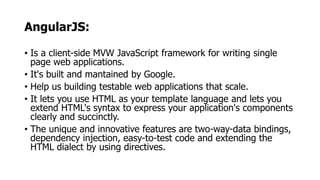
AngularJS:
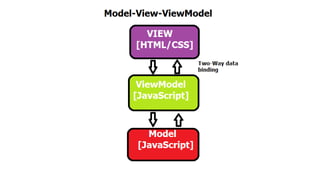
• Is a client-side MVW JavaScript framework for writing single
page web applications.
• It's built and mantained by Google.
• Help us building testable web applications that scale.
• It lets you use HTML as your template language and lets you
extend HTML's syntax to express your application's components
clearly and succinctly.
• The unique and innovative features are two-way-data bindings,
dependency injection, easy-to-test code and extending the
HTML dialect by using directives.
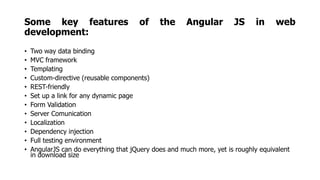
Some key features of the Angular JS in web
development:
• Two way data binding
• MVC framework
• Templating
• Custom-directive (reusable components)
• REST-friendly
• Set up a link for any dynamic page
• Form Validation
• Server Comunication
• Localization
• Dependency injection
• Full testing environment
• AngularJS can do everything that jQuery does and much more, yet is roughly equivalent
in download size
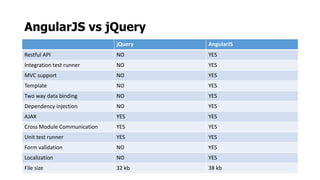
AngularJS vs jQuery
jQuery AngularJS
Restful API NO YES
Integration test runner NO YES
MVC support NO YES
Template NO YES
Two way data binding NO YES
Dependency injection NO YES
AJAX YES YES
Cross Module Communication YES YES
Unit test runner YES YES
Form validation NO YES
Localization NO YES
File size 32 kb 38 kb
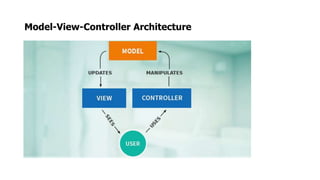
Model-View-Controller Architecture
Single Page Applications (SPA)
• In a Single Page Application (SPA), either all necessary code (HTML,
CSS, JavaScript) is retrieved with a single page load.
• Appropiate resources are dynamically loaded and added to the page
as necessary, ussually in response to user actions.
• The page does not reload at any point in the process.
• Interaction with the single page application often involves dynamic
communication with the web server behind the scenes.
• SPAs are backe-end independent, and we only care about the JSON
data coming back, be it from JAVA, .NET, PHP or any other server-side
language.
Main components of AngularJS:
• Directives - HTML annotations that trigger JavaScript behaviors
• Modules - Where our application components live
• Controllers - Where we add application behavior
• Expressions - How values get displayed within the page
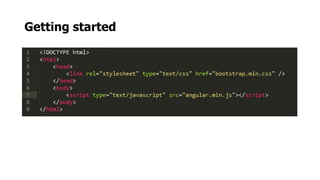
Getting started
Modules
• We can think of a module as a container for the different parts
of your app – controllers, services, filters, directives, etc.
• A container for different parts of application
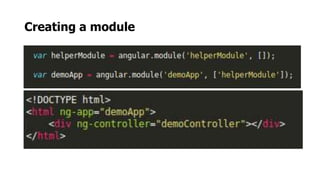
• Modules can have other modules as dependencies
Creating a module
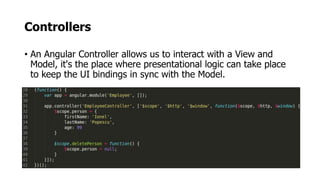
Controllers
• An Angular Controller allows us to interact with a View and
Model, it's the place where presentational logic can take place
to keep the UI bindings in sync with the Model.
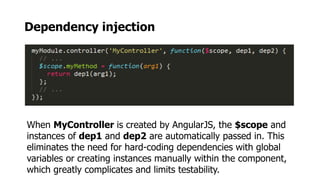
Dependency injection
When MyController is created by AngularJS, the $scope and
instances of dep1 and dep2 are automatically passed in. This
eliminates the need for hard-coding dependencies with global
variables or creating instances manually within the component,
which greatly complicates and limits testability.
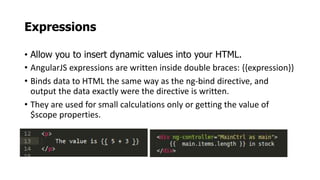
Expressions
• Allow you to insert dynamic values into your HTML.
• AngularJS expressions are written inside double braces: {{expression}}
• Binds data to HTML the same way as the ng-bind directive, and
output the data exactly were the directive is written.
• They are used for small calculations only or getting the value of
$scope properties.
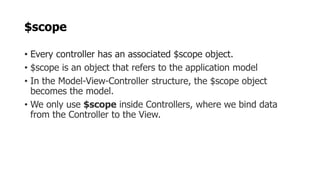
$scope
• Every controller has an associated $scope object.
• $scope is an object that refers to the application model
• In the Model-View-Controller structure, the $scope object
becomes the model.
• We only use $scope inside Controllers, where we bind data
from the Controller to the View.
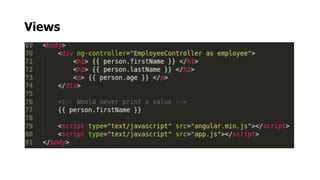
Views
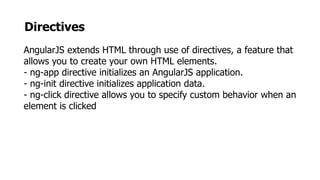
Directives
AngularJS extends HTML through use of directives, a feature that
allows you to create your own HTML elements.
- ng-app directive initializes an AngularJS application.
- ng-init directive initializes application data.
- ng-click directive allows you to specify custom behavior when an
element is clicked
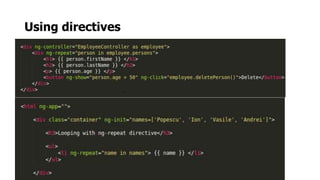
Using directives
_
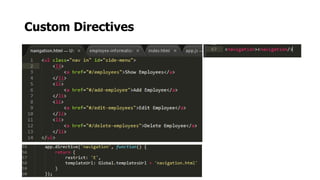
Custom Directives
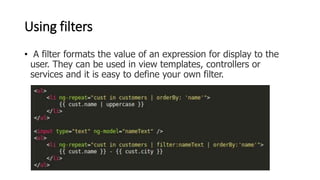
Using filters
• A filter formats the value of an expression for display to the
user. They can be used in view templates, controllers or
services and it is easy to define your own filter.
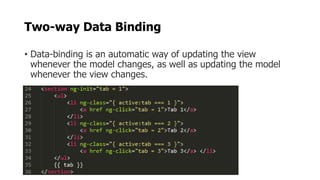
Two-way Data Binding
• Data-binding is an automatic way of updating the view
whenever the model changes, as well as updating the model
whenever the view changes.
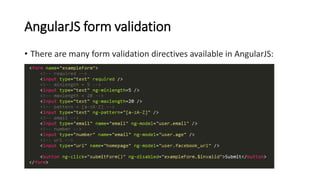
AngularJS form validation
• There are many form validation directives available in AngularJS:
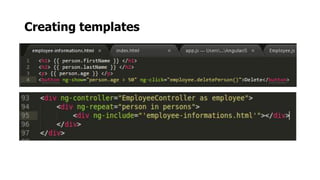
Creating templates
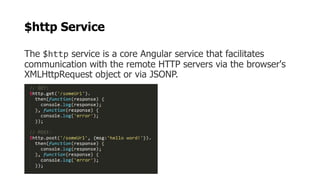
$http Service
The $http service is a core Angular service that facilitates
communication with the remote HTTP servers via the browser's
XMLHttpRequest object or via JSONP.
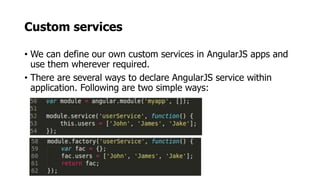
Custom services
• We can define our own custom services in AngularJS apps and
use them wherever required.
• There are several ways to declare AngularJS service within
application. Following are two simple ways:
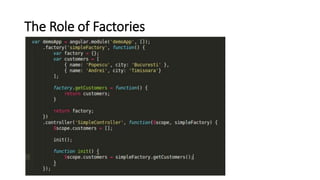
The Role of Factories
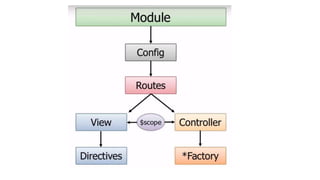
AngularJS routing
• Since we are making a single page application and we don’t
want any page refreshes, we’ll use Angular’s routing
capabilities.
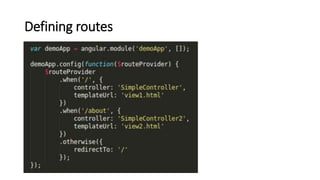
Defining routes
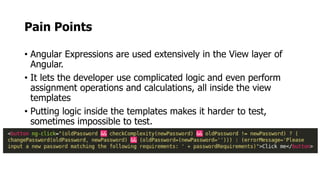
Pain Points
• Angular Expressions are used extensively in the View layer of
Angular.
• It lets the developer use complicated logic and even perform
assignment operations and calculations, all inside the view
templates
• Putting logic inside the templates makes it harder to test,
sometimes impossible to test.
Summary
• AngularJS provides a robust “SPA” framework for bulding robust
client-side applications.
•
Key features:
• Directives and filters
• Two-way data binding
• Views, Controllers, Scope
• Modules and Routes
Resources
• http://angularjs.org
• http://builtwith.angularjs.org
• http://angular-ui.github.io
• http://mgcrea.github.io/angular-strap
• http://pluralsight.com

AngularJS is awesome

  • 1.
    AngularJS is awesome! EusebiuSchipor - Frontend Developer
  • 3.
  • 4.
    AngularJS: • Is aclient-side MVW JavaScript framework for writing single page web applications. • It's built and mantained by Google. • Help us building testable web applications that scale. • It lets you use HTML as your template language and lets you extend HTML's syntax to express your application's components clearly and succinctly. • The unique and innovative features are two-way-data bindings, dependency injection, easy-to-test code and extending the HTML dialect by using directives.
  • 5.
    Some key featuresof the Angular JS in web development: • Two way data binding • MVC framework • Templating • Custom-directive (reusable components) • REST-friendly • Set up a link for any dynamic page • Form Validation • Server Comunication • Localization • Dependency injection • Full testing environment • AngularJS can do everything that jQuery does and much more, yet is roughly equivalent in download size
  • 6.
    AngularJS vs jQuery jQueryAngularJS Restful API NO YES Integration test runner NO YES MVC support NO YES Template NO YES Two way data binding NO YES Dependency injection NO YES AJAX YES YES Cross Module Communication YES YES Unit test runner YES YES Form validation NO YES Localization NO YES File size 32 kb 38 kb
  • 7.
  • 9.
    Single Page Applications(SPA) • In a Single Page Application (SPA), either all necessary code (HTML, CSS, JavaScript) is retrieved with a single page load. • Appropiate resources are dynamically loaded and added to the page as necessary, ussually in response to user actions. • The page does not reload at any point in the process. • Interaction with the single page application often involves dynamic communication with the web server behind the scenes. • SPAs are backe-end independent, and we only care about the JSON data coming back, be it from JAVA, .NET, PHP or any other server-side language.
  • 10.
    Main components ofAngularJS: • Directives - HTML annotations that trigger JavaScript behaviors • Modules - Where our application components live • Controllers - Where we add application behavior • Expressions - How values get displayed within the page
  • 12.
  • 13.
    Modules • We canthink of a module as a container for the different parts of your app – controllers, services, filters, directives, etc. • A container for different parts of application • Modules can have other modules as dependencies
  • 14.
  • 15.
    Controllers • An AngularController allows us to interact with a View and Model, it's the place where presentational logic can take place to keep the UI bindings in sync with the Model.
  • 16.
    Dependency injection When MyControlleris created by AngularJS, the $scope and instances of dep1 and dep2 are automatically passed in. This eliminates the need for hard-coding dependencies with global variables or creating instances manually within the component, which greatly complicates and limits testability.
  • 17.
    Expressions • Allow youto insert dynamic values into your HTML. • AngularJS expressions are written inside double braces: {{expression}} • Binds data to HTML the same way as the ng-bind directive, and output the data exactly were the directive is written. • They are used for small calculations only or getting the value of $scope properties.
  • 18.
    $scope • Every controllerhas an associated $scope object. • $scope is an object that refers to the application model • In the Model-View-Controller structure, the $scope object becomes the model. • We only use $scope inside Controllers, where we bind data from the Controller to the View.
  • 19.
  • 20.
    Directives AngularJS extends HTMLthrough use of directives, a feature that allows you to create your own HTML elements. - ng-app directive initializes an AngularJS application. - ng-init directive initializes application data. - ng-click directive allows you to specify custom behavior when an element is clicked
  • 21.
  • 22.
  • 23.
    Using filters • Afilter formats the value of an expression for display to the user. They can be used in view templates, controllers or services and it is easy to define your own filter.
  • 24.
    Two-way Data Binding •Data-binding is an automatic way of updating the view whenever the model changes, as well as updating the model whenever the view changes.
  • 25.
    AngularJS form validation •There are many form validation directives available in AngularJS:
  • 26.
  • 27.
    $http Service The $httpservice is a core Angular service that facilitates communication with the remote HTTP servers via the browser's XMLHttpRequest object or via JSONP.
  • 28.
    Custom services • Wecan define our own custom services in AngularJS apps and use them wherever required. • There are several ways to declare AngularJS service within application. Following are two simple ways:
  • 29.
    The Role ofFactories
  • 30.
    AngularJS routing • Sincewe are making a single page application and we don’t want any page refreshes, we’ll use Angular’s routing capabilities.
  • 31.
  • 32.
    Pain Points • AngularExpressions are used extensively in the View layer of Angular. • It lets the developer use complicated logic and even perform assignment operations and calculations, all inside the view templates • Putting logic inside the templates makes it harder to test, sometimes impossible to test.
  • 33.
    Summary • AngularJS providesa robust “SPA” framework for bulding robust client-side applications. • Key features: • Directives and filters • Two-way data binding • Views, Controllers, Scope • Modules and Routes
  • 34.
    Resources • http://angularjs.org • http://builtwith.angularjs.org •http://angular-ui.github.io • http://mgcrea.github.io/angular-strap • http://pluralsight.com