

Understanding Layouts in Android
Layouts

• Your layout is the architecture for the user interface in an
  Activity. It defines the layout structure and holds all the
  elements that appear to the user.
• Declare UI elements in XML
• Instantiate layout elements at runtime
Layouts

• These are the following:

1.     Linear Layout
2.     Relative Layout
3.     Table Layout
4.     Grid View
5.     List View
Linear Layouts

• A Layout that arranges its children in a single column or a
  single row
• Can be either vertical or horizontal.
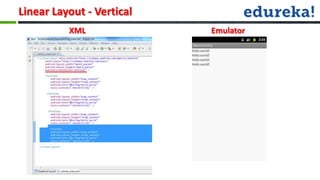
Linear Layout - Vertical
          XML              Emulator
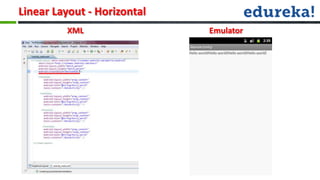
Linear Layout - Horizontal
         XML                 Emulator
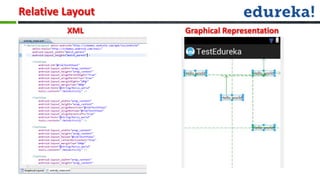
Relative Layout

• Relative Layout is a view group that displays child views in relative
  positions
• The position of each view can be specified as relative to sibling elements
Relative Layout
         XML      Graphical Representation
Table Layout

• A layout that arranges its children into rows and columns
• A TableLayout consists of a number of TableRow objects,
  each defining a row
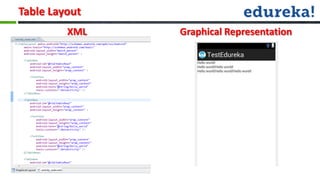
Table Layout
         XML   Graphical Representation
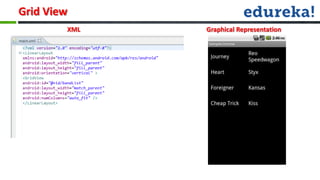
Grid View

• GridView is a ViewGroup that displays items in a two-dimensional,
  scrollable grid
Grid View
        XML   Graphical Representation
List View

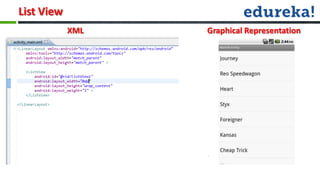
• ListView is a view group that displays a list of scrollable items.
• The list items are automatically inserted to the list using
  an Adapter
List View
            XML   Graphical Representation
Widgets in Android
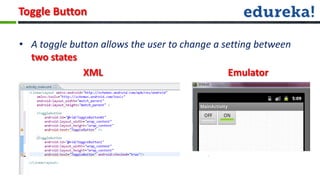
Toggle Button

• A toggle button allows the user to change a setting between
  two states
              XML                              Emulator
Check Boxes


• Checkboxes allow the user to select one or more options from
  a set.
• You should present each checkbox option in a vertical list
Radio Buttons


• Radio buttons allow the user to select one option from a set.
• Use radio buttons for optional sets that are mutually
  exclusive
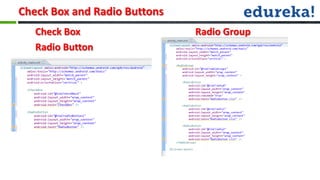
Check Box and Radio Buttons
   Check Box                  Radio Group
   Radio Button
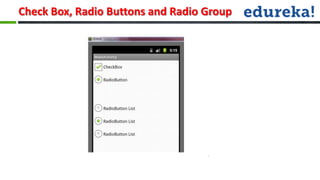
Check Box, Radio Buttons and Radio Group
Spinners
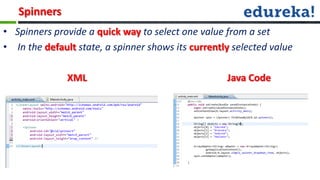
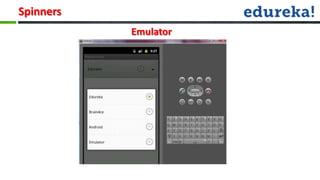
• Spinners provide a quick way to select one value from a set
• In the default state, a spinner shows its currently selected value

               XML                                  Java Code
Spinners
           Emulator
Autocomplete Textview

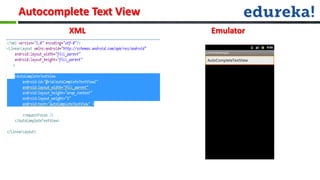
• An editable text view that shows completion suggestions
  automatically while the user is typing.
• The drop down can be dismissed at any time by pressing the
  back key or, if no item is selected in the drop down, by
  pressing the enter/dpad center key.
Autocomplete Text View
         XML             Emulator
Date Picker

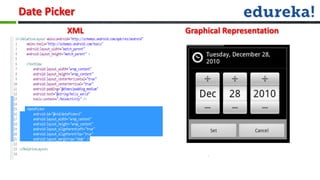
• This class is a widget for selecting a date
• The date can be selected by a year, month,
  and day spinners.
Date Picker
         XML   Graphical Representation
Time Picker

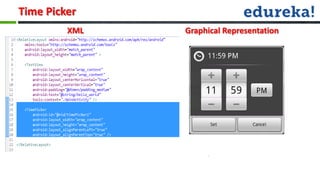
• A view for selecting the time of day, in either
  24 hour or AM/PM mode
• The hour can be entered by keyboard input
• The minutes can be entered by entering single
  digits.
Time Picker
         XML   Graphical Representation
Web Views

• A View that displays web pages
• you can roll your own web browser or simply display some
  online content within your Activity.
• <uses-permission
  android:name="android.permission.INTERNET" />
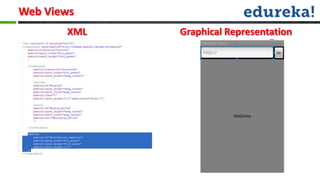
Web Views
       XML   Graphical Representation
•Q & A..?
Android webinar class_2

Android webinar class_2

  • 1.
  • 2.
    Layouts • Your layoutis the architecture for the user interface in an Activity. It defines the layout structure and holds all the elements that appear to the user. • Declare UI elements in XML • Instantiate layout elements at runtime
  • 3.
    Layouts • These arethe following: 1. Linear Layout 2. Relative Layout 3. Table Layout 4. Grid View 5. List View
  • 4.
    Linear Layouts • ALayout that arranges its children in a single column or a single row • Can be either vertical or horizontal.
  • 5.
    Linear Layout -Vertical XML Emulator
  • 6.
    Linear Layout -Horizontal XML Emulator
  • 7.
    Relative Layout • RelativeLayout is a view group that displays child views in relative positions • The position of each view can be specified as relative to sibling elements
  • 8.
    Relative Layout XML Graphical Representation
  • 9.
    Table Layout • Alayout that arranges its children into rows and columns • A TableLayout consists of a number of TableRow objects, each defining a row
  • 10.
    Table Layout XML Graphical Representation
  • 11.
    Grid View • GridViewis a ViewGroup that displays items in a two-dimensional, scrollable grid
  • 12.
    Grid View XML Graphical Representation
  • 13.
    List View • ListViewis a view group that displays a list of scrollable items. • The list items are automatically inserted to the list using an Adapter
  • 14.
    List View XML Graphical Representation
  • 15.
  • 16.
    Toggle Button • Atoggle button allows the user to change a setting between two states XML Emulator
  • 17.
    Check Boxes • Checkboxesallow the user to select one or more options from a set. • You should present each checkbox option in a vertical list
  • 18.
    Radio Buttons • Radiobuttons allow the user to select one option from a set. • Use radio buttons for optional sets that are mutually exclusive
  • 19.
    Check Box andRadio Buttons Check Box Radio Group Radio Button
  • 20.
    Check Box, RadioButtons and Radio Group
  • 21.
    Spinners • Spinners providea quick way to select one value from a set • In the default state, a spinner shows its currently selected value XML Java Code
  • 22.
    Spinners Emulator
  • 23.
    Autocomplete Textview • Aneditable text view that shows completion suggestions automatically while the user is typing. • The drop down can be dismissed at any time by pressing the back key or, if no item is selected in the drop down, by pressing the enter/dpad center key.
  • 24.
  • 25.
    Date Picker • Thisclass is a widget for selecting a date • The date can be selected by a year, month, and day spinners.
  • 26.
    Date Picker XML Graphical Representation
  • 27.
    Time Picker • Aview for selecting the time of day, in either 24 hour or AM/PM mode • The hour can be entered by keyboard input • The minutes can be entered by entering single digits.
  • 28.
    Time Picker XML Graphical Representation
  • 29.
    Web Views • AView that displays web pages • you can roll your own web browser or simply display some online content within your Activity. • <uses-permission android:name="android.permission.INTERNET" />
  • 30.
    Web Views XML Graphical Representation
  • 31.

Editor's Notes

  • #4 such as development toolkits for other programming languages, and can write and contribute their own plug-in modules.
  • #14 Java compilers convert your code from human readable Java source files to something called “bytecode” in the Java world. “Bytecode” is interpreted by a JVM, which operates much like a physical CPU might operate on machine code, to actually execute the compiled code. Performance - Java performance in generally second only to C/C++ in common language performance comparisons. In the Java programming language and environment, a just-in-time (JIT) compiler is a program that turns Java bytecode (a program that contains instructions that must be interpreted) into instructions that can be sent directly to the processor.The just-in-time compiler comes with the virtual machine and is used optionally. It compiles the bytecode into platform-specific executable code that is immediately executed
  • #15 Java compilers convert your code from human readable Java source files to something called “bytecode” in the Java world. “Bytecode” is interpreted by a JVM, which operates much like a physical CPU might operate on machine code, to actually execute the compiled code. Performance - Java performance in generally second only to C/C++ in common language performance comparisons. In the Java programming language and environment, a just-in-time (JIT) compiler is a program that turns Java bytecode (a program that contains instructions that must be interpreted) into instructions that can be sent directly to the processor.The just-in-time compiler comes with the virtual machine and is used optionally. It compiles the bytecode into platform-specific executable code that is immediately executed
  • #24 such as development toolkits for other programming languages, and can write and contribute their own plug-in modules.