


PROJECT PLAN
Process for Project Submission & Evaluation

• Each student is expected to create an Android App as Project
  Work for the Course.
• Certificates will be provided to the students after project
  submission and evaluation
• At the time of project submission a Skype interview will be
  conducted.
• The project will be evaluated on Usability, Functionality and
  Design.
• We are always there to help you on forum and on skype.
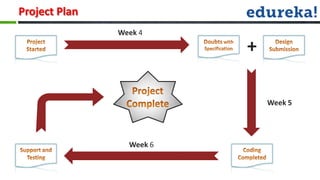
Project Plan
               Week 4

                          +

                              Week 5


                 Week 6
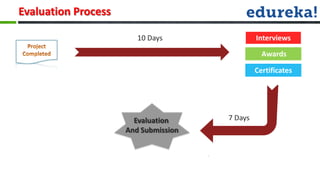
Evaluation Process

                        10 Days                Interviews
                                                 Awards

                                               Certificates


                       Evaluation     7 Days
                     And Submission
Http Classes
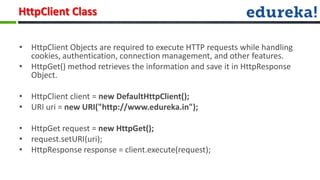
HttpClient Class

• HttpClient Objects are required to execute HTTP requests while handling
  cookies, authentication, connection management, and other features.
• HttpGet() method retrieves the information and save it in HttpResponse
  Object.

• HttpClient client = new DefaultHttpClient();
• URI uri = new URI("http://www.edureka.in");

• HttpGet request = new HttpGet();
• request.setURI(uri);
• HttpResponse response = client.execute(request);
JSON
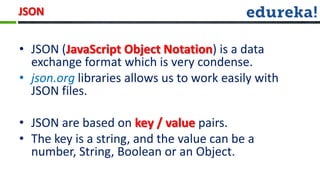
JSON


• JSON (JavaScript Object Notation) is a data
  exchange format which is very condense.
• json.org libraries allows us to work easily with
  JSON files.

• JSON are based on key / value pairs.
• The key is a string, and the value can be a
  number, String, Boolean or an Object.
JSON

•   JSON Syntax :
     –   Data is in name/value pairs
     –   Data is separated by comma
     –   Curly brackets holds objects
     –   Square brackets holds arrays

•   Objects can contain multiple name/values pairs:
     –   { “name":“Edureka" , “course":“Android" }
•   Arrays can contain multiple objects:
     –     { “company ": [
                              {“name":“Edureka" , “course":“Android" },
                             {“name":“Edureka" , “course":“iOS" }
                        ]
           }
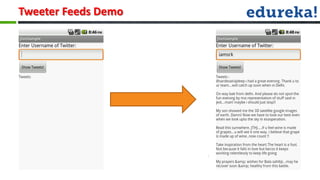
Tweeter Feeds Demo
Customization of Buttons
Customizing a button

• You can control exactly how your controls are styled using a theme that
  you apply to your entire application
• If you want to truly redefine the appearance of your button, you can
  specify a custom background.
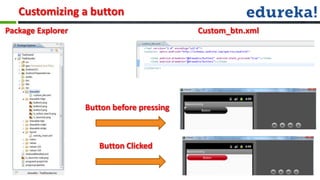
Customizing a button
Package Explorer                            Custom_btn.xml


                   Button before pressing


                      Button Clicked
Customization
Customization

• An adapter is used to bind data to a view
• BaseAdapter is an abstract base class for the Adaptor interface to simplify
  implementing adapters

• Override getView() to inflate, populate, and return a custom view for the
  given index in the array.
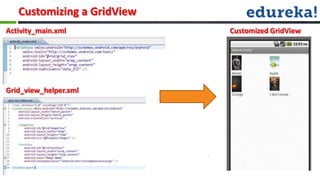
Customizing a GridView
Activity_main.xml           Customized GridView


Grid_view_helper.xml
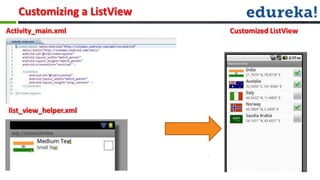
Customizing a ListView
Activity_main.xml           Customized ListView


list_view_helper.xml
•Q & A..?
Android webinar class_5

Android webinar class_5

  • 1.
  • 2.
    Process for ProjectSubmission & Evaluation • Each student is expected to create an Android App as Project Work for the Course. • Certificates will be provided to the students after project submission and evaluation • At the time of project submission a Skype interview will be conducted. • The project will be evaluated on Usability, Functionality and Design. • We are always there to help you on forum and on skype.
  • 3.
    Project Plan Week 4 + Week 5 Week 6
  • 4.
    Evaluation Process 10 Days Interviews Awards Certificates Evaluation 7 Days And Submission
  • 5.
  • 6.
    HttpClient Class • HttpClientObjects are required to execute HTTP requests while handling cookies, authentication, connection management, and other features. • HttpGet() method retrieves the information and save it in HttpResponse Object. • HttpClient client = new DefaultHttpClient(); • URI uri = new URI("http://www.edureka.in"); • HttpGet request = new HttpGet(); • request.setURI(uri); • HttpResponse response = client.execute(request);
  • 7.
  • 8.
    JSON • JSON (JavaScriptObject Notation) is a data exchange format which is very condense. • json.org libraries allows us to work easily with JSON files. • JSON are based on key / value pairs. • The key is a string, and the value can be a number, String, Boolean or an Object.
  • 9.
    JSON • JSON Syntax : – Data is in name/value pairs – Data is separated by comma – Curly brackets holds objects – Square brackets holds arrays • Objects can contain multiple name/values pairs: – { “name":“Edureka" , “course":“Android" } • Arrays can contain multiple objects: – { “company ": [ {“name":“Edureka" , “course":“Android" }, {“name":“Edureka" , “course":“iOS" } ] }
  • 10.
  • 11.
  • 12.
    Customizing a button •You can control exactly how your controls are styled using a theme that you apply to your entire application • If you want to truly redefine the appearance of your button, you can specify a custom background.
  • 13.
    Customizing a button PackageExplorer Custom_btn.xml Button before pressing Button Clicked
  • 14.
  • 15.
    Customization • An adapteris used to bind data to a view • BaseAdapter is an abstract base class for the Adaptor interface to simplify implementing adapters • Override getView() to inflate, populate, and return a custom view for the given index in the array.
  • 16.
    Customizing a GridView Activity_main.xml Customized GridView Grid_view_helper.xml
  • 17.
    Customizing a ListView Activity_main.xml Customized ListView list_view_helper.xml
  • 18.

Editor's Notes

  • #13 Java compilers convert your code from human readable Java source files to something called “bytecode” in the Java world. “Bytecode” is interpreted by a JVM, which operates much like a physical CPU might operate on machine code, to actually execute the compiled code. Performance - Java performance in generally second only to C/C++ in common language performance comparisons. In the Java programming language and environment, a just-in-time (JIT) compiler is a program that turns Java bytecode (a program that contains instructions that must be interpreted) into instructions that can be sent directly to the processor.The just-in-time compiler comes with the virtual machine and is used optionally. It compiles the bytecode into platform-specific executable code that is immediately executed
  • #14 Java compilers convert your code from human readable Java source files to something called “bytecode” in the Java world. “Bytecode” is interpreted by a JVM, which operates much like a physical CPU might operate on machine code, to actually execute the compiled code. Performance - Java performance in generally second only to C/C++ in common language performance comparisons. In the Java programming language and environment, a just-in-time (JIT) compiler is a program that turns Java bytecode (a program that contains instructions that must be interpreted) into instructions that can be sent directly to the processor.The just-in-time compiler comes with the virtual machine and is used optionally. It compiles the bytecode into platform-specific executable code that is immediately executed
  • #16 Java compilers convert your code from human readable Java source files to something called “bytecode” in the Java world. “Bytecode” is interpreted by a JVM, which operates much like a physical CPU might operate on machine code, to actually execute the compiled code. Performance - Java performance in generally second only to C/C++ in common language performance comparisons. In the Java programming language and environment, a just-in-time (JIT) compiler is a program that turns Java bytecode (a program that contains instructions that must be interpreted) into instructions that can be sent directly to the processor.The just-in-time compiler comes with the virtual machine and is used optionally. It compiles the bytecode into platform-specific executable code that is immediately executed
  • #17 Java compilers convert your code from human readable Java source files to something called “bytecode” in the Java world. “Bytecode” is interpreted by a JVM, which operates much like a physical CPU might operate on machine code, to actually execute the compiled code. Performance - Java performance in generally second only to C/C++ in common language performance comparisons. In the Java programming language and environment, a just-in-time (JIT) compiler is a program that turns Java bytecode (a program that contains instructions that must be interpreted) into instructions that can be sent directly to the processor.The just-in-time compiler comes with the virtual machine and is used optionally. It compiles the bytecode into platform-specific executable code that is immediately executed
  • #18 Java compilers convert your code from human readable Java source files to something called “bytecode” in the Java world. “Bytecode” is interpreted by a JVM, which operates much like a physical CPU might operate on machine code, to actually execute the compiled code. Performance - Java performance in generally second only to C/C++ in common language performance comparisons. In the Java programming language and environment, a just-in-time (JIT) compiler is a program that turns Java bytecode (a program that contains instructions that must be interpreted) into instructions that can be sent directly to the processor.The just-in-time compiler comes with the virtual machine and is used optionally. It compiles the bytecode into platform-specific executable code that is immediately executed