Android Radio Layer Interface
Summary Background RIL stack overview RIL daemon (rild)  Example: RIL with Mc39i on versatile  Example: RIL with HUAWEI E169 on Eeepc 900 Screenshots
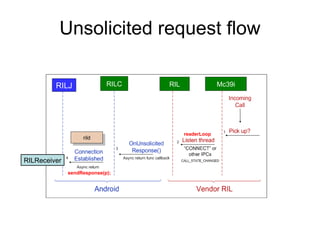
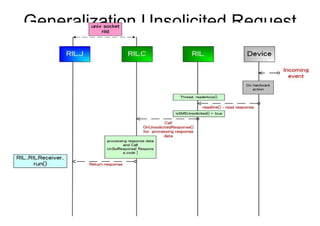
Background What is RIL ? RIL is the abbreviation of Android's Radio Interface Layer (RIL),  it provides  an abstraction layer  between Android telephony services ( android.telephony ) and radio hardware.  It consists of two primary components RIL Daemon and Vendor RIL. RIL Daemon it initializes the Vendor RIL,  and processes all communication from Android telephony services, and dispatches calls to the Vendor RIL as solicited commands.  Solicited Request, all the request that sent by RILJ belong this category. For example : dial, hung up send SMS Vendor RIL   It initialize the baseband device and processes all communication with radio hardware and dispatches calls to the RIL Daemon (rild) through unsolicited commands.  Unsolicited Request, the event that coming from outside. For example : incoming calling, MS change BS, signal strength  The purpose of this section is to introduce RIL control flow, but not includes voice and packet services.
Summary Background RIL stack overview RIL daemon (rild)  Example: RIL with Mc39i on versatile  Example: RIL with HUAWEI E169 on Eeepc 900 Screenshots
RIL Overview Android RIL stack
Summary Background RIL stack overview RIL daemon (rild)  Example: RIL with Mc39i on versatile  Example: RIL with HUAWEI E169 on Eeepc 900 Screenshots
RIL daemon (rild) RILD internal structure Startup flow Solicited request flow Unsolicited request flow
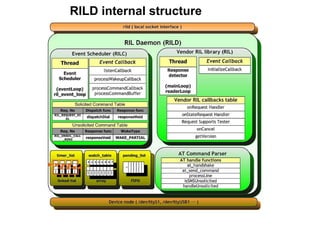
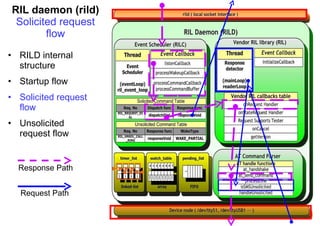
RILD internal structure
Component naming the RIL component, RILJ RILD RILC  and RIL, are the name used in the android  LOG functions . Android has a set of functions for recording different type log message, ex:  LOGE()  for error message,  LOGW()  for warning message, and  LOGI()  for normal information, we call those function ( or method whatever ) as  LOG functions . You can use logcat to watch those message via adb.
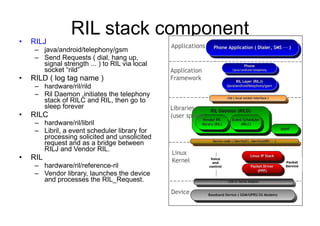
RIL stack component RILJ  java/android/telephony/gsm Send Requests ( dial, hang up, signal strength ... ) to RIL via local socket “rild” RILD ( log tag name ) hardware/ril/rild Ril Daemon ,initiates the telephony stack of RILC and RIL, then go to sleep forever RILC hardware/ril/libril Libril, a event scheduler library for processing solicited and unsolicited request and as a bridge between RILJ and Vendor RIL. RIL hardware/ril/reference-ril Vendor library, launches the device  and processes the RIL_Request.
RIL daemon (rild) RILD internal structure Startup flow Solicited request flow Unsolicited request flow
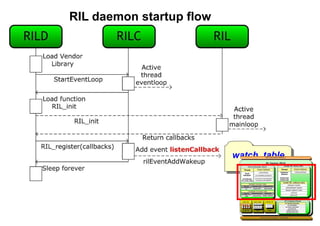
RIL daemon startup flow Init read /init.rc start rild services service ril-daemon /system/bin/rild socket rild stream 660 root radio socket rild-debug stream 660 radio system user root group radio cache inet misc
RIL daemon startup flow watch_table
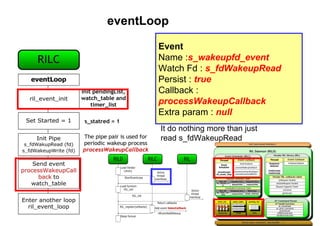
eventLoop Event Name : s_wakeupfd_event Watch Fd :  s_fdWakeupRead Persist :  true Callback :  processWakeupCallback Extra param :  null It do nothing more than just read s_fdWakeupRead
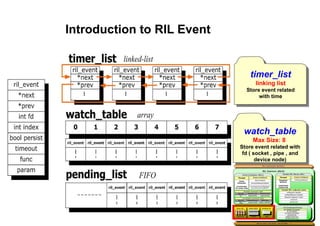
Introduction to RIL Event timer_list linking list Store event related with time watch_table Max Size: 8  Store event related with fd ( socket , pipe , and device node)
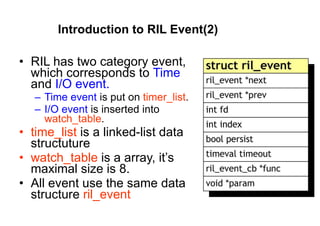
Introduction to RIL Event(2) RIL has two category event, which corresponds to  Time  and  I/O event. Time event  is put on  timer_list . I/O event  is inserted into  watch_table . time_list  is a linked-list data structuture watch_table  is a array, it’s maximal size is 8. All event use the same data structure  ril_event
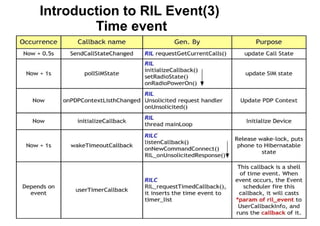
Introduction to RIL Event(3)  Time event
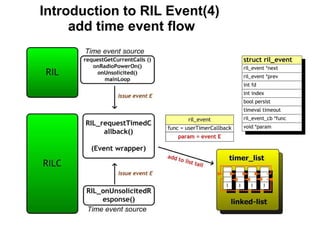
Introduction to RIL Event(4)  add time event flow
Introduction to RIL Event(5)  I/O event
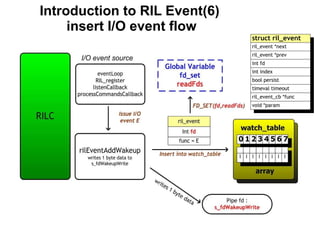
Introduction to RIL Event(6)  insert I/O event flow
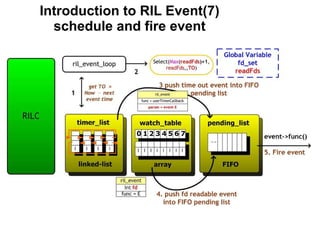
Introduction to RIL Event(7)  schedule and fire event
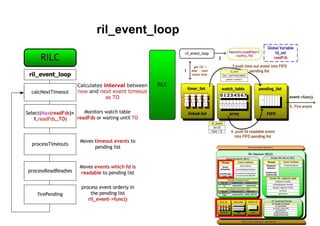
ril_event_loop
RIL_Register Event Name : s_listen_event Watch Fd :  s_fdListen Persist :  false Callback :  listenCallback Extra param :  null
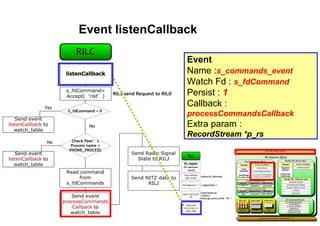
Event listenCallback Event Name : s_commands_event Watch Fd :  s_fdCommand Persist :  1 Callback :  processCommandsCallback Extra param :  RecordStream *p_rs
Event  processCommandsCallback
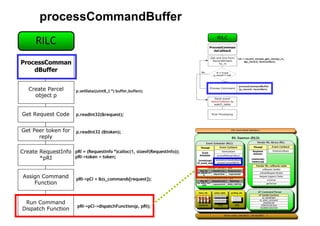
processCommandBuffer
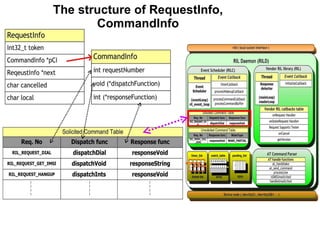
The usage of RequestInfo, CommandInfo and UnsolResponseInfo  In Android, RIL stack has two command table that corresponding to solicited and unsolicited request Solicited Request , all the request that sent by  RILJ  belong this category. For example : dial, hung up send SMS Unsolicited Request , the event that coming from outside. For example : incoming calling, MS change BS, signal strength  CommandInfo  stores Solicited Request processing function hardware\ril\libril\ril_commands.h UnsolResponseInfo  stores Unsolicited Request processing function  hardware\ril\libril\ril_unsol_commands.h RequestInfo  link multiple CommandInfo into a linked-list
The structure of RequestInfo, CommandInfo
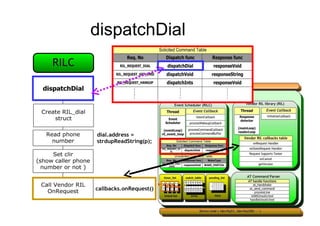
dispatchDial
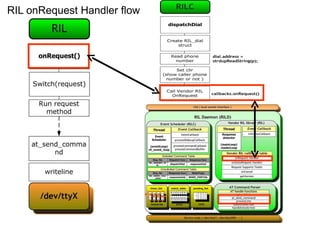
RIL onRequest Handler flow
mainLoop
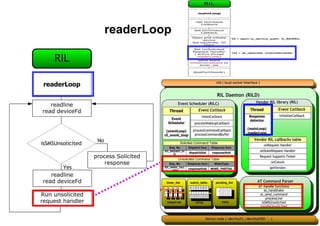
readerLoop
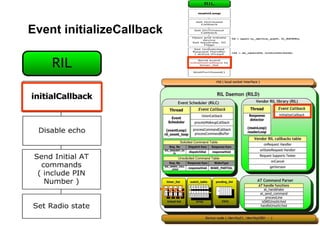
Event initializeCallback
RIL daemon (rild) Solicited request flow RILD internal structure Startup flow Solicited request flow Unsolicited request flow Request Path Response Path
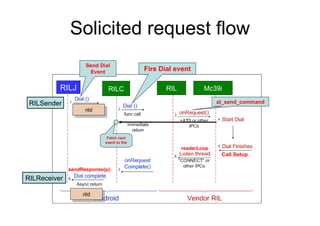
Solicited request flow RILC RIL Mc39i rild RILSender RILReceiver sendResponse(p); rild Call Setup readerLoop Send Dial Event Fire Dial event at_send_command Fetch next event to fire RILJ
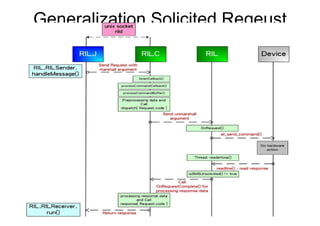
Generalization Solicited Reqeust
RIL daemon (rild)   Unsolicited request flow RILD internal structure Startup flow Solicited request flow Unsolicited request flow Response Path
Unsolicited request flow RIL Mc39i RILC readerLoop sendResponse(p); RILReceiver rild RILJ
Generalization Unsolicited Request
Summary Background RIL stack overview RIL daemon (rild)  Example: RIL with Mc39i on versatile  Example: RIL with HUAWEI E169 on Eeepc 900 Screenshots
RIL with Mc39i on versatile Building process Turn on telephony service on android
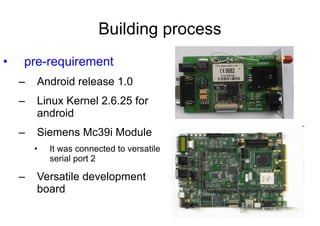
Building process pre-requirement Android release 1.0  Linux Kernel 2.6.25 for android Siemens Mc39i Module It was connected to versatile serial port 2 Versatile development board
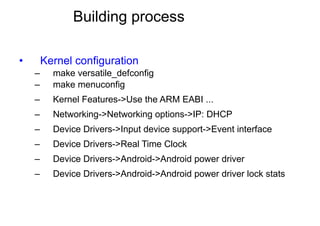
Building process Kernel configuration make versatile_defconfig make menuconfig Kernel Features->Use the ARM EABI ... Networking->Networking options->IP: DHCP Device Drivers->Input device support->Event interface Device Drivers->Real Time Clock Device Drivers->Android->Android power driver Device Drivers->Android->Android power driver lock stats
Building process Kernel modification arch/arm/mach-versatile/core.c Line 578 val |= SYS_CLCD_MODE_565_ B LSB; Line 611 framesize= 640*480*2*2 ; drivers/video/amba-clcd.c Line 370 fb->fb.fix.ypanstep =  1 ; Line 377 fb->fb.var.yres_virtual = fb->panel->mode.yres  * 2 ; clcdfb_disable, directly return; clcdfb_enable, insert below line into the function’s head. static int e=0; if (en==1) return; en=1;
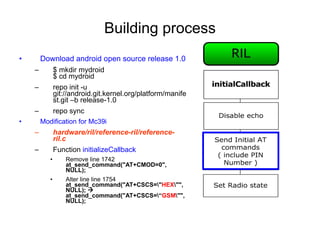
Building process Download android open source release 1.0 $ mkdir mydroid $ cd mydroid  repo init -u git://android.git.kernel.org/platform/manifest.git –b release-1.0 repo sync Modification for Mc39i hardware/ril/reference-ril/reference-ril.c  Function  initializeCallback Remove line 1742  at_send_command("AT+CMOD=0", NULL); Alter line line 1754  at_send_command("AT+CSCS=\" HEX \"", NULL);    at_send_command("AT+CSCS=\“ GSM \"", NULL);
Building process Modification for Mc39i (cont.) hardware/ril/reference-ril/reference-ril.c  ( mainLoop ) Change startup code  if ( fd >= 0 &&  !memcmp( s_device_path, "/dev/tty", 8 ) ) { struct termios ios;  tcgetattr( fd, &ios ); ios.c_lflag = 0;  cfsetispeed(&ios, B115200); cfsetospeed(&ios, B115200); ios.c_cflag |= CLOCAL|CREAD; ios.c_cflag &= ~PARENB; ios.c_cflag &= ~CSTOPB; ios.c_cflag &= ~CSIZE; ios.c_cflag |= CS8; tcsetattr(fd, TCSANOW, &ios); }
Building process Modification for Mc39i (cont.) hardware/ril/reference-ril/reference-ril.c  ( requestOperator ) No operator name on screen lock  Mc39i is not supported AT+COPS=3,1 AT+COPS=3,0 : Full Name, ex: ChungHwa  AT+COPS=3,1 : Short Name, ex: CHT  AT+COPS=3,2 : Location Area Identification, ex: 46692 Solution : Create a mapping table, before return from requestOperator, assign the short name to the Name vector.
Building process Compile android open source release 1.0 $ cd mydroid && make NFS setup mkdir /opt/rootfs/ cp –R out/target/product/generic/root/* /opt/rootfs cp –R out/target/product/generic/system/* /opt/rootfs/system chmod 777 /opt/rootfs/system ( to solve keymap file problem ) vi /etc/exports  /opt/rootfs *(rw, no_root_squash ) Restart NFS services
Building process Modification RIL configuration /opt/rootfs/system/build.prop rild.libargs=-d /dev/ttyS0     rild.libargs=-d /dev/ttyAMA2 Kernel command line Enter Uboot setenv bootargs console=ttyAMA0 mem=128M root=/dev/nfs ip=dhcp nfsroot=“your_ip_address”:/opt/rootfs  init=/init Reboot versatile for into Android
Reference Android RIL porting guide http://www.kandroid.org/android_pdk/telephony.html The original document has been obsolete by google.
RIL with Mc39i on versatile Building process Turn on telephony service on android
Turn on telephony service Problem : No startup wizard on android release 1.0  The android is not active .  Some services can not worked, ex: incoming call. To active the android, the device_provisioned flag must be set by manually. $cd /opt/rootfs/data/data/com.android.providers.settings/databases sqlite3 settings.db INSERT INTO system (name,value) VALUES (‘device_provisioned’, ‘1’); .quit
flag device_provisioned usage device_provisioned usage  in android donut (android 2.0)  define in class  android.provider.Settings.Secure public static final String  DEVICE_PROVISIONED  = "device_provisioned"; framework/base/core/java/com/android/provider/ Settings.java
flag device_provisioned usage Settings.Secure. getInt (context.getContentResolver(),  Settings.Secure.DEVICE_PROVISIONED , 0) Settings.Secure. getInt(cr, name, def)    Settings.Secure. getString (cr, name); getString()  android.provider.Settings.Secure.NameValueCache.getString()
android.provider.Settings.Secure.NameValueCache.getString()
Summary Background RIL stack overview RIL daemon (rild)  Example: RIL with Mc39i on versatile  Example: RIL with HUAWEI E169 on Eeepc 900 Screenshots
RIL with E169 on Eeepc 900 Building Process Surfing internet
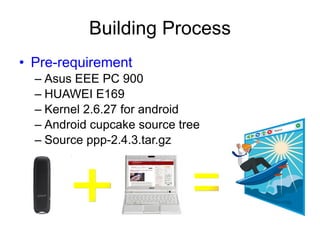
Building Process Pre-requirement Asus EEE PC 900 HUAWEI E169 Kernel 2.6.27 for android Android cupcake source tree Source ppp-2.4.3.tar.gz  + =
Building Process Download android cupcake for eeepc_701 mkdir ./eeepc;cd eeepc repo init -u git://android.git.kernel.org/ platform/manifest.git –b cupcake  repo sync vim .repo/local_manifest.xml <?xml version=&quot;1.0&quot; encoding=&quot;UTF-8&quot;?> <manifest> <project name=&quot;platform/vendor/asus/eee_701&quot;    path=&quot;vendor/asus/eee_701&quot;/> </manifest> repo sync
Building Process Kernel configuration Use cupcake/kernel Get eeepc 901 kernel config from  http://pastebin.com/f26fe5376  ,. Make menuconfig EXT2 ( installer needs it to mount ramdisk ) PPP ( choose all options ) USB serial Includes USB GSM and CDMA option Framebuffer VESA VGA Driver drivers/rtc/alarm.c revision Delete #include <time.h> Add below code to alarm.c #ifdef __i386__ static void save_time_delta(struct timespec *delta, struct timespec *rtc) { set_normalized_timespec(delta, xtime.tv_sec - rtc->tv_sec, xtime.tv_nsec - rtc->tv_nsec); } #endif
Building Process Source tree Modification cd cupcake mv verdor/asus/eee_701/Android.mk verdor/asus/eee_701 /AndroidBoard.mk vi external/e2fsprogs/Android.mk Unmark include $(call all-subdir-makefiles) vi framework/base/preloaded-classes (mark below lines ) #com.android.internal.policy.impl.PhoneLayoutInflater #com.android.internal.policy.impl.PhoneWindow #com.android.internal.policy.impl.PhoneWindow$1 #com.android.internal.policy.impl.PhoneWindow$ContextMenuCallback #com.android.internal.policy.impl.PhoneWindow$DecorView #com.android.internal.policy.impl.PhoneWindow$PanelFeatureState #com.android.internal.policy.impl.PhoneWindow$PanelFeatureState$SavedState #com.android.internal.policy.impl.PhoneWindow$PanelFeatureState$SavedState$1
Building Process Source tree Modification (cont.) vi vendor/asus/eee_701/init.rc : # Define the oom_adj values for the classes of processes that can be killed by the kernel.  These are used in ActivityManagerService. setprop ro.FOREGROUND_APP_ADJ 0 setprop ro.VISIBLE_APP_ADJ 1 setprop ro.SECONDARY_SERVER_ADJ 2 setprop ro.HOME_APP_ADJ 4 setprop ro.HIDDEN_APP_MIN_ADJ 7 setprop ro.CONTENT_PROVIDER_ADJ 14 setprop ro.EMPTY_APP_ADJ 15 # Define the memory thresholds at which the above process classes will # be killed.  These numbers are in pages (4k). setprop ro.FOREGROUND_APP_MEM 1536 setprop ro.VISIBLE_APP_MEM 2048 setprop ro.SECONDARY_SERVER_MEM 4096 setprop ro.HOME_APP_MEM 4096 setprop ro.HIDDEN_APP_MEM 8192 setprop ro.CONTENT_PROVIDER_MEM 8704 setprop ro.EMPTY_APP_MEM 16384
Building Process Source tree Modification (cont.) vi bootable/diskinstaller/init.rc  : service installer /system/bin/installer -p /dev/block/sdc2 vi vendor/asus/eeepc_701/BoardConfig.mk add vga=788 into BOOT_KERNEL_CMDLINE Vi external/ppp/pppd/Android.mk Del first line and last line to enable pppd compiling for x86 platform
Building Process Add ppp and chat script to source tree mkdir external/ppp/chat get chat source from  ftp://ftp.samba.org/pub/ppp/ ppp-2.4.3.tar.gz   vi external/ppp/chat/Android.mk LOCAL_PATH:= $(call my-dir) include $(CLEAR_VARS) LOCAL_SRC_FILES:= \ chat.c LOCAL_SHARED_LIBRARIES := \ libcutils libc LOCAL_C_INCLUDES := \ $(LOCAL_PATH)/include LOCAL_CFLAGS := -DANDROID_CHANGES -DTERMIOS -DSIGTYPE=void -UNO_SLEEP -DFNDELAY=O_NDELAY  LOCAL_MODULE_PATH := $(TARGET_OUT_OPTIONAL_EXECUTABLES) LOCAL_MODULE_TAGS := eng LOCAL_MODULE:= chat include $(BUILD_EXECUTABLE)
Building Process Add ppp and chat script to source tree (cont.) vi system/core/rootdir/etc/ppp/ppp-startup.sh #!/system/bin/sh setprop net.dns1 168.95.1.1 /system/xbin/pppd –detach modem crtscts debug \  /dev/ttyUSB0 460800 noipdefault \  defaultroute usepeerdns \  connect “/etc/ppp/pppondialer”
Building Process Add ppp and chat script to source tree (cont.) vi system/core/rootdir/etc/ppp/pppondialer #!/system/bin/sh chat –v –s \ TIMEOUT 30 \ ABORT BUSY \  ABORT ERROR \ “” ‘ AT’ \ OK ‘ATZ’ \ OK ‘ATQ0 V1 E1 S0=0 &C1 &C2 +FCLASS=0’ \ OK ‘AT+CGDCONT=1,”IP”,”internet”’ \    internet  為中華電信  APN name OK ‘AT+CSQ’ \ OK ‘ATD*99#’ \ CONNECT ‘’
Building Process Add ppp and chat script to source tree (cont.) vi system/core/rootdir/Android.mk copy_from := \ etc/dbus.conf \ etc/init.goldfish.sh \ etc/hosts \ etc/ppp/ppp-startup.sh \ etc/ppp/pppondialer  vi vendor/asus/eeepc_701/init.rc Add “chmod 777 /etc/ppp/ppp-startup.sh”  Add “chmod 777 /etc/ppp/pppondialer ”  Add “symlink /dev/ttyUSB0 /dev/3GModem” Add “chmod 777 /dev/3GModem”
Building Process Compile source tree and install image into eeepc 900 Compile source TARGET_ARCH=x86 TARGET_PRODUCT=eee_701 DISABLE_DEXPREOPT=true make installer_img Create USB installer  dd if= out/target/product/ eee_701/installer.img of=/dev/<USB HDD>
I915 resolution solution The  uvesafb  denotes the userspace VESA frame buffer driver, a generic frame buffer driver for Linux systems. It offers more features than the original  vesafb , such as adjustable resolution and adjustable refresh rates with VBE 3.0-compliant graphic cards.  UvesafbHowTo  http://www.android-x86.org/documents/uvesafbhowto Uvesafb project http://dev.gentoo.org/~spock/projects/uvesafb/
RIL with E169 on Eeepc 900 Building Process Surfing internet
Surfing internet Insert HUAWEI E169 into Eeepc 900  Press ALT+F1 into framebuffer console /etc/ppp/ppp-startup.sh Press ALT+CTRL+F7, back to Android
Summary Background RIL stack overview RIL daemon (rild)  Example: RIL with Mc39i on versatile  Example: RIL with HUAWEI E169 on Eeepc 900 Screenshots
Screenshots
Screenshots
Screenshots
Screenshots
Screenshots
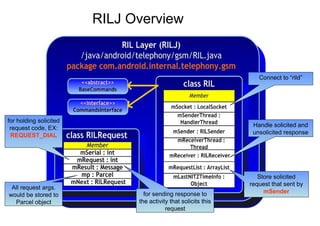
RILJ Overview Connect to “rild” Handle solicited and unsolicited response Store solicited request that sent by  mSender All request args. would be stored to Parcel object for holding solicited request code, EX:  REQUEST_DIAL for sending response to the activity that solicits this request

Android Radio Layer Interface

  • 1.
  • 2.
    Summary Background RILstack overview RIL daemon (rild) Example: RIL with Mc39i on versatile Example: RIL with HUAWEI E169 on Eeepc 900 Screenshots
  • 3.
    Background What isRIL ? RIL is the abbreviation of Android's Radio Interface Layer (RIL), it provides an abstraction layer between Android telephony services ( android.telephony ) and radio hardware. It consists of two primary components RIL Daemon and Vendor RIL. RIL Daemon it initializes the Vendor RIL, and processes all communication from Android telephony services, and dispatches calls to the Vendor RIL as solicited commands. Solicited Request, all the request that sent by RILJ belong this category. For example : dial, hung up send SMS Vendor RIL It initialize the baseband device and processes all communication with radio hardware and dispatches calls to the RIL Daemon (rild) through unsolicited commands. Unsolicited Request, the event that coming from outside. For example : incoming calling, MS change BS, signal strength The purpose of this section is to introduce RIL control flow, but not includes voice and packet services.
  • 4.
    Summary Background RILstack overview RIL daemon (rild) Example: RIL with Mc39i on versatile Example: RIL with HUAWEI E169 on Eeepc 900 Screenshots
  • 5.
  • 6.
    Summary Background RILstack overview RIL daemon (rild) Example: RIL with Mc39i on versatile Example: RIL with HUAWEI E169 on Eeepc 900 Screenshots
  • 7.
    RIL daemon (rild)RILD internal structure Startup flow Solicited request flow Unsolicited request flow
  • 8.
  • 9.
    Component naming theRIL component, RILJ RILD RILC and RIL, are the name used in the android LOG functions . Android has a set of functions for recording different type log message, ex: LOGE() for error message, LOGW() for warning message, and LOGI() for normal information, we call those function ( or method whatever ) as LOG functions . You can use logcat to watch those message via adb.
  • 10.
    RIL stack componentRILJ java/android/telephony/gsm Send Requests ( dial, hang up, signal strength ... ) to RIL via local socket “rild” RILD ( log tag name ) hardware/ril/rild Ril Daemon ,initiates the telephony stack of RILC and RIL, then go to sleep forever RILC hardware/ril/libril Libril, a event scheduler library for processing solicited and unsolicited request and as a bridge between RILJ and Vendor RIL. RIL hardware/ril/reference-ril Vendor library, launches the device and processes the RIL_Request.
  • 11.
    RIL daemon (rild)RILD internal structure Startup flow Solicited request flow Unsolicited request flow
  • 12.
    RIL daemon startupflow Init read /init.rc start rild services service ril-daemon /system/bin/rild socket rild stream 660 root radio socket rild-debug stream 660 radio system user root group radio cache inet misc
  • 13.
    RIL daemon startupflow watch_table
  • 14.
    eventLoop Event Name: s_wakeupfd_event Watch Fd : s_fdWakeupRead Persist : true Callback : processWakeupCallback Extra param : null It do nothing more than just read s_fdWakeupRead
  • 15.
    Introduction to RILEvent timer_list linking list Store event related with time watch_table Max Size: 8 Store event related with fd ( socket , pipe , and device node)
  • 16.
    Introduction to RILEvent(2) RIL has two category event, which corresponds to Time and I/O event. Time event is put on timer_list . I/O event is inserted into watch_table . time_list is a linked-list data structuture watch_table is a array, it’s maximal size is 8. All event use the same data structure ril_event
  • 17.
    Introduction to RILEvent(3) Time event
  • 18.
    Introduction to RILEvent(4) add time event flow
  • 19.
    Introduction to RILEvent(5) I/O event
  • 20.
    Introduction to RILEvent(6) insert I/O event flow
  • 21.
    Introduction to RILEvent(7) schedule and fire event
  • 22.
  • 23.
    RIL_Register Event Name: s_listen_event Watch Fd : s_fdListen Persist : false Callback : listenCallback Extra param : null
  • 24.
    Event listenCallback EventName : s_commands_event Watch Fd : s_fdCommand Persist : 1 Callback : processCommandsCallback Extra param : RecordStream *p_rs
  • 25.
  • 26.
  • 27.
    The usage ofRequestInfo, CommandInfo and UnsolResponseInfo In Android, RIL stack has two command table that corresponding to solicited and unsolicited request Solicited Request , all the request that sent by RILJ belong this category. For example : dial, hung up send SMS Unsolicited Request , the event that coming from outside. For example : incoming calling, MS change BS, signal strength CommandInfo stores Solicited Request processing function hardware\ril\libril\ril_commands.h UnsolResponseInfo stores Unsolicited Request processing function hardware\ril\libril\ril_unsol_commands.h RequestInfo link multiple CommandInfo into a linked-list
  • 28.
    The structure ofRequestInfo, CommandInfo
  • 29.
  • 30.
  • 31.
  • 32.
  • 33.
  • 34.
    RIL daemon (rild)Solicited request flow RILD internal structure Startup flow Solicited request flow Unsolicited request flow Request Path Response Path
  • 35.
    Solicited request flowRILC RIL Mc39i rild RILSender RILReceiver sendResponse(p); rild Call Setup readerLoop Send Dial Event Fire Dial event at_send_command Fetch next event to fire RILJ
  • 36.
  • 37.
    RIL daemon (rild) Unsolicited request flow RILD internal structure Startup flow Solicited request flow Unsolicited request flow Response Path
  • 38.
    Unsolicited request flowRIL Mc39i RILC readerLoop sendResponse(p); RILReceiver rild RILJ
  • 39.
  • 40.
    Summary Background RILstack overview RIL daemon (rild) Example: RIL with Mc39i on versatile Example: RIL with HUAWEI E169 on Eeepc 900 Screenshots
  • 41.
    RIL with Mc39ion versatile Building process Turn on telephony service on android
  • 42.
    Building process pre-requirementAndroid release 1.0 Linux Kernel 2.6.25 for android Siemens Mc39i Module It was connected to versatile serial port 2 Versatile development board
  • 43.
    Building process Kernelconfiguration make versatile_defconfig make menuconfig Kernel Features->Use the ARM EABI ... Networking->Networking options->IP: DHCP Device Drivers->Input device support->Event interface Device Drivers->Real Time Clock Device Drivers->Android->Android power driver Device Drivers->Android->Android power driver lock stats
  • 44.
    Building process Kernelmodification arch/arm/mach-versatile/core.c Line 578 val |= SYS_CLCD_MODE_565_ B LSB; Line 611 framesize= 640*480*2*2 ; drivers/video/amba-clcd.c Line 370 fb->fb.fix.ypanstep = 1 ; Line 377 fb->fb.var.yres_virtual = fb->panel->mode.yres * 2 ; clcdfb_disable, directly return; clcdfb_enable, insert below line into the function’s head. static int e=0; if (en==1) return; en=1;
  • 45.
    Building process Downloadandroid open source release 1.0 $ mkdir mydroid $ cd mydroid repo init -u git://android.git.kernel.org/platform/manifest.git –b release-1.0 repo sync Modification for Mc39i hardware/ril/reference-ril/reference-ril.c Function initializeCallback Remove line 1742 at_send_command(&quot;AT+CMOD=0&quot;, NULL); Alter line line 1754 at_send_command(&quot;AT+CSCS=\&quot; HEX \&quot;&quot;, NULL);  at_send_command(&quot;AT+CSCS=\“ GSM \&quot;&quot;, NULL);
  • 46.
    Building process Modificationfor Mc39i (cont.) hardware/ril/reference-ril/reference-ril.c ( mainLoop ) Change startup code if ( fd >= 0 && !memcmp( s_device_path, &quot;/dev/tty&quot;, 8 ) ) { struct termios ios; tcgetattr( fd, &ios ); ios.c_lflag = 0; cfsetispeed(&ios, B115200); cfsetospeed(&ios, B115200); ios.c_cflag |= CLOCAL|CREAD; ios.c_cflag &= ~PARENB; ios.c_cflag &= ~CSTOPB; ios.c_cflag &= ~CSIZE; ios.c_cflag |= CS8; tcsetattr(fd, TCSANOW, &ios); }
  • 47.
    Building process Modificationfor Mc39i (cont.) hardware/ril/reference-ril/reference-ril.c ( requestOperator ) No operator name on screen lock Mc39i is not supported AT+COPS=3,1 AT+COPS=3,0 : Full Name, ex: ChungHwa AT+COPS=3,1 : Short Name, ex: CHT AT+COPS=3,2 : Location Area Identification, ex: 46692 Solution : Create a mapping table, before return from requestOperator, assign the short name to the Name vector.
  • 48.
    Building process Compileandroid open source release 1.0 $ cd mydroid && make NFS setup mkdir /opt/rootfs/ cp –R out/target/product/generic/root/* /opt/rootfs cp –R out/target/product/generic/system/* /opt/rootfs/system chmod 777 /opt/rootfs/system ( to solve keymap file problem ) vi /etc/exports /opt/rootfs *(rw, no_root_squash ) Restart NFS services
  • 49.
    Building process ModificationRIL configuration /opt/rootfs/system/build.prop rild.libargs=-d /dev/ttyS0  rild.libargs=-d /dev/ttyAMA2 Kernel command line Enter Uboot setenv bootargs console=ttyAMA0 mem=128M root=/dev/nfs ip=dhcp nfsroot=“your_ip_address”:/opt/rootfs init=/init Reboot versatile for into Android
  • 50.
    Reference Android RILporting guide http://www.kandroid.org/android_pdk/telephony.html The original document has been obsolete by google.
  • 51.
    RIL with Mc39ion versatile Building process Turn on telephony service on android
  • 52.
    Turn on telephonyservice Problem : No startup wizard on android release 1.0 The android is not active . Some services can not worked, ex: incoming call. To active the android, the device_provisioned flag must be set by manually. $cd /opt/rootfs/data/data/com.android.providers.settings/databases sqlite3 settings.db INSERT INTO system (name,value) VALUES (‘device_provisioned’, ‘1’); .quit
  • 53.
    flag device_provisioned usagedevice_provisioned usage in android donut (android 2.0) define in class android.provider.Settings.Secure public static final String DEVICE_PROVISIONED = &quot;device_provisioned&quot;; framework/base/core/java/com/android/provider/ Settings.java
  • 54.
    flag device_provisioned usageSettings.Secure. getInt (context.getContentResolver(), Settings.Secure.DEVICE_PROVISIONED , 0) Settings.Secure. getInt(cr, name, def)  Settings.Secure. getString (cr, name); getString()  android.provider.Settings.Secure.NameValueCache.getString()
  • 55.
  • 56.
    Summary Background RILstack overview RIL daemon (rild) Example: RIL with Mc39i on versatile Example: RIL with HUAWEI E169 on Eeepc 900 Screenshots
  • 57.
    RIL with E169on Eeepc 900 Building Process Surfing internet
  • 58.
    Building Process Pre-requirementAsus EEE PC 900 HUAWEI E169 Kernel 2.6.27 for android Android cupcake source tree Source ppp-2.4.3.tar.gz + =
  • 59.
    Building Process Downloadandroid cupcake for eeepc_701 mkdir ./eeepc;cd eeepc repo init -u git://android.git.kernel.org/ platform/manifest.git –b cupcake repo sync vim .repo/local_manifest.xml <?xml version=&quot;1.0&quot; encoding=&quot;UTF-8&quot;?> <manifest> <project name=&quot;platform/vendor/asus/eee_701&quot; path=&quot;vendor/asus/eee_701&quot;/> </manifest> repo sync
  • 60.
    Building Process Kernelconfiguration Use cupcake/kernel Get eeepc 901 kernel config from http://pastebin.com/f26fe5376 ,. Make menuconfig EXT2 ( installer needs it to mount ramdisk ) PPP ( choose all options ) USB serial Includes USB GSM and CDMA option Framebuffer VESA VGA Driver drivers/rtc/alarm.c revision Delete #include <time.h> Add below code to alarm.c #ifdef __i386__ static void save_time_delta(struct timespec *delta, struct timespec *rtc) { set_normalized_timespec(delta, xtime.tv_sec - rtc->tv_sec, xtime.tv_nsec - rtc->tv_nsec); } #endif
  • 61.
    Building Process Sourcetree Modification cd cupcake mv verdor/asus/eee_701/Android.mk verdor/asus/eee_701 /AndroidBoard.mk vi external/e2fsprogs/Android.mk Unmark include $(call all-subdir-makefiles) vi framework/base/preloaded-classes (mark below lines ) #com.android.internal.policy.impl.PhoneLayoutInflater #com.android.internal.policy.impl.PhoneWindow #com.android.internal.policy.impl.PhoneWindow$1 #com.android.internal.policy.impl.PhoneWindow$ContextMenuCallback #com.android.internal.policy.impl.PhoneWindow$DecorView #com.android.internal.policy.impl.PhoneWindow$PanelFeatureState #com.android.internal.policy.impl.PhoneWindow$PanelFeatureState$SavedState #com.android.internal.policy.impl.PhoneWindow$PanelFeatureState$SavedState$1
  • 62.
    Building Process Sourcetree Modification (cont.) vi vendor/asus/eee_701/init.rc : # Define the oom_adj values for the classes of processes that can be killed by the kernel. These are used in ActivityManagerService. setprop ro.FOREGROUND_APP_ADJ 0 setprop ro.VISIBLE_APP_ADJ 1 setprop ro.SECONDARY_SERVER_ADJ 2 setprop ro.HOME_APP_ADJ 4 setprop ro.HIDDEN_APP_MIN_ADJ 7 setprop ro.CONTENT_PROVIDER_ADJ 14 setprop ro.EMPTY_APP_ADJ 15 # Define the memory thresholds at which the above process classes will # be killed. These numbers are in pages (4k). setprop ro.FOREGROUND_APP_MEM 1536 setprop ro.VISIBLE_APP_MEM 2048 setprop ro.SECONDARY_SERVER_MEM 4096 setprop ro.HOME_APP_MEM 4096 setprop ro.HIDDEN_APP_MEM 8192 setprop ro.CONTENT_PROVIDER_MEM 8704 setprop ro.EMPTY_APP_MEM 16384
  • 63.
    Building Process Sourcetree Modification (cont.) vi bootable/diskinstaller/init.rc : service installer /system/bin/installer -p /dev/block/sdc2 vi vendor/asus/eeepc_701/BoardConfig.mk add vga=788 into BOOT_KERNEL_CMDLINE Vi external/ppp/pppd/Android.mk Del first line and last line to enable pppd compiling for x86 platform
  • 64.
    Building Process Addppp and chat script to source tree mkdir external/ppp/chat get chat source from ftp://ftp.samba.org/pub/ppp/ ppp-2.4.3.tar.gz vi external/ppp/chat/Android.mk LOCAL_PATH:= $(call my-dir) include $(CLEAR_VARS) LOCAL_SRC_FILES:= \ chat.c LOCAL_SHARED_LIBRARIES := \ libcutils libc LOCAL_C_INCLUDES := \ $(LOCAL_PATH)/include LOCAL_CFLAGS := -DANDROID_CHANGES -DTERMIOS -DSIGTYPE=void -UNO_SLEEP -DFNDELAY=O_NDELAY LOCAL_MODULE_PATH := $(TARGET_OUT_OPTIONAL_EXECUTABLES) LOCAL_MODULE_TAGS := eng LOCAL_MODULE:= chat include $(BUILD_EXECUTABLE)
  • 65.
    Building Process Addppp and chat script to source tree (cont.) vi system/core/rootdir/etc/ppp/ppp-startup.sh #!/system/bin/sh setprop net.dns1 168.95.1.1 /system/xbin/pppd –detach modem crtscts debug \ /dev/ttyUSB0 460800 noipdefault \ defaultroute usepeerdns \ connect “/etc/ppp/pppondialer”
  • 66.
    Building Process Addppp and chat script to source tree (cont.) vi system/core/rootdir/etc/ppp/pppondialer #!/system/bin/sh chat –v –s \ TIMEOUT 30 \ ABORT BUSY \ ABORT ERROR \ “” ‘ AT’ \ OK ‘ATZ’ \ OK ‘ATQ0 V1 E1 S0=0 &C1 &C2 +FCLASS=0’ \ OK ‘AT+CGDCONT=1,”IP”,”internet”’ \  internet 為中華電信 APN name OK ‘AT+CSQ’ \ OK ‘ATD*99#’ \ CONNECT ‘’
  • 67.
    Building Process Addppp and chat script to source tree (cont.) vi system/core/rootdir/Android.mk copy_from := \ etc/dbus.conf \ etc/init.goldfish.sh \ etc/hosts \ etc/ppp/ppp-startup.sh \ etc/ppp/pppondialer vi vendor/asus/eeepc_701/init.rc Add “chmod 777 /etc/ppp/ppp-startup.sh” Add “chmod 777 /etc/ppp/pppondialer ” Add “symlink /dev/ttyUSB0 /dev/3GModem” Add “chmod 777 /dev/3GModem”
  • 68.
    Building Process Compilesource tree and install image into eeepc 900 Compile source TARGET_ARCH=x86 TARGET_PRODUCT=eee_701 DISABLE_DEXPREOPT=true make installer_img Create USB installer dd if= out/target/product/ eee_701/installer.img of=/dev/<USB HDD>
  • 69.
    I915 resolution solutionThe uvesafb denotes the userspace VESA frame buffer driver, a generic frame buffer driver for Linux systems. It offers more features than the original vesafb , such as adjustable resolution and adjustable refresh rates with VBE 3.0-compliant graphic cards. UvesafbHowTo http://www.android-x86.org/documents/uvesafbhowto Uvesafb project http://dev.gentoo.org/~spock/projects/uvesafb/
  • 70.
    RIL with E169on Eeepc 900 Building Process Surfing internet
  • 71.
    Surfing internet InsertHUAWEI E169 into Eeepc 900 Press ALT+F1 into framebuffer console /etc/ppp/ppp-startup.sh Press ALT+CTRL+F7, back to Android
  • 72.
    Summary Background RILstack overview RIL daemon (rild) Example: RIL with Mc39i on versatile Example: RIL with HUAWEI E169 on Eeepc 900 Screenshots
  • 73.
  • 74.
  • 75.
  • 76.
  • 77.
  • 78.
    RILJ Overview Connectto “rild” Handle solicited and unsolicited response Store solicited request that sent by mSender All request args. would be stored to Parcel object for holding solicited request code, EX: REQUEST_DIAL for sending response to the activity that solicits this request