© 2018, Amazon Web Services, Inc. or its Affiliates. All rights reserved.
서버리스 앱 배포 자동화
김필중 솔루션즈 아키텍트
AWS
© 2018, Amazon Web Services, Inc. or its Affiliates. All rights reserved.
서버리스
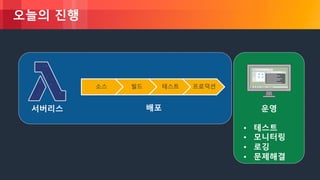
오늘의 진행
소스 빌드 테스트 프로덕션
배포 운영
• 테스트
• 모니터링
• 로깅
• 문제해결
© 2018, Amazon Web Services, Inc. or its Affiliates. All rights reserved.
서버리스
© 2018, Amazon Web Services, Inc. or its Affiliates. All rights reserved.
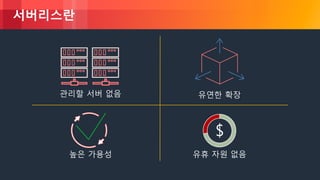
서버리스란
관리할 서버 없음 유연한 확장
유휴 자원 없음
$
높은 가용성
© 2018, Amazon Web Services, Inc. or its Affiliates. All rights reserved.
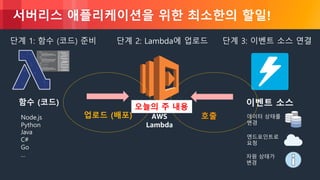
서버리스 애플리케이션을 위한 최소한의 할일!
AWS
Lambda
Node.js
Python
Java
C#
Go
…
함수 (코드)
단계 2: Lambda에 업로드
업로드 (배포)
이벤트 소스
데이터 상태를
변경
엔드포인트로
요청
자원 상태가
변경
단계 3: 이벤트 소스 연결단계 1: 함수 (코드) 준비
호출
오늘의 주 내용
© 2018, Amazon Web Services, Inc. or its Affiliates. All rights reserved.
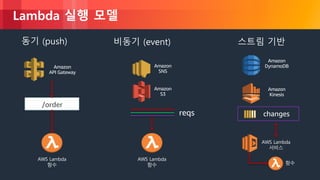
Lambda 실행 모델
동기 (push) 스트림 기반비동기 (event)
Amazon
API Gateway
AWS Lambda
함수
Amazon
DynamoDBAmazon
SNS
/order
AWS Lambda
함수
Amazon
S3
reqs
Amazon
Kinesis
changes
AWS Lambda
서비스
함수
© 2018, Amazon Web Services, Inc. or its Affiliates. All rights reserved.
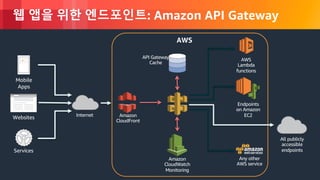
웹 앱을 위한 엔드포인트: Amazon API Gateway
Internet
Mobile
Apps
Websites
Services
AWS
Lambda
functions
AWS
API Gateway
Cache
Endpoints
on Amazon
EC2
All publicly
accessible
endpoints
Amazon
CloudWatch
Monitoring
Amazon
CloudFront
Any other
AWS service
© 2018, Amazon Web Services, Inc. or its Affiliates. All rights reserved.
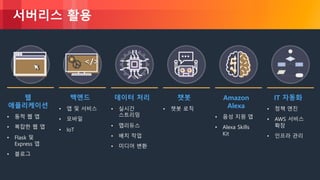
서버리스 활용
웹
애플리케이션
• 동적 웹 앱
• 복잡한 웹 앱
• Flask 및
Express 앱
• 블로그
데이터 처리
• 실시간
스트리밍
• 맵리듀스
• 배치 작업
• 미디어 변환
챗봇
• 챗봇 로직
백엔드
• 앱 및 서비스
• 모바일
• IoT
</></>
Amazon
Alexa
• 음성 지원 앱
• Alexa Skills
Kit
IT 자동화
• 정책 엔진
• AWS 서비스
확장
• 인프라 관리
© 2018, Amazon Web Services, Inc. or its Affiliates. All rights reserved.
배포
© 2018, Amazon Web Services, Inc. or its Affiliates. All rights reserved.
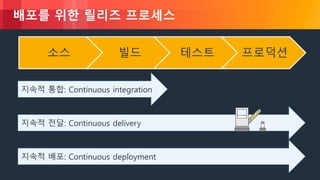
배포를 위한 릴리즈 프로세스
지속적 통합: Continuous integration
지속적 전달: Continuous delivery
지속적 배포: Continuous deployment
소스 빌드 테스트 프로덕션
© 2018, Amazon Web Services, Inc. or its Affiliates. All rights reserved.
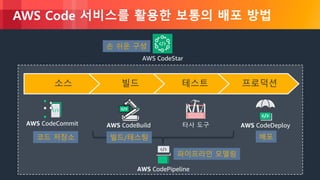
AWS Code 서비스를 활용한 보통의 배포 방법
소스 빌드 테스트 프로덕션
AWS CodeDeploy타사 도구AWS CodeBuildAWS CodeCommit
AWS CodePipeline
AWS CodeStar
코드 저장소 빌드/테스팅 배포
파이프라인 모델링
손 쉬운 구성
© 2018, Amazon Web Services, Inc. or its Affiliates. All rights reserved.
!
© 2018, Amazon Web Services, Inc. or its Affiliates. All rights reserved.
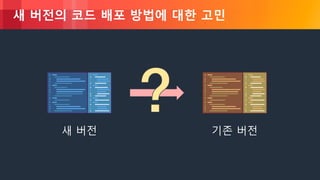
새 버전의 코드 배포 방법에 대한 고민
새 버전 기존 버전
© 2018, Amazon Web Services, Inc. or its Affiliates. All rights reserved.
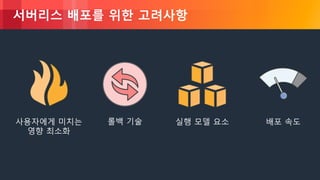
서버리스 배포를 위한 고려사항
사용자에게 미치는
영향 최소화
롤백 기술 실행 모델 요소 배포 속도
© 2018, Amazon Web Services, Inc. or its Affiliates. All rights reserved.
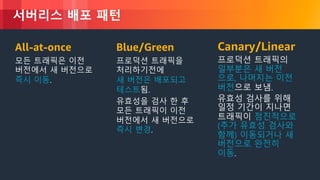
서버리스 배포 패턴
All-at-once
모든 트래픽은 이전
버전에서 새 버전으로
즉시 이동.
Blue/Green
프로덕션 트래픽을
처리하기전에
새 버전은 배포되고
테스트됨.
유효성을 검사 한 후
모든 트래픽이 이전
버전에서 새 버전으로
즉시 변경.
Canary/Linear
프로덕션 트래픽의
일부분은 새 버전
으로, 나머지는 이전
버전으로 보냄.
유효성 검사를 위해
일정 기간이 지나면
트래픽이 점진적으로
(추가 유효성 검사와
함께) 이동되거나 새
버전으로 완전히
이동.
© 2018, Amazon Web Services, Inc. or its Affiliates. All rights reserved.
서버리스 배포를 위한 도구
© 2018, Amazon Web Services, Inc. or its Affiliates. All rights reserved.
AWS CloudFormation
클라우드 인프라 템플릿을 정의하기 위한 언어
- JSON 및 YAML 지원
AWS 리소스 프로비저닝
CI/CD, 개발, 관리 도구와 통합
© 2018, Amazon Web Services, Inc. or its Affiliates. All rights reserved.
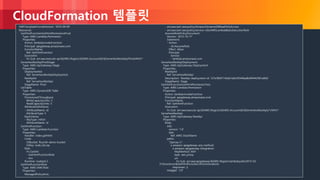
CloudFormation 템플릿
AWSTemplateFormatVersion: '2010-09-09'
Resources:
GetHtmlFunctionGetHtmlPermissionProd:
Type: AWS::Lambda::Permission
Properties:
Action: lambda:invokeFunction
Principal: apigateway.amazonaws.com
FunctionName:
Ref: GetHtmlFunction
SourceArn:
Fn::Sub: arn:aws:execute-api:${AWS::Region}:${AWS::AccountId}:${ServerlessRestApi}/Prod/ANY/*
ServerlessRestApiProdStage:
Type: AWS::ApiGateway::Stage
Properties:
DeploymentId:
Ref: ServerlessRestApiDeployment
RestApiId:
Ref: ServerlessRestApi
StageName: Prod
ListTable:
Type: AWS::DynamoDB::Table
Properties:
ProvisionedThroughput:
WriteCapacityUnits: 5
ReadCapacityUnits: 5
AttributeDefinitions:
- AttributeName: id
AttributeType: S
KeySchema:
- KeyType: HASH
AttributeName: id
GetHtmlFunction:
Type: AWS::Lambda::Function
Properties:
Handler: index.gethtml
Code:
S3Bucket: flourish-demo-bucket
S3Key: todo_list.zip
Role:
Fn::GetAtt:
- GetHtmlFunctionRole
- Arn
Runtime: nodejs4.3
GetHtmlFunctionRole:
Type: AWS::IAM::Role
Properties:
ManagedPolicyArns:
- arn:aws:iam::aws:policy/AmazonDynamoDBReadOnlyAccess
- arn:aws:iam::aws:policy/service-role/AWSLambdaBasicExecutionRole
AssumeRolePolicyDocument:
Version: '2012-10-17'
Statement:
- Action:
- sts:AssumeRole
Effect: Allow
Principal:
Service:
- lambda.amazonaws.com
ServerlessRestApiDeployment:
Type: AWS::ApiGateway::Deployment
Properties:
RestApiId:
Ref: ServerlessRestApi
Description: 'RestApi deployment id: 127e3fb91142ab1ddc5f5446adb094442581a90d'
StageName: Stage
GetHtmlFunctionGetHtmlPermissionTest:
Type: AWS::Lambda::Permission
Properties:
Action: lambda:invokeFunction
Principal: apigateway.amazonaws.com
FunctionName:
Ref: GetHtmlFunction
SourceArn:
Fn::Sub: arn:aws:execute-api:${AWS::Region}:${AWS::AccountId}:${ServerlessRestApi}/*/ANY/*
ServerlessRestApi:
Type: AWS::ApiGateway::RestApi
Properties:
Body:
info:
version: '1.0'
title:
Ref: AWS::StackName
paths:
"/{proxy+}":
x-amazon-apigateway-any-method:
x-amazon-apigateway-integration:
httpMethod: ANY
type: aws_proxy
uri:
Fn::Sub: arn:aws:apigateway:${AWS::Region}:lambda:path/2015-03-
31/functions/${GetHtmlFunction.Arn}/invocations
responses: {}
swagger: '2.0'
© 2018, Amazon Web Services, Inc. or its Affiliates. All rights reserved.
AWS Serverless Application Model (SAM)
서버리스에 최적화된 CloudFormation 확장판
새로운 서버리스 자원 유형: 함수, API, 테이블
CloudFormation이 지원하는 모든 것을 지원
오픈 사양 (Apache 2.0)
https://github.com/awslabs/serverless-application-model
© 2018, Amazon Web Services, Inc. or its Affiliates. All rights reserved.
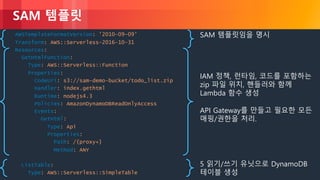
SAM 템플릿
AWSTemplateFormatVersion: '2010-09-09’
Transform: AWS::Serverless-2016-10-31
Resources:
GetHtmlFunction:
Type: AWS::Serverless::Function
Properties:
CodeUri: s3://sam-demo-bucket/todo_list.zip
Handler: index.gethtml
Runtime: nodejs4.3
Policies: AmazonDynamoDBReadOnlyAccess
Events:
GetHtml:
Type: Api
Properties:
Path: /{proxy+}
Method: ANY
ListTable:
Type: AWS::Serverless::SimpleTable
SAM 템플릿임을 명시
IAM 정책, 런타임, 코드를 포함하는
zip 파일 위치, 핸들러와 함께
Lambda 함수 생성
API Gateway를 만들고 필요한 모든
매핑/권한을 처리.
5 읽기/쓰기 유닛으로 DynamoDB
테이블 생성
© 2018, Amazon Web Services, Inc. or its Affiliates. All rights reserved.
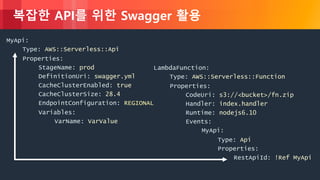
복잡한 API를 위한 Swagger 활용
MyApi:
Type: AWS::Serverless::Api
Properties:
StageName: prod
DefinitionUri: swagger.yml
CacheClusterEnabled: true
CacheClusterSize: 28.4
EndpointConfiguration: REGIONAL
Variables:
VarName: VarValue
LambdaFunction:
Type: AWS::Serverless::Function
Properties:
CodeUri: s3://<bucket>/fn.zip
Handler: index.handler
Runtime: nodejs6.10
Events:
MyApi:
Type: Api
Properties:
RestApiId: !Ref MyApi
© 2018, Amazon Web Services, Inc. or its Affiliates. All rights reserved.
서버리스 애플리케이션 배포 기법
© 2018, Amazon Web Services, Inc. or its Affiliates. All rights reserved.
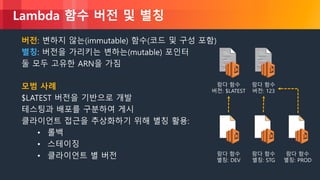
Lambda 함수 버전 및 별칭
버전: 변하지 않는(immutable) 함수(코드 및 구성 포함)
별칭: 버전을 가리키는 변하는(mutable) 포인터
둘 모두 고유한 ARN을 가짐
모범 사례
$LATEST 버전을 기반으로 개발
테스팅과 배포를 구분하여 게시
클라이언트 접근을 추상화하기 위해 별칭 활용:
• 롤백
• 스테이징
• 클라이언트 별 버전
람다 함수
버전: $LATEST
람다 함수
버전: 123
람다 함수
별칭: PROD
람다 함수
별칭: STG
람다 함수
별칭: DEV
© 2018, Amazon Web Services, Inc. or its Affiliates. All rights reserved.
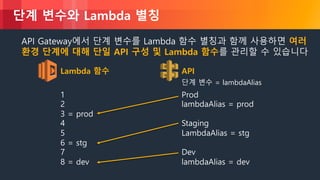
단계 변수와 Lambda 별칭
API Gateway에서 단계 변수를 Lambda 함수 별칭과 함께 사용하면 여러
환경 단계에 대해 단일 API 구성 및 Lambda 함수를 관리할 수 있습니다
Lambda 함수 API
1
2
3 = prod
4
5
6 = stg
7
8 = dev
Prod
lambdaAlias = prod
Staging
LambdaAlias = stg
Dev
lambdaAlias = dev
단계 변수 = lambdaAlias
© 2018, Amazon Web Services, Inc. or its Affiliates. All rights reserved.
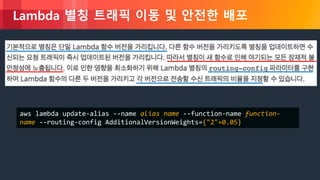
Lambda 별칭 트래픽 이동 및 안전한 배포
aws lambda update-alias --name alias name --function-name function-
name --routing-config AdditionalVersionWeights={"2"=0.05}
© 2018, Amazon Web Services, Inc. or its Affiliates. All rights reserved.
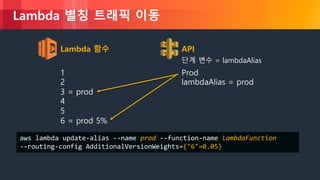
Lambda 별칭 트래픽 이동
Lambda 함수 API
1
2
3 = prod
4
5
6 = prod 5%
Prod
lambdaAlias = prod
단계 변수 = lambdaAlias
aws lambda update-alias --name prod --function-name lambdaFunction
--routing-config AdditionalVersionWeights={"6"=0.05}
© 2018, Amazon Web Services, Inc. or its Affiliates. All rights reserved.
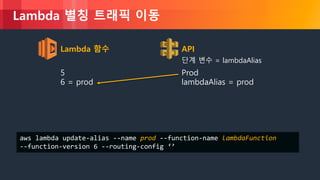
Lambda 별칭 트래픽 이동
Lambda 함수 API
5
6 = prod
Prod
lambdaAlias = prod
단계 변수 = lambdaAlias
aws lambda update-alias --name prod --function-name lambdaFunction
--function-version 6 --routing-config ‘’
© 2018, Amazon Web Services, Inc. or its Affiliates. All rights reserved.
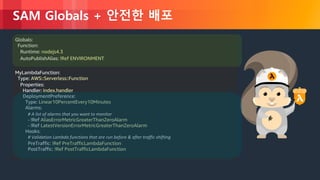
SAM Globals + 안전한 배포
Globals:
Function:
Runtime: nodejs4.3
AutoPublishAlias: !Ref ENVIRONMENT
MyLambdaFunction:
Type: AWS::Serverless::Function
Properties:
Handler: index.handler
DeploymentPreference:
Type: Linear10PercentEvery10Minutes
Alarms:
# A list of alarms that you want to monitor
- !Ref AliasErrorMetricGreaterThanZeroAlarm
- !Ref LatestVersionErrorMetricGreaterThanZeroAlarm
Hooks:
# Validation Lambda functions that are run before & after traffic shifting
PreTraffic: !Ref PreTrafficLambdaFunction
PostTraffic: !Ref PostTrafficLambdaFunction
© 2018, Amazon Web Services, Inc. or its Affiliates. All rights reserved.
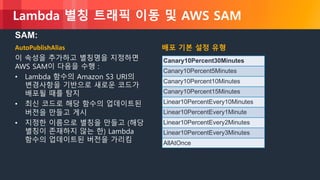
Lambda 별칭 트래픽 이동 및 AWS SAM
AutoPublishAlias
이 속성을 추가하고 별칭명을 지정하면
AWS SAM이 다음을 수행 :
• Lambda 함수의 Amazon S3 URI의
변경사항을 기반으로 새로운 코드가
배포될 때를 탐지
• 최신 코드로 해당 함수의 업데이트된
버전을 만들고 게시
• 지정한 이름으로 별칭을 만들고 (해당
별칭이 존재하지 않는 한) Lambda
함수의 업데이트된 버전을 가리킴
배포 기본 설정 유형
Canary10Percent30Minutes
Canary10Percent5Minutes
Canary10Percent10Minutes
Canary10Percent15Minutes
Linear10PercentEvery10Minutes
Linear10PercentEvery1Minute
Linear10PercentEvery2Minutes
Linear10PercentEvery3Minutes
AllAtOnce
SAM:
© 2018, Amazon Web Services, Inc. or its Affiliates. All rights reserved.
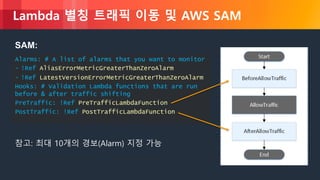
Lambda 별칭 트래픽 이동 및 AWS SAM
SAM:
Alarms: # A list of alarms that you want to monitor
- !Ref AliasErrorMetricGreaterThanZeroAlarm
- !Ref LatestVersionErrorMetricGreaterThanZeroAlarm
Hooks: # Validation Lambda functions that are run
before & after traffic shifting
PreTraffic: !Ref PreTrafficLambdaFunction
PostTraffic: !Ref PostTrafficLambdaFunction
참고: 최대 10개의 경보(Alarm) 지정 가능
© 2018, Amazon Web Services, Inc. or its Affiliates. All rights reserved.
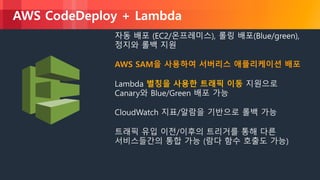
AWS CodeDeploy + Lambda
자동 배포 (EC2/온프레미스), 롤링 배포(Blue/green),
정지와 롤백 지원
AWS SAM을 사용하여 서버리스 애플리케이션 배포
Lambda 별칭을 사용한 트래픽 이동 지원으로
Canary와 Blue/Green 배포 가능
CloudWatch 지표/알람을 기반으로 롤백 가능
트래픽 유입 이전/이후의 트리거를 통해 다른
서비스들간의 통합 가능 (람다 함수 호출도 가능)
© 2018, Amazon Web Services, Inc. or its Affiliates. All rights reserved.
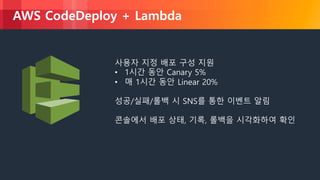
AWS CodeDeploy + Lambda
사용자 지정 배포 구성 지원
• 1시간 동안 Canary 5%
• 매 1시간 동안 Linear 20%
성공/실패/롤백 시 SNS를 통한 이벤트 알림
콘솔에서 배포 상태, 기록, 롤백을 시각화하여 확인
© 2018, Amazon Web Services, Inc. or its Affiliates. All rights reserved.
Amazon API Gateway Canary 지원
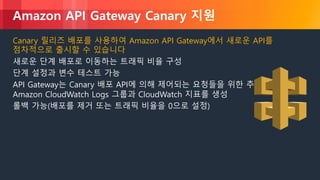
Canary 릴리즈 배포를 사용하여 Amazon API Gateway에서 새로운 API를
점차적으로 출시할 수 있습니다
새로운 단계 배포로 이동하는 트래픽 비율 구성
단계 설정과 변수 테스트 가능
API Gateway는 Canary 배포 API에 의해 제어되는 요청들을 위한 추가적인
Amazon CloudWatch Logs 그룹과 CloudWatch 지표를 생성
롤백 가능(배포를 제거 또는 트래픽 비율을 0으로 설정)
© 2018, Amazon Web Services, Inc. or its Affiliates. All rights reserved.
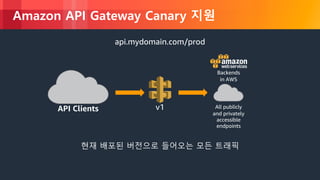
Amazon API Gateway Canary 지원
v1API Clients All publicly
and privately
accessible
endpoints
Backends
in AWS
api.mydomain.com/prod
현재 배포된 버전으로 들어오는 모든 트래픽
© 2018, Amazon Web Services, Inc. or its Affiliates. All rights reserved.
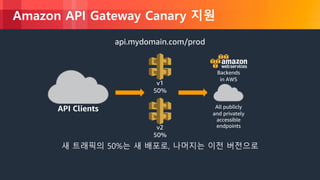
Amazon API Gateway Canary 지원
API Clients All publicly
and privately
accessible
endpoints
Backends
in AWS
v1
50%
v2
50%
새 트래픽의 50%는 새 배포로, 나머지는 이전 버전으로
api.mydomain.com/prod
© 2018, Amazon Web Services, Inc. or its Affiliates. All rights reserved.
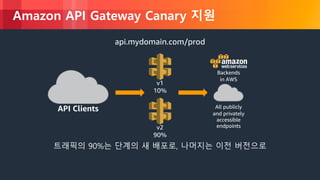
Amazon API Gateway Canary 지원
API Clients All publicly
and privately
accessible
endpoints
Backends
in AWS
v1
10%
v2
90%
트래픽의 90%는 단계의 새 배포로, 나머지는 이전 버전으로
api.mydomain.com/prod
© 2018, Amazon Web Services, Inc. or its Affiliates. All rights reserved.
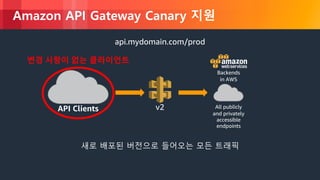
Amazon API Gateway Canary 지원
v2API Clients All publicly
and privately
accessible
endpoints
Backends
in AWS
api.mydomain.com/prod
새로 배포된 버전으로 들어오는 모든 트래픽
변경 사항이 없는 클라이언트
© 2018, Amazon Web Services, Inc. or its Affiliates. All rights reserved.
Amazon API Gateway Canary 지원
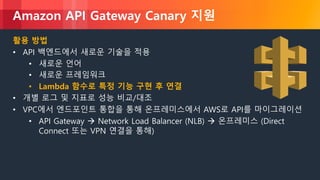
활용 방법
• API 백엔드에서 새로운 기술을 적용
• 새로운 언어
• 새로운 프레임워크
• Lambda 함수로 특정 기능 구현 후 연결
• 개별 로그 및 지표로 성능 비교/대조
• VPC에서 엔드포인트 통합을 통해 온프레미스에서 AWS로 API를 마이그레이션
• API Gateway à Network Load Balancer (NLB) à 온프레미스 (Direct
Connect 또는 VPN 연결을 통해)
© 2018, Amazon Web Services, Inc. or its Affiliates. All rights reserved.
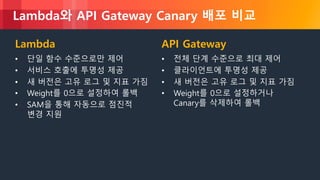
Lambda와 API Gateway Canary 배포 비교
Lambda
• 단일 함수 수준으로만 제어
• 서비스 호출에 투명성 제공
• 새 버전은 고유 로그 및 지표 가짐
• Weight를 0으로 설정하여 롤백
• SAM을 통해 자동으로 점진적
변경 지원
API Gateway
• 전체 단계 수준으로 최대 제어
• 클라이언트에 투명성 제공
• 새 버전은 고유 로그 및 지표 가짐
• Weight를 0으로 설정하거나
Canary를 삭제하여 롤백
© 2018, Amazon Web Services, Inc. or its Affiliates. All rights reserved.
배포 파이프라인 구축
© 2018, Amazon Web Services, Inc. or its Affiliates. All rights reserved.
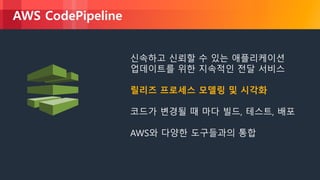
AWS CodePipeline
신속하고 신뢰할 수 있는 애플리케이션
업데이트를 위한 지속적인 전달 서비스
릴리즈 프로세스 모델링 및 시각화
코드가 변경될 때 마다 빌드, 테스트, 배포
AWS와 다양한 도구들과의 통합
© 2018, Amazon Web Services, Inc. or its Affiliates. All rights reserved.
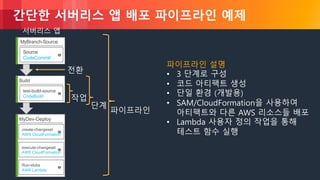
간단한 서버리스 앱 배포 파이프라인 예제
MyBranch-Source
Source
CodeCommit
서버리스 앱
Build
test-build-source
CodeBuild
MyDev-Deploy
create-changeset
AWS CloudFormation
execute-changeset
AWS CloudFormation
Run-stubs
AWS Lambda
파이프라인 설명
• 3 단계로 구성
• 코드 아티팩트 생성
• 단일 환경 (개발용)
• SAM/CloudFormation을 사용하여
아티팩트와 다른 AWS 리소스들 배포
• Lambda 사용자 정의 작업을 통해
테스트 함수 실행
파이프라인
단계
작업
전환
© 2018, Amazon Web Services, Inc. or its Affiliates. All rights reserved.
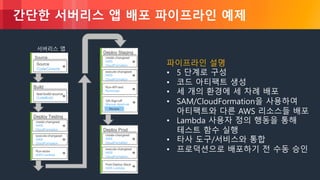
간단한 서버리스 앱 배포 파이프라인 예제
파이프라인 설명
• 5 단계로 구성
• 코드 아티팩트 생성
• 세 개의 환경에 세 차례 배포
• SAM/CloudFormation을 사용하여
아티팩트와 다른 AWS 리소스들 배포
• Lambda 사용자 정의 행동을 통해
테스트 함수 실행
• 타사 도구/서비스와 통합
• 프로덕션으로 배포하기 전 수동 승인
Source
Source
CodeCommit
서버리스 앱
Build
test-build-source
CodeBuild
Deploy Testing
create-changeset
AWS
CloudFormation
execute-changeset
AWS
CloudFormation
Run-stubs
AWS Lambda
Deploy Staging
create-changeset
AWS
CloudFormation
execute-changeset
AWS
CloudFormation
Run-API-test
Runscope
QA-Sign-off
Manual Approval
Review
Deploy Prod
create-changeset
AWS
CloudFormation
execute-changeset
AWS
CloudFormation
Post-Deploy-Slack
AWS Lambda
© 2018, Amazon Web Services, Inc. or its Affiliates. All rights reserved.
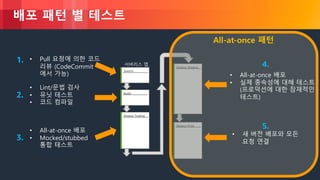
배포 패턴 별 테스트
Source
서버리스 앱
Build
Deploy Testing
Deploy Staging
Deploy Prod
• Pull 요청에 의한 코드
리뷰 (CodeCommit
에서 가능)
• Lint/문법 검사
• 유닛 테스트
• 코드 컴파일
• All-at-once 배포
• Mocked/stubbed
통합 테스트
• All-at-once 배포
• 실제 종속성에 대해 테스트
(프로덕션에 대한 잠재적인
테스트)
• 새 버전 배포와 모든
요청 연결
1.
2.
3.
4.
5.
All-at-once 패턴
© 2018, Amazon Web Services, Inc. or its Affiliates. All rights reserved.
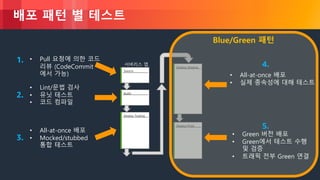
배포 패턴 별 테스트
Source
서버리스 앱
Build
Deploy Testing
Deploy Staging
Deploy Prod
• Pull 요청에 의한 코드
리뷰 (CodeCommit
에서 가능)
• Lint/문법 검사
• 유닛 테스트
• 코드 컴파일
• All-at-once 배포
• Mocked/stubbed
통합 테스트
• All-at-once 배포
• 실제 종속성에 대해 테스트
• Green 버전 배포
• Green에서 테스트 수행
및 검증
• 트래픽 전부 Green 연결
1.
2.
3.
4.
5.
Blue/Green 패턴
© 2018, Amazon Web Services, Inc. or its Affiliates. All rights reserved.
배포 패턴 별 테스트
Source
서버리스 앱
Build
Deploy Testing
Deploy Staging
Deploy Prod
• Pull 요청에 의한 코드
리뷰 (CodeCommit
에서 가능)
• Lint/문법 검사
• 유닛 테스트
• 코드 컴파일
• All-at-once 배포
• Mocked/stubbed
통합 테스트
• All-at-once 배포
• 실제 종속성에 대해 테스트
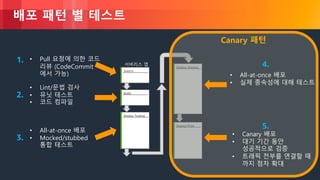
• Canary 배포
• 대기 기간 동안
성공적으로 검증
• 트래픽 전부를 연결할 때
까지 점차 확대
1.
2.
3.
4.
5.
Canary 패턴
© 2018, Amazon Web Services, Inc. or its Affiliates. All rights reserved.
환경, 단계, 버전, Canary 관련 모범 사례
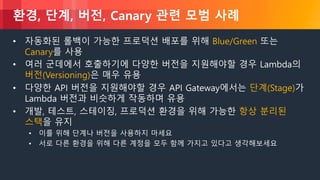
• 자동화된 롤백이 가능한 프로덕션 배포를 위해 Blue/Green 또는
Canary를 사용
• 여러 군데에서 호출하기에 다양한 버전을 지원해야할 경우 Lambda의
버전(Versioning)은 매우 유용
• 다양한 API 버전을 지원해야할 경우 API Gateway에서는 단계(Stage)가
Lambda 버전과 비슷하게 작동하며 유용
• 개발, 테스트, 스테이징, 프로덕션 환경을 위해 가능한 항상 분리된
스택을 유지
• 이를 위해 단계나 버전을 사용하지 마세요
• 서로 다른 환경을 위해 다른 계정을 모두 함께 가지고 있다고 생각해보세요
© 2018, Amazon Web Services, Inc. or its Affiliates. All rights reserved.
운영
(테스트/로깅/모니터링/문제 해결)
© 2018, Amazon Web Services, Inc. or its Affiliates. All rights reserved.
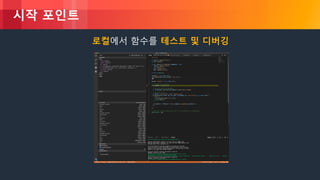
시작 포인트
로컬에서 함수를 테스트 및 디버깅
© 2018, Amazon Web Services, Inc. or its Affiliates. All rights reserved.
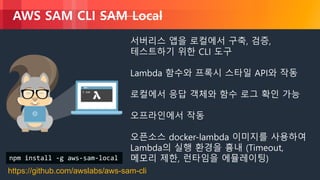
AWS SAM CLI SAM Local
서버리스 앱을 로컬에서 구축, 검증,
테스트하기 위한 CLI 도구
Lambda 함수와 프록시 스타일 API와 작동
로컬에서 응답 객체와 함수 로그 확인 가능
오프라인에서 작동
오픈소스 docker-lambda 이미지를 사용하여
Lambda의 실행 환경을 흉내 (Timeout,
메모리 제한, 런타임을 에뮬레이팅)
https://github.com/awslabs/aws-sam-cli
npm install -g aws-sam-local
© 2018, Amazon Web Services, Inc. or its Affiliates. All rights reserved.
AWS CodeBuild: 높은 수준의 Lambda 테스트
CodeBuild는 Docker 이미지를 사용하여
빌드/테스트 환경을 구성한 뒤 원하는 작업을
가능하게 함
SAM Local은 Lambda 런타임의 복제본을 포함
바이너리 호환 라이브러리와 실행 파일을
빌드하고 테스트 가능
© 2018, Amazon Web Services, Inc. or its Affiliates. All rights reserved.
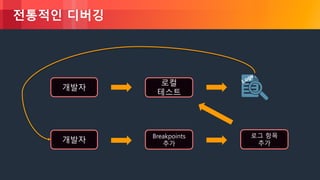
전통적인 디버깅
개발자
로컬
테스트
개발자
Breakpoints
추가
로그 항목
추가
© 2018, Amazon Web Services, Inc. or its Affiliates. All rights reserved.
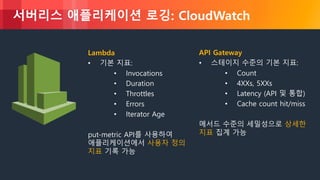
서버리스 애플리케이션 로깅: CloudWatch
Lambda
• 기본 지표:
• Invocations
• Duration
• Throttles
• Errors
• Iterator Age
put-metric API를 사용하여
애플리케이션에서 사용자 정의
지표 기록 가능
API Gateway
• 스테이지 수준의 기본 지표:
• Count
• 4XXs, 5XXs
• Latency (API 및 통합)
• Cache count hit/miss
메서드 수준의 세밀성으로 상세한
지표 집계 가능
© 2018, Amazon Web Services, Inc. or its Affiliates. All rights reserved.
서버리스 앱 문제 해결의 접근
• 기본적으로 적절한 로그를 기록하는 것부터 시작
• 기록된 로그는 빠르게 검색 가능해야 함
• 특히 람다 함수가 많다면 로그 기록은 더욱 중요!
© 2018, Amazon Web Services, Inc. or its Affiliates. All rights reserved.
사용자 정의 지표 및 로그 생성
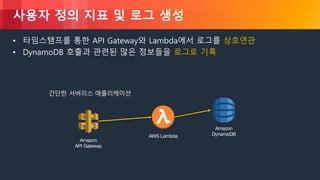
• 타임스탬프를 통한 API Gateway와 Lambda에서 로그를 상호연관
• DynamoDB 호출과 관련된 많은 정보들을 로그로 기록
Amazon
API Gateway
Amazon
DynamoDBAWS Lambda
간단한 서버리스 애플리케이션
© 2018, Amazon Web Services, Inc. or its Affiliates. All rights reserved.
조금 어려운 문제들
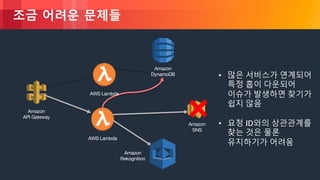
• 많은 서비스가 연계되어
특정 홉이 다운되어
이슈가 발생하면 찾기가
쉽지 않음
• 요청 ID와의 상관관계를
찾는 것은 물론
유지하기가 어려움
Amazon
API Gateway
Amazon
DynamoDB
AWS Lambda
AWS Lambda
Amazon
Rekognition
Amazon
SNS
© 2018, Amazon Web Services, Inc. or its Affiliates. All rights reserved.
조금 어려운 문제들
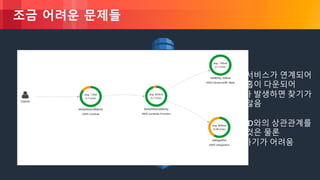
• 많은 서비스가 연계되어
특정 홉이 다운되어
이슈가 발생하면 찾기가
쉽지 않음
• 요청 ID와의 상관관계를
찾는 것은 물론
유지하기가 어려움
Amazon
API Gateway
Amazon
DynamoDB
AWS Lambda
AWS Lambda
Amazon
Rekognition
Amazon
SNS
© 2018, Amazon Web Services, Inc. or its Affiliates. All rights reserved.
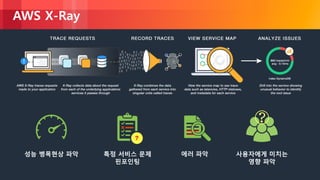
AWS X-Ray
성능 병목현상 파악 특정 서비스 문제
핀포인팅
에러 파악 사용자에게 미치는
영향 파악
© 2018, Amazon Web Services, Inc. or its Affiliates. All rights reserved.
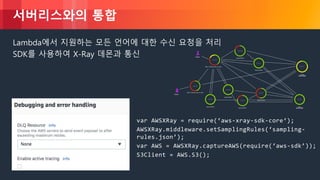
서버리스와의 통합
Lambda에서 지원하는 모든 언어에 대한 수신 요청을 처리
SDK를 사용하여 X-Ray 데몬과 통신
var AWSXRay = require(‘aws-xray-sdk-core‘);
AWSXRay.middleware.setSamplingRules(‘sampling-
rules.json’);
var AWS = AWSXRay.captureAWS(require(‘aws-sdk’));
S3Client = AWS.S3();
© 2018, Amazon Web Services, Inc. or its Affiliates. All rights reserved.
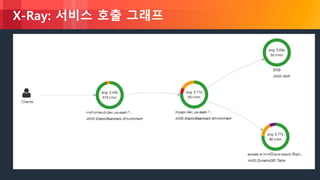
X-Ray: 서비스 호출 그래프
© 2018, Amazon Web Services, Inc. or its Affiliates. All rights reserved.
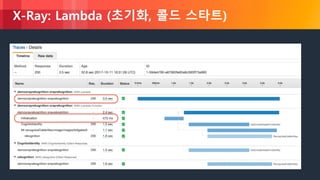
X-Ray: Lambda (초기화, 콜드 스타트)
© 2018, Amazon Web Services, Inc. or its Affiliates. All rights reserved.
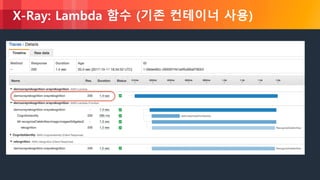
X-Ray: Lambda 함수 (기존 컨테이너 사용)
© 2018, Amazon Web Services, Inc. or its Affiliates. All rights reserved.
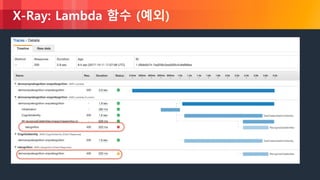
X-Ray: Lambda 함수 (예외)
© 2018, Amazon Web Services, Inc. or its Affiliates. All rights reserved.
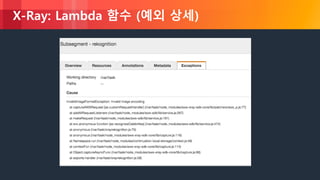
X-Ray: Lambda 함수 (예외 상세)
© 2018, Amazon Web Services, Inc. or its Affiliates. All rights reserved.
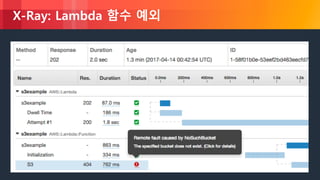
X-Ray: Lambda 함수 예외
© 2018, Amazon Web Services, Inc. or its Affiliates. All rights reserved.
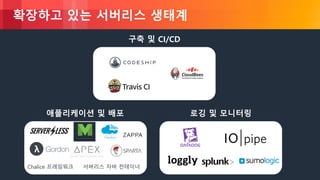
확장하고 있는 서버리스 생태계
구축 및 CI/CD
로깅 및 모니터링애플리케이션 및 배포
Chalice 프레임워크 서버리스 자바 컨테이너
© 2018, Amazon Web Services, Inc. or its Affiliates. All rights reserved.
정리
• 다양한 기능들을 활용하여 안전하고 제어된 방식으로 Lambda 함수를
배포
• 자동 롤백은 배포 관련 문제 복구를 위한 가장 빠른 방법
• 이벤트 모델과 워크로드 크기에 따라 적절한 배포 패턴을 선택
• AWS SAM + AWS CodeDeploy를 사용하여 서버리스 애플리케이션을
다양한 배포방식(All-at-once, Blue/Green, Canary)으로 배포 가능
• 서버리스 앱은 로깅과 모니터링 기능이 빌트인으로 포함됨
• 강력한 도구인 X-Ray를 활용하여 문제점을 시각화하여 해결
© 2018, Amazon Web Services, Inc. or its Affiliates. All rights reserved.
참고
• https://aws.amazon.com/serverless 에 참고 아키텍처, 샘플 등 다양한
콘텐츠가 준비되어 있습니다.
• https://github.com/awslabs/serverless-application-model 에 준비된
다양한 AWS SAM 사양을 살펴보세요.
• Lambda 콘솔에서 원하는 블루프린트를 선택 후 서버리스 앱 개발을
당장 시작할 수 있습니다.
© 2018, Amazon Web Services, Inc. or its Affiliates. All rights reserved.
Q&A
• 세션 후, 설문에 참여해 주시면 행사 후 소정의 선물을 드립니다.
• #AWSDevDay 해시 태그로 의견을 남겨주세요!

서버리스 앱 배포 자동화 (김필중, AWS 솔루션즈 아키텍트) :: AWS DevDay2018

  • 1.
    © 2018, AmazonWeb Services, Inc. or its Affiliates. All rights reserved. 서버리스 앱 배포 자동화 김필중 솔루션즈 아키텍트 AWS
  • 2.
    © 2018, AmazonWeb Services, Inc. or its Affiliates. All rights reserved. 서버리스 오늘의 진행 소스 빌드 테스트 프로덕션 배포 운영 • 테스트 • 모니터링 • 로깅 • 문제해결
  • 3.
    © 2018, AmazonWeb Services, Inc. or its Affiliates. All rights reserved. 서버리스
  • 4.
    © 2018, AmazonWeb Services, Inc. or its Affiliates. All rights reserved. 서버리스란 관리할 서버 없음 유연한 확장 유휴 자원 없음 $ 높은 가용성
  • 5.
    © 2018, AmazonWeb Services, Inc. or its Affiliates. All rights reserved. 서버리스 애플리케이션을 위한 최소한의 할일! AWS Lambda Node.js Python Java C# Go … 함수 (코드) 단계 2: Lambda에 업로드 업로드 (배포) 이벤트 소스 데이터 상태를 변경 엔드포인트로 요청 자원 상태가 변경 단계 3: 이벤트 소스 연결단계 1: 함수 (코드) 준비 호출 오늘의 주 내용
  • 6.
    © 2018, AmazonWeb Services, Inc. or its Affiliates. All rights reserved. Lambda 실행 모델 동기 (push) 스트림 기반비동기 (event) Amazon API Gateway AWS Lambda 함수 Amazon DynamoDBAmazon SNS /order AWS Lambda 함수 Amazon S3 reqs Amazon Kinesis changes AWS Lambda 서비스 함수
  • 7.
    © 2018, AmazonWeb Services, Inc. or its Affiliates. All rights reserved. 웹 앱을 위한 엔드포인트: Amazon API Gateway Internet Mobile Apps Websites Services AWS Lambda functions AWS API Gateway Cache Endpoints on Amazon EC2 All publicly accessible endpoints Amazon CloudWatch Monitoring Amazon CloudFront Any other AWS service
  • 8.
    © 2018, AmazonWeb Services, Inc. or its Affiliates. All rights reserved. 서버리스 활용 웹 애플리케이션 • 동적 웹 앱 • 복잡한 웹 앱 • Flask 및 Express 앱 • 블로그 데이터 처리 • 실시간 스트리밍 • 맵리듀스 • 배치 작업 • 미디어 변환 챗봇 • 챗봇 로직 백엔드 • 앱 및 서비스 • 모바일 • IoT </></> Amazon Alexa • 음성 지원 앱 • Alexa Skills Kit IT 자동화 • 정책 엔진 • AWS 서비스 확장 • 인프라 관리
  • 9.
    © 2018, AmazonWeb Services, Inc. or its Affiliates. All rights reserved. 배포
  • 10.
    © 2018, AmazonWeb Services, Inc. or its Affiliates. All rights reserved. 배포를 위한 릴리즈 프로세스 지속적 통합: Continuous integration 지속적 전달: Continuous delivery 지속적 배포: Continuous deployment 소스 빌드 테스트 프로덕션
  • 11.
    © 2018, AmazonWeb Services, Inc. or its Affiliates. All rights reserved. AWS Code 서비스를 활용한 보통의 배포 방법 소스 빌드 테스트 프로덕션 AWS CodeDeploy타사 도구AWS CodeBuildAWS CodeCommit AWS CodePipeline AWS CodeStar 코드 저장소 빌드/테스팅 배포 파이프라인 모델링 손 쉬운 구성
  • 12.
    © 2018, AmazonWeb Services, Inc. or its Affiliates. All rights reserved. !
  • 13.
    © 2018, AmazonWeb Services, Inc. or its Affiliates. All rights reserved. 새 버전의 코드 배포 방법에 대한 고민 새 버전 기존 버전
  • 14.
    © 2018, AmazonWeb Services, Inc. or its Affiliates. All rights reserved. 서버리스 배포를 위한 고려사항 사용자에게 미치는 영향 최소화 롤백 기술 실행 모델 요소 배포 속도
  • 15.
    © 2018, AmazonWeb Services, Inc. or its Affiliates. All rights reserved. 서버리스 배포 패턴 All-at-once 모든 트래픽은 이전 버전에서 새 버전으로 즉시 이동. Blue/Green 프로덕션 트래픽을 처리하기전에 새 버전은 배포되고 테스트됨. 유효성을 검사 한 후 모든 트래픽이 이전 버전에서 새 버전으로 즉시 변경. Canary/Linear 프로덕션 트래픽의 일부분은 새 버전 으로, 나머지는 이전 버전으로 보냄. 유효성 검사를 위해 일정 기간이 지나면 트래픽이 점진적으로 (추가 유효성 검사와 함께) 이동되거나 새 버전으로 완전히 이동.
  • 16.
    © 2018, AmazonWeb Services, Inc. or its Affiliates. All rights reserved. 서버리스 배포를 위한 도구
  • 17.
    © 2018, AmazonWeb Services, Inc. or its Affiliates. All rights reserved. AWS CloudFormation 클라우드 인프라 템플릿을 정의하기 위한 언어 - JSON 및 YAML 지원 AWS 리소스 프로비저닝 CI/CD, 개발, 관리 도구와 통합
  • 18.
    © 2018, AmazonWeb Services, Inc. or its Affiliates. All rights reserved. CloudFormation 템플릿 AWSTemplateFormatVersion: '2010-09-09' Resources: GetHtmlFunctionGetHtmlPermissionProd: Type: AWS::Lambda::Permission Properties: Action: lambda:invokeFunction Principal: apigateway.amazonaws.com FunctionName: Ref: GetHtmlFunction SourceArn: Fn::Sub: arn:aws:execute-api:${AWS::Region}:${AWS::AccountId}:${ServerlessRestApi}/Prod/ANY/* ServerlessRestApiProdStage: Type: AWS::ApiGateway::Stage Properties: DeploymentId: Ref: ServerlessRestApiDeployment RestApiId: Ref: ServerlessRestApi StageName: Prod ListTable: Type: AWS::DynamoDB::Table Properties: ProvisionedThroughput: WriteCapacityUnits: 5 ReadCapacityUnits: 5 AttributeDefinitions: - AttributeName: id AttributeType: S KeySchema: - KeyType: HASH AttributeName: id GetHtmlFunction: Type: AWS::Lambda::Function Properties: Handler: index.gethtml Code: S3Bucket: flourish-demo-bucket S3Key: todo_list.zip Role: Fn::GetAtt: - GetHtmlFunctionRole - Arn Runtime: nodejs4.3 GetHtmlFunctionRole: Type: AWS::IAM::Role Properties: ManagedPolicyArns: - arn:aws:iam::aws:policy/AmazonDynamoDBReadOnlyAccess - arn:aws:iam::aws:policy/service-role/AWSLambdaBasicExecutionRole AssumeRolePolicyDocument: Version: '2012-10-17' Statement: - Action: - sts:AssumeRole Effect: Allow Principal: Service: - lambda.amazonaws.com ServerlessRestApiDeployment: Type: AWS::ApiGateway::Deployment Properties: RestApiId: Ref: ServerlessRestApi Description: 'RestApi deployment id: 127e3fb91142ab1ddc5f5446adb094442581a90d' StageName: Stage GetHtmlFunctionGetHtmlPermissionTest: Type: AWS::Lambda::Permission Properties: Action: lambda:invokeFunction Principal: apigateway.amazonaws.com FunctionName: Ref: GetHtmlFunction SourceArn: Fn::Sub: arn:aws:execute-api:${AWS::Region}:${AWS::AccountId}:${ServerlessRestApi}/*/ANY/* ServerlessRestApi: Type: AWS::ApiGateway::RestApi Properties: Body: info: version: '1.0' title: Ref: AWS::StackName paths: "/{proxy+}": x-amazon-apigateway-any-method: x-amazon-apigateway-integration: httpMethod: ANY type: aws_proxy uri: Fn::Sub: arn:aws:apigateway:${AWS::Region}:lambda:path/2015-03- 31/functions/${GetHtmlFunction.Arn}/invocations responses: {} swagger: '2.0'
  • 19.
    © 2018, AmazonWeb Services, Inc. or its Affiliates. All rights reserved. AWS Serverless Application Model (SAM) 서버리스에 최적화된 CloudFormation 확장판 새로운 서버리스 자원 유형: 함수, API, 테이블 CloudFormation이 지원하는 모든 것을 지원 오픈 사양 (Apache 2.0) https://github.com/awslabs/serverless-application-model
  • 20.
    © 2018, AmazonWeb Services, Inc. or its Affiliates. All rights reserved. SAM 템플릿 AWSTemplateFormatVersion: '2010-09-09’ Transform: AWS::Serverless-2016-10-31 Resources: GetHtmlFunction: Type: AWS::Serverless::Function Properties: CodeUri: s3://sam-demo-bucket/todo_list.zip Handler: index.gethtml Runtime: nodejs4.3 Policies: AmazonDynamoDBReadOnlyAccess Events: GetHtml: Type: Api Properties: Path: /{proxy+} Method: ANY ListTable: Type: AWS::Serverless::SimpleTable SAM 템플릿임을 명시 IAM 정책, 런타임, 코드를 포함하는 zip 파일 위치, 핸들러와 함께 Lambda 함수 생성 API Gateway를 만들고 필요한 모든 매핑/권한을 처리. 5 읽기/쓰기 유닛으로 DynamoDB 테이블 생성
  • 21.
    © 2018, AmazonWeb Services, Inc. or its Affiliates. All rights reserved. 복잡한 API를 위한 Swagger 활용 MyApi: Type: AWS::Serverless::Api Properties: StageName: prod DefinitionUri: swagger.yml CacheClusterEnabled: true CacheClusterSize: 28.4 EndpointConfiguration: REGIONAL Variables: VarName: VarValue LambdaFunction: Type: AWS::Serverless::Function Properties: CodeUri: s3://<bucket>/fn.zip Handler: index.handler Runtime: nodejs6.10 Events: MyApi: Type: Api Properties: RestApiId: !Ref MyApi
  • 22.
    © 2018, AmazonWeb Services, Inc. or its Affiliates. All rights reserved.
  • 23.
    © 2018, AmazonWeb Services, Inc. or its Affiliates. All rights reserved. 서버리스 애플리케이션 배포 기법
  • 24.
    © 2018, AmazonWeb Services, Inc. or its Affiliates. All rights reserved. Lambda 함수 버전 및 별칭 버전: 변하지 않는(immutable) 함수(코드 및 구성 포함) 별칭: 버전을 가리키는 변하는(mutable) 포인터 둘 모두 고유한 ARN을 가짐 모범 사례 $LATEST 버전을 기반으로 개발 테스팅과 배포를 구분하여 게시 클라이언트 접근을 추상화하기 위해 별칭 활용: • 롤백 • 스테이징 • 클라이언트 별 버전 람다 함수 버전: $LATEST 람다 함수 버전: 123 람다 함수 별칭: PROD 람다 함수 별칭: STG 람다 함수 별칭: DEV
  • 25.
    © 2018, AmazonWeb Services, Inc. or its Affiliates. All rights reserved. 단계 변수와 Lambda 별칭 API Gateway에서 단계 변수를 Lambda 함수 별칭과 함께 사용하면 여러 환경 단계에 대해 단일 API 구성 및 Lambda 함수를 관리할 수 있습니다 Lambda 함수 API 1 2 3 = prod 4 5 6 = stg 7 8 = dev Prod lambdaAlias = prod Staging LambdaAlias = stg Dev lambdaAlias = dev 단계 변수 = lambdaAlias
  • 26.
    © 2018, AmazonWeb Services, Inc. or its Affiliates. All rights reserved. Lambda 별칭 트래픽 이동 및 안전한 배포 aws lambda update-alias --name alias name --function-name function- name --routing-config AdditionalVersionWeights={"2"=0.05}
  • 27.
    © 2018, AmazonWeb Services, Inc. or its Affiliates. All rights reserved. Lambda 별칭 트래픽 이동 Lambda 함수 API 1 2 3 = prod 4 5 6 = prod 5% Prod lambdaAlias = prod 단계 변수 = lambdaAlias aws lambda update-alias --name prod --function-name lambdaFunction --routing-config AdditionalVersionWeights={"6"=0.05}
  • 28.
    © 2018, AmazonWeb Services, Inc. or its Affiliates. All rights reserved. Lambda 별칭 트래픽 이동 Lambda 함수 API 5 6 = prod Prod lambdaAlias = prod 단계 변수 = lambdaAlias aws lambda update-alias --name prod --function-name lambdaFunction --function-version 6 --routing-config ‘’
  • 29.
    © 2018, AmazonWeb Services, Inc. or its Affiliates. All rights reserved. SAM Globals + 안전한 배포 Globals: Function: Runtime: nodejs4.3 AutoPublishAlias: !Ref ENVIRONMENT MyLambdaFunction: Type: AWS::Serverless::Function Properties: Handler: index.handler DeploymentPreference: Type: Linear10PercentEvery10Minutes Alarms: # A list of alarms that you want to monitor - !Ref AliasErrorMetricGreaterThanZeroAlarm - !Ref LatestVersionErrorMetricGreaterThanZeroAlarm Hooks: # Validation Lambda functions that are run before & after traffic shifting PreTraffic: !Ref PreTrafficLambdaFunction PostTraffic: !Ref PostTrafficLambdaFunction
  • 30.
    © 2018, AmazonWeb Services, Inc. or its Affiliates. All rights reserved. Lambda 별칭 트래픽 이동 및 AWS SAM AutoPublishAlias 이 속성을 추가하고 별칭명을 지정하면 AWS SAM이 다음을 수행 : • Lambda 함수의 Amazon S3 URI의 변경사항을 기반으로 새로운 코드가 배포될 때를 탐지 • 최신 코드로 해당 함수의 업데이트된 버전을 만들고 게시 • 지정한 이름으로 별칭을 만들고 (해당 별칭이 존재하지 않는 한) Lambda 함수의 업데이트된 버전을 가리킴 배포 기본 설정 유형 Canary10Percent30Minutes Canary10Percent5Minutes Canary10Percent10Minutes Canary10Percent15Minutes Linear10PercentEvery10Minutes Linear10PercentEvery1Minute Linear10PercentEvery2Minutes Linear10PercentEvery3Minutes AllAtOnce SAM:
  • 31.
    © 2018, AmazonWeb Services, Inc. or its Affiliates. All rights reserved. Lambda 별칭 트래픽 이동 및 AWS SAM SAM: Alarms: # A list of alarms that you want to monitor - !Ref AliasErrorMetricGreaterThanZeroAlarm - !Ref LatestVersionErrorMetricGreaterThanZeroAlarm Hooks: # Validation Lambda functions that are run before & after traffic shifting PreTraffic: !Ref PreTrafficLambdaFunction PostTraffic: !Ref PostTrafficLambdaFunction 참고: 최대 10개의 경보(Alarm) 지정 가능
  • 32.
    © 2018, AmazonWeb Services, Inc. or its Affiliates. All rights reserved. AWS CodeDeploy + Lambda 자동 배포 (EC2/온프레미스), 롤링 배포(Blue/green), 정지와 롤백 지원 AWS SAM을 사용하여 서버리스 애플리케이션 배포 Lambda 별칭을 사용한 트래픽 이동 지원으로 Canary와 Blue/Green 배포 가능 CloudWatch 지표/알람을 기반으로 롤백 가능 트래픽 유입 이전/이후의 트리거를 통해 다른 서비스들간의 통합 가능 (람다 함수 호출도 가능)
  • 33.
    © 2018, AmazonWeb Services, Inc. or its Affiliates. All rights reserved. AWS CodeDeploy + Lambda 사용자 지정 배포 구성 지원 • 1시간 동안 Canary 5% • 매 1시간 동안 Linear 20% 성공/실패/롤백 시 SNS를 통한 이벤트 알림 콘솔에서 배포 상태, 기록, 롤백을 시각화하여 확인
  • 34.
    © 2018, AmazonWeb Services, Inc. or its Affiliates. All rights reserved. Amazon API Gateway Canary 지원 Canary 릴리즈 배포를 사용하여 Amazon API Gateway에서 새로운 API를 점차적으로 출시할 수 있습니다 새로운 단계 배포로 이동하는 트래픽 비율 구성 단계 설정과 변수 테스트 가능 API Gateway는 Canary 배포 API에 의해 제어되는 요청들을 위한 추가적인 Amazon CloudWatch Logs 그룹과 CloudWatch 지표를 생성 롤백 가능(배포를 제거 또는 트래픽 비율을 0으로 설정)
  • 35.
    © 2018, AmazonWeb Services, Inc. or its Affiliates. All rights reserved. Amazon API Gateway Canary 지원 v1API Clients All publicly and privately accessible endpoints Backends in AWS api.mydomain.com/prod 현재 배포된 버전으로 들어오는 모든 트래픽
  • 36.
    © 2018, AmazonWeb Services, Inc. or its Affiliates. All rights reserved. Amazon API Gateway Canary 지원 API Clients All publicly and privately accessible endpoints Backends in AWS v1 50% v2 50% 새 트래픽의 50%는 새 배포로, 나머지는 이전 버전으로 api.mydomain.com/prod
  • 37.
    © 2018, AmazonWeb Services, Inc. or its Affiliates. All rights reserved. Amazon API Gateway Canary 지원 API Clients All publicly and privately accessible endpoints Backends in AWS v1 10% v2 90% 트래픽의 90%는 단계의 새 배포로, 나머지는 이전 버전으로 api.mydomain.com/prod
  • 38.
    © 2018, AmazonWeb Services, Inc. or its Affiliates. All rights reserved. Amazon API Gateway Canary 지원 v2API Clients All publicly and privately accessible endpoints Backends in AWS api.mydomain.com/prod 새로 배포된 버전으로 들어오는 모든 트래픽 변경 사항이 없는 클라이언트
  • 39.
    © 2018, AmazonWeb Services, Inc. or its Affiliates. All rights reserved. Amazon API Gateway Canary 지원 활용 방법 • API 백엔드에서 새로운 기술을 적용 • 새로운 언어 • 새로운 프레임워크 • Lambda 함수로 특정 기능 구현 후 연결 • 개별 로그 및 지표로 성능 비교/대조 • VPC에서 엔드포인트 통합을 통해 온프레미스에서 AWS로 API를 마이그레이션 • API Gateway à Network Load Balancer (NLB) à 온프레미스 (Direct Connect 또는 VPN 연결을 통해)
  • 40.
    © 2018, AmazonWeb Services, Inc. or its Affiliates. All rights reserved. Lambda와 API Gateway Canary 배포 비교 Lambda • 단일 함수 수준으로만 제어 • 서비스 호출에 투명성 제공 • 새 버전은 고유 로그 및 지표 가짐 • Weight를 0으로 설정하여 롤백 • SAM을 통해 자동으로 점진적 변경 지원 API Gateway • 전체 단계 수준으로 최대 제어 • 클라이언트에 투명성 제공 • 새 버전은 고유 로그 및 지표 가짐 • Weight를 0으로 설정하거나 Canary를 삭제하여 롤백
  • 41.
    © 2018, AmazonWeb Services, Inc. or its Affiliates. All rights reserved. 배포 파이프라인 구축
  • 42.
    © 2018, AmazonWeb Services, Inc. or its Affiliates. All rights reserved. AWS CodePipeline 신속하고 신뢰할 수 있는 애플리케이션 업데이트를 위한 지속적인 전달 서비스 릴리즈 프로세스 모델링 및 시각화 코드가 변경될 때 마다 빌드, 테스트, 배포 AWS와 다양한 도구들과의 통합
  • 43.
    © 2018, AmazonWeb Services, Inc. or its Affiliates. All rights reserved. 간단한 서버리스 앱 배포 파이프라인 예제 MyBranch-Source Source CodeCommit 서버리스 앱 Build test-build-source CodeBuild MyDev-Deploy create-changeset AWS CloudFormation execute-changeset AWS CloudFormation Run-stubs AWS Lambda 파이프라인 설명 • 3 단계로 구성 • 코드 아티팩트 생성 • 단일 환경 (개발용) • SAM/CloudFormation을 사용하여 아티팩트와 다른 AWS 리소스들 배포 • Lambda 사용자 정의 작업을 통해 테스트 함수 실행 파이프라인 단계 작업 전환
  • 44.
    © 2018, AmazonWeb Services, Inc. or its Affiliates. All rights reserved. 간단한 서버리스 앱 배포 파이프라인 예제 파이프라인 설명 • 5 단계로 구성 • 코드 아티팩트 생성 • 세 개의 환경에 세 차례 배포 • SAM/CloudFormation을 사용하여 아티팩트와 다른 AWS 리소스들 배포 • Lambda 사용자 정의 행동을 통해 테스트 함수 실행 • 타사 도구/서비스와 통합 • 프로덕션으로 배포하기 전 수동 승인 Source Source CodeCommit 서버리스 앱 Build test-build-source CodeBuild Deploy Testing create-changeset AWS CloudFormation execute-changeset AWS CloudFormation Run-stubs AWS Lambda Deploy Staging create-changeset AWS CloudFormation execute-changeset AWS CloudFormation Run-API-test Runscope QA-Sign-off Manual Approval Review Deploy Prod create-changeset AWS CloudFormation execute-changeset AWS CloudFormation Post-Deploy-Slack AWS Lambda
  • 45.
    © 2018, AmazonWeb Services, Inc. or its Affiliates. All rights reserved. 배포 패턴 별 테스트 Source 서버리스 앱 Build Deploy Testing Deploy Staging Deploy Prod • Pull 요청에 의한 코드 리뷰 (CodeCommit 에서 가능) • Lint/문법 검사 • 유닛 테스트 • 코드 컴파일 • All-at-once 배포 • Mocked/stubbed 통합 테스트 • All-at-once 배포 • 실제 종속성에 대해 테스트 (프로덕션에 대한 잠재적인 테스트) • 새 버전 배포와 모든 요청 연결 1. 2. 3. 4. 5. All-at-once 패턴
  • 46.
    © 2018, AmazonWeb Services, Inc. or its Affiliates. All rights reserved. 배포 패턴 별 테스트 Source 서버리스 앱 Build Deploy Testing Deploy Staging Deploy Prod • Pull 요청에 의한 코드 리뷰 (CodeCommit 에서 가능) • Lint/문법 검사 • 유닛 테스트 • 코드 컴파일 • All-at-once 배포 • Mocked/stubbed 통합 테스트 • All-at-once 배포 • 실제 종속성에 대해 테스트 • Green 버전 배포 • Green에서 테스트 수행 및 검증 • 트래픽 전부 Green 연결 1. 2. 3. 4. 5. Blue/Green 패턴
  • 47.
    © 2018, AmazonWeb Services, Inc. or its Affiliates. All rights reserved. 배포 패턴 별 테스트 Source 서버리스 앱 Build Deploy Testing Deploy Staging Deploy Prod • Pull 요청에 의한 코드 리뷰 (CodeCommit 에서 가능) • Lint/문법 검사 • 유닛 테스트 • 코드 컴파일 • All-at-once 배포 • Mocked/stubbed 통합 테스트 • All-at-once 배포 • 실제 종속성에 대해 테스트 • Canary 배포 • 대기 기간 동안 성공적으로 검증 • 트래픽 전부를 연결할 때 까지 점차 확대 1. 2. 3. 4. 5. Canary 패턴
  • 48.
    © 2018, AmazonWeb Services, Inc. or its Affiliates. All rights reserved. 환경, 단계, 버전, Canary 관련 모범 사례 • 자동화된 롤백이 가능한 프로덕션 배포를 위해 Blue/Green 또는 Canary를 사용 • 여러 군데에서 호출하기에 다양한 버전을 지원해야할 경우 Lambda의 버전(Versioning)은 매우 유용 • 다양한 API 버전을 지원해야할 경우 API Gateway에서는 단계(Stage)가 Lambda 버전과 비슷하게 작동하며 유용 • 개발, 테스트, 스테이징, 프로덕션 환경을 위해 가능한 항상 분리된 스택을 유지 • 이를 위해 단계나 버전을 사용하지 마세요 • 서로 다른 환경을 위해 다른 계정을 모두 함께 가지고 있다고 생각해보세요
  • 49.
    © 2018, AmazonWeb Services, Inc. or its Affiliates. All rights reserved. 운영 (테스트/로깅/모니터링/문제 해결)
  • 50.
    © 2018, AmazonWeb Services, Inc. or its Affiliates. All rights reserved. 시작 포인트 로컬에서 함수를 테스트 및 디버깅
  • 51.
    © 2018, AmazonWeb Services, Inc. or its Affiliates. All rights reserved. AWS SAM CLI SAM Local 서버리스 앱을 로컬에서 구축, 검증, 테스트하기 위한 CLI 도구 Lambda 함수와 프록시 스타일 API와 작동 로컬에서 응답 객체와 함수 로그 확인 가능 오프라인에서 작동 오픈소스 docker-lambda 이미지를 사용하여 Lambda의 실행 환경을 흉내 (Timeout, 메모리 제한, 런타임을 에뮬레이팅) https://github.com/awslabs/aws-sam-cli npm install -g aws-sam-local
  • 52.
    © 2018, AmazonWeb Services, Inc. or its Affiliates. All rights reserved. AWS CodeBuild: 높은 수준의 Lambda 테스트 CodeBuild는 Docker 이미지를 사용하여 빌드/테스트 환경을 구성한 뒤 원하는 작업을 가능하게 함 SAM Local은 Lambda 런타임의 복제본을 포함 바이너리 호환 라이브러리와 실행 파일을 빌드하고 테스트 가능
  • 53.
    © 2018, AmazonWeb Services, Inc. or its Affiliates. All rights reserved. 전통적인 디버깅 개발자 로컬 테스트 개발자 Breakpoints 추가 로그 항목 추가
  • 54.
    © 2018, AmazonWeb Services, Inc. or its Affiliates. All rights reserved. 서버리스 애플리케이션 로깅: CloudWatch Lambda • 기본 지표: • Invocations • Duration • Throttles • Errors • Iterator Age put-metric API를 사용하여 애플리케이션에서 사용자 정의 지표 기록 가능 API Gateway • 스테이지 수준의 기본 지표: • Count • 4XXs, 5XXs • Latency (API 및 통합) • Cache count hit/miss 메서드 수준의 세밀성으로 상세한 지표 집계 가능
  • 55.
    © 2018, AmazonWeb Services, Inc. or its Affiliates. All rights reserved. 서버리스 앱 문제 해결의 접근 • 기본적으로 적절한 로그를 기록하는 것부터 시작 • 기록된 로그는 빠르게 검색 가능해야 함 • 특히 람다 함수가 많다면 로그 기록은 더욱 중요!
  • 56.
    © 2018, AmazonWeb Services, Inc. or its Affiliates. All rights reserved. 사용자 정의 지표 및 로그 생성 • 타임스탬프를 통한 API Gateway와 Lambda에서 로그를 상호연관 • DynamoDB 호출과 관련된 많은 정보들을 로그로 기록 Amazon API Gateway Amazon DynamoDBAWS Lambda 간단한 서버리스 애플리케이션
  • 57.
    © 2018, AmazonWeb Services, Inc. or its Affiliates. All rights reserved. 조금 어려운 문제들 • 많은 서비스가 연계되어 특정 홉이 다운되어 이슈가 발생하면 찾기가 쉽지 않음 • 요청 ID와의 상관관계를 찾는 것은 물론 유지하기가 어려움 Amazon API Gateway Amazon DynamoDB AWS Lambda AWS Lambda Amazon Rekognition Amazon SNS
  • 58.
    © 2018, AmazonWeb Services, Inc. or its Affiliates. All rights reserved. 조금 어려운 문제들 • 많은 서비스가 연계되어 특정 홉이 다운되어 이슈가 발생하면 찾기가 쉽지 않음 • 요청 ID와의 상관관계를 찾는 것은 물론 유지하기가 어려움 Amazon API Gateway Amazon DynamoDB AWS Lambda AWS Lambda Amazon Rekognition Amazon SNS
  • 59.
    © 2018, AmazonWeb Services, Inc. or its Affiliates. All rights reserved. AWS X-Ray 성능 병목현상 파악 특정 서비스 문제 핀포인팅 에러 파악 사용자에게 미치는 영향 파악
  • 60.
    © 2018, AmazonWeb Services, Inc. or its Affiliates. All rights reserved. 서버리스와의 통합 Lambda에서 지원하는 모든 언어에 대한 수신 요청을 처리 SDK를 사용하여 X-Ray 데몬과 통신 var AWSXRay = require(‘aws-xray-sdk-core‘); AWSXRay.middleware.setSamplingRules(‘sampling- rules.json’); var AWS = AWSXRay.captureAWS(require(‘aws-sdk’)); S3Client = AWS.S3();
  • 61.
    © 2018, AmazonWeb Services, Inc. or its Affiliates. All rights reserved. X-Ray: 서비스 호출 그래프
  • 62.
    © 2018, AmazonWeb Services, Inc. or its Affiliates. All rights reserved. X-Ray: Lambda (초기화, 콜드 스타트)
  • 63.
    © 2018, AmazonWeb Services, Inc. or its Affiliates. All rights reserved. X-Ray: Lambda 함수 (기존 컨테이너 사용)
  • 64.
    © 2018, AmazonWeb Services, Inc. or its Affiliates. All rights reserved. X-Ray: Lambda 함수 (예외)
  • 65.
    © 2018, AmazonWeb Services, Inc. or its Affiliates. All rights reserved. X-Ray: Lambda 함수 (예외 상세)
  • 66.
    © 2018, AmazonWeb Services, Inc. or its Affiliates. All rights reserved. X-Ray: Lambda 함수 예외
  • 67.
    © 2018, AmazonWeb Services, Inc. or its Affiliates. All rights reserved. 확장하고 있는 서버리스 생태계 구축 및 CI/CD 로깅 및 모니터링애플리케이션 및 배포 Chalice 프레임워크 서버리스 자바 컨테이너
  • 68.
    © 2018, AmazonWeb Services, Inc. or its Affiliates. All rights reserved. 정리 • 다양한 기능들을 활용하여 안전하고 제어된 방식으로 Lambda 함수를 배포 • 자동 롤백은 배포 관련 문제 복구를 위한 가장 빠른 방법 • 이벤트 모델과 워크로드 크기에 따라 적절한 배포 패턴을 선택 • AWS SAM + AWS CodeDeploy를 사용하여 서버리스 애플리케이션을 다양한 배포방식(All-at-once, Blue/Green, Canary)으로 배포 가능 • 서버리스 앱은 로깅과 모니터링 기능이 빌트인으로 포함됨 • 강력한 도구인 X-Ray를 활용하여 문제점을 시각화하여 해결
  • 69.
    © 2018, AmazonWeb Services, Inc. or its Affiliates. All rights reserved. 참고 • https://aws.amazon.com/serverless 에 참고 아키텍처, 샘플 등 다양한 콘텐츠가 준비되어 있습니다. • https://github.com/awslabs/serverless-application-model 에 준비된 다양한 AWS SAM 사양을 살펴보세요. • Lambda 콘솔에서 원하는 블루프린트를 선택 후 서버리스 앱 개발을 당장 시작할 수 있습니다.
  • 70.
    © 2018, AmazonWeb Services, Inc. or its Affiliates. All rights reserved. Q&A • 세션 후, 설문에 참여해 주시면 행사 후 소정의 선물을 드립니다. • #AWSDevDay 해시 태그로 의견을 남겨주세요!