


ANDROID APP
DEVELOPMENT
SUBMITTED BY: PRESENTATION BY:
SMITA DANDOTIA MAM ANKIT CHAVHAN
ASST. PROF CS I, IV SEM
CS DEPT. O905CS111011
ITM UNIVERSE
Introduction to Android :
• Open software platform for mobile development
• Fast application development in Java
• Software platform from Google and the Open Handset Alliance
Powered by Linux operating system
• Open source under the Apache 2 license
• Powered by Linux operating system
Android Features :
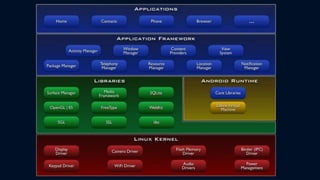
• Application Framework
• Dalvik virtual machine
• Integrated ( webkit ) browser
• SQL Lite
• Video and audio codec
• Bluetooth, EDGE, 3G, and WiFi
• Camera, GPS, compass, and accelerometer
Android and the Hardware :
• Built-in Apps ≡ Apps created in SDK
• Leverage Linux kernel to interface with hardware
• Open source platform promotes development from global
community
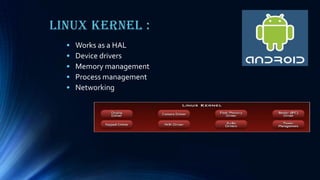
Linux Kernel :
• Works as a HAL
• Device drivers
• Memory management
• Process management
• Networking
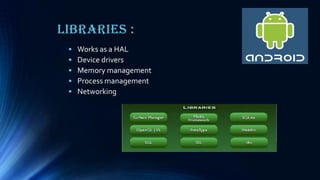
Libraries :
• Works as a HAL
• Device drivers
• Memory management
• Process management
• Networking
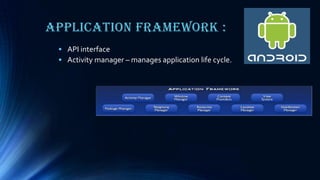
Application Framework :
• API interface
• Activity manager – manages application life cycle.
Installation &
Configuration :
Software Needed :
• JDK (Java Development Kit)
> Java programming language is used to build Android application
• Eclipse IDE
> Editor, Debugger, profiler, deployment
• Android SDK
> Libraries, samples, documentation, handset ,emulators, debugger
• Eclipse ADT (Android DevelopmentTools) plugin
> Give you a powerful, integrated Android development environment
Creating Android Project using
Eclipse :
• Automatic creation of building blocks of an Android
application :
>AndroidManifest.xml
> strings.xml
> R.java
>Android library
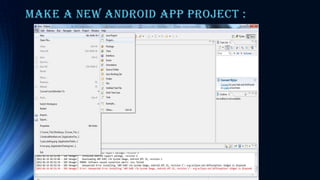
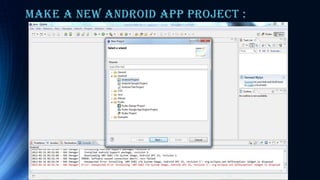
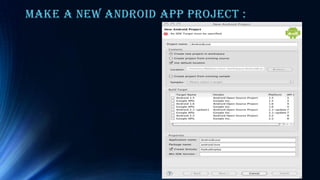
Make a new Android app project :
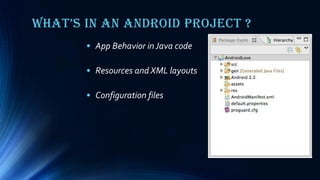
What’s in an android project ?
• App Behavior in Java code
• Resources and XML layouts
• Configuration files
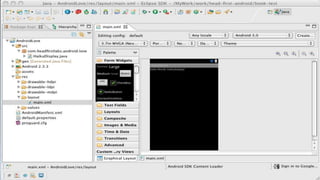
What’s in an android project ?
• App Behavior in Java code
• Resources and XML layouts
• Configuration files
Run the project :
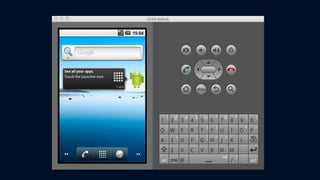
ANDROID EMULATOR:
• The Android SDK includes an Android emulator desktop
application that simulates a complete running Android
device.
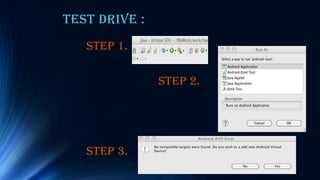
Test Drive :
STEP 1.
STEP 2.
STEP 3.
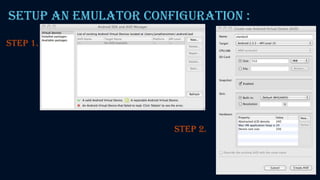
Setup an emulator configuration :
STEP 1.
STEP 2.
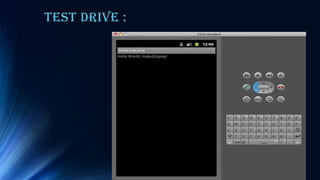
Test Drive :
THANK
YOU!!!

Android App Development..

  • 1.
    ANDROID APP DEVELOPMENT SUBMITTED BY:PRESENTATION BY: SMITA DANDOTIA MAM ANKIT CHAVHAN ASST. PROF CS I, IV SEM CS DEPT. O905CS111011 ITM UNIVERSE
  • 2.
    Introduction to Android: • Open software platform for mobile development • Fast application development in Java • Software platform from Google and the Open Handset Alliance Powered by Linux operating system • Open source under the Apache 2 license • Powered by Linux operating system
  • 3.
    Android Features : •Application Framework • Dalvik virtual machine • Integrated ( webkit ) browser • SQL Lite • Video and audio codec • Bluetooth, EDGE, 3G, and WiFi • Camera, GPS, compass, and accelerometer
  • 4.
    Android and theHardware : • Built-in Apps ≡ Apps created in SDK • Leverage Linux kernel to interface with hardware • Open source platform promotes development from global community
  • 6.
    Linux Kernel : •Works as a HAL • Device drivers • Memory management • Process management • Networking
  • 7.
    Libraries : • Worksas a HAL • Device drivers • Memory management • Process management • Networking
  • 8.
    Application Framework : •API interface • Activity manager – manages application life cycle.
  • 9.
  • 10.
    Software Needed : •JDK (Java Development Kit) > Java programming language is used to build Android application • Eclipse IDE > Editor, Debugger, profiler, deployment • Android SDK > Libraries, samples, documentation, handset ,emulators, debugger • Eclipse ADT (Android DevelopmentTools) plugin > Give you a powerful, integrated Android development environment
  • 11.
    Creating Android Projectusing Eclipse : • Automatic creation of building blocks of an Android application : >AndroidManifest.xml > strings.xml > R.java >Android library
  • 12.
    Make a newAndroid app project :
  • 13.
    Make a newAndroid app project :
  • 14.
    Make a newAndroid app project :
  • 15.
    What’s in anandroid project ? • App Behavior in Java code • Resources and XML layouts • Configuration files
  • 16.
    What’s in anandroid project ? • App Behavior in Java code • Resources and XML layouts • Configuration files
  • 17.
    Run the project: ANDROID EMULATOR: • The Android SDK includes an Android emulator desktop application that simulates a complete running Android device.
  • 19.
    Test Drive : STEP1. STEP 2. STEP 3.
  • 20.
    Setup an emulatorconfiguration : STEP 1. STEP 2.
  • 21.
  • 22.