Paul Buck
Eclipse Foundation
Stevan Le Meur
Red Hat
Dana Boudreau
Broadcom
Our speakers today
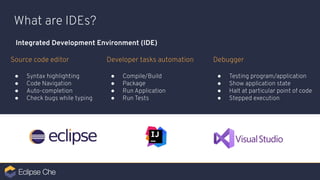
What are IDEs?
Integrated Development Environment (IDE)
Source code editor
● Syntax highlighting
● Code Navigation
● Auto-completion
● Check bugs while typing
Developer tasks automation
● Compile/Build
● Package
● Run Application
● Run Tests
Debugger
● Testing program/application
● Show application state
● Halt at particular point of code
● Stepped execution
Eclipse Che
The Cloud-native IDE for
developer teams
Eclipse Foundation and the
place of Eclipse Che
Cloud Native Java IoT & Edge Automotive Tools
Strategic Focus Areas
Ecosystem
Development &
Marketing
IP Management
& Licensing
Governance &
Processes Infrastructure
Eclipse Foundation Services
We provide a collaborative
environment for the world’s
leading Java ecosystem
players to advance open
source enterprise Java
technologies for the cloud.
We enable industry
leaders to collaborate on
an end-to-end IoT
architecture that is
secure, flexible, and fully
based on open source
and open standards.
We provide leading
automotive OEMs, their
suppliers, and partners with
a sustainable, transparent,
and vendor-neutral platform
to collaborate on open
technologies and
standards.
The Eclipse IDE is the
critical development
environment for more than
6 million active users. Our
community is innovating on
the next generation of cloud
native developer tools.
Cloud Native Java AutomotiveIoT & Edge Tools
Strategic Focus Areas - What We Do
275+
Members
375+
Projects
1600+
Committers
30
Staff Members
10+
Working Groups
195M+
Lines of Code
The Eclipse Foundation - By the Numbers
Why Eclipse Che?
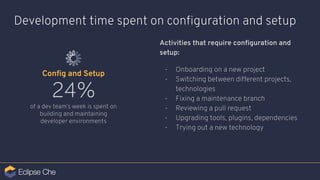
Development time spent on configuration and setup
Activities that require configuration and
setup:
- Onboarding on a new project
- Switching between different projects,
technologies
- Fixing a maintenance branch
- Reviewing a pull request
- Upgrading tools, plugins, dependencies
- Trying out a new technology
24%
of a dev team’s week is spent on
building and maintaining
developer environments
Config and Setup
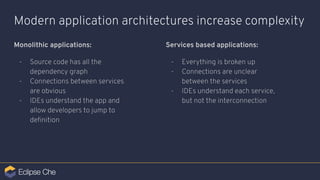
Modern application architectures increase complexity
Monolithic applications:
- Source code has all the
dependency graph
- Connections between services
are obvious
- IDEs understand the app and
allow developers to jump to
definition
Services based applications:
- Everything is broken up
- Connections are unclear
between the services
- IDEs understand each service,
but not the interconnection
Anyone, anytime can contribute to a project
without installing software.
The developer contribution journey
- Scaffold
- Configure dependencies
- Code
- Build
- Run
- Test
- Debug
- Integrate
- Optimize
The developer contribution journey
- Scaffold
- Configure dependencies
- Code
- Build
- Run
- Test
- Debug
- Integrate
- Optimize
Config and Setup
Dev
Feedback
The developer contribution journey
- Scaffold
- Configure dependencies
- Code
- Build
- Run
- Test
- Debug
- Integrate
- Optimize
Config and Setup
Dev
Consistency, reproducibility, and ease of access is a velocity factor
Feedback
What is needed to contribute?
- Project sources
- Dependencies
- Developer Tools: language servers, debuggers, testing tools, security tools, etc...
- Commands
- Build and packaging tools
- Terminal
- Operating system
- Web server / application server
- Database
- (All other runtime components)
The Eclipse Che Solution
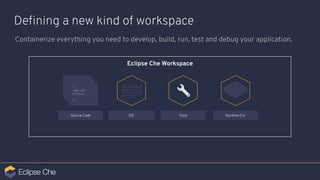
Eclipse Che Workspace
Defining a new kind of workspace
Containerize everything you need to develop, build, run, test and debug your application.
IDE Tools Runtime EnvSource Code
> ………………………
…………………………
…………………………
………………………....
> ………………………
…………………………
…………………………
………………………....
{
Main void
function() …………..
}
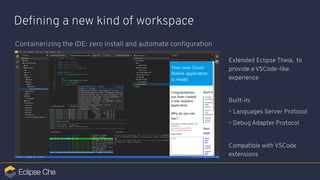
Defining a new kind of workspace
Containerizing the IDE: zero install and automate configuration
Extended Eclipse Theia, to
provide a VSCode-like
experience
Built-in:
⌁ Languages Server Protocol
⌁ Debug Adapter Protocol
Compatible with VSCode
extensions
Demo
How it works?
Eclipse Che Workspace
Tools
Defining a new kind of workspace
Containerizing everything you need to develop, build, run, test and debug your application.
Plug-ins
Build Env
Dependency MgtIDE
Commands
Compilers
Build Configuration
Runtime Env
OS
Runtime Dep
Env Variables
Debug Env
Debugger
Debug Configuration
Test Env
Testing Tools
Target environment
Log services
Common LibrariesVCS
Env Variables
Defining a new kind of workspace
Containerizing development tools Tools (IDEs and plug-ins) are bringing
runtimes and dependencies:
- Zero dependency installation
- Isolated execution
- Own lifecycle
- Easy upgrade/switch
- Simple packaging
- Scalable
Package VSCode extensions in the
container.
Runtime
Executable
Dependencies
Devfile Definition
Devfile: Developer environment as code
Build Env
Runtime Env
Commands
Editor
Tools Plug-ins Dep
Project
Name Repo Branch
Test Env
Build Run Debug
The devfile provides easy to configure, highly
reproducible definitions of portable developer
environments.
It is a declarative abstraction of a replicable
developer workspaces, which includes the runtime
environments, the source code of the projects
mapped to repositories and the tools, plugins and
commands needed to code, build, test, run and debug
a project.
1
---
apiVersion: 1.0.0
metadata:
generateName: java-web-vertx-
projects:
- name: java-web-vertx
source:
type: git
location: "https://github.com/che-samples/web-java-vertx"
components:
- type: chePlugin
id: redhat/java/latest
- type: dockerimage
alias: maven
image: quay.io/eclipse/che-java8-maven:nightly
env:
- name: JAVA_OPTS
value: "-Duser.home=/home/user"
- name: MAVEN_OPTS
value: $(JAVA_OPTS)
memoryLimit: 512Mi
endpoints:
- name: '8080/tcp'
port: 8080
mountSources: true
volumes:
- name: m2
containerPath: /home/user/.m2
2
3
4
6
Devfile Example
1
2
3
Project information
List of components of the workspace
Plugin component
4
5
Runtime image
Env variables to configure the container
5
6 Endpoints definition
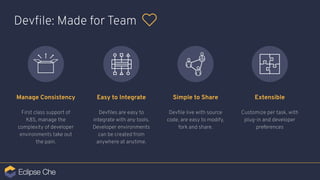
Devfile: Made for Team
Manage Consistency
First class support of
K8S, manage the
complexity of developer
environments take out
the pain.
Easy to Integrate
Devfiles are easy to
integrate with any tools.
Developer environments
can be created from
anywhere at anytime.
Simple to Share
Devfile live with source
code, are easy to modify,
fork and share.
Extensible
Customize per task, with
plug-in and developer
preferences
Eclipse Che
for
Developer Teams
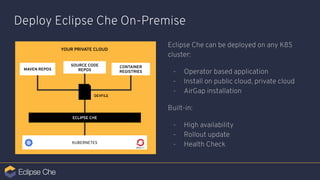
Deploy Eclipse Che On-Premise
Eclipse Che can be deployed on any K8S
cluster:
- Operator based application
- Install on public cloud, private cloud
- AirGap installation
Built-in:
- High availability
- Rollout update
- Health Check
MAVEN REPOS
KUBERNETES
ECLIPSE CHE
SOURCE CODE
REPOS
YOUR PRIVATE CLOUD
CONTAINER
REGISTRIES
DEVFILE
Collaborate with your team
- One-click onboarding
- Resource limits per group
- RBAC security
- Pre-commit feedback
- Standards compliance enforcement
Integrate with LDAP / AD and OAuth
Toolchain Integration
Integrate Eclipse Che developer
workspaces in your entire toolchain:
issues tracker, CI, CD, logs and generate
disposable one-click developer
environment.
Change the paradigm and get on-demand
developer environments. Pre-load them
with in-context and event-driven
metadatas for even more developer
productivity.
Eclipse Che4z
Using Eclipse Che for modern
Mainframe Developer Tooling
43%
of World Banking system
is build on COBOL
80%
of of-in transactions use
COBOL
95%
of ATM swipes rely on
COBOL code
220
billion lines of COBOL are
in use today
Mainframe Applications
Che4z goal
“Focus on developing common components”
Che4z Code4z
Strategy: Open Source Driven
Demo
Conclusion
Eclipse Che
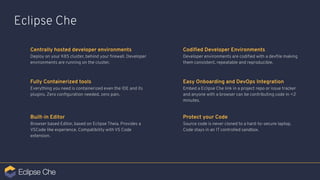
Centrally hosted developer environments
Deploy on your K8S cluster, behind your firewall. Developer
environments are running on the cluster.
Protect your Code
Source code is never cloned to a hard-to-secure laptop.
Code stays in an IT controlled sandbox.
Easy Onboarding and DevOps Integration
Embed a Eclipse Che link in a project repo or issue tracker
and anyone with a browser can be contributing code in <2
minutes.
Fully Containerized tools
Everything you need is containerized even the IDE and its
plugins. Zero configuration needed, zero pain.
Built-in Editor
Browser based Editor, based on Eclipse Theia. Provides a
VSCode like experience. Compatibility with VS Code
extension.
Codified Developer Environments
Developer environments are codified with a devfile making
them consistent, repeatable and reproducible.
Cloud Development Tools at Eclipse Foundation
Eclipse Foundation and its community is investing efforts at building the next generation of
Developer tools
Eclipse Cloud Development top-level project is expanding fast
- Che
- Orion
- Dirigible
- Tools for CloudFoundry
New working group at Eclipse for Cloud Development Tools launched in September, 2019
New in 2019
- Theia
- Sprotty
- CodeWind
- GLSP
- Che4z
Getting Involved
github.com/eclipse/che
Website eclipse.org/che
Repository
https://mattermost.eclipse.org/eclipse/channels/eclipse-chePublic Chat
Try it now ! che.openshift.io
CHE4Z
Open Mainframe SW
development for Che
projects.eclipse.org/projects/ecd.che.che4z
mainframedevops@broadcom.com
Thank You!

Eclipse Che - A Revolutionary IDE for Distributed & Mainframe Development

  • 2.
    Paul Buck Eclipse Foundation StevanLe Meur Red Hat Dana Boudreau Broadcom Our speakers today
  • 3.
    What are IDEs? IntegratedDevelopment Environment (IDE) Source code editor ● Syntax highlighting ● Code Navigation ● Auto-completion ● Check bugs while typing Developer tasks automation ● Compile/Build ● Package ● Run Application ● Run Tests Debugger ● Testing program/application ● Show application state ● Halt at particular point of code ● Stepped execution
  • 4.
    Eclipse Che The Cloud-nativeIDE for developer teams
  • 5.
    Eclipse Foundation andthe place of Eclipse Che
  • 6.
    Cloud Native JavaIoT & Edge Automotive Tools Strategic Focus Areas Ecosystem Development & Marketing IP Management & Licensing Governance & Processes Infrastructure Eclipse Foundation Services
  • 7.
    We provide acollaborative environment for the world’s leading Java ecosystem players to advance open source enterprise Java technologies for the cloud. We enable industry leaders to collaborate on an end-to-end IoT architecture that is secure, flexible, and fully based on open source and open standards. We provide leading automotive OEMs, their suppliers, and partners with a sustainable, transparent, and vendor-neutral platform to collaborate on open technologies and standards. The Eclipse IDE is the critical development environment for more than 6 million active users. Our community is innovating on the next generation of cloud native developer tools. Cloud Native Java AutomotiveIoT & Edge Tools Strategic Focus Areas - What We Do
  • 8.
  • 9.
  • 10.
    Development time spenton configuration and setup Activities that require configuration and setup: - Onboarding on a new project - Switching between different projects, technologies - Fixing a maintenance branch - Reviewing a pull request - Upgrading tools, plugins, dependencies - Trying out a new technology 24% of a dev team’s week is spent on building and maintaining developer environments Config and Setup
  • 11.
    Modern application architecturesincrease complexity Monolithic applications: - Source code has all the dependency graph - Connections between services are obvious - IDEs understand the app and allow developers to jump to definition Services based applications: - Everything is broken up - Connections are unclear between the services - IDEs understand each service, but not the interconnection
  • 12.
    Anyone, anytime cancontribute to a project without installing software.
  • 13.
    The developer contributionjourney - Scaffold - Configure dependencies - Code - Build - Run - Test - Debug - Integrate - Optimize
  • 14.
    The developer contributionjourney - Scaffold - Configure dependencies - Code - Build - Run - Test - Debug - Integrate - Optimize Config and Setup Dev Feedback
  • 15.
    The developer contributionjourney - Scaffold - Configure dependencies - Code - Build - Run - Test - Debug - Integrate - Optimize Config and Setup Dev Consistency, reproducibility, and ease of access is a velocity factor Feedback
  • 16.
    What is neededto contribute? - Project sources - Dependencies - Developer Tools: language servers, debuggers, testing tools, security tools, etc... - Commands - Build and packaging tools - Terminal - Operating system - Web server / application server - Database - (All other runtime components)
  • 17.
  • 18.
    Eclipse Che Workspace Defininga new kind of workspace Containerize everything you need to develop, build, run, test and debug your application. IDE Tools Runtime EnvSource Code > ……………………… ………………………… ………………………… ……………………….... > ……………………… ………………………… ………………………… ……………………….... { Main void function() ………….. }
  • 19.
    Defining a newkind of workspace Containerizing the IDE: zero install and automate configuration Extended Eclipse Theia, to provide a VSCode-like experience Built-in: ⌁ Languages Server Protocol ⌁ Debug Adapter Protocol Compatible with VSCode extensions
  • 20.
  • 21.
  • 22.
    Eclipse Che Workspace Tools Defininga new kind of workspace Containerizing everything you need to develop, build, run, test and debug your application. Plug-ins Build Env Dependency MgtIDE Commands Compilers Build Configuration Runtime Env OS Runtime Dep Env Variables Debug Env Debugger Debug Configuration Test Env Testing Tools Target environment Log services Common LibrariesVCS Env Variables
  • 23.
    Defining a newkind of workspace Containerizing development tools Tools (IDEs and plug-ins) are bringing runtimes and dependencies: - Zero dependency installation - Isolated execution - Own lifecycle - Easy upgrade/switch - Simple packaging - Scalable Package VSCode extensions in the container. Runtime Executable Dependencies
  • 24.
    Devfile Definition Devfile: Developerenvironment as code Build Env Runtime Env Commands Editor Tools Plug-ins Dep Project Name Repo Branch Test Env Build Run Debug The devfile provides easy to configure, highly reproducible definitions of portable developer environments. It is a declarative abstraction of a replicable developer workspaces, which includes the runtime environments, the source code of the projects mapped to repositories and the tools, plugins and commands needed to code, build, test, run and debug a project.
  • 25.
    1 --- apiVersion: 1.0.0 metadata: generateName: java-web-vertx- projects: -name: java-web-vertx source: type: git location: "https://github.com/che-samples/web-java-vertx" components: - type: chePlugin id: redhat/java/latest - type: dockerimage alias: maven image: quay.io/eclipse/che-java8-maven:nightly env: - name: JAVA_OPTS value: "-Duser.home=/home/user" - name: MAVEN_OPTS value: $(JAVA_OPTS) memoryLimit: 512Mi endpoints: - name: '8080/tcp' port: 8080 mountSources: true volumes: - name: m2 containerPath: /home/user/.m2 2 3 4 6 Devfile Example 1 2 3 Project information List of components of the workspace Plugin component 4 5 Runtime image Env variables to configure the container 5 6 Endpoints definition
  • 26.
    Devfile: Made forTeam Manage Consistency First class support of K8S, manage the complexity of developer environments take out the pain. Easy to Integrate Devfiles are easy to integrate with any tools. Developer environments can be created from anywhere at anytime. Simple to Share Devfile live with source code, are easy to modify, fork and share. Extensible Customize per task, with plug-in and developer preferences
  • 27.
  • 28.
    Deploy Eclipse CheOn-Premise Eclipse Che can be deployed on any K8S cluster: - Operator based application - Install on public cloud, private cloud - AirGap installation Built-in: - High availability - Rollout update - Health Check MAVEN REPOS KUBERNETES ECLIPSE CHE SOURCE CODE REPOS YOUR PRIVATE CLOUD CONTAINER REGISTRIES DEVFILE
  • 29.
    Collaborate with yourteam - One-click onboarding - Resource limits per group - RBAC security - Pre-commit feedback - Standards compliance enforcement Integrate with LDAP / AD and OAuth
  • 30.
    Toolchain Integration Integrate EclipseChe developer workspaces in your entire toolchain: issues tracker, CI, CD, logs and generate disposable one-click developer environment. Change the paradigm and get on-demand developer environments. Pre-load them with in-context and event-driven metadatas for even more developer productivity.
  • 31.
    Eclipse Che4z Using EclipseChe for modern Mainframe Developer Tooling
  • 32.
    43% of World Bankingsystem is build on COBOL 80% of of-in transactions use COBOL 95% of ATM swipes rely on COBOL code 220 billion lines of COBOL are in use today Mainframe Applications
  • 33.
  • 34.
    “Focus on developingcommon components” Che4z Code4z
  • 35.
  • 36.
  • 37.
  • 38.
    Eclipse Che Centrally hosteddeveloper environments Deploy on your K8S cluster, behind your firewall. Developer environments are running on the cluster. Protect your Code Source code is never cloned to a hard-to-secure laptop. Code stays in an IT controlled sandbox. Easy Onboarding and DevOps Integration Embed a Eclipse Che link in a project repo or issue tracker and anyone with a browser can be contributing code in <2 minutes. Fully Containerized tools Everything you need is containerized even the IDE and its plugins. Zero configuration needed, zero pain. Built-in Editor Browser based Editor, based on Eclipse Theia. Provides a VSCode like experience. Compatibility with VS Code extension. Codified Developer Environments Developer environments are codified with a devfile making them consistent, repeatable and reproducible.
  • 39.
    Cloud Development Toolsat Eclipse Foundation Eclipse Foundation and its community is investing efforts at building the next generation of Developer tools Eclipse Cloud Development top-level project is expanding fast - Che - Orion - Dirigible - Tools for CloudFoundry New working group at Eclipse for Cloud Development Tools launched in September, 2019 New in 2019 - Theia - Sprotty - CodeWind - GLSP - Che4z
  • 40.
    Getting Involved github.com/eclipse/che Website eclipse.org/che Repository https://mattermost.eclipse.org/eclipse/channels/eclipse-chePublicChat Try it now ! che.openshift.io CHE4Z Open Mainframe SW development for Che projects.eclipse.org/projects/ecd.che.che4z mainframedevops@broadcom.com
  • 41.