Android
Presented By :
Abhishek Kumar
Roll no. 212330
Seminar
on
Introduction to Android
• Open software platform for mobile development
• Software stack – OS, Middleware, Applications
• An Open Handset Alliance (OHA) project
• Powered by Linux operating system
• Fast application development in Java
• Open source
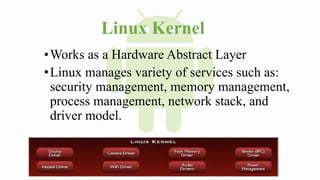
Linux Kernel
•Works as a Hardware Abstract Layer
•Linux manages variety of services such as:
security management, memory management,
process management, network stack, and
driver model.
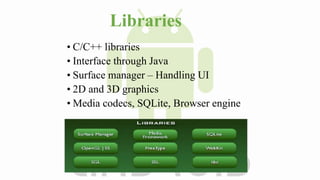
Libraries
• C/C++ libraries
• Interface through Java
• Surface manager – Handling UI
• 2D and 3D graphics
• Media codecs, SQLite, Browser engine
Android Features
Integrated browser based on the open source Web Kit engine
SQLite for relational data storage
Media support for common audio, video, and image formats
(MPEG4, H.264, MP3, AAC, AMR, JPG, PNG, GIF)
Dalvik Virtual Machine optimized for mobile devices
Software Features
Hardware Features
Cellular networking : GSM, EDGE, 3G (hardware
dependent)
LAN : Bluetooth, and Wi-Fi (hardware dependent)
Graphics Hardware Acceleration
Camera, GPS and Compass (hardware dependent)
Touch screen and accelerometer for motion sensing
DEVELOPMENT TOOL
• Android Emulator -A virtual mobile device that runs on our
computer -use to design, debug, and test our applications in an actual
Android run-time environment
• Android Development Tools Plugin -for the Eclipse IDE and
Android studio – adds powerful extensions to the integrated
environment
• Dalvik Debug Monitor Service (DDMS) -Integrated with Dalvik-
this tool let us manage processes on an emulator and assists in
debugging
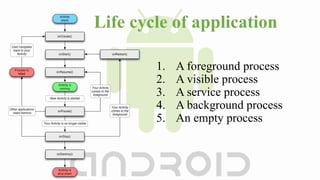
Life cycle of application
1. A foreground process
2. A visible process
3. A service process
4. A background process
5. An empty process
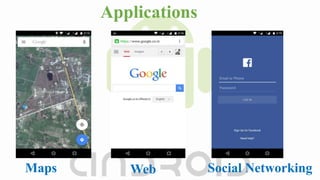
Applications
Maps Web Social Networking
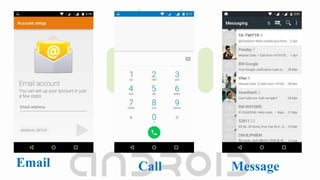
Email Call Message
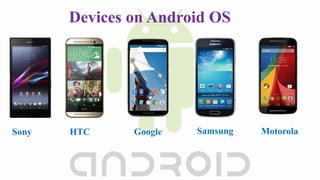
Devices on Android OS
Sony HTC Google Samsung Motorola
Why Android Better
•Total interface customization
•Better app management
•More phone security options
As a User
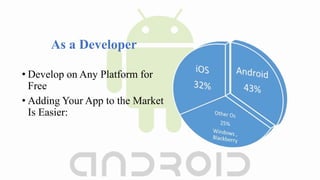
• Develop on Any Platform for
Free
• Adding Your App to the Market
Is Easier:
As a Developer
conclusion
•Android is open to all : industry, developers and
users
•Aims to be easy to build.
•Introduced initially on mobile handsets, but has
much wider potential.
Thank You…..

Android

  • 1.
    Android Presented By : AbhishekKumar Roll no. 212330 Seminar on
  • 2.
    Introduction to Android •Open software platform for mobile development • Software stack – OS, Middleware, Applications • An Open Handset Alliance (OHA) project • Powered by Linux operating system • Fast application development in Java • Open source
  • 3.
    Linux Kernel •Works asa Hardware Abstract Layer •Linux manages variety of services such as: security management, memory management, process management, network stack, and driver model.
  • 4.
    Libraries • C/C++ libraries •Interface through Java • Surface manager – Handling UI • 2D and 3D graphics • Media codecs, SQLite, Browser engine
  • 5.
    Android Features Integrated browserbased on the open source Web Kit engine SQLite for relational data storage Media support for common audio, video, and image formats (MPEG4, H.264, MP3, AAC, AMR, JPG, PNG, GIF) Dalvik Virtual Machine optimized for mobile devices Software Features
  • 6.
    Hardware Features Cellular networking: GSM, EDGE, 3G (hardware dependent) LAN : Bluetooth, and Wi-Fi (hardware dependent) Graphics Hardware Acceleration Camera, GPS and Compass (hardware dependent) Touch screen and accelerometer for motion sensing
  • 7.
    DEVELOPMENT TOOL • AndroidEmulator -A virtual mobile device that runs on our computer -use to design, debug, and test our applications in an actual Android run-time environment • Android Development Tools Plugin -for the Eclipse IDE and Android studio – adds powerful extensions to the integrated environment • Dalvik Debug Monitor Service (DDMS) -Integrated with Dalvik- this tool let us manage processes on an emulator and assists in debugging
  • 8.
    Life cycle ofapplication 1. A foreground process 2. A visible process 3. A service process 4. A background process 5. An empty process
  • 9.
  • 10.
  • 11.
    Devices on AndroidOS Sony HTC Google Samsung Motorola
  • 12.
    Why Android Better •Totalinterface customization •Better app management •More phone security options As a User
  • 13.
    • Develop onAny Platform for Free • Adding Your App to the Market Is Easier: As a Developer
  • 14.
    conclusion •Android is opento all : industry, developers and users •Aims to be easy to build. •Introduced initially on mobile handsets, but has much wider potential.
  • 15.