Android アプリ開発と API レベルについて


     ネットプラン松山 上田 和章
         twitter: @twikaz
      Android Play: netplan_jp
それは 10 月の末頃でした


ちょっとデザインに凝ってみました
この資料を作り始
めたところで ...
ABC 2012 東北
乗り遅れまい、と twitter


「資料は既に公開されています。」
www.slideshare.net/○○○○○○/abc2012xxxx/

    のようなツイートがありまして
このようなスクリーンショットが


http://actionbarsherlock.com/
                                http://code.google.com/p/iosched/
あれ、かぶってる !?


         orz
ということで


方針を変更しました。 ( キリッ
ActionBarSherlock


This allows you to easily develop an application
 with an action bar for every version of Android

      from   2.x and up.
できれば


1.6 にも対応したい ...?
できれば


AndroidBarSharlock
  に頼らないで ...
そんなこんなで
温かい目で


お願いします。
プラットフォーム・バージョン


Portions of this page are modifications based on work created and shared by the Android Open Source Project
and used according to terms described in the Creative Commons 2.5 Attribution License.
プラットフォーム・バージョンの整理


1.x    1.0, 1.1, 1.5, 1.6
2.x    2.0, 2.0.1, 2.1.x(1,2,3)
   2.2.x, 2.3, 2.3.1, 2.3.2, 2.3.3, 2.3.4
3.x    3.0.x, 3.1.x, 3.2
4.x    4.0, 4.0.x, 4.1, 4.1.1, 4.2
Codename による割合


Portions of this page are modifications based on work created and shared by the Android Open Source Project
and used according to terms described in the Creative Commons 2.5 Attribution License.
前のページのデータは


Google Play へのアクセス( 14 日間)を集計したもの


Portions of this page are modifications based on work created and shared by the Android Open Source Project
and used according to terms described in the Creative Commons 2.5 Attribution License.
Codename による割合

2012 年 11 月 1 日時点( 14 日間)


Gingerbread                                                  54%
Ice Cream Sandwitch                                          26%
Froyo                                                        12%
Eclair                                                       3.1%
Jerry Bean                                                   2.7%
  Portions of this page are modifications based on work created and shared by the Android Open Source Project
  and used according to terms described in the Creative Commons 2.5 Attribution License.
Codename による割合 (API)

Gingerbread                                                  54%               API-9, 10
Ice Cream Sandwitch                                          26%               API-15
Froyo                                                        12%               API-8
Eclair                                                       3.1%              API-7
Jerry Bean                                                   2.7%              API-16


                                          2012 年 11 月 1 日時点( 14 日間)

  Portions of this page are modifications based on work created and shared by the Android Open Source Project
  and used according to terms described in the Creative Commons 2.5 Attribution License.
対象とする API レベル

● API-9 ~ 15
  Android ユーザの約 82% をカバー
● API-8 ~ 16


  Android ユーザの約 97% をカバー
そもそも API レベルって

Android プラットフォームの
各バージョンで推奨される
フレームワーク API のリビジョン

                                                   ちょっとわかりにくい ...?


http://developer.android.com/guide/topics/manifest/uses-sdk-element.html#ApiLevels
そもそも API レベルって


Android のこのバージョンには
この API レベルで作りましょう


         これくらいで
         いかがでしょうか。
そもそも API レベルって

●   パッケージとクラス(群)
●   マニフェストを定義する XML
●   リソースを定義する XML
●   インテント(群)
●   アプリが利用できるパーミッション(群)

         set をセットと書くとわかりにくいので
         (群)と書いてみました。
API のアップデート

API のアップデートは、
前のバージョンと互換性を保つように
設計されます。


http://developer.android.com/guide/topics/manifest/uses-sdk-element.html#ApiLevels
deprecated
ある API パーツがアップグレードされると、

古い API は        deprecated (非推奨)
になります。


既存のアプリが使用できるように、
削除はされません。


 http://developer.android.com/guide/topics/manifest/uses-sdk-element.html#ApiLevels
ただし、

ごく一部
セキュリティや安定性のために

API が  修正されたり削除される
場合があります。


 http://developer.android.com/guide/topics/manifest/uses-sdk-element.html#ApiLevels
引き継がれます

その他、

すべての      旧バージョンの API パーツは
修正なしに引き継がれます。


http://developer.android.com/guide/topics/manifest/uses-sdk-element.html#ApiLevels
たとえば互換性がないもの

●   新しく追加されたクラス( Fragment )


    Portions of this page are modifications based on work created and shared by the Android Open Source Project
    and used according to terms described in the Creative Commons 2.5 Attribution License.
たとえば互換性がないもの

●   新しく追加されたクラス( ActionBar )


    Portions of this page are modifications based on work created and shared by the Android Open Source Project
    and used according to terms described in the Creative Commons 2.5 Attribution License.
互換性を保つには

●   以前の API を使って、同様の動きを実装
●   Support Package
● サードパーティのライブラリ
● その他 ...
Support Package

http://developer.android.com/tools/extras/support-library.html
●   Fragment
●   FragmentManager
●   FragmentTransaction
●   ListFragment
●   DialogFragment
●   LoaderManager
●   Loader
●   AsyncTaskLoader
●   CursorLoader
    Portions of this page are modifications based on work created and shared by the Android Open Source Project
    and used according to terms described in the Creative Commons 2.5 Attribution License.
Support Package – ただし ...

The ActionBar is

                      not supported
                                                                                   by the library.
その代わりに、
          MenuCompat.setShowAsAction()
                                                                                  が使えます。

  Portions of this page are modifications based on work created and shared by the Android Open Source Project
  and used according to terms described in the Creative Commons 2.5 Attribution License.
Support Package – さらに ...


             PreferenceFragment も非対応 ...


                                                                                  orz
Portions of this page are modifications based on work created and shared by the Android Open Source Project
and used according to terms described in the Creative Commons 2.5 Attribution License.
android.support.v4.app

API level 4 以降に紹介された機能を
サポートするためのパッケージ


主に FragmentManager and LoaderManager のサポート .
android.support.v13.app


API level 13 以降に紹介された機能を
  サポートするためのパッケージ
SupportPackage リリース状況

●   Support Package, revision 11 (November 2012)
●   Support Package, revision 10 (August 2012)
●   Support Package, revision 9 (June 2012)
●   Support Package, revision 8 (April 2012)
●   Support Package, revision 7 (March 2012)
●   Support Package, revision 6 (December 2011)
●   Support Package, revision 5 (December 2011)
●   Support Package, revision 4 (October 2011)
●   Compatibility Package, revision 3 (July 2011)
●   Compatibility Package, revision 2 (May 2011)
●   Compatibility Package, revision 1 (March 2011)
SupportPackage


 結構こまめに
 メンテされている
ライブラリのセットアップ

●   フォルダ libs/ を追加
    src/ や res/ と同じ階層に追加します。
●   android-support-v4.jar をコピー
    SDK のフォルダ内にあります。
    <SDK>/extras/android/support/v4/android-support-v4.jar
●   Build Path に JAR ファイルを追加
    Configure Build Path -> Add JARs
SDK のバージョンによっては
ターゲット API のバージョンにより
 自動的に依存関係が解決される。
Developer サイトの記事

Creating Backward-Compatible UIs
http://developer.android.com/training/backward-compatible-ui/index.html

Lessons として以下が紹介されています。
●   Abstracting the New APIs
●   Proxying to the New APIs
●   Creating an Implementation with Older APIs
●   Using the Version-Aware Component                           今回は
                                                                ここに
                                                                注目。
Creating an Implementation with Older APIs


Decide on a Substitute Solution
 ●   Action Bar は、イメージボタン、カスタムタイトル
     バーやビューを水平に配置
 ●   Action bar tabs は、ボタンを配置するか Tab Widget
     を使う
 ●   Number Picker や Switch は、 Spinner や Toggle
     Button で
 ●   ListPopupWindow や PopupMenu は PopupWindow で
http://developer.android.com/training/backward-compatible-ui/older-implementation.html

     Portions of this page are modifications based on work created and shared by the Android Open Source Project
     and used according to terms described in the Creative Commons 2.5 Attribution License.
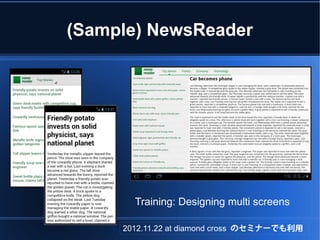
(Sample) NewsReader


       Training: Designing multi screens

     2012.11.22 at diamond cross のセミナーでも利用
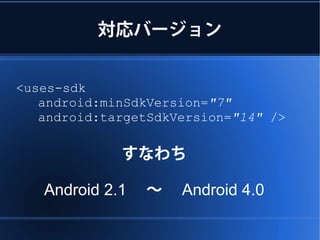
対応バージョン


<uses-sdk
   android:minSdkVersion="7"
   android:targetSdkVersion="14" />

             すなわち

   Android 2.1  ~  Android 4.0
互換性のポイント

● Fragment
  Support Library にて対応可能
● ActionBar


  API バージョンによって制御
Fragment 編


タイトルと記事の表示


              made with Inkscape
layout の種類

onepane             twopanes
_with_bar            -narrow


onepane             twopanes


             2012.11.22 at diamond cross のセミナーでも利用
values リソースで切替

res/values-sw600dp/layouts.xml

<resources>
  <item name="main_layout"
  type="layout">@layout/onepane</item>
                        onepane
  <bool name="has_two_panes">false</bool>
                             false
</resources>


 Portions of this page are modifications based on work created and shared by the Android Open Source Project
 and used according to terms described in the Creative Commons 2.5 Attribution License.
識別子でレイアウト切替

●   values                ●   values-v11
    onepane_with_bar          onepane
●   values-sw600dp-land   ●   values-xlarge-land
    twopanes                  twopanes
●   values-sw600dp-port   ●   values-xlarge-port
    onepane                   twopanes_narrow
レイアウトの切り替え

●   values
    onepane_with_bar
●   values-sw600dp-land
    twopanes
●   values-sw600dp-port
    onepane
レイアウトの切り替え

     ●   values-v11
         onepane
     ●   values-xlarge-land
         twopanes
     ●   values-xlarge-port
         twopanes_narrow
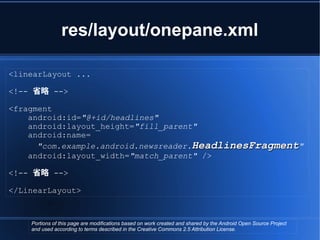
res/layout/onepane.xml

<linearLayout ...

<!-- 省略 -->

<fragment
    android:id="@+id/headlines"
    android:layout_height="fill_parent"
    android:name=
      "com.example.android.newsreader.HeadlinesFragment"
    android:layout_width="match_parent" />

<!-- 省略 -->

</LinearLayout>


    Portions of this page are modifications based on work created and shared by the Android Open Source Project
    and used according to terms described in the Creative Commons 2.5 Attribution License.
res/layout/twopanes.xml
<linearLayout ...

<!-- 省略 -->

<fragment
    android:id="@+id/headlines"
    android:layout_height="fill_parent"
    android:name="com.example.android.newsreader.HeadlinesFragment"
    android:layout_width="400dp"
    android:layout_marginRight="10dp"/>

<fragment
    android:id="@+id/article"
    android:layout_height="fill_parent"
    android:name="com.example.android.newsreader.ArticleFragment"
    android:layout_width="fill_parent" />

<!-- 省略 -->

</LinearLayout>
     Portions of this page are modifications based on work created and shared by the Android Open Source Project
     and used according to terms described in the Creative Commons 2.5 Attribution License.
タイトルを選んで記事を表示


@Override
public void onHeadlineSelected(int index) {
    mArtIndex = index;
    if (mIsDualPane) {
        // display it on the article fragment
        mArticleFragment.displayArticle(mCurrentCat.getArticle(index));
    }
    else {
        // use separate activity
        Intent i = new Intent(this, ArticleActivity.class);
        i.putExtra("catIndex", mCatIndex);
        i.putExtra("artIndex", index);
        startActivity(i);
    }
}


    Portions of this page are modifications based on work created and shared by the Android Open Source Project
    and used according to terms described in the Creative Commons 2.5 Attribution License.
タイトルを選んで記事を表示

                               twopanes の場合はそのまま Fragment 表示
@Override
public void onHeadlineSelected(int index) {
    mArtIndex = index;
    if (mIsDualPane) {
        // display it on the article fragment
        mArticleFragment.displayArticle(mCurrentCat.getArticle(index));
    }
    else {
        // use separate activity
        Intent i = new Intent(this, ArticleActivity.class);
        i.putExtra("catIndex", mCatIndex);
        i.putExtra("artIndex", index);
        startActivity(i);
    }

                                  onepane の場合は ArticleActivity 起動
}


     Portions of this page are modifications based on work created and shared by the Android Open Source Project
     and used according to terms described in the Creative Commons 2.5 Attribution License.
ArticleActivity

@Override
protected void onCreate(Bundle savedInstanceState) {
    super.onCreate(savedInstanceState);
    mCatIndex = getIntent().getExtras().getInt("catIndex", 0);
    mArtIndex = getIntent().getExtras().getInt("artIndex", 0);

    // If we are in two-pane layout mode, this activity is no longer necessary
    if (getResources().getBoolean(R.bool.has_two_panes)) {
        finish();
        return;
    }
    // Place an ArticleFragment as our content pane
    ArticleFragment f = new ArticleFragment();
    getSupportFragmentManager().beginTransaction().add(android.R.id.content, f).commit();
    // Display the correct news article on the fragment
    NewsArticle article =
         NewsSource.getInstance().getCategory(mCatIndex).getArticle(mArtIndex);
    f.displayArticle(article);
}


     Portions of this page are modifications based on work created and shared by the Android Open Source Project
     and used according to terms described in the Creative Commons 2.5 Attribution License.
レイアウト: onepane_with_bar


                                           <LinearLayout xmlns:android="http://schemas.android.com/apk/res/android"
                                               android:orientation="vertical"
                                               android:layout_width="match_parent"
                                               android:layout_height="match_parent">
                                               <LinearLayout android:layout_width="match_parent"
                                                             android:id="@+id/linearLayout1"
                                                             android:gravity="center"
                                                             android:layout_height="50dp">
                                                   <ImageView android:id="@+id/imageView1"
                                                               android:layout_height="wrap_content"
                                                               android:layout_width="wrap_content"
                                                               android:src="@drawable/logo"
                                                               android:paddingRight="30dp"
                                                               android:layout_gravity="left"
                                                               android:layout_weight="0"
                                                               android:contentDescription="TODO"/>
                                                   <View android:layout_height="wrap_content"
                                                         android:id="@+id/view1"
                                                         android:layout_width="wrap_content"
                                                         android:layout_weight="1" />
                                                   <Button android:id="@+id/categorybutton"
                                                           android:background="@drawable/button_bg"
                                                           android:layout_height="match_parent"
                                                           android:layout_weight="0"
                                                           android:layout_width="120dp"
                                                           style="@style/CategoryButtonStyle"/>
                                               </LinearLayout>

                                               <fragment android:id="@+id/headlines"

表示領域 (pane) が 1 個
                                                         android:layout_height="fill_parent"
                                                         android:name="com.example.android.newsreader.HeadlinesFragment"

アクションバーを実装
                                                         android:layout_width="match_parent" />
                                           </LinearLayout>


Portions of this page are modifications based on work created and shared by the Android Open Source Project
and used according to terms described in the Creative Commons 2.5 Attribution License.
values-sw600dp-land

<resources>
  <item name="main_layout" type="layout">@layout/twopanes</item>
  <bool name="has_two_panes">true</bool>
</resources>


                                values-sw600dp-land/layouts.xml
                                ・ layout リソースの指定
                                ・ 2 つの表示領域あり


 Portions of this page are modifications based on work created and shared by the Android Open Source Project
 and used according to terms described in the Creative Commons 2.5 Attribution License.
レイアウト: twopanes

                                               <LinearLayout xmlns:android="http://schemas.android.com/apk/res/android"
                                                   android:layout_width="fill_parent"
                                                   android:layout_height="fill_parent"
                                                   android:orientation="horizontal">

                                                   <fragment
                                                       android:id="@+id/headlines"
                                                       android:name="com.example.android.newsreader.HeadlinesFragment"
                                                       android:layout_width="121dp"
                                                       android:layout_height="fill_parent"
                                                       android:layout_marginRight="10dp" />

                                                   <fragment android:id="@+id/article"
                                                             android:layout_height="fill_parent"

                                               android:name="com.example.android.newsreader.ArticleFragment"
                                                             android:layout_width="fill_parent" />


表示領域 (pane) が 2 個
                                               </LinearLayout>


アクションバーは自動


 Portions of this page are modifications based on work created and shared by the Android Open Source Project
 and used according to terms described in the Creative Commons 2.5 Attribution License.
ActionBar 編

カテゴリの選択


      made with Inkscape
ActionBar のセットアップ

●   NewsReaderActivity の onCreate() にて


    setUpActionBar(mIsDualPane, catIndex);


Portions of this page are modifications based on work created and shared by the Android Open Source Project
and used according to terms described in the Creative Commons 2.5 Attribution License.
setUpActionBar

if (Build.VERSION.SDK_INT < 11) {
    return;
}
android.app.ActionBar actionBar = getActionBar();
actionBar.setDisplayShowTitleEnabled(false);

// 以下、ActionBarのセットアップ(略)


 Portions of this page are modifications based on work created and shared by the Android Open Source Project
 and used according to terms described in the Creative Commons 2.5 Attribution License.
ActionBar 非対応の場合

すなわち、 res/values リソースが読み込まれる

<resources>
    <item name="main_layout" type="layout">
     @layout/onepane_with_bar
  </item>
    <bool name="has_two_panes">false</bool>
</resources>
先ほどの、レイアウト: onepane_with_bar


                                            <LinearLayout xmlns:android="http://schemas.android.com/apk/res/android"
                                                android:orientation="vertical"
                                                android:layout_width="match_parent"
                                                android:layout_height="match_parent">
                                                <LinearLayout android:layout_width="match_parent"
                                                              android:id="@+id/linearLayout1"
                                                              android:gravity="center"
                                                              android:layout_height="50dp">
                                                    <ImageView android:id="@+id/imageView1"


                                             categorybutton"
                                                                android:layout_height="wrap_content"

<Button android:id="@+id/
                                                                android:layout_width="wrap_content"
                                                                android:src="@drawable/logo"
                                                                android:paddingRight="30dp"

    android:background="@drawable/button_bg"                    android:layout_gravity="left"
                                                                android:layout_weight="0"
                                                                android:contentDescription="TODO"/>
    android:layout_height="match_parent"            <View android:layout_height="wrap_content"
                                                          android:id="@+id/view1"

    android:layout_weight="0"                             android:layout_width="wrap_content"
                                                          android:layout_weight="1" />
                                                    <Button android:id="@+id/categorybutton"
    android:layout_width="120dp"                            android:background="@drawable/button_bg"
                                                            android:layout_height="match_parent"

    style="@style/CategoryButtonStyle"/>                    android:layout_weight="0"
                                                            android:layout_width="120dp"
                                                            style="@style/CategoryButtonStyle"/>
                                                </LinearLayout>

                                                <fragment android:id="@+id/headlines"

 表示領域 (pane) が 1 個
                                                          android:layout_height="fill_parent"
                                                          android:name="com.example.android.newsreader.HeadlinesFragment"

 アクションバーを実装
                                                          android:layout_width="match_parent" />
                                            </LinearLayout>


 Portions of this page are modifications based on work created and shared by the Android Open Source Project
 and used according to terms described in the Creative Commons 2.5 Attribution License.

ActionBar 非対応の場合

NewsReaderActivity (メイン画面)
 ●   onCreate()
Button catButton = (Button) findViewById(R.id.categorybutton);
if (catButton != null) {
    catButton.setOnClickListener(this);
}

 ●   setNewsCategory()
Button catButton = (Button) findViewById(R.id.categorybutton);
if (catButton != null) {
    catButton.setText(CATEGORIES[mCatIndex]);
}
Android2.1(API 7)
Android4.2(API 17)
付録
Android1.6(API 4) でテスト

Could not find method
com.example.android.newsreader.NewsReaderAc
tivity.getActionBar, referenced from method
com.example.android.newsreader.NewsReaderAc
tivity.setupActionBar
1.6 は回避できず


@TargetApi(11)
public void setUpActionBar(boolean showTabs, int selTab) {
    if (Build.VERSION.SDK_INT          < 11)   {
        return;
    }
    android.app.ActionBar actionBar = getActionBar() ;
    // 省略... 
}
Verifyer でエラー

●   2.0 以降はアノテーションで回避
    @TargetApi(11)
●   1.6 は回避できず Verifyer でエラー
    例えば wrapper クラス
ActionBar のラッパー

public class ActionBarWrapper {
 private ActionBar actionBar;

 // Check if android.app.ActionBar exists and throw an error if
not
 static {
    try {
      Class.forName("android.app.ActionBar");
    } catch (Exception e) {
      throw new RuntimeException(e);
    }
 }

    // 省略

}
実行時にエラー


Installation error: INSTALL_FAILED_MISSING_SHARED_LIBRARY
Please check logcat output for more details.
Launch canceled!
http://goo.gl/RWYl8
ご清聴を感謝します。

Android api-levels

  • 1.
    Android アプリ開発と APIレベルについて ネットプラン松山 上田 和章 twitter: @twikaz Android Play: netplan_jp
  • 2.
  • 3.
  • 4.
  • 5.
  • 6.
  • 7.
  • 8.
  • 9.
    ActionBarSherlock This allows youto easily develop an application with an action bar for every version of Android from 2.x and up.
  • 10.
  • 11.
  • 12.
  • 13.
  • 14.
    プラットフォーム・バージョン Portions of thispage are modifications based on work created and shared by the Android Open Source Project and used according to terms described in the Creative Commons 2.5 Attribution License.
  • 15.
    プラットフォーム・バージョンの整理 1.x 1.0, 1.1, 1.5, 1.6 2.x 2.0, 2.0.1, 2.1.x(1,2,3)    2.2.x, 2.3, 2.3.1, 2.3.2, 2.3.3, 2.3.4 3.x 3.0.x, 3.1.x, 3.2 4.x 4.0, 4.0.x, 4.1, 4.1.1, 4.2
  • 16.
    Codename による割合 Portions ofthis page are modifications based on work created and shared by the Android Open Source Project and used according to terms described in the Creative Commons 2.5 Attribution License.
  • 17.
    前のページのデータは Google Play へのアクセス(14 日間)を集計したもの Portions of this page are modifications based on work created and shared by the Android Open Source Project and used according to terms described in the Creative Commons 2.5 Attribution License.
  • 18.
    Codename による割合 2012 年11 月 1 日時点( 14 日間) Gingerbread 54% Ice Cream Sandwitch 26% Froyo 12% Eclair 3.1% Jerry Bean 2.7% Portions of this page are modifications based on work created and shared by the Android Open Source Project and used according to terms described in the Creative Commons 2.5 Attribution License.
  • 19.
    Codename による割合 (API) Gingerbread 54% API-9, 10 Ice Cream Sandwitch 26% API-15 Froyo 12% API-8 Eclair 3.1% API-7 Jerry Bean 2.7% API-16 2012 年 11 月 1 日時点( 14 日間) Portions of this page are modifications based on work created and shared by the Android Open Source Project and used according to terms described in the Creative Commons 2.5 Attribution License.
  • 20.
    対象とする API レベル ●API-9 ~ 15 Android ユーザの約 82% をカバー ● API-8 ~ 16 Android ユーザの約 97% をカバー
  • 21.
    そもそも API レベルって Androidプラットフォームの 各バージョンで推奨される フレームワーク API のリビジョン ちょっとわかりにくい ...? http://developer.android.com/guide/topics/manifest/uses-sdk-element.html#ApiLevels
  • 22.
    そもそも API レベルって Androidのこのバージョンには この API レベルで作りましょう これくらいで いかがでしょうか。
  • 23.
    そもそも API レベルって ● パッケージとクラス(群) ● マニフェストを定義する XML ● リソースを定義する XML ● インテント(群) ● アプリが利用できるパーミッション(群) set をセットと書くとわかりにくいので (群)と書いてみました。
  • 24.
  • 25.
    deprecated ある API パーツがアップグレードされると、 古いAPI は deprecated (非推奨) になります。 既存のアプリが使用できるように、 削除はされません。 http://developer.android.com/guide/topics/manifest/uses-sdk-element.html#ApiLevels
  • 26.
    ただし、 ごく一部 セキュリティや安定性のために API が 修正されたり削除される 場合があります。 http://developer.android.com/guide/topics/manifest/uses-sdk-element.html#ApiLevels
  • 27.
    引き継がれます その他、 すべての 旧バージョンの API パーツは 修正なしに引き継がれます。 http://developer.android.com/guide/topics/manifest/uses-sdk-element.html#ApiLevels
  • 28.
    たとえば互換性がないもの ● 新しく追加されたクラス( Fragment ) Portions of this page are modifications based on work created and shared by the Android Open Source Project and used according to terms described in the Creative Commons 2.5 Attribution License.
  • 29.
    たとえば互換性がないもの ● 新しく追加されたクラス( ActionBar ) Portions of this page are modifications based on work created and shared by the Android Open Source Project and used according to terms described in the Creative Commons 2.5 Attribution License.
  • 30.
    互換性を保つには ● 以前の API を使って、同様の動きを実装 ● Support Package ● サードパーティのライブラリ ● その他 ...
  • 31.
    Support Package http://developer.android.com/tools/extras/support-library.html ● Fragment ● FragmentManager ● FragmentTransaction ● ListFragment ● DialogFragment ● LoaderManager ● Loader ● AsyncTaskLoader ● CursorLoader Portions of this page are modifications based on work created and shared by the Android Open Source Project and used according to terms described in the Creative Commons 2.5 Attribution License.
  • 32.
    Support Package –ただし ... The ActionBar is not supported by the library. その代わりに、 MenuCompat.setShowAsAction() が使えます。 Portions of this page are modifications based on work created and shared by the Android Open Source Project and used according to terms described in the Creative Commons 2.5 Attribution License.
  • 33.
    Support Package –さらに ... PreferenceFragment も非対応 ... orz Portions of this page are modifications based on work created and shared by the Android Open Source Project and used according to terms described in the Creative Commons 2.5 Attribution License.
  • 34.
    android.support.v4.app API level 4以降に紹介された機能を サポートするためのパッケージ 主に FragmentManager and LoaderManager のサポート .
  • 35.
    android.support.v13.app API level 13以降に紹介された機能を サポートするためのパッケージ
  • 36.
    SupportPackage リリース状況 ● Support Package, revision 11 (November 2012) ● Support Package, revision 10 (August 2012) ● Support Package, revision 9 (June 2012) ● Support Package, revision 8 (April 2012) ● Support Package, revision 7 (March 2012) ● Support Package, revision 6 (December 2011) ● Support Package, revision 5 (December 2011) ● Support Package, revision 4 (October 2011) ● Compatibility Package, revision 3 (July 2011) ● Compatibility Package, revision 2 (May 2011) ● Compatibility Package, revision 1 (March 2011)
  • 37.
  • 38.
    ライブラリのセットアップ ● フォルダ libs/ を追加 src/ や res/ と同じ階層に追加します。 ● android-support-v4.jar をコピー SDK のフォルダ内にあります。 <SDK>/extras/android/support/v4/android-support-v4.jar ● Build Path に JAR ファイルを追加 Configure Build Path -> Add JARs
  • 39.
    SDK のバージョンによっては ターゲット APIのバージョンにより 自動的に依存関係が解決される。
  • 40.
    Developer サイトの記事 Creating Backward-CompatibleUIs http://developer.android.com/training/backward-compatible-ui/index.html Lessons として以下が紹介されています。 ● Abstracting the New APIs ● Proxying to the New APIs ● Creating an Implementation with Older APIs ● Using the Version-Aware Component 今回は ここに 注目。
  • 41.
    Creating an Implementationwith Older APIs Decide on a Substitute Solution ● Action Bar は、イメージボタン、カスタムタイトル バーやビューを水平に配置 ● Action bar tabs は、ボタンを配置するか Tab Widget を使う ● Number Picker や Switch は、 Spinner や Toggle Button で ● ListPopupWindow や PopupMenu は PopupWindow で http://developer.android.com/training/backward-compatible-ui/older-implementation.html Portions of this page are modifications based on work created and shared by the Android Open Source Project and used according to terms described in the Creative Commons 2.5 Attribution License.
  • 42.
    (Sample) NewsReader Training: Designing multi screens 2012.11.22 at diamond cross のセミナーでも利用
  • 43.
    対応バージョン <uses-sdk android:minSdkVersion="7" android:targetSdkVersion="14" /> すなわち Android 2.1  ~  Android 4.0
  • 44.
    互換性のポイント ● Fragment Support Library にて対応可能 ● ActionBar API バージョンによって制御
  • 45.
  • 46.
    layout の種類 onepane twopanes _with_bar -narrow onepane twopanes 2012.11.22 at diamond cross のセミナーでも利用
  • 47.
    values リソースで切替 res/values-sw600dp/layouts.xml <resources> <item name="main_layout" type="layout">@layout/onepane</item> onepane <bool name="has_two_panes">false</bool> false </resources> Portions of this page are modifications based on work created and shared by the Android Open Source Project and used according to terms described in the Creative Commons 2.5 Attribution License.
  • 48.
    識別子でレイアウト切替 ● values ● values-v11 onepane_with_bar onepane ● values-sw600dp-land ● values-xlarge-land twopanes twopanes ● values-sw600dp-port ● values-xlarge-port onepane twopanes_narrow
  • 49.
    レイアウトの切り替え ● values onepane_with_bar ● values-sw600dp-land twopanes ● values-sw600dp-port onepane
  • 50.
    レイアウトの切り替え ● values-v11 onepane ● values-xlarge-land twopanes ● values-xlarge-port twopanes_narrow
  • 51.
    res/layout/onepane.xml <linearLayout ... <!-- 省略--> <fragment android:id="@+id/headlines" android:layout_height="fill_parent" android:name= "com.example.android.newsreader.HeadlinesFragment" android:layout_width="match_parent" /> <!-- 省略 --> </LinearLayout> Portions of this page are modifications based on work created and shared by the Android Open Source Project and used according to terms described in the Creative Commons 2.5 Attribution License.
  • 52.
    res/layout/twopanes.xml <linearLayout ... <!-- 省略--> <fragment android:id="@+id/headlines" android:layout_height="fill_parent" android:name="com.example.android.newsreader.HeadlinesFragment" android:layout_width="400dp" android:layout_marginRight="10dp"/> <fragment android:id="@+id/article" android:layout_height="fill_parent" android:name="com.example.android.newsreader.ArticleFragment" android:layout_width="fill_parent" /> <!-- 省略 --> </LinearLayout> Portions of this page are modifications based on work created and shared by the Android Open Source Project and used according to terms described in the Creative Commons 2.5 Attribution License.
  • 53.
    タイトルを選んで記事を表示 @Override public void onHeadlineSelected(intindex) { mArtIndex = index; if (mIsDualPane) { // display it on the article fragment mArticleFragment.displayArticle(mCurrentCat.getArticle(index)); } else { // use separate activity Intent i = new Intent(this, ArticleActivity.class); i.putExtra("catIndex", mCatIndex); i.putExtra("artIndex", index); startActivity(i); } } Portions of this page are modifications based on work created and shared by the Android Open Source Project and used according to terms described in the Creative Commons 2.5 Attribution License.
  • 54.
    タイトルを選んで記事を表示 twopanes の場合はそのまま Fragment 表示 @Override public void onHeadlineSelected(int index) { mArtIndex = index; if (mIsDualPane) { // display it on the article fragment mArticleFragment.displayArticle(mCurrentCat.getArticle(index)); } else { // use separate activity Intent i = new Intent(this, ArticleActivity.class); i.putExtra("catIndex", mCatIndex); i.putExtra("artIndex", index); startActivity(i); } onepane の場合は ArticleActivity 起動 } Portions of this page are modifications based on work created and shared by the Android Open Source Project and used according to terms described in the Creative Commons 2.5 Attribution License.
  • 55.
    ArticleActivity @Override protected void onCreate(BundlesavedInstanceState) { super.onCreate(savedInstanceState); mCatIndex = getIntent().getExtras().getInt("catIndex", 0); mArtIndex = getIntent().getExtras().getInt("artIndex", 0); // If we are in two-pane layout mode, this activity is no longer necessary if (getResources().getBoolean(R.bool.has_two_panes)) { finish(); return; } // Place an ArticleFragment as our content pane ArticleFragment f = new ArticleFragment(); getSupportFragmentManager().beginTransaction().add(android.R.id.content, f).commit(); // Display the correct news article on the fragment NewsArticle article = NewsSource.getInstance().getCategory(mCatIndex).getArticle(mArtIndex); f.displayArticle(article); } Portions of this page are modifications based on work created and shared by the Android Open Source Project and used according to terms described in the Creative Commons 2.5 Attribution License.
  • 56.
    レイアウト: onepane_with_bar <LinearLayout xmlns:android="http://schemas.android.com/apk/res/android" android:orientation="vertical" android:layout_width="match_parent" android:layout_height="match_parent"> <LinearLayout android:layout_width="match_parent" android:id="@+id/linearLayout1" android:gravity="center" android:layout_height="50dp"> <ImageView android:id="@+id/imageView1" android:layout_height="wrap_content" android:layout_width="wrap_content" android:src="@drawable/logo" android:paddingRight="30dp" android:layout_gravity="left" android:layout_weight="0" android:contentDescription="TODO"/> <View android:layout_height="wrap_content" android:id="@+id/view1" android:layout_width="wrap_content" android:layout_weight="1" /> <Button android:id="@+id/categorybutton" android:background="@drawable/button_bg" android:layout_height="match_parent" android:layout_weight="0" android:layout_width="120dp" style="@style/CategoryButtonStyle"/> </LinearLayout> <fragment android:id="@+id/headlines" 表示領域 (pane) が 1 個 android:layout_height="fill_parent" android:name="com.example.android.newsreader.HeadlinesFragment" アクションバーを実装 android:layout_width="match_parent" /> </LinearLayout> Portions of this page are modifications based on work created and shared by the Android Open Source Project and used according to terms described in the Creative Commons 2.5 Attribution License.
  • 57.
    values-sw600dp-land <resources> <itemname="main_layout" type="layout">@layout/twopanes</item> <bool name="has_two_panes">true</bool> </resources> values-sw600dp-land/layouts.xml ・ layout リソースの指定 ・ 2 つの表示領域あり Portions of this page are modifications based on work created and shared by the Android Open Source Project and used according to terms described in the Creative Commons 2.5 Attribution License.
  • 58.
    レイアウト: twopanes <LinearLayout xmlns:android="http://schemas.android.com/apk/res/android" android:layout_width="fill_parent" android:layout_height="fill_parent" android:orientation="horizontal"> <fragment android:id="@+id/headlines" android:name="com.example.android.newsreader.HeadlinesFragment" android:layout_width="121dp" android:layout_height="fill_parent" android:layout_marginRight="10dp" /> <fragment android:id="@+id/article" android:layout_height="fill_parent" android:name="com.example.android.newsreader.ArticleFragment" android:layout_width="fill_parent" /> 表示領域 (pane) が 2 個 </LinearLayout> アクションバーは自動 Portions of this page are modifications based on work created and shared by the Android Open Source Project and used according to terms described in the Creative Commons 2.5 Attribution License.
  • 59.
  • 60.
    ActionBar のセットアップ ● NewsReaderActivity の onCreate() にて setUpActionBar(mIsDualPane, catIndex); Portions of this page are modifications based on work created and shared by the Android Open Source Project and used according to terms described in the Creative Commons 2.5 Attribution License.
  • 61.
    setUpActionBar if (Build.VERSION.SDK_INT <11) { return; } android.app.ActionBar actionBar = getActionBar(); actionBar.setDisplayShowTitleEnabled(false); // 以下、ActionBarのセットアップ(略) Portions of this page are modifications based on work created and shared by the Android Open Source Project and used according to terms described in the Creative Commons 2.5 Attribution License.
  • 62.
    ActionBar 非対応の場合 すなわち、 res/valuesリソースが読み込まれる <resources> <item name="main_layout" type="layout"> @layout/onepane_with_bar </item> <bool name="has_two_panes">false</bool> </resources>
  • 63.
    先ほどの、レイアウト: onepane_with_bar <LinearLayout xmlns:android="http://schemas.android.com/apk/res/android" android:orientation="vertical" android:layout_width="match_parent" android:layout_height="match_parent"> <LinearLayout android:layout_width="match_parent" android:id="@+id/linearLayout1" android:gravity="center" android:layout_height="50dp"> <ImageView android:id="@+id/imageView1" categorybutton" android:layout_height="wrap_content" <Button android:id="@+id/ android:layout_width="wrap_content" android:src="@drawable/logo" android:paddingRight="30dp" android:background="@drawable/button_bg" android:layout_gravity="left" android:layout_weight="0" android:contentDescription="TODO"/> android:layout_height="match_parent" <View android:layout_height="wrap_content" android:id="@+id/view1" android:layout_weight="0" android:layout_width="wrap_content" android:layout_weight="1" /> <Button android:id="@+id/categorybutton" android:layout_width="120dp" android:background="@drawable/button_bg" android:layout_height="match_parent" style="@style/CategoryButtonStyle"/> android:layout_weight="0" android:layout_width="120dp" style="@style/CategoryButtonStyle"/> </LinearLayout> <fragment android:id="@+id/headlines" 表示領域 (pane) が 1 個 android:layout_height="fill_parent" android:name="com.example.android.newsreader.HeadlinesFragment" アクションバーを実装 android:layout_width="match_parent" /> </LinearLayout> Portions of this page are modifications based on work created and shared by the Android Open Source Project and used according to terms described in the Creative Commons 2.5 Attribution License.
  • 64.
    ActionBar 非対応の場合 NewsReaderActivity (メイン画面) ● onCreate() Button catButton = (Button) findViewById(R.id.categorybutton); if (catButton != null) { catButton.setOnClickListener(this); } ● setNewsCategory() Button catButton = (Button) findViewById(R.id.categorybutton); if (catButton != null) { catButton.setText(CATEGORIES[mCatIndex]); }
  • 65.
  • 66.
  • 67.
  • 68.
    Android1.6(API 4) でテスト Couldnot find method com.example.android.newsreader.NewsReaderAc tivity.getActionBar, referenced from method com.example.android.newsreader.NewsReaderAc tivity.setupActionBar
  • 69.
    1.6 は回避できず @TargetApi(11) public voidsetUpActionBar(boolean showTabs, int selTab) { if (Build.VERSION.SDK_INT < 11) { return; } android.app.ActionBar actionBar = getActionBar() ; // 省略...  }
  • 70.
    Verifyer でエラー ● 2.0 以降はアノテーションで回避 @TargetApi(11) ● 1.6 は回避できず Verifyer でエラー 例えば wrapper クラス
  • 71.
    ActionBar のラッパー public classActionBarWrapper { private ActionBar actionBar; // Check if android.app.ActionBar exists and throw an error if not static { try { Class.forName("android.app.ActionBar"); } catch (Exception e) { throw new RuntimeException(e); } } // 省略 }
  • 72.
  • 73.
  • 74.