1
What is Android?
2
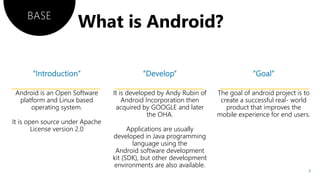
Android is an Open Software
platform and Linux based
operating system.
It is open source under Apache
License version 2.0
It is developed by Andy Rubin of
Android Incorporation then
acquired by GOOGLE and later
the OHA.
Applications are usually
developed in Java programming
language using the
Android software development
kit (SDK), but other development
environments are also available.
The goal of android project is to
create a successful real- world
product that improves the
mobile experience for end users.
BASE
3
OPEN HANDSET ALLIANCE
(OHA)
It is a consortium of 84 companies which was established on 5th November 2007, led by GOOGLE.
It is committed to advance open standards, provide services and deploy handsets using the
android platform.
!
5
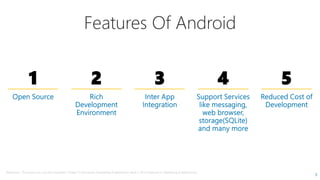
Features Of Android
1 2 3 4 5
Reference : The basics you can find anywhere 5 Steps To Successful Storytelling Published on April 5, 2014 Featured in: Marketing & Advertising
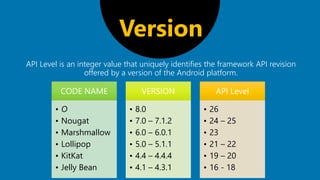
API Level is an integer value that uniquely identifies the framework API revision
offered by a version of the Android platform.
Version
CODE NAME
• O
• Nougat
• Marshmallow
• Lollipop
• KitKat
• Jelly Bean
VERSION
• 8.0
• 7.0 – 7.1.2
• 6.0 – 6.0.1
• 5.0 – 5.1.1
• 4.4 – 4.4.4
• 4.1 – 4.3.1
API Level
• 26
• 24 – 25
• 23
• 21 – 22
• 19 – 20
• 16 - 18





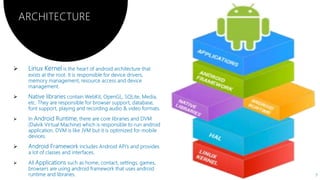
ARCHITECTURE
7
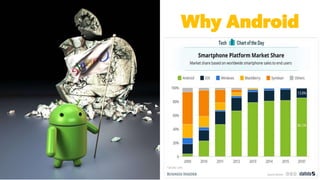
Why Android
8
9
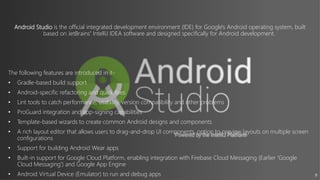
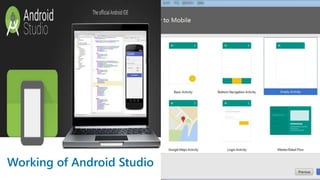
Android Studio is the official integrated development environment (IDE) for Google's Android operating system, built
based on JetBrains' IntelliJ IDEA software and designed specifically for Android development.
The following features are introduced in it-
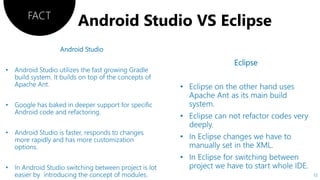
• Gradle-based build support
• Android-specific refactoring and quick fixes
• Lint tools to catch performance, usability, version compatibility and other problems
• ProGuard integration and app-signing capabilities
• Template-based wizards to create common Android designs and components
• A rich layout editor that allows users to drag-and-drop UI components, option to preview layouts on multiple screen
configurations.
• Support for building Android Wear apps
• Built-in support for Google Cloud Platform, enabling integration with Firebase Cloud Messaging (Earlier 'Google
Cloud Messaging') and Google App Engine.
• Android Virtual Device (Emulator) to run and debug apps
10
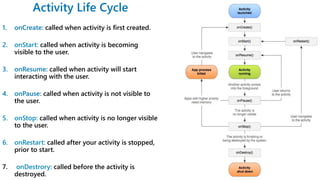
called when activity is first created.
2. onStart: called when activity is becoming
visible to the user.
called when activity will start
interacting with the user.
called when activity is not visible to
the user.
5. onStop: called when activity is no longer visible
to the user.
6. onRestart: called after your activity is stopped,
prior to start.
7. onDestrory: called before the activity is
destroyed. 11
FACT
12
Neal Creative | click & Learn moreNeal Creative ©

Android

  • 1.
  • 2.
  • 3.
    Android is anOpen Software platform and Linux based operating system. It is open source under Apache License version 2.0 It is developed by Andy Rubin of Android Incorporation then acquired by GOOGLE and later the OHA. Applications are usually developed in Java programming language using the Android software development kit (SDK), but other development environments are also available. The goal of android project is to create a successful real- world product that improves the mobile experience for end users. BASE 3
  • 4.
    OPEN HANDSET ALLIANCE (OHA) Itis a consortium of 84 companies which was established on 5th November 2007, led by GOOGLE. It is committed to advance open standards, provide services and deploy handsets using the android platform. !
  • 5.
    5 Features Of Android 12 3 4 5 Reference : The basics you can find anywhere 5 Steps To Successful Storytelling Published on April 5, 2014 Featured in: Marketing & Advertising
  • 6.
    API Level isan integer value that uniquely identifies the framework API revision offered by a version of the Android platform. Version CODE NAME • O • Nougat • Marshmallow • Lollipop • KitKat • Jelly Bean VERSION • 8.0 • 7.0 – 7.1.2 • 6.0 – 6.0.1 • 5.0 – 5.1.1 • 4.4 – 4.4.4 • 4.1 – 4.3.1 API Level • 26 • 24 – 25 • 23 • 21 – 22 • 19 – 20 • 16 - 18
  • 7.
  • 8.
  • 9.
    9 Android Studio isthe official integrated development environment (IDE) for Google's Android operating system, built based on JetBrains' IntelliJ IDEA software and designed specifically for Android development. The following features are introduced in it- • Gradle-based build support • Android-specific refactoring and quick fixes • Lint tools to catch performance, usability, version compatibility and other problems • ProGuard integration and app-signing capabilities • Template-based wizards to create common Android designs and components • A rich layout editor that allows users to drag-and-drop UI components, option to preview layouts on multiple screen configurations. • Support for building Android Wear apps • Built-in support for Google Cloud Platform, enabling integration with Firebase Cloud Messaging (Earlier 'Google Cloud Messaging') and Google App Engine. • Android Virtual Device (Emulator) to run and debug apps
  • 10.
  • 11.
    called when activityis first created. 2. onStart: called when activity is becoming visible to the user. called when activity will start interacting with the user. called when activity is not visible to the user. 5. onStop: called when activity is no longer visible to the user. 6. onRestart: called after your activity is stopped, prior to start. 7. onDestrory: called before the activity is destroyed. 11
  • 12.
  • 13.
    Neal Creative |click & Learn moreNeal Creative ©

Editor's Notes

  • #2 To use this title animation slide with a new image simply 1) move the top semi-transparent shape to the side, 2) delete placeholder image, 3) click on the picture icon to add a new picture, 4) Move semi-transparent shape back to original position, 5) Update text on slide.
  • #10 Tip: When using complex image as full-bleed background add a transparency (70%-90%) fill layer to give contrast to text.