ANDROID NATIVE
WORKSHOP SERIES
Introduction to Android Native and Firebase
What is Android
Why develop for Android
What is Android Studio
Basics of Android Studio
Assignment Live Coding
Authentication Code Explanation
OVERVIEW
TABLE OF CONTENTS
What is Android
Android is an open-source and Linux-based
Operating System for mobile devices such as
smartphones and tablet computers.
Android was developed by the Open Handset
Alliance, led by Google, and other companies.
Android offers a unified approach to application
development for mobile devices which means
developers need only develop for Android, and their
applications should be able to run on different
devices powered by Android.
Why develop for
Android
Over 1B users
Over 1.5M activations per day
Over 200M smartphones running Android said
annually
Over 1.43M apps available
Over 76% smartohone operating system market
share
Why develop
for Android
BASICS FOR
ANDROID STUDIO
What is Android
Studio
Android Studio is the official Integrated
Development Environment (IDE) for Android
app development, based on IntelliJ IDEA
A flexible Gradle-based build system
A fast and feature-rich emulator
A unified environment where you can
develop for all Android devices
Apply Changes to push code and
resource changes to your running app
without restarting your app
Code templates and GitHub integration
to help you build common app features
and import sample code
Extensive testing tools and frameworks
Lint tools to catch performance,
usability, version compatibility, and other
problems
C++ and NDK support
Built-in support for Google Cloud
Platform, making it easy to integrate
Google Cloud Messaging and App Engine
android Studio offers even more features
that enhance your productivity when building
Android apps, such as
Why JAVA for
android
Java has an extensive set of libraries. It is
easy to take advantage of these libraries.
Android SDK has many standard Java
libraries included.
These provide functionalities for data
structure, math functions, graphics
implantation, and networking functions and
much more. These java libraries help us to do
everything else we could want. This way java
helps develop Android applications fast and
inefficient manner.
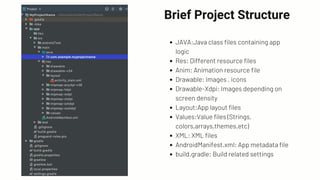
Brief Project Structure
JAVA:Java class files containing app
logic
Res: Different resource files
Anim: Animation resource file
Drawable: Images , icons
Drawable-Xdpi: Images depending on
screen density
Layout:App layout files
Values:Value files (Strings,
colors,arrays,themes,etc)
XML: XML files
AndroidManifest.xml: App metadata file
build.gradle: Build related settings
Android Studio
Installation Guide
Firebase is a mobile platform that helps you
quickly develop high-quality apps, grow your
user base, and earn more money. Firebase is
made up of complementary features that you
can mix and match to fit your needs, with
Google Analytics for Firebase at the core.
Assignment Live Coding
Authentication Code
Explaination
Do you have
any questions?
Hope you learned something from this
workshop.
THANK YOU

Android workshop series

  • 1.
    ANDROID NATIVE WORKSHOP SERIES Introductionto Android Native and Firebase
  • 2.
    What is Android Whydevelop for Android What is Android Studio Basics of Android Studio Assignment Live Coding Authentication Code Explanation OVERVIEW TABLE OF CONTENTS
  • 3.
    What is Android Androidis an open-source and Linux-based Operating System for mobile devices such as smartphones and tablet computers. Android was developed by the Open Handset Alliance, led by Google, and other companies. Android offers a unified approach to application development for mobile devices which means developers need only develop for Android, and their applications should be able to run on different devices powered by Android.
  • 4.
  • 5.
    Over 1B users Over1.5M activations per day Over 200M smartphones running Android said annually Over 1.43M apps available Over 76% smartohone operating system market share Why develop for Android
  • 6.
  • 7.
    What is Android Studio AndroidStudio is the official Integrated Development Environment (IDE) for Android app development, based on IntelliJ IDEA A flexible Gradle-based build system A fast and feature-rich emulator A unified environment where you can develop for all Android devices Apply Changes to push code and resource changes to your running app without restarting your app Code templates and GitHub integration to help you build common app features and import sample code Extensive testing tools and frameworks Lint tools to catch performance, usability, version compatibility, and other problems C++ and NDK support Built-in support for Google Cloud Platform, making it easy to integrate Google Cloud Messaging and App Engine android Studio offers even more features that enhance your productivity when building Android apps, such as
  • 8.
    Why JAVA for android Javahas an extensive set of libraries. It is easy to take advantage of these libraries. Android SDK has many standard Java libraries included. These provide functionalities for data structure, math functions, graphics implantation, and networking functions and much more. These java libraries help us to do everything else we could want. This way java helps develop Android applications fast and inefficient manner.
  • 9.
    Brief Project Structure JAVA:Javaclass files containing app logic Res: Different resource files Anim: Animation resource file Drawable: Images , icons Drawable-Xdpi: Images depending on screen density Layout:App layout files Values:Value files (Strings, colors,arrays,themes,etc) XML: XML files AndroidManifest.xml: App metadata file build.gradle: Build related settings
  • 10.
  • 11.
    Firebase is amobile platform that helps you quickly develop high-quality apps, grow your user base, and earn more money. Firebase is made up of complementary features that you can mix and match to fit your needs, with Google Analytics for Firebase at the core.
  • 12.
  • 13.
  • 14.
    Do you have anyquestions? Hope you learned something from this workshop.
  • 15.