Jenkins User Conference San Francisco #jenkinsconf 
Building Your Continuous 
Delivery Toolkit 
Andrew Phillips 
XebiaLabs 
xebialabs.com |@xebialabs 
October 23, 2014 
With thanks to TJ Randall 
#jenkinsconf
Jenkins User Conference San Francisco #jenkinsconf 
You’re talking about other tools at a JUC?? 
• It's OK to think you may need additional tooling to 
solve your issues rather than tying to use one tool for 
everything that you need to do! 
• If you’ve expanded Jenkins into this area you’ll see 
that there are indeed a bunch of options…after all, 
you can do anything with Jenkins! 
• You’re hitting some challenges: 
– Maybe you’ve already put this together, but you're having 
challenges maintaining it. 
– Or, maybe you need your solution to do more, and are 
finding that you’re getting quite far away from the sweet 
spot.
Jenkins User Conference San Francisco #jenkinsconf 
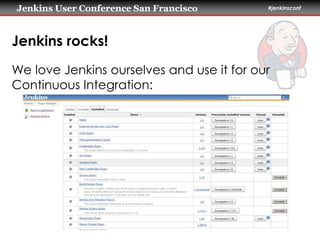
Jenkins rocks! 
We love Jenkins ourselves and use it for our 
Continuous Integration:
Jenkins User Conference San Francisco #jenkinsconf 
Jenkins rocks! 
Some of our favourite plugins… 
• Build Failure Analyzer 
– Helps us to understand why builds are failing, especially when 
analying possible infrastructure issues. 
• Matrix Reloaded Plugin 
– Allows users to easily rebuild parts of an already built Matrix build. 
• Promoted Builds Plugin 
– Distinguish good builds from bad builds by introducing the notion of 
'promotion'. 
• Throttle Concurrent Builds Plugin 
– For throttling the number of concurrent builds of a project running per 
node or globally.
Jenkins User Conference San Francisco #jenkinsconf 
Beyond Jenkins..? 
When do you hit the edges of your CI tool? 
– Challenges can be conceptual, technical or 
organizational 
Jenkins has a luxury problem based on its 
success 
– Many, many plugins for many different types of 
tasks…”anything is possible”
Jenkins User Conference San Francisco #jenkinsconf 
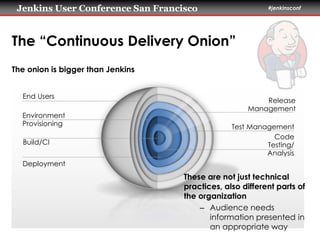
The “Continuous Delivery Onion” 
The onion is bigger than Jenkins 
Build/CI 
Deployment 
Release 
Management 
Test Management 
Code 
Testing/ 
Analysis 
End Users 
These are not just technical 
practices, also different parts of 
the organization 
– Audience needs 
information presented in 
an appropriate way 
Environment 
Provisioning
Jenkins User Conference San Francisco #jenkinsconf 
Outline for a Continuous Delivery Toolkit 
Before we talk about tools… 
– CD is a means, not a goal! 
– So there will be different needs depending on 
what you are looking to achieve 
– We’ll talk about what we see frequently… 
– …but it’s not intended to be taken as a silver 
bullet!
Jenkins User Conference San Francisco #jenkinsconf 
Outline for a Continuous Delivery Toolkit 
Let’s take a look at five technical needs for 
Continuous Delivery: 
– Build/Continuous Integration 
– Environment Provisioning 
– Deployment 
– Test Management 
– Release Management/Pipeline Orchestration
Jenkins User Conference San Francisco #jenkinsconf 
Outline for a Continuous Delivery Toolkit 
Let’s not forget…these are different teams, 
too: 
– Build/Continuous Integration: Dev 
– Environment Provisioning: Ops 
– Deployment: Release/Ops 
– Test Management: QA 
– Release Management/Pipeline Orchestration: 
Release/DBAs/Ops/Business
Jenkins User Conference San Francisco #jenkinsconf 
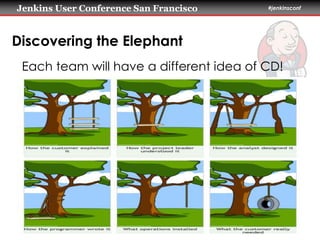
Discovering the Elephant 
Each team will have a different idea of CD!
Jenkins User Conference San Francisco #jenkinsconf 
Example: CI 
Let’s not forget…these are different teams, 
too: 
– Dev: “It’s that server that we run that does builds” 
– QA: “What’s a CI tool?” 
– DBAs: “Database changes in source control??” 
– Release: “What’s a CI tool?” 
– Ops: “What’s a CI tool?”
Jenkins User Conference San Francisco #jenkinsconf 
Continuous Integration 
• Scalability! 
• Handling different types of builds 
• Access control and visibility to the right 
groups
Jenkins User Conference San Francisco #jenkinsconf 
Environment Provisioning 
• This is not so much about scaling your CD 
infrastructure itself… 
• …but about creating target environments in 
which to run your applications 
• Need to define and instantiate environments 
• Also need to register these environments with 
your other tools
Jenkins User Conference San Francisco #jenkinsconf 
Deployment 
• How to define the entire application, 
including configuration? 
• How to orchestrate multiple components 
across multiple machines? 
• Any way to avoid duplication in scripts? 
• Plus handling “standard” deployment 
problems such as environment-specific values, 
access control etc.
Jenkins User Conference San Francisco #jenkinsconf 
Test Management 
• Current trend: more and more tests in more 
and more different test tools 
• How to combine all the output to answer the 
“go/no-go” question with confidence? 
• How to choose the right tests for the context 
and manage your test suite over time?
Jenkins User Conference San Francisco #jenkinsconf 
Pipeline Orchestration 
• How to get the pipeline to go to production? 
• How to handle variation and manual tasks in 
your process? 
• How to provide the right level of insight to the 
right groups? 
• How to start with the process you have today 
and improve over time?
Jenkins User Conference San Francisco #jenkinsconf 
How do you Introduce a Toolkit? 
• How do you involve all of your teams in your 
Continuous Delivery tool set? How did your 
automation tools get chosen? 
• Most organizations try to limit/avoid cross-team 
activities when choosing a tool.
Jenkins User Conference San Francisco #jenkinsconf 
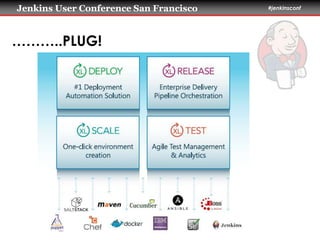
………..PLUG!
Jenkins User Conference San Francisco #jenkinsconf 
Thank You To Our Sponsors 
Platinum Gold 
Silver Corporate

Building your Continuous Delivery Toolkit @ JUC SF 2014

  • 1.
    Jenkins User ConferenceSan Francisco #jenkinsconf Building Your Continuous Delivery Toolkit Andrew Phillips XebiaLabs xebialabs.com |@xebialabs October 23, 2014 With thanks to TJ Randall #jenkinsconf
  • 2.
    Jenkins User ConferenceSan Francisco #jenkinsconf You’re talking about other tools at a JUC?? • It's OK to think you may need additional tooling to solve your issues rather than tying to use one tool for everything that you need to do! • If you’ve expanded Jenkins into this area you’ll see that there are indeed a bunch of options…after all, you can do anything with Jenkins! • You’re hitting some challenges: – Maybe you’ve already put this together, but you're having challenges maintaining it. – Or, maybe you need your solution to do more, and are finding that you’re getting quite far away from the sweet spot.
  • 3.
    Jenkins User ConferenceSan Francisco #jenkinsconf Jenkins rocks! We love Jenkins ourselves and use it for our Continuous Integration:
  • 4.
    Jenkins User ConferenceSan Francisco #jenkinsconf Jenkins rocks! Some of our favourite plugins… • Build Failure Analyzer – Helps us to understand why builds are failing, especially when analying possible infrastructure issues. • Matrix Reloaded Plugin – Allows users to easily rebuild parts of an already built Matrix build. • Promoted Builds Plugin – Distinguish good builds from bad builds by introducing the notion of 'promotion'. • Throttle Concurrent Builds Plugin – For throttling the number of concurrent builds of a project running per node or globally.
  • 5.
    Jenkins User ConferenceSan Francisco #jenkinsconf Beyond Jenkins..? When do you hit the edges of your CI tool? – Challenges can be conceptual, technical or organizational Jenkins has a luxury problem based on its success – Many, many plugins for many different types of tasks…”anything is possible”
  • 6.
    Jenkins User ConferenceSan Francisco #jenkinsconf The “Continuous Delivery Onion” The onion is bigger than Jenkins Build/CI Deployment Release Management Test Management Code Testing/ Analysis End Users These are not just technical practices, also different parts of the organization – Audience needs information presented in an appropriate way Environment Provisioning
  • 7.
    Jenkins User ConferenceSan Francisco #jenkinsconf Outline for a Continuous Delivery Toolkit Before we talk about tools… – CD is a means, not a goal! – So there will be different needs depending on what you are looking to achieve – We’ll talk about what we see frequently… – …but it’s not intended to be taken as a silver bullet!
  • 8.
    Jenkins User ConferenceSan Francisco #jenkinsconf Outline for a Continuous Delivery Toolkit Let’s take a look at five technical needs for Continuous Delivery: – Build/Continuous Integration – Environment Provisioning – Deployment – Test Management – Release Management/Pipeline Orchestration
  • 9.
    Jenkins User ConferenceSan Francisco #jenkinsconf Outline for a Continuous Delivery Toolkit Let’s not forget…these are different teams, too: – Build/Continuous Integration: Dev – Environment Provisioning: Ops – Deployment: Release/Ops – Test Management: QA – Release Management/Pipeline Orchestration: Release/DBAs/Ops/Business
  • 10.
    Jenkins User ConferenceSan Francisco #jenkinsconf Discovering the Elephant Each team will have a different idea of CD!
  • 11.
    Jenkins User ConferenceSan Francisco #jenkinsconf Example: CI Let’s not forget…these are different teams, too: – Dev: “It’s that server that we run that does builds” – QA: “What’s a CI tool?” – DBAs: “Database changes in source control??” – Release: “What’s a CI tool?” – Ops: “What’s a CI tool?”
  • 12.
    Jenkins User ConferenceSan Francisco #jenkinsconf Continuous Integration • Scalability! • Handling different types of builds • Access control and visibility to the right groups
  • 13.
    Jenkins User ConferenceSan Francisco #jenkinsconf Environment Provisioning • This is not so much about scaling your CD infrastructure itself… • …but about creating target environments in which to run your applications • Need to define and instantiate environments • Also need to register these environments with your other tools
  • 14.
    Jenkins User ConferenceSan Francisco #jenkinsconf Deployment • How to define the entire application, including configuration? • How to orchestrate multiple components across multiple machines? • Any way to avoid duplication in scripts? • Plus handling “standard” deployment problems such as environment-specific values, access control etc.
  • 15.
    Jenkins User ConferenceSan Francisco #jenkinsconf Test Management • Current trend: more and more tests in more and more different test tools • How to combine all the output to answer the “go/no-go” question with confidence? • How to choose the right tests for the context and manage your test suite over time?
  • 16.
    Jenkins User ConferenceSan Francisco #jenkinsconf Pipeline Orchestration • How to get the pipeline to go to production? • How to handle variation and manual tasks in your process? • How to provide the right level of insight to the right groups? • How to start with the process you have today and improve over time?
  • 17.
    Jenkins User ConferenceSan Francisco #jenkinsconf How do you Introduce a Toolkit? • How do you involve all of your teams in your Continuous Delivery tool set? How did your automation tools get chosen? • Most organizations try to limit/avoid cross-team activities when choosing a tool.
  • 18.
    Jenkins User ConferenceSan Francisco #jenkinsconf ………..PLUG!
  • 19.
    Jenkins User ConferenceSan Francisco #jenkinsconf Thank You To Our Sponsors Platinum Gold Silver Corporate

Editor's Notes

  • #3 (maybe Jenkins isn't the best fit) (technical, business, organizational) If you already have a solution, how is a talk "Building your Toolkit" relevant to you?
  • #4 •Build Failure Analyzer: Cuts down on analysis time. •Matrix Reloaded Plugin: Makes matrix builds more bearable. Especially if builds are flip/flopping. •Promoted Builds Plugin: Bit of a hassle to set up correctly in a build. You always need the copy artifact plugin to create a reproducible build. •Throttle Concurrent Builds Plugin: now in use with XL Release. Usually a sign that people use hard coded ports etc. in their build or something else that makes a job not scale.
  • #5 •Build Failure Analyzer: Cuts down on analysis time. •Matrix Reloaded Plugin: Makes matrix builds more bearable. Especially if builds are flip/flopping. •Promoted Builds Plugin: Bit of a hassle to set up correctly in a build. You always need the copy artifact plugin to create a reproducible build. •Throttle Concurrent Builds Plugin: now in use with XL Release. Usually a sign that people use hard coded ports etc. in their build or something else that makes a job not scale.
  • #7 There is more pain as you get towards the outside of the onion? Things should be pretty OK on the inside? TODO: onion – technical/non-technical code build time stuff (checkout, build, code coverage) deployment / integration testing (custom scripting) capacity / slave pool  (managed ok by plugins) pipelines  (coordinate across multiple machines)
  • #8  Doing CD successfully will be meeting the needs of the teams (“the onion”) Where do tools delivery end / need to integrate tools
  • #9  Doing CD successfully will be meeting the needs of the teams (“the onion”) Where do tools delivery end / need to integrate tools
  • #10  Doing CD successfully will be meeting the needs of the teams (“the onion”) Where do tools delivery end / need to integrate tools
  • #12  Doing CD successfully will be meeting the needs of the teams (“the onion”) Where do tools delivery end / need to integrate tools
  • #13  Doing CD successfully will be meeting the needs of the teams (“the onion”) Where do tools delivery end / need to integrate tools
  • #14  Doing CD successfully will be meeting the needs of the teams (“the onion”) Where do tools delivery end / need to integrate tools
  • #15  Doing CD successfully will be meeting the needs of the teams (“the onion”) Where do tools delivery end / need to integrate tools
  • #16  Doing CD successfully will be meeting the needs of the teams (“the onion”) Where do tools delivery end / need to integrate tools
  • #17  Doing CD successfully will be meeting the needs of the teams (“the onion”) Where do tools delivery end / need to integrate tools