bertjan@openvalue.eu
Debugging distributed systems
Bert Jan Schrijver
@bjschrijver
Debugging distributed systems: the good parts
bertjan@openvalue.eu
Bert Jan Schrijver
@bjschrijver
Networking 101
How the internet works
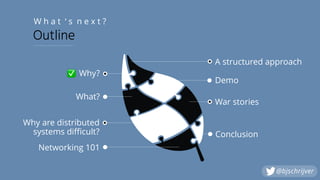
Why?
Bert Jan Schrijver
L e t ’ s m e e t
@bjschrijver
Why are distributed
systems difficult?
Networking 101
What?
Why?
✅
Demo
War stories
Conclusion
W h a t ‘ s n e x t ?
Outline
A structured approach
@bjschrijver
What is a distributed system?
A distributed system is a system whose
components are located on different
networked computers, which
communicate and coordinate their actions
by passing messages to one another.
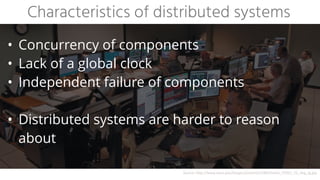
• Concurrency of components


• Lack of a global clock


• Independent failure of components


• Distributed systems are harder to reason
about
Characteristics of distributed systems
Source:	http://www.nasa.gov/images/content/218652main_STOCC_FS_img_lg.jpg
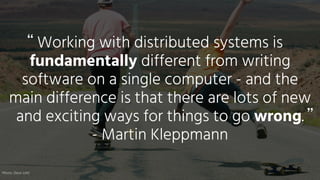
Working with distributed systems is
fundamentally different from writing
software on a single computer - and the
main difference is that there are lots of new
and exciting ways for things to go wrong.


- Martin Kleppmann
“
”
Photo:	Dave	Lehl
What could possibly go wrong?
“ ”
Photo:	Dave	Lehl
OSI & TCP/IP
Source:	https://www.guru99.com/difference-tcp-ip-vs-osi-model.html
.. in your browser’s address bar and press Enter
What happens when you type google.com…
Source:	https://github.com/alex/what-happens-when
13
Source:	https://7216-presscdn-0-76-pagely.netdna-ssl.com/wp-content/uploads/2011/12/confused-man-single-good-men.jpg
Where do I start?
Step 1: Observe & document
• What do you know about the problem?


• Inspect logging, errors, metrics, tracing


• Draw the path from source to target - what’s
in between? Focus on details!


• Document what you know


• Can we reproduce in a test?


• By injecting errors, for example
Tools


Whiteboard,
documentation, logging,
metrics, tracing
(opentracing.io), tests,
Jepsen
Step 1: Observe & document
Step 2: Create minimal reproducer
• Goal: maximise the amount of debugging
cycles


• Focus on short development iterations /
feedback loops


• Get close to the action!
Tools


IDE, Shell scripts,


SSH tunnels, Curl
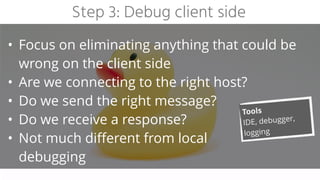
Step 3: Debug client side
• Focus on eliminating anything that could be
wrong on the client side


• Are we connecting to the right host?


• Do we send the right message?


• Do we receive a response?


• Not much different from local


debugging
Tools


IDE, debugger,
logging
Step 4: Check DNS & routing
• DNS:


• Make sure you know what IP address the
hostname should resolve to


• Verify that this actually happens


at the client


• Routing:


• Verify you can reach the


target machine
Tools


host, nslookup,
dig, whois, ping,
traceroute,
nslookup.io,
dnschecker.org
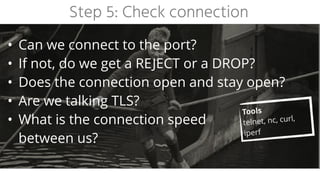
Step 5: Check connection
• Can we connect to the port?


• If not, do we get a REJECT or a DROP?


• Does the connection open and stay open?


• Are we talking TLS?


• What is the connection speed


between us?
Tools


telnet, nc, curl,
iperf
Step 6: Inspect traffic / messages
• Do we send the right request?


• Do we receive the right response?


• How do we know?


• How do we handle TLS?


• Are there any load balancers


or proxies in between?
Tools


curl, wireshark,
tcpdump, network
tab in browser,
mitm/tls proxy
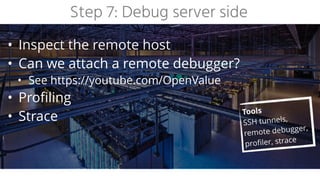
Step 7: Debug server side
• Inspect the remote host


• Can we attach a remote debugger?


• See https://youtube.com/OpenValue


• Profiling


• Strace Tools


SSH tunnels,
remote debugger,
profiler, strace
Step 8: Wrap up & post mortem
• Document the issue:


• Timeline


• What did we see?


• Why did it happen?


• What was the impact?


• How did we find out?


• What did we do to mitigate and fix?


• What should we do to prevent


repetition?
Tools


Whiteboard,
documentation
If you really want a reliable system, you
have to understand what its failure modes
are. You have to actually have witnessed
it misbehaving.


- Jason Cahoon
“
”
Distributed systems war stories
The time where it worked half of the time…
The one at a school…
The one with breaking news…
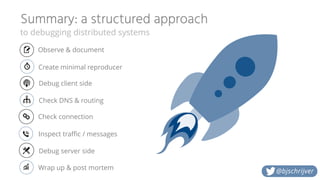
Summary: a structured approach
to debugging distributed systems
@bjschrijver
Check DNS & routing
Check connection
Debug client side
Create minimal reproducer
Debug server side
Observe & document
Wrap up & post mortem
Inspect traffic / messages
Source:	https://cdn2.vox-cdn.com/thumbor/J9OqPYS7FgI9fjGhnF7AFh8foVY=/148x0:1768x1080/1280x854/cdn0.vox-cdn.com/uploads/chorus_image/image/46147742/cute-success-kid-1920x1080.0.0.jpg
THAT’S IT.


NOW GO KICK SOME ASS!
Questions?


@bjschrijver
Thanks for your time.
Got feedback? Tweet it!
All pictures belong


to their respective


authors
@bjschrijver

Debugging distributed systems

  • 1.
  • 2.
    Debugging distributed systems:the good parts bertjan@openvalue.eu Bert Jan Schrijver @bjschrijver Networking 101 How the internet works
  • 3.
  • 4.
    Bert Jan Schrijver Le t ’ s m e e t @bjschrijver
  • 5.
    Why are distributed systemsdifficult? Networking 101 What? Why? ✅ Demo War stories Conclusion W h a t ‘ s n e x t ? Outline A structured approach @bjschrijver
  • 6.
    What is adistributed system?
  • 7.
    A distributed systemis a system whose components are located on different networked computers, which communicate and coordinate their actions by passing messages to one another.
  • 8.
    • Concurrency ofcomponents • Lack of a global clock • Independent failure of components 
 • Distributed systems are harder to reason about Characteristics of distributed systems Source: http://www.nasa.gov/images/content/218652main_STOCC_FS_img_lg.jpg
  • 9.
    Working with distributedsystems is fundamentally different from writing software on a single computer - and the main difference is that there are lots of new and exciting ways for things to go wrong. - Martin Kleppmann “ ” Photo: Dave Lehl
  • 10.
    What could possiblygo wrong? “ ” Photo: Dave Lehl
  • 11.
  • 12.
    .. in yourbrowser’s address bar and press Enter What happens when you type google.com… Source: https://github.com/alex/what-happens-when
  • 13.
  • 14.
  • 15.
    Step 1: Observe& document • What do you know about the problem? • Inspect logging, errors, metrics, tracing • Draw the path from source to target - what’s in between? Focus on details! • Document what you know • Can we reproduce in a test? • By injecting errors, for example Tools Whiteboard, documentation, logging, metrics, tracing (opentracing.io), tests, Jepsen
  • 16.
    Step 1: Observe& document
  • 17.
    Step 2: Createminimal reproducer • Goal: maximise the amount of debugging cycles • Focus on short development iterations / feedback loops • Get close to the action! Tools IDE, Shell scripts, SSH tunnels, Curl
  • 18.
    Step 3: Debugclient side • Focus on eliminating anything that could be wrong on the client side • Are we connecting to the right host? • Do we send the right message? • Do we receive a response? • Not much different from local 
 debugging Tools IDE, debugger, logging
  • 19.
    Step 4: CheckDNS & routing • DNS: • Make sure you know what IP address the hostname should resolve to • Verify that this actually happens 
 at the client • Routing: • Verify you can reach the 
 target machine Tools host, nslookup, dig, whois, ping, traceroute, nslookup.io, dnschecker.org
  • 20.
    Step 5: Checkconnection • Can we connect to the port? • If not, do we get a REJECT or a DROP? • Does the connection open and stay open? • Are we talking TLS? • What is the connection speed 
 between us? Tools telnet, nc, curl, iperf
  • 21.
    Step 6: Inspecttraffic / messages • Do we send the right request? • Do we receive the right response? • How do we know? • How do we handle TLS? • Are there any load balancers 
 or proxies in between? Tools curl, wireshark, tcpdump, network tab in browser, mitm/tls proxy
  • 22.
    Step 7: Debugserver side • Inspect the remote host • Can we attach a remote debugger? • See https://youtube.com/OpenValue • Profiling • Strace Tools SSH tunnels, remote debugger, profiler, strace
  • 23.
    Step 8: Wrapup & post mortem • Document the issue: • Timeline • What did we see? • Why did it happen? • What was the impact? • How did we find out? • What did we do to mitigate and fix? • What should we do to prevent 
 repetition? Tools Whiteboard, documentation
  • 24.
    If you reallywant a reliable system, you have to understand what its failure modes are. You have to actually have witnessed it misbehaving. - Jason Cahoon “ ”
  • 25.
  • 26.
    The time whereit worked half of the time…
  • 27.
    The one ata school…
  • 29.
    The one withbreaking news…
  • 30.
    Summary: a structuredapproach to debugging distributed systems @bjschrijver Check DNS & routing Check connection Debug client side Create minimal reproducer Debug server side Observe & document Wrap up & post mortem Inspect traffic / messages
  • 31.
  • 32.
  • 33.
    Thanks for yourtime. Got feedback? Tweet it! All pictures belong to their respective authors @bjschrijver