





Configuration Manager
Community Event
Switzerland 2014
Automating OSD and PostOSD Configuration with
Powershell and
Orchestrator
Triggering Runbooks and Webservices with Powershell in
Pre- and Post-Execution to conform with Asset Details in
the CMDB, allowing complex zero touch deployments
throughout the Desktop life cycle.
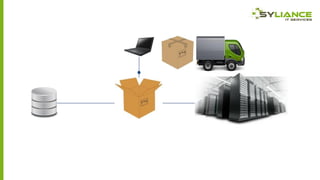
Preparing the environment
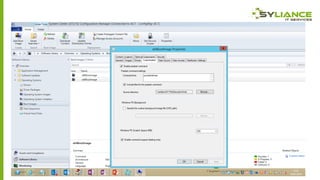
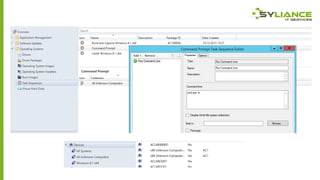
Demo
Demos
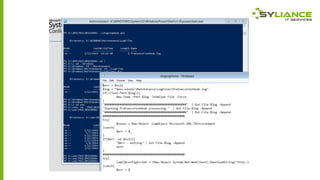
• The following demos contain plenty of powershell examples of
querying WMI, looking up datastores or SQL tables and
communicationg with Webservices and Orchestrator.
• The commands are included in slides after the demos.
Using Powershell to trigger local and
remote WMI queries and methods
Demo
Using Powershell to access a datastore
Demo
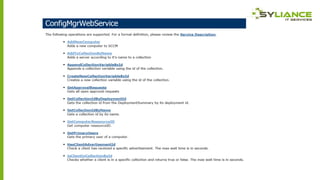
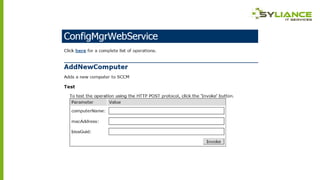
Using Powershell to trigger web services
Demo
Using Powershell to add data to tables
Demo
Using Powershell to trigger Orchestrator
runbooks
Demo
Powershell Commands – local WMI
• $macAddress = (gwmi -Namespace rootcimv2 -Class
Win32_NetworkAdapterConfiguration -Filter "ipenabled =
'true'").MACAddress
• $smBIOSGUID = (gwmi -Namespace rootcimv2 -Class
Win32_ComputerSystemProduct).UUID
Powershell Commands – lookup xml
• [xml]$configScript = (New-Object
System.Net.WebClient).DownloadString("http://server:86/filena
me.xml")
• $dhcpServer = $configScript.Config.dhcpServer
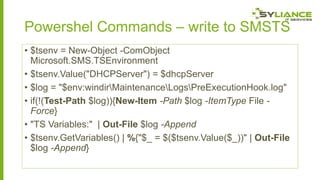
Powershel Commands – write to SMSTS
• $tsenv = New-Object -ComObject
Microsoft.SMS.TSEnvironment
• $tsenv.Value("DHCPServer") = $dhcpServer
• $log = "$env:windirMaintenanceLogsPreExecutionHook.log"
• if(!(Test-Path $log)){New-Item -Path $log -ItemType File Force}
• "TS Variables:" | Out-File $log -Append
• $tsenv.GetVariables() | %{"$_ = $($tsenv.Value($_))" | Out-File
$log -Append}
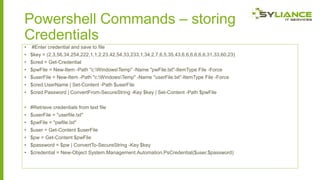
Powershell Commands – storing
Credentials
•

#Enter credential and save to file

• $key = (2,3,56,34,254,222,1,1,2,23,42,54,33,233,1,34,2,7,6,5,35,43,6,6,6,6,6,6,31,33,60,23)
• $cred = Get-Credential
• $pwFile = New-Item -Path "c:WindowsTemp" -Name "pwFile.txt"-ItemType File -Force
• $userFile = New-Item -Path "c:WindowsTemp" -Name "userFile.txt"-ItemType File -Force

• $cred.UserName | Set-Content -Path $userFile
• $cred.Password | ConvertFrom-SecureString -Key $key | Set-Content -Path $pwFile
• #Retrieve credentials from text file
• $userFile = "userfile.txt"
• $pwFile = "pwfile.txt"
• $user = Get-Content $userFile
• $pw = Get-Content $pwFile
• $password = $pw | ConvertTo-SecureString -Key $key

• $credential = New-Object System.Management.Automation.PsCredential($user,$password)
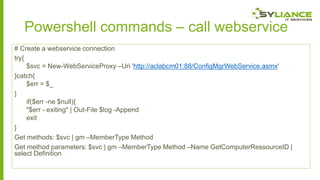
Powershell commands – call webservice
# Create a webservice connection
try{
$svc = New-WebServiceProxy –Uri 'http://aclabcm01:88/ConfigMgrWebService.asmx'
}catch{
$err = $_
}
if($err -ne $null){
"$err - exiting" | Out-File $log -Append
exit
}
Get methods: $svc | gm –MemberType Method
Get method parameters: $svc | gm –MemberType Method –Name GetComputerRessourceID |
select Definition
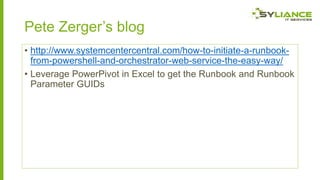
Pete Zerger’s blog
• http://www.systemcentercentral.com/how-to-initiate-a-runbookfrom-powershell-and-orchestrator-web-service-the-easy-way/
• Leverage PowerPivot in Excel to get the Runbook and Runbook
Parameter GUIDs
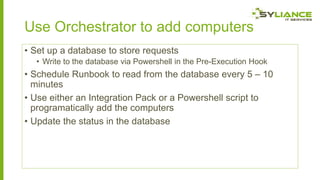
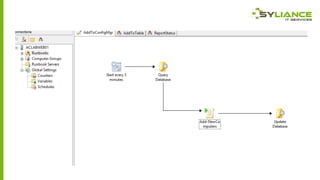
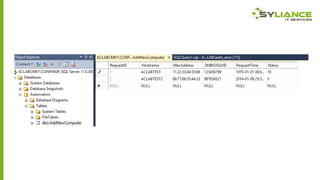
Use Orchestrator to add computers
• Set up a database to store requests
• Write to the database via Powershell in the Pre-Execution Hook

• Schedule Runbook to read from the database every 5 – 10
minutes
• Use either an Integration Pack or a Powershell script to
programatically add the computers
• Update the status in the database
What can we automate after OSD?
• Configuration post-OSD of a computer is by design carried out by
ConfigMgr
• What cannot be accomplished in the TS can be deployed as configuration
settings in a baseline, or installed as an application
• Triggering post-install tasks really only affects VDI situations where the
ConfigMgr client may be removed after staging
• SMSTSPostAction:

• C:Windowsccmsetupccmsetup.exe /uninstall
• Only one command possible
• postConfig.ps1
• Wrap commands like ccmsetup uninstall in a script

• Other actions
•
•
•
•
•

Prepare disk for Hyper-V
Citrix PVS prepare machine for P2V
XenDesktop prepare disk as master
Other third party virtualisation products
Remove from domain
Questions & Answers
Thank you!
Kontakt aufnehme
• www.configmgr.ch
• andrewdcraig.wordpress.com
• Twitter: @mracraig

Automating OSD and Post-OSD Configuration with Powershell and Orchestrator

  • 1.
  • 2.
    Automating OSD andPostOSD Configuration with Powershell and Orchestrator Triggering Runbooks and Webservices with Powershell in Pre- and Post-Execution to conform with Asset Details in the CMDB, allowing complex zero touch deployments throughout the Desktop life cycle.
  • 4.
  • 7.
    Demos • The followingdemos contain plenty of powershell examples of querying WMI, looking up datastores or SQL tables and communicationg with Webservices and Orchestrator. • The commands are included in slides after the demos.
  • 8.
    Using Powershell totrigger local and remote WMI queries and methods Demo
  • 10.
    Using Powershell toaccess a datastore Demo
  • 11.
    Using Powershell totrigger web services Demo
  • 12.
    Using Powershell toadd data to tables Demo
  • 13.
    Using Powershell totrigger Orchestrator runbooks Demo
  • 14.
    Powershell Commands –local WMI • $macAddress = (gwmi -Namespace rootcimv2 -Class Win32_NetworkAdapterConfiguration -Filter "ipenabled = 'true'").MACAddress • $smBIOSGUID = (gwmi -Namespace rootcimv2 -Class Win32_ComputerSystemProduct).UUID
  • 15.
    Powershell Commands –lookup xml • [xml]$configScript = (New-Object System.Net.WebClient).DownloadString("http://server:86/filena me.xml") • $dhcpServer = $configScript.Config.dhcpServer
  • 16.
    Powershel Commands –write to SMSTS • $tsenv = New-Object -ComObject Microsoft.SMS.TSEnvironment • $tsenv.Value("DHCPServer") = $dhcpServer • $log = "$env:windirMaintenanceLogsPreExecutionHook.log" • if(!(Test-Path $log)){New-Item -Path $log -ItemType File Force} • "TS Variables:" | Out-File $log -Append • $tsenv.GetVariables() | %{"$_ = $($tsenv.Value($_))" | Out-File $log -Append}
  • 17.
    Powershell Commands –storing Credentials • #Enter credential and save to file • $key = (2,3,56,34,254,222,1,1,2,23,42,54,33,233,1,34,2,7,6,5,35,43,6,6,6,6,6,6,31,33,60,23) • $cred = Get-Credential • $pwFile = New-Item -Path "c:WindowsTemp" -Name "pwFile.txt"-ItemType File -Force • $userFile = New-Item -Path "c:WindowsTemp" -Name "userFile.txt"-ItemType File -Force • $cred.UserName | Set-Content -Path $userFile • $cred.Password | ConvertFrom-SecureString -Key $key | Set-Content -Path $pwFile • #Retrieve credentials from text file • $userFile = "userfile.txt" • $pwFile = "pwfile.txt" • $user = Get-Content $userFile • $pw = Get-Content $pwFile • $password = $pw | ConvertTo-SecureString -Key $key • $credential = New-Object System.Management.Automation.PsCredential($user,$password)
  • 20.
    Powershell commands –call webservice # Create a webservice connection try{ $svc = New-WebServiceProxy –Uri 'http://aclabcm01:88/ConfigMgrWebService.asmx' }catch{ $err = $_ } if($err -ne $null){ "$err - exiting" | Out-File $log -Append exit } Get methods: $svc | gm –MemberType Method Get method parameters: $svc | gm –MemberType Method –Name GetComputerRessourceID | select Definition
  • 21.
    Pete Zerger’s blog •http://www.systemcentercentral.com/how-to-initiate-a-runbookfrom-powershell-and-orchestrator-web-service-the-easy-way/ • Leverage PowerPivot in Excel to get the Runbook and Runbook Parameter GUIDs
  • 22.
    Use Orchestrator toadd computers • Set up a database to store requests • Write to the database via Powershell in the Pre-Execution Hook • Schedule Runbook to read from the database every 5 – 10 minutes • Use either an Integration Pack or a Powershell script to programatically add the computers • Update the status in the database
  • 25.
    What can weautomate after OSD? • Configuration post-OSD of a computer is by design carried out by ConfigMgr • What cannot be accomplished in the TS can be deployed as configuration settings in a baseline, or installed as an application • Triggering post-install tasks really only affects VDI situations where the ConfigMgr client may be removed after staging • SMSTSPostAction: • C:Windowsccmsetupccmsetup.exe /uninstall • Only one command possible • postConfig.ps1 • Wrap commands like ccmsetup uninstall in a script • Other actions • • • • • Prepare disk for Hyper-V Citrix PVS prepare machine for P2V XenDesktop prepare disk as master Other third party virtualisation products Remove from domain
  • 26.
  • 27.
    Kontakt aufnehme • www.configmgr.ch •andrewdcraig.wordpress.com • Twitter: @mracraig