Dance for the puppet
master
An introduction to Puppet
Michael Peacock
So, what is puppet
Provisioning tool
  “Open source configuration management
  tool”
Used to automate server management
  Configuration
  Installs & upgrades
  etc
Internal development team presentation

          Ground Six Limited
Idempotent
Can be ran multiple times without changing the
server (unless the configuration changes)
Instead of doing things, it checks or ensures
things:
 Ensuring a package is installed only installs it if
 it hasn’t been installed. Execs only run if their
 create file isn’t found (and puppet doesn’t
 think they have been ran)
Configuration within
Vagrant

Tell puppet to run
Tell it where the manifests live
Tell it the default manifest
Tell it where modules live
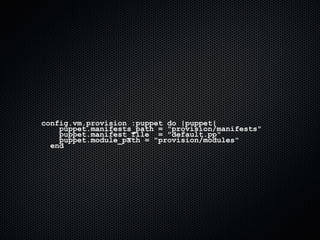
config.vm.provision :puppet do |puppet|
    puppet.manifests_path = "provision/manifests"
    puppet.manifest_file = "default.pp"
    puppet.module_path = "provision/modules"
  end
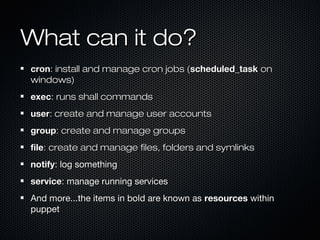
What can it do?
cron: install and manage cron jobs (scheduled_task on
windows)
exec: runs shall commands
user: create and manage user accounts
group: create and manage groups
file: create and manage files, folders and symlinks
notify: log something
service: manage running services
And more...the items in bold are known as resources within
puppet
Require
Many / all puppet options support a “require”
configuration
Defines other puppet tasks which must have
been successfully checked / executed before
this can be ran
 We only want to install packages once we
 have updated aptitude
 We only want to install MySQL drivers once
 we have the MySQL client/server installed
Require example


require => [ Package['mysql-client'], Package['mysql-server'] ]


   notice when referencing other puppet
   configurations, the resource type is capitalised
exec
command: command (including full path unless path
is also defined) to be executed. The “name” will be
used if omitted
user & group: to run the command as
create: a file that the command creates. If found,
the exec is not run
cwd: directory to run the command from
path: if full path for command isn’t supplied, path
must point to location of the command
exec: a note

 We create lock files in some of our exec
commands to prevent repeated execution,
 e.g. after installing the default database,
download something or run anything which
           can only be ran once.
exec: example
exec{ "create-db":
           command => '/bin/gunzip -c
/vagrant/database/default.sql.gz > db.sql &&
/usr/bin/mysql < db.sql && /bin/rm db.sql &&
/bin/touch /vagrant/mysqlimport.lock',
      require => [ Package['mysql-client'],
Package['mysql-server'] ],
      creates => "/vagrant/mysqlimport.lock",
      timeout => 0
    }
exec: another example
exec{ "compose":
          command => '/bin/rm -rfv /vagrant/vendor/* && /bin/rm
-f /vagrant/composer.lock && /usr/bin/curl -s
http://getcomposer.org/installer | /usr/bin/php -- --install-
dir=/vagrant && cd /vagrant && /usr/bin/php
/vagrant/composer.phar install',
          require => [ Package['curl'], Package['git-core'] ],
          creates => "/vagrant/composer.lock",
     timeout => 0
     }
exec: what we use it for

Installing the default MySQL database content
Install pear projects
Note: we should probably use or write a puppet
module to install pear projects we need, our
approach is a bit of a hack
subscribe & refreshonly
Some commands need to be ran periodically after
other things have ran
  More so the case when puppet manages
  existing infrastructure (using it to manage whats
  already on a machine and installing new things)
subscribe: defines other events which should cause the
task to run (like require, but refreshes the task)
refreshonly: instructs the task to only run when the other
tasks are completed
Installing software


Package “type”
We need to apt-get update first...
We want to ensure some of our installed
software is running
Update aptitude


  exec { 'apt-get   update':
       command =>   '/usr/bin/apt-get update',
       require =>   Exec['preparenetworking'],
       timeout =>   0
       }
Install package
We just need to ensure the package is present


       package { "apache2":
           ensure => present,
           require => Exec['apt-get update']
         }
Run the service


    service { "apache2":
        ensure => running,
        require => Package['apache2']
      }
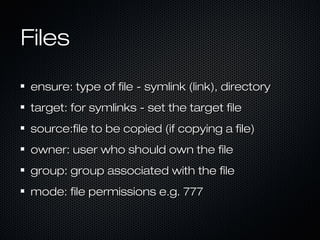
Files

ensure: type of file - symlink (link), directory
target: for symlinks - set the target file
source:file to be copied (if copying a file)
owner: user who should own the file
group: group associated with the file
mode: file permissions e.g. 777
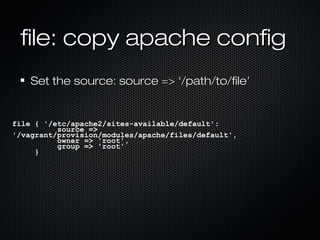
file: copy apache config
    Set the source: source => ‘/path/to/file’


file { '/etc/apache2/sites-available/default':
          source =>
'/vagrant/provision/modules/apache/files/default',
          owner => 'root',
          group => 'root'
     }
file: create a symlink
ensure => ‘link’


        file { '/var/www/vendor':
                ensure => 'link',
                target => '/vagrant/vendor',
                require => Package['apache2']
        }
file: create a folder

 ensure => ‘directory’

       file{ "/var/www/uploads":
               ensure => "directory",
               owner => "www-data",
               group => "www-data",
               mode   => 777,
       }
file: create several
  folders

$cache_directories = [ "/var/www/cache/", "/var/www/cache/pages",
                  "/var/www/cache/routes",
"/var/www/cache/templates",
                ]
    file { $cache_directories:
        ensure => "directory",
        owner => "www-data",
        group => "www-data",
        mode   => 777,
    }
Add a cron

command: the command to run
user: user to run the cron as
hour, minute, month, monthday, weekday
 can be defined as hour => 1 or
 hour => [1,2,3,5] or
 hour => [1-10]
Create a user

     user { "developer":
               ensure => "present",
               gid => "wheel",
               shell => "/bin/bash",
               home =>
     "/home/developer",
               managehome => true,
               password =>
     "passwordtest",
               require =>
     Group["wheel"]
          }
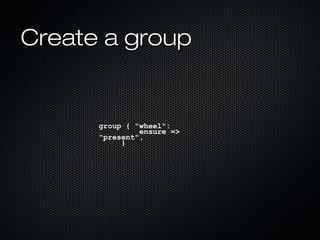
Create a group


      group { "wheel":
               ensure =>
      "present",
           }
Make the group a
sudoer
   We probably want to stop this being ran
   multiple times!


exec { "/bin/echo "%wheel ALL=(ALL) ALL" >> /etc/sudoers":
         require => Group["wheel"]
     }
Stages
Running things in a specific order can often be
important
Require often makes this easy for us, however
Exec’s don’t seem to use this reliably
We can define “stages” with a specific order.
We can then put puppet modules into stages
Default stage is Stage[main]
Stages example


   stage { 'first': before => Stage[main] }
   class {'apache': stage => first}
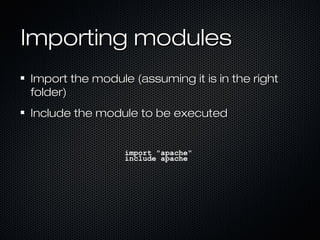
Importing modules
Import the module (assuming it is in the right
folder)
Include the module to be executed


                 import "apache"
                 include apache
Image Credits


http://www.flickr.com/photos/stephen_wong/5
60079730/

Dance for the puppet master: G6 Tech Talk

  • 1.
    Dance for thepuppet master An introduction to Puppet Michael Peacock
  • 2.
    So, what ispuppet Provisioning tool “Open source configuration management tool” Used to automate server management Configuration Installs & upgrades etc
  • 3.
    Internal development teampresentation Ground Six Limited
  • 4.
    Idempotent Can be ranmultiple times without changing the server (unless the configuration changes) Instead of doing things, it checks or ensures things: Ensuring a package is installed only installs it if it hasn’t been installed. Execs only run if their create file isn’t found (and puppet doesn’t think they have been ran)
  • 5.
    Configuration within Vagrant Tell puppetto run Tell it where the manifests live Tell it the default manifest Tell it where modules live
  • 6.
    config.vm.provision :puppet do|puppet| puppet.manifests_path = "provision/manifests" puppet.manifest_file = "default.pp" puppet.module_path = "provision/modules" end
  • 7.
    What can itdo? cron: install and manage cron jobs (scheduled_task on windows) exec: runs shall commands user: create and manage user accounts group: create and manage groups file: create and manage files, folders and symlinks notify: log something service: manage running services And more...the items in bold are known as resources within puppet
  • 8.
    Require Many / allpuppet options support a “require” configuration Defines other puppet tasks which must have been successfully checked / executed before this can be ran We only want to install packages once we have updated aptitude We only want to install MySQL drivers once we have the MySQL client/server installed
  • 9.
    Require example require =>[ Package['mysql-client'], Package['mysql-server'] ] notice when referencing other puppet configurations, the resource type is capitalised
  • 10.
    exec command: command (includingfull path unless path is also defined) to be executed. The “name” will be used if omitted user & group: to run the command as create: a file that the command creates. If found, the exec is not run cwd: directory to run the command from path: if full path for command isn’t supplied, path must point to location of the command
  • 11.
    exec: a note We create lock files in some of our exec commands to prevent repeated execution, e.g. after installing the default database, download something or run anything which can only be ran once.
  • 12.
    exec: example exec{ "create-db": command => '/bin/gunzip -c /vagrant/database/default.sql.gz > db.sql && /usr/bin/mysql < db.sql && /bin/rm db.sql && /bin/touch /vagrant/mysqlimport.lock', require => [ Package['mysql-client'], Package['mysql-server'] ], creates => "/vagrant/mysqlimport.lock", timeout => 0 }
  • 13.
    exec: another example exec{"compose": command => '/bin/rm -rfv /vagrant/vendor/* && /bin/rm -f /vagrant/composer.lock && /usr/bin/curl -s http://getcomposer.org/installer | /usr/bin/php -- --install- dir=/vagrant && cd /vagrant && /usr/bin/php /vagrant/composer.phar install', require => [ Package['curl'], Package['git-core'] ], creates => "/vagrant/composer.lock", timeout => 0 }
  • 14.
    exec: what weuse it for Installing the default MySQL database content Install pear projects Note: we should probably use or write a puppet module to install pear projects we need, our approach is a bit of a hack
  • 15.
    subscribe & refreshonly Somecommands need to be ran periodically after other things have ran More so the case when puppet manages existing infrastructure (using it to manage whats already on a machine and installing new things) subscribe: defines other events which should cause the task to run (like require, but refreshes the task) refreshonly: instructs the task to only run when the other tasks are completed
  • 16.
    Installing software Package “type” Weneed to apt-get update first... We want to ensure some of our installed software is running
  • 17.
    Update aptitude exec { 'apt-get update': command => '/usr/bin/apt-get update', require => Exec['preparenetworking'], timeout => 0 }
  • 18.
    Install package We justneed to ensure the package is present package { "apache2": ensure => present, require => Exec['apt-get update'] }
  • 19.
    Run the service service { "apache2": ensure => running, require => Package['apache2'] }
  • 20.
    Files ensure: type offile - symlink (link), directory target: for symlinks - set the target file source:file to be copied (if copying a file) owner: user who should own the file group: group associated with the file mode: file permissions e.g. 777
  • 21.
    file: copy apacheconfig Set the source: source => ‘/path/to/file’ file { '/etc/apache2/sites-available/default': source => '/vagrant/provision/modules/apache/files/default', owner => 'root', group => 'root' }
  • 22.
    file: create asymlink ensure => ‘link’ file { '/var/www/vendor': ensure => 'link', target => '/vagrant/vendor', require => Package['apache2'] }
  • 23.
    file: create afolder ensure => ‘directory’ file{ "/var/www/uploads": ensure => "directory", owner => "www-data", group => "www-data", mode => 777, }
  • 24.
    file: create several folders $cache_directories = [ "/var/www/cache/", "/var/www/cache/pages", "/var/www/cache/routes", "/var/www/cache/templates", ] file { $cache_directories: ensure => "directory", owner => "www-data", group => "www-data", mode => 777, }
  • 25.
    Add a cron command:the command to run user: user to run the cron as hour, minute, month, monthday, weekday can be defined as hour => 1 or hour => [1,2,3,5] or hour => [1-10]
  • 26.
    Create a user user { "developer": ensure => "present", gid => "wheel", shell => "/bin/bash", home => "/home/developer", managehome => true, password => "passwordtest", require => Group["wheel"] }
  • 27.
    Create a group group { "wheel": ensure => "present", }
  • 28.
    Make the groupa sudoer We probably want to stop this being ran multiple times! exec { "/bin/echo "%wheel ALL=(ALL) ALL" >> /etc/sudoers": require => Group["wheel"] }
  • 29.
    Stages Running things ina specific order can often be important Require often makes this easy for us, however Exec’s don’t seem to use this reliably We can define “stages” with a specific order. We can then put puppet modules into stages Default stage is Stage[main]
  • 30.
    Stages example stage { 'first': before => Stage[main] } class {'apache': stage => first}
  • 31.
    Importing modules Import themodule (assuming it is in the right folder) Include the module to be executed import "apache" include apache
  • 32.