



#AZUREBOOTCAMP
Analyzing & Visualizing
Cloud Data With Power BI
Presented By : Richard Harbridge (@Rharbridge)
RICHARD
HARBRIDGE
My twitter handle is @RHarbridge, blog is http://RHarbridge.com, and I work at
SPEAKER | AUTHOR | SUPER FRIENDLY
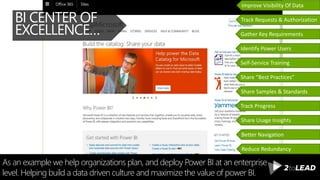
As an example we help organizations plan, and deploy Power BI at an enterprise
level. Helping build a data driven culture and maximize the value of power BI.
BI CENTER OF
EXCELLENCE… Gather Key Requirements
Identify Power Users
Self-Service Training
Share “Best Practices”
Share Samples & Standards
Track Progress
Share Usage Insights
Track Requests & Authorization
Improve Visibility Of Data
Reduce Redundancy
Better Navigation
RICHARD
HARBRIDGE
My twitter handle is @RHarbridge, blog is http://RHarbridge.com, and I work at
SPEAKER | AUTHOR | SUPER FRIENDLY
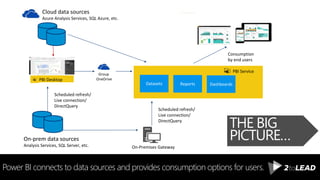
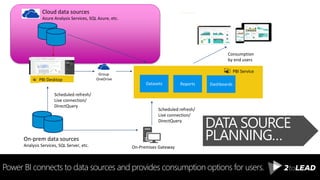
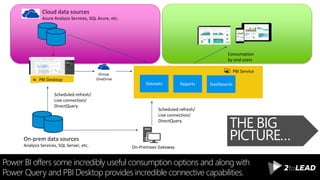
Power BI connects to data sources and provides consumption options for users.
THE BIG
PICTURE…
PBI Desktop
On-Premises Gateway
Scheduled refresh/
Live connection/
DirectQuery
Group
OneDrive
PBI Service
Datasets Reports Dashboards
Cloud data sources
Azure Analysis Services, SQL Azure, etc.
On-prem data sources
Analysis Services, SQL Server, etc.
Scheduled refresh/
Live connection/
DirectQuery
Consume
Consumption
by end users
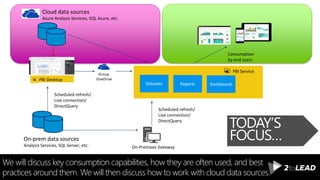
We will discuss key consumption capabilities, how they are often used, and best
practices around them. We will then discuss how to work with cloud data sources.
TODAY’S
FOCUS…
PBI Desktop
On-Premises Gateway
Scheduled refresh/
Live connection/
DirectQuery
Group
OneDrive
PBI Service
Datasets Reports Dashboards
Cloud data sources
Azure Analysis Services, SQL Azure, etc.
On-prem data sources
Analysis Services, SQL Server, etc.
Scheduled refresh/
Live connection/
DirectQuery
Consumption
by end users
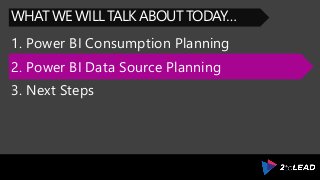
1. Power BI Consumption Planning
WHAT WE WILL TALK ABOUT TODAY…
2. Power BI Data Source Planning
3. Next Steps
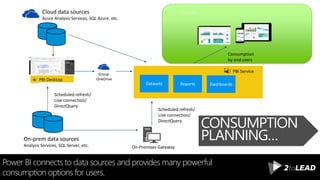
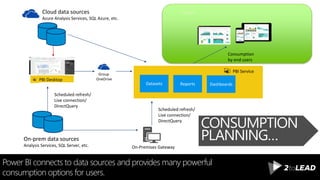
Power BI connects to data sources and provides many powerful
consumption options for users.
CONSUMPTION
PLANNING…
PBI Desktop
On-Premises Gateway
Scheduled refresh/
Live connection/
DirectQuery
Group
OneDrive
PBI Service
Datasets Reports Dashboards
Cloud data sources
Azure Analysis Services, SQL Azure, etc.
On-prem data sources
Analysis Services, SQL Server, etc.
Scheduled refresh/
Live connection/
DirectQuery
Consume
Consumption
by end users
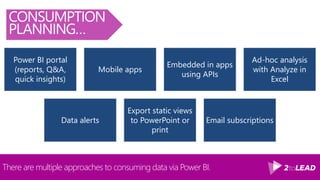
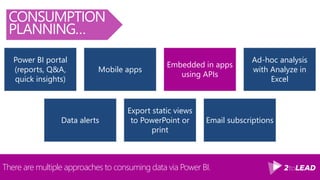
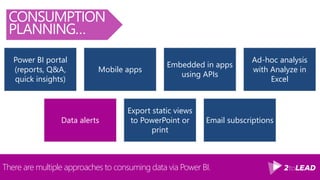
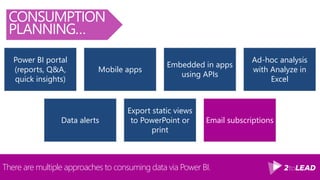
There are multiple approaches to consuming data via Power BI.
CONSUMPTION
PLANNING…
Power BI portal
(reports, Q&A,
quick insights)
Mobile apps
Embedded in apps
using APIs
Ad-hoc analysis
with Analyze in
Excel
Data alerts
Export static views
to PowerPoint or
print
Email subscriptions
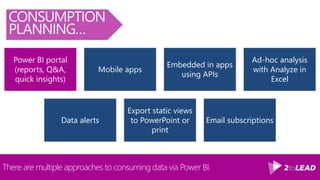
There are multiple approaches to consuming data via Power BI.
CONSUMPTION
PLANNING…
Power BI portal
(reports, Q&A,
quick insights)
Mobile apps
Embedded in apps
using APIs
Ad-hoc analysis
with Analyze in
Excel
Data alerts
Export static views
to PowerPoint or
print
Email subscriptions
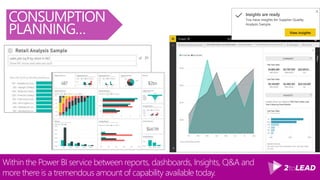
Within the Power BI service between reports, dashboards, Insights, Q&A and
more there is a tremendous amount of capability available today.
CONSUMPTION
PLANNING…
There are multiple approaches to consuming data via Power BI.
CONSUMPTION
PLANNING…
Power BI portal
(reports, Q&A,
quick insights)
Mobile apps
Embedded in apps
using APIs
Ad-hoc analysis
with Analyze in
Excel
Data alerts
Export static views
to PowerPoint or
print
Email subscriptions
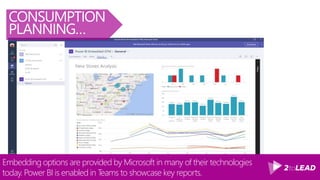
Embedding options are provided by Microsoft in many of their technologies
today. Power BI is enabled in Teams to showcase key reports.
CONSUMPTION
PLANNING…
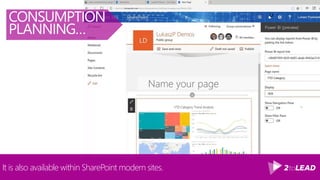
It is also available within SharePoint modern sites.
CONSUMPTION
PLANNING…
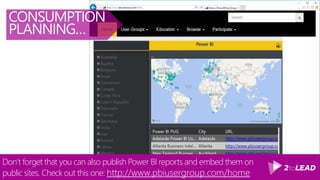
Don’t forget that you can also publish Power BI reports and embed them on
public sites. Check out this one: http://www.pbiusergroup.com/home
CONSUMPTION
PLANNING…
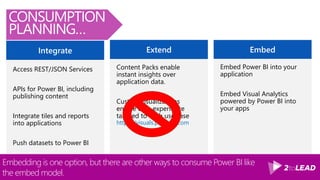
ExtendIntegrate
Access REST/JSON Services
APIs for Power BI, including
publishing content
Integrate tiles and reports
into applications
Push datasets to Power BI
Content Packs enable
instant insights over
application data.
Custom visualizations
enable data experience
tailored to each use case
https://visuals.powerbi.com
Embed
Embed Power BI into your
application
Embed Visual Analytics
powered by Power BI into
your apps
Embedding is one option, but there are other ways to consume Power BI like
the embed model.
CONSUMPTION
PLANNING…
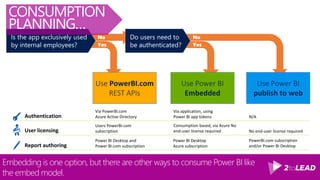
Embedding is one option, but there are other ways to consume Power BI like
the embed model.
Authentication
Use PowerBI.com
REST APIs
User licensing
Report authoring
Via PowerBI.com
Azure Active Directory
Via application, using
Power BI app tokens N/A
Users PowerBI.com
subscription
Consumption based, via Azure No
end-user license required No end-user license required
Power BI Desktop and
Power BI.com subscription
Power BI Desktop
Azure subscription
PowerBI.com subscription
and/or Power BI Desktop
Is the app exclusively used
by internal employees?
Do users need to
be authenticated?Yes Yes
No No
Use Power BI
publish to web
Use Power BI
Embedded
CONSUMPTION
PLANNING…
There are multiple approaches to consuming data via Power BI.
CONSUMPTION
PLANNING…
Power BI portal
(reports, Q&A,
quick insights)
Mobile apps
Embedded in apps
using APIs
Ad-hoc analysis
with Analyze in
Excel
Data alerts
Export static views
to PowerPoint or
print
Email subscriptions
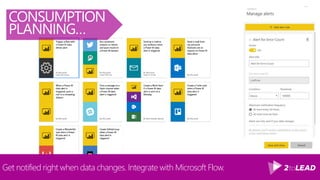
Get notified right when data changes. Integrate with Microsoft Flow.
CONSUMPTION
PLANNING…
There are multiple approaches to consuming data via Power BI.
CONSUMPTION
PLANNING…
Power BI portal
(reports, Q&A,
quick insights)
Mobile apps
Embedded in apps
using APIs
Ad-hoc analysis
with Analyze in
Excel
Data alerts
Export static views
to PowerPoint or
print
Email subscriptions
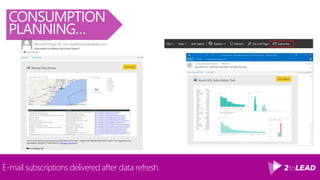
E-mail subscriptions delivered after data refresh.
CONSUMPTION
PLANNING…
Power BI connects to data sources and provides many powerful
consumption options for users.
PBI Desktop
On-Premises Gateway
Scheduled refresh/
Live connection/
DirectQuery
Group
OneDrive
PBI Service
Datasets Reports Dashboards
Cloud data sources
Azure Analysis Services, SQL Azure, etc.
On-prem data sources
Analysis Services, SQL Server, etc.
Scheduled refresh/
Live connection/
DirectQuery
Consume
Consumption
by end users
CONSUMPTION
PLANNING…
1. Power BI Consumption Planning
WHAT WE WILL TALK ABOUT TODAY…
2. Power BI Data Source Planning
3. Next Steps
1. Power BI Consumption Planning
WHAT WE WILL TALK ABOUT TODAY…
2. Power BI Data Source Planning
3. Next Steps
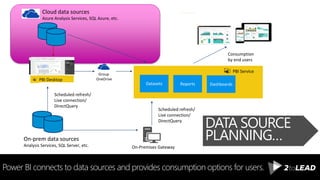
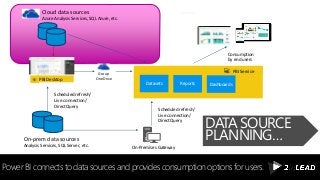
Power BI connects to data sources and provides consumption options for users.
DATA SOURCE
PLANNING…
PBI Desktop
On-Premises Gateway
Scheduled refresh/
Live connection/
DirectQuery
Group
OneDrive
PBI Service
Datasets Reports Dashboards
Cloud data sources
Azure Analysis Services, SQL Azure, etc.
On-prem data sources
Analysis Services, SQL Server, etc.
Scheduled refresh/
Live connection/
DirectQuery
Consume
Consumption
by end users
There are many possible data sources for Power BI. Let’s focus on the Cloud sources
based on Azure. This is not a comprehensive list, but a good summary of key ones.
DATA SOURCE
PLANNING…
This is your curated and managed data layer.Azure SQL IaaS, Azure SQL
DW or Azure SQL Service
This is your semantic layer. Remove calculation development, model tasks away
from user responsibility, etc.Azure Analysis Services
This is for real-time reporting of streaming data (typically via IoT).Azure Event Hub & Stream
Analytics
This means R models can be automated and become part of the data production
process that is ultimately consumed by Power BI.
Azure Machine Learning &
Cortana Analytics
This can be especially helpful as a Analytics Sandbox where your users may not
know ahead of time the questions they would like to ask of the data.
Azure Data Lake & Azure
HDInsight
This can help users find quality data sources to use based on IT setting up the Azure
Data Catalog and users maintaining the metadata around tables and columns.
Azure Data Catalog
Simple
Moderate
Complex
Model size and
complexity
Active concurrent users
Data update frequency
Query latency
Number of queries
time
timetime
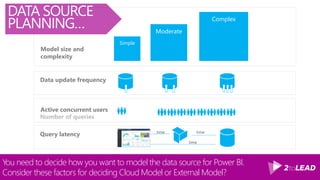
You need to decide how you want to model the data source for Power BI.
Consider these factors for deciding Cloud Model or External Model?
DATA SOURCE
PLANNING…
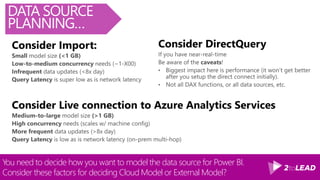
You need to decide how you want to model the data source for Power BI.
Consider these factors for deciding Cloud Model or External Model?
DATA SOURCE
PLANNING…
Consider Import:
Consider Live connection to Azure Analytics Services
Consider DirectQuery
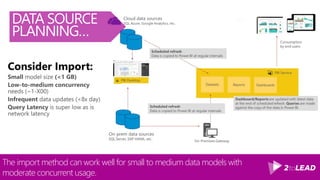
The import method can work well for small to medium data models with
moderate concurrent usage.
DATA SOURCE
PLANNING…
Consider Import:
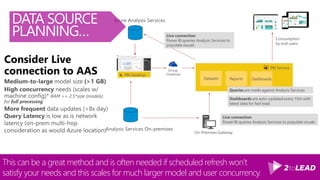
This can be a great method and is often needed if scheduled refresh won’t
satisfy your needs and this scales for much larger model and user concurrency.
DATA SOURCE
PLANNING…
Consider Live
connection to AAS
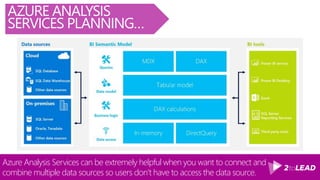
Azure Analysis Services can be extremely helpful when you want to connect and
combine multiple data sources so users don’t have to access the data source.
AZURE ANALYSIS
SERVICES PLANNING…
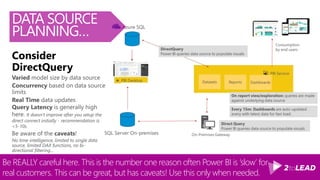
Be REALLY careful here. This is the number one reason often Power BI is ‘slow’ for
real customers. This can be great, but has caveats! Use this only when needed.
DATA SOURCE
PLANNING…
Consider
DirectQuery
Power BI connects to data sources and provides consumption options for users.
PBI Desktop
On-Premises Gateway
Scheduled refresh/
Live connection/
DirectQuery
Group
OneDrive
PBI Service
Datasets Reports Dashboards
Cloud data sources
Azure Analysis Services, SQL Azure, etc.
On-prem data sources
Analysis Services, SQL Server, etc.
Scheduled refresh/
Live connection/
DirectQuery
Consume
Consumption
by end users
DATA SOURCE
PLANNING…
1. Power BI Consumption Planning
WHAT WE WILL TALK ABOUT TODAY…
2. Power BI Data Source Planning
3. Next Steps
1. Power BI Consumption Planning
WHAT WE WILL TALK ABOUT TODAY…
2. Power BI Data Source Planning
3. Next Steps
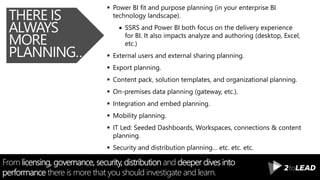
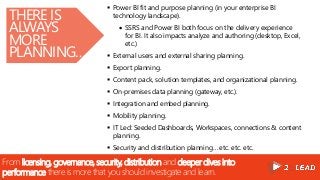
From licensing, governance, security, distribution and deeper dives into
performance there is more that you should investigate and learn.
THERE IS
ALWAYS
MORE
PLANNING…
 Power BI fit and purpose planning (in your enterprise BI
technology landscape).
 SSRS and Power BI both focus on the delivery experience
for BI. It also impacts analyze and authoring (desktop, Excel,
etc.)
 External users and external sharing planning.
 Export planning.
 Content pack, solution templates, and organizational planning.
 On-premises data planning (gateway, etc.).
 Integration and embed planning.
 Mobility planning.
 IT Led: Seeded Dashboards, Workspaces, connections & content
planning.
 Security and distribution planning… etc. etc. etc.
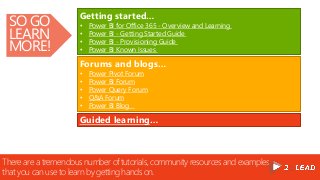
There are a tremendous number of tutorials, community resources and examples
that you can use to learn by getting hands on.
SO GO
LEARN
MORE!
Getting started…
• Power BI for Office 365 - Overview and Learning
• Power BI - Getting Started Guide
• Power BI - Provisioning Guide
• Power BI Known Issues
Forums and blogs…
• Power Pivot Forum
• Power BI Forum
• Power Query Forum
• Q&A Forum
• Power BI Blog
Guided learning…
Thank You!
Organizers,SponsorsandYouformakingthispossible.
100+AwesomePresentationsAt.. Slideshare.Net/RHarbridge
300+PagesOfWhitepapersAt.. 2toLead.com/Whitepapers
WhenToUseWhat.com Office365Intranets.com
Office365Metrics.com Office365Campaigns.com
Office365Extranets.com Office365Resources.com
Message Me On LinkedIn or Email Richard@2toLead.com
SPEAKER | AUTHOR | SUPER FRIENDLY
Twitter: @RHarbridge. More to come on our blog at http://2toLead.com.

Analyzing & Visualizing Cloud Data With Power BI

  • 1.
    #AZUREBOOTCAMP Analyzing & Visualizing CloudData With Power BI Presented By : Richard Harbridge (@Rharbridge)
  • 2.
    RICHARD HARBRIDGE My twitter handleis @RHarbridge, blog is http://RHarbridge.com, and I work at SPEAKER | AUTHOR | SUPER FRIENDLY
  • 3.
    As an examplewe help organizations plan, and deploy Power BI at an enterprise level. Helping build a data driven culture and maximize the value of power BI. BI CENTER OF EXCELLENCE… Gather Key Requirements Identify Power Users Self-Service Training Share “Best Practices” Share Samples & Standards Track Progress Share Usage Insights Track Requests & Authorization Improve Visibility Of Data Reduce Redundancy Better Navigation
  • 4.
    RICHARD HARBRIDGE My twitter handleis @RHarbridge, blog is http://RHarbridge.com, and I work at SPEAKER | AUTHOR | SUPER FRIENDLY
  • 5.
    Power BI connectsto data sources and provides consumption options for users. THE BIG PICTURE… PBI Desktop On-Premises Gateway Scheduled refresh/ Live connection/ DirectQuery Group OneDrive PBI Service Datasets Reports Dashboards Cloud data sources Azure Analysis Services, SQL Azure, etc. On-prem data sources Analysis Services, SQL Server, etc. Scheduled refresh/ Live connection/ DirectQuery Consume Consumption by end users
  • 6.
    We will discusskey consumption capabilities, how they are often used, and best practices around them. We will then discuss how to work with cloud data sources. TODAY’S FOCUS… PBI Desktop On-Premises Gateway Scheduled refresh/ Live connection/ DirectQuery Group OneDrive PBI Service Datasets Reports Dashboards Cloud data sources Azure Analysis Services, SQL Azure, etc. On-prem data sources Analysis Services, SQL Server, etc. Scheduled refresh/ Live connection/ DirectQuery Consumption by end users
  • 7.
    1. Power BIConsumption Planning WHAT WE WILL TALK ABOUT TODAY… 2. Power BI Data Source Planning 3. Next Steps
  • 8.
    Power BI connectsto data sources and provides many powerful consumption options for users. CONSUMPTION PLANNING… PBI Desktop On-Premises Gateway Scheduled refresh/ Live connection/ DirectQuery Group OneDrive PBI Service Datasets Reports Dashboards Cloud data sources Azure Analysis Services, SQL Azure, etc. On-prem data sources Analysis Services, SQL Server, etc. Scheduled refresh/ Live connection/ DirectQuery Consume Consumption by end users
  • 9.
    There are multipleapproaches to consuming data via Power BI. CONSUMPTION PLANNING… Power BI portal (reports, Q&A, quick insights) Mobile apps Embedded in apps using APIs Ad-hoc analysis with Analyze in Excel Data alerts Export static views to PowerPoint or print Email subscriptions
  • 10.
    There are multipleapproaches to consuming data via Power BI. CONSUMPTION PLANNING… Power BI portal (reports, Q&A, quick insights) Mobile apps Embedded in apps using APIs Ad-hoc analysis with Analyze in Excel Data alerts Export static views to PowerPoint or print Email subscriptions
  • 11.
    Within the PowerBI service between reports, dashboards, Insights, Q&A and more there is a tremendous amount of capability available today. CONSUMPTION PLANNING…
  • 12.
    There are multipleapproaches to consuming data via Power BI. CONSUMPTION PLANNING… Power BI portal (reports, Q&A, quick insights) Mobile apps Embedded in apps using APIs Ad-hoc analysis with Analyze in Excel Data alerts Export static views to PowerPoint or print Email subscriptions
  • 13.
    Embedding options areprovided by Microsoft in many of their technologies today. Power BI is enabled in Teams to showcase key reports. CONSUMPTION PLANNING…
  • 14.
    It is alsoavailable within SharePoint modern sites. CONSUMPTION PLANNING…
  • 15.
    Don’t forget thatyou can also publish Power BI reports and embed them on public sites. Check out this one: http://www.pbiusergroup.com/home CONSUMPTION PLANNING…
  • 16.
    ExtendIntegrate Access REST/JSON Services APIsfor Power BI, including publishing content Integrate tiles and reports into applications Push datasets to Power BI Content Packs enable instant insights over application data. Custom visualizations enable data experience tailored to each use case https://visuals.powerbi.com Embed Embed Power BI into your application Embed Visual Analytics powered by Power BI into your apps Embedding is one option, but there are other ways to consume Power BI like the embed model. CONSUMPTION PLANNING…
  • 17.
    Embedding is oneoption, but there are other ways to consume Power BI like the embed model. Authentication Use PowerBI.com REST APIs User licensing Report authoring Via PowerBI.com Azure Active Directory Via application, using Power BI app tokens N/A Users PowerBI.com subscription Consumption based, via Azure No end-user license required No end-user license required Power BI Desktop and Power BI.com subscription Power BI Desktop Azure subscription PowerBI.com subscription and/or Power BI Desktop Is the app exclusively used by internal employees? Do users need to be authenticated?Yes Yes No No Use Power BI publish to web Use Power BI Embedded CONSUMPTION PLANNING…
  • 18.
    There are multipleapproaches to consuming data via Power BI. CONSUMPTION PLANNING… Power BI portal (reports, Q&A, quick insights) Mobile apps Embedded in apps using APIs Ad-hoc analysis with Analyze in Excel Data alerts Export static views to PowerPoint or print Email subscriptions
  • 19.
    Get notified rightwhen data changes. Integrate with Microsoft Flow. CONSUMPTION PLANNING…
  • 20.
    There are multipleapproaches to consuming data via Power BI. CONSUMPTION PLANNING… Power BI portal (reports, Q&A, quick insights) Mobile apps Embedded in apps using APIs Ad-hoc analysis with Analyze in Excel Data alerts Export static views to PowerPoint or print Email subscriptions
  • 21.
    E-mail subscriptions deliveredafter data refresh. CONSUMPTION PLANNING…
  • 22.
    Power BI connectsto data sources and provides many powerful consumption options for users. PBI Desktop On-Premises Gateway Scheduled refresh/ Live connection/ DirectQuery Group OneDrive PBI Service Datasets Reports Dashboards Cloud data sources Azure Analysis Services, SQL Azure, etc. On-prem data sources Analysis Services, SQL Server, etc. Scheduled refresh/ Live connection/ DirectQuery Consume Consumption by end users CONSUMPTION PLANNING…
  • 23.
    1. Power BIConsumption Planning WHAT WE WILL TALK ABOUT TODAY… 2. Power BI Data Source Planning 3. Next Steps
  • 24.
    1. Power BIConsumption Planning WHAT WE WILL TALK ABOUT TODAY… 2. Power BI Data Source Planning 3. Next Steps
  • 25.
    Power BI connectsto data sources and provides consumption options for users. DATA SOURCE PLANNING… PBI Desktop On-Premises Gateway Scheduled refresh/ Live connection/ DirectQuery Group OneDrive PBI Service Datasets Reports Dashboards Cloud data sources Azure Analysis Services, SQL Azure, etc. On-prem data sources Analysis Services, SQL Server, etc. Scheduled refresh/ Live connection/ DirectQuery Consume Consumption by end users
  • 26.
    There are manypossible data sources for Power BI. Let’s focus on the Cloud sources based on Azure. This is not a comprehensive list, but a good summary of key ones. DATA SOURCE PLANNING… This is your curated and managed data layer.Azure SQL IaaS, Azure SQL DW or Azure SQL Service This is your semantic layer. Remove calculation development, model tasks away from user responsibility, etc.Azure Analysis Services This is for real-time reporting of streaming data (typically via IoT).Azure Event Hub & Stream Analytics This means R models can be automated and become part of the data production process that is ultimately consumed by Power BI. Azure Machine Learning & Cortana Analytics This can be especially helpful as a Analytics Sandbox where your users may not know ahead of time the questions they would like to ask of the data. Azure Data Lake & Azure HDInsight This can help users find quality data sources to use based on IT setting up the Azure Data Catalog and users maintaining the metadata around tables and columns. Azure Data Catalog
  • 27.
    Simple Moderate Complex Model size and complexity Activeconcurrent users Data update frequency Query latency Number of queries time timetime You need to decide how you want to model the data source for Power BI. Consider these factors for deciding Cloud Model or External Model? DATA SOURCE PLANNING…
  • 28.
    You need todecide how you want to model the data source for Power BI. Consider these factors for deciding Cloud Model or External Model? DATA SOURCE PLANNING… Consider Import: Consider Live connection to Azure Analytics Services Consider DirectQuery
  • 29.
    The import methodcan work well for small to medium data models with moderate concurrent usage. DATA SOURCE PLANNING… Consider Import:
  • 30.
    This can bea great method and is often needed if scheduled refresh won’t satisfy your needs and this scales for much larger model and user concurrency. DATA SOURCE PLANNING… Consider Live connection to AAS
  • 31.
    Azure Analysis Servicescan be extremely helpful when you want to connect and combine multiple data sources so users don’t have to access the data source. AZURE ANALYSIS SERVICES PLANNING…
  • 32.
    Be REALLY carefulhere. This is the number one reason often Power BI is ‘slow’ for real customers. This can be great, but has caveats! Use this only when needed. DATA SOURCE PLANNING… Consider DirectQuery
  • 33.
    Power BI connectsto data sources and provides consumption options for users. PBI Desktop On-Premises Gateway Scheduled refresh/ Live connection/ DirectQuery Group OneDrive PBI Service Datasets Reports Dashboards Cloud data sources Azure Analysis Services, SQL Azure, etc. On-prem data sources Analysis Services, SQL Server, etc. Scheduled refresh/ Live connection/ DirectQuery Consume Consumption by end users DATA SOURCE PLANNING…
  • 34.
    1. Power BIConsumption Planning WHAT WE WILL TALK ABOUT TODAY… 2. Power BI Data Source Planning 3. Next Steps
  • 35.
    1. Power BIConsumption Planning WHAT WE WILL TALK ABOUT TODAY… 2. Power BI Data Source Planning 3. Next Steps
  • 36.
    From licensing, governance,security, distribution and deeper dives into performance there is more that you should investigate and learn. THERE IS ALWAYS MORE PLANNING…  Power BI fit and purpose planning (in your enterprise BI technology landscape).  SSRS and Power BI both focus on the delivery experience for BI. It also impacts analyze and authoring (desktop, Excel, etc.)  External users and external sharing planning.  Export planning.  Content pack, solution templates, and organizational planning.  On-premises data planning (gateway, etc.).  Integration and embed planning.  Mobility planning.  IT Led: Seeded Dashboards, Workspaces, connections & content planning.  Security and distribution planning… etc. etc. etc.
  • 37.
    There are atremendous number of tutorials, community resources and examples that you can use to learn by getting hands on. SO GO LEARN MORE! Getting started… • Power BI for Office 365 - Overview and Learning • Power BI - Getting Started Guide • Power BI - Provisioning Guide • Power BI Known Issues Forums and blogs… • Power Pivot Forum • Power BI Forum • Power Query Forum • Q&A Forum • Power BI Blog Guided learning…
  • 38.
    Thank You! Organizers,SponsorsandYouformakingthispossible. 100+AwesomePresentationsAt.. Slideshare.Net/RHarbridge 300+PagesOfWhitepapersAt..2toLead.com/Whitepapers WhenToUseWhat.com Office365Intranets.com Office365Metrics.com Office365Campaigns.com Office365Extranets.com Office365Resources.com Message Me On LinkedIn or Email Richard@2toLead.com SPEAKER | AUTHOR | SUPER FRIENDLY Twitter: @RHarbridge. More to come on our blog at http://2toLead.com.

Editor's Notes

  • #4 Self-service supportive BI technologies like Power BI are at their core, about enabling users in an organization to better develop, or accelerate their insight, sharing and data exploration. One of the best things to start with is to create a center of excellence and BI/Data community within the organization. This can greatly help in number of ways: This can be a great way to gather key requirements, and interested users or existing Power Users. This can be a great way to establish a location and place for self-service training and further enablement. This can be a great way to share ‘best practices’, great samples and standards and to align Governance of data efforts with broader organizational awareness. This can be a great way to track (in a variety of ways) the progress of the organization and as the organization matures provide more data services from IT to the organization and users. We often recommend providing (anonymized) Power BI audit based reporting to help others understand how technologies are being used today. This can be a great way to track authorizations, requests, or approvals for access to certain enterprise data sets. This can be a great way to also enable others to know what enterprise data sets are available with appropriate needs and support (visibility to reduce redundancy or inaccurate data reporting in various organizational, departmental or functional team reports). This can be a great way to find excellent report examples, or reports (excel based in most cases) that the organizational IT/data team should help scale, improve or make a new enterprise data set or report for broader distribution. This can be a great way to improve navigation, discovery and productivity around viewing or getting insights on key data. As you create more dashboards, reports, query options, and connections it will be important for there to be a way to successfully navigate these (from Excel reports in libraries, to Power BI dashboards, to SSRS reports or other solutions in play within the organization).
  • #8 Remove Demos. Why Are Organizations Investing In The Cloud - Intranets Are Changing (Orgs Change/Industry Change) - THis is how we keep up. - Because of upgrades - How do we modernize - we upgrade Embrace The Capabilities In The Platform - App Launcher - Analytics - ESN - Video Portal Customize (Acceleration) (Hows) - Site provisioning - Top Navigation - Responsive Design - Integrated ESN Drive success/adoption - Adoption
  • #28 Remove Demos. Why Are Organizations Investing In The Cloud - Intranets Are Changing (Orgs Change/Industry Change) - THis is how we keep up. - Because of upgrades - How do we modernize - we upgrade Embrace The Capabilities In The Platform - App Launcher - Analytics - ESN - Video Portal Customize (Acceleration) (Hows) - Site provisioning - Top Navigation - Responsive Design - Integrated ESN Drive success/adoption - Adoption
  • #29 Remove Demos. Why Are Organizations Investing In The Cloud - Intranets Are Changing (Orgs Change/Industry Change) - THis is how we keep up. - Because of upgrades - How do we modernize - we upgrade Embrace The Capabilities In The Platform - App Launcher - Analytics - ESN - Video Portal Customize (Acceleration) (Hows) - Site provisioning - Top Navigation - Responsive Design - Integrated ESN Drive success/adoption - Adoption
  • #32 Dataset metadata and data stored in Power BI Sources: Imported (Content Packs, Power BI Desktop/Excel Files) Streaming Dataset metadata stored in Power BI; data stored externally Sources: Power BI Desktop w/ Live Connection to SSAS (On-Prem or Azure) Power BI Desktop w/ Direct Query to Source Data (On-Prem or Azure)
  • #33 Dataset metadata and data stored in Power BI Sources: Imported (Content Packs, Power BI Desktop/Excel Files) Streaming Dataset metadata stored in Power BI; data stored externally Sources: Power BI Desktop w/ Live Connection to SSAS (On-Prem or Azure) Power BI Desktop w/ Direct Query to Source Data (On-Prem or Azure)
  • #39 Remove Demos. Why Are Organizations Investing In The Cloud - Intranets Are Changing (Orgs Change/Industry Change) - THis is how we keep up. - Because of upgrades - How do we modernize - we upgrade Embrace The Capabilities In The Platform - App Launcher - Analytics - ESN - Video Portal Customize (Acceleration) (Hows) - Site provisioning - Top Navigation - Responsive Design - Integrated ESN Drive success/adoption - Adoption
  • #41 Remove Demos. Why Are Organizations Investing In The Cloud - Intranets Are Changing (Orgs Change/Industry Change) - THis is how we keep up. - Because of upgrades - How do we modernize - we upgrade Embrace The Capabilities In The Platform - App Launcher - Analytics - ESN - Video Portal Customize (Acceleration) (Hows) - Site provisioning - Top Navigation - Responsive Design - Integrated ESN Drive success/adoption - Adoption