1
ANALYSIS OF RXBOT
A Thesis
Presented to
The Faculty of the Department of Computer Science
San José State University
In Partial Fulfillment
of the Requirements for the Degree
Master of Science
by
Esha Patil
May 2009
2
© 2009
Esha Patil
ALL RIGHTS RESERVED
3
SAN JOSÉ STATE UNIVERSITY
The Undersigned Thesis Committee Approves the Thesis Titled
ANALYSIS OF RXBOT
by
Esha Patil
APPROVED FOR THE DEPARTMENT OF COMPUTER SCIENCE
___________________________________________________________
Dr. Mark Stamp, Department of Computer Science Date
__________________________________________________________
Dr. Robert Chun, Department of Computer Science Date
__________________________________________________________
Dr. Teng Moh, Department of Computer Science Date
APPROVED FOR THE UNIVERSITY
_______________________________________________________________
Associate Dean Office of Graduate Studies and Research Date
4
ABSTRACT
ANALYSIS OF RXBOT
by Esha Patil
In the recent years, botnets have emerged as a serious threat on the Internet. Botnets are
commonly used for exploits such as distributed denial of service (DDoS) attacks, identity
theft, spam, and click fraud. The immense size of botnets (hundreds or thousands of PCs
connected in a botnet) increases the ubiquity and speed of attacks. Due to the criminally
motivated uses of botnets, they pose a serious threat to the community. Thus, it is
important to analyze known botnets to understand their working.
Most of the botnets target security vulnerabilities in Microsoft Windows platform. Rxbot
is a win32 bot that belongs to the Agobot family. This paper presents an analysis of
Rxbot. The observations of the analysis process provide in-depth understanding of
various aspects of the botnet lifecycle such as botnet architecture, network formation,
propagation mechanisms, and exploit capabilities.
The study of Rxbot reveals certain tricks and techniques used by the botnet owners to
hide their bots and bypass some security softwares.
5
TABLE OF CONTENTS
1 Introduction 10
1.1 What is Malware? 10
1.2 The changing trend in malware usage 10
1.3 Malware infection increases the threat 10
1.4 Hiding makes detection difficult 11
1.5 Evolution of Malware 11
1.5.1 Elk Cloner virus 12
1.5.2 Melissa computer worm 12
1.5.3 Storm botnet 13
2 Introduction to Botnets 14
2.1 Overview of Botnets 14
2.2 Botnet Architecture 15
2.2.1 Formation 15
2.2.2 Command and Control (C&C) 16
2.2.3 Harvesting bot army 16
3 IRC 17
3.1 Introduction to Internet Relay Chat (IRC) 17
3.2 IRC features 17
3.2.1 IRC Server 17
3.2.2 IRC Client 17
3.2.3 Command and Responses 18
6
3.2.4 Channels 18
3.2.5 Modes 18
3.2.6 Operators 19
3.3 IRC Bots 19
4 Malware Analysis 20
4.1 Malware Overview 20
4.2 Malware Typology 20
4.3 Malware Analysis Process 21
5 Analysis of Rxbot 23
5.1 Overview of Rxbot 23
5.1.1 Definition 23
5.1.2 Features of Rxbot 23
5.1.3 Exploits 24
5.2 Analysis Infrastructure 24
5.2.1 UnrealIRCd 25
5.2.2 mIRC 25
5.3 Static code analysis of Rxbot 25
5.3.1 What is static code analysis? 25
5.3.2 Source code analysis of Rxbot 26
5.3.3 Modularity of Rxbot source code 26
5.3.4 Configuration of Rxbot 26
5.3.5 Different modules of Rxbot 33
7
5.4 Dynamic analysis of Rxbot 35
5.4.1 What is dynamic analysis? 35
5.4.2 Building and executing the bot client 35
5.4.3 Process level analysis 36
5.4.4 Network level analysis 39
5.5 Tricks used by bot masters 42
6 Packing and Crypting 43
6.1 Introduction to packing and crypting 43
6.2 Packing and Crypting performed on rBot.exe 43
6.2.1 Packing rBot.exe 43
6.2.2 Crypting of rBot.exe 45
6.2.3 Anti Virus scanning results 49
7 Future Work 53
7.1 Inroduction to Honeypots 53
7.1.1 Where did the name come from 53
7.1.2 Definition 53
7.2 Types of Honeypots 54
7.3 The Value of Honeypots 55
7.4 Limitations of Honeypots 55
7.5 Proposed Future Work 55
8 Conclusion 57
Appendix A References 58
8
LIST OF TABLES
Table 5.1: IRC Server configuration details 27
Table 5.2: Backup IRC Server configuration details 28
Table 5.3: IRC user and command configuration details 29
Table 5.4: Bot client configuration details 30
Table 5.5: Bot feature configuration details 31
Table 5.6: Service port configuration details 32
9
LIST OF FIGURES
Figure 4.1: Malware Activities Diagram 21
Figure 5.1: Rxbot process level details 37
Figure 5.2: Windows registry key under "Run" for Rxbot process 38
Figure 5.3: Windows registry key under "RunServices" for Rxbot process 39
Figure 6.1: Packing of rBot.exe 44
Figure 6.2: OUTPUT.EXE 45
Figure 6.3: Crypting of OUTPUT.EXE 46
Figure 6.4: "Save As" dialog box prompted by Poisen Ivy Crypter 47
Figure 6.5: Encrypted form of rBot.exe 48
Figure 6.6: Distinction between rBot executable files 49
Figure 6.7: Comparison of Anti Virus scanning results 50
Figure 6.8: Original rBot.exe detected by McAfee 51
Figure 6.9: McAfee scan results for packed and crypted rBot executable 51
10
Chapter 1: Introduction
This chapter introduces malware and emphasizes the changing trend in malware usage.
The purpose is to help the readers understand the importance of malware analysis.
1.1 What is Malware?
Malware is a term derived from the words "malicious" and "software." Malware is
software designed to damage a computer system without the owner's consent
(“Malware”, 2009). Malware includes harmful software like spyware, adware, trojan
horses, worms, and viruses.
1.2 The changing trend in malware usage
The purpose of malware has evolved a great deal during the past several years. During
the early years, malware was written as experiments or pranks intended to cause mere
annoyance rather than serious harm (“Malware”, 2009). In recent years, the motivation
for writing malware has shifted from mere experiments to profit-based malware creation.
With the increasing use of the Internet, malware is being used for spam, identity theft,
distributed denial-of-service (DDoS) attacks, and monetary purposes (“Botnet”, 2009).
1.3 Malware infection increases the threat
Various types of malware include manual or automatic spreading mechanisms. Worms
can spread the infection automatically over the network. Viruses can spread the infection
with user intervention. Attackers employ smart techniques like personalized email
11
messages, free softwares, and games to persuade users for getting their computer systems
infected. The spreading of malware increases the threat by broadening the infection area
(“Malware”, 2009).
1.4 Hiding makes detection difficult
Trojans have the intelligence of pretending to be innocent to hide the evil. The prime
motive of concealment is to get the victim systems infected without the owner's
knowledge and consent (“Malware”, 2009).
1.5 Evolution of Malware
Before the popularity of the Internet, the early virus infections were observed in programs
on personal computers or executable boot sectors of floppy disks. The targeted systems
ranged from Apple II and Macintosh to IBM PC and MS-DOS systems. These virus
infections required user exchange of software or boot floppies (“Malware”, 2009).
In 1988, the network-borne infectious programs called worms were first developed.
Worms originated on multitasking Unix systems. The worms were different from viruses
in exploiting the security vulnerabilities in network server programs. Rather than
spreading infection into executable programs, worms had the capability of running as a
separate process (“Malware”, 2009).
In the 1990s, it became possible to write macro viruses that infected Microsoft Word
12
documents and templates rather than applications. These viruses exploited the fact that
macros in a Word document are executable (“Malware”, 2009).
Today, worms have extended the damage to home users and businesses via the Internet.
Worms today still behave like the worms in 1988. Worms are commonly targeting large
number of Windows systems (“Malware”, 2009).
1.5.1 Elk Cloner virus
During the early years, passive propagation of viruses through the exchange of floppy
disks was prevalent. A virus was found in 1982 on Apple II and was known as Elk Cloner
(“Elk Cloner”, 2009).
1.5.2 Melissa computer worm
With the first worms, propagation was extended to a worldwide scale. The Melissa worm
was first found on March 26, 1999 when Internet mail systems were shut down as a result
of getting clogged by emails infected by Melissa. Melissa is a mass-mailing macro virus
that can spread on word processors like Microsoft Word 97, and Word 2000 as well as
Microsoft Excel 97, 2000, and 2003. The way Melissa spreads is through execution of a
macro from a downloaded Word document and attempts to mass email itself. The victims
of mass emailing are the first 50 entries of the address book or alias list (“Melissa”,
2009).
13
1.5.3 Storm botnet
With the increasing use of the Internet, the focus of malware shifted to ubiquity and
speed, and the motivation of attacks was money. First found in January 2007, the Storm
worm accounted for 8% of all malware on Microsoft Windows computers (“Storm
botnet”,2009). Storm is a trojan horse that spreads through spam email. The Storm botnet
is a network of zombie computers connected by the Storm worm and can be controlled
remotely. It was estimated, by September 2007, that the Storm botnet was running on
anywhere from 1 million to 50 million computer systems. This botnet is used for various
criminal activities. The United States Federal Bureau of Investigation has considered the
botnet as a major risk to increased bank fraud, identity theft, and other cybercrimes
(“Storm botnet”, 2009).
14
Chapter 2: Introduction to Botnets
This chapter presents a brief overview of the botnet lifecycle and usage. The purpose is to
establish a clear understanding of the mechanics of botnets, before moving to the detailed
analysis of Rxbot.
2.1 Overview of Botnets
Botnets are one of the most dangerous and fast changing threats on the Internet today.
Traditional botnets are networks of compromised computers that can be controlled
remotely using Command and Control (C&C) mechanisms. Pieces of malicious code
called “bots” are installed on the victim machines. The originator of the botnet is known
as the "bot herder" or the “bot master.” The bot herder controls and commands the bots
remotely, using various C&C mechanisms (“Botnet”, 2009). Usually IRC is used for
C&C. However, recently there is a shift towards using peer-to-peer mechanism for C&C.
A bot is also referred to as "zombie" or "drone." Bots run automatically and are hidden.
Bots propagate themselves automatically to other victim machines. An attacker can
remotely control a large number (hundreds or thousands) of machines connected in a
botnet (“Botnet”, 2009).
Bots are not inherently evil. The first bots were programs used in Internet Relay Chat
(IRC) networks to provide gaming or messaging services (“Internet Relay Chat bot”,
2009). These were "good" bots that enabled real-time communication through IRC
15
channels. Eventually bot code turned into malicious software serving nefarious purposes.
Botnets can be used for various monetary and destructive purposes including distributed
denial-of-service (DDoS) attacks, spam, click fraud, identity theft, and so on (“Botnet”,
2009).
2.2 Botnet Architecture
2.2.1 Formation
A malicious piece of code called the “bot client” is created by an attacker who acts as the
bot herder or the bot master. The bot herder infects a victim computer over the Internet
with this malicious bot code without the knowledge or consent of the computer owner.
Once the computer is compromised, the bot can take over the computer, and the bot
typically remains hidden. The bot is programmed to accept and respond to commands and
communicate with the Command and Control (C&C) center established by the bot
master. Usually an IRC server is setup as the C&C center. When the bot successfully
infects a victim machine, it informs the C&C center. The bot client is then updated with
new commands. The bot client goes over the Internet attempting to propagate itself to
other victim machines. In this manner, a large number of machines are compromised and
connected to the botnet that can be controlled and instructed remotely by an attacker to
perform various types of for-profit and destructive activities (Nachreiner, 2009).
16
2.2.2 Command and Control (C&C)
A bot master establishes a Command and Control (C&C) center to control and command
the network of bots. Typically, an IRC server is setup and configured to act as the C&C
center. Public IRC servers can be used for C&C purposes. However, today most bot
herders prefer to hide by setting up private IRC servers for their C&C mechanism. A bot
master can install the IRC server on any compromised machine. Using IRC channels, a
bot master can remotely command and control his army of bots (Nachreiner, 2009).
2.2.3 Harvesting bot army
Getting the first bot is the toughest job for a bot master. In order to install a bot client on
a victim machine, an attacker can use various hacking techniques such as spam email
with attachment, music download, exploiting unpatched vulnerabilities, hosting on a
website that pushes it to visitors. The bots are programmed with scanning commands
which can be used to spread the infection to many other victim machines over the
Internet. Once the first bot is propagated to a victim machine, the scanner commands of
the bot can add other machines to the malicious network. These compromised machines
then go on and add many other machines to the network. In this manner, a huge number
of machines can be forced to join the botnet. The bot masters can stop compromising
machines anytime they think they have a sufficient bot army (Nachreiner, 2009).
17
Chapter 3: IRC
This chapter introduces the IRC mechanism typically used by botnets for Command and
Control. The operational knowledge of IRC will support a thorough understanding of the
analysis results presented in this paper.
3.1 Introduction to Internet Relay Chat (IRC)
IRC is a form of real-time Internet chat or synchronous conferencing. IRC was created in
1988. It is a teleconferencing system that uses the client-server model and runs in a
distributed manner (“Internet Relay Chat”, 2009). The IRC client-to-server protocol is
documented in RFC 1459 (Oikarinen, 1993). IRC enables one-to-one as well as group
communication through messaging. For group communication, IRC channels are
established (“Internet Relay Chat”, 2009).
3.2 IRC features
3.2.1 IRC Server
An IRC server is the central point of contact for various clients to communicate with each
other. IRC servers can connect to each other, thus forming an IRC network (“Internet
Relay Chat”, 2009).
3.2.2 IRC Client
IRC servers can be accessed by users via an IRC client. IRC clients are distinguished
18
using a unique nickname that can contain a maximum of 9 characters (“Internet Relay
Chat”, 2009). A popular Windows IRC client is the “mIRC.”
3.2.3 Commands and Responses
IRC clients can send single-line messages to an IRC server and receive responses from
the server for those messages. Commands can be entered using the IRC clients by
prefixing each command with a “/”. Each message can contain three parts: an optional
prefix, the command, and the parameters for the command. The parts of a message are
separated by an ascii space character (0x20) (“Internet Relay Chat”, 2009).
3.2.4 Channels
Channels are the communication medium in an IRC session. Different users who want to
communicate with each other can join the same IRC channel using the command “/join
#channelname”. Once a user joins an IRC channel, the user can send a message on the
channel, which will be communicated to other users of the same channel. IRC channels
can be protected using passwords. Users are required to enter a password in order to join
a password-protected IRC channel (“Internet Relay Chat”, 2009).
3.2.5 Modes
There are two types of modes: user mode and channel mode. The modes can be set or
unset using a mode command. A mode is represented by a single case-sensitive letter. For
example, the letter “i” represents invisible user mode, or the letter “p” represents a private
19
channel mode (“Internet Relay Chat”, 2009).
3.2.6 Operators
“IRC Operators,” also known as “IRCops,” are users who have superior rights over the
entire IRC network or their local IRC server. These rights allow a user to perform
network administration. An IRC operator can act as the channel operator. Usually,
channel administration and network administration are handled separately (“Internet
Relay Chat”, 2009).
3.3 IRC Bots
An “IRC bot” is an automated client that connects to IRC. The difference between a
normal IRC user and an IRC bot is that the IRC bot carries out functions in an automated
fashion. The early IRC bots were used in games. The usage evolved to serve special
purposes like managing channels for user groups, maintaining access lists, and providing
access to databases. Bots can perform many other useful functions, such as logging
activities in IRC channel, hosting games, creating statistics, etc. (“Internet Relay Chat
bot”, 2009).
20
Chapter 4: Malware Analysis
The process of analyzing a piece of malware is explained in this chapter.
4.1 Malware Overview
As previously mentioned, the term Malware is derived from two words: Malicious and
Software (“Malware”, 2009). Malware is an intelligent piece of code that exhibits the
following behavior:
• It will infect its targets
• It will propagate itself, automatically or with human intervention
• It might install a resident program, which allows an attacker to access and master
the infected system
• It will remain hidden so as to prevent detection by the user of the system
4.2 Malware Typology
Malware occurs in different forms such as viruses, worms, trojan horses, rootkits,
backdoors, spyware, and adware. These forms differ in the type of activities they
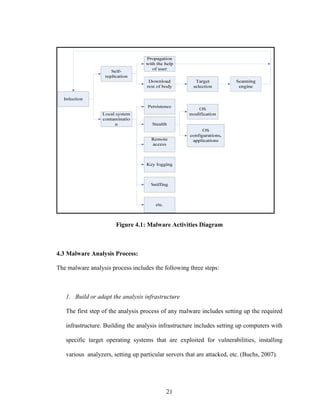
perform. Various activities performed by any form of malware are shown in Figure 4.1.
21
Figure 4.1: Malware Activities Diagram
4.3 Malware Analysis Process:
The malware analysis process includes the following three steps:
1. Build or adapt the analysis infrastructure
The first step of the analysis process of any malware includes setting up the required
infrastructure. Building the analysis infrastructure includes setting up computers with
specific target operating systems that are exploited for vulnerabilities, installing
various analyzers, setting up particular servers that are attacked, etc. (Buchs, 2007).
22
2. Static analysis
This step must be performed before executing the malware and infecting the target
machines for study. This type of analysis includes observations such as characteristics
of files, source code analysis, configuration study, etc. (Buchs, 2007).
3. Dynamic or “live” analysis
At this step, the analyst will record the behavioral characteristics of the malware such
as accesses to files, directories, disks, windows registry, automatic startup
mechanisms, and integrity checks of files (Buchs, 2007).
Dynamic analysis can be performed in following ways:
a. Malware process analysis
b. Network traffic analysis
23
Chapter 5: Analysis of Rxbot
This chapter presents the detailed analysis of “Rxbot.”
5.1 Overview of Rxbot
5.1.1 Definition
“Rxbot” (also known as “rBot”) is a win32 computer IRC worm (written in C++) that
spreads to computers running Windows XP (“Agobot”, 2009).
5.1.2 Features of Rxbot
Rxbot has the following features (“Agobot”, 2009):
• Belongs to the Agobot family of worms
• Maintains modularity
• Targets the Microsoft Windows platform
• Uses IRC for Command and Control (C&C)
• Supports password protected IRC channels for bot communication
• Includes the following capabilities
o Port scanning
o Packet sniffing
o Key logging
• Includes Multi-threaded, Object Oriented, and Polymorphic code
• Uses SMTP client for sending spam and spreading copies of itself
• Uses HTTP client for click fraud and DDoS attacks
24
5.1.3 Exploits
Attackers exploit Rxbot to perform the following harmful activities (“Botnet”, 2009;
“Agotbot”, 2009):
• Distributed Denial of Service (DDoS) attacks
• Identity Theft
• Spam
• Click Fraud
5.2 Analysis Infrastructure
The analysis of Rxbot was performed using the following infrastructure:
• PC #1 running Windows operating system used as the victim machine
o Rxbot infection was spread to this machine.
• PC #2 running Windows operating system used as the IRC Command and Control
(C&C) center
o UnrealIRCd was installed on this machine as a daemon process for the
IRC server.
o mIRC was installed on this machine as a Windows client for accessing the
IRC server.
• Private network established between PC #1 and PC #2
o Cross-cable connection was used between the two PCs.
The analysis was performed very carefully in a private network. The personal computers
25
used for analysis were disconnected from the Internet in order to make sure that the
Internet was not endangered due to the experiments performed on Rxbot.
5.2.1 UnrealIRCd
“UnrealIRCd” is a very popular open source IRC daemon among the botnet community.
It runs on Windows and Linux operating systems. It is a light weight and easy to
configure daemon (“UnrealIRCd”, 2009).
5.2.2 mIRC
“mIRC” is a popular Windows IRC client. It is available for free, and it is relatively easy
to setup. mIRC provides a user friendly GUI to perform various IRC related operations
(“mIRC”, 2009).
5.3 Static code analysis of Rxbot
5.3.1 What is static code analysis?
Static code analysis is the analysis performed on computer software without executing
the programs built from that software. This type of analysis can be performed on source
code or object code. This can be performed in an automated fashion using various
available source code analysis tools or with human analysis of the code known as
program understanding (“Static code analysis”, 2009).
5.3.2 Source code analysis of Rxbot
26
The source code of Rxbot was obtained from an underground forum (“Rxbot source
code”, 2009) as a “rar” file. After extraction, the C++ source code was retrieved. The
source code of Rxbot included a collection of C++ source and header files. Human
analysis was performed on the Rxbot source code, relying on knowledge of the C++
programming language and the Windows Operating System.
5.3.3 Modularity of Rxbot source code
The source code of Rxbot is very modular. Each individual feature of Rxbot has a
separate C++ source file. This enables the bot master to manage the botnet source code
easily. Adding a new module or removing any unwanted feature is simple. One can use
the original source code base and add new modules to it. Members of the Agobot family
are usually compatible with each other. A module written for one member can be easily
ported to another member. Modularity of Rxbot facilitates this mix-matching of modules
to meet the bot herder’s requirements.
5.3.4 Configuration of Rxbot
The configuration file for Rxbot is named as “configs.h”, and it is located under the
header folder. The configuration properties of Rxbot are organized below with brief
description:
Primary IRC server properties
These properties are used to configure the IRC Command and Control server for the
27
botnet. These should match the settings of the IRC server instance used for Command
and Control. The IRC server configuration details are described in Table 5.1.
Table 5.1: IRC server configuration details
Property Variable Description
IRC Server Name or IP char server[] = " " This is the IP or hostname
of the IRC server acting as
C&C center.
IRC Server Password char serverpass[] = "" This is the password
required to connect to the
IRC server.
IRC Server Port int port = 6667 This is the listening port of
the IRC server. The default
port is 6667.
IRC Channel Name char channel[] = "#pwn" This is the name of the IRC
channel the bot is supposed
to join.
IRC Channel Password char chanpass[] = "" IRC channels are protected
using passwords. This
property contains the
password required to join
28
the IRC channel.
Backup IRC server properties
There is an option of defining a secondary IRC server. This server acts as a backup for
the main IRC server if it goes offline. The properties for the backup IRC server are listed
in Table 5.2.
Table 5.2: Backup IRC server configuration details
Property Variable Description
IRC Server2 Name or IP char server2[] = "" This is the IP or hostname
of the backup IRC server.
IRC Server2 Port int port2 = 6668 This is the listening port of
the backup IRC server.
IRC Channel2 Name char channel2[] = "#pwn" This is the channel name for
backup IRC server.
IRC Channel2 Password char chanpass2[] = "" This is the password
required to connect to the
IRC channel of the backup
IRC server.
Other IRC properties
These include other properties required by IRC such as the command properties and user
29
properties. These properties will define the rules that must be followed by the IRC
commands and users, in order to carry out the communication in the IRC channel. The
configuration details specific to IRC users and commands are explained in Table 5.3.
Table 5.3: IRC user and command configuration details
Property Variable Description
Channel Topic Command BOOL topiccmd = TRUE If set to “TRUE”, an IRC
command can be used as
the channel topic.
Command Prefix Char prefix = '.' This is the prefix character
for the IRC commands.
Nick Type int nicktype = CONSTNICK The nick type is identified
by this property. It can take
the values declared in the
file rndnick.h.
Random Numbers in Nick int maxrand = 7 This property indicates how
many random numbers are
allowed in the bot’s
nickname.
Nick Prefix BOOL nickprefix = TRUE This is a flag indicating the
presence of nick prefix.
Nick Constant char nickconst[] = This string is the first part
30
"[skank]" of the bot’s nickname.
Bot Mode char modeonconn[] = "-x" The bot’s mode after
connection is identified by
this property.
Bot client properties
The bot client properties define the characteristics of the bot client file such as ID,
version, etc. These properties are described in Table 5.4.
Table 5.4: Bot client configuration details
Property Variable Description
Bot ID char botid[] = "" This string defines the bot
ID.
Bot Version char version[] =” “ The bot version is defined
by this string.
Bot Password char password[] = "" This is the password to
connect to the botnet.
Bot Executable Filename char filename[]=”” This is the filename of the
bot executable created by
the Trojan installed on the
victim machine.
31
Bot feature properties
These properties define the configuration for the various features of the Rxbot such as
debug logging, key logging, etc. They also define the registry entries. Table 5.5 explains
these properties in detail.
Table 5.5: Bot feature configuration details
Property Variable Description
Debug Log Filename #ifdef DEBUG_LOGGING
char logfile[]="c:debug.crf";
#endif
This is the name of the
debug log file created
by the bot process on
the victim machine.
Key Logger Filename char keylogfile[] = "test.crf” The keylogging feature
of Rxbot will log the
victim’s keystrokes to
the file identified by the
value of this property.
Auto Start Flag BOOL AutoStart = TRUE This flag must be set to
“TRUE” to enable the
auto start registry keys.
Auto Start Value char valuename[] = "Microsoft IT
Update"
This is the registry key
value for the auto start
feature of the bot.
Pay Load Filename char This is the filename for
32
szLocalPayloadFile[]="payload.dat” the pay load.
Exploit Channel Name char exploitchan[] = "#pwn" This is the redirection
channel for the exploit
messages.
Key Logger Channel
Name
char keylogchan[] = "#pwn" This is the redirection
channel for the
messages from the key
logging function.
Packet Sniffer
Filename
char psniffchan[] = "#pwn" This is the redirection
channel for the packet
sniffing messages.
Ports for other services
The configuration properties for additional services are explained in Table 5.6.
Table 5.6: Service ports configuration details
Property Variable Description
sock4 Daemon Port int socks4port = 1243 The port for sock4 daemon
is defined here.
tftp Port int tftpport = 69 The port for tftp daemon is
defined here.
http port int httpport = 2001 The port for http daemon is
33
defined here.
rlogin port int rloginport = 513 The port for rlogin daemon
is defined here.
5.3.5 Different modules of Rxbot
The analysis of some of the modules of Rxbot is presented below:
rBot.cpp
This is the most important module of the Rxbot source code. It contains the core code of
Rxbot. This is the bot’s main “brain” from which the execution of different bot exploits
starts.
autostart.cpp
This source code file provides the auto start functionality for a bot. It enables the bot to
add itself to the victim machine’s registry so that it can start automatically. For this
feature to be enabled, the Boolean variable “AutoStart” in configs.h should be set to
“true”. The value of registry entry will be picked up from the character variable
“valuename[]” in configs.h. Please refer to Table 5.5 for details of the above two
configuration properties.
capture.cpp
34
This module adds the functionality of capturing screen shots, images through webcam or
even videos playing on the victim machines. This would enable retrieving confidential
data of the victim machine’s owner for identity theft or any other harmful purposes like
morphing the images for creating porn.
cdkeys.cpp
This module of the Rxbot provides the functionality of stealing CD keys of different
licensed software from the Windows registry of victim machines. This C++ file contains
definitions for different registry entry locations for various software. This instructs the
bot where to look for CD keys. If the registry entry locations for any popular licensed
software are known, a bot master can add these registry entries to this source file and
retrieve CD keys for that particular software.
findpass.cpp
This module pulls the victim machine’s users’ passwords from memory and sends them
to the bot master over the IRC channel. The passwords can then be used to hack the
users’ email accounts or bank accounts.
processes.cpp
The functionality of this module is to kill any process on the victim machines. For
example, one might want to kill an anti virus software running on a victim machine. A
bot master creates a list of processes to kill on the victim machines. Most of the processes
35
would include Anti Virus, firewall, and security processes that are running on the victim
machines and can hinder to the bot functioning. This function also kills any other worms
running on the victim machines to reduce competition with other exploits.
Additional modules can be added to the Rxbot as required by the bot herder. Modules can
simply be plugged into Rxbot from different Agobot variants. Unwanted modules can be
removed from the source code.
5.4 Dynamic analysis of Rxbot
Dynamic analysis of Rxbot was performed by executing the bot in the controlled
environment described in section 5.2.
5.4.1 What is dynamic analysis?
Dynamic analysis is the analysis of computer software performed by executing it on a
real or virtual processor (“Dynamic program analysis”, 2009).
5.4.2 Building and executing the bot client
Dynamic analysis requires a Trojan that would install the bot client on the victim
machine. To build the Trojan, the Rxbot source code was obtained from underground
forums and was compiled using Visual Studio 6. The build process produced rBot.exe
which was used as the Trojan to infect the victim machine.
36
The rBot executable was transported manually to a personal computer running Windows
XP and was executed on the machine. In the real world scenario, the bot master will
spread the bot executable on target machines as email attachments, through music
downloads, or using various other means for installation of the malicious executable.
5.4.3 Process level analysis
New bot process
Upon execution of the Trojan rBot.exe, a new bot executable file is created with the name
specified in the configuration file as property “char filename[]”.This executable is located
under “C:WindowsSystem32” as a hidden file. A new bot client process is started on the
victim machine. Figure 5.1 shows the process level details of the bot program.
37
Figure 5.1: Rxbot process level details
Auto start
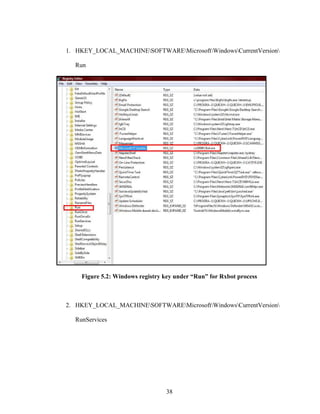
If the Boolean variable “AutoStart” in the configuration file is set to “true”, a registry
entry for auto starting the bot process is created in the Windows registry with the value
specified in the configuration property “char valuename[]”. The following registry keys
are observed:
38
1. HKEY_LOCAL_MACHINESOFTWAREMicrosoftWindowsCurrentVersion
Run
Figure 5.2: Windows registry key under “Run” for Rxbot process
2. HKEY_LOCAL_MACHINESOFTWAREMicrosoftWindowsCurrentVersion
RunServices
39
Figure 5.3: Windows registry key under “RunServices” for Rxbot process
5.4.4 Network level analysis
Even though the bot has infected the victim machine, it can neither inform the bot herder
nor accept commands from the bot herder. For this communication between the bot
40
clients and the bot master, the master has to establish a Command and Control (C&C)
server. The master controls his army of bots using this Command and Control center.
Establishing IRC Command and Control center
Since Rxbot follows the IRC protocol, an IRC server is required for Command and
Control. Publicly available IRC servers can be used for this purpose. Some bot masters
also prefer to setup their own private IRC servers to better hide their bot. It is very
important for a bot master to hide his Command and Control center since it serves as the
heart of the botnet. If the Command and Control center for a botnet is detected, it is easy
to bring down the whole botnet (which might comprise hundreds or thousands of PCs) by
shutting down the Command and Control server. A bot master can even install the IRC
server for C&C on a remote, victim machine.
PC #2 with UnrealIRCd (described in section 5.2) was used as the IRC C&C server for
the experimental analysis of Rxbot. The UnrealIRCd instance was configured with the
settings exactly matching the IRC configuration properties (described in Table 5.1) of the
Rxbot client. UnrealIRCd instance was running on PC #2 and listening on port 6667.
Creating IRC Channel and Gaining Operator Rights
The IRC client program mIRC (described in section 5.2.2) was used to connect to the
IRC C&C server. It is required that a user creates a nickname before connecting to the
C&C server. A user with nickname “CS299BotMaster” logged into the IRC server
41
instance using mIRC. After a successful connection was established with the IRC server
instance, user “CS299BotMaster” created and joined an IRC channel with the channel
name “#CS299IRCchannel” that was configured in the bot client. Since user
“CS299BotMaster” was the first user to join channel “#CS299IRCchannel”, the user
obtained operator privileges over the channel. A symbol “@” was observed preceding the
user’s nickname in the mIRC console. The IRC channel operator is indentified by the
“@” symbol preceding the nickname. The channel operator has administrative rights over
the channel.
Recruiting bots
The first bot of this IRC botnet was PC #1 (described in section 5.2). It was infected with
rBot.exe. This bot was configured to connect to the UnrealIRCd server instance running
on PC #2 and join channel “#CS299IRCchannel” created by the bot master
“CS299BotMaster”. The mIRC console and the debug logs written on the victim machine
(PC #1) displayed messages indicating that a new nick joined the IRC channel
#CS299IRCchannel”. In a similar manner, a number of other machines can be infected
with the rBot.exe and added to the botnet. The victim PC can also scan other PCs for
vulnerabilities and spread the Rxbot infection.
Controlling the botnet
The bot master can control the bots using the following features of Rxbot:
o Password-protected channels
42
The IRC channels are secured using passwords. This prevents the bot rivals
from gaining control of the botnet channel.
o Prefixed IRC commands
The bots are configured to accept commands prefixed with a specific letter.
This assures that the bots will not accept commands from rival bot masters.
o Moderated mode
A bot master can protect a channel by operating it in a moderated mode. This
ensures that only the bot master can talk on the channel.
5.5 Tricks used by bot masters
The analysis reveals the following tricks used by bot masters:
• The default value for IRC server port is 6667. However, bot masters prefer to use
a different port to make it difficult to detect the IRC C&C center.
• The bot masters can assign a tricky filename to the bot executable that is created
on the victim machine after the Trojan is installed. This file can be named to
indicate it is an Anti Virus scanner or some type of security software. This would
prevent the victim machine’s owner from noticing the installed bot executable file
or the bot process that is running.
• The bot master can trick the victim by using unusual file extensions like “jpeg”,
“crf”, etc., for the debug log files and the key logger files.
43
Chapter 6: Packing and Crypting
This chapter explains two processes: packing and crypting that can be performed on bot
client executables to protect the malicious bots from being detected by Anti Virus
softwares.
6.1 Introduction to packing and crypting
These are optional processes an attacker can perform on bot executable files to facilitate
easy spreading of the bots and bypass some security softwares. Packing reduces the bot
client file size. Smaller files spread over the Internet quickly, and signature scanning
becomes difficult. Crypting encrypts the bot client so that Anti Virus scanners and other
security softwares cannot detect the bot (Nachreiner, 2009).
6.2 Packing and Crypting performed on rBot.exe
6.2.1 Packing rBot.exe
The rBot.exe obtained by compiling the RxBot source code, was passed through packer
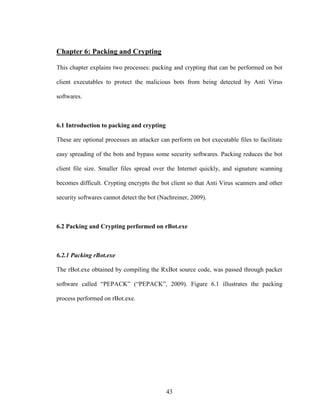
software called “PEPACK” (“PEPACK”, 2009). Figure 6.1 illustrates the packing
process performed on rBot.exe.
44
Figure 6.1: Packing of rBot.exe
The command “pepack rBot.exe –o” instructs the “pepack” executable to pack the file
named “rBot.exe.” The switch –o indicates that the output of the packer will be written to
a file named “OUTPUT.EXE.” Code, data and resource sections of the rBot executable
file are compressed by pepack, and the compressed output is written to OUTPUT.EXE.
45
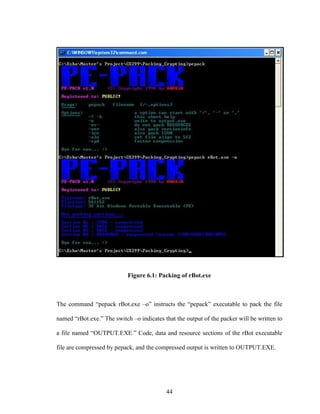
Figure 6.2 shows a new file named OUTPUT.EXE being created in the folder where the
pepack command was executed.
Figure 6.2: OUTPUT.EXE
6.2.2 Crypting rBot.exe
An encrypting tool called “Poisen Ivy Crypter” is very popular among the black hat
community. This tool was obtained from underground forums and was used to encrypt
the packed rBot.exe (“Poisen Ivy Crypter, 2009).
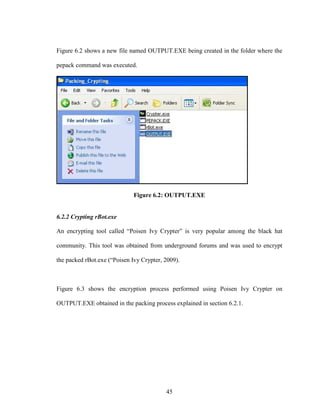
Figure 6.3 shows the encryption process performed using Poisen Ivy Crypter on
OUTPUT.EXE obtained in the packing process explained in section 6.2.1.
46
Figure 6.3: Crypting of OUTPUT.EXE
As shown in Figure 6.3, OUTPUT.EXE is selected as the input file to Poisen Ivy Crypter
and the button labeled “Build” is clicked. Fig… shows the next step in the encryption
process after the “Build” button is clicked.
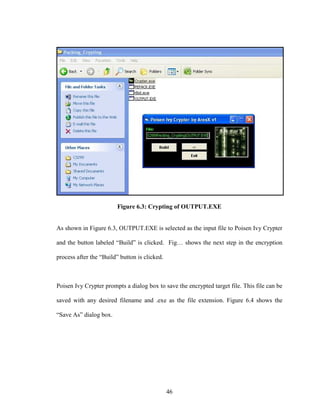
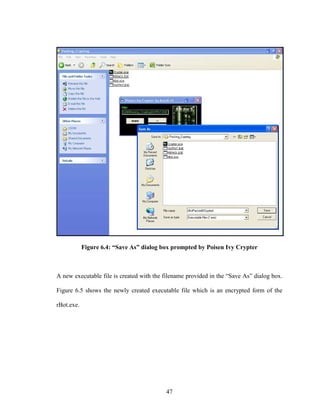
Poisen Ivy Crypter prompts a dialog box to save the encrypted target file. This file can be
saved with any desired filename and .exe as the file extension. Figure 6.4 shows the
“Save As” dialog box.
47
Figure 6.4: “Save As” dialog box prompted by Poisen Ivy Crypter
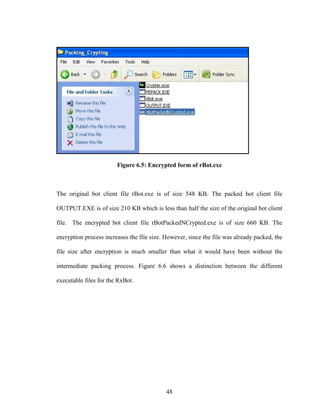
A new executable file is created with the filename provided in the “Save As” dialog box.
Figure 6.5 shows the newly created executable file which is an encrypted form of the
rBot.exe.
48
Figure 6.5: Encrypted form of rBot.exe
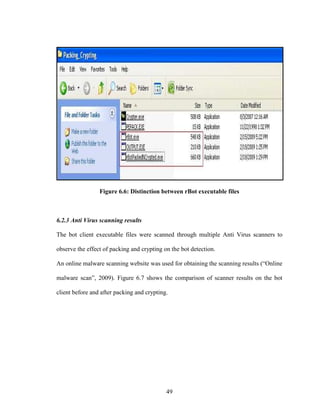
The original bot client file rBot.exe is of size 548 KB. The packed bot client file
OUTPUT.EXE is of size 210 KB which is less than half the size of the original bot client
file. The encrypted bot client file rBotPackedNCrypted.exe is of size 660 KB. The
encryption process increases the file size. However, since the file was already packed, the
file size after encryption is much smaller than what it would have been without the
intermediate packing process. Figure 6.6 shows a distinction between the different
executable files for the RxBot.
49
Figure 6.6: Distinction between rBot executable files
6.2.3 Anti Virus scanning results
The bot client executable files were scanned through multiple Anti Virus scanners to
observe the effect of packing and crypting on the bot detection.
An online malware scanning website was used for obtaining the scanning results (“Online
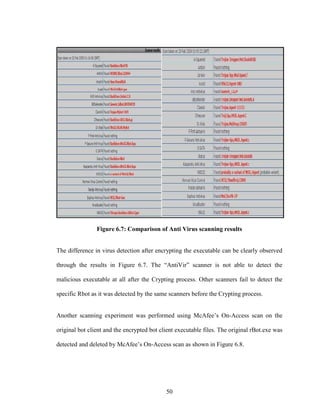
malware scan”, 2009). Figure 6.7 shows the comparison of scanner results on the bot
client before and after packing and crypting.
50
Figure 6.7: Comparison of Anti Virus scanning results
The difference in virus detection after encrypting the executable can be clearly observed
through the results in Figure 6.7. The “AntiVir” scanner is not able to detect the
malicious executable at all after the Crypting process. Other scanners fail to detect the
specific Rbot as it was detected by the same scanners before the Crypting process.
Another scanning experiment was performed using McAfee’s On-Access scan on the
original bot client and the encrypted bot client executable files. The original rBot.exe was
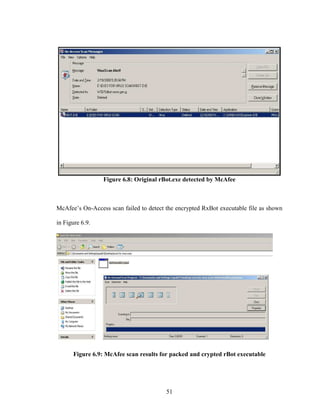
detected and deleted by McAfee’s On-Access scan as shown in Figure 6.8.
51
Figure 6.8: Original rBot.exe detected by McAfee
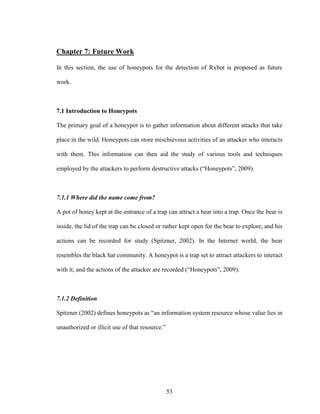
McAfee’s On-Access scan failed to detect the encrypted RxBot executable file as shown
in Figure 6.9.
Figure 6.9: McAfee scan results for packed and crypted rBot executable
52
Thus, a bot herder can take an old bot executable that was previously detected and make
it undetectable simply by passing it through the packing and crypting processes.
53
Chapter 7: Future Work
In this section, the use of honeypots for the detection of Rxbot is proposed as future
work.
7.1 Introduction to Honeypots
The primary goal of a honeypot is to gather information about different attacks that take
place in the wild. Honeypots can store mischievous activities of an attacker who interacts
with them. This information can then aid the study of various tools and techniques
employed by the attackers to perform destructive attacks (“Honeypots”, 2009).
7.1.1 Where did the name come from?
A pot of honey kept at the entrance of a trap can attract a bear into a trap. Once the bear is
inside, the lid of the trap can be closed or rather kept open for the bear to explore, and his
actions can be recorded for study (Spitzner, 2002). In the Internet world, the bear
resembles the black hat community. A honeypot is a trap set to attract attackers to interact
with it, and the actions of the attacker are recorded (“Honeypots”, 2009).
7.1.2 Definition
Spitzner (2002) defines honeypots as “an information system resource whose value lies in
unauthorized or illicit use of that resource.”
54
7.2 Types of Honeypots
Honeypots can be categorized into the following two types based on their complexity and
the amount of interaction that is allowed (“Honeypots”, 2009):
• Low-interaction Honeypots
• High-interaction Honeypots
Low-interaction honeypots are simple to deploy and maintain. Also, they pose less of a
risk because they do not work with real production systems. However, due to the
emulation of operating systems and other services, they do not give much control to the
attacker (Spitzner, 2002).
High-interaction honeypots expose real operating systems and applications to the
attackers for interaction. They work with real systems rather than emulated systems. This
allows an analyst to capture a wide range of information that can aid in learning about
new tools and techniques used for attacks. The disadvantage of high-interaction
honeypots is the complexity and difficulty involved in deployment. The level of risk is
high, since the attacker can possibly gain control of the honeypot. For example, an
attacker might take over the honeypot and use it to attack non-honeypot systems
(Spitzner, 2002).
55
7.3 The Value of Honeypots
The advantages of honeypots can be summarized in brief (Spitzner, 2002):
• Simple design, hence minimal resources are required
• Deployment cost is less since expensive, high end computers are not mandatory
• Smaller sets of data with very high values are collected
• All activities that come in contact with a honeypot are recorded
• Interaction is allowed only with attackers
• New technologies and tools used by attackers can be detected with the help of
honeypots
• Low probability of mis-configuration
7.4 Limitations of Honeypots
Honeypots have certain disadvantages (Spitzner, 2002):
• Honeypot can only track activity that interacts with it
• Attackers may be able to take over the honeypot and use it for harmful purposes
• Attacks against other systems cannot be captured unless they interact with the
honeypot setup
7.5 Proposed Future Work
The next step in the analysis process of Rxbot will be using a honeypot for gathering data
concerning on-going, real-world, bot activity and analyzing the collected data (Provos,
2007). A trap can be set in the form of a honeypot and a large volume of data can be
56
collected for Rxbot activity that is occuring on the Internet. Once a real botnet is
detected, a fake client can become part of the botnet, and the attacker’s tools, techniques,
and strategies can be studied in detail. Various open source honeypot daemons are
available. Nepenthes (“Nepenthes”, 2008) or Honeyd (“Honeyd”, 2008) appear to be
ideal for this type of experimental work.
57
Chapter 8: Conclusion
The analysis performed on Rxbot using static and dynamic analysis techniques aids
understanding of the botnet formation, propagation, and exploitation capabilities. The use
of IRC for Command and Control enables the bot herders to remotely control their
botnets. Password-protected IRC channels allow the bots to communicate in private and
protected channels. The bot herders employ various tricks to keep their bots hidden from
view. The bots have the capability to spread their infection to other PCs and compromise
a huge number of PCs on the Internet.
The study of packing and crypting reveals the capability of these processes to trick
antivirus scanners and other security software. It is evident from this study how bot
herders prevent their botnets from being detected. Packing contributes to the spreading
speed of a bot by making the bot client file smaller, whereas crypting helps the bot to
bypass security software.
Malware exploits are increasing at an alarming rate. The Internet is continuously
endangered by black hats. It is thus essential to encourage the study of malware in order
to develop highly effective measures to curb black hat operations.
58
Appendix A: References
Agobot (computer worm). (2009). Retrieved February 10, 2009, from Wikipedia:
http://en.wikipedia.org/wiki/Agobot_(computer_worm)
Botnet. (2009). Retrieved February 10, 2009, from Wikipedia:
http://en.wikipedia.org/wiki/Botnet
Buchs, C. (2007). Malware Analysis [PowerPoint slides]. Retrieved from Institute For
Information And Communication Technologies.
Dynamic program analysis. (2009). Retrieved February 10, 2009, from Wikipedia:
http://en.wikipedia.org/wiki/Dynamic_program_analysis
Elk Cloner. (2009). Retrieved February 05, 2009, from Wikipedia:
http://en.wikipedia.org/wiki/Elk_Cloner
Honeyd. (2008). Retrieved Feb 18, 2009, from Development of the Honeyd Virtual
Honeypot: http://www.honeyd.org
Honeypots (computing). (2009). Retrieved February 18, 2009, from Wikipedia:
http://en.wikipedia.org/wiki/Honeypot_(computing)
59
Internet Relay Chat, (2009). Retrieved February 07, 2009, from Wikipedia:
http://en.wikipedia.org/wiki/IRC
Internet Relay Chat bot. (2009). Retrieved February 07, 2009, from Wikipedia:
http://en.wikipedia.org/wiki/IRC_bots
Malware. (2009). Retrieved February 05, 2009, from Wikipedia:
http://en.wikipedia.org/wiki/Malware
Melissa (computer worm). (2009). Retrieved February 05, 2009, from Wikipedia:
http://en.wikipedia.org/wiki/Melissa_(computer_worm)
mIRC. (2009). Retrieved Jan 15, 2009, from mIRC: http://www.mirc.
Nachreiner, C. (2009). Botnets Part 1. Retrieved January 15, 2009, from WatchGuard
Video Tutorials: http://www.watchguard.com
Nachreiner, C. (2009). Botnet Source Code for Overachievers. Retrieved January 15,
2009, from WatchGuard Video Tutorials: http://www.watchguard.com
Nepenthes. (2008). Retrieved February 18, 2009, from Nepenthes – finest collection:
http://nepenthes.carnivore.it
60
Oikarinen, J., & Reed. D. (1993, May). Internet Relay Chat Protocol. Retrieved February
10, 2009, from Request for Comments: 1459 Web site: http://tools.ietf.org/html/rfc1459
Online malware scan. (2009). Retrieved Jan 18, 2009, from Jotti’s virus scan:
http://virusscan.jotti.org
PEPACK. (2009). Retrieved Jan 18, 2009, from Rapid Library: http://rapidlibrary.com
Poisen Ivy Crypter. (2009). Retrieved Jan 18, 2009, from Rapid Library:
http://rapidlibrary.com
Provos, N., & Holz, T. (2007, August). Virtual Honeypots. Massachusetts: Addison-
Wesley.
Rxbot source code. (2009). Retrieved Jan 10, 2009, from Rapid Library:
http://rapidlibrary.com
Spitzner, L. (2002, September). Honeypots: Tracking Hackers. Addison-Wesley.
Static code analysis. (2009). Retrieved February 10, 2009, from Wikipedia:
http://en.wikipedia.org/wiki/Static_code_analysis
61
Storm botnet. (2009) Retrieved February 05, 2009, from Wikipedia:
http://en.wikipedia.org/wiki/Storm_botnet
UnrealIRCd. (2009). Retrieved Jan 15, 2009, from UnrealIRCd:
http://www.unrealircd.com

Analysis of rxbot

  • 1.
    1 ANALYSIS OF RXBOT AThesis Presented to The Faculty of the Department of Computer Science San José State University In Partial Fulfillment of the Requirements for the Degree Master of Science by Esha Patil May 2009
  • 2.
    2 © 2009 Esha Patil ALLRIGHTS RESERVED
  • 3.
    3 SAN JOSÉ STATEUNIVERSITY The Undersigned Thesis Committee Approves the Thesis Titled ANALYSIS OF RXBOT by Esha Patil APPROVED FOR THE DEPARTMENT OF COMPUTER SCIENCE ___________________________________________________________ Dr. Mark Stamp, Department of Computer Science Date __________________________________________________________ Dr. Robert Chun, Department of Computer Science Date __________________________________________________________ Dr. Teng Moh, Department of Computer Science Date APPROVED FOR THE UNIVERSITY _______________________________________________________________ Associate Dean Office of Graduate Studies and Research Date
  • 4.
    4 ABSTRACT ANALYSIS OF RXBOT byEsha Patil In the recent years, botnets have emerged as a serious threat on the Internet. Botnets are commonly used for exploits such as distributed denial of service (DDoS) attacks, identity theft, spam, and click fraud. The immense size of botnets (hundreds or thousands of PCs connected in a botnet) increases the ubiquity and speed of attacks. Due to the criminally motivated uses of botnets, they pose a serious threat to the community. Thus, it is important to analyze known botnets to understand their working. Most of the botnets target security vulnerabilities in Microsoft Windows platform. Rxbot is a win32 bot that belongs to the Agobot family. This paper presents an analysis of Rxbot. The observations of the analysis process provide in-depth understanding of various aspects of the botnet lifecycle such as botnet architecture, network formation, propagation mechanisms, and exploit capabilities. The study of Rxbot reveals certain tricks and techniques used by the botnet owners to hide their bots and bypass some security softwares.
  • 5.
    5 TABLE OF CONTENTS 1Introduction 10 1.1 What is Malware? 10 1.2 The changing trend in malware usage 10 1.3 Malware infection increases the threat 10 1.4 Hiding makes detection difficult 11 1.5 Evolution of Malware 11 1.5.1 Elk Cloner virus 12 1.5.2 Melissa computer worm 12 1.5.3 Storm botnet 13 2 Introduction to Botnets 14 2.1 Overview of Botnets 14 2.2 Botnet Architecture 15 2.2.1 Formation 15 2.2.2 Command and Control (C&C) 16 2.2.3 Harvesting bot army 16 3 IRC 17 3.1 Introduction to Internet Relay Chat (IRC) 17 3.2 IRC features 17 3.2.1 IRC Server 17 3.2.2 IRC Client 17 3.2.3 Command and Responses 18
  • 6.
    6 3.2.4 Channels 18 3.2.5Modes 18 3.2.6 Operators 19 3.3 IRC Bots 19 4 Malware Analysis 20 4.1 Malware Overview 20 4.2 Malware Typology 20 4.3 Malware Analysis Process 21 5 Analysis of Rxbot 23 5.1 Overview of Rxbot 23 5.1.1 Definition 23 5.1.2 Features of Rxbot 23 5.1.3 Exploits 24 5.2 Analysis Infrastructure 24 5.2.1 UnrealIRCd 25 5.2.2 mIRC 25 5.3 Static code analysis of Rxbot 25 5.3.1 What is static code analysis? 25 5.3.2 Source code analysis of Rxbot 26 5.3.3 Modularity of Rxbot source code 26 5.3.4 Configuration of Rxbot 26 5.3.5 Different modules of Rxbot 33
  • 7.
    7 5.4 Dynamic analysisof Rxbot 35 5.4.1 What is dynamic analysis? 35 5.4.2 Building and executing the bot client 35 5.4.3 Process level analysis 36 5.4.4 Network level analysis 39 5.5 Tricks used by bot masters 42 6 Packing and Crypting 43 6.1 Introduction to packing and crypting 43 6.2 Packing and Crypting performed on rBot.exe 43 6.2.1 Packing rBot.exe 43 6.2.2 Crypting of rBot.exe 45 6.2.3 Anti Virus scanning results 49 7 Future Work 53 7.1 Inroduction to Honeypots 53 7.1.1 Where did the name come from 53 7.1.2 Definition 53 7.2 Types of Honeypots 54 7.3 The Value of Honeypots 55 7.4 Limitations of Honeypots 55 7.5 Proposed Future Work 55 8 Conclusion 57 Appendix A References 58
  • 8.
    8 LIST OF TABLES Table5.1: IRC Server configuration details 27 Table 5.2: Backup IRC Server configuration details 28 Table 5.3: IRC user and command configuration details 29 Table 5.4: Bot client configuration details 30 Table 5.5: Bot feature configuration details 31 Table 5.6: Service port configuration details 32
  • 9.
    9 LIST OF FIGURES Figure4.1: Malware Activities Diagram 21 Figure 5.1: Rxbot process level details 37 Figure 5.2: Windows registry key under "Run" for Rxbot process 38 Figure 5.3: Windows registry key under "RunServices" for Rxbot process 39 Figure 6.1: Packing of rBot.exe 44 Figure 6.2: OUTPUT.EXE 45 Figure 6.3: Crypting of OUTPUT.EXE 46 Figure 6.4: "Save As" dialog box prompted by Poisen Ivy Crypter 47 Figure 6.5: Encrypted form of rBot.exe 48 Figure 6.6: Distinction between rBot executable files 49 Figure 6.7: Comparison of Anti Virus scanning results 50 Figure 6.8: Original rBot.exe detected by McAfee 51 Figure 6.9: McAfee scan results for packed and crypted rBot executable 51
  • 10.
    10 Chapter 1: Introduction Thischapter introduces malware and emphasizes the changing trend in malware usage. The purpose is to help the readers understand the importance of malware analysis. 1.1 What is Malware? Malware is a term derived from the words "malicious" and "software." Malware is software designed to damage a computer system without the owner's consent (“Malware”, 2009). Malware includes harmful software like spyware, adware, trojan horses, worms, and viruses. 1.2 The changing trend in malware usage The purpose of malware has evolved a great deal during the past several years. During the early years, malware was written as experiments or pranks intended to cause mere annoyance rather than serious harm (“Malware”, 2009). In recent years, the motivation for writing malware has shifted from mere experiments to profit-based malware creation. With the increasing use of the Internet, malware is being used for spam, identity theft, distributed denial-of-service (DDoS) attacks, and monetary purposes (“Botnet”, 2009). 1.3 Malware infection increases the threat Various types of malware include manual or automatic spreading mechanisms. Worms can spread the infection automatically over the network. Viruses can spread the infection with user intervention. Attackers employ smart techniques like personalized email
  • 11.
    11 messages, free softwares,and games to persuade users for getting their computer systems infected. The spreading of malware increases the threat by broadening the infection area (“Malware”, 2009). 1.4 Hiding makes detection difficult Trojans have the intelligence of pretending to be innocent to hide the evil. The prime motive of concealment is to get the victim systems infected without the owner's knowledge and consent (“Malware”, 2009). 1.5 Evolution of Malware Before the popularity of the Internet, the early virus infections were observed in programs on personal computers or executable boot sectors of floppy disks. The targeted systems ranged from Apple II and Macintosh to IBM PC and MS-DOS systems. These virus infections required user exchange of software or boot floppies (“Malware”, 2009). In 1988, the network-borne infectious programs called worms were first developed. Worms originated on multitasking Unix systems. The worms were different from viruses in exploiting the security vulnerabilities in network server programs. Rather than spreading infection into executable programs, worms had the capability of running as a separate process (“Malware”, 2009). In the 1990s, it became possible to write macro viruses that infected Microsoft Word
  • 12.
    12 documents and templatesrather than applications. These viruses exploited the fact that macros in a Word document are executable (“Malware”, 2009). Today, worms have extended the damage to home users and businesses via the Internet. Worms today still behave like the worms in 1988. Worms are commonly targeting large number of Windows systems (“Malware”, 2009). 1.5.1 Elk Cloner virus During the early years, passive propagation of viruses through the exchange of floppy disks was prevalent. A virus was found in 1982 on Apple II and was known as Elk Cloner (“Elk Cloner”, 2009). 1.5.2 Melissa computer worm With the first worms, propagation was extended to a worldwide scale. The Melissa worm was first found on March 26, 1999 when Internet mail systems were shut down as a result of getting clogged by emails infected by Melissa. Melissa is a mass-mailing macro virus that can spread on word processors like Microsoft Word 97, and Word 2000 as well as Microsoft Excel 97, 2000, and 2003. The way Melissa spreads is through execution of a macro from a downloaded Word document and attempts to mass email itself. The victims of mass emailing are the first 50 entries of the address book or alias list (“Melissa”, 2009).
  • 13.
    13 1.5.3 Storm botnet Withthe increasing use of the Internet, the focus of malware shifted to ubiquity and speed, and the motivation of attacks was money. First found in January 2007, the Storm worm accounted for 8% of all malware on Microsoft Windows computers (“Storm botnet”,2009). Storm is a trojan horse that spreads through spam email. The Storm botnet is a network of zombie computers connected by the Storm worm and can be controlled remotely. It was estimated, by September 2007, that the Storm botnet was running on anywhere from 1 million to 50 million computer systems. This botnet is used for various criminal activities. The United States Federal Bureau of Investigation has considered the botnet as a major risk to increased bank fraud, identity theft, and other cybercrimes (“Storm botnet”, 2009).
  • 14.
    14 Chapter 2: Introductionto Botnets This chapter presents a brief overview of the botnet lifecycle and usage. The purpose is to establish a clear understanding of the mechanics of botnets, before moving to the detailed analysis of Rxbot. 2.1 Overview of Botnets Botnets are one of the most dangerous and fast changing threats on the Internet today. Traditional botnets are networks of compromised computers that can be controlled remotely using Command and Control (C&C) mechanisms. Pieces of malicious code called “bots” are installed on the victim machines. The originator of the botnet is known as the "bot herder" or the “bot master.” The bot herder controls and commands the bots remotely, using various C&C mechanisms (“Botnet”, 2009). Usually IRC is used for C&C. However, recently there is a shift towards using peer-to-peer mechanism for C&C. A bot is also referred to as "zombie" or "drone." Bots run automatically and are hidden. Bots propagate themselves automatically to other victim machines. An attacker can remotely control a large number (hundreds or thousands) of machines connected in a botnet (“Botnet”, 2009). Bots are not inherently evil. The first bots were programs used in Internet Relay Chat (IRC) networks to provide gaming or messaging services (“Internet Relay Chat bot”, 2009). These were "good" bots that enabled real-time communication through IRC
  • 15.
    15 channels. Eventually botcode turned into malicious software serving nefarious purposes. Botnets can be used for various monetary and destructive purposes including distributed denial-of-service (DDoS) attacks, spam, click fraud, identity theft, and so on (“Botnet”, 2009). 2.2 Botnet Architecture 2.2.1 Formation A malicious piece of code called the “bot client” is created by an attacker who acts as the bot herder or the bot master. The bot herder infects a victim computer over the Internet with this malicious bot code without the knowledge or consent of the computer owner. Once the computer is compromised, the bot can take over the computer, and the bot typically remains hidden. The bot is programmed to accept and respond to commands and communicate with the Command and Control (C&C) center established by the bot master. Usually an IRC server is setup as the C&C center. When the bot successfully infects a victim machine, it informs the C&C center. The bot client is then updated with new commands. The bot client goes over the Internet attempting to propagate itself to other victim machines. In this manner, a large number of machines are compromised and connected to the botnet that can be controlled and instructed remotely by an attacker to perform various types of for-profit and destructive activities (Nachreiner, 2009).
  • 16.
    16 2.2.2 Command andControl (C&C) A bot master establishes a Command and Control (C&C) center to control and command the network of bots. Typically, an IRC server is setup and configured to act as the C&C center. Public IRC servers can be used for C&C purposes. However, today most bot herders prefer to hide by setting up private IRC servers for their C&C mechanism. A bot master can install the IRC server on any compromised machine. Using IRC channels, a bot master can remotely command and control his army of bots (Nachreiner, 2009). 2.2.3 Harvesting bot army Getting the first bot is the toughest job for a bot master. In order to install a bot client on a victim machine, an attacker can use various hacking techniques such as spam email with attachment, music download, exploiting unpatched vulnerabilities, hosting on a website that pushes it to visitors. The bots are programmed with scanning commands which can be used to spread the infection to many other victim machines over the Internet. Once the first bot is propagated to a victim machine, the scanner commands of the bot can add other machines to the malicious network. These compromised machines then go on and add many other machines to the network. In this manner, a huge number of machines can be forced to join the botnet. The bot masters can stop compromising machines anytime they think they have a sufficient bot army (Nachreiner, 2009).
  • 17.
    17 Chapter 3: IRC Thischapter introduces the IRC mechanism typically used by botnets for Command and Control. The operational knowledge of IRC will support a thorough understanding of the analysis results presented in this paper. 3.1 Introduction to Internet Relay Chat (IRC) IRC is a form of real-time Internet chat or synchronous conferencing. IRC was created in 1988. It is a teleconferencing system that uses the client-server model and runs in a distributed manner (“Internet Relay Chat”, 2009). The IRC client-to-server protocol is documented in RFC 1459 (Oikarinen, 1993). IRC enables one-to-one as well as group communication through messaging. For group communication, IRC channels are established (“Internet Relay Chat”, 2009). 3.2 IRC features 3.2.1 IRC Server An IRC server is the central point of contact for various clients to communicate with each other. IRC servers can connect to each other, thus forming an IRC network (“Internet Relay Chat”, 2009). 3.2.2 IRC Client IRC servers can be accessed by users via an IRC client. IRC clients are distinguished
  • 18.
    18 using a uniquenickname that can contain a maximum of 9 characters (“Internet Relay Chat”, 2009). A popular Windows IRC client is the “mIRC.” 3.2.3 Commands and Responses IRC clients can send single-line messages to an IRC server and receive responses from the server for those messages. Commands can be entered using the IRC clients by prefixing each command with a “/”. Each message can contain three parts: an optional prefix, the command, and the parameters for the command. The parts of a message are separated by an ascii space character (0x20) (“Internet Relay Chat”, 2009). 3.2.4 Channels Channels are the communication medium in an IRC session. Different users who want to communicate with each other can join the same IRC channel using the command “/join #channelname”. Once a user joins an IRC channel, the user can send a message on the channel, which will be communicated to other users of the same channel. IRC channels can be protected using passwords. Users are required to enter a password in order to join a password-protected IRC channel (“Internet Relay Chat”, 2009). 3.2.5 Modes There are two types of modes: user mode and channel mode. The modes can be set or unset using a mode command. A mode is represented by a single case-sensitive letter. For example, the letter “i” represents invisible user mode, or the letter “p” represents a private
  • 19.
    19 channel mode (“InternetRelay Chat”, 2009). 3.2.6 Operators “IRC Operators,” also known as “IRCops,” are users who have superior rights over the entire IRC network or their local IRC server. These rights allow a user to perform network administration. An IRC operator can act as the channel operator. Usually, channel administration and network administration are handled separately (“Internet Relay Chat”, 2009). 3.3 IRC Bots An “IRC bot” is an automated client that connects to IRC. The difference between a normal IRC user and an IRC bot is that the IRC bot carries out functions in an automated fashion. The early IRC bots were used in games. The usage evolved to serve special purposes like managing channels for user groups, maintaining access lists, and providing access to databases. Bots can perform many other useful functions, such as logging activities in IRC channel, hosting games, creating statistics, etc. (“Internet Relay Chat bot”, 2009).
  • 20.
    20 Chapter 4: MalwareAnalysis The process of analyzing a piece of malware is explained in this chapter. 4.1 Malware Overview As previously mentioned, the term Malware is derived from two words: Malicious and Software (“Malware”, 2009). Malware is an intelligent piece of code that exhibits the following behavior: • It will infect its targets • It will propagate itself, automatically or with human intervention • It might install a resident program, which allows an attacker to access and master the infected system • It will remain hidden so as to prevent detection by the user of the system 4.2 Malware Typology Malware occurs in different forms such as viruses, worms, trojan horses, rootkits, backdoors, spyware, and adware. These forms differ in the type of activities they perform. Various activities performed by any form of malware are shown in Figure 4.1.
  • 21.
    21 Figure 4.1: MalwareActivities Diagram 4.3 Malware Analysis Process: The malware analysis process includes the following three steps: 1. Build or adapt the analysis infrastructure The first step of the analysis process of any malware includes setting up the required infrastructure. Building the analysis infrastructure includes setting up computers with specific target operating systems that are exploited for vulnerabilities, installing various analyzers, setting up particular servers that are attacked, etc. (Buchs, 2007).
  • 22.
    22 2. Static analysis Thisstep must be performed before executing the malware and infecting the target machines for study. This type of analysis includes observations such as characteristics of files, source code analysis, configuration study, etc. (Buchs, 2007). 3. Dynamic or “live” analysis At this step, the analyst will record the behavioral characteristics of the malware such as accesses to files, directories, disks, windows registry, automatic startup mechanisms, and integrity checks of files (Buchs, 2007). Dynamic analysis can be performed in following ways: a. Malware process analysis b. Network traffic analysis
  • 23.
    23 Chapter 5: Analysisof Rxbot This chapter presents the detailed analysis of “Rxbot.” 5.1 Overview of Rxbot 5.1.1 Definition “Rxbot” (also known as “rBot”) is a win32 computer IRC worm (written in C++) that spreads to computers running Windows XP (“Agobot”, 2009). 5.1.2 Features of Rxbot Rxbot has the following features (“Agobot”, 2009): • Belongs to the Agobot family of worms • Maintains modularity • Targets the Microsoft Windows platform • Uses IRC for Command and Control (C&C) • Supports password protected IRC channels for bot communication • Includes the following capabilities o Port scanning o Packet sniffing o Key logging • Includes Multi-threaded, Object Oriented, and Polymorphic code • Uses SMTP client for sending spam and spreading copies of itself • Uses HTTP client for click fraud and DDoS attacks
  • 24.
    24 5.1.3 Exploits Attackers exploitRxbot to perform the following harmful activities (“Botnet”, 2009; “Agotbot”, 2009): • Distributed Denial of Service (DDoS) attacks • Identity Theft • Spam • Click Fraud 5.2 Analysis Infrastructure The analysis of Rxbot was performed using the following infrastructure: • PC #1 running Windows operating system used as the victim machine o Rxbot infection was spread to this machine. • PC #2 running Windows operating system used as the IRC Command and Control (C&C) center o UnrealIRCd was installed on this machine as a daemon process for the IRC server. o mIRC was installed on this machine as a Windows client for accessing the IRC server. • Private network established between PC #1 and PC #2 o Cross-cable connection was used between the two PCs. The analysis was performed very carefully in a private network. The personal computers
  • 25.
    25 used for analysiswere disconnected from the Internet in order to make sure that the Internet was not endangered due to the experiments performed on Rxbot. 5.2.1 UnrealIRCd “UnrealIRCd” is a very popular open source IRC daemon among the botnet community. It runs on Windows and Linux operating systems. It is a light weight and easy to configure daemon (“UnrealIRCd”, 2009). 5.2.2 mIRC “mIRC” is a popular Windows IRC client. It is available for free, and it is relatively easy to setup. mIRC provides a user friendly GUI to perform various IRC related operations (“mIRC”, 2009). 5.3 Static code analysis of Rxbot 5.3.1 What is static code analysis? Static code analysis is the analysis performed on computer software without executing the programs built from that software. This type of analysis can be performed on source code or object code. This can be performed in an automated fashion using various available source code analysis tools or with human analysis of the code known as program understanding (“Static code analysis”, 2009). 5.3.2 Source code analysis of Rxbot
  • 26.
    26 The source codeof Rxbot was obtained from an underground forum (“Rxbot source code”, 2009) as a “rar” file. After extraction, the C++ source code was retrieved. The source code of Rxbot included a collection of C++ source and header files. Human analysis was performed on the Rxbot source code, relying on knowledge of the C++ programming language and the Windows Operating System. 5.3.3 Modularity of Rxbot source code The source code of Rxbot is very modular. Each individual feature of Rxbot has a separate C++ source file. This enables the bot master to manage the botnet source code easily. Adding a new module or removing any unwanted feature is simple. One can use the original source code base and add new modules to it. Members of the Agobot family are usually compatible with each other. A module written for one member can be easily ported to another member. Modularity of Rxbot facilitates this mix-matching of modules to meet the bot herder’s requirements. 5.3.4 Configuration of Rxbot The configuration file for Rxbot is named as “configs.h”, and it is located under the header folder. The configuration properties of Rxbot are organized below with brief description: Primary IRC server properties These properties are used to configure the IRC Command and Control server for the
  • 27.
    27 botnet. These shouldmatch the settings of the IRC server instance used for Command and Control. The IRC server configuration details are described in Table 5.1. Table 5.1: IRC server configuration details Property Variable Description IRC Server Name or IP char server[] = " " This is the IP or hostname of the IRC server acting as C&C center. IRC Server Password char serverpass[] = "" This is the password required to connect to the IRC server. IRC Server Port int port = 6667 This is the listening port of the IRC server. The default port is 6667. IRC Channel Name char channel[] = "#pwn" This is the name of the IRC channel the bot is supposed to join. IRC Channel Password char chanpass[] = "" IRC channels are protected using passwords. This property contains the password required to join
  • 28.
    28 the IRC channel. BackupIRC server properties There is an option of defining a secondary IRC server. This server acts as a backup for the main IRC server if it goes offline. The properties for the backup IRC server are listed in Table 5.2. Table 5.2: Backup IRC server configuration details Property Variable Description IRC Server2 Name or IP char server2[] = "" This is the IP or hostname of the backup IRC server. IRC Server2 Port int port2 = 6668 This is the listening port of the backup IRC server. IRC Channel2 Name char channel2[] = "#pwn" This is the channel name for backup IRC server. IRC Channel2 Password char chanpass2[] = "" This is the password required to connect to the IRC channel of the backup IRC server. Other IRC properties These include other properties required by IRC such as the command properties and user
  • 29.
    29 properties. These propertieswill define the rules that must be followed by the IRC commands and users, in order to carry out the communication in the IRC channel. The configuration details specific to IRC users and commands are explained in Table 5.3. Table 5.3: IRC user and command configuration details Property Variable Description Channel Topic Command BOOL topiccmd = TRUE If set to “TRUE”, an IRC command can be used as the channel topic. Command Prefix Char prefix = '.' This is the prefix character for the IRC commands. Nick Type int nicktype = CONSTNICK The nick type is identified by this property. It can take the values declared in the file rndnick.h. Random Numbers in Nick int maxrand = 7 This property indicates how many random numbers are allowed in the bot’s nickname. Nick Prefix BOOL nickprefix = TRUE This is a flag indicating the presence of nick prefix. Nick Constant char nickconst[] = This string is the first part
  • 30.
    30 "[skank]" of thebot’s nickname. Bot Mode char modeonconn[] = "-x" The bot’s mode after connection is identified by this property. Bot client properties The bot client properties define the characteristics of the bot client file such as ID, version, etc. These properties are described in Table 5.4. Table 5.4: Bot client configuration details Property Variable Description Bot ID char botid[] = "" This string defines the bot ID. Bot Version char version[] =” “ The bot version is defined by this string. Bot Password char password[] = "" This is the password to connect to the botnet. Bot Executable Filename char filename[]=”” This is the filename of the bot executable created by the Trojan installed on the victim machine.
  • 31.
    31 Bot feature properties Theseproperties define the configuration for the various features of the Rxbot such as debug logging, key logging, etc. They also define the registry entries. Table 5.5 explains these properties in detail. Table 5.5: Bot feature configuration details Property Variable Description Debug Log Filename #ifdef DEBUG_LOGGING char logfile[]="c:debug.crf"; #endif This is the name of the debug log file created by the bot process on the victim machine. Key Logger Filename char keylogfile[] = "test.crf” The keylogging feature of Rxbot will log the victim’s keystrokes to the file identified by the value of this property. Auto Start Flag BOOL AutoStart = TRUE This flag must be set to “TRUE” to enable the auto start registry keys. Auto Start Value char valuename[] = "Microsoft IT Update" This is the registry key value for the auto start feature of the bot. Pay Load Filename char This is the filename for
  • 32.
    32 szLocalPayloadFile[]="payload.dat” the payload. Exploit Channel Name char exploitchan[] = "#pwn" This is the redirection channel for the exploit messages. Key Logger Channel Name char keylogchan[] = "#pwn" This is the redirection channel for the messages from the key logging function. Packet Sniffer Filename char psniffchan[] = "#pwn" This is the redirection channel for the packet sniffing messages. Ports for other services The configuration properties for additional services are explained in Table 5.6. Table 5.6: Service ports configuration details Property Variable Description sock4 Daemon Port int socks4port = 1243 The port for sock4 daemon is defined here. tftp Port int tftpport = 69 The port for tftp daemon is defined here. http port int httpport = 2001 The port for http daemon is
  • 33.
    33 defined here. rlogin portint rloginport = 513 The port for rlogin daemon is defined here. 5.3.5 Different modules of Rxbot The analysis of some of the modules of Rxbot is presented below: rBot.cpp This is the most important module of the Rxbot source code. It contains the core code of Rxbot. This is the bot’s main “brain” from which the execution of different bot exploits starts. autostart.cpp This source code file provides the auto start functionality for a bot. It enables the bot to add itself to the victim machine’s registry so that it can start automatically. For this feature to be enabled, the Boolean variable “AutoStart” in configs.h should be set to “true”. The value of registry entry will be picked up from the character variable “valuename[]” in configs.h. Please refer to Table 5.5 for details of the above two configuration properties. capture.cpp
  • 34.
    34 This module addsthe functionality of capturing screen shots, images through webcam or even videos playing on the victim machines. This would enable retrieving confidential data of the victim machine’s owner for identity theft or any other harmful purposes like morphing the images for creating porn. cdkeys.cpp This module of the Rxbot provides the functionality of stealing CD keys of different licensed software from the Windows registry of victim machines. This C++ file contains definitions for different registry entry locations for various software. This instructs the bot where to look for CD keys. If the registry entry locations for any popular licensed software are known, a bot master can add these registry entries to this source file and retrieve CD keys for that particular software. findpass.cpp This module pulls the victim machine’s users’ passwords from memory and sends them to the bot master over the IRC channel. The passwords can then be used to hack the users’ email accounts or bank accounts. processes.cpp The functionality of this module is to kill any process on the victim machines. For example, one might want to kill an anti virus software running on a victim machine. A bot master creates a list of processes to kill on the victim machines. Most of the processes
  • 35.
    35 would include AntiVirus, firewall, and security processes that are running on the victim machines and can hinder to the bot functioning. This function also kills any other worms running on the victim machines to reduce competition with other exploits. Additional modules can be added to the Rxbot as required by the bot herder. Modules can simply be plugged into Rxbot from different Agobot variants. Unwanted modules can be removed from the source code. 5.4 Dynamic analysis of Rxbot Dynamic analysis of Rxbot was performed by executing the bot in the controlled environment described in section 5.2. 5.4.1 What is dynamic analysis? Dynamic analysis is the analysis of computer software performed by executing it on a real or virtual processor (“Dynamic program analysis”, 2009). 5.4.2 Building and executing the bot client Dynamic analysis requires a Trojan that would install the bot client on the victim machine. To build the Trojan, the Rxbot source code was obtained from underground forums and was compiled using Visual Studio 6. The build process produced rBot.exe which was used as the Trojan to infect the victim machine.
  • 36.
    36 The rBot executablewas transported manually to a personal computer running Windows XP and was executed on the machine. In the real world scenario, the bot master will spread the bot executable on target machines as email attachments, through music downloads, or using various other means for installation of the malicious executable. 5.4.3 Process level analysis New bot process Upon execution of the Trojan rBot.exe, a new bot executable file is created with the name specified in the configuration file as property “char filename[]”.This executable is located under “C:WindowsSystem32” as a hidden file. A new bot client process is started on the victim machine. Figure 5.1 shows the process level details of the bot program.
  • 37.
    37 Figure 5.1: Rxbotprocess level details Auto start If the Boolean variable “AutoStart” in the configuration file is set to “true”, a registry entry for auto starting the bot process is created in the Windows registry with the value specified in the configuration property “char valuename[]”. The following registry keys are observed:
  • 38.
    38 1. HKEY_LOCAL_MACHINESOFTWAREMicrosoftWindowsCurrentVersion Run Figure 5.2:Windows registry key under “Run” for Rxbot process 2. HKEY_LOCAL_MACHINESOFTWAREMicrosoftWindowsCurrentVersion RunServices
  • 39.
    39 Figure 5.3: Windowsregistry key under “RunServices” for Rxbot process 5.4.4 Network level analysis Even though the bot has infected the victim machine, it can neither inform the bot herder nor accept commands from the bot herder. For this communication between the bot
  • 40.
    40 clients and thebot master, the master has to establish a Command and Control (C&C) server. The master controls his army of bots using this Command and Control center. Establishing IRC Command and Control center Since Rxbot follows the IRC protocol, an IRC server is required for Command and Control. Publicly available IRC servers can be used for this purpose. Some bot masters also prefer to setup their own private IRC servers to better hide their bot. It is very important for a bot master to hide his Command and Control center since it serves as the heart of the botnet. If the Command and Control center for a botnet is detected, it is easy to bring down the whole botnet (which might comprise hundreds or thousands of PCs) by shutting down the Command and Control server. A bot master can even install the IRC server for C&C on a remote, victim machine. PC #2 with UnrealIRCd (described in section 5.2) was used as the IRC C&C server for the experimental analysis of Rxbot. The UnrealIRCd instance was configured with the settings exactly matching the IRC configuration properties (described in Table 5.1) of the Rxbot client. UnrealIRCd instance was running on PC #2 and listening on port 6667. Creating IRC Channel and Gaining Operator Rights The IRC client program mIRC (described in section 5.2.2) was used to connect to the IRC C&C server. It is required that a user creates a nickname before connecting to the C&C server. A user with nickname “CS299BotMaster” logged into the IRC server
  • 41.
    41 instance using mIRC.After a successful connection was established with the IRC server instance, user “CS299BotMaster” created and joined an IRC channel with the channel name “#CS299IRCchannel” that was configured in the bot client. Since user “CS299BotMaster” was the first user to join channel “#CS299IRCchannel”, the user obtained operator privileges over the channel. A symbol “@” was observed preceding the user’s nickname in the mIRC console. The IRC channel operator is indentified by the “@” symbol preceding the nickname. The channel operator has administrative rights over the channel. Recruiting bots The first bot of this IRC botnet was PC #1 (described in section 5.2). It was infected with rBot.exe. This bot was configured to connect to the UnrealIRCd server instance running on PC #2 and join channel “#CS299IRCchannel” created by the bot master “CS299BotMaster”. The mIRC console and the debug logs written on the victim machine (PC #1) displayed messages indicating that a new nick joined the IRC channel #CS299IRCchannel”. In a similar manner, a number of other machines can be infected with the rBot.exe and added to the botnet. The victim PC can also scan other PCs for vulnerabilities and spread the Rxbot infection. Controlling the botnet The bot master can control the bots using the following features of Rxbot: o Password-protected channels
  • 42.
    42 The IRC channelsare secured using passwords. This prevents the bot rivals from gaining control of the botnet channel. o Prefixed IRC commands The bots are configured to accept commands prefixed with a specific letter. This assures that the bots will not accept commands from rival bot masters. o Moderated mode A bot master can protect a channel by operating it in a moderated mode. This ensures that only the bot master can talk on the channel. 5.5 Tricks used by bot masters The analysis reveals the following tricks used by bot masters: • The default value for IRC server port is 6667. However, bot masters prefer to use a different port to make it difficult to detect the IRC C&C center. • The bot masters can assign a tricky filename to the bot executable that is created on the victim machine after the Trojan is installed. This file can be named to indicate it is an Anti Virus scanner or some type of security software. This would prevent the victim machine’s owner from noticing the installed bot executable file or the bot process that is running. • The bot master can trick the victim by using unusual file extensions like “jpeg”, “crf”, etc., for the debug log files and the key logger files.
  • 43.
    43 Chapter 6: Packingand Crypting This chapter explains two processes: packing and crypting that can be performed on bot client executables to protect the malicious bots from being detected by Anti Virus softwares. 6.1 Introduction to packing and crypting These are optional processes an attacker can perform on bot executable files to facilitate easy spreading of the bots and bypass some security softwares. Packing reduces the bot client file size. Smaller files spread over the Internet quickly, and signature scanning becomes difficult. Crypting encrypts the bot client so that Anti Virus scanners and other security softwares cannot detect the bot (Nachreiner, 2009). 6.2 Packing and Crypting performed on rBot.exe 6.2.1 Packing rBot.exe The rBot.exe obtained by compiling the RxBot source code, was passed through packer software called “PEPACK” (“PEPACK”, 2009). Figure 6.1 illustrates the packing process performed on rBot.exe.
  • 44.
    44 Figure 6.1: Packingof rBot.exe The command “pepack rBot.exe –o” instructs the “pepack” executable to pack the file named “rBot.exe.” The switch –o indicates that the output of the packer will be written to a file named “OUTPUT.EXE.” Code, data and resource sections of the rBot executable file are compressed by pepack, and the compressed output is written to OUTPUT.EXE.
  • 45.
    45 Figure 6.2 showsa new file named OUTPUT.EXE being created in the folder where the pepack command was executed. Figure 6.2: OUTPUT.EXE 6.2.2 Crypting rBot.exe An encrypting tool called “Poisen Ivy Crypter” is very popular among the black hat community. This tool was obtained from underground forums and was used to encrypt the packed rBot.exe (“Poisen Ivy Crypter, 2009). Figure 6.3 shows the encryption process performed using Poisen Ivy Crypter on OUTPUT.EXE obtained in the packing process explained in section 6.2.1.
  • 46.
    46 Figure 6.3: Cryptingof OUTPUT.EXE As shown in Figure 6.3, OUTPUT.EXE is selected as the input file to Poisen Ivy Crypter and the button labeled “Build” is clicked. Fig… shows the next step in the encryption process after the “Build” button is clicked. Poisen Ivy Crypter prompts a dialog box to save the encrypted target file. This file can be saved with any desired filename and .exe as the file extension. Figure 6.4 shows the “Save As” dialog box.
  • 47.
    47 Figure 6.4: “SaveAs” dialog box prompted by Poisen Ivy Crypter A new executable file is created with the filename provided in the “Save As” dialog box. Figure 6.5 shows the newly created executable file which is an encrypted form of the rBot.exe.
  • 48.
    48 Figure 6.5: Encryptedform of rBot.exe The original bot client file rBot.exe is of size 548 KB. The packed bot client file OUTPUT.EXE is of size 210 KB which is less than half the size of the original bot client file. The encrypted bot client file rBotPackedNCrypted.exe is of size 660 KB. The encryption process increases the file size. However, since the file was already packed, the file size after encryption is much smaller than what it would have been without the intermediate packing process. Figure 6.6 shows a distinction between the different executable files for the RxBot.
  • 49.
    49 Figure 6.6: Distinctionbetween rBot executable files 6.2.3 Anti Virus scanning results The bot client executable files were scanned through multiple Anti Virus scanners to observe the effect of packing and crypting on the bot detection. An online malware scanning website was used for obtaining the scanning results (“Online malware scan”, 2009). Figure 6.7 shows the comparison of scanner results on the bot client before and after packing and crypting.
  • 50.
    50 Figure 6.7: Comparisonof Anti Virus scanning results The difference in virus detection after encrypting the executable can be clearly observed through the results in Figure 6.7. The “AntiVir” scanner is not able to detect the malicious executable at all after the Crypting process. Other scanners fail to detect the specific Rbot as it was detected by the same scanners before the Crypting process. Another scanning experiment was performed using McAfee’s On-Access scan on the original bot client and the encrypted bot client executable files. The original rBot.exe was detected and deleted by McAfee’s On-Access scan as shown in Figure 6.8.
  • 51.
    51 Figure 6.8: OriginalrBot.exe detected by McAfee McAfee’s On-Access scan failed to detect the encrypted RxBot executable file as shown in Figure 6.9. Figure 6.9: McAfee scan results for packed and crypted rBot executable
  • 52.
    52 Thus, a botherder can take an old bot executable that was previously detected and make it undetectable simply by passing it through the packing and crypting processes.
  • 53.
    53 Chapter 7: FutureWork In this section, the use of honeypots for the detection of Rxbot is proposed as future work. 7.1 Introduction to Honeypots The primary goal of a honeypot is to gather information about different attacks that take place in the wild. Honeypots can store mischievous activities of an attacker who interacts with them. This information can then aid the study of various tools and techniques employed by the attackers to perform destructive attacks (“Honeypots”, 2009). 7.1.1 Where did the name come from? A pot of honey kept at the entrance of a trap can attract a bear into a trap. Once the bear is inside, the lid of the trap can be closed or rather kept open for the bear to explore, and his actions can be recorded for study (Spitzner, 2002). In the Internet world, the bear resembles the black hat community. A honeypot is a trap set to attract attackers to interact with it, and the actions of the attacker are recorded (“Honeypots”, 2009). 7.1.2 Definition Spitzner (2002) defines honeypots as “an information system resource whose value lies in unauthorized or illicit use of that resource.”
  • 54.
    54 7.2 Types ofHoneypots Honeypots can be categorized into the following two types based on their complexity and the amount of interaction that is allowed (“Honeypots”, 2009): • Low-interaction Honeypots • High-interaction Honeypots Low-interaction honeypots are simple to deploy and maintain. Also, they pose less of a risk because they do not work with real production systems. However, due to the emulation of operating systems and other services, they do not give much control to the attacker (Spitzner, 2002). High-interaction honeypots expose real operating systems and applications to the attackers for interaction. They work with real systems rather than emulated systems. This allows an analyst to capture a wide range of information that can aid in learning about new tools and techniques used for attacks. The disadvantage of high-interaction honeypots is the complexity and difficulty involved in deployment. The level of risk is high, since the attacker can possibly gain control of the honeypot. For example, an attacker might take over the honeypot and use it to attack non-honeypot systems (Spitzner, 2002).
  • 55.
    55 7.3 The Valueof Honeypots The advantages of honeypots can be summarized in brief (Spitzner, 2002): • Simple design, hence minimal resources are required • Deployment cost is less since expensive, high end computers are not mandatory • Smaller sets of data with very high values are collected • All activities that come in contact with a honeypot are recorded • Interaction is allowed only with attackers • New technologies and tools used by attackers can be detected with the help of honeypots • Low probability of mis-configuration 7.4 Limitations of Honeypots Honeypots have certain disadvantages (Spitzner, 2002): • Honeypot can only track activity that interacts with it • Attackers may be able to take over the honeypot and use it for harmful purposes • Attacks against other systems cannot be captured unless they interact with the honeypot setup 7.5 Proposed Future Work The next step in the analysis process of Rxbot will be using a honeypot for gathering data concerning on-going, real-world, bot activity and analyzing the collected data (Provos, 2007). A trap can be set in the form of a honeypot and a large volume of data can be
  • 56.
    56 collected for Rxbotactivity that is occuring on the Internet. Once a real botnet is detected, a fake client can become part of the botnet, and the attacker’s tools, techniques, and strategies can be studied in detail. Various open source honeypot daemons are available. Nepenthes (“Nepenthes”, 2008) or Honeyd (“Honeyd”, 2008) appear to be ideal for this type of experimental work.
  • 57.
    57 Chapter 8: Conclusion Theanalysis performed on Rxbot using static and dynamic analysis techniques aids understanding of the botnet formation, propagation, and exploitation capabilities. The use of IRC for Command and Control enables the bot herders to remotely control their botnets. Password-protected IRC channels allow the bots to communicate in private and protected channels. The bot herders employ various tricks to keep their bots hidden from view. The bots have the capability to spread their infection to other PCs and compromise a huge number of PCs on the Internet. The study of packing and crypting reveals the capability of these processes to trick antivirus scanners and other security software. It is evident from this study how bot herders prevent their botnets from being detected. Packing contributes to the spreading speed of a bot by making the bot client file smaller, whereas crypting helps the bot to bypass security software. Malware exploits are increasing at an alarming rate. The Internet is continuously endangered by black hats. It is thus essential to encourage the study of malware in order to develop highly effective measures to curb black hat operations.
  • 58.
    58 Appendix A: References Agobot(computer worm). (2009). Retrieved February 10, 2009, from Wikipedia: http://en.wikipedia.org/wiki/Agobot_(computer_worm) Botnet. (2009). Retrieved February 10, 2009, from Wikipedia: http://en.wikipedia.org/wiki/Botnet Buchs, C. (2007). Malware Analysis [PowerPoint slides]. Retrieved from Institute For Information And Communication Technologies. Dynamic program analysis. (2009). Retrieved February 10, 2009, from Wikipedia: http://en.wikipedia.org/wiki/Dynamic_program_analysis Elk Cloner. (2009). Retrieved February 05, 2009, from Wikipedia: http://en.wikipedia.org/wiki/Elk_Cloner Honeyd. (2008). Retrieved Feb 18, 2009, from Development of the Honeyd Virtual Honeypot: http://www.honeyd.org Honeypots (computing). (2009). Retrieved February 18, 2009, from Wikipedia: http://en.wikipedia.org/wiki/Honeypot_(computing)
  • 59.
    59 Internet Relay Chat,(2009). Retrieved February 07, 2009, from Wikipedia: http://en.wikipedia.org/wiki/IRC Internet Relay Chat bot. (2009). Retrieved February 07, 2009, from Wikipedia: http://en.wikipedia.org/wiki/IRC_bots Malware. (2009). Retrieved February 05, 2009, from Wikipedia: http://en.wikipedia.org/wiki/Malware Melissa (computer worm). (2009). Retrieved February 05, 2009, from Wikipedia: http://en.wikipedia.org/wiki/Melissa_(computer_worm) mIRC. (2009). Retrieved Jan 15, 2009, from mIRC: http://www.mirc. Nachreiner, C. (2009). Botnets Part 1. Retrieved January 15, 2009, from WatchGuard Video Tutorials: http://www.watchguard.com Nachreiner, C. (2009). Botnet Source Code for Overachievers. Retrieved January 15, 2009, from WatchGuard Video Tutorials: http://www.watchguard.com Nepenthes. (2008). Retrieved February 18, 2009, from Nepenthes – finest collection: http://nepenthes.carnivore.it
  • 60.
    60 Oikarinen, J., &Reed. D. (1993, May). Internet Relay Chat Protocol. Retrieved February 10, 2009, from Request for Comments: 1459 Web site: http://tools.ietf.org/html/rfc1459 Online malware scan. (2009). Retrieved Jan 18, 2009, from Jotti’s virus scan: http://virusscan.jotti.org PEPACK. (2009). Retrieved Jan 18, 2009, from Rapid Library: http://rapidlibrary.com Poisen Ivy Crypter. (2009). Retrieved Jan 18, 2009, from Rapid Library: http://rapidlibrary.com Provos, N., & Holz, T. (2007, August). Virtual Honeypots. Massachusetts: Addison- Wesley. Rxbot source code. (2009). Retrieved Jan 10, 2009, from Rapid Library: http://rapidlibrary.com Spitzner, L. (2002, September). Honeypots: Tracking Hackers. Addison-Wesley. Static code analysis. (2009). Retrieved February 10, 2009, from Wikipedia: http://en.wikipedia.org/wiki/Static_code_analysis
  • 61.
    61 Storm botnet. (2009)Retrieved February 05, 2009, from Wikipedia: http://en.wikipedia.org/wiki/Storm_botnet UnrealIRCd. (2009). Retrieved Jan 15, 2009, from UnrealIRCd: http://www.unrealircd.com