Nov 19, 2016
Sofia
var title = “Automate communication
with MS Bot Framework”;
var info = {
name: “Stamo Petkov”,
company: “Information Services Plc”,
email: “stamo.petkov@gmail.com”,
gitHub: “https://github.com/stamo”,
blog: “http://www.stamopetkov.eu”
};
Nov 19, 2016
agenda();
• Definitions
• Overview of MS Bot Framework
• Building blocks of the framework
• Bot Builder for Node.js
• Registering your Bot
• Configuring channels
• Publishing your Bot
• Best practices
• Bot Intelligence
Stamo Petkov Automate communication with MS Bot Framework
Nov 19, 2016
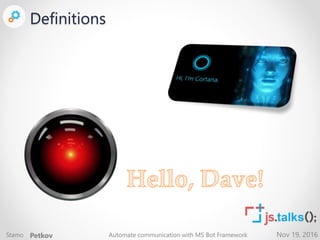
Definitions
Nov 19, 2016
Definitions
Stamo Petkov Automate communication with MS Bot Framework
Nov 19, 2016
Definitions
<bot>
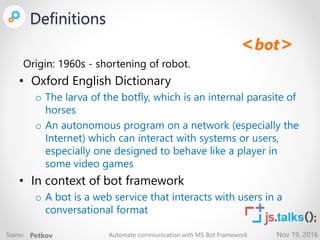
Origin: 1960s - shortening of robot.
• Oxford English Dictionary
o The larva of the botfly, which is an internal parasite of
horses
o An autonomous program on a network (especially the
Internet) which can interact with systems or users,
especially one designed to behave like a player in
some video games
• In context of bot framework
o A bot is a web service that interacts with users in a
conversational format
Stamo Petkov Automate communication with MS Bot Framework
Nov 19, 2016
Definitions
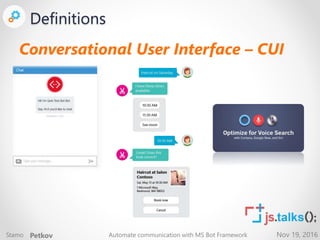
Conversational User Interface – CUI
Stamo Petkov Automate communication with MS Bot Framework
Nov 19, 2016
Overview of MS Bot
Framework
Nov 19, 2016
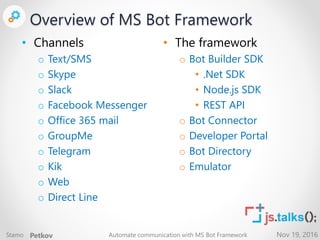
• Channels
o Text/SMS
o Skype
o Slack
o Facebook Messenger
o Office 365 mail
o GroupMe
o Telegram
o Kik
o Web
o Direct Line
• The framework
o Bot Builder SDK
• .Net SDK
• Node.js SDK
• REST API
o Bot Connector
o Developer Portal
o Bot Directory
o Emulator
Overview of MS Bot Framework
Stamo Petkov Automate communication with MS Bot Framework
Nov 19, 2016
Building blocks of the
framework
Bot Builder SDK, Bot Connector, Developer Portal, and Bot
Directory
Nov 19, 2016
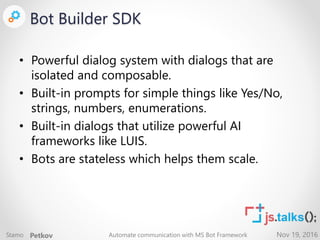
Bot Builder SDK
• Powerful dialog system with dialogs that are
isolated and composable.
• Built-in prompts for simple things like Yes/No,
strings, numbers, enumerations.
• Built-in dialogs that utilize powerful AI
frameworks like LUIS.
• Bots are stateless which helps them scale.
Stamo Petkov Automate communication with MS Bot Framework
Nov 19, 2016
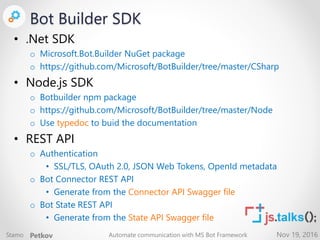
Bot Builder SDK
• .Net SDK
o Microsoft.Bot.Builder NuGet package
o https://github.com/Microsoft/BotBuilder/tree/master/CSharp
• Node.js SDK
o Botbuilder npm package
o https://github.com/Microsoft/BotBuilder/tree/master/Node
o Use typedoc to buid the documentation
• REST API
o Authentication
• SSL/TLS, OAuth 2.0, JSON Web Tokens, OpenId metadata
o Bot Connector REST API
• Generate from the Connector API Swagger file
o Bot State REST API
• Generate from the State API Swagger file
Stamo Petkov Automate communication with MS Bot Framework
Nov 19, 2016
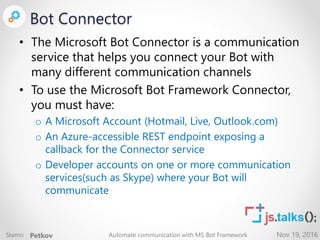
Bot Connector
• The Microsoft Bot Connector is a communication
service that helps you connect your Bot with
many different communication channels
• To use the Microsoft Bot Framework Connector,
you must have:
o A Microsoft Account (Hotmail, Live, Outlook.com)
o An Azure-accessible REST endpoint exposing a
callback for the Connector service
o Developer accounts on one or more communication
services(such as Skype) where your Bot will
communicate
Stamo Petkov Automate communication with MS Bot Framework
Nov 19, 2016
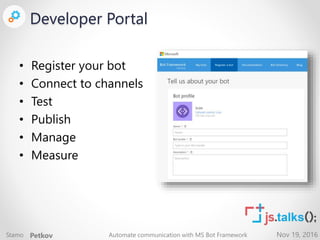
Developer Portal
• Register your bot
• Connect to channels
• Test
• Publish
• Manage
• Measure
Stamo Petkov Automate communication with MS Bot Framework
Nov 19, 2016
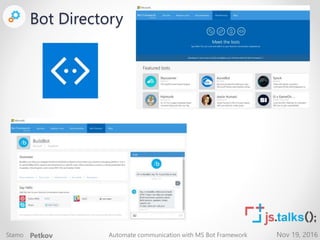
Bot Directory
Stamo Petkov Automate communication with MS Bot Framework
Nov 19, 2016
Bot Builder for Node.js
Nov 19, 2016
Bot Builder for Node.js
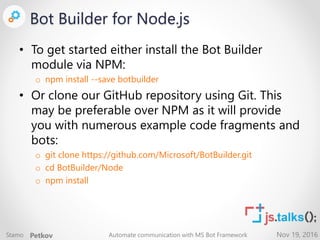
• To get started either install the Bot Builder
module via NPM:
o npm install --save botbuilder
• Or clone our GitHub repository using Git. This
may be preferable over NPM as it will provide
you with numerous example code fragments and
bots:
o git clone https://github.com/Microsoft/BotBuilder.git
o cd BotBuilder/Node
o npm install
Stamo Petkov Automate communication with MS Bot Framework
Nov 19, 2016
Bot Builder for Node.js
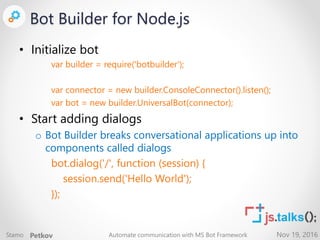
• Initialize bot
var builder = require('botbuilder');
var connector = new builder.ConsoleConnector().listen();
var bot = new builder.UniversalBot(connector);
• Start adding dialogs
o Bot Builder breaks conversational applications up into
components called dialogs
bot.dialog('/', function (session) {
session.send('Hello World');
});
Stamo Petkov Automate communication with MS Bot Framework
Nov 19, 2016
Registering and
Publishing
Register, Configure, Publish, Best practices
Nov 19, 2016
Registering your Bot
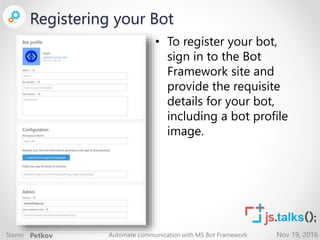
• To register your bot,
sign in to the Bot
Framework site and
provide the requisite
details for your bot,
including a bot profile
image.
Stamo Petkov Automate communication with MS Bot Framework
Nov 19, 2016
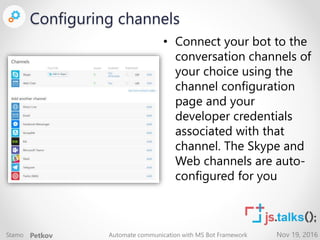
Configuring channels
• Connect your bot to the
conversation channels of
your choice using the
channel configuration
page and your
developer credentials
associated with that
channel. The Skype and
Web channels are auto-
configured for you
Stamo Petkov Automate communication with MS Bot Framework
Nov 19, 2016
Publishing your Bot
• Bots registered through Developer Portal and
reviewed for publishing will appear in the Bot
Directory
• Publishing your bot is an optional process
• Microsoft will review your bot submission to
make sure it meets certain minimum
requirements before it is publicly available on the
Bot Directory
Stamo Petkov Automate communication with MS Bot Framework
Nov 19, 2016
Best practices
• Craft an engaging welcome message
o Always introduce your Bot to members of the chat.
o Let users know how they can interact with your Bot (e.g., list command interfaces
your Bot supports).
o Engage them by requesting a response and wait for the user to respond before
continuing the conversation.
• Emotion, variety and personality are vital
o Unless you want to deliberately project a robotic persona, make your Bot colorful
and rich in expression (e.g., using different font-styles, emoticons etc. in your
Bot’s script). Try to keep variety in the conversation responses when the same
topic or question comes up multiple times in a conversation. Over time, based on
the tone and character of your Bot, the user should build a character for your Bot
in their mind.
Stamo Petkov Automate communication with MS Bot Framework
Nov 19, 2016
Best practices
• Be judicious with data and message frequency
o Don’t send out too many messages in sequence when they can be grouped into a
single message.
o Be cognizant of the user’s network-speed and bandwidth charges when sending
images and/or videos
o If you want to do something out of the ordinary (e.g. send a 100 messages in the
next minute, send a large file etc.), then take consent from the user before doing
it.
o Don’t send out messages that might appear as spam (e.g. wishing a user “Good
night” at 10 pm every night).
• Give feedback
o It’s always good to give a sense of awareness to the user. Let the user know if the
Bot understood or didn’t understand the user’s response. Paraphrase and/or
confirm if the Bot is uncertain about the user’s intent and before performing
more involved (or irrevocable) actions like deleting something permanently.
If the Bot needs to take time in performing time-intensive actions, don’t leave the
user hanging.
Stamo Petkov Automate communication with MS Bot Framework
Nov 19, 2016
Best practices
• Keep the user in control
o The user must not feel constrained or forced by the Bot’s script. Let the user tailor
the Bot to suit their needs, for example, if the Bot sends updates on five
categories of something but the user is only interested in two, let the user turn off
updates for the other three.
o Let the user select from options in your script wherever appropriate.
• Be nice and do the right things including but not
limited to:
o Being respectful and considerate of everyone;
o Respecting user privacy;
o Not being be rude in conversations;
o Striving for quality;
o Operating with integrity.
Stamo Petkov Automate communication with MS Bot Framework
Nov 19, 2016
What’s next
Bot intelligence
Nov 19, 2016
Bot Intelligence
• Microsoft Cognitive Services lets you tap into an
ever-growing collection of powerful AI
algorithms developed by experts in the fields of
o computer vision
o speech
o natural language processing
o knowledge extraction
o intelligent web search
• https://www.microsoft.com/cognitive-services
Stamo Petkov Automate communication with MS Bot Framework
Nov 19, 2016
Thanks to our Sponsors:
General Sponsor:
Gold Sponsors:
Media Partners:
Technological Partners:
Hosting Partner:

Automate Comunication with MS Bot Framework

  • 1.
    Nov 19, 2016 Sofia vartitle = “Automate communication with MS Bot Framework”; var info = { name: “Stamo Petkov”, company: “Information Services Plc”, email: “stamo.petkov@gmail.com”, gitHub: “https://github.com/stamo”, blog: “http://www.stamopetkov.eu” };
  • 2.
    Nov 19, 2016 agenda(); •Definitions • Overview of MS Bot Framework • Building blocks of the framework • Bot Builder for Node.js • Registering your Bot • Configuring channels • Publishing your Bot • Best practices • Bot Intelligence Stamo Petkov Automate communication with MS Bot Framework
  • 3.
  • 4.
    Nov 19, 2016 Definitions StamoPetkov Automate communication with MS Bot Framework
  • 5.
    Nov 19, 2016 Definitions <bot> Origin:1960s - shortening of robot. • Oxford English Dictionary o The larva of the botfly, which is an internal parasite of horses o An autonomous program on a network (especially the Internet) which can interact with systems or users, especially one designed to behave like a player in some video games • In context of bot framework o A bot is a web service that interacts with users in a conversational format Stamo Petkov Automate communication with MS Bot Framework
  • 6.
    Nov 19, 2016 Definitions ConversationalUser Interface – CUI Stamo Petkov Automate communication with MS Bot Framework
  • 7.
    Nov 19, 2016 Overviewof MS Bot Framework
  • 8.
    Nov 19, 2016 •Channels o Text/SMS o Skype o Slack o Facebook Messenger o Office 365 mail o GroupMe o Telegram o Kik o Web o Direct Line • The framework o Bot Builder SDK • .Net SDK • Node.js SDK • REST API o Bot Connector o Developer Portal o Bot Directory o Emulator Overview of MS Bot Framework Stamo Petkov Automate communication with MS Bot Framework
  • 9.
    Nov 19, 2016 Buildingblocks of the framework Bot Builder SDK, Bot Connector, Developer Portal, and Bot Directory
  • 10.
    Nov 19, 2016 BotBuilder SDK • Powerful dialog system with dialogs that are isolated and composable. • Built-in prompts for simple things like Yes/No, strings, numbers, enumerations. • Built-in dialogs that utilize powerful AI frameworks like LUIS. • Bots are stateless which helps them scale. Stamo Petkov Automate communication with MS Bot Framework
  • 11.
    Nov 19, 2016 BotBuilder SDK • .Net SDK o Microsoft.Bot.Builder NuGet package o https://github.com/Microsoft/BotBuilder/tree/master/CSharp • Node.js SDK o Botbuilder npm package o https://github.com/Microsoft/BotBuilder/tree/master/Node o Use typedoc to buid the documentation • REST API o Authentication • SSL/TLS, OAuth 2.0, JSON Web Tokens, OpenId metadata o Bot Connector REST API • Generate from the Connector API Swagger file o Bot State REST API • Generate from the State API Swagger file Stamo Petkov Automate communication with MS Bot Framework
  • 12.
    Nov 19, 2016 BotConnector • The Microsoft Bot Connector is a communication service that helps you connect your Bot with many different communication channels • To use the Microsoft Bot Framework Connector, you must have: o A Microsoft Account (Hotmail, Live, Outlook.com) o An Azure-accessible REST endpoint exposing a callback for the Connector service o Developer accounts on one or more communication services(such as Skype) where your Bot will communicate Stamo Petkov Automate communication with MS Bot Framework
  • 13.
    Nov 19, 2016 DeveloperPortal • Register your bot • Connect to channels • Test • Publish • Manage • Measure Stamo Petkov Automate communication with MS Bot Framework
  • 14.
    Nov 19, 2016 BotDirectory Stamo Petkov Automate communication with MS Bot Framework
  • 15.
    Nov 19, 2016 BotBuilder for Node.js
  • 16.
    Nov 19, 2016 BotBuilder for Node.js • To get started either install the Bot Builder module via NPM: o npm install --save botbuilder • Or clone our GitHub repository using Git. This may be preferable over NPM as it will provide you with numerous example code fragments and bots: o git clone https://github.com/Microsoft/BotBuilder.git o cd BotBuilder/Node o npm install Stamo Petkov Automate communication with MS Bot Framework
  • 17.
    Nov 19, 2016 BotBuilder for Node.js • Initialize bot var builder = require('botbuilder'); var connector = new builder.ConsoleConnector().listen(); var bot = new builder.UniversalBot(connector); • Start adding dialogs o Bot Builder breaks conversational applications up into components called dialogs bot.dialog('/', function (session) { session.send('Hello World'); }); Stamo Petkov Automate communication with MS Bot Framework
  • 18.
    Nov 19, 2016 Registeringand Publishing Register, Configure, Publish, Best practices
  • 19.
    Nov 19, 2016 Registeringyour Bot • To register your bot, sign in to the Bot Framework site and provide the requisite details for your bot, including a bot profile image. Stamo Petkov Automate communication with MS Bot Framework
  • 20.
    Nov 19, 2016 Configuringchannels • Connect your bot to the conversation channels of your choice using the channel configuration page and your developer credentials associated with that channel. The Skype and Web channels are auto- configured for you Stamo Petkov Automate communication with MS Bot Framework
  • 21.
    Nov 19, 2016 Publishingyour Bot • Bots registered through Developer Portal and reviewed for publishing will appear in the Bot Directory • Publishing your bot is an optional process • Microsoft will review your bot submission to make sure it meets certain minimum requirements before it is publicly available on the Bot Directory Stamo Petkov Automate communication with MS Bot Framework
  • 22.
    Nov 19, 2016 Bestpractices • Craft an engaging welcome message o Always introduce your Bot to members of the chat. o Let users know how they can interact with your Bot (e.g., list command interfaces your Bot supports). o Engage them by requesting a response and wait for the user to respond before continuing the conversation. • Emotion, variety and personality are vital o Unless you want to deliberately project a robotic persona, make your Bot colorful and rich in expression (e.g., using different font-styles, emoticons etc. in your Bot’s script). Try to keep variety in the conversation responses when the same topic or question comes up multiple times in a conversation. Over time, based on the tone and character of your Bot, the user should build a character for your Bot in their mind. Stamo Petkov Automate communication with MS Bot Framework
  • 23.
    Nov 19, 2016 Bestpractices • Be judicious with data and message frequency o Don’t send out too many messages in sequence when they can be grouped into a single message. o Be cognizant of the user’s network-speed and bandwidth charges when sending images and/or videos o If you want to do something out of the ordinary (e.g. send a 100 messages in the next minute, send a large file etc.), then take consent from the user before doing it. o Don’t send out messages that might appear as spam (e.g. wishing a user “Good night” at 10 pm every night). • Give feedback o It’s always good to give a sense of awareness to the user. Let the user know if the Bot understood or didn’t understand the user’s response. Paraphrase and/or confirm if the Bot is uncertain about the user’s intent and before performing more involved (or irrevocable) actions like deleting something permanently. If the Bot needs to take time in performing time-intensive actions, don’t leave the user hanging. Stamo Petkov Automate communication with MS Bot Framework
  • 24.
    Nov 19, 2016 Bestpractices • Keep the user in control o The user must not feel constrained or forced by the Bot’s script. Let the user tailor the Bot to suit their needs, for example, if the Bot sends updates on five categories of something but the user is only interested in two, let the user turn off updates for the other three. o Let the user select from options in your script wherever appropriate. • Be nice and do the right things including but not limited to: o Being respectful and considerate of everyone; o Respecting user privacy; o Not being be rude in conversations; o Striving for quality; o Operating with integrity. Stamo Petkov Automate communication with MS Bot Framework
  • 25.
    Nov 19, 2016 What’snext Bot intelligence
  • 26.
    Nov 19, 2016 BotIntelligence • Microsoft Cognitive Services lets you tap into an ever-growing collection of powerful AI algorithms developed by experts in the fields of o computer vision o speech o natural language processing o knowledge extraction o intelligent web search • https://www.microsoft.com/cognitive-services Stamo Petkov Automate communication with MS Bot Framework
  • 27.
    Nov 19, 2016 Thanksto our Sponsors: General Sponsor: Gold Sponsors: Media Partners: Technological Partners: Hosting Partner: