
“An Introduction to AngularJS End to End
Testing using Protractor”
Cubet Seminar
Presented by “Jenson”
“We help build and architect IT solutions”
About Cubet
Founded in 2007, Cubet Techno Labs
is an end-to-end SMAC (social,
mobile, analytics and cloud) consulting
company with offices at Kochi, India
and London, UK. With expertise in
insightful product strategy, well-crafted
design and proficient development for
high-end web and mobile application
technologies.
Where we stand
Visit – www.cubettech.com
What is Protractor ?
Visit – www.cubettech.com
 An AngularJS E2E Testing Framework
 Find Issues -Integration between components
 Introduced during AngularJS 1.2 and Beyond presentation
 A new replacement of the existing E2E Testing framework
 Nodejs program – end to end test run written in javascript
 Webdriver – control browsers and simulate user actions
 Jasmin – test syntax
 Allows running tests targeting remote addresses, No longer
need to have test files on the server being tested
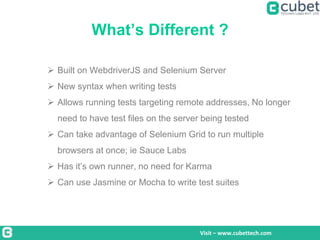
What’s Different ?
Visit – www.cubettech.com
 Built on WebdriverJS and Selenium Server
 New syntax when writing tests
 Allows running tests targeting remote addresses, No longer
need to have test files on the server being tested
 Can take advantage of Selenium Grid to run multiple
browsers at once; ie Sauce Labs
 Has it’s own runner, no need for Karma
 Can use Jasmine or Mocha to write test suites
List of Contents:
Visit – www.cubettech.com
● HOW IT WORKS
● FRAMEWORK OR DRIVERS USED
● HOW TO INSTALL AND RUN
● WRITE A TEST
HOW IT WORKS
Visit – www.cubettech.com
1) Selenium server
Browser automation framework
 Selenium server
 Webdriver APIs
 Browser driver
2) Protractor
Node js program that support jasmine framework
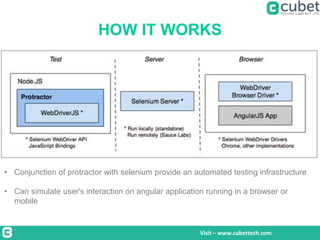
HOW IT WORKS
Visit – www.cubettech.com
• Conjunction of protractor with selenium provide an automated testing infrastructure
• Can simulate user's interaction on angular application running in a browser or
mobile
JASMIN FRAMEWORK
Visit – www.cubettech.com
● It’s a test syntax
● One or more it blocks describe the requirement of your
application
● Commands + expectation = it blocks
● Commands = do something with application
Navigate to a page
Click on a button
Expectation = assert something about the application's state
Value of the field
Current url
Expectation with an it block fails – runner mark it as “failed”
After each and before each
Visit – www.cubettech.com
INSTALLATION
Visit – www.cubettech.com
●Installed via Node Package Manager
npm install protractor
●Install Selenium Standalone Server
node_modules/protractor/bin/install_selenium_standal
one
Note: Require JDK(java development kit)
The webdriver-manager -helper tool to easily get an instance of a Selenium Server running
• webdriver-manager update
• webdriver-manager start
http://localhost:4444/wd/hub
WRITE A TEST
Visit – www.cubettech.com
● Clean folder with
•spec file
•configuration file.
spec.js
describe('Protractor Demo App', function() {
it('should have a title', function() {
browser.get('http://juliemr.github.io/protractor-demo/');
expect(browser.getTitle()).toEqual('Super Calculator');
});
});
The describe and it syntax is from the Jasmine framework
browser - global created by Protractor
The Configuration File
Visit – www.cubettech.com
exports.config = {
framework: 'jasmine',
seleniumAddress: 'http://localhost:4444/wd/hub',
specs: ['spec.js'] ,
capabilities: {
browserName: 'firefox'
}
}
Chrome : default browser
RUN COMMAND : protractor config.js
RESULT : 1 tests, 1 assertion, 0 failures
INTERACTING WITH ELEMENTS
Visit – www.cubettech.com
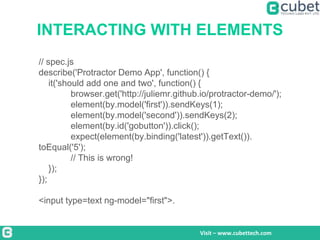
// spec.js
describe('Protractor Demo App', function() {
it('should add one and two', function() {
browser.get('http://juliemr.github.io/protractor-demo/');
element(by.model('first')).sendKeys(1);
element(by.model('second')).sendKeys(2);
element(by.id('gobutton')).click();
expect(element(by.binding('latest')).getText()).
toEqual('5');
// This is wrong!
});
});
<input type=text ng-model="first">.
Finding Elements in a Test
Visit – www.cubettech.com
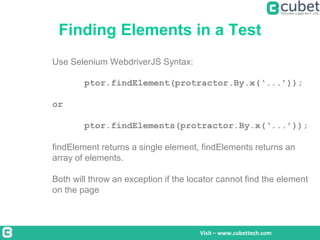
Use Selenium WebdriverJS Syntax:
ptor.findElement(protractor.By.x(‘...’));
or
ptor.findElements(protractor.By.x(‘...’));
findElement returns a single element, findElements returns an
array of elements.
Both will throw an exception if the locator cannot find the element
on the page
Protractor Locators
Visit – www.cubettech.com
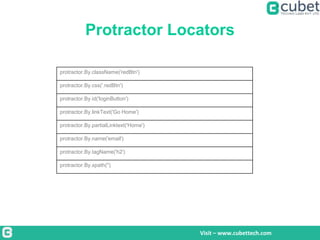
protractor.By.className('redBtn')
protractor.By.css('.redBtn')
protractor.By.id('loginButton')
protractor.By.linkText('Go Home')
protractor.By.partialLinktext('Home')
protractor.By.name('email')
protractor.By.tagName('h2')
protractor.By.xpath('')
Protractor Locators (cont)
Visit – www.cubettech.com
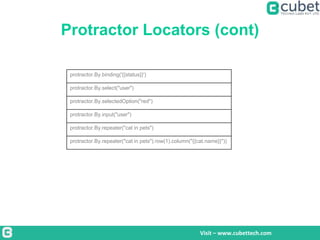
protractor.By.binding('{{status}}')
protractor.By.select("user")
protractor.By.selectedOption("red")
protractor.By.input("user")
protractor.By.repeater("cat in pets")
protractor.By.repeater("cat in pets").row(1).column("{{cat.name}}"))
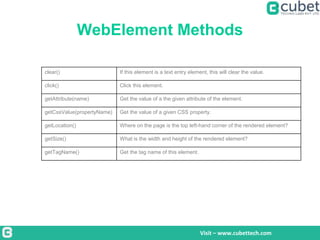
WebElement Methods
Visit – www.cubettech.com
clear() If this element is a text entry element, this will clear the value.
click() Click this element.
getAttribute(name) Get the value of a the given attribute of the element.
getCssValue(propertyName) Get the value of a given CSS property.
getLocation() Where on the page is the top left-hand corner of the rendered element?
getSize() What is the width and height of the rendered element?
getTagName() Get the tag name of this element.
WebElement Methods (cont)
Visit – www.cubettech.com
getText() Get the visible (i.e. not hidden by CSS) innerText of this element, including
sub-elements, without any leading or trailing whitespace.
isDisplayed() Is this element displayed or not? This method avoids the problem of having
to parse an element's "style" attribute.
isEnabled() Is the element currently enabled or not? This will generally return true for
everything but disabled input elements.
isSelected() Determine whether or not this element is selected or not.
sendKeys(keysToSend) Use this method to simulate typing into an element, which may set its value.
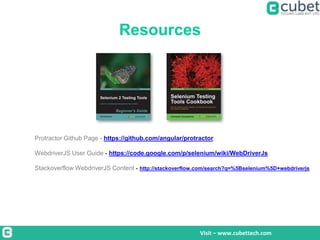
Resources
Visit – www.cubettech.com
Protractor Github Page - https://github.com/angular/protractor
WebdriverJS User Guide - https://code.google.com/p/selenium/wiki/WebDriverJs
Stackoverflow WebdriverJS Content - http://stackoverflow.com/search?q=%5Bselenium%5D+webdriverjs
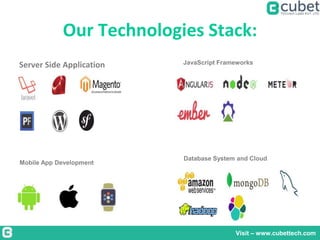
Our Technologies Stack:
Server Side Application JavaScript Frameworks
Mobile App Development
Database System and Cloud
Visit – www.cubettech.com
THANKS!
ANY QUESTIONS? PLEASE GET IN TOUCH!
www.cubettech.com
Email : info@cubettech.com
Skype : cubet.se
Phone: +91 484 405 4324
Contact us:
Kemp House
160 City Road
London- EC1V2NX,
UK.info@cubettech.com
+44 2071938618
Carnival Info Park,
Unit IX-C, 9th floor
PhaseIV,
Kochi, Kerala, India
info@cubettech.com
+91 484 4054324

An Introduction to AngularJS End to End Testing using Protractor

  • 1.
    “An Introduction toAngularJS End to End Testing using Protractor” Cubet Seminar Presented by “Jenson” “We help build and architect IT solutions”
  • 2.
    About Cubet Founded in2007, Cubet Techno Labs is an end-to-end SMAC (social, mobile, analytics and cloud) consulting company with offices at Kochi, India and London, UK. With expertise in insightful product strategy, well-crafted design and proficient development for high-end web and mobile application technologies. Where we stand Visit – www.cubettech.com
  • 3.
    What is Protractor? Visit – www.cubettech.com  An AngularJS E2E Testing Framework  Find Issues -Integration between components  Introduced during AngularJS 1.2 and Beyond presentation  A new replacement of the existing E2E Testing framework  Nodejs program – end to end test run written in javascript  Webdriver – control browsers and simulate user actions  Jasmin – test syntax  Allows running tests targeting remote addresses, No longer need to have test files on the server being tested
  • 4.
    What’s Different ? Visit– www.cubettech.com  Built on WebdriverJS and Selenium Server  New syntax when writing tests  Allows running tests targeting remote addresses, No longer need to have test files on the server being tested  Can take advantage of Selenium Grid to run multiple browsers at once; ie Sauce Labs  Has it’s own runner, no need for Karma  Can use Jasmine or Mocha to write test suites
  • 5.
    List of Contents: Visit– www.cubettech.com ● HOW IT WORKS ● FRAMEWORK OR DRIVERS USED ● HOW TO INSTALL AND RUN ● WRITE A TEST
  • 6.
    HOW IT WORKS Visit– www.cubettech.com 1) Selenium server Browser automation framework  Selenium server  Webdriver APIs  Browser driver 2) Protractor Node js program that support jasmine framework
  • 7.
    HOW IT WORKS Visit– www.cubettech.com • Conjunction of protractor with selenium provide an automated testing infrastructure • Can simulate user's interaction on angular application running in a browser or mobile
  • 8.
    JASMIN FRAMEWORK Visit –www.cubettech.com ● It’s a test syntax ● One or more it blocks describe the requirement of your application ● Commands + expectation = it blocks ● Commands = do something with application Navigate to a page Click on a button Expectation = assert something about the application's state Value of the field Current url Expectation with an it block fails – runner mark it as “failed” After each and before each
  • 9.
  • 10.
    INSTALLATION Visit – www.cubettech.com ●Installedvia Node Package Manager npm install protractor ●Install Selenium Standalone Server node_modules/protractor/bin/install_selenium_standal one Note: Require JDK(java development kit) The webdriver-manager -helper tool to easily get an instance of a Selenium Server running • webdriver-manager update • webdriver-manager start http://localhost:4444/wd/hub
  • 11.
    WRITE A TEST Visit– www.cubettech.com ● Clean folder with •spec file •configuration file. spec.js describe('Protractor Demo App', function() { it('should have a title', function() { browser.get('http://juliemr.github.io/protractor-demo/'); expect(browser.getTitle()).toEqual('Super Calculator'); }); }); The describe and it syntax is from the Jasmine framework browser - global created by Protractor
  • 12.
    The Configuration File Visit– www.cubettech.com exports.config = { framework: 'jasmine', seleniumAddress: 'http://localhost:4444/wd/hub', specs: ['spec.js'] , capabilities: { browserName: 'firefox' } } Chrome : default browser RUN COMMAND : protractor config.js RESULT : 1 tests, 1 assertion, 0 failures
  • 13.
    INTERACTING WITH ELEMENTS Visit– www.cubettech.com // spec.js describe('Protractor Demo App', function() { it('should add one and two', function() { browser.get('http://juliemr.github.io/protractor-demo/'); element(by.model('first')).sendKeys(1); element(by.model('second')).sendKeys(2); element(by.id('gobutton')).click(); expect(element(by.binding('latest')).getText()). toEqual('5'); // This is wrong! }); }); <input type=text ng-model="first">.
  • 14.
    Finding Elements ina Test Visit – www.cubettech.com Use Selenium WebdriverJS Syntax: ptor.findElement(protractor.By.x(‘...’)); or ptor.findElements(protractor.By.x(‘...’)); findElement returns a single element, findElements returns an array of elements. Both will throw an exception if the locator cannot find the element on the page
  • 15.
    Protractor Locators Visit –www.cubettech.com protractor.By.className('redBtn') protractor.By.css('.redBtn') protractor.By.id('loginButton') protractor.By.linkText('Go Home') protractor.By.partialLinktext('Home') protractor.By.name('email') protractor.By.tagName('h2') protractor.By.xpath('')
  • 16.
    Protractor Locators (cont) Visit– www.cubettech.com protractor.By.binding('{{status}}') protractor.By.select("user") protractor.By.selectedOption("red") protractor.By.input("user") protractor.By.repeater("cat in pets") protractor.By.repeater("cat in pets").row(1).column("{{cat.name}}"))
  • 17.
    WebElement Methods Visit –www.cubettech.com clear() If this element is a text entry element, this will clear the value. click() Click this element. getAttribute(name) Get the value of a the given attribute of the element. getCssValue(propertyName) Get the value of a given CSS property. getLocation() Where on the page is the top left-hand corner of the rendered element? getSize() What is the width and height of the rendered element? getTagName() Get the tag name of this element.
  • 18.
    WebElement Methods (cont) Visit– www.cubettech.com getText() Get the visible (i.e. not hidden by CSS) innerText of this element, including sub-elements, without any leading or trailing whitespace. isDisplayed() Is this element displayed or not? This method avoids the problem of having to parse an element's "style" attribute. isEnabled() Is the element currently enabled or not? This will generally return true for everything but disabled input elements. isSelected() Determine whether or not this element is selected or not. sendKeys(keysToSend) Use this method to simulate typing into an element, which may set its value.
  • 19.
    Resources Visit – www.cubettech.com ProtractorGithub Page - https://github.com/angular/protractor WebdriverJS User Guide - https://code.google.com/p/selenium/wiki/WebDriverJs Stackoverflow WebdriverJS Content - http://stackoverflow.com/search?q=%5Bselenium%5D+webdriverjs
  • 20.
    Our Technologies Stack: ServerSide Application JavaScript Frameworks Mobile App Development Database System and Cloud Visit – www.cubettech.com
  • 21.
    THANKS! ANY QUESTIONS? PLEASEGET IN TOUCH! www.cubettech.com Email : info@cubettech.com Skype : cubet.se Phone: +91 484 405 4324
  • 22.
    Contact us: Kemp House 160City Road London- EC1V2NX, UK.info@cubettech.com +44 2071938618 Carnival Info Park, Unit IX-C, 9th floor PhaseIV, Kochi, Kerala, India info@cubettech.com +91 484 4054324