Mark Bate
AWS Solutions Architect
Amazon API Gateway
Managed APIs in the Cloud
Host multiple versions and stages of your APIs
Create and distribute API keys to developers
Leverage AWS Sig-v4 to authorize access to APIs
Throttle and monitor requests to protect your backend
Managed cache to store API responses
SDK Generation for iOS, Android, and JavaScript
Swagger support
Request / Response data transformation and API mocking
Features
How does it work?
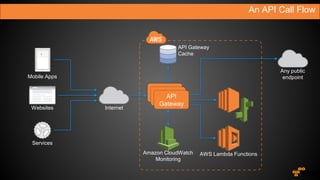
An API Call Flow
API
Gateway
Mobile Apps
Websites
Services
Internet
Any public
endpoint
Amazon CloudWatch
Monitoring
AWS Lambda Functions
API Gateway
Cache
Build, Deploy, Clone & Rollback
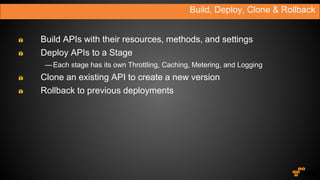
Build APIs with their resources, methods, and settings
Deploy APIs to a Stage
—Each stage has its own Throttling, Caching, Metering, and Logging
Clone an existing API to create a new version
Rollback to previous deployments
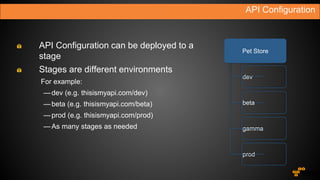
API Configuration
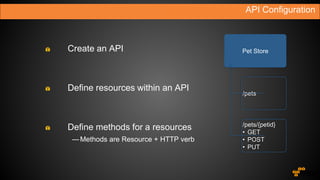
Pet Store
/pets/{petid}
• GET
• POST
• PUT
/pets
Define resources within an API
Create an API
Define methods for a resources
—Methods are Resource + HTTP verb
API Configuration
dev
beta
gamma
prod
Pet Store
API Configuration can be deployed to a
stage
Stages are different environments
For example:
—dev (e.g. thisismyapi.com/dev)
—beta (e.g. thisismyapi.com/beta)
—prod (e.g. thisismyapi.com/prod)
—As many stages as needed
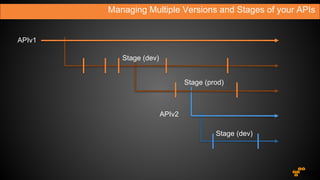
Stage (dev)
APIv2
Stage (prod)
Stage (dev)
Managing Multiple Versions and Stages of your APIs
APIv1
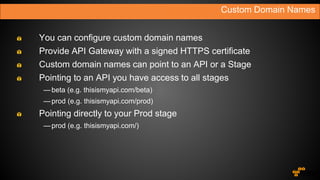
You can configure custom domain names
Provide API Gateway with a signed HTTPS certificate
Custom domain names can point to an API or a Stage
Pointing to an API you have access to all stages
—beta (e.g. thisismyapi.com/beta)
—prod (e.g. thisismyapi.com/prod)
Pointing directly to your Prod stage
—prod (e.g. thisismyapi.com/)
Custom Domain Names
Securing your API
API Keys to Meter Developer Usage
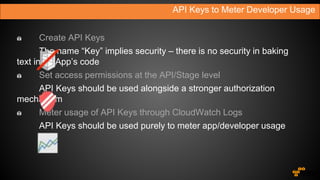
Create API Keys
Set access permissions at the API/Stage level
Meter usage of API Keys through CloudWatch Logs
API Keys to Meter Developer Usage
Create API Keys
The name “Key” implies security – there is no security in baking
text in an App’s code
Set access permissions at the API/Stage level
API Keys should be used alongside a stronger authorization
mechanism
Meter usage of API Keys through CloudWatch Logs
API Keys should be used purely to meter app/developer usage
You can leverage AWS Sig-v4 to sign and authorize API calls
—Amazon Cognito and AWS Security Token Service (STS) simplify the
generation of temporary credentials for your app
You can support OAuth or other authorization mechanisms through
custom headers
—Simply configure your API methods to forward the custom headers to your
backend
Authentication Options
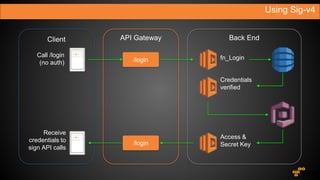
Using Sig-v4
Call /login
(no auth)
Receive
credentials to
sign API calls
Client API Gateway Back End
/login
/login
fn_Login
Credentials
verified
Access &
Secret Key
Throttling and Caching
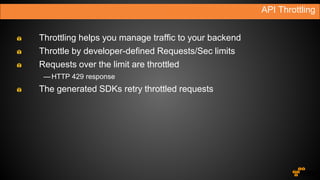
Throttling helps you manage traffic to your backend
Throttle by developer-defined Requests/Sec limits
Requests over the limit are throttled
—HTTP 429 response
The generated SDKs retry throttled requests
API Throttling
You can configure a cache key and the Time to Live (TTL) of the
API response
Cached items are returned without calling the backend
A cache is dedicated to you, by stage
You can provision between 0.5GB to 237GB of cache
Caching API Responses
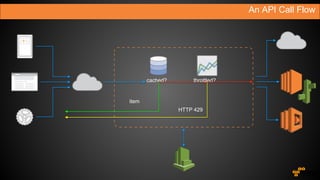
An API Call Flow
cached? throttled?
item
HTTP 429
SDK Generation
SDKs are generated based on API deployments (Stages)
If Request and Response Models are defined, the SDK includes
input and output marshaling of your methods
SDKs know how to handle throttling responses
SDKs also know how to sign requests with AWS temporary
credentials (Sig-v4)
Support for Android, iOS, JavaScript, …
Generate Client SDKs Based on Your APIs
How much does it cost?
Amazon API Gateway Pricing
$3.50 per Million API Gateway requests
1 Million API requests per month for 12 months
—Included in the AWS Free Tier
Data Transfer Out (Standard AWS Prices)
—$0.09/GB for the first 10 TB
—$0.085/GB for the next 40 TB
—$0.07/GB for the next 100 TB
—$0.05/GB for the next 350 TB
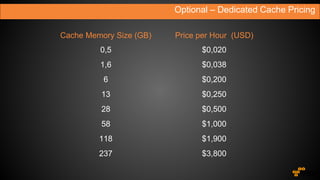
Optional – Dedicated Cache Pricing
Cache Memory Size (GB) Price per Hour (USD)
0,5 $0,020
1,6 $0,038
6 $0,200
13 $0,250
28 $0,500
58 $1,000
118 $1,900
237 $3,800
Availability
Amazon API Gateway
http://aws.amazon.com/apigateway/

Amazon API Gateway

  • 1.
    Mark Bate AWS SolutionsArchitect Amazon API Gateway Managed APIs in the Cloud
  • 2.
    Host multiple versionsand stages of your APIs Create and distribute API keys to developers Leverage AWS Sig-v4 to authorize access to APIs Throttle and monitor requests to protect your backend Managed cache to store API responses SDK Generation for iOS, Android, and JavaScript Swagger support Request / Response data transformation and API mocking Features
  • 3.
  • 4.
    An API CallFlow API Gateway Mobile Apps Websites Services Internet Any public endpoint Amazon CloudWatch Monitoring AWS Lambda Functions API Gateway Cache
  • 5.
    Build, Deploy, Clone& Rollback Build APIs with their resources, methods, and settings Deploy APIs to a Stage —Each stage has its own Throttling, Caching, Metering, and Logging Clone an existing API to create a new version Rollback to previous deployments
  • 6.
    API Configuration Pet Store /pets/{petid} •GET • POST • PUT /pets Define resources within an API Create an API Define methods for a resources —Methods are Resource + HTTP verb
  • 7.
    API Configuration dev beta gamma prod Pet Store APIConfiguration can be deployed to a stage Stages are different environments For example: —dev (e.g. thisismyapi.com/dev) —beta (e.g. thisismyapi.com/beta) —prod (e.g. thisismyapi.com/prod) —As many stages as needed
  • 8.
    Stage (dev) APIv2 Stage (prod) Stage(dev) Managing Multiple Versions and Stages of your APIs APIv1
  • 9.
    You can configurecustom domain names Provide API Gateway with a signed HTTPS certificate Custom domain names can point to an API or a Stage Pointing to an API you have access to all stages —beta (e.g. thisismyapi.com/beta) —prod (e.g. thisismyapi.com/prod) Pointing directly to your Prod stage —prod (e.g. thisismyapi.com/) Custom Domain Names
  • 10.
  • 11.
    API Keys toMeter Developer Usage Create API Keys Set access permissions at the API/Stage level Meter usage of API Keys through CloudWatch Logs
  • 12.
    API Keys toMeter Developer Usage Create API Keys The name “Key” implies security – there is no security in baking text in an App’s code Set access permissions at the API/Stage level API Keys should be used alongside a stronger authorization mechanism Meter usage of API Keys through CloudWatch Logs API Keys should be used purely to meter app/developer usage
  • 13.
    You can leverageAWS Sig-v4 to sign and authorize API calls —Amazon Cognito and AWS Security Token Service (STS) simplify the generation of temporary credentials for your app You can support OAuth or other authorization mechanisms through custom headers —Simply configure your API methods to forward the custom headers to your backend Authentication Options
  • 14.
    Using Sig-v4 Call /login (noauth) Receive credentials to sign API calls Client API Gateway Back End /login /login fn_Login Credentials verified Access & Secret Key
  • 15.
  • 16.
    Throttling helps youmanage traffic to your backend Throttle by developer-defined Requests/Sec limits Requests over the limit are throttled —HTTP 429 response The generated SDKs retry throttled requests API Throttling
  • 17.
    You can configurea cache key and the Time to Live (TTL) of the API response Cached items are returned without calling the backend A cache is dedicated to you, by stage You can provision between 0.5GB to 237GB of cache Caching API Responses
  • 18.
    An API CallFlow cached? throttled? item HTTP 429
  • 19.
  • 20.
    SDKs are generatedbased on API deployments (Stages) If Request and Response Models are defined, the SDK includes input and output marshaling of your methods SDKs know how to handle throttling responses SDKs also know how to sign requests with AWS temporary credentials (Sig-v4) Support for Android, iOS, JavaScript, … Generate Client SDKs Based on Your APIs
  • 21.
    How much doesit cost?
  • 22.
    Amazon API GatewayPricing $3.50 per Million API Gateway requests 1 Million API requests per month for 12 months —Included in the AWS Free Tier Data Transfer Out (Standard AWS Prices) —$0.09/GB for the first 10 TB —$0.085/GB for the next 40 TB —$0.07/GB for the next 100 TB —$0.05/GB for the next 350 TB
  • 23.
    Optional – DedicatedCache Pricing Cache Memory Size (GB) Price per Hour (USD) 0,5 $0,020 1,6 $0,038 6 $0,200 13 $0,250 28 $0,500 58 $1,000 118 $1,900 237 $3,800
  • 24.
  • 25.

Editor's Notes

  • #3 The ability to create and run multiple version of an API simultaneously. We have also built Stages. These enable developers to deploy multiple stages of each version simultaneously. For example, dev stage, prod stage, or beta stage. API Gateway helps developers create, monitor, and manage API Keys that they can distribute to 3rd party developers Developers who already own an authentication and authorization system can leverage their own infrastructure. For developers who are starting from scratch we have introduced the ability to leverage AWS’ own authorization mechanisms such as Signature V4 on Requests and IAM access policies for fine-grained access control At AWS we already run a very large, reliable network. API Gateway helps developers leverage all the work we have done over the years and allows developers to throttle incoming requests and use CloudWatch to monitor the status and latency of their APIs and set Alarms. Customers will be able to provision and configure a dedicated cache for their APIs, we will serve responses from the cache without hitting a customer’s backend whenever possible API Gateway can automatically generate client SDKs based on our customer’s API definition. This allows developers to take their APIs from concept to integration test in a client app in a matter of hours, not weeks Many of our customers use Swagger to define their APIs. API Gateway can import Swagger definitions. We have also built an open source Swagger import tool that our customers can use as part of their development workflow. This way they can keep working with Swagger in their local repository, then import and deploy their APIs into API Gateway at build time We have also integrated with the Apache Velocity templating engine, this allows our customers to transform the shape of requests and responses as they flow through the API Gateway. This gives customers the ability to expose legacy endpoints as modern, RESTful APIs among many other things.
  • #5 The first thing we want to look at is the standard flow of an API call, including all components in the system First, a request comes in from a client, this could be a mobile device, a web application or a backend service The requests arrives at one of our CloudFront PoP locations, it’s accepted and routed through to the API Gateway in the customer’s region The API Gateway receives the request, then checks for records in the dedicated cache (if it is configured). If there are no cached records available then it will forward the request to the backend for processing The backend can be a Lambda function, a web service running on Amazon EC2, or any other publicly accessible web service Once the backend has processed the request the API call metrics are logged in Amazon CloudWatch and the content is returned to the client
  • #6 Let’s look at what is an API, how you build, and how you deploy an API The first step is to create a new API, and declare its resources and methods. Once an API is declared it can be tested from the Console or the API Gateway APIs, but it is not yet accessible on the internet To make the API available it needs to be deployed to a Stage. Stages help you manage your development, beta, production environments etc. Customers can create as many stages as they want, similar to tagging. Each stage can be configured with its own logging, throttling, monitoring and caching settings At any time you can clone the state of an existing API into a new one, this allows you to start working on v2 of your APIs while v1 is still being developed/fixed. API Gateway saves a history of the last 300 deployments to each stage, at any time you can point a Stage (for example production) to a different deployment
  • #7 Let’s look in details at the hierarchical structure of an API The top level element is the API itself, we call it a REST API. A rest API can contain many resources, resources are typed objects that are part of your API’s domain. They also represent the path through which the objects will be accessible You can nest resources, in our example the /pet/{petId} represents an individual pet and is a nested resource of the /pets/ resource. Each resource can declare methods. Methods are the combination of a resource + an HTTP Verb. We support 7 standard HTTP Verbs, For example, a method is the POST to the /pets/{petId} resources – this would be used to create a new pet
  • #8 Now that we have declared an API with its resources and methods, we can deploy it to make it accessible to 3rd party developers APIs are deployed to a Stage Stages represent environments, for example development of production In API Gateway Stages are like tags, and developers can create as many stages as they want. A stage is just an alphanumeric string Stages are part of the path that will be used to reach sources and methods, for example the prod stage will be available at execute-api.apigateway.com/stage/resource
  • #9 This is a visual representation of how versions and stages are managed by the API Gateway, and how customers can leverage these features for their APIs * The first thing we’ll do is declared a V1 API and start configuring its resources and methods * The next step is to deploy the API to a development stage, we’ll keep deploying to development as we evolve our API * At a certain point, when we are ready for 3rd party developers to access this API, we will publish it to a production stage and distribute API Keys and generated SDKs * All along we will keep deploying APIs to both dev and prod including new features and bug fixed * Eventually we’ll want to make some breaking changes, and work on a much improved v2 API. However, we cannot make breaking changes to the API in production because we have thousands of developers using it. * To manage this situation we’ll simply clone the current state of the v1 API into a new API called v2, and begin development of the new version * By cloning we can keep publishing bug fixes to the first release and supporting users that are calling it with a gentle, gradual deprecation “… developers feel like they can deliver what they want, when they want to – and that makes for an extremely valuable tool …”
  • #10 Customers can configure the API Gateway to use a custom domain name they provide instead of the standard AWS domain. We expect customers to bring their own signed certificate for the HTTPS endpoints Domain names can be configured to point to an API, our top level item, or directly to a specific stage within an API. Pointing a custom domain name to an API requires the stage to be included in the path If the domain name is pointed directly at a stage there is no need for the path variable, resources can be accessed directly form the API root “/”
  • #12 API Keys are a great tool to manage the community of 3rd party developers interacting with the APIs API Gateway allows customers to create API Keys through a console interface or through an API for programmatic creation. Customers can set permissions on API Keys and allow access only to a set of APIs, or stages within an API Calls made by an API Key are logged in CloudWatch so that customers can always track utilization by 3rd party developers
  • #13 We always get asked whether API Keys are the authorization mechanism for APIs, so we’ll just be upfront: NO, at least we don’t recommend it We strongly encourage customers to use a temporary tokens based on a successful user authentication, either by leveraging AWS temporary credentials through API Signature Version 4, or their own Oauth mechanism
  • #14 AWS gives customers the ability to retrieve temporary, limited privilege credentials that are tied to an IAM role within their AWS account through services like Cognito and STS. Based on these credentials developers can sign calls to the APIs, the generated client SDKs automatically know how to handle these credentials In the next slide we’ll go through a real-world use-case for this Alternatively customers can setup the API Gateway to forward their existing headers to keep using their current OAuth authorization schema
  • #15 We’ll go through a use case that leverage AWS Lambda and Amazon Cognito to retrieve temporary credentials for a particular end user and authorize access to the APIs As discussed before the API Gateway helps customers leverage AWS Sigv4 – only one open API is required and then we can verify signatures on all other calls.
  • #17 API Gateway uses throttling to help protect customer backends and send only request that they can handle To implement throttling we use the token bucket algorithm Customers can set the number of RPS calls they know their backend can handle, and a rate at which the bucket is refilled
  • #18 API Gateway uses throttling to help protect customer backends and send only request that they can handle To implement throttling we use the token bucket algorithm Customers can set the number of RPS calls they know their backend can handle, and a rate at which the bucket is refilled
  • #19 Let’s put the two together and look at the execution path of an API call First, when we receive a request, we will check the dedicated cache (if it’s been configured) If we have an item in the cache then we can handle the request regardless of the throttling configuration, it will have no effect on our customer’s backend Next, if we don’t have a cache, we check the throttling configuration and the current throttling state (our bucket) If we are above the limit we will return a 429 response Otherwise we will execute the backend call and return the result As we mentioned our generated SDKs automatically know how to handle throttling responses, and they will perform an exponential backoff while retrying the call
  • #21 API Gateway can generate client SDKs based on a customer’s API definition. Simply select the deployment the SDK should target, the platform, and setup a couple of parameters and the API Gateway generates an SDK and makes it available to download through an API or the management console SDK are model-aware and also come with the built-in AWS core that allows them to handle throttling responses and sign requests using AWS Credentials
  • #25 Today! Initially available in: US East (N. Virginia) US West (Oregon) EU West (Dublin) Other regions soon
  • #26 Build, Deploy & Manage your APIs Request & Response Transform support Secure access using Sigv4 or OAuth Protect your backend with Throttling & Caching Simplified Client access via SDK Generation Usage-based pricing