The Ultimate API Checklist
for SaaS companies
SaaS companies should
adopt an API-first strategy
since API’s are the
cornerstone of integrations,
ecosystems, and
partnerships.
Integrations are not only essential for SaaS
survival, but they also open up new use
cases, reduce churn and bring added value to
your platform. Publishing an API is crucial for
SaaS growth, however bad API design can
damage your SaaS platform reputation.
When SaaS companies use Blendr.io – an
embedded integration platform – to boost
their native integrations offering, we often
receive the question – “What is a good API”?
At Blendr.io, we have been working with
hundreds of API’s and compiled an API
Checklist for SaaS companies.
“What is a
good API?”
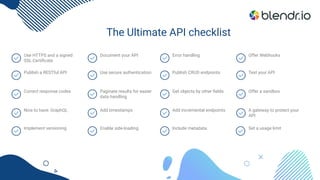
The Ultimate API checklist
Use HTTPS and a signed
SSL Certificate
Document your API Error handling Offer Webhooks
Publish a RESTful API Use secure authentication Publish CRUD endpoints Test your API
Correct response codes Paginate results for easier
data handling
Get objects by other fields Offer a sandbox
Nice to have: GraphQL Add timestamps Add incremental endpoints A gateway to protect your
API
Implement versioning Enable side-loading Include metadata Set a usage limit
Use HTTPS and a signed SSL Certificate
It goes without saying that your API endpoints need to use
HTTPS as opposed to HTTP, your data needs to travel the web
encrypted. Make sure your SSL certificate is not self-signed, it
needs to be signed by a trusted authority. If not, certain clients
will not allow making API calls. Use SSLChecker to test your
certificate.
Publish a RESTful API
Most SaaS companies today, choose to publish a RESTful API,
using JSON as data format. This is as opposed to e.g. SOAP
Webservices using XML, which are much harder to consume.
Great tutorial on REST API concepts:
https://www.restapitutorial.com
Correct response codes
Make sure to return the correct response codes, such as 200 for
a successful API request, 401 for an unauthorized request, etc.
Many clients rely on this response code to know what went
wrong. If you send a 200 response with an error in the response
body “Not authorized”, this is considered bad practice.
Nice to have: GraphQL
REST API’s have a limitation – clients that consume the API,
typically need to make many calls to get all the data they need,
and on top of that, the client typically receives more information
than it requested. That’s why Facebook invented “GraphQL”, a
query language definition for REST API’s.
GraphQL queries are more or less written in JSON, but there are
no values, only keys in the JSON. There are only around 5% of
API’s that support GraphQL, and that’s for a reason: it’s hard to
implement an API which supports GraphQL queries since the
incoming queries can be more complex compared to a classic
REST API.
Implement Versioning
Your API will change over time, as you add new features, or
perhaps fix a certain issue. However, you cannot just change the
structure and behavior of your API once it is in production and
used by customers. Each change could break integrations and
it’s essential to implement versioning in your API.
Your initial version is 1.0. Minor updates - 1.1, 1.2. etc., major
updates - 2.0 and beyond. When you deploy a new version, it
should not replace the older versions. Each version needs to
have a unique URL (e.g. https://api.domain.com/v1.0/…).
Alternatively, the URL’s stay the same, but the consumer
requests a certain version via a parameter in the header.
Use secure authentication
You can choose between several secure authentication
methods:
● oAuth2
● JWT web tokens
● API tokens or keys
Basic authentication using login and password is not
recommended.
Document your API
You can use Swagger, Postman, Apiary, or Readme.io to
automatically generate a part of your documentation. There’s
more than just listing the URL’s and parameters. Your
documentation should explain concepts, interactions between
certain types of data, data flows that must be followed, etc.
Here’s a checklist of things to include at a minimum in your API
documentation:
● Authentication
● Base URL for test, production, etc.
● General concepts
● Paging, filtering, data structures
● Response codes (errors etc.)
● Usage limits (rate limits, max. requests per
second/day/month, etc.)
● A list of all endpoints (URL’s), and per endpoint:
● A description, the method (GET, POST…) and the URL
The headers and body structure
The parameters, and per parameter:
Description
Type (integer, string…)
Required or optional
Example value
An example call: how to call this endpoint
from the command line using curl, and how to call it
in various programming languages such as JS, PHP,
Python, .NET etc.
Enable side-loading
Side-loading allows to retrieve related
objects as a part of a single request,
e.g. when requesting a list of
customers, each customer object
would have a property “orders” with the
actual orders of the customer. The
side-loading can limit the number of
API calls made.
Add timestamps
Make sure to include a “timestamp
created” and “timestamp last update”
for each record. The timestamp can
e.g. be an epoch unix timestamp. This
is related to incremental data retrieval,
see below.
Paginate results for easier
handling
Make sure to implement paging to
support large amounts of data:
● Cursor based: your API returns
a cursor or URL with each
response to get the next page
● Paging parameters: your API
has parameters such as limit
and page
Test your API
Postman is a great tool to execute API
calls for testing.
Include metadata
The ability to request metadata through
the API is very useful for various
integration use cases. Examples:
● List object types (useful for
platforms that support custom
objects)
● List fields of object type (useful
for platforms that support
custom fields)
Error handling
Provide detailed error messages when
things go wrong. There’s nothing worse
than a 500 response without any
explanation 🙂
Publish CRUD endpoints
Publish CRUD (Create, Read, Update, Delete) endpoints for each
object type (e.g. Contacts, Companies, etc.). In case your SaaS
platform is only a source of data, not a destination, it might
make sense to publish a read-only API.
Example CRUD endpoints for one object type:
● List: returns a full list
● Search: returns a filtered list
● Get: returns one record (one object)
● Create: creates a new object
● Update: updates an existing object
● Delete: deletes an object
Get objects by other fields
In many integration use cases, it’s useful to be able to retrieve a
single object not by its id, but by another unique property.
Examples:
● Get contact by email
● Get company by VAT number
● Get company by domain
Add incremental endpoints
For data synchronization, it’s very useful to be able to request
new and/or updated records since a given timestamp. Such API
endpoints are useful in scheduled integrations to process new
data incrementally on each run (e.g. every 5 minutes or every 30
seconds).Example API endpoints:
● Get new contacts created since timestamp X
(timestamp_created >= X, where X is a unix epoch
timestamp)
● Get new and updated contacts since timestamp X
(timestamp_lastupdate >= Y)
Note that this can also be accomplished with webhooks, but
webhooks do not allow to process historical data..
Offer a sandbox
Your API users will have to test their integrations, so make sure
to offer them a free limited license to use your SaaS platform for
testing purposes. Depending on the type of platform, it might be
needed to offer a so-called “Sandbox” environment, which is a
testing environment where tests cannot cause any “damage”.
For example, online payment platforms offer a Sandbox
environment where test payments can be made, without actual
money being involved.
Offer Webhooks
Offering a Webhook capability in your platform provides value to
your customers, it allows them to orchestrate certain processes
efficiently without unneeded delays, and it optimizes resource
usage on both platforms involved.
The Webhook configuration in your platform, should at a
minimum allow customers to configure the outbound URL.
Make sure to enforce HTTPS for security reasons, in other
words, do not accept a Webhook URL that uses “http://”. Also,
customers should be able to configure the event that triggers a
Webhook call.
Make sure your Webhooks support retries (queueing) and respect
rate limiting of the destination endpoint.
Ideally, your API allows to create and manage webhooks so that the
creation of webhooks can be automated. Example endpoints:
● Add webhook
● Remove webhook
● List webhooks (from one account)
A gateway to protect your API
To secure your API, it will be behind a firewall, but that’s not
enough. You will also want to protect your API in terms of the
maximum requests that a consumer can send per second etc.
And you may want to apply some caching, keep track of usage
per consumer and monitor the health of your API. This is where
an API gateway comes in. An API gateway sits in between your
actual API and the consumer, and it can take care of various
tasks such as logging usage and limiting usage per user.
Examples:
● Amazon AWS API gateway
● 3Scale
● And many others
Set a usage limit
It’s essential to limit the usage of your API to reasonable levels,
since API consumers are usually automated code or scripts, and
they can go wrong. If your partner makes a mistake, their code
might start calling your API multiple times every second. If on
top of that, that same script is launched for each of their
customers, you might be looking at hundreds of API calls per
second coming your way. An API gateway can limit the usage of
your API per end-user. Usage limiting consists of 2 parts:
● Request limiting: a maximum number of API calls per
hour/day/month.
● Rate limiting: a maximum of e.g. 10 calls per second, to
limit “bursts”, or a maximum of e.g. 100 calls per
60-second sliding window.
Conclusion
SaaS companies should should adopt an API-first approach.
Your API will be used by customers, partners and iPaaS
platforms such as Blendr.io. Blendr.io is a powerful,
hyper-scalable and secure integration platform for SaaS
companies. Use Blendr.io to create native integrations with the
low-code visual builder, embed them into the UI of your platform
and centrally manage your customer integrations.
Are you still building your API? We recommend having a look at
some of the platforms with great API’s – such as HubSpot or
Eventbrite – to get an idea of how they implemented and
documented their API.
blendr.io
@blendr_HQ
linkedin.com/company/blendr-io
www.youtube.com
www.facebook.com/blendrHQ

The ultimate api checklist by Blendr.io

  • 1.
    The Ultimate APIChecklist for SaaS companies
  • 2.
    SaaS companies should adoptan API-first strategy since API’s are the cornerstone of integrations, ecosystems, and partnerships. Integrations are not only essential for SaaS survival, but they also open up new use cases, reduce churn and bring added value to your platform. Publishing an API is crucial for SaaS growth, however bad API design can damage your SaaS platform reputation. When SaaS companies use Blendr.io – an embedded integration platform – to boost their native integrations offering, we often receive the question – “What is a good API”? At Blendr.io, we have been working with hundreds of API’s and compiled an API Checklist for SaaS companies. “What is a good API?”
  • 3.
    The Ultimate APIchecklist Use HTTPS and a signed SSL Certificate Document your API Error handling Offer Webhooks Publish a RESTful API Use secure authentication Publish CRUD endpoints Test your API Correct response codes Paginate results for easier data handling Get objects by other fields Offer a sandbox Nice to have: GraphQL Add timestamps Add incremental endpoints A gateway to protect your API Implement versioning Enable side-loading Include metadata Set a usage limit
  • 4.
    Use HTTPS anda signed SSL Certificate It goes without saying that your API endpoints need to use HTTPS as opposed to HTTP, your data needs to travel the web encrypted. Make sure your SSL certificate is not self-signed, it needs to be signed by a trusted authority. If not, certain clients will not allow making API calls. Use SSLChecker to test your certificate. Publish a RESTful API Most SaaS companies today, choose to publish a RESTful API, using JSON as data format. This is as opposed to e.g. SOAP Webservices using XML, which are much harder to consume. Great tutorial on REST API concepts: https://www.restapitutorial.com
  • 5.
    Correct response codes Makesure to return the correct response codes, such as 200 for a successful API request, 401 for an unauthorized request, etc. Many clients rely on this response code to know what went wrong. If you send a 200 response with an error in the response body “Not authorized”, this is considered bad practice. Nice to have: GraphQL REST API’s have a limitation – clients that consume the API, typically need to make many calls to get all the data they need, and on top of that, the client typically receives more information than it requested. That’s why Facebook invented “GraphQL”, a query language definition for REST API’s. GraphQL queries are more or less written in JSON, but there are no values, only keys in the JSON. There are only around 5% of API’s that support GraphQL, and that’s for a reason: it’s hard to implement an API which supports GraphQL queries since the incoming queries can be more complex compared to a classic REST API.
  • 6.
    Implement Versioning Your APIwill change over time, as you add new features, or perhaps fix a certain issue. However, you cannot just change the structure and behavior of your API once it is in production and used by customers. Each change could break integrations and it’s essential to implement versioning in your API. Your initial version is 1.0. Minor updates - 1.1, 1.2. etc., major updates - 2.0 and beyond. When you deploy a new version, it should not replace the older versions. Each version needs to have a unique URL (e.g. https://api.domain.com/v1.0/…). Alternatively, the URL’s stay the same, but the consumer requests a certain version via a parameter in the header. Use secure authentication You can choose between several secure authentication methods: ● oAuth2 ● JWT web tokens ● API tokens or keys Basic authentication using login and password is not recommended.
  • 7.
    Document your API Youcan use Swagger, Postman, Apiary, or Readme.io to automatically generate a part of your documentation. There’s more than just listing the URL’s and parameters. Your documentation should explain concepts, interactions between certain types of data, data flows that must be followed, etc. Here’s a checklist of things to include at a minimum in your API documentation: ● Authentication ● Base URL for test, production, etc. ● General concepts ● Paging, filtering, data structures ● Response codes (errors etc.) ● Usage limits (rate limits, max. requests per second/day/month, etc.) ● A list of all endpoints (URL’s), and per endpoint: ● A description, the method (GET, POST…) and the URL The headers and body structure The parameters, and per parameter: Description Type (integer, string…) Required or optional Example value An example call: how to call this endpoint from the command line using curl, and how to call it in various programming languages such as JS, PHP, Python, .NET etc.
  • 8.
    Enable side-loading Side-loading allowsto retrieve related objects as a part of a single request, e.g. when requesting a list of customers, each customer object would have a property “orders” with the actual orders of the customer. The side-loading can limit the number of API calls made. Add timestamps Make sure to include a “timestamp created” and “timestamp last update” for each record. The timestamp can e.g. be an epoch unix timestamp. This is related to incremental data retrieval, see below. Paginate results for easier handling Make sure to implement paging to support large amounts of data: ● Cursor based: your API returns a cursor or URL with each response to get the next page ● Paging parameters: your API has parameters such as limit and page
  • 9.
    Test your API Postmanis a great tool to execute API calls for testing. Include metadata The ability to request metadata through the API is very useful for various integration use cases. Examples: ● List object types (useful for platforms that support custom objects) ● List fields of object type (useful for platforms that support custom fields) Error handling Provide detailed error messages when things go wrong. There’s nothing worse than a 500 response without any explanation 🙂
  • 10.
    Publish CRUD endpoints PublishCRUD (Create, Read, Update, Delete) endpoints for each object type (e.g. Contacts, Companies, etc.). In case your SaaS platform is only a source of data, not a destination, it might make sense to publish a read-only API. Example CRUD endpoints for one object type: ● List: returns a full list ● Search: returns a filtered list ● Get: returns one record (one object) ● Create: creates a new object ● Update: updates an existing object ● Delete: deletes an object Get objects by other fields In many integration use cases, it’s useful to be able to retrieve a single object not by its id, but by another unique property. Examples: ● Get contact by email ● Get company by VAT number ● Get company by domain
  • 11.
    Add incremental endpoints Fordata synchronization, it’s very useful to be able to request new and/or updated records since a given timestamp. Such API endpoints are useful in scheduled integrations to process new data incrementally on each run (e.g. every 5 minutes or every 30 seconds).Example API endpoints: ● Get new contacts created since timestamp X (timestamp_created >= X, where X is a unix epoch timestamp) ● Get new and updated contacts since timestamp X (timestamp_lastupdate >= Y) Note that this can also be accomplished with webhooks, but webhooks do not allow to process historical data.. Offer a sandbox Your API users will have to test their integrations, so make sure to offer them a free limited license to use your SaaS platform for testing purposes. Depending on the type of platform, it might be needed to offer a so-called “Sandbox” environment, which is a testing environment where tests cannot cause any “damage”. For example, online payment platforms offer a Sandbox environment where test payments can be made, without actual money being involved.
  • 12.
    Offer Webhooks Offering aWebhook capability in your platform provides value to your customers, it allows them to orchestrate certain processes efficiently without unneeded delays, and it optimizes resource usage on both platforms involved. The Webhook configuration in your platform, should at a minimum allow customers to configure the outbound URL. Make sure to enforce HTTPS for security reasons, in other words, do not accept a Webhook URL that uses “http://”. Also, customers should be able to configure the event that triggers a Webhook call. Make sure your Webhooks support retries (queueing) and respect rate limiting of the destination endpoint. Ideally, your API allows to create and manage webhooks so that the creation of webhooks can be automated. Example endpoints: ● Add webhook ● Remove webhook ● List webhooks (from one account)
  • 13.
    A gateway toprotect your API To secure your API, it will be behind a firewall, but that’s not enough. You will also want to protect your API in terms of the maximum requests that a consumer can send per second etc. And you may want to apply some caching, keep track of usage per consumer and monitor the health of your API. This is where an API gateway comes in. An API gateway sits in between your actual API and the consumer, and it can take care of various tasks such as logging usage and limiting usage per user. Examples: ● Amazon AWS API gateway ● 3Scale ● And many others Set a usage limit It’s essential to limit the usage of your API to reasonable levels, since API consumers are usually automated code or scripts, and they can go wrong. If your partner makes a mistake, their code might start calling your API multiple times every second. If on top of that, that same script is launched for each of their customers, you might be looking at hundreds of API calls per second coming your way. An API gateway can limit the usage of your API per end-user. Usage limiting consists of 2 parts: ● Request limiting: a maximum number of API calls per hour/day/month. ● Rate limiting: a maximum of e.g. 10 calls per second, to limit “bursts”, or a maximum of e.g. 100 calls per 60-second sliding window.
  • 14.
    Conclusion SaaS companies shouldshould adopt an API-first approach. Your API will be used by customers, partners and iPaaS platforms such as Blendr.io. Blendr.io is a powerful, hyper-scalable and secure integration platform for SaaS companies. Use Blendr.io to create native integrations with the low-code visual builder, embed them into the UI of your platform and centrally manage your customer integrations. Are you still building your API? We recommend having a look at some of the platforms with great API’s – such as HubSpot or Eventbrite – to get an idea of how they implemented and documented their API.
  • 15.