AWS Lambda- ServerLess
Arch
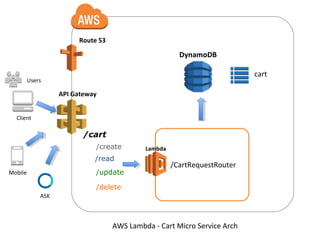
Cart Micro Service
API Gateway
Lambda
DynamoDB
Dhanu Gupta
January, 2016
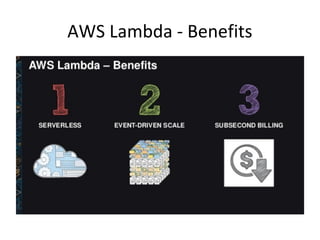
AWS Lambda - Benefits
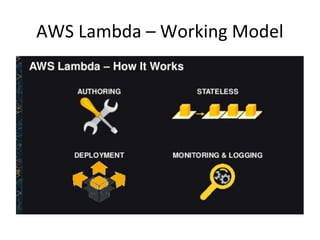
AWS Lambda – Working Model
Route 53
API Gateway
/cart
/read
/create
/delete
Lambda
/CartRequestRouter
/update
DynamoDB
cart
AWS Lambda - Cart Micro Service Arch
ASK
Mobile
Client
Users
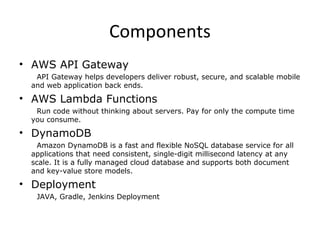
Components
• AWS API Gateway
API Gateway helps developers deliver robust, secure, and scalable mobile
and web application back ends.
• AWS Lambda Functions
Run code without thinking about servers. Pay for only the compute time
you consume.
• DynamoDB
Amazon DynamoDB is a fast and flexible NoSQL database service for all
applications that need consistent, single-digit millisecond latency at any
scale. It is a fully managed cloud database and supports both document
and key-value store models.
• Deployment
JAVA, Gradle, Jenkins Deployment
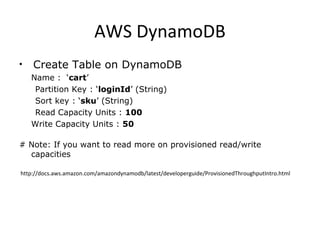
AWS DynamoDB
• Create Table on DynamoDB
Name : ‘cart’
Partition Key : ‘loginId’ (String)
Sort key : ‘sku’ (String)
Read Capacity Units : 100
Write Capacity Units : 50
# Note: If you want to read more on provisioned read/write
capacities
http://docs.aws.amazon.com/amazondynamodb/latest/developerguide/ProvisionedThroughputIntro.html
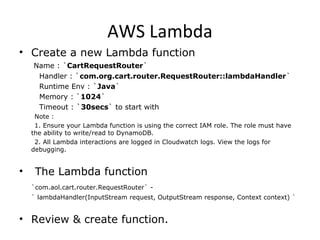
AWS Lambda
• Create a new Lambda function
Name : `CartRequestRouter`
Handler : `com.org.cart.router.RequestRouter::lambdaHandler`
Runtime Env : `Java`
Memory : `1024`
Timeout : `30secs` to start with
Note :
1. Ensure your Lambda function is using the correct IAM role. The role must have
the ability to write/read to DynamoDB.
2. All Lambda interactions are logged in Cloudwatch logs. View the logs for
debugging.
• The Lambda function
`com.aol.cart.router.RequestRouter` -
` lambdaHandler(InputStream request, OutputStream response, Context context) `
• Review & create function.
AWS API Gateway
• Create a new API. Give it a name and description. This will
be our RESTful endpoint.
• Create a resource. The path should be ‘/cart’ , for
example.
• We need to add one more resource as ‘/read’ under cart
as’ /cart/read’. Create a GET method with Lambda
integration.
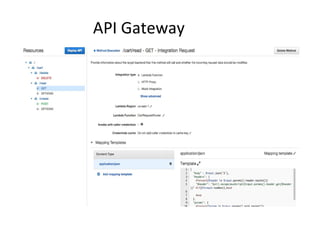
• Now let's setup the Integration Request. Cart Micro Service
GET request will be of type application/json. This
Integration step will map this type to a JSON object, which
Lambda requires. In the Integration Requests page create a
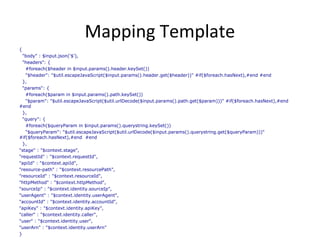
mapping template. Content-type is application/json and
template:
Mapping Template
{
"body" : $input.json('$'),
"headers": {
#foreach($header in $input.params().header.keySet())
"$header": "$util.escapeJavaScript($input.params().header.get($header))" #if($foreach.hasNext),#end #end
},
"params": {
#foreach($param in $input.params().path.keySet())
"$param": "$util.escapeJavaScript($util.urlDecode($input.params().path.get($param)))" #if($foreach.hasNext),#end
#end
},
"query": {
#foreach($queryParam in $input.params().querystring.keySet())
"$queryParam": "$util.escapeJavaScript($util.urlDecode($input.params().querystring.get($queryParam)))"
#if($foreach.hasNext),#end #end
},
"stage" : "$context.stage",
"requestId" : "$context.requestId",
"apiId" : "$context.apiId",
"resource-path" : "$context.resourcePath",
"resourceId" : "$context.resourceId",
"httpMethod" : "$context.httpMethod",
"sourceIp" : "$context.identity.sourceIp",
"userAgent" : "$context.identity.userAgent",
"accountId" : "$context.identity.accountId",
"apiKey" : "$context.identity.apiKey",
"caller" : "$context.identity.caller",
"user" : "$context.identity.user",
"userArn" : "$context.identity.userArn"
}
API Gateway
API Gateway Deployment
• Let's ensure the response is correct. Cart Micro Service will
respond as valid JSON.
• Lambda cannot return valid JSON Response.
• Now let's deploy this API, so we can test it! Click the Deploy API
button.
Testing
• We should now have a publically accessible GET endpoint.
Ex: https://xxxx.execute-api.us-west-
2.amazonaws.com/prod/cart
• Make sure you add API Key to API Gateway for security
purpose. Each client has to provie x-api-key:xxxxxxxx to
access each REST API's.
• You can access read API as https://xxxx.execute-api.us-
west-2.amazonaws.com/prod/cart/read?loginId=xxxx and
response will be JSON Object like
{ cart:[],
code:200,
loginId:xxx}
Latency Performance Checklist
•#1 - Avoid cross-region calls: for best performance, ensure your clients, API, and backend
integrations are located in the same geographical region
•#2 - Lambda functions receiving low traffic may exhibit "cold start" behavior, resulting in a
fraction of requests completing with higher than usual latency. Lambda is constantly trying to
improve cold start times.
•#3 - Ensure your Lambda function has appropriate memory allocation
•#4 - Use resource-based permissions whenever possible. The API Gateway console adds
resource-based permissions to your Lambda function by default. If using STS credentials for your
Lambda or AWS integration, please ensure STS endpoints are activated for the appropriate region
for your account (See
http://docs.aws.amazon.com/IAM/latest/UserGuide/id_credentials_temp_enable-regions.html)
Troubleshooting
• Cloud Watch logs are your friends
References
• http://www.slideshare.net/AmazonWebServic
es/a-walk-in-the-cloud-with-aws-lambda-
55789425
• https://aws.amazon.com/dynamodb/
• https://aws.amazon.com/lambda/
• https://aws.amazon.com/api-gateway/
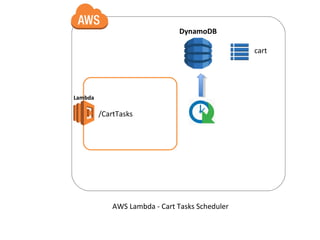
Lambda
/CartTasks
DynamoDB
cart
AWS Lambda - Cart Tasks Scheduler
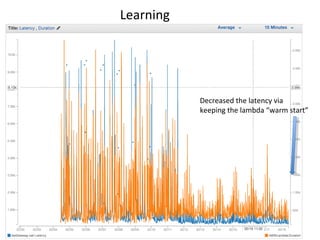
Decreased the latency via
keeping the lambda “warm start”
Learning
Aws Lambda Cart Microservice Server Less

Aws Lambda Cart Microservice Server Less

  • 1.
    AWS Lambda- ServerLess Arch CartMicro Service API Gateway Lambda DynamoDB Dhanu Gupta January, 2016
  • 2.
    AWS Lambda -Benefits
  • 3.
    AWS Lambda –Working Model
  • 4.
  • 5.
    Components • AWS APIGateway API Gateway helps developers deliver robust, secure, and scalable mobile and web application back ends. • AWS Lambda Functions Run code without thinking about servers. Pay for only the compute time you consume. • DynamoDB Amazon DynamoDB is a fast and flexible NoSQL database service for all applications that need consistent, single-digit millisecond latency at any scale. It is a fully managed cloud database and supports both document and key-value store models. • Deployment JAVA, Gradle, Jenkins Deployment
  • 6.
    AWS DynamoDB • CreateTable on DynamoDB Name : ‘cart’ Partition Key : ‘loginId’ (String) Sort key : ‘sku’ (String) Read Capacity Units : 100 Write Capacity Units : 50 # Note: If you want to read more on provisioned read/write capacities http://docs.aws.amazon.com/amazondynamodb/latest/developerguide/ProvisionedThroughputIntro.html
  • 7.
    AWS Lambda • Createa new Lambda function Name : `CartRequestRouter` Handler : `com.org.cart.router.RequestRouter::lambdaHandler` Runtime Env : `Java` Memory : `1024` Timeout : `30secs` to start with Note : 1. Ensure your Lambda function is using the correct IAM role. The role must have the ability to write/read to DynamoDB. 2. All Lambda interactions are logged in Cloudwatch logs. View the logs for debugging. • The Lambda function `com.aol.cart.router.RequestRouter` - ` lambdaHandler(InputStream request, OutputStream response, Context context) ` • Review & create function.
  • 8.
    AWS API Gateway •Create a new API. Give it a name and description. This will be our RESTful endpoint. • Create a resource. The path should be ‘/cart’ , for example. • We need to add one more resource as ‘/read’ under cart as’ /cart/read’. Create a GET method with Lambda integration. • Now let's setup the Integration Request. Cart Micro Service GET request will be of type application/json. This Integration step will map this type to a JSON object, which Lambda requires. In the Integration Requests page create a mapping template. Content-type is application/json and template:
  • 9.
    Mapping Template { "body" :$input.json('$'), "headers": { #foreach($header in $input.params().header.keySet()) "$header": "$util.escapeJavaScript($input.params().header.get($header))" #if($foreach.hasNext),#end #end }, "params": { #foreach($param in $input.params().path.keySet()) "$param": "$util.escapeJavaScript($util.urlDecode($input.params().path.get($param)))" #if($foreach.hasNext),#end #end }, "query": { #foreach($queryParam in $input.params().querystring.keySet()) "$queryParam": "$util.escapeJavaScript($util.urlDecode($input.params().querystring.get($queryParam)))" #if($foreach.hasNext),#end #end }, "stage" : "$context.stage", "requestId" : "$context.requestId", "apiId" : "$context.apiId", "resource-path" : "$context.resourcePath", "resourceId" : "$context.resourceId", "httpMethod" : "$context.httpMethod", "sourceIp" : "$context.identity.sourceIp", "userAgent" : "$context.identity.userAgent", "accountId" : "$context.identity.accountId", "apiKey" : "$context.identity.apiKey", "caller" : "$context.identity.caller", "user" : "$context.identity.user", "userArn" : "$context.identity.userArn" }
  • 10.
  • 11.
    API Gateway Deployment •Let's ensure the response is correct. Cart Micro Service will respond as valid JSON. • Lambda cannot return valid JSON Response. • Now let's deploy this API, so we can test it! Click the Deploy API button.
  • 12.
    Testing • We shouldnow have a publically accessible GET endpoint. Ex: https://xxxx.execute-api.us-west- 2.amazonaws.com/prod/cart • Make sure you add API Key to API Gateway for security purpose. Each client has to provie x-api-key:xxxxxxxx to access each REST API's. • You can access read API as https://xxxx.execute-api.us- west-2.amazonaws.com/prod/cart/read?loginId=xxxx and response will be JSON Object like { cart:[], code:200, loginId:xxx}
  • 13.
    Latency Performance Checklist •#1- Avoid cross-region calls: for best performance, ensure your clients, API, and backend integrations are located in the same geographical region •#2 - Lambda functions receiving low traffic may exhibit "cold start" behavior, resulting in a fraction of requests completing with higher than usual latency. Lambda is constantly trying to improve cold start times. •#3 - Ensure your Lambda function has appropriate memory allocation •#4 - Use resource-based permissions whenever possible. The API Gateway console adds resource-based permissions to your Lambda function by default. If using STS credentials for your Lambda or AWS integration, please ensure STS endpoints are activated for the appropriate region for your account (See http://docs.aws.amazon.com/IAM/latest/UserGuide/id_credentials_temp_enable-regions.html)
  • 14.
    Troubleshooting • Cloud Watchlogs are your friends
  • 15.
  • 16.
  • 17.
    Decreased the latencyvia keeping the lambda “warm start” Learning

Editor's Notes

  • #18 Due to not much traffic to our API’s we were experiencing “cold start” Lambda Function behavior Solution is to keep adding enough traffic so that lambda function not go on “cold start” mode.