ALL ABOUT E-MAILS
WHY EMAIL?
Discuss with your partner:
Why do people use emails?Why do people use emails?
Which are the advantages of using emails?Which are the advantages of using emails?
Are there any disadvantages?Are there any disadvantages?
Do you have an email account?Do you have an email account?
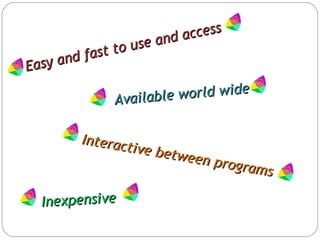
Easy and fast to use and access
Interactive between programs
Available world wide
InexpensiveInexpensive
Get ready! You’re about to createGet ready! You’re about to create
your own email account!your own email account!
Y3 2009 – Tatiana Sobral
WHAT IS IT?
Email or e-mail is short for electronic mail.
It’s a modern method of:
transmitting data, text files, digital photos, and
audio and video files from one computer to
another over the internet.
SOME HISTORY...
During the 1960s and 1970s many companies in
the United States used email facilities on their
systems.
This enabled users of terminals attached to
those systems to send messages to each other.
That was even before the internet was invented!
As companies began to connect their central
systems (hosts) to their head offices then
employees were able to send email to other
employees on a world-wide basis.
The internet just helped email become popular!
That was in the beginning of the 1990s –
when you were not even born!
SENDING MESS GES
Email users create and send messages from
individual computers using commercial programs:
To send the message, the user has to specify the
addresses. Messages to more than one recipient
are called broadcasting.
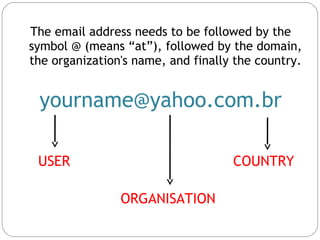
The email address needs to be followed by the
symbol @ (means “at”), followed by the domain,
the organization's name, and finally the country.
yourname@yahoo.com.br
USER
ORGANISATION
COUNTRY
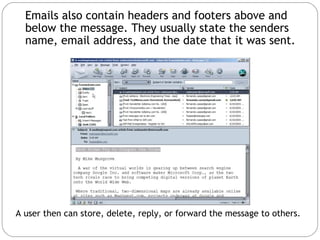
Emails also contain headers and footers above and
below the message. They usually state the senders
name, email address, and the date that it was sent.
A user then can store, delete, reply, or forward the message to others.
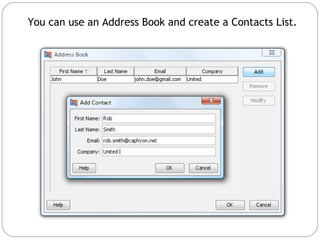
You can use an Address Book and create a Contacts List.
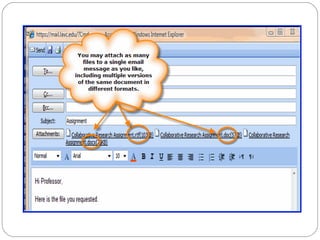
Most email programs allow you to attach files and
photos to emails to send to others. This includes
audio and video files and digital photographs.
WHY EMAIL?
Discuss with your partner:
Why do people use emails?Why do people use emails?
Which are the advantages of using emails?Which are the advantages of using emails?
Are there any disadvantages?Are there any disadvantages?
Do you have an email account?Do you have an email account?
Easy and fast to use and access
Interactive between programs
Available world wide
InexpensiveInexpensive
Get ready! You’re about to createGet ready! You’re about to create
your own email account!your own email account!
Y3 2009 – Tatiana Sobral

All about email

  • 1.
  • 2.
    WHY EMAIL? Discuss withyour partner: Why do people use emails?Why do people use emails? Which are the advantages of using emails?Which are the advantages of using emails? Are there any disadvantages?Are there any disadvantages? Do you have an email account?Do you have an email account?
  • 4.
    Easy and fastto use and access Easy and fast to use and access Interactive between programs Interactive between programs Available world wide Available world wide InexpensiveInexpensive
  • 5.
    Get ready! You’reabout to createGet ready! You’re about to create your own email account!your own email account! Y3 2009 – Tatiana Sobral
  • 6.
    WHAT IS IT? Emailor e-mail is short for electronic mail. It’s a modern method of: transmitting data, text files, digital photos, and audio and video files from one computer to another over the internet.
  • 7.
    SOME HISTORY... During the1960s and 1970s many companies in the United States used email facilities on their systems. This enabled users of terminals attached to those systems to send messages to each other. That was even before the internet was invented!
  • 8.
    As companies beganto connect their central systems (hosts) to their head offices then employees were able to send email to other employees on a world-wide basis. The internet just helped email become popular! That was in the beginning of the 1990s – when you were not even born!
  • 9.
    SENDING MESS GES Emailusers create and send messages from individual computers using commercial programs: To send the message, the user has to specify the addresses. Messages to more than one recipient are called broadcasting.
  • 10.
    The email addressneeds to be followed by the symbol @ (means “at”), followed by the domain, the organization's name, and finally the country. yourname@yahoo.com.br USER ORGANISATION COUNTRY
  • 11.
    Emails also containheaders and footers above and below the message. They usually state the senders name, email address, and the date that it was sent. A user then can store, delete, reply, or forward the message to others.
  • 12.
    You can usean Address Book and create a Contacts List.
  • 14.
    Most email programsallow you to attach files and photos to emails to send to others. This includes audio and video files and digital photographs.
  • 16.
    WHY EMAIL? Discuss withyour partner: Why do people use emails?Why do people use emails? Which are the advantages of using emails?Which are the advantages of using emails? Are there any disadvantages?Are there any disadvantages? Do you have an email account?Do you have an email account?
  • 18.
    Easy and fastto use and access Easy and fast to use and access Interactive between programs Interactive between programs Available world wide Available world wide InexpensiveInexpensive
  • 19.
    Get ready! You’reabout to createGet ready! You’re about to create your own email account!your own email account! Y3 2009 – Tatiana Sobral