MODULE 2.4:
ELECTRONIC
COMMUNICATION
CONTENTS
Introduction
What is electronic
communication
Email
 ISP email vs web-based email
 Email addresses
 Practical use of Email
Other modes of e-
communication
 Social networking sites
 Instant Messaging and Chat
applications
Netiquette
 Netiquette and social
networking
 Netiquette and email
Activity 3
2
3
INTRODUCTION
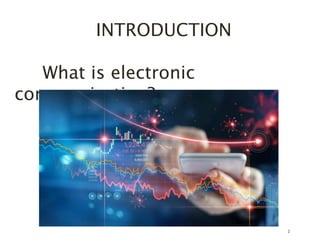
What is electronic
communication?
INTRODUCTION
• E-communication – all forms of
electronic communication
• Process by which computers and
other communication
devices(electronic media) are used
to exchange messages and/or
digital data
• Data like images, files, pictures
etcetera can be shared
• In order for E-communication to
occur an electronic devices is
needed
4
EMAIL
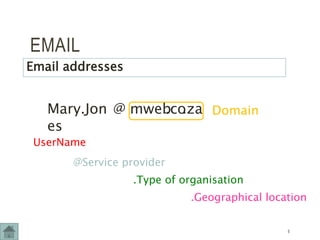
Mary.Jon
es
UserName
@ mweb
.co
@Service provider
.za
.Type of organisation
.Geographical location
Domain
Email addresses
5
EMAIL
• Messages which are instantly sent through
electronic means
• A formal means of communication and used
frequently in businesses.
• When the e-mail is sent, the receiver receives
it immediately.
• Time take for a reply may depend on the
receiver (not always immediate)
• E-mail will allow you to attach files to
messages
Practical use of email:
6
EMAIL
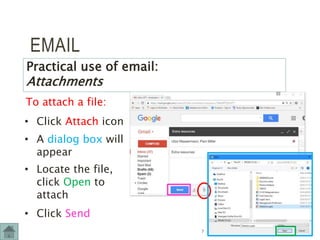
To attach a file:
Practical use of email:
Attachments
• Click Attach icon
• A dialog box will
appear
• Locate the file,
click Open to
attach
• Click Send
7
EMAIL
ISP email vs web-based email
Web-based email
•Accessed using a
web browser
anywhere where
internet access
•Must be online to
access account
•Free of charge
(might pay for
internet access)
ISP-based email
•Set up on local
computer or device
using appropriate
software
•Can be accessed
without being online
•Monthly ISP charge
plus internet access
cost
8
OTHER MODES OF E-
COMMUNICATION
Social networking sites
Interactive websites where individuals and
organisations post their likes, dislikes,
photographs and activities for friends and
interested parties to read and respond to
9
OTHER MODES OF E-
COMMUNICATION
Instant Messaging and Chat applications
• These applications occur in real time (different
to email)
• Many social networking sites offer instant
messaging
10
11
Instant messaging
• Instant messaging is an informal way of
communication
• Used to communicate with family, friends,
peers' etcetera.
• Instant messaging can be used to share
geographical data, pictures, files, audio
etcetera
• Emoticons are used when communicating
through instant messaging. 
• When the message is sent either between
two people or a group, it is instantly
received, and a reply is instant (opposed to
e-mail). A conversation can occur back and
forth in the same time frame.
OTHER MODES OF E-
COMMUNICATION
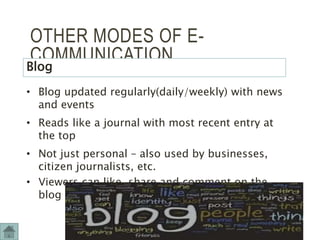
Blog
• Blog updated regularly(daily/weekly) with news
and events
• Reads like a journal with most recent entry at
the top
• Not just personal – also used by businesses,
citizen journalists, etc.
• Viewers can like, share and comment on the
blog
12
NETIQUETTE (Net +etiquette)
Netiquette and social networking
Use of good
manners and
showing respect
for other users
when using the
internet
Think before you post
…
• Would I be happy if this were
placed on a public poster?
• Would I be happy for e.g. my
parents or teacher to see
this?
• Is this the kind of
information that reflects who
I am?
• Would I be happy for a 13
NETIQUETTE
Netiquette and email
• Message must be clear and error-free
• Never type messages only in capital letters
• Files attached to a message must be viruses-
free
• Never be insulting in a message
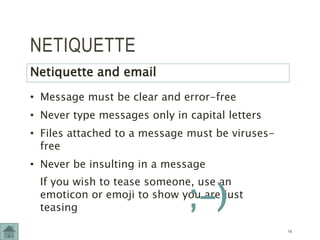
If you wish to tease someone, use an
emoticon or emoji to show you are just
teasing
14
;-)
NETIQUETTE
Netiquette and email
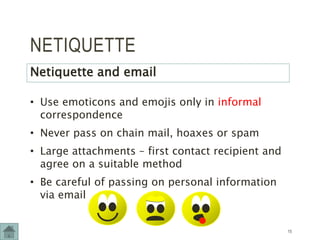
• Use emoticons and emojis only in informal
correspondence
• Never pass on chain mail, hoaxes or spam
• Large attachments – first contact recipient and
agree on a suitable method
• Be careful of passing on personal information
via email
15
How has E-communication changed
the way we communicate?
• Communication is easier and more convenient/
saves time
• Communication can occur with people from
other countries from anywhere (breaks
diversity boundaries)
• Allows for social networking
• Employees can have work meeting through e-
communication and share files without being
physically present
• Communication can occur instantly.
16
What are the positive’s and
negative's of using e-
communication?
How has e-communication
changes the way we
communicate?
How did people communicate in
the past?
Why is netiquette important?
17
18
Complete Activity 3
Page 120
Thank you 

Electronic communication grade 10 cat

  • 1.
  • 2.
    CONTENTS Introduction What is electronic communication Email ISP email vs web-based email  Email addresses  Practical use of Email Other modes of e- communication  Social networking sites  Instant Messaging and Chat applications Netiquette  Netiquette and social networking  Netiquette and email Activity 3 2
  • 3.
  • 4.
    INTRODUCTION • E-communication –all forms of electronic communication • Process by which computers and other communication devices(electronic media) are used to exchange messages and/or digital data • Data like images, files, pictures etcetera can be shared • In order for E-communication to occur an electronic devices is needed 4
  • 5.
    EMAIL Mary.Jon es UserName @ mweb .co @Service provider .za .Typeof organisation .Geographical location Domain Email addresses 5
  • 6.
    EMAIL • Messages whichare instantly sent through electronic means • A formal means of communication and used frequently in businesses. • When the e-mail is sent, the receiver receives it immediately. • Time take for a reply may depend on the receiver (not always immediate) • E-mail will allow you to attach files to messages Practical use of email: 6
  • 7.
    EMAIL To attach afile: Practical use of email: Attachments • Click Attach icon • A dialog box will appear • Locate the file, click Open to attach • Click Send 7
  • 8.
    EMAIL ISP email vsweb-based email Web-based email •Accessed using a web browser anywhere where internet access •Must be online to access account •Free of charge (might pay for internet access) ISP-based email •Set up on local computer or device using appropriate software •Can be accessed without being online •Monthly ISP charge plus internet access cost 8
  • 9.
    OTHER MODES OFE- COMMUNICATION Social networking sites Interactive websites where individuals and organisations post their likes, dislikes, photographs and activities for friends and interested parties to read and respond to 9
  • 10.
    OTHER MODES OFE- COMMUNICATION Instant Messaging and Chat applications • These applications occur in real time (different to email) • Many social networking sites offer instant messaging 10
  • 11.
    11 Instant messaging • Instantmessaging is an informal way of communication • Used to communicate with family, friends, peers' etcetera. • Instant messaging can be used to share geographical data, pictures, files, audio etcetera • Emoticons are used when communicating through instant messaging.  • When the message is sent either between two people or a group, it is instantly received, and a reply is instant (opposed to e-mail). A conversation can occur back and forth in the same time frame.
  • 12.
    OTHER MODES OFE- COMMUNICATION Blog • Blog updated regularly(daily/weekly) with news and events • Reads like a journal with most recent entry at the top • Not just personal – also used by businesses, citizen journalists, etc. • Viewers can like, share and comment on the blog 12
  • 13.
    NETIQUETTE (Net +etiquette) Netiquetteand social networking Use of good manners and showing respect for other users when using the internet Think before you post … • Would I be happy if this were placed on a public poster? • Would I be happy for e.g. my parents or teacher to see this? • Is this the kind of information that reflects who I am? • Would I be happy for a 13
  • 14.
    NETIQUETTE Netiquette and email •Message must be clear and error-free • Never type messages only in capital letters • Files attached to a message must be viruses- free • Never be insulting in a message If you wish to tease someone, use an emoticon or emoji to show you are just teasing 14 ;-)
  • 15.
    NETIQUETTE Netiquette and email •Use emoticons and emojis only in informal correspondence • Never pass on chain mail, hoaxes or spam • Large attachments – first contact recipient and agree on a suitable method • Be careful of passing on personal information via email 15
  • 16.
    How has E-communicationchanged the way we communicate? • Communication is easier and more convenient/ saves time • Communication can occur with people from other countries from anywhere (breaks diversity boundaries) • Allows for social networking • Employees can have work meeting through e- communication and share files without being physically present • Communication can occur instantly. 16
  • 17.
    What are thepositive’s and negative's of using e- communication? How has e-communication changes the way we communicate? How did people communicate in the past? Why is netiquette important? 17
  • 18.
    18 Complete Activity 3 Page120 Thank you 