Alerts, Assignments, Quizzes, and 
Polls 
…Oh My!
Edmodo’s mission is to connect all learners 
with the people and resources they need to 
reach their full potential
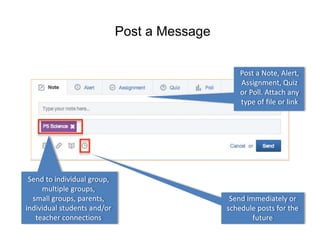
Post a Message 
Post a Note, Alert, 
Assignment, Quiz 
or Poll. Attach any 
type of file or link 
Send to individual group, 
multiple groups, 
small groups, parents, 
individual students and/or 
teacher connections 
Send immediately or 
schedule posts for the 
future
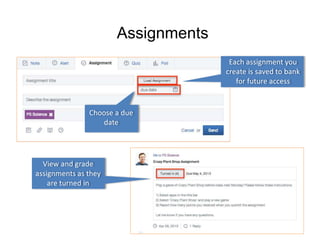
Assignments 
View and grade 
assignments as they 
are turned in 
Each assignment you 
create is saved to bank 
for future access 
Choose a due 
date
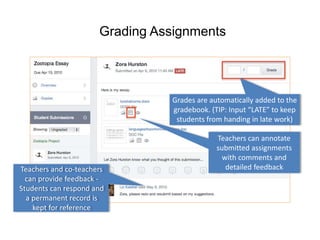
Grading Assignments 
Teachers and co-teachers 
can provide feedback - 
Students can respond and 
a permanent record is 
kept for reference 
Grades are automatically added to the 
gradebook. (TIP: Input “LATE” to keep 
students from handing in late work) 
Teachers can annotate 
submitted assignments 
with comments and 
detailed feedback
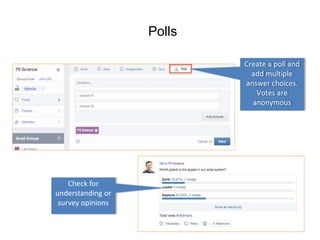
Polls 
Create a poll and 
add multiple 
answer choices. 
Votes are 
anonymous 
Check for 
understanding or 
survey opinions
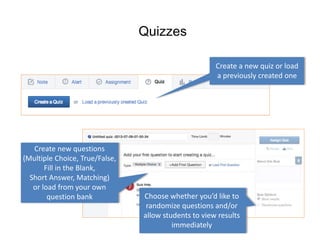
Quizzes 
Create a new quiz or load 
a previously created one 
Choose whether you’d like to 
randomize questions and/or 
allow students to view results 
immediately 
Create new questions 
(Multiple Choice, True/False, 
Fill in the Blank, 
Short Answer, Matching) 
or load from your own 
question bank
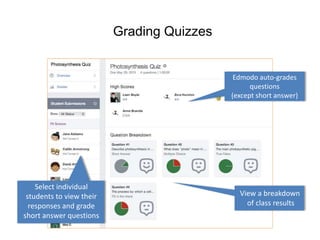
Grading Quizzes 
Select individual 
students to view their 
responses and grade 
short answer questions 
Edmodo auto-grades 
questions 
(except short answer) 
View a breakdown 
of class results
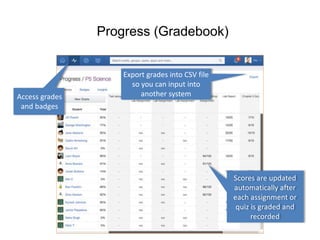
Progress (Gradebook) 
Export grades into CSV file 
so you can input into 
another system 
Scores are updated 
automatically after 
each assignment or 
quiz is graded and 
recorded 
Access grades 
and badges
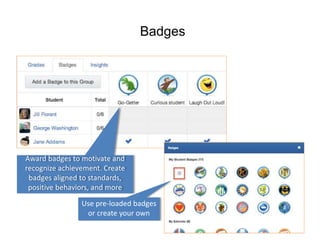
Badges 
Award badges to motivate and 
recognize achievement. Create 
badges aligned to standards, 
positive behaviors, and more 
Use pre-loaded badges 
or create your own
Alerts assignments, quizzes, polls

Alerts assignments, quizzes, polls

  • 1.
    Alerts, Assignments, Quizzes,and Polls …Oh My!
  • 2.
    Edmodo’s mission isto connect all learners with the people and resources they need to reach their full potential
  • 3.
    Post a Message Post a Note, Alert, Assignment, Quiz or Poll. Attach any type of file or link Send to individual group, multiple groups, small groups, parents, individual students and/or teacher connections Send immediately or schedule posts for the future
  • 4.
    Assignments View andgrade assignments as they are turned in Each assignment you create is saved to bank for future access Choose a due date
  • 5.
    Grading Assignments Teachersand co-teachers can provide feedback - Students can respond and a permanent record is kept for reference Grades are automatically added to the gradebook. (TIP: Input “LATE” to keep students from handing in late work) Teachers can annotate submitted assignments with comments and detailed feedback
  • 6.
    Polls Create apoll and add multiple answer choices. Votes are anonymous Check for understanding or survey opinions
  • 7.
    Quizzes Create anew quiz or load a previously created one Choose whether you’d like to randomize questions and/or allow students to view results immediately Create new questions (Multiple Choice, True/False, Fill in the Blank, Short Answer, Matching) or load from your own question bank
  • 8.
    Grading Quizzes Selectindividual students to view their responses and grade short answer questions Edmodo auto-grades questions (except short answer) View a breakdown of class results
  • 9.
    Progress (Gradebook) Exportgrades into CSV file so you can input into another system Scores are updated automatically after each assignment or quiz is graded and recorded Access grades and badges
  • 10.
    Badges Award badgesto motivate and recognize achievement. Create badges aligned to standards, positive behaviors, and more Use pre-loaded badges or create your own