Student Placement Software
What is
Class Creator?
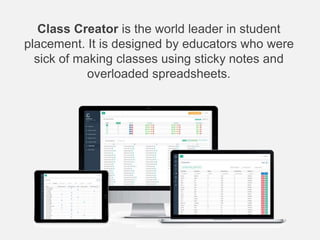
Class Creator is the world leader in student
placement. It is designed by educators who were
sick of making classes using sticky notes and
overloaded spreadsheets.
How does
Class Creator
work?
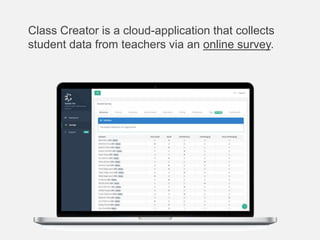
Class Creator is a cloud-application that collects
student data from teachers via an online survey.
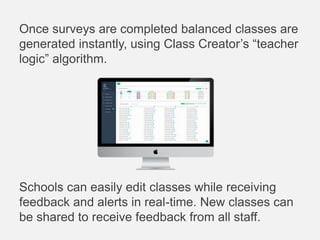
Once surveys are completed balanced classes are
generated instantly, using Class Creator’s “teacher
logic” algorithm.
Schools can easily edit classes while receiving
feedback and alerts in real-time. New classes can
be shared to receive feedback from all staff.
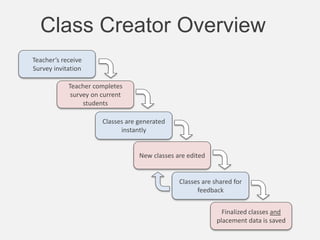
Teacher’s receive
Survey invitation
Teacher completes
survey on current
students
Classes are generated
instantly
Classes are shared for
feedback
New classes are edited
Finalized classes and
placement data is saved
Class Creator Overview
Class Creator
Surveys
Classes are created using the data provided by
teachers via their Surveys.
Surveys are designed to be quick and easy for
teachers to complete…they’re busy enough.
All data is recorded for future reference.
(No more lost student history).
Teacher’s will be emailed their login details and an
invitation to complete their class survey.
Each survey contains the following:
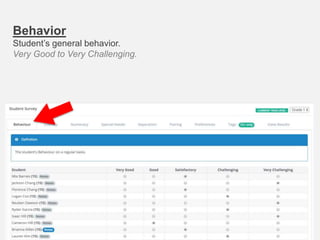
Behavior
Student’s general behavior.
Very Good to Very Challenging.
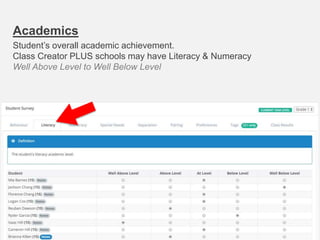
Academics
Student’s overall academic achievement.
Class Creator PLUS schools may have Literacy & Numeracy
Well Above Level to Well Below Level
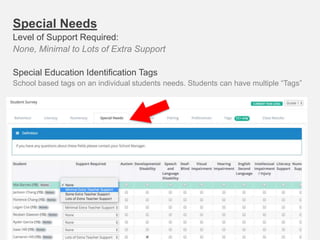
Special Needs
Level of Support Required:
None, Minimal to Lots of Extra Support
Special Education Identification Tags
School based tags on an individual students needs. Students can have multiple “Tags”
Separations
Students that SHOULD NOT be together.
Class Creator will attempt to place these students in different classes.
Student/Teacher Separations must be discussed with school admin.
ONLY for essential situations or placement/balanced classes
become impossible to create.
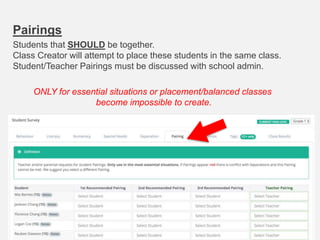
Pairings
Students that SHOULD be together.
Class Creator will attempt to place these students in the same class.
Student/Teacher Pairings must be discussed with school admin.
ONLY for essential situations or placement/balanced classes
become impossible to create.
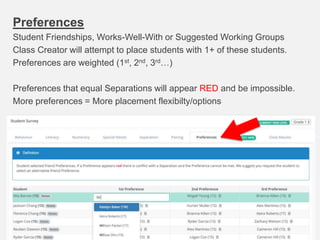
Preferences
Student Friendships, Works-Well-With or Suggested Working Groups
Class Creator will attempt to place students with 1+ of these students.
Preferences are weighted (1st, 2nd, 3rd…)
Preferences that equal Separations will appear RED and be impossible.
More preferences = More placement flexibilty/options
Tags
Students can have multiple “Tags” relevant to student placement.
Tags are for identification and editing purposes only.
Schools may customize Tags to suit their needs.
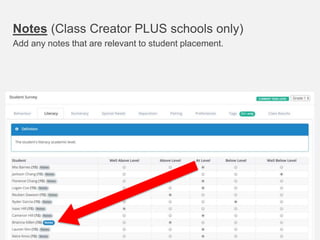
Notes (Class Creator PLUS schools only)
Add any notes that are relevant to student placement.
Class Creation
Class creation beings once:
 All teacher surveys are completed
 Student numbers have been “finalized”
 Resources have been allocated (staff & buildings)
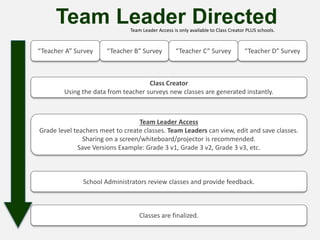
“Teacher A” Survey “Teacher B” Survey “Teacher D” Survey“Teacher C” Survey
Class Creator
Using the data from teacher surveys new classes are generated instantly.
Team Leader Access
Grade level teachers meet to create classes. Team Leaders can view, edit and save classes.
Sharing on a screen/whiteboard/projector is recommended.
Save Versions Example: Grade 3 v1, Grade 3 v2, Grade 3 v3, etc.
Team Leader Directed
School Administrators review classes and provide feedback.
Classes are finalized.
Team Leader Access is only available to Class Creator PLUS schools.
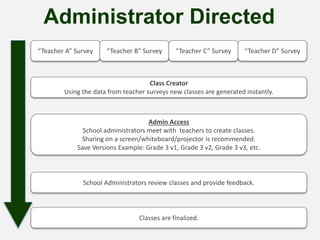
“Teacher A” Survey “Teacher B” Survey “Teacher D” Survey“Teacher C” Survey
Class Creator
Using the data from teacher surveys new classes are generated instantly.
Admin Access
School administrators meet with teachers to create classes.
Sharing on a screen/whiteboard/projector is recommended.
Save Versions Example: Grade 3 v1, Grade 3 v2, Grade 3 v3, etc.
Administrator Directed
School Administrators review classes and provide feedback.
Classes are finalized.
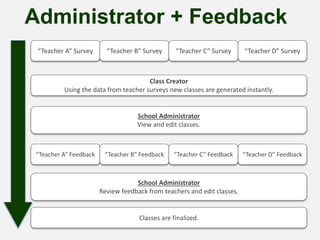
“Teacher A” Survey “Teacher B” Survey “Teacher D” Survey“Teacher C” Survey
Class Creator
Using the data from teacher surveys new classes are generated instantly.
School Administrator
View and edit classes.
Administrator + Feedback
Classes are finalized.
“Teacher A” Feedback “Teacher B” Feedback “Teacher D” Feedback“Teacher C” Feedback
School Administrator
Review feedback from teachers and edit classes.
What doesn’t
Class Creator
do?
Class Creator doesn’t
know our students
like we do!
Class Creator is a tool to allow us to save time
and make better classes for our school.
Rest assured all student placement decisions
will be made by the educators of this school, not
a computer.
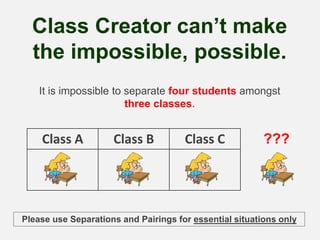
Class Creator can’t make
the impossible, possible.
It is impossible to separate four students amongst
three classes.
Class A Class B Class C ???
Please use Separations and Pairings for essential situations only
Class Creator doesn’t
recognize siblings.
If you wish to keep siblings or family members
together or apart, please use the
Separations/Pairing options provided in the
surveys.
What does
Class Creator
do?
• Makes data collection easier, and more consistent across
the school.
• Makes our data more user friendly(visible) and valuable.
• Provides a starting point for class creation by automatically
generating class lists.
• Ensures class creation is both subjective (educator
experience) and objective (data driven).
• Provides instant alerts/feedback when editing classes to
prevent mistakes and imbalances.
• Saves survey data, student placement history and reduces
data entry.
From all of us at
Class Creator.

Class Creator | Student Placement Software

  • 1.
  • 2.
  • 3.
    Class Creator isthe world leader in student placement. It is designed by educators who were sick of making classes using sticky notes and overloaded spreadsheets.
  • 4.
  • 5.
    Class Creator isa cloud-application that collects student data from teachers via an online survey.
  • 6.
    Once surveys arecompleted balanced classes are generated instantly, using Class Creator’s “teacher logic” algorithm. Schools can easily edit classes while receiving feedback and alerts in real-time. New classes can be shared to receive feedback from all staff.
  • 7.
    Teacher’s receive Survey invitation Teachercompletes survey on current students Classes are generated instantly Classes are shared for feedback New classes are edited Finalized classes and placement data is saved Class Creator Overview
  • 8.
  • 9.
    Classes are createdusing the data provided by teachers via their Surveys. Surveys are designed to be quick and easy for teachers to complete…they’re busy enough. All data is recorded for future reference. (No more lost student history). Teacher’s will be emailed their login details and an invitation to complete their class survey. Each survey contains the following:
  • 10.
  • 11.
    Academics Student’s overall academicachievement. Class Creator PLUS schools may have Literacy & Numeracy Well Above Level to Well Below Level
  • 12.
    Special Needs Level ofSupport Required: None, Minimal to Lots of Extra Support Special Education Identification Tags School based tags on an individual students needs. Students can have multiple “Tags”
  • 13.
    Separations Students that SHOULDNOT be together. Class Creator will attempt to place these students in different classes. Student/Teacher Separations must be discussed with school admin. ONLY for essential situations or placement/balanced classes become impossible to create.
  • 14.
    Pairings Students that SHOULDbe together. Class Creator will attempt to place these students in the same class. Student/Teacher Pairings must be discussed with school admin. ONLY for essential situations or placement/balanced classes become impossible to create.
  • 15.
    Preferences Student Friendships, Works-Well-Withor Suggested Working Groups Class Creator will attempt to place students with 1+ of these students. Preferences are weighted (1st, 2nd, 3rd…) Preferences that equal Separations will appear RED and be impossible. More preferences = More placement flexibilty/options
  • 16.
    Tags Students can havemultiple “Tags” relevant to student placement. Tags are for identification and editing purposes only. Schools may customize Tags to suit their needs.
  • 17.
    Notes (Class CreatorPLUS schools only) Add any notes that are relevant to student placement.
  • 18.
  • 19.
    Class creation beingsonce:  All teacher surveys are completed  Student numbers have been “finalized”  Resources have been allocated (staff & buildings)
  • 20.
    “Teacher A” Survey“Teacher B” Survey “Teacher D” Survey“Teacher C” Survey Class Creator Using the data from teacher surveys new classes are generated instantly. Team Leader Access Grade level teachers meet to create classes. Team Leaders can view, edit and save classes. Sharing on a screen/whiteboard/projector is recommended. Save Versions Example: Grade 3 v1, Grade 3 v2, Grade 3 v3, etc. Team Leader Directed School Administrators review classes and provide feedback. Classes are finalized. Team Leader Access is only available to Class Creator PLUS schools.
  • 21.
    “Teacher A” Survey“Teacher B” Survey “Teacher D” Survey“Teacher C” Survey Class Creator Using the data from teacher surveys new classes are generated instantly. Admin Access School administrators meet with teachers to create classes. Sharing on a screen/whiteboard/projector is recommended. Save Versions Example: Grade 3 v1, Grade 3 v2, Grade 3 v3, etc. Administrator Directed School Administrators review classes and provide feedback. Classes are finalized.
  • 22.
    “Teacher A” Survey“Teacher B” Survey “Teacher D” Survey“Teacher C” Survey Class Creator Using the data from teacher surveys new classes are generated instantly. School Administrator View and edit classes. Administrator + Feedback Classes are finalized. “Teacher A” Feedback “Teacher B” Feedback “Teacher D” Feedback“Teacher C” Feedback School Administrator Review feedback from teachers and edit classes.
  • 23.
  • 24.
    Class Creator doesn’t knowour students like we do! Class Creator is a tool to allow us to save time and make better classes for our school. Rest assured all student placement decisions will be made by the educators of this school, not a computer.
  • 25.
    Class Creator can’tmake the impossible, possible. It is impossible to separate four students amongst three classes. Class A Class B Class C ??? Please use Separations and Pairings for essential situations only
  • 26.
    Class Creator doesn’t recognizesiblings. If you wish to keep siblings or family members together or apart, please use the Separations/Pairing options provided in the surveys.
  • 27.
  • 28.
    • Makes datacollection easier, and more consistent across the school. • Makes our data more user friendly(visible) and valuable. • Provides a starting point for class creation by automatically generating class lists. • Ensures class creation is both subjective (educator experience) and objective (data driven). • Provides instant alerts/feedback when editing classes to prevent mistakes and imbalances. • Saves survey data, student placement history and reduces data entry.
  • 29.
    From all ofus at Class Creator.