This document contains sample code solutions to 8 questions on Java AWT and Swing programming.
The questions cover topics like:
1. Creating GUI forms with labels, text fields, buttons using AWT Frame and FlowLayout.
2. Selecting multiple languages using checkboxes.
3. Adding items to a list component.
4. Arranging buttons using different layout managers like GridLayout and BorderLayout.
5. Creating menus and menu bars.
6. Using dialog boxes and file dialogs.
7. Creating GUI elements like buttons and tables using Swing components like JApplet, JButton, JTable.
8. Adding progress bars, tool
![AJP Practical Answer PDF
Chapter 1 –
Q1. Design an application to create form using TextField, TextArea, Button and Label.
import java.awt.*;
public class P1_5 extends Frame {
public static void main(String[] args) {
P1_5 f = new P1_5();
f.setSize(400, 400);
f.setVisible(true);
f.setLayout(new FlowLayout());
Label l1 = new Label();
l1.setText("Enter Your Name ");
TextField tf = new TextField("User");
Label l2 = new Label("Address");
TextArea ta = new TextArea("", 5, 20);
Button b = new Button("Submit");
f.add(l1);
f.add(tf);
f.add(l2);
f.add(ta);
f.add(b);
}
}
Q2. Develop a program to select multiple languages known to user (eg. Marathi, Hindi ,
English, Sanskrit.
import java.awt.*;
public class P1_2 {
public static void main(String[] args) {
Frame f=new Frame();
Label l1=new Label("Select known Languages");
f.add(l1);
Checkbox c1=new Checkbox("Marathi");
f.add(c1);
Checkbox c2=new Checkbox("Hindi");
f.add(c2);
Checkbox c3=new Checkbox("English");
f.add(c3);
Checkbox c4=new Checkbox("Sanskrit");
f.add(c4);](https://image.slidesharecdn.com/ajppracticalquestionswithsolution-230403165014-56f7e3a3/85/AJP-Practical-Questions-with-Solution-docx-1-320.jpg)
![AJP Practical Answer PDF
Chapter 1 –
Q1. Design an application to create form using TextField, TextArea, Button and Label.
import java.awt.*;
public class P1_5 extends Frame {
public static void main(String[] args) {
P1_5 f = new P1_5();
f.setSize(400, 400);
f.setVisible(true);
f.setLayout(new FlowLayout());
Label l1 = new Label();
l1.setText("Enter Your Name ");
TextField tf = new TextField("User");
Label l2 = new Label("Address");
TextArea ta = new TextArea("", 5, 20);
Button b = new Button("Submit");
f.add(l1);
f.add(tf);
f.add(l2);
f.add(ta);
f.add(b);
}
}
Q2. Develop a program to select multiple languages known to user (eg. Marathi, Hindi ,
English, Sanskrit.
import java.awt.*;
public class P1_2 {
public static void main(String[] args) {
Frame f=new Frame();
Label l1=new Label("Select known Languages");
f.add(l1);
Checkbox c1=new Checkbox("Marathi");
f.add(c1);
Checkbox c2=new Checkbox("Hindi");
f.add(c2);
Checkbox c3=new Checkbox("English");
f.add(c3);
Checkbox c4=new Checkbox("Sanskrit");
f.add(c4);](https://image.slidesharecdn.com/ajppracticalquestionswithsolution-230403165014-56f7e3a3/75/AJP-Practical-Questions-with-Solution-docx-1-2048.jpg)
![f.setTitle("Practical 1");
f.setSize(400,300);
f.setLayout(new FlowLayout());
f.setVisible(true);
}
}
Q3. Develop an application using List Components to add names of 10 different cities.
import java.awt.*;
public class P2_1 extends Frame {
public static void main(String[] args) {
P2_1 fr = new P2_1();
fr.setSize(350,340);
fr.setLayout( new FlowLayout());
fr.setVisible(true);
fr.setTitle("Practical 2");
List l1 = new List(10);
l1.add("Mumbai");
l1.add("Pune");
l1.add("Nashik");
l1.add("Delhi");
l1.add("Hyderabad");
l1.add("Chennai");
l1.add("Ahmedabad");
l1.add("Nagpur");
l1.add("Jaipur");
l1.add("Jhodpur");
fr.add(l1);
}
}
Q4. Write a program to display the grid of 5*5 using respective layout manager.
import java.awt.*;
public class P3_1 extends Frame{
public static void main(String[] args) {
P3_1 fr = new P3_1();
fr.setLayout(new GridLayout(5,5));
fr.setTitle("GridLayout");
fr.setSize(500,500);
fr.setVisible(true);](https://image.slidesharecdn.com/ajppracticalquestionswithsolution-230403165014-56f7e3a3/85/AJP-Practical-Questions-with-Solution-docx-2-320.jpg)
![for (int i = 1;i<=25;i++)
{
fr.add(new Button("Button "+i));
}
}
}
Q5. Write a program to align the five button components using BorderLayout.
(Center,North,South,East,West).
import java.awt.*;
public class P3_3 extends Frame {
public static void main(String[] args) {
P3_3 fr = new P3_3();
fr.setLayout(new BorderLayout());
fr.setSize(400,200);
fr.setVisible(true);
fr.add(new Button("Center"),BorderLayout.CENTER);
fr.add(new Button("North"),BorderLayout.NORTH);
fr.add(new Button("West"),BorderLayout.WEST);
fr.add(new Button("East"),BorderLayout.EAST);
fr.add(new Button("South"),BorderLayout.SOUTH);
}
}
Q6. Develop a program to demonstrate the use of menubar with menu items NEW,
LOAD, SAVE. **note –multiple menus can be used**
import java.awt.*;
import java.awt.event.KeyEvent;
public class P5_2 extends Frame {
public static void main(String[] args)
{
P5_2 fr = new P5_2();
fr.setTitle("Menubar");
fr.setSize(500,500);
fr.setLayout(null);
Menu mn = new Menu("File");
MenuShortcut ms = new MenuShortcut(KeyEvent.VK_X);
MenuBar mb = new MenuBar();](https://image.slidesharecdn.com/ajppracticalquestionswithsolution-230403165014-56f7e3a3/85/AJP-Practical-Questions-with-Solution-docx-3-320.jpg)
![MenuItem m1 = new MenuItem("New...");
MenuItem m2 = new MenuItem("Load...");
MenuItem m3 = new MenuItem("Save...");
mn.add(m1);
mn.add(m2);
mn.add(m3);
mb.add(mn);
fr.setVisible(true);
fr.setMenuBar(mb);
}
}
Q7. Write a DialogBox program to display the message “This is simple dialogbox”.
import java.io.*;
import java.awt.*;
import java.awt.event.*;
public class DialogBoxDemo {
public static void main(String[] args) {
Frame fr = new Frame();
Dialog d= new Dialog( fr,"Dialog Box Demo",true);
d.add(new Label("This is a simple dialog box"));
d.setSize(300,300);
d.setVisible(true);
fr.setSize(330,250);
fr.setVisible(true);
}
}
Q8. Write a program to demonstrate a simple FileDialog Box window .
import java.io.*;
import java.awt.*;
import java.awt.event.*;
public class FileDialogDemo extends Frame {
public static void main(String[] args) {
Frame fr = new Frame("Hello Frame");
FileDialog fd= new FileDialog( fr,"Choose a
file...",FileDialog.LOAD);
fd.setDirectory("C:");
fd.setSize(300,300);
fd.setVisible(true);
fr.setSize(330,250);
fr.setVisible(true);
}
}](https://image.slidesharecdn.com/ajppracticalquestionswithsolution-230403165014-56f7e3a3/85/AJP-Practical-Questions-with-Solution-docx-4-320.jpg)
![Chapter 2
Q1. Write a program using JApplet to display a Smiley face.
import java.awt.*;
import java.awt.event.*;
import javax.swing.*;
public class SmileyFacePrgm extends JApplet {
public void paint (Graphics g)
{
g.drawOval(20,40,250,250);
g.drawOval(70,100,50,50);
g.drawOval(180,100,50,50);
g.drawArc(100,150,100,100,180,180);
}
}
Q2. Write a program that demonstrate JButton with icon and label on it.
import java.awt.*;
import javax.swing.*;
public class ButtonIconDemo extends JApplet
{
public void start()
{
Container cr = getContentPane();
cr.setLayout(new FlowLayout());
ImageIcon im = new ImageIcon("img.jpg");
JButton btn = new JButton("Imagedisplay",im);
cr.add(btn);
}
}
Q3. Develop a program to demostarte the use of JTable using swing.
import javax.swing.*;
public class Practical8_1 extends JFrame {
public static void main(String[] args) {
Practical8_1 fr = new Practical8_1();
fr.setTitle("Practical 8");
fr.setVisible(true);
fr.setSize(400,400);
String Data [][]={{"01","Rudra","TYIF"},
{"02","Ayuti","TYIF"},
{"03","Namrata","TYIF"},](https://image.slidesharecdn.com/ajppracticalquestionswithsolution-230403165014-56f7e3a3/85/AJP-Practical-Questions-with-Solution-docx-5-320.jpg)
![{"04","Amit","TYIF"}};
String coloum[]={"ID","NAME","CLASS"};
JTable jt = new JTable(Data,coloum);
fr.add(jt);
JScrollPane sp=new JScrollPane(jt);
fr.add(sp);
}
}
Q4. Write a java program to generate a JProgressBar and display it to the user.
import javax.swing.*;
import java.awt.*;
public class Practical9_1 extends JFrame {
static JProgressBar jpb;
public static void main(String[] args) {
Practical9_1 fr = new Practical9_1();
fr.setTitle("Practical 9");
fr.setSize(400,400);
fr.setVisible(true);
fr.setLayout(new FlowLayout());
jpb = new JProgressBar(0,2000);
jpb.setValue(0);
jpb.setStringPainted(true);
jpb.setBounds(50,50,180,30);
fr.add(jpb);
fr.setDefaultCloseOperation(JFrame.EXIT_ON_CLOSE);
fillbar();
}
public static void fillbar()
{
int i = 0;
try {
while (i<=2000)
{
jpb.setValue(i);
Thread.sleep(100);
i=i+10;
}
} catch (Exception e) {}
}
}
Q5. Write a program to display the use of Tooltip in JFrame.
import java.awt.*;
import javax.swing.*;
public class ToolTipDemo {
public static void main(String[] args) {](https://image.slidesharecdn.com/ajppracticalquestionswithsolution-230403165014-56f7e3a3/85/AJP-Practical-Questions-with-Solution-docx-6-320.jpg)
![JFrame fr = new JFrame("TooltipDEMO");
JLabel l = new JLabel("Name:");
JTextField t = new JTextField("",10);
t.setToolTipText("Enter your name here");
JButton btn = new JButton("Submit");
btn.setToolTipText("Click to submit");
fr.setLayout(new FlowLayout());
fr.add(l);
fr.add(t);
fr.add(btn);
fr.setSize(300,300);
fr.setVisible(true);
}
}
Q7. Write a program to create a JTree component in swing.
import javax.swing.*;
import javax.swing.tree.DefaultMutableTreeNode;
import java.awt.*;
public class Practical7_1 extends JFrame {
public static void main(String[] args) {
Practical7_1 fr = new Practical7_1();
fr.setSize(400,400);
fr.setTitle("Practical 7");
fr.setVisible(true);
fr.setLayout(new FlowLayout());
DefaultMutableTreeNode root = new
DefaultMutableTreeNode("Root Node");
DefaultMutableTreeNode child1 = new
DefaultMutableTreeNode("Child 1");
DefaultMutableTreeNode child2 = new
DefaultMutableTreeNode("Child 2");
root.add(child1);
root.add(child2);
DefaultMutableTreeNode grandchild1 = new
DefaultMutableTreeNode("Grand Child 1");
DefaultMutableTreeNode grandchild2 = new
DefaultMutableTreeNode("Grand Child 2");
child1.add(grandchild1);
child1.add(grandchild2);
DefaultMutableTreeNode grandchild3 = new
DefaultMutableTreeNode("Grand Child 1");
DefaultMutableTreeNode grandchild4 = new
DefaultMutableTreeNode("Grand Child 2");
child2.add(grandchild3);
child2.add(grandchild4);
JTree jt = new JTree(root);
fr.add(jt);}
}](https://image.slidesharecdn.com/ajppracticalquestionswithsolution-230403165014-56f7e3a3/85/AJP-Practical-Questions-with-Solution-docx-7-320.jpg)
![Chapter 3
Q1. Write a program on ActionListener to add values of two Textfields into third
textfield.
import javax.swing.*;
import java.awt.event.*;
public class Practical12_3 implements ActionListener{
JTextField tf1,tf2,tf3;
JButton b1,b2;
Practical12_3(){
JFrame f= new JFrame();
tf1=new JTextField();
tf1.setBounds(50,50,150,20);
tf2=new JTextField();
tf2.setBounds(50,100,150,20);
tf3=new JTextField();
tf3.setBounds(50,150,150,20);
tf3.setEditable(false);
b1=new JButton("Addition +");
b1.setBounds(50,200,150,50);
b1.addActionListener(this);
f.add(tf1);f.add(tf2);f.add(tf3);f.add(b1);;
f.setSize(300,300);
f.setLayout(null);
f.setVisible(true);
}
public void actionPerformed(ActionEvent e) {
String s1=tf1.getText();
String s2=tf2.getText();
int a=Integer.parseInt(s1);
int b=Integer.parseInt(s2);
int c=0;
if(e.getSource()==b1){
c=a+b;
}
String result=String.valueOf(c);
tf3.setText(result);
}
public static void main(String[] args) {
new Practical12_3();
} }](https://image.slidesharecdn.com/ajppracticalquestionswithsolution-230403165014-56f7e3a3/85/AJP-Practical-Questions-with-Solution-docx-8-320.jpg)
![Q2. Develop a program to demonstrate the use of JComboBox to select the different
states of India.
import java.awt.*;
import java.awt.event.ItemEvent;
import java.awt.event.ItemListener;
import javax.swing.*;
class Check extends JFrame implements ItemListener {
static JFrame f;
static JLabel l, l1;
static JComboBox c1;
public static void main(String[] args)
{
f = new JFrame("frame");
Check s = new Check();
f.setLayout(new FlowLayout());
String s1[] = { "Jalpaiguri", "Mumbai", "Noida",
"Kolkata", "New Delhi" };
c1 = new JComboBox(s1);
c1.addItemListener(s);
l = new JLabel("select your city ");
l1 = new JLabel("Jalpaiguri selected");
l.setForeground(Color.red);
l1.setForeground(Color.blue);
JPanel p = new JPanel();
p.add(l);
p.add(c1);
p.add(l1);
f.add(p);
f.setSize(400, 300);
f.show();
}
public void itemStateChanged(ItemEvent e)
{
if (e.getSource() == c1)
l1.setText(c1.getSelectedItem() + " selected");
}
}](https://image.slidesharecdn.com/ajppracticalquestionswithsolution-230403165014-56f7e3a3/85/AJP-Practical-Questions-with-Solution-docx-9-320.jpg)
![Q2. Write a program to generate KeyEvent when a key is pressed and display “Key
Pressed” message.
import java.awt.*;
import java.awt.event.*;
public class Practical10_1 extends Frame implements
KeyListener {
Label l;
TextArea area;
Practical10_1() {
l = new Label();
l.setBounds (20, 50, 100, 20);
area = new TextArea();
area.setBounds (20, 80, 300, 300);
area.addKeyListener(this);
add(l);
add(area);
setTitle("Practical 10");
setSize (400, 400);
setLayout (null);
setVisible (true);
}
public void keyPressed (KeyEvent e) {
l.setText ("Key Pressed");
}
public void keyReleased (KeyEvent e) {
l.setText ("Key Released");
}
public void keyTyped (KeyEvent e) {
l.setText ("Key Typed");
}
public static void main(String[] args) {
new Practical10_1();
}
}
Q3. Develop a program to accept two numbers and display product of two numbers
when user pressed “MULTIPLY” button.
import javax.swing.*;
import java.awt.event.ActionEvent;
import java.awt.event.ActionListener;
class Multiplication extends JFrame implements ActionListener
{
JLabel l1, l2;](https://image.slidesharecdn.com/ajppracticalquestionswithsolution-230403165014-56f7e3a3/85/AJP-Practical-Questions-with-Solution-docx-10-320.jpg)
![JTextField t1, t2, t3;
JButton b1;
public Multiplication()
{
l1 = new JLabel("First Number:");
l1.setBounds(20, 10, 150, 30);
t1 = new JTextField(10);
t1.setBounds(120, 10, 150, 30);
l2 = new JLabel("Second Number:");
l2.setBounds(20, 40, 150, 30);
t2 = new JTextField(10);
t2.setBounds(120, 40, 150, 30);
b1 = new JButton("Multiply");
b1.setBounds(20, 70, 100, 30);
t3 = new JTextField(10);
t3.setBounds(120, 70, 150, 30);
add(l1);
add(t1);
add(l2);
add(t2);
add(b1);
add(t3);
b1.addActionListener(this);
setSize(400,400);
setLayout(null);
setVisible(true);
setDefaultCloseOperation(JFrame.EXIT_ON_CLOSE);
}
public void actionPerformed(ActionEvent e)
{
if(e.getSource()==b1){
int num1 = Integer.parseInt(t1.getText());
int num2 = Integer.parseInt(t2.getText());
int product = num1 * num2;
t3.setText(String.valueOf(product));
}
}
public static void main(String args[])
{
new Multiplication();}}
Q4. Write a program to change the background color of Applet when user performs
event using mouse.
import java.applet.*;
import java.awt.*;
import java.awt.event.*;
public class Practical11_2 extends Applet implements
MouseListener {](https://image.slidesharecdn.com/ajppracticalquestionswithsolution-230403165014-56f7e3a3/85/AJP-Practical-Questions-with-Solution-docx-11-320.jpg)
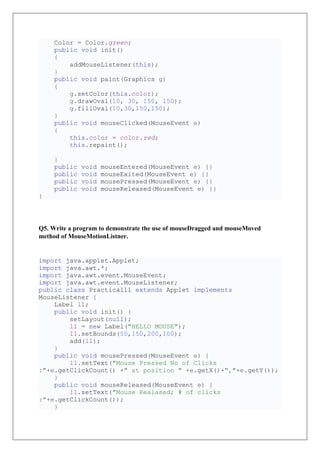
![public void mouseEntered(MouseEvent e) {
l1.setText("Mouse Entered");
}
public void mouseExited(MouseEvent e) {
l1.setText("Mouse Exited");
}
public void mouseClicked(MouseEvent e) {
l1.setText("Mouse clicked (# of clicks
"+e.getClickCount());
}
}
Q6. Write a program using JPasswordField to set the password characters as ‘ # ’
instead of ‘*’.
import javax.swing.*;
import java.awt.*;
public class Practical12_1
{
public static void main(String[] args) {
JFrame f = new JFrame();
f.setTitle("Password : Practical 12");
f.setVisible(true);
f.setSize(400,400);
f.setLayout(new FlowLayout());
JLabel j = new JLabel("Enter Psssword :");
f.add(j);
JPasswordField pf = new JPasswordField(20);
pf.setEchoChar('#');
f.add(pf);
}
}
Q7. Write a program to demonstrate the use of window adapter class in java.
import java.awt.*;
import java.awt.event.WindowAdapter;
import java.awt.event.WindowEvent;
public class Practical13_1 {
Frame f;
Practical13_1()
{
f=new Frame("Window Adapter");
f.addWindowListener(new WindowAdapter() {](https://image.slidesharecdn.com/ajppracticalquestionswithsolution-230403165014-56f7e3a3/85/AJP-Practical-Questions-with-Solution-docx-13-320.jpg)
![@Override
public void windowClosing(WindowEvent e) {
f.dispose();
}
});
f.setSize(400,400);
f.setLayout(null);
f.setVisible(false);
}
public static void main(String[] args) {
new Practical13_1();
}
}
Q8. Write a program to demonstrate the use of anonymous inner class.
interface HiddenClass {
int x = 12;
void getAge();
}
class MyClass implements HiddenClass {
@Override public void getAge()
{
System.out.print("The AGE is :" + x);
}
}
class CLASS2 {
public static void main(String[] args)
{
MyClass obj = new MyClass();
obj.getAge();
}
}](https://image.slidesharecdn.com/ajppracticalquestionswithsolution-230403165014-56f7e3a3/85/AJP-Practical-Questions-with-Solution-docx-14-320.jpg)
![Chapter 4
Q1. Develop a program using InetAddress class to retrieve IP address of computer
when hostname is entered by the user.
import java.net.InetAddress;
import java.net.UnknownHostException;
import java.util.Scanner;
public class URL_2 {
public static void main(String[] args) {
try {
Scanner myobj = new Scanner(System.in);
String username;
System.out.println("Enter Username :");
username = myobj.nextLine();
InetAddress ip = InetAddress.getByName(username);
System.out.println("Host name
:"+ip.getHostName());
System.out.println("IP Address
:"+ip.getHostAddress());
} catch (UnknownHostException e) {
System.out.println(e);
}
}
}
Q2. Write program using URL class to retrive the host, protocol , port and file of URL
http://www.msbte.org.in
import java.net.MalformedURLException;
import java.net.URL;
public class URl_1 {
public static void main(String[] args) throws
MalformedURLException {
URL obj = new URL("https://www.msbte.org.in");
System.out.println("Protocal :"+obj.getProtocol());
System.out.println("Port :"+obj.getPort());
System.out.println("Host :"+obj.getHost());
System.out.println("File :"+obj.getFile());
}
}](https://image.slidesharecdn.com/ajppracticalquestionswithsolution-230403165014-56f7e3a3/85/AJP-Practical-Questions-with-Solution-docx-15-320.jpg)
![Q3. Write a program using URL and URL connection class to retrieve the date, content
type , content length information of any entered URL .
import java.io.IOException;
import java.net.URL;
import java.net.URLConnection;
public class Practical15_3 {
public static void main(String[] args) throws IOException
{
URL url=new URL("http://www.javatpoint.com/java-
tutorial");
URLConnection u_con=url.openConnection();
System.out.println("Date :"+u_con.getDate());
System.out.println("Content Type
:"+u_con.getContentType());
System.out.println("Content Length
:"+u_con.getContentLength());
}
}
Q4. Write a program to pass any message to server via client.
Server
import java.net.DatagramPacket;
import java.net.DatagramSocket;
public class DgramRec {
public static void main(String[] args) throws Exception {
DatagramSocket ds = new DatagramSocket(3000);
byte[] buf = new byte[1024];
DatagramPacket dp = new DatagramPacket(buf,1024);
ds.receive(dp);
String str = new
String(dp.getData(),0,dp.getLength());
System.out.println(str);
ds.close();
}
}
Client
import java.net.DatagramPacket;
import java.net.DatagramSocket;
import java.net.InetAddress;
public class DGramSender {](https://image.slidesharecdn.com/ajppracticalquestionswithsolution-230403165014-56f7e3a3/85/AJP-Practical-Questions-with-Solution-docx-16-320.jpg)
![public static void main(String[] args) throws Exception{
DatagramSocket ds = new DatagramSocket();
String str = "Java is Easy!!!!";
InetAddress ip = InetAddress.getByName("127.0.0.1");
DatagramPacket dp = new
DatagramPacket(str.getBytes(),str.length(),ip,3000);
ds.send(dp);
ds.close();
}
}
Q5. Write a Client Server program that accepts a username from client and sends a
greeti ng message "Hello ' Username ' " to client.
Server
import java.net.*;
import java.io.*;
public class UsernameS
{
public static void main(String[] args) throws IOException
{
int f=1, i, n;
ServerSocket ss = new ServerSocket(100);
Socket s = ss.accept();
DataOutputStream dos = new
DataOutputStream(s.getOutputStream());
DataInputStream dis = new
DataInputStream(s.getInputStream());
String str = (String)dis.readUTF();
System.out.println("Server says , Hello"+str);
ss.close();
s.close();
}
}
Client
import java.net.*;
import java.io.*;
public class UsernameC
{
public static void main(String[] args) throws IOException
{
Socket s = new Socket("localhost",100);
DataOutputStream dos = new
DataOutputStream(s.getOutputStream());
DataInputStream dis = new
DataInputStream(s.getInputStream());
System.out.print("Client application is sending user name");](https://image.slidesharecdn.com/ajppracticalquestionswithsolution-230403165014-56f7e3a3/85/AJP-Practical-Questions-with-Solution-docx-17-320.jpg)
![dos.writeUTF("Mr. XYZ");
s.close();
}
}
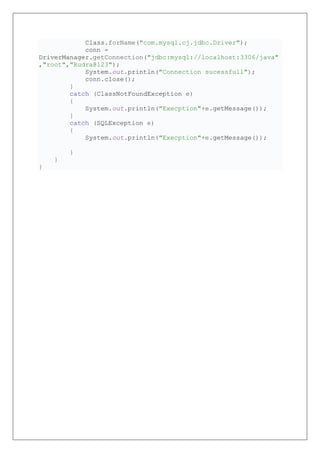
Chapter 5
Develop a program to create employee table having two columns emp_id , emp_name.
import java.sql.*;
public class Database {
public static void main(String[] args) {
Connection conn;
try {
Class.forName("com.mysql.cj.jdbc.Driver");
conn =
DriverManager.getConnection("jdbc:mysql://localhost:3306/java"
,"root","Rudra@123");
Statement stmt = conn.createStatement();
ResultSet rs = stmt.executeQuery("Create TABLE
Employee (emp_ID varchar(15), emp_Name varchar(10))");
while (rs.next())
{
System.out.println("Table Created
Sucessfully");
}
}
catch (Exception e)
{
System.out.println("Execption"+e.getMessage());
}
}
}
Write a java program using JDBC that illustrates how to create table in database.
import java.sql.Connection;
import java.sql.DriverManager;
import java.sql.SQLException;
public class Database {
public static void main(String[] args) {
Connection conn;
try {](https://image.slidesharecdn.com/ajppracticalquestionswithsolution-230403165014-56f7e3a3/85/AJP-Practical-Questions-with-Solution-docx-18-320.jpg)


![EDE_Report_Final_14-12-22[1] (AutoRecovered).docx](https://cdn.slidesharecdn.com/ss_thumbnails/edereportfinal14-12-221autorecovered-230403165017-b6177214-thumbnail.jpg?width=640&height=640&fit=bounds)
![EST-Report[1] grp 15 (AutoRecovered).pdf](https://cdn.slidesharecdn.com/ss_thumbnails/est-report1grp15autorecovered-230403165016-e3bdc02e-thumbnail.jpg?width=640&height=640&fit=bounds)
![EST-Report[1] grp.pdf](https://cdn.slidesharecdn.com/ss_thumbnails/est-report1grp-230403165015-a0c8b4a8-thumbnail.jpg?width=640&height=640&fit=bounds)
![EST-Report[1] grp dhansahri.docx](https://cdn.slidesharecdn.com/ss_thumbnails/est-report1grpdhansahri-230403165015-120f09d5-thumbnail.jpg?width=640&height=640&fit=bounds)
![osy microproject[1].pdf](https://cdn.slidesharecdn.com/ss_thumbnails/osymicroproject1-230403165015-ab19507e-thumbnail.jpg?width=640&height=640&fit=bounds)


