Presented by:-
 K.Rahul Reddy
 Ch.Avinash Reddy
 T.Uday Kiran
Topics that are covered:-
 Different SDLC.
 Waterfall methodology advantages and disadvantages.
 Agile with scrum framework Roles, Process and
Benefits.
 Requirements and analysis
 Structure of 3-tier architecture and its layers.
Topics that are covered:-
 model view controller(MVC).
 Technical design document(TDD).
 Code re-use, code convention, code comments, unit
testing
 Testing phase which includes QA and QC.
 source control.
Software Development Life Cycle
(SDLC):-
 A software development life cycle is a series of steps or
phases that are performed to develop a software
project.
Different Software development
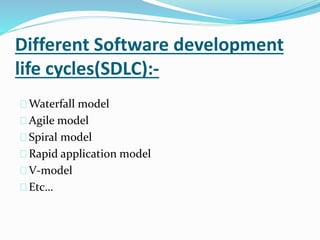
life cycles(SDLC):-
 Waterfall model
 Agile-scrum model
 Spiral model
 Rapid application model
 V-model
 Etc…
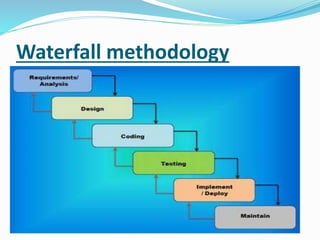
Waterfall methodology
Advantages :-
 A waterfall model is easy to follow.
 Quality is given higher priority than time and cost.
 Documentation is done at every stage of a waterfall
model allowing team to understand what has been
done.
 The stages cannot be jumped or bypass.
Disadvantages :-
 It can be implemented for any size project but mostly
preferable to small projects.
 Requirement must be gathered in the beginning and
there won’t be any change.
 The stakeholder may not be completely satisfied.
 Its difficult to estimate time and cost.
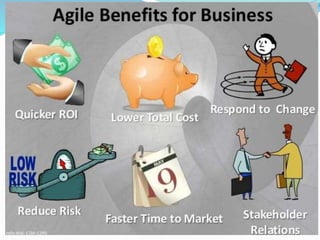
Why agile is mostly used?
 The highest priority is to satisfy the customer.
 It saves time, money and it involves stakeholders
through the project.
 The change in requirements is possible during the
project.
 Deliver working software frequently.
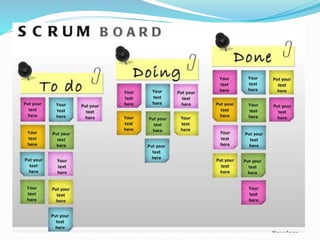
Agile with scrum methodology:-
 Scrum is an framework in agile that is basically used
in software development for better results.
 Self-organization small teams manage their own
workload.
 They organize themselves around clear goals and
constraints.
Note:-
 Teams goals are your goals you must commit to them.
 There is no individual failure-the team fails !
 There is no individual success-the team succeed !
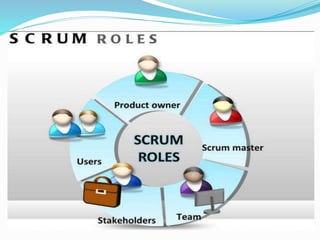
 Product Owner:-
The person responsible for maintaining the Product Backlog
by representing the interests of the stakeholders.
 Scrum Master:-
The person responsible for the Scrum process, who arranges
daily meetings, tracks the backlog of work to be done.
 Development Team:-
A cross-functional group of people responsible for delivering
potentially shippable increments of Product at the end of
every Sprint.
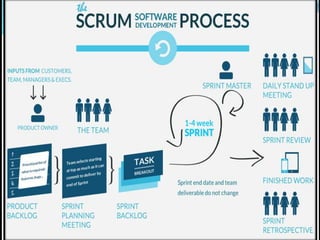
 Sprint:-
It is a span of 2-4 weeks to finish a part of project.
 Product backlog:-
The product backlog is an priority ordered list of
requirements.
 Sprint planning meeting:-
The scrum master plans the sprints and gives the
tasks to the teams.
 Sprint backlogs:-
The list of tasks that are to be completed during the
sprint.
 Stand up meeting:-
In this meet the team reports about –
What they did?
What they are going to do?
 Impediments meeting:-
They will discuss about new technique or any
problem in the sprint.
 Retrospective meeting:-
It is held after every sprint, what went well and
what went wrong.
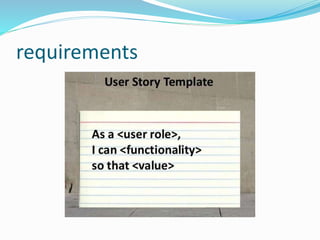
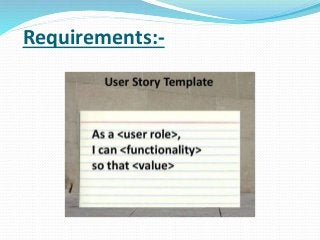
Requirements:-
Development phase:-
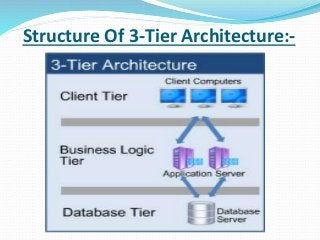
 Every developer develops the project using a 3-tier
architecture in their projects.
 In this architecture the software is divided into three
layers they are-
1. User Interface Layer(UI)
2. Business Logic Layer(BLL)
3. Data Access Layer(DAL)
 Through this logic, data and user interface are divided
into three division.
Structure Of 3-Tier Architecture:-
Use:-
 if any change need to be done then we can modify
a particular structure without disturbing the other
structure.
Example :-
 If the replace Sql server database with oracle
database then we need to change only data layer.
How this layers work:-
UI Layer:-
 It deals with the user interface and interaction.
 Presentation layer is your UI Layer.
 You can design your interface for you application
using our own control (i.e web, windows or
mobile).
Business Logic Layer:-
 Application layer or Business Layer is the middle or
Bridge layer.
 In this layer we can write logics of the program or any
validation code.
 This layer communicates with presentation layer and
database layer.
Data Access layer:-
 This layer makes a connection to the database layer.
 In this layer we can write queries or database
connection.
 It communicates only with the Business layer.
Advantages of using 3 tier
architecture:-
 It makes the logical separation between business layer,
presentation layer and database layer.
 It helps to maintain and understand large project and
complex project.
 Database Security can be provided at application layer.
Why to use 3 tier architecture in
projects:-
 If a new developer joins you for the same project then
it becomes very difficult to make him/her understand
about the code.
 It becomes very difficult to find any specific part of
project code.
 Our database server is not secured because database
server code is directly written in the page level.
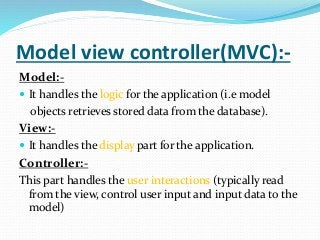
Model view controller(MVC):-
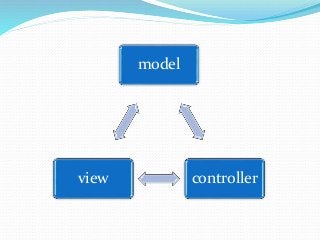
Model:-
 It handles the logic for the application (i.e model
objects retrieves stored data from the database).
View:-
 It handles the display part for the application.
Controller:-
This part handles the user interactions (typically read
from the view, control user input and input data to the
model)
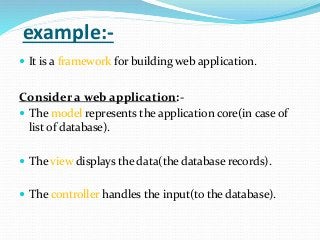
example:-
 It is a framework for building web application.
Consider a web application:-
 The model represents the application core(in case of
list of database).
 The view displays the data(the database records).
 The controller handles the input(to the database).
model
controllerview
Technical Design Document(TDD):-
 This TDD is prepared by team in the presence of all
team members.
 It consists of-
o Class diagram
o Database diagram
o Controls added and modified
o Code level changes.
 This document is studied clearly by every team
member before starting of the project.
Code Re-use:-
 Code reuse is the practice of using the same segment
of code in multiple applications.
 Reusing code saves programming time, which reduces
costs.
 Code reuse is promoted through
API
Frameworks
Libraries.
Coding conventions:-
 This are the rules to be followed when we are writing a
code.
 There are some rules in using private and public
variables.
 camel case-Car Performance.
 Adding space after use of binary operators ==,&&.
Coding comments:-
 Comments are like describing a part of code what it
does.
 It is important to use comments while programming.
 When a coder replaces with a new coder, the new
coder must easily understand the code.
Unit test:-
 This test is done at the end of the program.
 It is basically done by the coder to check whether the
code runs properly or not.
 After checking the code, if it runs properly then the
code is sent to testing phase.
Testing Phase
 In testing phase it’s basically done two methods .
1. Manual
2. Automation.
 In manual testing he check the working application
manually by observing each and every option in the
project.
 Using automation we need to write a program in which
we can test a particular option many times.
 In automation various tools are used like selenium,
QTP etc.
 Automation method is best technique because we can
save a lot of time.
Quality assurance(QA):-
 QA is a planned and systematic set of activities
necessary to provide adequate confidence that
products and services will conform to specified
requirements and meet user needs.
 It is process oriented.
 Defect prevention based.
Quality control:-
 Quality control is the process by which product quality
is compared with applicable standards and the action
taken when non conformance is detected.
 It is product oriented.
 Defect detection based.
 Tester must have the knowledge of all the
requirement's of the project and he must know the
tools used in the project.
 There are many types of testing -
Black box testing:-
 In this testing simply the input is given and checks for
the output.
White box testing-
 This testing includes the code checking at every stage.
Source control:-
 It is to maintain the source code in the central server.
 By this any coder can access the code.
 We can even keep a track on history of modifications.
 Comparison of different versions can be done so that
we will have an idea of where the code has been
modified.
agile with scrum methodology

agile with scrum methodology

  • 2.
    Presented by:-  K.RahulReddy  Ch.Avinash Reddy  T.Uday Kiran
  • 3.
    Topics that arecovered:-  Different SDLC.  Waterfall methodology advantages and disadvantages.  Agile with scrum framework Roles, Process and Benefits.  Requirements and analysis  Structure of 3-tier architecture and its layers.
  • 4.
    Topics that arecovered:-  model view controller(MVC).  Technical design document(TDD).  Code re-use, code convention, code comments, unit testing  Testing phase which includes QA and QC.  source control.
  • 5.
    Software Development LifeCycle (SDLC):-  A software development life cycle is a series of steps or phases that are performed to develop a software project.
  • 6.
    Different Software development lifecycles(SDLC):-  Waterfall model  Agile-scrum model  Spiral model  Rapid application model  V-model  Etc…
  • 7.
  • 8.
    Advantages :-  Awaterfall model is easy to follow.  Quality is given higher priority than time and cost.  Documentation is done at every stage of a waterfall model allowing team to understand what has been done.  The stages cannot be jumped or bypass.
  • 9.
    Disadvantages :-  Itcan be implemented for any size project but mostly preferable to small projects.  Requirement must be gathered in the beginning and there won’t be any change.  The stakeholder may not be completely satisfied.  Its difficult to estimate time and cost.
  • 11.
    Why agile ismostly used?  The highest priority is to satisfy the customer.  It saves time, money and it involves stakeholders through the project.  The change in requirements is possible during the project.  Deliver working software frequently.
  • 13.
    Agile with scrummethodology:-  Scrum is an framework in agile that is basically used in software development for better results.  Self-organization small teams manage their own workload.  They organize themselves around clear goals and constraints.
  • 14.
    Note:-  Teams goalsare your goals you must commit to them.  There is no individual failure-the team fails !  There is no individual success-the team succeed !
  • 16.
     Product Owner:- Theperson responsible for maintaining the Product Backlog by representing the interests of the stakeholders.  Scrum Master:- The person responsible for the Scrum process, who arranges daily meetings, tracks the backlog of work to be done.  Development Team:- A cross-functional group of people responsible for delivering potentially shippable increments of Product at the end of every Sprint.
  • 18.
     Sprint:- It isa span of 2-4 weeks to finish a part of project.  Product backlog:- The product backlog is an priority ordered list of requirements.  Sprint planning meeting:- The scrum master plans the sprints and gives the tasks to the teams.  Sprint backlogs:- The list of tasks that are to be completed during the sprint.
  • 19.
     Stand upmeeting:- In this meet the team reports about – What they did? What they are going to do?  Impediments meeting:- They will discuss about new technique or any problem in the sprint.  Retrospective meeting:- It is held after every sprint, what went well and what went wrong.
  • 20.
  • 22.
    Development phase:-  Everydeveloper develops the project using a 3-tier architecture in their projects.  In this architecture the software is divided into three layers they are- 1. User Interface Layer(UI) 2. Business Logic Layer(BLL) 3. Data Access Layer(DAL)  Through this logic, data and user interface are divided into three division.
  • 23.
    Structure Of 3-TierArchitecture:-
  • 24.
    Use:-  if anychange need to be done then we can modify a particular structure without disturbing the other structure. Example :-  If the replace Sql server database with oracle database then we need to change only data layer.
  • 25.
    How this layerswork:- UI Layer:-  It deals with the user interface and interaction.  Presentation layer is your UI Layer.  You can design your interface for you application using our own control (i.e web, windows or mobile).
  • 26.
    Business Logic Layer:- Application layer or Business Layer is the middle or Bridge layer.  In this layer we can write logics of the program or any validation code.  This layer communicates with presentation layer and database layer.
  • 27.
    Data Access layer:- This layer makes a connection to the database layer.  In this layer we can write queries or database connection.  It communicates only with the Business layer.
  • 28.
    Advantages of using3 tier architecture:-  It makes the logical separation between business layer, presentation layer and database layer.  It helps to maintain and understand large project and complex project.  Database Security can be provided at application layer.
  • 29.
    Why to use3 tier architecture in projects:-  If a new developer joins you for the same project then it becomes very difficult to make him/her understand about the code.  It becomes very difficult to find any specific part of project code.  Our database server is not secured because database server code is directly written in the page level.
  • 30.
    Model view controller(MVC):- Model:- It handles the logic for the application (i.e model objects retrieves stored data from the database). View:-  It handles the display part for the application. Controller:- This part handles the user interactions (typically read from the view, control user input and input data to the model)
  • 31.
    example:-  It isa framework for building web application. Consider a web application:-  The model represents the application core(in case of list of database).  The view displays the data(the database records).  The controller handles the input(to the database).
  • 32.
  • 33.
    Technical Design Document(TDD):- This TDD is prepared by team in the presence of all team members.  It consists of- o Class diagram o Database diagram o Controls added and modified o Code level changes.  This document is studied clearly by every team member before starting of the project.
  • 34.
    Code Re-use:-  Codereuse is the practice of using the same segment of code in multiple applications.  Reusing code saves programming time, which reduces costs.  Code reuse is promoted through API Frameworks Libraries.
  • 35.
    Coding conventions:-  Thisare the rules to be followed when we are writing a code.  There are some rules in using private and public variables.  camel case-Car Performance.  Adding space after use of binary operators ==,&&.
  • 36.
    Coding comments:-  Commentsare like describing a part of code what it does.  It is important to use comments while programming.  When a coder replaces with a new coder, the new coder must easily understand the code.
  • 37.
    Unit test:-  Thistest is done at the end of the program.  It is basically done by the coder to check whether the code runs properly or not.  After checking the code, if it runs properly then the code is sent to testing phase.
  • 38.
    Testing Phase  Intesting phase it’s basically done two methods . 1. Manual 2. Automation.  In manual testing he check the working application manually by observing each and every option in the project.  Using automation we need to write a program in which we can test a particular option many times.
  • 39.
     In automationvarious tools are used like selenium, QTP etc.  Automation method is best technique because we can save a lot of time.
  • 40.
    Quality assurance(QA):-  QAis a planned and systematic set of activities necessary to provide adequate confidence that products and services will conform to specified requirements and meet user needs.  It is process oriented.  Defect prevention based.
  • 41.
    Quality control:-  Qualitycontrol is the process by which product quality is compared with applicable standards and the action taken when non conformance is detected.  It is product oriented.  Defect detection based.
  • 42.
     Tester musthave the knowledge of all the requirement's of the project and he must know the tools used in the project.  There are many types of testing - Black box testing:-  In this testing simply the input is given and checks for the output. White box testing-  This testing includes the code checking at every stage.
  • 43.
    Source control:-  Itis to maintain the source code in the central server.  By this any coder can access the code.  We can even keep a track on history of modifications.  Comparison of different versions can be done so that we will have an idea of where the code has been modified.