d.tour: Style-based
      Exploration of
 Design Example Galleries
Author: Daniel Ritchie, Ankita Arvind
Kejriwal, Scott R. Klemmer
Stanford University HCI Group
Department of Computer Science
Stanford, CA, USA
Source: UIST’11, October 1619,
2011, Santa Barbara, CA, USA. ACM
Advisor: Geeng Neng You
Speaker: Ching Jung Chang
http://www.youtube.com/watch?v=g4ggoccLOyI&featur
e=related
                                              1
INTRODUCTION
• An interface and interaction techniques for style-
  based gallery exploration.
• Introduce exploratory techniques for finding
  relevant and inspiring design examples.
• A curated database of Web pages .
• Methods for extracting and analyzing design
  features from a curated corpus of Web pages.
• A recommender system that processes queries
  and returns relevant pages from the database.
• It decreases the gulfs of execution and evaluation
  for design example-finding.
                                                 2
Web interface : (a) Search Results, (b) Search box,
(c) Current Query, (d) Ambient Style Display, (e) Bookmarks
                                                        3
USER INTERFACE

• (a) Search Results: Presents search
  results as interactive thumbnails.
• query interface by providing ‘Show more
  like’     Show less like’    clicking a page
  thumbnail to expand the page to full size
  bookmark and add notes to the page.
• (b) Search box: Supports query by text
  string, color keywords, style terms, or any
  combination of the three. (colorful image-
  heavy)
                                             4
Searching for ‘colorful image heavy’ retrieves
colorful pages that make heavy use of images.    5
• (c) Current Query: This right-hand
  pane displays the keyword and page
  queries that specify the current state
  of the design gallery.
• Building simple interfaces for users to
  convey rationale is an important open
  issue in recommender systems.
• (d) Ambient Style Display: When a
  user hovers over a page, the display
  provides instant feedback by showing
  stylistic attributes .
• (e) Bookmarks: allows the user to
  maintain a collection of interesting
  pages across several search sessions.
                                            6
The Ambient Style Display shows bar chart visualizes the
aggregate style attributes of the current example queries.
When the user mouse over a page thumbnail, it instead
                                                         7
shows that page’s stylistic attributes.
IMPLEMENTATION
• Database
• The current prototype includes around
  300 Web pages listed on sites such as
  webbyawards.com, designmeltdown.co
  m, ilovetypography.com, sixrevisions.co
  m, and the Alexa Top 100.
• The complete contents of the database:
  bricolage.stanford.edu/database.


                                            8
• System Architecture:
• All utilities for processing pages and
  extracting features are implemented in:
• C++ with the Qt framework.
• QtWebKit API to interface with the
  WebKit browser engine.
• Search interface : HTML, JavaScript, CSS.
• Supports HTML5-compliant browsers :
  Firefox, Safari, and Chrome.
• Web server: JavaScript using node.js

                                          9
FEATURE EXTRACTION
• Focuse on global pages features that
  describe a design’s use of
  space, color, text, and images.
• These features compose to predict
  higher-level stylistic attributes.
• Many of these features are derived from
  the page’s Document Object Model
  (DOM) tree.

                                        10
http://www.w3schools.com/
htmldom/dom_nodetree.asp


                            Parents


           Children            Siblings


        • The HTML DOM views an HTML document as a tree
          structure. The tree structure is called a node-tree.
        • The tree starts at the root node and branches out to the
          text nodes at the lowest level of the tree.
        • Node Parents, Children, and Siblings. The nodes in the
          node tree have a hierarchical relationship to each other.
                                                                11
<html>
                                       <head>
                                        <title>Hello DOM </title>
                                       </head>
                                       <body>
                                        <h1>DOM Lesson
                                      one</h1>
                                        <p>Hello world!</p>
                                       </body>
                                      </html>

The <html> node has no parent node; it is the root node.
The <html> node has two child nodes; <head> and <body>
The <head> node has one child node; the <title> node
The <title> node also has one child node; the text node “Hello DOM "
The <h1> and <p> nodes are siblings, and both child nodes of <body>


                                                                 12
Principles from the design literature
Use of   DOM tree depth (min, max, mean, stddev), # of
Space    DOM leaf nodes, document width/height, amount
         of separation between content blocks,
         foreground/background ratio, overlapping element
         area, connected components in rendered image (#,
         minarea, maxarea, meanarea)
Use of   Color (mean, stddev), saturation (min, max, mean,
Color    stddev), value (min, max, mean, stddev), # of
         colors (in DOM, in rendered page), most dominant
         color, most dominant text color, # of dominant
         colors, text-to-background contrast (min, max,
         mean, stddev), histogram
Use of   # of words in page, # of words per block (min,
Text     max, mean, stddev), # of fonts, font size (min, max,
         mode, mean)
Use of   # of images, aspectRatio (min, max, mean,
Images   stddev), area (min, max, mean, stddev), complexity
         (min, max, mean, stddev)                         13
• Other features require Segmentation
• Apply the Bento page segmentation algorithm
  to ensure that the DOM tree accurately
  reflects the page’s visual layout.
• Bento: data collection study, the mapping
  algorithm, and the machine learning method.
• The system also computes a color histogram of
  the rendered page, quantizing the image into
  256 colors that evenly sample the RGB color
  cube.
• Additional features for the local structure web
  pages.
• Bricolage algorithm transfers the contents of a
  source page into the style of a target page by
  computing a mapping between the two pages’
  DOM trees.
                                               14
Left: The colored boxes illustrate Bento’s
segmentation.
Right: Bento’s output tree and associated
DOM nodes for this page.
                                         15
Red
                                                     128-     192-
                                      0-63   64-127
                                                      191     255
Original
                              0-63   43        78     18       0
                             64-127  45        67     33       2
                       Blue   128-
                                    127        58      25       8
                              191
                              192-
                                    140        47      47      13
256 colors     •   Color histogram in the
                              255            RGB color space
               • A Red–Blue chromaticity histogram can be formed by
                 first normalizing color pixel values by dividing RGB
                 values by R+G+B.
               • Quantizing the normalized R and B coordinates into N
                 bins each.
               • A two-dimensional histogram of Red-Blue
                 chromaticity divide in to four bins (N=4) might yield a
                 histogram that looks like this table:
                                                                     16
             Reference: Wiki
Bricolage
computes
coherent
mappings
between Web
pages by
matching
visually and
semantically
similar page
elements.


         17
QUERY PROCESSING
• Use the text contents of its pages and the
  combined feature vectors described above to
  respond to different types of queries.
• 1. Show More/Less Like’
• q weighted average of all feature vectors for pages
  rated via ‘show more/less like.’
• M be the set of feature vectors for all ‘show more
  like’ pages
• L be the set of vectors for all ‘show less like’ pages.


                                                        18
• 2. Text Keyword Search
• System computes a TF-IDF score for each word in the
  page’s document text .
• It returns a ranked list of the pages whose combined
  scores for the query terms are greater than zero.
• TF-IDF : Term Frequency–Inverse Document Frequency.
• Consider a document containing 100 words where in the
  word colorful appears 3 times.
• Term frequency (TF) for colorful (3 / 100) = 0.03.
• Assume 10 million documents and colorful appears in
  1,000 of these. DF=(10, 000 ,000 / 1, 000)
• Inverse document frequency is calculated as log(10, 000
  ,000 / 1, 000) =10,000= 4.
• tf–idf score : 0.03 × 4 = 0.12.

                                                      19
• 3. Color Keyword Search
• The system converts each color keyword into
  an RGB color c* for that word using a hard-
  coded lookup table. / Six-digit hexadecimal
• The current prototype supports twelve
  common color words.
• To determine how well a page matches the
  query color.
• It computes a score s based on the page’s
  histogram h. h is a set of pairs (ci; fi),
• ci - RGB color and fi - fraction of pixels in the
  page whose nearest histogram color is ci.


                       S=S1+S2+S3……..+Sh
                                                 20
• frequently-occurring colors that are close to
  query color should have a high score
  contribution si.
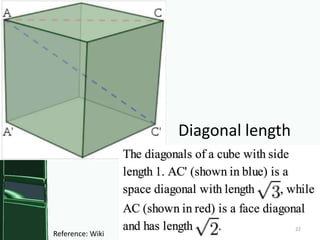
• use a value of    one-third the diagonal
  length of the RGB color cube for the threshold.
• The system returns as search results only the
  pages with s greater than a heuristically
  determined threshold.
                                        fraction of pixels


    RGB color

                each histogram pair (ci; fi)
                                                             21
Diagonal length


                                    22
Reference: Wiki
4. Style
Keyword
Search
The current
prototype
invokes these
rules when the
user searches for
the bold terms.
35 terms—
including
synonyms—map
to 14 unique
rules.

All the features
in any single rule
are weighted
equally.         23
• EVALUATION
• Method
• An online study instructed participants to find
  a set of inspirational design examples.
• Participants were randomly assigned to use
  either d.tour or a Web search engine to find
  examples.
• Provide feedback about their search strategies
  and experience.


                                               24
• Participants
• 40 participants: 20 through student email lists
  at university and 20 more via Amazon
  Mechanical Turk.
• Participants searched for design examples.
• Finishing search, responded to a
  questionnaire.
• Provided four inspirational design examples
  URLs and explanations for their chosen
  examples.


                                                25
• Results
• Mainly reported querying with keywords such
  as ‘science,’ ‘kids,’ and ‘education.’
• Retrieved pages from their own mental search
  history, recalling well-designed, potentially
  relevant sites they had seen recently.
• Lack of style-based search or the insufficiency
  of searching by page content as serious
  roadblocks.
• Search function “rated sites by mood or feel.”
• “Google is only really useful for searching for
  actual page content, not page style.
                                               26
• d.tour as a “really good tool
  to find quick examples.”
• Specific interface features as
  useful.
• Current Query as reminder
  of search history.
• ‘Ambient Style Display’
  received mixed feedback,
  difficulty interpreting and
  operationalizing the
  information it provided.
• Low corpus size as a
  limitation for d.tour.
                                   27
• Participants
  using d.tour
  focused on
  the style
  and
  present-
  ction of
  their
  chosen
  designs.


           28
• Many
  participants
  using
  search
  engines
  chose
  pages on a
  topic
  relevant to
  the design
  task.


            29
• CONCLUSION AND FUTURE WORK
• 1. d.tour currently standardizes all page
  features, effectively giving them all the same
  weight.
• 2. Expanding the stylistic vocabulary. Apply
  machine learning techniques to a large corpus of
  stylistically-tagged Web pages.
• 3. Many of d.tour’s features rely on the HTML
  DOM, which simplifies a page to a hierarchy of
  rectangles.
• 4. d.tour does not attempt to capture non-static
  aspects of design such as animation or
  interaction.
• 5. A full-fledged system should scale to much
  large page databases—perhaps even the entire 30
3. The wine bottles and the type on this page overlap and span
multiple DOM nodes (outlined in blue). Breaking the strong grid lines
specified by the DOM. d.tour’s current feature set cannot support
                                                                    31
queries about ‘organic’ page layouts such as this.

Style based

  • 1.
    d.tour: Style-based Exploration of Design Example Galleries Author: Daniel Ritchie, Ankita Arvind Kejriwal, Scott R. Klemmer Stanford University HCI Group Department of Computer Science Stanford, CA, USA Source: UIST’11, October 1619, 2011, Santa Barbara, CA, USA. ACM Advisor: Geeng Neng You Speaker: Ching Jung Chang http://www.youtube.com/watch?v=g4ggoccLOyI&featur e=related 1
  • 2.
    INTRODUCTION • An interfaceand interaction techniques for style- based gallery exploration. • Introduce exploratory techniques for finding relevant and inspiring design examples. • A curated database of Web pages . • Methods for extracting and analyzing design features from a curated corpus of Web pages. • A recommender system that processes queries and returns relevant pages from the database. • It decreases the gulfs of execution and evaluation for design example-finding. 2
  • 3.
    Web interface :(a) Search Results, (b) Search box, (c) Current Query, (d) Ambient Style Display, (e) Bookmarks 3
  • 4.
    USER INTERFACE • (a)Search Results: Presents search results as interactive thumbnails. • query interface by providing ‘Show more like’ Show less like’ clicking a page thumbnail to expand the page to full size bookmark and add notes to the page. • (b) Search box: Supports query by text string, color keywords, style terms, or any combination of the three. (colorful image- heavy) 4
  • 5.
    Searching for ‘colorfulimage heavy’ retrieves colorful pages that make heavy use of images. 5
  • 6.
    • (c) CurrentQuery: This right-hand pane displays the keyword and page queries that specify the current state of the design gallery. • Building simple interfaces for users to convey rationale is an important open issue in recommender systems. • (d) Ambient Style Display: When a user hovers over a page, the display provides instant feedback by showing stylistic attributes . • (e) Bookmarks: allows the user to maintain a collection of interesting pages across several search sessions. 6
  • 7.
    The Ambient StyleDisplay shows bar chart visualizes the aggregate style attributes of the current example queries. When the user mouse over a page thumbnail, it instead 7 shows that page’s stylistic attributes.
  • 8.
    IMPLEMENTATION • Database • Thecurrent prototype includes around 300 Web pages listed on sites such as webbyawards.com, designmeltdown.co m, ilovetypography.com, sixrevisions.co m, and the Alexa Top 100. • The complete contents of the database: bricolage.stanford.edu/database. 8
  • 9.
    • System Architecture: •All utilities for processing pages and extracting features are implemented in: • C++ with the Qt framework. • QtWebKit API to interface with the WebKit browser engine. • Search interface : HTML, JavaScript, CSS. • Supports HTML5-compliant browsers : Firefox, Safari, and Chrome. • Web server: JavaScript using node.js 9
  • 10.
    FEATURE EXTRACTION • Focuseon global pages features that describe a design’s use of space, color, text, and images. • These features compose to predict higher-level stylistic attributes. • Many of these features are derived from the page’s Document Object Model (DOM) tree. 10
  • 11.
    http://www.w3schools.com/ htmldom/dom_nodetree.asp Parents Children Siblings • The HTML DOM views an HTML document as a tree structure. The tree structure is called a node-tree. • The tree starts at the root node and branches out to the text nodes at the lowest level of the tree. • Node Parents, Children, and Siblings. The nodes in the node tree have a hierarchical relationship to each other. 11
  • 12.
    <html> <head> <title>Hello DOM </title> </head> <body> <h1>DOM Lesson one</h1> <p>Hello world!</p> </body> </html> The <html> node has no parent node; it is the root node. The <html> node has two child nodes; <head> and <body> The <head> node has one child node; the <title> node The <title> node also has one child node; the text node “Hello DOM " The <h1> and <p> nodes are siblings, and both child nodes of <body> 12
  • 13.
    Principles from thedesign literature Use of DOM tree depth (min, max, mean, stddev), # of Space DOM leaf nodes, document width/height, amount of separation between content blocks, foreground/background ratio, overlapping element area, connected components in rendered image (#, minarea, maxarea, meanarea) Use of Color (mean, stddev), saturation (min, max, mean, Color stddev), value (min, max, mean, stddev), # of colors (in DOM, in rendered page), most dominant color, most dominant text color, # of dominant colors, text-to-background contrast (min, max, mean, stddev), histogram Use of # of words in page, # of words per block (min, Text max, mean, stddev), # of fonts, font size (min, max, mode, mean) Use of # of images, aspectRatio (min, max, mean, Images stddev), area (min, max, mean, stddev), complexity (min, max, mean, stddev) 13
  • 14.
    • Other featuresrequire Segmentation • Apply the Bento page segmentation algorithm to ensure that the DOM tree accurately reflects the page’s visual layout. • Bento: data collection study, the mapping algorithm, and the machine learning method. • The system also computes a color histogram of the rendered page, quantizing the image into 256 colors that evenly sample the RGB color cube. • Additional features for the local structure web pages. • Bricolage algorithm transfers the contents of a source page into the style of a target page by computing a mapping between the two pages’ DOM trees. 14
  • 15.
    Left: The coloredboxes illustrate Bento’s segmentation. Right: Bento’s output tree and associated DOM nodes for this page. 15
  • 16.
    Red 128- 192- 0-63 64-127 191 255 Original 0-63 43 78 18 0 64-127 45 67 33 2 Blue 128- 127 58 25 8 191 192- 140 47 47 13 256 colors • Color histogram in the 255 RGB color space • A Red–Blue chromaticity histogram can be formed by first normalizing color pixel values by dividing RGB values by R+G+B. • Quantizing the normalized R and B coordinates into N bins each. • A two-dimensional histogram of Red-Blue chromaticity divide in to four bins (N=4) might yield a histogram that looks like this table: 16 Reference: Wiki
  • 17.
  • 18.
    QUERY PROCESSING • Usethe text contents of its pages and the combined feature vectors described above to respond to different types of queries. • 1. Show More/Less Like’ • q weighted average of all feature vectors for pages rated via ‘show more/less like.’ • M be the set of feature vectors for all ‘show more like’ pages • L be the set of vectors for all ‘show less like’ pages. 18
  • 19.
    • 2. TextKeyword Search • System computes a TF-IDF score for each word in the page’s document text . • It returns a ranked list of the pages whose combined scores for the query terms are greater than zero. • TF-IDF : Term Frequency–Inverse Document Frequency. • Consider a document containing 100 words where in the word colorful appears 3 times. • Term frequency (TF) for colorful (3 / 100) = 0.03. • Assume 10 million documents and colorful appears in 1,000 of these. DF=(10, 000 ,000 / 1, 000) • Inverse document frequency is calculated as log(10, 000 ,000 / 1, 000) =10,000= 4. • tf–idf score : 0.03 × 4 = 0.12. 19
  • 20.
    • 3. ColorKeyword Search • The system converts each color keyword into an RGB color c* for that word using a hard- coded lookup table. / Six-digit hexadecimal • The current prototype supports twelve common color words. • To determine how well a page matches the query color. • It computes a score s based on the page’s histogram h. h is a set of pairs (ci; fi), • ci - RGB color and fi - fraction of pixels in the page whose nearest histogram color is ci. S=S1+S2+S3……..+Sh 20
  • 21.
    • frequently-occurring colorsthat are close to query color should have a high score contribution si. • use a value of one-third the diagonal length of the RGB color cube for the threshold. • The system returns as search results only the pages with s greater than a heuristically determined threshold. fraction of pixels RGB color each histogram pair (ci; fi) 21
  • 22.
    Diagonal length 22 Reference: Wiki
  • 23.
    4. Style Keyword Search The current prototype invokesthese rules when the user searches for the bold terms. 35 terms— including synonyms—map to 14 unique rules. All the features in any single rule are weighted equally. 23
  • 24.
    • EVALUATION • Method •An online study instructed participants to find a set of inspirational design examples. • Participants were randomly assigned to use either d.tour or a Web search engine to find examples. • Provide feedback about their search strategies and experience. 24
  • 25.
    • Participants • 40participants: 20 through student email lists at university and 20 more via Amazon Mechanical Turk. • Participants searched for design examples. • Finishing search, responded to a questionnaire. • Provided four inspirational design examples URLs and explanations for their chosen examples. 25
  • 26.
    • Results • Mainlyreported querying with keywords such as ‘science,’ ‘kids,’ and ‘education.’ • Retrieved pages from their own mental search history, recalling well-designed, potentially relevant sites they had seen recently. • Lack of style-based search or the insufficiency of searching by page content as serious roadblocks. • Search function “rated sites by mood or feel.” • “Google is only really useful for searching for actual page content, not page style. 26
  • 27.
    • d.tour asa “really good tool to find quick examples.” • Specific interface features as useful. • Current Query as reminder of search history. • ‘Ambient Style Display’ received mixed feedback, difficulty interpreting and operationalizing the information it provided. • Low corpus size as a limitation for d.tour. 27
  • 28.
    • Participants using d.tour focused on the style and present- ction of their chosen designs. 28
  • 29.
    • Many participants using search engines chose pages on a topic relevant to the design task. 29
  • 30.
    • CONCLUSION ANDFUTURE WORK • 1. d.tour currently standardizes all page features, effectively giving them all the same weight. • 2. Expanding the stylistic vocabulary. Apply machine learning techniques to a large corpus of stylistically-tagged Web pages. • 3. Many of d.tour’s features rely on the HTML DOM, which simplifies a page to a hierarchy of rectangles. • 4. d.tour does not attempt to capture non-static aspects of design such as animation or interaction. • 5. A full-fledged system should scale to much large page databases—perhaps even the entire 30
  • 31.
    3. The winebottles and the type on this page overlap and span multiple DOM nodes (outlined in blue). Breaking the strong grid lines specified by the DOM. d.tour’s current feature set cannot support 31 queries about ‘organic’ page layouts such as this.