UNTANGLING THE WEB
CLASS 6 – IBM BLUEMIX, A FEW JAVASCRIPT THINGS, MAPS
AGENDA
• IBM Bluemix
• Javascript concepts – variable scope, this pointer, events,
immediately invoked functions
• Mapping using Google Maps
• Some project work, if we have time
• Homework 7
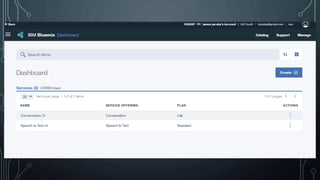
IBM BLUEMIX
• This is one of the top 3 or 4 cloud platform providers
• AWS
• Azure
• Google Cloud Platform
• IBM Bluemix
• Provides servers, but lots of people do that
• Integrated services are the real key to why a platform is
valuable
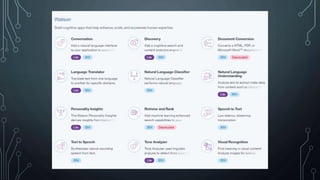
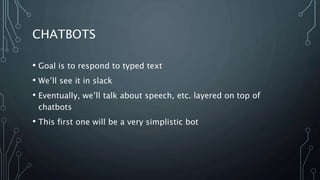
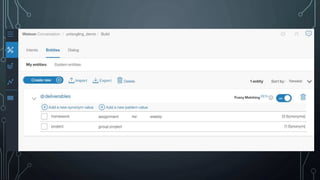
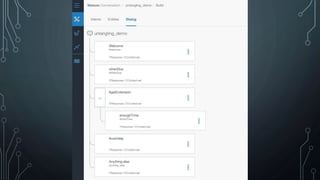
CHATBOTS
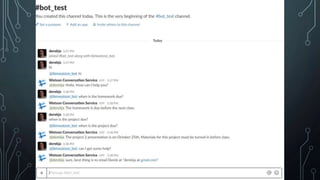
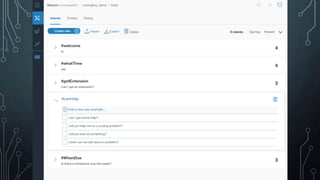
• Goal is to respond to typed text
• We’ll see it in slack
• Eventually, we’ll talk about speech, etc. layered on top of
chatbots
• This first one will be a very simplistic bot
SOME JS CONCEPTS
VARIABLE SCOPE
• A reminder that variables are only accessible from within the block
they are declared, or children of that block:
• In a file, variables declared outside any functions are global to all the
functions in that file
• In a function, variables declared at the top of the function are accessible to
everywhere within that function
• In a for loop, variables declared within the loop are accessible ONLY within
the loop
• Any identically named variables will be taken from the closest block
• Don’t name the same or your more global variables will be hidden
STRICT MODE
• “use strict”; as the first line of a js file
• Mistakes become errors
• Global variables must be explicitly created
• Some other behaviors change
• See https://developer.mozilla.org/en-
US/docs/Web/JavaScript/Reference/Strict_mode
THIS
• This keyword retrieves the current execution context
• Some difference in strict mode where it retrieves the context at the time of
the function call
• In non-strict mode, the global context is the default, in strict mode will be at
whatever it was previously defined to, or undefined
• This is the basis of understanding arrow functions (ES6 concept we’ll
explore later)
• Reference:
• https://developer.mozilla.org/en/docs/Web/JavaScript/Reference/Op
erators/this
NEW
• function Car(make, model, year) {
• this.make = make;
• this.model = model;
• this.year = year;
• }
• var mycar = new Car("Eagle", "Talon TSi", 1993);
• console.log(mycar.make);
EVENTS
• There are also events on the document object model, but we
won’t discuss that in depth today
• Events are called when something happens – a UI action, a
message, a timer, etc.
• google.maps.event.addListener
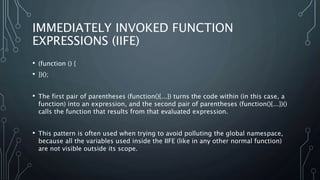
IMMEDIATELY INVOKED FUNCTION
EXPRESSIONS (IIFE)
• (function () {
• })();
• The first pair of parentheses (function(){...}) turns the code within (in this case, a
function) into an expression, and the second pair of parentheses (function(){...})()
calls the function that results from that evaluated expression.
• This pattern is often used when trying to avoid polluting the global namespace,
because all the variables used inside the IIFE (like in any other normal function)
are not visible outside its scope.
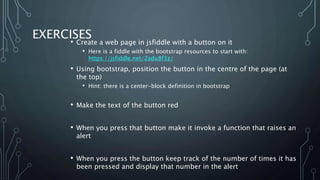
EXERCISES
• Create a web page in jsfiddle with a button on it
• Here is a fiddle with the bootstrap resources to start with:
https://jsfiddle.net/2adu8f3z/
• Using bootstrap, position the button in the centre of the page (at
the top)
• Hint: there is a center-block definition in bootstrap
• Make the text of the button red
• When you press that button make it invoke a function that raises an
alert
• When you press the button keep track of the number of times it has
been pressed and display that number in the alert
EXERCISE ANSWERS
• https://jsfiddle.net/L3wLvvnL/5/
MAPPING
• Two main options
• Google maps
• Leaflet
• Main decision is really whether to be in the google ecosphere
• Google maps may be slightly easier initially, but leaflet is easier
to extend
• Leaflet sits primarily on open street maps, so perhaps less
detail than google
GOOGLE MAPS EXAMPLE
• Getting an API key (will initially work without it, but some features disabled and will not
keep working)
• https://developers.google.com/maps/documentation/javascript/get-api-key
• https://jsfiddle.net/v892njbz/1/
• Key concepts
• Arrays (review)
• Looping (review)
• New objects
GOOGLE MAPS EXAMPLE 2
• New concepts
• Events
• https://jsfiddle.net/qswaLznm/5/
GOOGLE MAPS EXAMPLE 3
• New Concept
• Immediately Invoked Function Expression (IIFE)
• https://jsfiddle.net/v892njbz/
BITCOIN DISCUSSION (IF WE HAVE TIME)
• Who has used bitcoin? Knows about it?
• Perhaps watch the Singularity University video
HOMEWORK 6
• 1) create a web page that shows a map of the Uvic campus, using
your own google API key
• 2) on that campus map, create 3 markers.
• 3) when the marker is clicked on, launch a pop-up dialog that shows
the latitude and longitude of the marker, and a count of the number
of markers that have been shown so far
• Turn this in by oct 18th start of class, submitting your github
repository and a link to the page running on github pages.
PROJECT 2 – DUE START OF CLASS OCT
25TH
• Groups of 3-4 (no smaller than 2, no larger than 5)
• You will design and implement a website business
• This website must contain 3-4 html pages, a map (we’ll discuss
this next week), a database mockup (you’ll do the UI only in
this project, the database itself will be for project 3), and a
chatbot (also for project 3, but you’ll do the dialog design for
this project)
PROJECT 2 DELIVERABLES
• A business model canvas and value proposition canvas for your
website business
• 3-4 web pages, hosted on github pages, that are styled nicely in CSS
• A half-page discussion of which SEO factors your website exhibits
• A functional map on one of the pages, although it does not have to
be completely populated
• A presentation of between 3-5 minutes giving a walkthrough of the
website concept
• This project is worth 15% of your mark and all group members will
get the same mark. Switching groups between projects 2 and 3 is
discouraged but not impossible.

Untangling - fall2017 - week6

  • 1.
    UNTANGLING THE WEB CLASS6 – IBM BLUEMIX, A FEW JAVASCRIPT THINGS, MAPS
  • 2.
    AGENDA • IBM Bluemix •Javascript concepts – variable scope, this pointer, events, immediately invoked functions • Mapping using Google Maps • Some project work, if we have time • Homework 7
  • 3.
    IBM BLUEMIX • Thisis one of the top 3 or 4 cloud platform providers • AWS • Azure • Google Cloud Platform • IBM Bluemix • Provides servers, but lots of people do that • Integrated services are the real key to why a platform is valuable
  • 7.
    CHATBOTS • Goal isto respond to typed text • We’ll see it in slack • Eventually, we’ll talk about speech, etc. layered on top of chatbots • This first one will be a very simplistic bot
  • 12.
  • 13.
    VARIABLE SCOPE • Areminder that variables are only accessible from within the block they are declared, or children of that block: • In a file, variables declared outside any functions are global to all the functions in that file • In a function, variables declared at the top of the function are accessible to everywhere within that function • In a for loop, variables declared within the loop are accessible ONLY within the loop • Any identically named variables will be taken from the closest block • Don’t name the same or your more global variables will be hidden
  • 14.
    STRICT MODE • “usestrict”; as the first line of a js file • Mistakes become errors • Global variables must be explicitly created • Some other behaviors change • See https://developer.mozilla.org/en- US/docs/Web/JavaScript/Reference/Strict_mode
  • 15.
    THIS • This keywordretrieves the current execution context • Some difference in strict mode where it retrieves the context at the time of the function call • In non-strict mode, the global context is the default, in strict mode will be at whatever it was previously defined to, or undefined • This is the basis of understanding arrow functions (ES6 concept we’ll explore later) • Reference: • https://developer.mozilla.org/en/docs/Web/JavaScript/Reference/Op erators/this
  • 16.
    NEW • function Car(make,model, year) { • this.make = make; • this.model = model; • this.year = year; • } • var mycar = new Car("Eagle", "Talon TSi", 1993); • console.log(mycar.make);
  • 17.
    EVENTS • There arealso events on the document object model, but we won’t discuss that in depth today • Events are called when something happens – a UI action, a message, a timer, etc. • google.maps.event.addListener
  • 18.
    IMMEDIATELY INVOKED FUNCTION EXPRESSIONS(IIFE) • (function () { • })(); • The first pair of parentheses (function(){...}) turns the code within (in this case, a function) into an expression, and the second pair of parentheses (function(){...})() calls the function that results from that evaluated expression. • This pattern is often used when trying to avoid polluting the global namespace, because all the variables used inside the IIFE (like in any other normal function) are not visible outside its scope.
  • 19.
    EXERCISES • Create aweb page in jsfiddle with a button on it • Here is a fiddle with the bootstrap resources to start with: https://jsfiddle.net/2adu8f3z/ • Using bootstrap, position the button in the centre of the page (at the top) • Hint: there is a center-block definition in bootstrap • Make the text of the button red • When you press that button make it invoke a function that raises an alert • When you press the button keep track of the number of times it has been pressed and display that number in the alert
  • 20.
  • 21.
    MAPPING • Two mainoptions • Google maps • Leaflet • Main decision is really whether to be in the google ecosphere • Google maps may be slightly easier initially, but leaflet is easier to extend • Leaflet sits primarily on open street maps, so perhaps less detail than google
  • 22.
    GOOGLE MAPS EXAMPLE •Getting an API key (will initially work without it, but some features disabled and will not keep working) • https://developers.google.com/maps/documentation/javascript/get-api-key • https://jsfiddle.net/v892njbz/1/ • Key concepts • Arrays (review) • Looping (review) • New objects
  • 23.
    GOOGLE MAPS EXAMPLE2 • New concepts • Events • https://jsfiddle.net/qswaLznm/5/
  • 24.
    GOOGLE MAPS EXAMPLE3 • New Concept • Immediately Invoked Function Expression (IIFE) • https://jsfiddle.net/v892njbz/
  • 25.
    BITCOIN DISCUSSION (IFWE HAVE TIME) • Who has used bitcoin? Knows about it? • Perhaps watch the Singularity University video
  • 26.
    HOMEWORK 6 • 1)create a web page that shows a map of the Uvic campus, using your own google API key • 2) on that campus map, create 3 markers. • 3) when the marker is clicked on, launch a pop-up dialog that shows the latitude and longitude of the marker, and a count of the number of markers that have been shown so far • Turn this in by oct 18th start of class, submitting your github repository and a link to the page running on github pages.
  • 27.
    PROJECT 2 –DUE START OF CLASS OCT 25TH • Groups of 3-4 (no smaller than 2, no larger than 5) • You will design and implement a website business • This website must contain 3-4 html pages, a map (we’ll discuss this next week), a database mockup (you’ll do the UI only in this project, the database itself will be for project 3), and a chatbot (also for project 3, but you’ll do the dialog design for this project)
  • 28.
    PROJECT 2 DELIVERABLES •A business model canvas and value proposition canvas for your website business • 3-4 web pages, hosted on github pages, that are styled nicely in CSS • A half-page discussion of which SEO factors your website exhibits • A functional map on one of the pages, although it does not have to be completely populated • A presentation of between 3-5 minutes giving a walkthrough of the website concept • This project is worth 15% of your mark and all group members will get the same mark. Switching groups between projects 2 and 3 is discouraged but not impossible.