Advanced PPC

      Frank Coyle – President
Lisa Sanner – Senior Client Manager

           Mar 18, 2010
Webinar Logistics

• Being recorded
• Email with link will be sent out later this
  week
• Ask questions throughout
About Point It
            Presentation Agenda

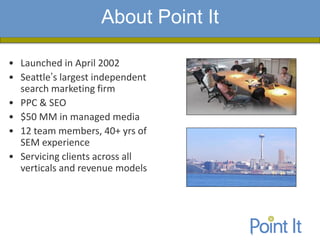
• Launched in April 2002
• Seattle’s largest independent
  search marketing firm
• PPC & SEO
• $50 MM in managed media
• 12 team members, 40+ yrs of
  SEM experience
• Servicing clients across all
  verticals and revenue models
Agenda

•   New Google Ad Formats
•   Content network
•   International PPC
•   Geo targeting PPC
•   Working with the Engine Reps
•   Q&A
New Ad Formats
             Key Points/Findings


• What these ad formats are and how they differ
• Getting the user closer to what they want – think about
  conversion metrics
• Eligibility requirements and limitations
• Early results
• Samples
New Ad Formats

•   Google Sitelinks
•   Yahoo Rich Ads in Search
•   Google Product Extensions
•   Google Product Listings


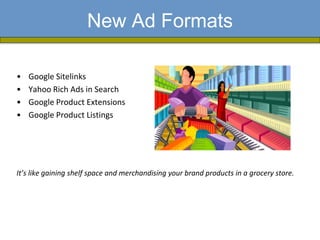
It’s like gaining shelf space and merchandising your brand products in a grocery store.
What are Sitelinks?

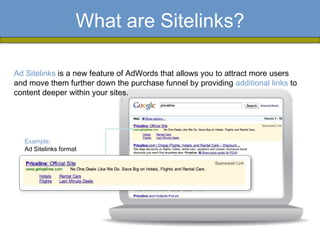
Ad Sitelinks is a new feature of AdWords that allows you to attract more users
and move them further down the purchase funnel by providing additional links to
content deeper within your sites.


  Example:
  Ad Sitelinks format
Sitelinks Tips

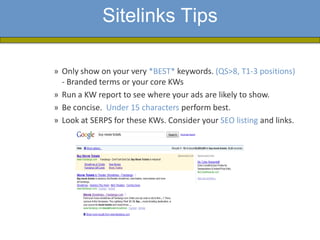
» Only show on your very *BEST* keywords. (QS>8, T1-3 positions)
  - Branded terms or your core KWs
» Run a KW report to see where your ads are likely to show.
» Be concise. Under 15 characters perform best.
» Look at SERPS for these KWs. Consider your SEO listing and links.
Tracking and Measurement

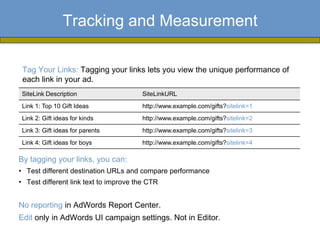
 Tag Your Links: Tagging your links lets you view the unique performance of
 each link in your ad.
 SiteLink Description                  SiteLinkURL
 Link 1: Top 10 Gift Ideas             http://www.example.com/gifts?sitelink=1
 Link 2: Gift ideas for kinds          http://www.example.com/gifts?sitelink=2
 Link 3: Gift ideas for parents        http://www.example.com/gifts?sitelink=3
 Link 4: Gift ideas for boys           http://www.example.com/gifts?sitelink=4

By tagging your links, you can:
• Test different destination URLs and compare performance
• Test different link text to improve the CTR


No reporting in AdWords Report Center.
Edit only in AdWords UI campaign settings. Not in Editor.
Choosing Sitelinks - Segmentation


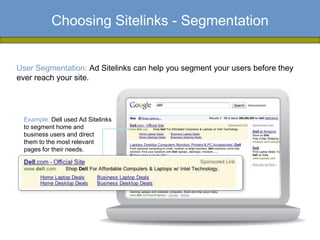
User Segmentation: Ad Sitelinks can help you segment your users before they
ever reach your site.


 Example: Dell used Ad Sitelinks
 to segment home and
 business users and direct
 them to the most relevant
 pages for their needs.
Choosing Sitelinks - Promos

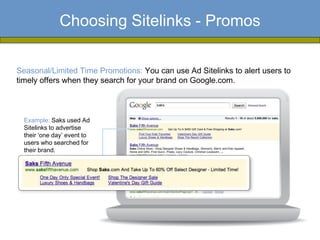
Seasonal/Limited Time Promotions: You can use Ad Sitelinks to alert users to
timely offers when they search for your brand on Google.com.


  Example: Saks used Ad
  Sitelinks to advertise
  their ‘one day’ event to
  users who searched for
  their brand.
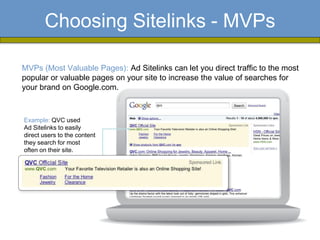
Choosing Sitelinks - MVPs

MVPs (Most Valuable Pages): Ad Sitelinks can let you direct traffic to the most
popular or valuable pages on your site to increase the value of searches for
your brand on Google.com.


Example: QVC used
Ad Sitelinks to easily
direct users to the content
they search for most
often on their site.
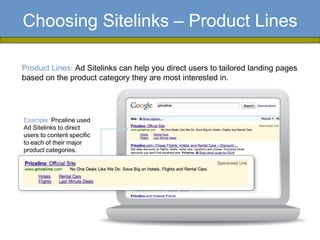
Choosing Sitelinks – Product Lines

Product Lines: Ad Sitelinks can help you direct users to tailored landing pages
based on the product category they are most interested in.


Example: Priceline used
Ad Sitelinks to direct
users to content specific
to each of their major
product categories.
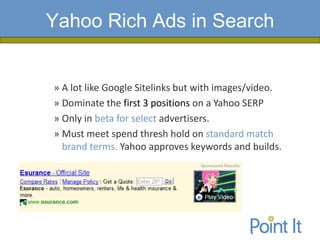
Yahoo Rich Ads in Search


» A lot like Google Sitelinks but with images/video.
» Dominate the first 3 positions on a Yahoo SERP
» Only in beta for select advertisers.
» Must meet spend thresh hold on standard match
  brand terms. Yahoo approves keywords and builds.
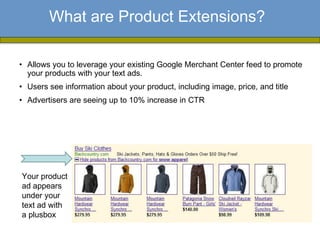
What are Product Extensions?

• Allows you to leverage your existing Google Merchant Center feed to promote
  your products with your text ads.
• Users see information about your product, including image, price, and title
• Advertisers are seeing up to 10% increase in CTR


Your product
ad appears
under your
text ad with
a plusbox
What are Product Listings?

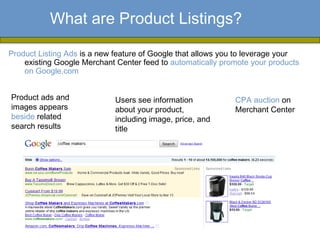
Product Listing Ads is a new feature of Google that allows you to leverage your
    existing Google Merchant Center feed to automatically promote your products
    on Google.com


Product ads and              Users see information           CPA auction on
images appears               about your product,             Merchant Center
beside related               including image, price, and
search results               title
Product Extensions vs. Product Listings


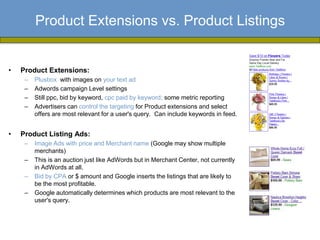
•   Product Extensions:
     –   Plusbox with images on your text ad
     –   Adwords campaign Level settings
     –   Still ppc, bid by keyword, cpc paid by keyword; some metric reporting
     –   Advertisers can control the targeting for Product extensions and select
         offers are most relevant for a user's query. Can include keywords in feed.


•   Product Listing Ads:
     –   Image Ads with price and Merchant name (Google may show multiple
         merchants)
     –   This is an auction just like AdWords but in Merchant Center, not currently
         in AdWords at all.
     –   Bid by CPA or $ amount and Google inserts the listings that are likely to
         be the most profitable.
     –   Google automatically determines which products are most relevant to the
         user's query.
Content Network

• What it’s really good for
• Tips/Techniques
• Targeting Gmail
Using Content Network


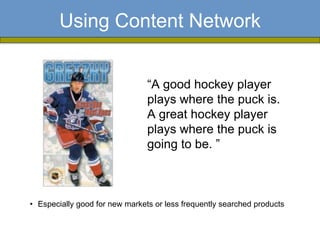
                                “A good hockey player
                                plays where the puck is.
                                A great hockey player
                                plays where the puck is
                                going to be. ”


• Especially good for new markets or less frequently searched products
Using Content Network

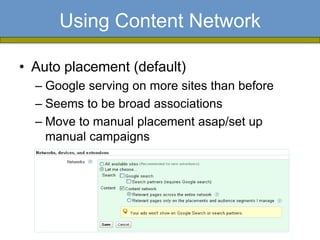
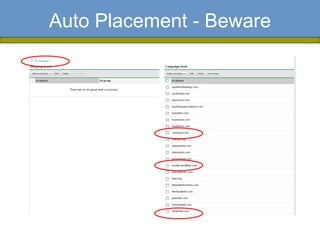
• Auto placement (default)
  – Google serving on more sites than before
  – Seems to be broad associations
  – Move to manual placement asap/set up
    manual campaigns
Auto Placement - Beware
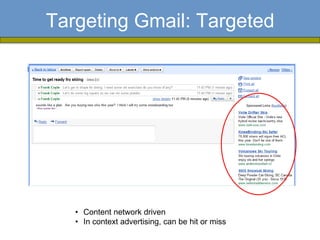
Targeting Gmail: Targeted


   • Content network driven
   • In context advertising, can be hit or miss
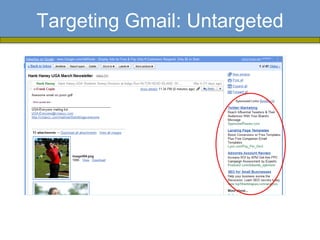
Targeting Gmail: Untargeted
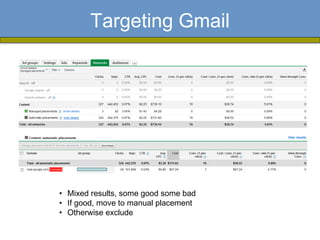
Targeting Gmail


• Mixed results, some good some bad
• If good, move to manual placement
• Otherwise exclude
International Accounts Best Practices


         • Drive traffic to local websites when possible
           Users like to feel “at home” throughout the search
           experience


         • Build ad campaigns in local language
            Ensures reaching the largest population in each country

         • Augment with English
            Pick up extra traffic by targeting English-speakers

         • Leverage MCC for better management
            For teams managing multiple country accounts,
            convenient access and dashboard view into all accounts
            with one login
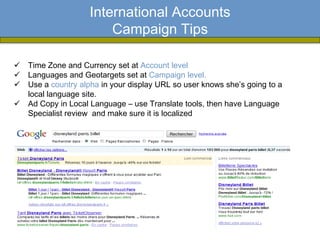
International Accounts
                        Campaign Tips

 Time Zone and Currency set at Account level
 Languages and Geotargets set at Campaign level.
 Use a country alpha in your display URL so user knows she’s going to a
  local language site.
 Ad Copy in Local Language – use Translate tools, then have Language
  Specialist review and make sure it is localized
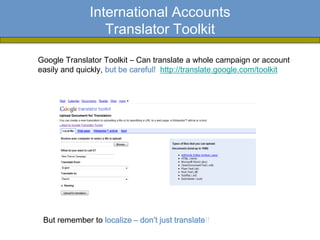
International Accounts
                 Translator Toolkit

Google Translator Toolkit – Can translate a whole campaign or account
easily and quickly, but be careful! http://translate.google.com/toolkit


 But remember to localize – don’t just translate!!
International Accounts
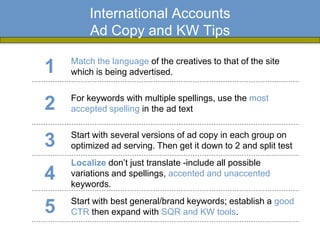
        Ad Copy and KW Tips

    Match the language of the creatives to that of the site
1   which is being advertised.

    For keywords with multiple spellings, use the most
2   accepted spelling in the ad text

    Start with several versions of ad copy in each group on
3   optimized ad serving. Then get it down to 2 and split test
    Localize don’t just translate -include all possible
4   variations and spellings, accented and unaccented
    keywords.
    Start with best general/brand keywords; establish a good
5   CTR then expand with SQR and KW tools.
Geo Targeted Campaign Case Study


• 20 locations * two product offerings per location
            = 40 business lines to track
• Geo target at the zipcode level
• Same set of keywords in each location
• Phase 1: target an overall CPA
• Phase 2: CPA/product/Geo
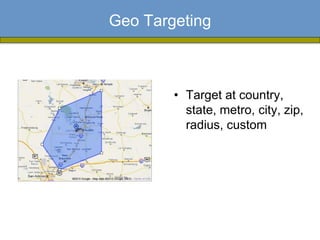
Geo Targeting


        • Target at country,
          state, metro, city, zip,
          radius, custom
Geo Targeting Findings

• Because traffic is low and slow,
  sometimes make decisions based on the
  aggregate (ad testing)
• Kws don’t perform the same in every geo
• Talk to your sales team and adjust spend
  – Telesales closing rate varies by Geo
• Separate landing pages for key geos
• Get very detailed on analysis
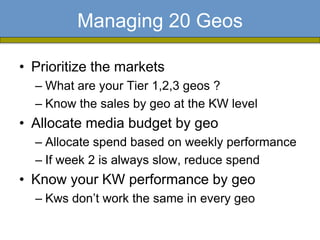
Managing 20 Geos

• Prioritize the markets
  – What are your Tier 1,2,3 geos ?
  – Know the sales by geo at the KW level
• Allocate media budget by geo
  – Allocate spend based on weekly performance
  – If week 2 is always slow, reduce spend
• Know your KW performance by geo
  – Kws don’t work the same in every geo
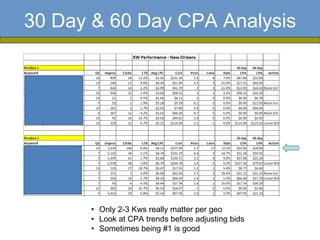
30 Day & 60 Day CPA Analysis


      • Only 2-3 Kws really matter per geo
      • Look at CPA trends before adjusting bids
      • Sometimes being #1 is good
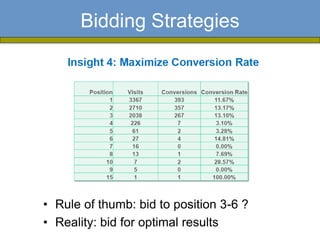
Bidding Strategies


• Rule of thumb: bid to position 3-6 ?
• Reality: bid for optimal results
Getting the Most from Your Engine Reps


1. MOST impt: Let your reps know your success metrics and objectives.
2. Take time to have a conversation with them every month about new features
3. Talk with them more frequently with account activities. Pick up the phone vs.
   email. Request optimization recommendations if something is not performing.
4. Poke around the UI once in awhile. You’ll see new things regularly often before
   they are formally “released.”
5. Be informed, willing to learn, and ask questions. Read blogs, social networking,
   Inside Adwords.

If you don’t have an Adwords rep, reach out to adwords-support@google.com

 Being Advanced about PPC is:
      being knowledgeable about new and dynamic features
     smart about your account to know when/when not to test them
     nimble enough to try them early.
Q&A

lisas@pointit.com

frankc@pointit.com

Advanced PPC Techniques

  • 1.
    Advanced PPC Frank Coyle – President Lisa Sanner – Senior Client Manager Mar 18, 2010
  • 2.
    Webinar Logistics • Beingrecorded • Email with link will be sent out later this week • Ask questions throughout
  • 3.
    About Point It Presentation Agenda • Launched in April 2002 • Seattle’s largest independent search marketing firm • PPC & SEO • $50 MM in managed media • 12 team members, 40+ yrs of SEM experience • Servicing clients across all verticals and revenue models
  • 4.
    Agenda • New Google Ad Formats • Content network • International PPC • Geo targeting PPC • Working with the Engine Reps • Q&A
  • 5.
    New Ad Formats Key Points/Findings • What these ad formats are and how they differ • Getting the user closer to what they want – think about conversion metrics • Eligibility requirements and limitations • Early results • Samples
  • 6.
    New Ad Formats • Google Sitelinks • Yahoo Rich Ads in Search • Google Product Extensions • Google Product Listings It’s like gaining shelf space and merchandising your brand products in a grocery store.
  • 7.
    What are Sitelinks? AdSitelinks is a new feature of AdWords that allows you to attract more users and move them further down the purchase funnel by providing additional links to content deeper within your sites. Example: Ad Sitelinks format
  • 8.
    Sitelinks Tips » Onlyshow on your very *BEST* keywords. (QS>8, T1-3 positions) - Branded terms or your core KWs » Run a KW report to see where your ads are likely to show. » Be concise. Under 15 characters perform best. » Look at SERPS for these KWs. Consider your SEO listing and links.
  • 9.
    Tracking and Measurement Tag Your Links: Tagging your links lets you view the unique performance of each link in your ad. SiteLink Description SiteLinkURL Link 1: Top 10 Gift Ideas http://www.example.com/gifts?sitelink=1 Link 2: Gift ideas for kinds http://www.example.com/gifts?sitelink=2 Link 3: Gift ideas for parents http://www.example.com/gifts?sitelink=3 Link 4: Gift ideas for boys http://www.example.com/gifts?sitelink=4 By tagging your links, you can: • Test different destination URLs and compare performance • Test different link text to improve the CTR No reporting in AdWords Report Center. Edit only in AdWords UI campaign settings. Not in Editor.
  • 10.
    Choosing Sitelinks -Segmentation User Segmentation: Ad Sitelinks can help you segment your users before they ever reach your site. Example: Dell used Ad Sitelinks to segment home and business users and direct them to the most relevant pages for their needs.
  • 11.
    Choosing Sitelinks -Promos Seasonal/Limited Time Promotions: You can use Ad Sitelinks to alert users to timely offers when they search for your brand on Google.com. Example: Saks used Ad Sitelinks to advertise their ‘one day’ event to users who searched for their brand.
  • 12.
    Choosing Sitelinks -MVPs MVPs (Most Valuable Pages): Ad Sitelinks can let you direct traffic to the most popular or valuable pages on your site to increase the value of searches for your brand on Google.com. Example: QVC used Ad Sitelinks to easily direct users to the content they search for most often on their site.
  • 13.
    Choosing Sitelinks –Product Lines Product Lines: Ad Sitelinks can help you direct users to tailored landing pages based on the product category they are most interested in. Example: Priceline used Ad Sitelinks to direct users to content specific to each of their major product categories.
  • 14.
    Yahoo Rich Adsin Search » A lot like Google Sitelinks but with images/video. » Dominate the first 3 positions on a Yahoo SERP » Only in beta for select advertisers. » Must meet spend thresh hold on standard match brand terms. Yahoo approves keywords and builds.
  • 15.
    What are ProductExtensions? • Allows you to leverage your existing Google Merchant Center feed to promote your products with your text ads. • Users see information about your product, including image, price, and title • Advertisers are seeing up to 10% increase in CTR Your product ad appears under your text ad with a plusbox
  • 16.
    What are ProductListings? Product Listing Ads is a new feature of Google that allows you to leverage your existing Google Merchant Center feed to automatically promote your products on Google.com Product ads and Users see information CPA auction on images appears about your product, Merchant Center beside related including image, price, and search results title
  • 17.
    Product Extensions vs.Product Listings • Product Extensions: – Plusbox with images on your text ad – Adwords campaign Level settings – Still ppc, bid by keyword, cpc paid by keyword; some metric reporting – Advertisers can control the targeting for Product extensions and select offers are most relevant for a user's query. Can include keywords in feed. • Product Listing Ads: – Image Ads with price and Merchant name (Google may show multiple merchants) – This is an auction just like AdWords but in Merchant Center, not currently in AdWords at all. – Bid by CPA or $ amount and Google inserts the listings that are likely to be the most profitable. – Google automatically determines which products are most relevant to the user's query.
  • 18.
    Content Network • Whatit’s really good for • Tips/Techniques • Targeting Gmail
  • 19.
    Using Content Network “A good hockey player plays where the puck is. A great hockey player plays where the puck is going to be. ” • Especially good for new markets or less frequently searched products
  • 20.
    Using Content Network •Auto placement (default) – Google serving on more sites than before – Seems to be broad associations – Move to manual placement asap/set up manual campaigns
  • 21.
  • 22.
    Targeting Gmail: Targeted • Content network driven • In context advertising, can be hit or miss
  • 23.
  • 24.
    Targeting Gmail • Mixedresults, some good some bad • If good, move to manual placement • Otherwise exclude
  • 25.
    International Accounts BestPractices • Drive traffic to local websites when possible Users like to feel “at home” throughout the search experience • Build ad campaigns in local language Ensures reaching the largest population in each country • Augment with English Pick up extra traffic by targeting English-speakers • Leverage MCC for better management For teams managing multiple country accounts, convenient access and dashboard view into all accounts with one login
  • 26.
    International Accounts Campaign Tips  Time Zone and Currency set at Account level  Languages and Geotargets set at Campaign level.  Use a country alpha in your display URL so user knows she’s going to a local language site.  Ad Copy in Local Language – use Translate tools, then have Language Specialist review and make sure it is localized
  • 27.
    International Accounts Translator Toolkit Google Translator Toolkit – Can translate a whole campaign or account easily and quickly, but be careful! http://translate.google.com/toolkit But remember to localize – don’t just translate!!
  • 28.
    International Accounts Ad Copy and KW Tips Match the language of the creatives to that of the site 1 which is being advertised. For keywords with multiple spellings, use the most 2 accepted spelling in the ad text Start with several versions of ad copy in each group on 3 optimized ad serving. Then get it down to 2 and split test Localize don’t just translate -include all possible 4 variations and spellings, accented and unaccented keywords. Start with best general/brand keywords; establish a good 5 CTR then expand with SQR and KW tools.
  • 29.
    Geo Targeted CampaignCase Study • 20 locations * two product offerings per location = 40 business lines to track • Geo target at the zipcode level • Same set of keywords in each location • Phase 1: target an overall CPA • Phase 2: CPA/product/Geo
  • 30.
    Geo Targeting • Target at country, state, metro, city, zip, radius, custom
  • 31.
    Geo Targeting Findings •Because traffic is low and slow, sometimes make decisions based on the aggregate (ad testing) • Kws don’t perform the same in every geo • Talk to your sales team and adjust spend – Telesales closing rate varies by Geo • Separate landing pages for key geos • Get very detailed on analysis
  • 32.
    Managing 20 Geos •Prioritize the markets – What are your Tier 1,2,3 geos ? – Know the sales by geo at the KW level • Allocate media budget by geo – Allocate spend based on weekly performance – If week 2 is always slow, reduce spend • Know your KW performance by geo – Kws don’t work the same in every geo
  • 33.
    30 Day &60 Day CPA Analysis • Only 2-3 Kws really matter per geo • Look at CPA trends before adjusting bids • Sometimes being #1 is good
  • 34.
    Bidding Strategies • Ruleof thumb: bid to position 3-6 ? • Reality: bid for optimal results
  • 35.
    Getting the Mostfrom Your Engine Reps 1. MOST impt: Let your reps know your success metrics and objectives. 2. Take time to have a conversation with them every month about new features 3. Talk with them more frequently with account activities. Pick up the phone vs. email. Request optimization recommendations if something is not performing. 4. Poke around the UI once in awhile. You’ll see new things regularly often before they are formally “released.” 5. Be informed, willing to learn, and ask questions. Read blogs, social networking, Inside Adwords. If you don’t have an Adwords rep, reach out to adwords-support@google.com Being Advanced about PPC is:  being knowledgeable about new and dynamic features smart about your account to know when/when not to test them nimble enough to try them early.
  • 36.