Integrating Axure Into Your
Design Process
Presented by Fred Beecher
Lead User Experience Consultant

@fred_beecher


UX MARATHON 2011 | OCTOBER 28, 2011
What You’ll Learn Today…
     • Iterative design & prototyping in software development

     • How to configure Axure for integration into your process

     • How to reuse design components & maintain consistency

     • How to work with Axure efficiently & effectively

     • How to document your designs


@fred_beecher
Part 1: Iterative Design & Prototyping in Software
                   Development
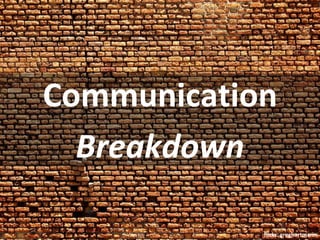
Communication
  Breakdown

            flickr: greghartmann
Success?

           flickr: greghartmann
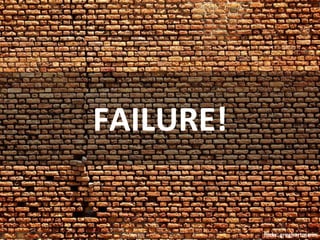
FAILURE!

           flickr: greghartmann
innovation


             flickr: greghartmann
STANDARD
SOLUTIONS

            flickr: greghartmann
Change hurts

               flickr: greghartmann
Rework. Ugh.

               flickr: greghartmann
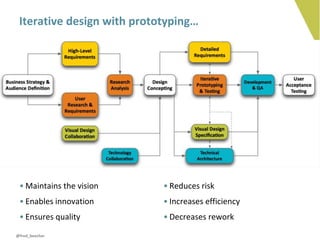
Iterative design with prototyping…


 • Maintains the vision     • Reduces risk
 • Enables innovation       • Increases efficiency
 • Ensures quality          • Decreases rework
@fred_beecher
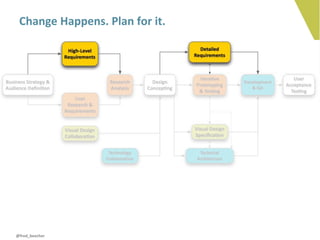
Change Happens. Plan for it.


@fred_beecher
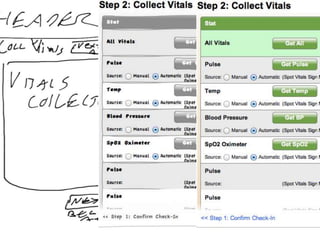
>
DESIGN ≠
DOCUMENTATION

           flickr: sonrisaelectrica
Part 2: Configuring Axure for Integration
COLLABORATE
Collaborating with…
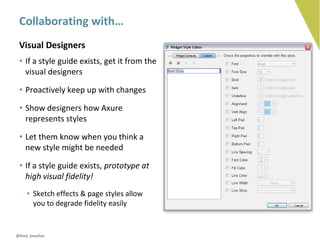
 Visual Designers
 • If a style guide exists, get it from the
   visual designers

 • Proactively keep up with changes

 • Show designers how Axure
   represents styles

 • Let them know when you think a
   new style might be needed

 • If a style guide exists, prototype at
   high visual fidelity!
    • Sketch effects & page styles allow
      you to degrade fidelity easily


@fred_beecher
Collaborating with…
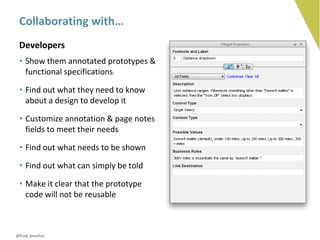
 Developers
 • Show them annotated prototypes &
   functional specifications

 • Find out what they need to know
   about a design to develop it

 • Customize annotation & page notes
   fields to meet their needs

 • Find out what needs to be shown

 • Find out what can simply be told

 • Make it clear that the prototype
   code will not be reusable


@fred_beecher
Collaborating with…
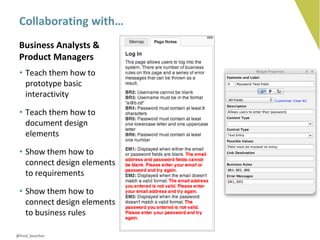
 Business Analysts &
 Product Managers
 • Teach them how to
   prototype basic
   interactivity

 • Teach them how to
   document design
   elements

 • Show them how to
   connect design elements
   to requirements

 • Show them how to
   connect design elements
   to business rules

@fred_beecher
Collaborating with…
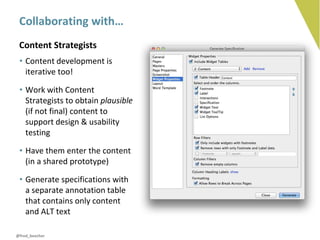
 Content Strategists
 • Content development is
   iterative too!

 • Work with Content
   Strategists to obtain plausible
   (if not final) content to
   support design & usability
   testing

 • Have them enter the content
   (in a shared prototype)

 • Generate specifications with
   a separate annotation table
   that contains only content
   and ALT text

@fred_beecher
Collaborating with…
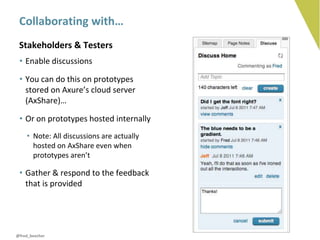
 Stakeholders & Testers
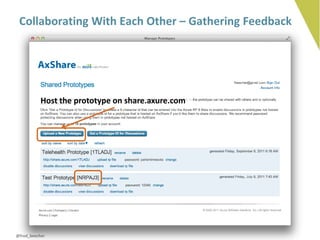
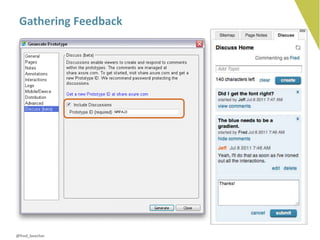
 • Enable discussions

 • You can do this on prototypes
   stored on Axure’s cloud server
   (AxShare)…

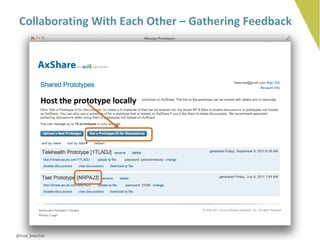
 • Or on prototypes hosted internally
    • Note: All discussions are actually
      hosted on AxShare even when
      prototypes aren’t

 • Gather & respond to the feedback
   that is provided


@fred_beecher
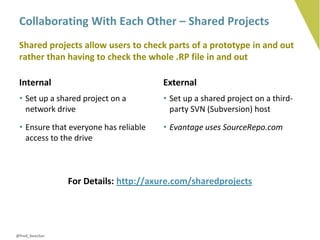
Collaborating With Each Other – Shared Projects
 Shared projects allow users to check parts of a prototype in and out
 rather than having to check the whole .RP file in and out

 Internal                              External
 • Set up a shared project on a        • Set up a shared project on a third-
   network drive                         party SVN (Subversion) host

 • Ensure that everyone has reliable   • Evantage uses SourceRepo.com
   access to the drive


                For Details: http://axure.com/sharedprojects


@fred_beecher
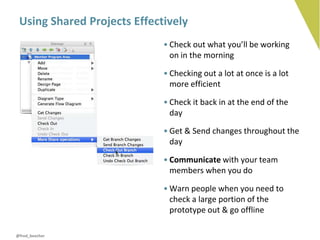
Using Shared Projects Effectively
                             • Check out what you’ll be working
                               on in the morning

                             • Checking out a lot at once is a lot
                               more efficient

                             • Check it back in at the end of the
                               day

                             • Get & Send changes throughout the
                               day

                             • Communicate with your team
                               members when you do

                             • Warn people when you need to
                               check a large portion of the
                               prototype out & go offline

@fred_beecher
Collaborating With Each Other – Gathering Feedback


           Host the prototype on share.axure.com


@fred_beecher
Collaborating With Each Other – Gathering Feedback


           Host the prototype locally


@fred_beecher
Gathering Feedback


@fred_beecher
Part 3: Reuse & Consistency
Keeping it Consistent
 Masters
 • Best for reuse & consistency within a single prototype


 Custom Widget Libraries
 • Best for reuse & consistency across multiple prototypes


 Template .RP Files
 • Best for reuse & consistency across an entire organization


@fred_beecher
Different Types of Masters
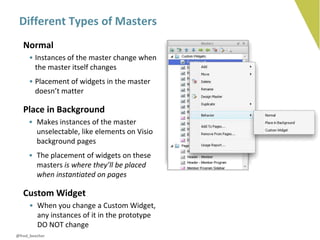
   Normal
     • Instances of the master change when
       the master itself changes
     • Placement of widgets in the master
       doesn’t matter

   Place in Background
     • Makes instances of the master
       unselectable, like elements on Visio
       background pages
     • The placement of widgets on these
       masters is where they’ll be placed
       when instantiated on pages

   Custom Widget
     • When you change a Custom Widget,
       any instances of it in the prototype
       DO NOT change
@fred_beecher
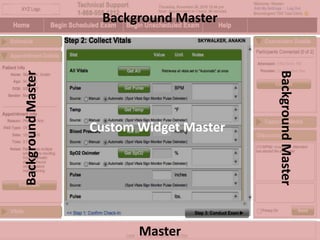
Background Master


                                           Background Master
Background Master


                    Custom Widget Master


                           Master
Custom Widget Libraries
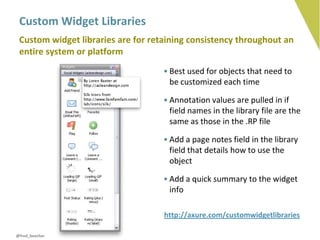
 Custom widget libraries are for retaining consistency throughout an
 entire system or platform
                                    • Best used for objects that need to
                                      be customized each time

                                    • Annotation values are pulled in if
                                      field names in the library file are the
                                      same as those in the .RP file

                                    • Add a page notes field in the library
                                      field that details how to use the
                                      object

                                    • Add a quick summary to the widget
                                      info

                                    http://axure.com/customwidgetlibraries

@fred_beecher
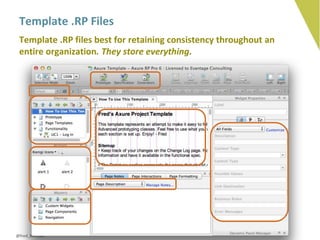
Template .RP Files
 Template .RP files best for retaining consistency throughout an
 entire organization. They store everything.


@fred_beecher
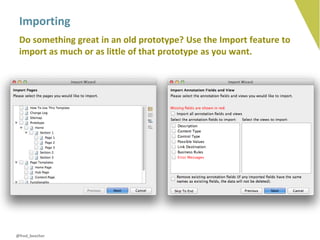
Importing
 Do something great in an old prototype? Use the Import feature to
 import as much or as little of that prototype as you want.


@fred_beecher
Part 4: Doing the Work
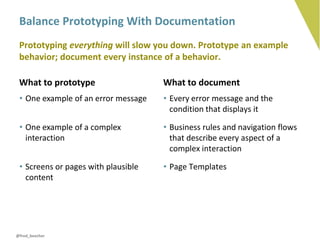
Balance Prototyping With Documentation
 Prototyping everything will slow you down. Prototype an example
 behavior; document every instance of a behavior.

 What to prototype                   What to document
 • One example of an error message   • Every error message and the
                                       condition that displays it

 • One example of a complex          • Business rules and navigation flows
   interaction                         that describe every aspect of a
                                       complex interaction

 • Screens or pages with plausible   • Page Templates
   content


@fred_beecher
Dividing the Work
 If you’re integrating Axure into a process in which you collaborate
 with other UX designers, assigning roles helps things go smoothly

 • Give the responsibility for maintaining custom widget libraries to one person

 • One person should also be ultimately responsible for the prototype overall

 • Divide the design work by page section, use case, or feature

 • Overcommunicate!


@fred_beecher
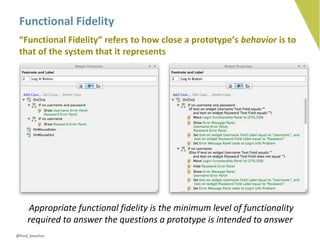
Functional Fidelity
 “Functional Fidelity” refers to how close a prototype’s behavior is to
 that of the system that it represents


     Appropriate functional fidelity is the minimum level of functionality
     required to answer the questions a prototype is intended to answer
@fred_beecher
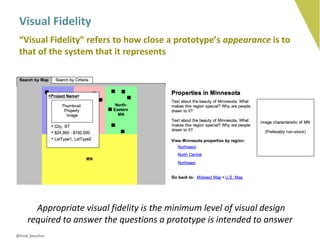
Visual Fidelity
 “Visual Fidelity” refers to how close a prototype’s appearance is to
 that of the system that it represents


       Appropriate visual fidelity is the minimum level of visual design
     required to answer the questions a prototype is intended to answer
@fred_beecher
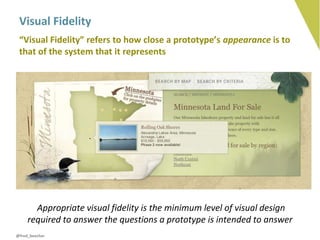
Visual Fidelity
 “Visual Fidelity” refers to how close a prototype’s appearance is to
 that of the system that it represents


       Appropriate visual fidelity is the minimum level of visual design
     required to answer the questions a prototype is intended to answer
@fred_beecher
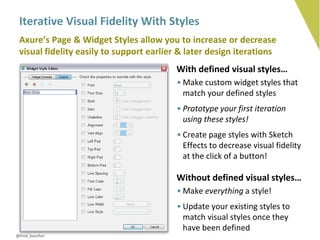
Iterative Visual Fidelity With Styles
 Axure’s Page & Widget Styles allow you to increase or decrease
 visual fidelity easily to support earlier & later design iterations
                                         With defined visual styles…
                                          • Make custom widget styles that
                                            match your defined styles
                                          • Prototype your first iteration
                                            using these styles!
                                          • Create page styles with Sketch
                                            Effects to decrease visual fidelity
                                            at the click of a button!

                                         Without defined visual styles…
                                          • Make everything a style!
                                          • Update your existing styles to
                                            match visual styles once they
                                            have been defined
@fred_beecher
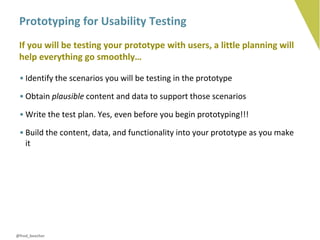
Prototyping for Usability Testing
 If you will be testing your prototype with users, a little planning will
 help everything go smoothly…

 • Identify the scenarios you will be testing in the prototype

 • Obtain plausible content and data to support those scenarios

 • Write the test plan. Yes, even before you begin prototyping!!!

 • Build the content, data, and functionality into your prototype as you make
   it


@fred_beecher
Part 5: Documentation
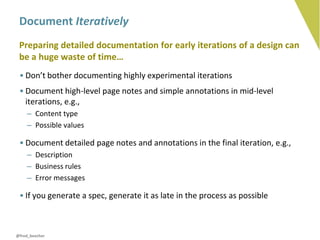
Document Iteratively
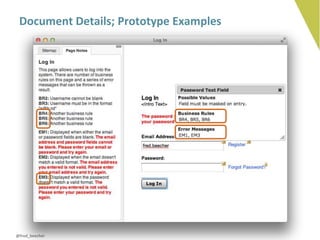
 Preparing detailed documentation for early iterations of a design can
 be a huge waste of time…
 • Don’t bother documenting highly experimental iterations
 • Document high-level page notes and simple annotations in mid-level
   iterations, e.g.,
    – Content type
    – Possible values

 • Document detailed page notes and annotations in the final iteration, e.g.,
    – Description
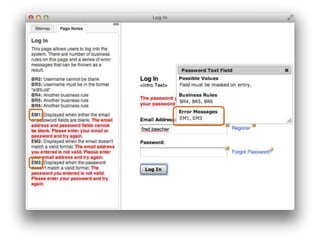
    – Business rules
    – Error messages

 • If you generate a spec, generate it as late in the process as possible


@fred_beecher
Document Details; Prototype Examples


@fred_beecher
Generating a Functional Specification
 Axure’s specification generator is so flexible that it can handle pretty
 much any horrifying documentation template you can throw at it…
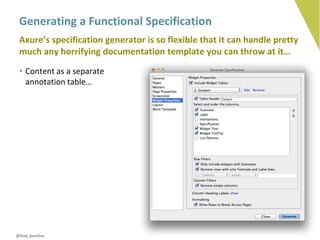
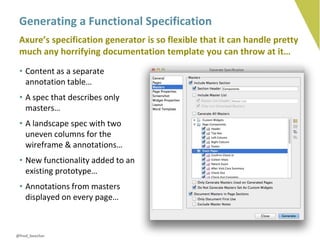
 • Content as a separate
   annotation table…


@fred_beecher
Generating a Functional Specification
 Axure’s specification generator is so flexible that it can handle pretty
 much any horrifying documentation template you can throw at it…
 • Content as a separate
   annotation table…
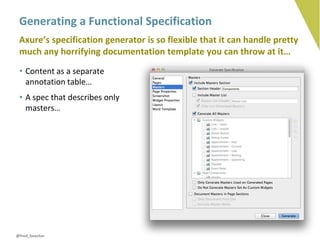
 • A spec that describes only
   masters…


@fred_beecher
Generating a Functional Specification
 Axure’s specification generator is so flexible that it can handle pretty
 much any horrifying documentation template you can throw at it…
 • Content as a separate
   annotation table…
 • A spec that describes only
   masters…
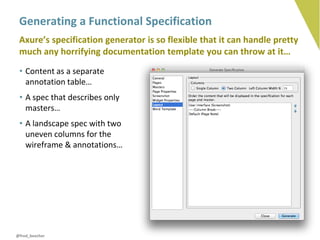
 • A landscape spec with two
   uneven columns for the
   wireframe & annotations…


@fred_beecher
Generating a Functional Specification
 Axure’s specification generator is so flexible that it can handle pretty
 much any horrifying documentation template you can throw at it…
 • Content as a separate
   annotation table…
 • A spec that describes only
   masters…
 • A landscape spec with two
   uneven columns for the
   wireframe & annotations…
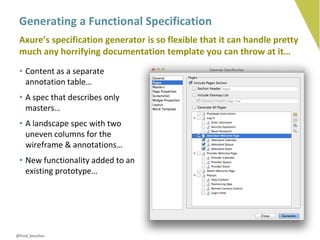
 • New functionality added to an
   existing prototype…


@fred_beecher
Generating a Functional Specification
 Axure’s specification generator is so flexible that it can handle pretty
 much any horrifying documentation template you can throw at it…
 • Content as a separate
   annotation table…
 • A spec that describes only
   masters…
 • A landscape spec with two
   uneven columns for the
   wireframe & annotations…
 • New functionality added to an
   existing prototype…
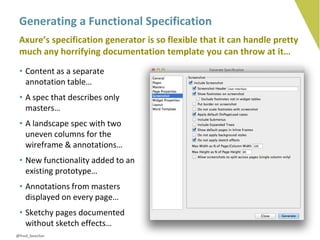
 • Annotations from masters
   displayed on every page…


@fred_beecher
Generating a Functional Specification
 Axure’s specification generator is so flexible that it can handle pretty
 much any horrifying documentation template you can throw at it…
 • Content as a separate
   annotation table…
 • A spec that describes only
   masters…
 • A landscape spec with two
   uneven columns for the
   wireframe & annotations…
 • New functionality added to an
   existing prototype…
 • Annotations from masters
   displayed on every page…
 • Sketchy pages documented
   without sketch effects…
@fred_beecher
Finalizing a Functional Specification
 A printed functional spec requires 2-4 hours of cleanup time,
 depending on the size of the prototype
 • Generate the spec at the last possible moment!
 • When changes are requested to the final design (!!!), save the cleaned-up
   spec to a new filename
 • Generate the changes to the old filename
 • Copy & paste the changes from the new spec into the cleaned-up version


        My personal opinion? Functional specifications are a hack.
      Annotated prototypes require less work and communicate more
                              effectively.


@fred_beecher
Summary
 We talked about…
 • Iterative design with prototyping
 • Collaborating effectively with multiple roles
 • Gathering feedback from others
 • Efficiency & consistency through reuse
 • Prototyping examples & documenting details
 • Appropriate visual & functional fidelity
 • Flexible & efficient documentation


@fred_beecher
Thanks!!!!


fbeecher@evantageconsulting.com | @fred_beecher


               ©2011 Evantage Consulting

Integrating Axure Into Your Design Process

  • 1.
    Integrating Axure IntoYour Design Process Presented by Fred Beecher Lead User Experience Consultant @fred_beecher UX MARATHON 2011 | OCTOBER 28, 2011
  • 2.
    What You’ll LearnToday… • Iterative design & prototyping in software development • How to configure Axure for integration into your process • How to reuse design components & maintain consistency • How to work with Axure efficiently & effectively • How to document your designs @fred_beecher
  • 3.
    Part 1: IterativeDesign & Prototyping in Software Development
  • 4.
    Communication Breakdown flickr: greghartmann
  • 5.
    Success? flickr: greghartmann
  • 6.
    FAILURE! flickr: greghartmann
  • 7.
    innovation flickr: greghartmann
  • 8.
    STANDARD SOLUTIONS flickr: greghartmann
  • 9.
    Change hurts flickr: greghartmann
  • 10.
    Rework. Ugh. flickr: greghartmann
  • 11.
    Iterative design withprototyping… • Maintains the vision • Reduces risk • Enables innovation • Increases efficiency • Ensures quality • Decreases rework @fred_beecher
  • 12.
    Change Happens. Planfor it. @fred_beecher
  • 13.
  • 15.
    DESIGN ≠ DOCUMENTATION flickr: sonrisaelectrica
  • 16.
    Part 2: ConfiguringAxure for Integration
  • 17.
  • 18.
    Collaborating with… VisualDesigners • If a style guide exists, get it from the visual designers • Proactively keep up with changes • Show designers how Axure represents styles • Let them know when you think a new style might be needed • If a style guide exists, prototype at high visual fidelity! • Sketch effects & page styles allow you to degrade fidelity easily @fred_beecher
  • 19.
    Collaborating with… Developers • Show them annotated prototypes & functional specifications • Find out what they need to know about a design to develop it • Customize annotation & page notes fields to meet their needs • Find out what needs to be shown • Find out what can simply be told • Make it clear that the prototype code will not be reusable @fred_beecher
  • 20.
    Collaborating with… BusinessAnalysts & Product Managers • Teach them how to prototype basic interactivity • Teach them how to document design elements • Show them how to connect design elements to requirements • Show them how to connect design elements to business rules @fred_beecher
  • 21.
    Collaborating with… ContentStrategists • Content development is iterative too! • Work with Content Strategists to obtain plausible (if not final) content to support design & usability testing • Have them enter the content (in a shared prototype) • Generate specifications with a separate annotation table that contains only content and ALT text @fred_beecher
  • 22.
    Collaborating with… Stakeholders& Testers • Enable discussions • You can do this on prototypes stored on Axure’s cloud server (AxShare)… • Or on prototypes hosted internally • Note: All discussions are actually hosted on AxShare even when prototypes aren’t • Gather & respond to the feedback that is provided @fred_beecher
  • 23.
    Collaborating With EachOther – Shared Projects Shared projects allow users to check parts of a prototype in and out rather than having to check the whole .RP file in and out Internal External • Set up a shared project on a • Set up a shared project on a third- network drive party SVN (Subversion) host • Ensure that everyone has reliable • Evantage uses SourceRepo.com access to the drive For Details: http://axure.com/sharedprojects @fred_beecher
  • 24.
    Using Shared ProjectsEffectively • Check out what you’ll be working on in the morning • Checking out a lot at once is a lot more efficient • Check it back in at the end of the day • Get & Send changes throughout the day • Communicate with your team members when you do • Warn people when you need to check a large portion of the prototype out & go offline @fred_beecher
  • 25.
    Collaborating With EachOther – Gathering Feedback Host the prototype on share.axure.com @fred_beecher
  • 26.
    Collaborating With EachOther – Gathering Feedback Host the prototype locally @fred_beecher
  • 27.
  • 28.
    Part 3: Reuse& Consistency
  • 29.
    Keeping it Consistent Masters • Best for reuse & consistency within a single prototype Custom Widget Libraries • Best for reuse & consistency across multiple prototypes Template .RP Files • Best for reuse & consistency across an entire organization @fred_beecher
  • 30.
    Different Types ofMasters Normal • Instances of the master change when the master itself changes • Placement of widgets in the master doesn’t matter Place in Background • Makes instances of the master unselectable, like elements on Visio background pages • The placement of widgets on these masters is where they’ll be placed when instantiated on pages Custom Widget • When you change a Custom Widget, any instances of it in the prototype DO NOT change @fred_beecher
  • 31.
    Background Master Background Master Background Master Custom Widget Master Master
  • 32.
    Custom Widget Libraries Custom widget libraries are for retaining consistency throughout an entire system or platform • Best used for objects that need to be customized each time • Annotation values are pulled in if field names in the library file are the same as those in the .RP file • Add a page notes field in the library field that details how to use the object • Add a quick summary to the widget info http://axure.com/customwidgetlibraries @fred_beecher
  • 33.
    Template .RP Files Template .RP files best for retaining consistency throughout an entire organization. They store everything. @fred_beecher
  • 34.
    Importing Do somethinggreat in an old prototype? Use the Import feature to import as much or as little of that prototype as you want. @fred_beecher
  • 35.
    Part 4: Doingthe Work
  • 36.
    Balance Prototyping WithDocumentation Prototyping everything will slow you down. Prototype an example behavior; document every instance of a behavior. What to prototype What to document • One example of an error message • Every error message and the condition that displays it • One example of a complex • Business rules and navigation flows interaction that describe every aspect of a complex interaction • Screens or pages with plausible • Page Templates content @fred_beecher
  • 38.
    Dividing the Work If you’re integrating Axure into a process in which you collaborate with other UX designers, assigning roles helps things go smoothly • Give the responsibility for maintaining custom widget libraries to one person • One person should also be ultimately responsible for the prototype overall • Divide the design work by page section, use case, or feature • Overcommunicate! @fred_beecher
  • 41.
    Functional Fidelity “FunctionalFidelity” refers to how close a prototype’s behavior is to that of the system that it represents Appropriate functional fidelity is the minimum level of functionality required to answer the questions a prototype is intended to answer @fred_beecher
  • 42.
    Visual Fidelity “VisualFidelity” refers to how close a prototype’s appearance is to that of the system that it represents Appropriate visual fidelity is the minimum level of visual design required to answer the questions a prototype is intended to answer @fred_beecher
  • 43.
    Visual Fidelity “VisualFidelity” refers to how close a prototype’s appearance is to that of the system that it represents Appropriate visual fidelity is the minimum level of visual design required to answer the questions a prototype is intended to answer @fred_beecher
  • 44.
    Iterative Visual FidelityWith Styles Axure’s Page & Widget Styles allow you to increase or decrease visual fidelity easily to support earlier & later design iterations With defined visual styles… • Make custom widget styles that match your defined styles • Prototype your first iteration using these styles! • Create page styles with Sketch Effects to decrease visual fidelity at the click of a button! Without defined visual styles… • Make everything a style! • Update your existing styles to match visual styles once they have been defined @fred_beecher
  • 45.
    Prototyping for UsabilityTesting If you will be testing your prototype with users, a little planning will help everything go smoothly… • Identify the scenarios you will be testing in the prototype • Obtain plausible content and data to support those scenarios • Write the test plan. Yes, even before you begin prototyping!!! • Build the content, data, and functionality into your prototype as you make it @fred_beecher
  • 46.
  • 47.
    Document Iteratively Preparingdetailed documentation for early iterations of a design can be a huge waste of time… • Don’t bother documenting highly experimental iterations • Document high-level page notes and simple annotations in mid-level iterations, e.g., – Content type – Possible values • Document detailed page notes and annotations in the final iteration, e.g., – Description – Business rules – Error messages • If you generate a spec, generate it as late in the process as possible @fred_beecher
  • 48.
    Document Details; PrototypeExamples @fred_beecher
  • 49.
    Generating a FunctionalSpecification Axure’s specification generator is so flexible that it can handle pretty much any horrifying documentation template you can throw at it… • Content as a separate annotation table… @fred_beecher
  • 50.
    Generating a FunctionalSpecification Axure’s specification generator is so flexible that it can handle pretty much any horrifying documentation template you can throw at it… • Content as a separate annotation table… • A spec that describes only masters… @fred_beecher
  • 51.
    Generating a FunctionalSpecification Axure’s specification generator is so flexible that it can handle pretty much any horrifying documentation template you can throw at it… • Content as a separate annotation table… • A spec that describes only masters… • A landscape spec with two uneven columns for the wireframe & annotations… @fred_beecher
  • 52.
    Generating a FunctionalSpecification Axure’s specification generator is so flexible that it can handle pretty much any horrifying documentation template you can throw at it… • Content as a separate annotation table… • A spec that describes only masters… • A landscape spec with two uneven columns for the wireframe & annotations… • New functionality added to an existing prototype… @fred_beecher
  • 53.
    Generating a FunctionalSpecification Axure’s specification generator is so flexible that it can handle pretty much any horrifying documentation template you can throw at it… • Content as a separate annotation table… • A spec that describes only masters… • A landscape spec with two uneven columns for the wireframe & annotations… • New functionality added to an existing prototype… • Annotations from masters displayed on every page… @fred_beecher
  • 54.
    Generating a FunctionalSpecification Axure’s specification generator is so flexible that it can handle pretty much any horrifying documentation template you can throw at it… • Content as a separate annotation table… • A spec that describes only masters… • A landscape spec with two uneven columns for the wireframe & annotations… • New functionality added to an existing prototype… • Annotations from masters displayed on every page… • Sketchy pages documented without sketch effects… @fred_beecher
  • 55.
    Finalizing a FunctionalSpecification A printed functional spec requires 2-4 hours of cleanup time, depending on the size of the prototype • Generate the spec at the last possible moment! • When changes are requested to the final design (!!!), save the cleaned-up spec to a new filename • Generate the changes to the old filename • Copy & paste the changes from the new spec into the cleaned-up version My personal opinion? Functional specifications are a hack. Annotated prototypes require less work and communicate more effectively. @fred_beecher
  • 56.
    Summary We talkedabout… • Iterative design with prototyping • Collaborating effectively with multiple roles • Gathering feedback from others • Efficiency & consistency through reuse • Prototyping examples & documenting details • Appropriate visual & functional fidelity • Flexible & efficient documentation @fred_beecher
  • 57.

Editor's Notes

  • #5 Communication breaks down between the stepsMarketplace success is unknownFailure is a big riskDiscourages innovationEncourages standard solutionsDoes not accommodate changeChange introduces rework
  • #6 Communication breaks down between the stepsMarketplace success is unknownFailure is a big riskDiscourages innovationEncourages standard solutionsDoes not accommodate changeChange introduces rework
  • #7 Communication breaks down between the stepsMarketplace success is unknownFailure is a big riskDiscourages innovationEncourages standard solutionsDoes not accommodate changeChange introduces rework
  • #8 Communication breaks down between the stepsMarketplace success is unknownFailure is a big riskDiscourages innovationEncourages standard solutionsDoes not accommodate changeChange introduces rework
  • #9 Communication breaks down between the stepsMarketplace success is unknownFailure is a big riskDiscourages innovationEncourages standard solutionsDoes not accommodate changeChange introduces rework
  • #10 Communication breaks down between the stepsMarketplace success is unknownFailure is a big riskDiscourages innovationEncourages standard solutionsDoes not accommodate changeChange introduces rework
  • #11 Communication breaks down between the stepsMarketplace success is unknownFailure is a big riskDiscourages innovationEncourages standard solutionsDoes not accommodate changeChange introduces rework
  • #12 Tools like Axure make this possibleIntegrating Axure effectively means integrating iterative designUsing Axure in a Waterfall environment helps solve communication issues but doesn’t address the others
  • #13 New requirements will be added, some will be deleted, others will changeExploring the problem space throughout the course of a project expands the scope of your knowledge and evolve the nature of the projectInteracting with different designs as you prototype them causes you to look at the problem in ways you hadn’t before, evolving your ideasHow you set up your Axure prototype affects your ability to accommodate change
  • #14 Design is the process of thinking through a situation and different ways to improve that situationAxure is not a thinking tool!It will help you evolve your thinking, once you’ve done some, but it’s not very good at allowing you to think in many different directions at once
  • #15 Do your non linear, chaotic, generative thinking outside of AxureOnce you begin prototyping, Axure will help you evolve your thinking by allowing you to interact with your design and presenting you with multiple ways to represent it
  • #16 Within iterative design, design is a thought processDocumentation should occur only after you have iterated through a design and tested it enough times that its success has been demonstratedWorking with a tool like Axure involves show and tell, deciding what to show (prototype) and what to tell (document)So you should be thinking about how & what to document, & maybe documenting a little for your own reference as you go alongBut the focus should not be on documentation until the design has been proven successful
  • #18 A tool like Axure is going to affect how you collaborate with your colleagesThe first step in configuring it for collaboration is working with those colleagues to define new ways of working with them
  • #19 Axure is not a visual design tool...But it’s easy to implement an existing visual design within it
  • #20 Axure is capable of a lot of interactivity and a lot of detail in the documentationEffective integration balances the two
  • #21 Axure is not a requirements management tool...But you can use it to connect design elements with requirementsThey can use it too!
  • #24 Sometimes hosts are tricky.Paste in URLs rather than file pathsYou must tack on the name of the project after the full URL
  • #25 IM, Group Chat, whatever worksChecking in/out takes a lot of time You don’t want to do it more than you have to
  • #37 It’s real easy to go down the prototyping rabbit holeAnd real easy to go down the documentation rabbit hole tooPlanning helps prevent these “detail detours.”
  • #39 ONE PERSON Responsible for masters, annotation fields, styles (page & widget), page templates, etc.Divvy it up by use case, page template, or taskRefer back to shared projects discussionOveruse IM/Campfire/EtcSharing projects is no excuse to not communicate with other human beings
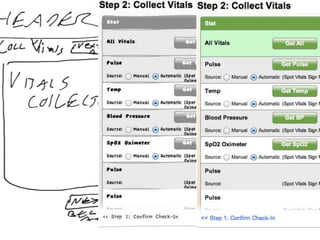
  • #41 Each level of fidelity answers a certain set of questions...Sketch: Do we have the right features?Lo-fi: Do the features work right?Hi-Fi: Does the design communicate how it works?
  • #48 Don’t bother documenting experimental iterationsDocument lightweight page by page in more final iterations
  • #49 Error messagesBusiness rulesRequirements traceability
  • #56 If you generate a spec, generate it as late in the process as possibleClean it up, save it as a different file nameGenerate changes to the original filename and copy & paste them into the cleaned up versionGenerate a documented version of the prototype to a different folder than the normal one