Remote laboratories  for teaching and learning Enriching Student Learning Experience through International Collaboration in Remote Laboratories   Meeting at Adelaide :: January of 2009 :: This presentation is available at  http://www.slideshare.net/josemmf J. M. Martins Ferreira  [ jmf@fe.up.pt ] FEUP / DEEC Rua Dr. Roberto Frias 4200-465 Porto – PORTUGAL
Outline of this talk Scope and characterization Examples On-campus Outside The Labs-on-the-web project Pedagogical issues Conclusion
What they  are  and  what they  are not Remote labs may be seen as an extension of e-learning (but they use a wider technology spectrum) They are a  complement  – not a  replacement  – to real labs
Remote, virtual  and mixed-reality labs A remote lab enables access to real devices through a communication network A virtual lab deals with simulation models In a mixed-reality lab real devices interact with simulation models
Benefits… (pedagogical and other wise) Adapt easily to each individual’s pace of learning Safety and security Cost / benefit Institutional image and interaction with the outside world
Technical implementation issues Timing    Very short or very long experiments need an  off-line  mode, but most experiments enable  on-line  modes Observation-only  experiments do not require access management tools, but  observation-and-control  experiments call for reservation and coordinated sharing
Technical obstacles The wide variety of technologies used in their implementation is a problem (each case is a different case too often…) Network security policies and bandwidth represent additional obstacles
Institutional implications Teacher training (technical and pedagogical) Technicians for setup and maintenance Support services (computers and pedagogical contents) Access policies
The examples herein presented… Do not cover all types of remote labs existing at FEUP (which includes several departments) Were selected to illustrate two main types: On-campus labs Outside labs
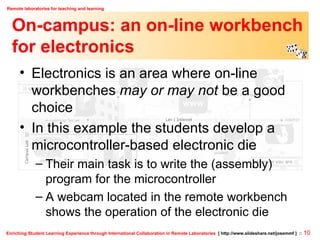
On-campus: an on-line workbench for electronics Electronics is an area where on-line workbenches  may or may not  be a good choice In this example the students develop a microcontroller-based electronic die Their main task is to write the (assembly) program for the microcontroller A webcam located in the remote workbench shows the operation of the electronic die
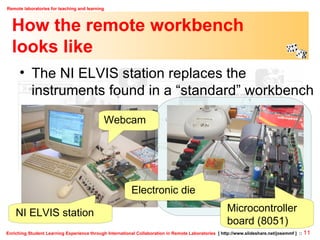
How the remote workbench  looks like The NI ELVIS station replaces the instruments found in a “standard” workbench NI ELVIS station Webcam Electronic die Microcontroller board (8051)
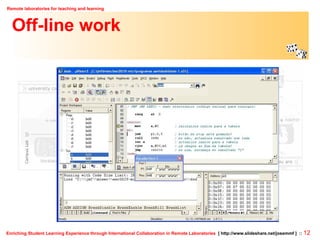
Off-line work
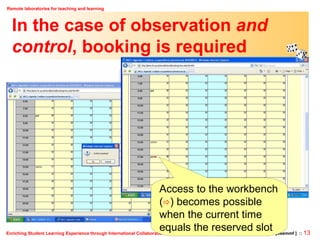
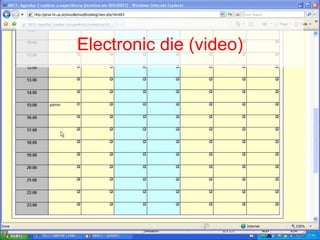
In the case of observation  and control , booking is required Access to the workbench (  ) becomes possible when the current time equals the reserved slot
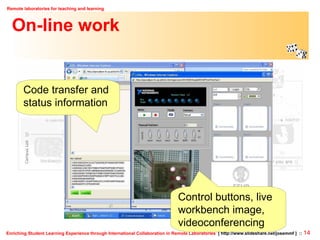
On-line work Control buttons, live workbench image, videoconferencing Code transfer and status information
Electronic die (video)
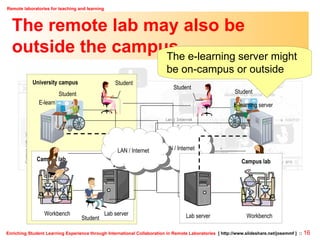
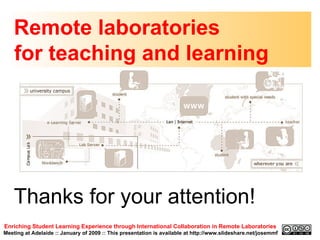
The remote lab may also be outside the campus… University campus E-learning server Student Teacher Student Campus lab Student LAN / Internet Lab server Workbench The e-learning server might be on-campus or outside E-learning server Student Teacher Student Campus lab Student LAN / Internet Lab server Workbench
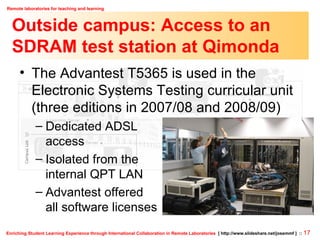
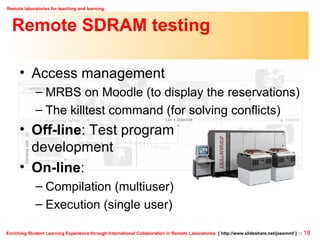
Outside campus: Access to an SDRAM test station at Qimonda The Advantest T5365 is used in the  Electronic Systems Testing curricular unit (three editions in 2007/08 and 2008/09) Dedicated ADSL  access Isolated from the internal QPT LAN Advantest offered all software licenses
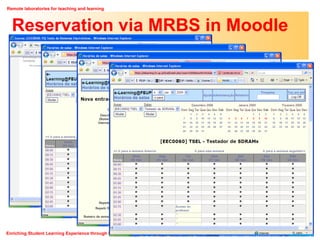
Remote SDRAM testing Access management MRBS on Moodle (to display the reservations) The killtest command (for solving conflicts) Off-line : Test program development On-line :  Compilation (multiuser) Execution (single user)
Reservation via MRBS in Moodle
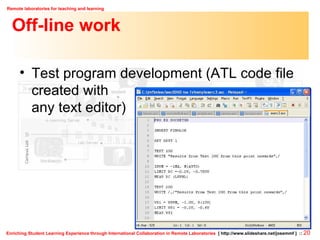
Off-line work Test program development (ATL code file created with  any text editor)
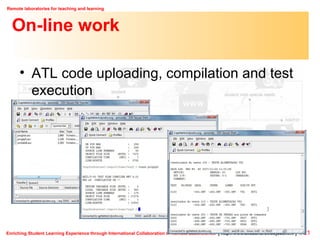
On-line work ATL code uploading, compilation and test execution
Further examples: The Labs-on-the-web project Web access to lab workbenches in engineering courses Implementation and pedagogical contents Evaluation of pedagogical effectiveness Teacher training A FEUP-FPCEUP partnership with a duration of 20 months (Nov’06 - Jun’08)
Labs-on-the-web:  Teacher training Training actions –  TA1 : Pedagogical principles;  TA2 : E-learning via Moodle;  TA3 : On-line workbenches 4 months in total, 5 on-site sessions for each training action (alternating TA1 and TA2), homework recommendations Teachers were allowed to build their own personal training plan
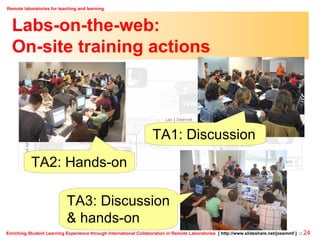
Labs-on-the-web:  On-site training actions TA1: Discussion TA3: Discussion & hands-on TA2: Hands-on
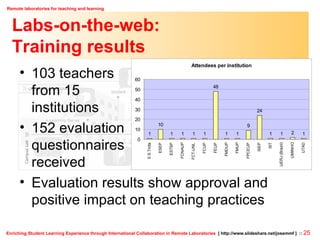
Labs-on-the-web: Training results 103 teachers  from 15  institutions 152 evaluation  questionnaires  received  Evaluation results show approval and  positive impact on teaching practices
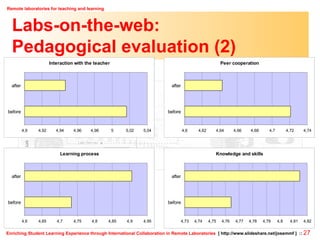
Labs-on-the-web: Pedagogical evaluation Evaluation dimensions : interaction with the teacher, peer cooperation, learning process, knowledge and skills Various curricular units and a number of respondents that ranged from 153 to 169 Evaluation questionnaires were proposed  before  and  after  the remote experiments, using a grading scale of 1 to 7
Labs-on-the-web: Pedagogical evaluation (2)
Labs-on-the-web:  DVD contents Management Dissemination Training Evaluation Technology
Pedagogical issues: Remote x virtual Do on-line workbenches (remote labs) have an added-value in relation to simulation (virtual labs)? [Quino]
Pedagogical issues: Acquisition of skills Are simulation / remote  experimentation able to meet all our training  needs? (acquisition of  haptic skills,  professional recognition, etc.) [Quino]
Pedagogical issues: Technical restrictions Technical restrictions may hamper the  pedagogical benefits… (by degrading the experiments, the interaction among,  the students, etc.) [Quino]
Pedagogical issues: Interaction with the teacher May the students find themselves abandoned to technology? [Quino]
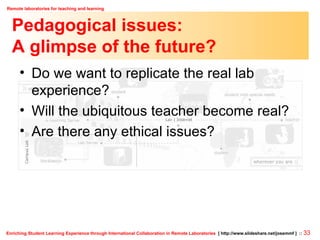
Pedagogical issues: A glimpse of the future? Do we want to replicate the real lab experience? Will the ubiquitous teacher become real? Are there any ethical issues?
Complementary activities at FEUP The benchmarking exercise on e-learning (ESMU / University of South Denmark) Quality assurance on teaching and learning at FEUP (in cooperation with the Psychology and Educational Sciences faculty)
Conclusion The availability of remote labs may indeed contribute to improve the effectiveness of teaching and learning Bad use is possible, but relatively easy to avoid (just as with e-learning in general…) There’s plenty of opportunities to innovate, both in technical and pedagogical terms
Remote laboratories  for teaching and learning Enriching Student Learning Experience through International Collaboration in Remote Laboratories   Meeting at Adelaide :: January of 2009 :: This presentation is available at http://www.slideshare.net/josemmf Thanks for your attention!

Adelaide Jan 2009

  • 1.
    Remote laboratories for teaching and learning Enriching Student Learning Experience through International Collaboration in Remote Laboratories Meeting at Adelaide :: January of 2009 :: This presentation is available at http://www.slideshare.net/josemmf J. M. Martins Ferreira [ jmf@fe.up.pt ] FEUP / DEEC Rua Dr. Roberto Frias 4200-465 Porto – PORTUGAL
  • 2.
    Outline of thistalk Scope and characterization Examples On-campus Outside The Labs-on-the-web project Pedagogical issues Conclusion
  • 3.
    What they are and what they are not Remote labs may be seen as an extension of e-learning (but they use a wider technology spectrum) They are a complement – not a replacement – to real labs
  • 4.
    Remote, virtual and mixed-reality labs A remote lab enables access to real devices through a communication network A virtual lab deals with simulation models In a mixed-reality lab real devices interact with simulation models
  • 5.
    Benefits… (pedagogical andother wise) Adapt easily to each individual’s pace of learning Safety and security Cost / benefit Institutional image and interaction with the outside world
  • 6.
    Technical implementation issuesTiming  Very short or very long experiments need an off-line mode, but most experiments enable on-line modes Observation-only experiments do not require access management tools, but observation-and-control experiments call for reservation and coordinated sharing
  • 7.
    Technical obstacles Thewide variety of technologies used in their implementation is a problem (each case is a different case too often…) Network security policies and bandwidth represent additional obstacles
  • 8.
    Institutional implications Teachertraining (technical and pedagogical) Technicians for setup and maintenance Support services (computers and pedagogical contents) Access policies
  • 9.
    The examples hereinpresented… Do not cover all types of remote labs existing at FEUP (which includes several departments) Were selected to illustrate two main types: On-campus labs Outside labs
  • 10.
    On-campus: an on-lineworkbench for electronics Electronics is an area where on-line workbenches may or may not be a good choice In this example the students develop a microcontroller-based electronic die Their main task is to write the (assembly) program for the microcontroller A webcam located in the remote workbench shows the operation of the electronic die
  • 11.
    How the remoteworkbench looks like The NI ELVIS station replaces the instruments found in a “standard” workbench NI ELVIS station Webcam Electronic die Microcontroller board (8051)
  • 12.
  • 13.
    In the caseof observation and control , booking is required Access to the workbench (  ) becomes possible when the current time equals the reserved slot
  • 14.
    On-line work Controlbuttons, live workbench image, videoconferencing Code transfer and status information
  • 15.
  • 16.
    The remote labmay also be outside the campus… University campus E-learning server Student Teacher Student Campus lab Student LAN / Internet Lab server Workbench The e-learning server might be on-campus or outside E-learning server Student Teacher Student Campus lab Student LAN / Internet Lab server Workbench
  • 17.
    Outside campus: Accessto an SDRAM test station at Qimonda The Advantest T5365 is used in the Electronic Systems Testing curricular unit (three editions in 2007/08 and 2008/09) Dedicated ADSL access Isolated from the internal QPT LAN Advantest offered all software licenses
  • 18.
    Remote SDRAM testingAccess management MRBS on Moodle (to display the reservations) The killtest command (for solving conflicts) Off-line : Test program development On-line : Compilation (multiuser) Execution (single user)
  • 19.
  • 20.
    Off-line work Testprogram development (ATL code file created with any text editor)
  • 21.
    On-line work ATLcode uploading, compilation and test execution
  • 22.
    Further examples: TheLabs-on-the-web project Web access to lab workbenches in engineering courses Implementation and pedagogical contents Evaluation of pedagogical effectiveness Teacher training A FEUP-FPCEUP partnership with a duration of 20 months (Nov’06 - Jun’08)
  • 23.
    Labs-on-the-web: Teachertraining Training actions – TA1 : Pedagogical principles; TA2 : E-learning via Moodle; TA3 : On-line workbenches 4 months in total, 5 on-site sessions for each training action (alternating TA1 and TA2), homework recommendations Teachers were allowed to build their own personal training plan
  • 24.
    Labs-on-the-web: On-sitetraining actions TA1: Discussion TA3: Discussion & hands-on TA2: Hands-on
  • 25.
    Labs-on-the-web: Training results103 teachers from 15 institutions 152 evaluation questionnaires received Evaluation results show approval and positive impact on teaching practices
  • 26.
    Labs-on-the-web: Pedagogical evaluationEvaluation dimensions : interaction with the teacher, peer cooperation, learning process, knowledge and skills Various curricular units and a number of respondents that ranged from 153 to 169 Evaluation questionnaires were proposed before and after the remote experiments, using a grading scale of 1 to 7
  • 27.
  • 28.
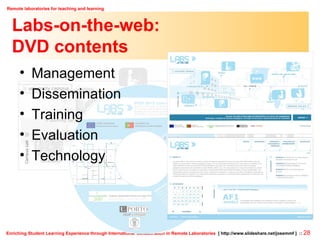
    Labs-on-the-web: DVDcontents Management Dissemination Training Evaluation Technology
  • 29.
    Pedagogical issues: Remotex virtual Do on-line workbenches (remote labs) have an added-value in relation to simulation (virtual labs)? [Quino]
  • 30.
    Pedagogical issues: Acquisitionof skills Are simulation / remote experimentation able to meet all our training needs? (acquisition of haptic skills, professional recognition, etc.) [Quino]
  • 31.
    Pedagogical issues: Technicalrestrictions Technical restrictions may hamper the pedagogical benefits… (by degrading the experiments, the interaction among, the students, etc.) [Quino]
  • 32.
    Pedagogical issues: Interactionwith the teacher May the students find themselves abandoned to technology? [Quino]
  • 33.
    Pedagogical issues: Aglimpse of the future? Do we want to replicate the real lab experience? Will the ubiquitous teacher become real? Are there any ethical issues?
  • 34.
    Complementary activities atFEUP The benchmarking exercise on e-learning (ESMU / University of South Denmark) Quality assurance on teaching and learning at FEUP (in cooperation with the Psychology and Educational Sciences faculty)
  • 35.
    Conclusion The availabilityof remote labs may indeed contribute to improve the effectiveness of teaching and learning Bad use is possible, but relatively easy to avoid (just as with e-learning in general…) There’s plenty of opportunities to innovate, both in technical and pedagogical terms
  • 36.
    Remote laboratories for teaching and learning Enriching Student Learning Experience through International Collaboration in Remote Laboratories Meeting at Adelaide :: January of 2009 :: This presentation is available at http://www.slideshare.net/josemmf Thanks for your attention!