Discovery Troubleshooting Understanding the Discovery Access Page
Outline Monitoring Discovery Current/Recent Runs Discovery Dashboard Credential/Slave usage feedback Troubleshooting Discovery Metadata page Specific Reports Additional Discovery Reference Material Appendix A Appendix B
Introduction Keeping Foundations access to your environment in tip top shape is important for the best quality data This module covers how to monitor Foundation’s Access and how to troubleshoot problems
Discovery Troubleshooting Understanding the Discovery Access Page
Understanding the Discovery Access view The Discovery Access view is the key page for troubleshooting discovery It provides a summary view of the Directly Discovered Data for this access Device Type Session Results Methods and Scripts used Script Failure Feedback
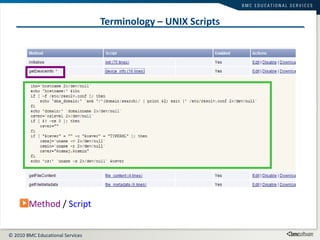
Terminology – UNIX Scripts Method  /  Script
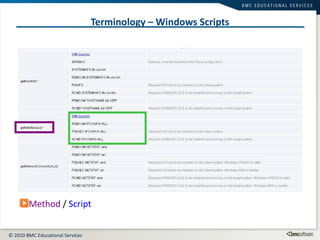
Terminology – Windows Scripts Method  /  Script
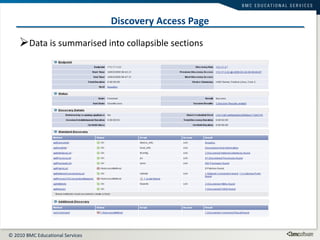
Discovery Access Page Data is summarised into collapsible sections
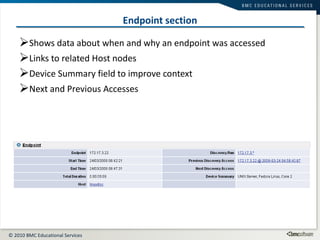
Endpoint section Shows data about when and why an endpoint was accessed Links to related Host nodes Device Summary field to improve context Next and Previous Accesses
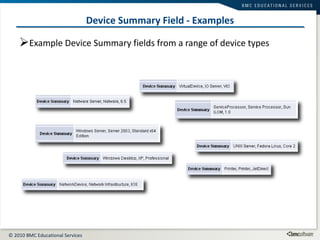
Device Summary Field - Examples Example Device Summary fields from a range of device types
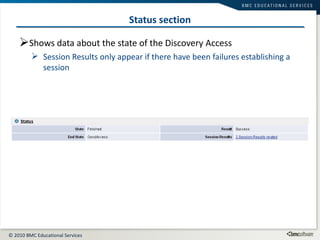
Status section Shows data about the state of the Discovery Access Session Results only appear if there have been failures establishing a session
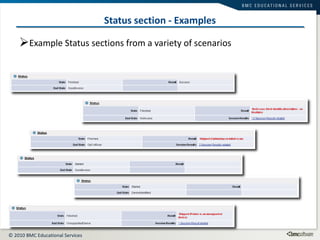
Status section - Examples Example Status sections from a variety of scenarios
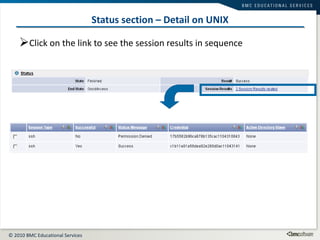
Status section – Detail on UNIX Click on the link to see the session results in sequence
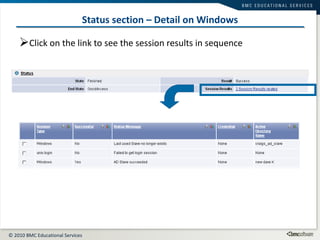
Status section – Detail on Windows Click on the link to see the session results in sequence
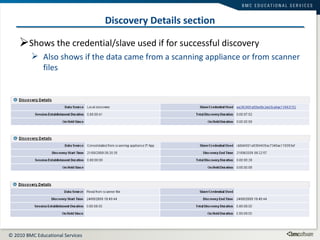
Discovery Details section Shows the credential/slave used if for successful discovery Also shows if the data came from a scanning appliance or from scanner files
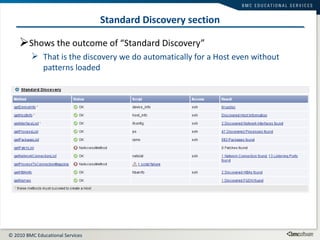
Standard Discovery section Shows the outcome of “Standard Discovery” That is the discovery we do automatically for a Host even without patterns loaded
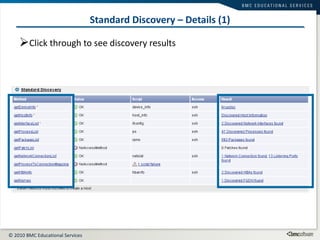
Standard Discovery – Details (1) Click through to see discovery results
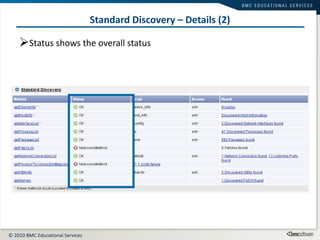
Standard Discovery – Details (2) Status shows the overall status
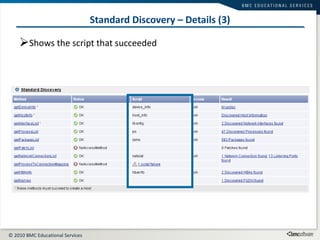
Standard Discovery – Details (3) Shows the script that succeeded
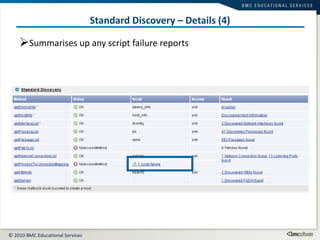
Standard Discovery – Details (4) Summarises up any script failure reports
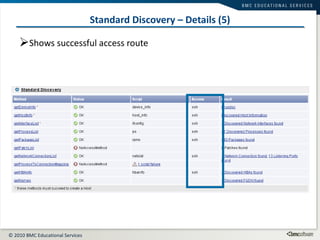
Standard Discovery – Details (5) Shows successful access route
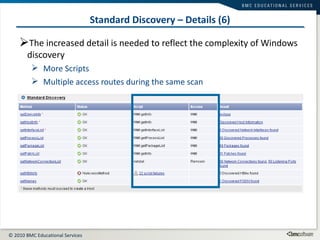
Standard Discovery – Details (6) The increased detail is needed to reflect the complexity of Windows discovery More Scripts Multiple access routes during the same scan
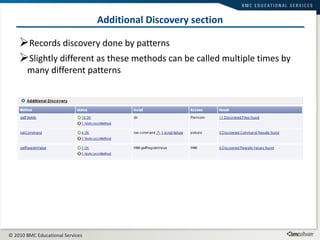
Additional Discovery section Records discovery done by patterns Slightly different as these methods can be called multiple times by many different patterns
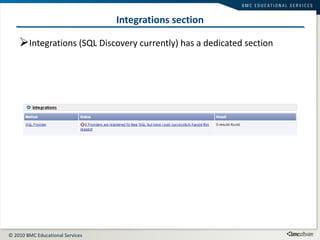
Integrations section Integrations (SQL Discovery currently) has a dedicated section
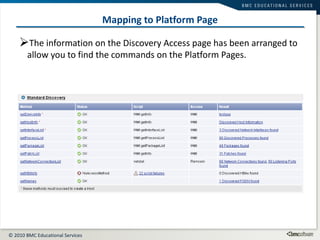
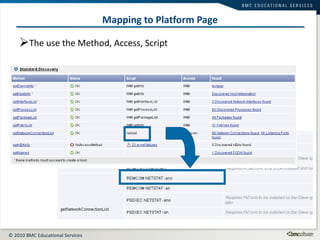
Mapping to Platform Page The information on the Discovery Access page has been arranged to allow you to find the commands on the Platform Pages.
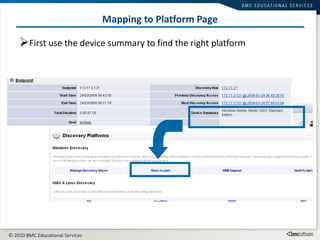
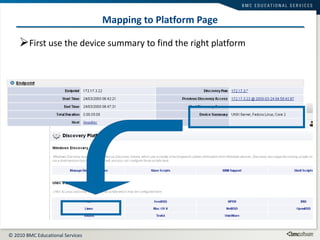
Mapping to Platform Page First use the device summary to find the right platform
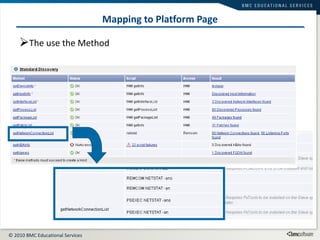
Mapping to Platform Page The use the Method
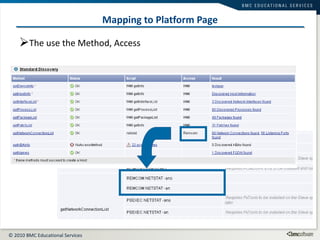
Mapping to Platform Page The use the Method, Access
Mapping to Platform Page The use the Method, Access, Script
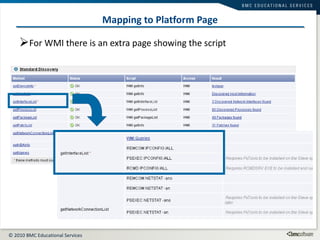
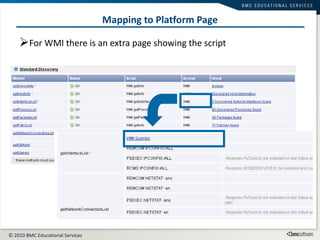
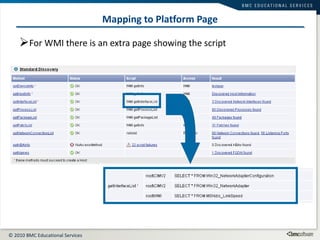
Mapping to Platform Page For WMI there is an extra page showing the script
Mapping to Platform Page First use the device summary to find the right platform
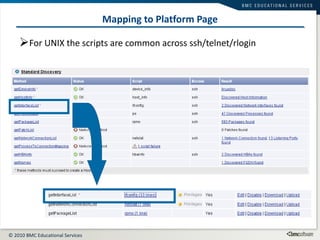
Mapping to Platform Page For UNIX the scripts are common across ssh/telnet/rlogin
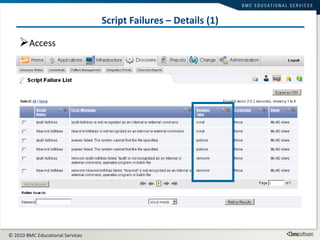
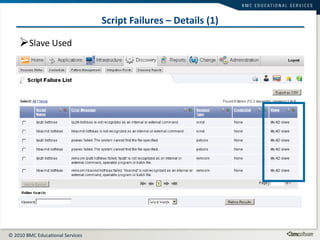
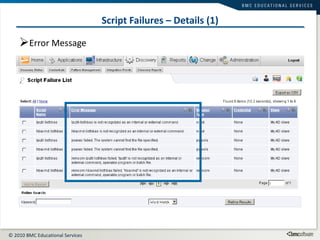
Understanding Script Failures Any script that fails to return useful output will be logged as a Script Failure Sometimes this is normal behaviour as in methods with more than one script scripts are tried in priority order
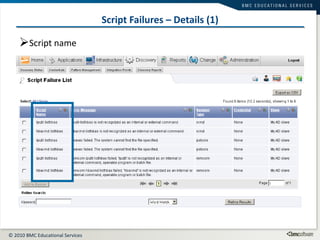
Script Failures – Details (1) Script name
Script Failures – Details (1) Access
Script Failures – Details (1) Slave Used
Script Failures – Details (1) Error Message
Discovery Troubleshooting Specific Reports
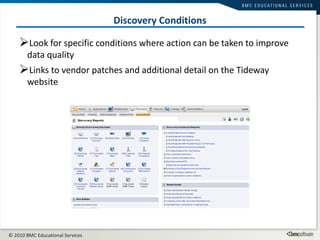
Discovery Conditions Look for specific conditions where action can be taken to improve data quality Links to vendor patches and additional detail on the Tideway website
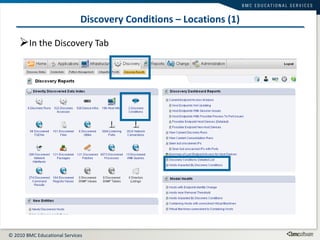
Discovery Conditions – Locations (1) In the Discovery Tab
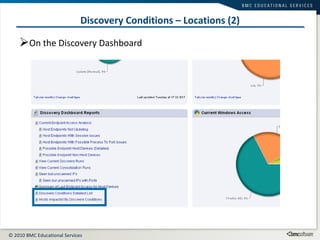
Discovery Conditions – Locations (2) On the Discovery Dashboard
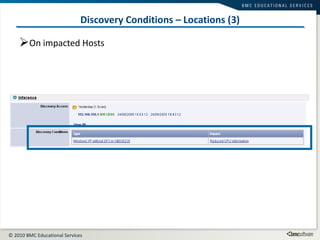
Discovery Conditions – Locations (3) On impacted Hosts
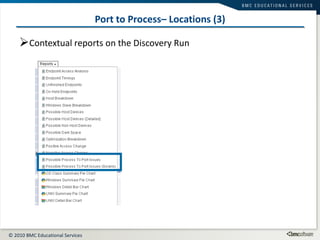
Possible Process To Port Issues A frequent area of discovery troubleshooting is gather Process to Port connections This data assist in understanding network dependencies and improves the detail of the Automatic Grouping There is a specific report available to assist We will also cover how to instrument UNIX scripts for further troubleshooting
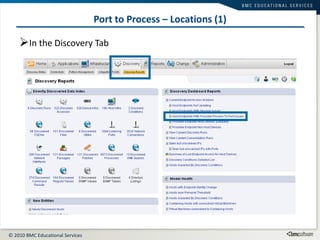
Port to Process – Locations (1) In the Discovery Tab
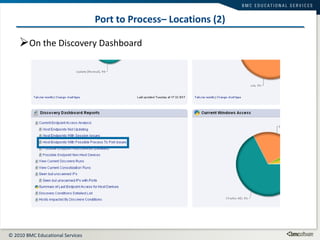
Port to Process– Locations (2) On the Discovery Dashboard
Port to Process– Locations (3) Contextual reports on the Discovery Run
Instrumenting UNIX Script Edit the script to add instrumentation Doesn’t happen out of the box Precede the command with  tw_capture tw_capture <name> <command> [<args>..] <name>  needs to be a unique identifier within that script tw_capture  will record the  exit code  and  stderr This will result in a CommandFailure node being created and linked to the discovery result But  ONLY  if the command fails
CommandFailure Details tw_capture can be used in a pipeline or subprocess (e.g. backticks) The /tmp directory must be writeable for the feature to be enabled Otherwise you will get a CommandFailure with the message “Unable to write to /tmp” tw_capture can also be used in scripts run from TPL patterns
CommandFailure attributes command_name The name given to tw_capture  status The exit code (integer) error Any text written to stderr
CommandFailure: Enable tw_capture <name> <command> [<args>..] <name> needs to be a unique identifier within that script If used with PRIV_XXXX the tw_capture must go first tw_capture lsof_i PRIV_LSOF lsof -l -n -P -F ptPTn -i 2>/dev/null
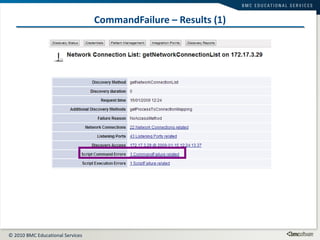
CommandFailure – Results (1)
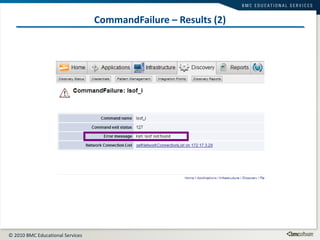
CommandFailure – Results (2)
Other useful discovery reports (1) Which Host IPs didn’t update last access? “ Host Endpoints Not Updating” report Filters just to Host devices Which Host IPs had session establishment issues last access? “ Host Endpoints With Session Issues” report Filters out first access to any IP to remove initial noise on deployment
Other useful discovery reports (2) What Hosts were scanned but not accessed at last access? “ Possible Endpoint Host Devices (Detailed)” report Includes both the raw OS estimate list and the discovery refined classification What other devices have been scanned?  “ Possible Endpoint Non Host Devices” report Includes both the raw OS estimate list and the discovery refined classification INCLUDES ‘Other’, ‘Embedded’ and ‘Unknown’ OS Classes Handy for displaying the non Host device discovery Also handy for checking for heavily firewalled Hosts!
Other useful discovery reports (3) What other IPs should be scanned? “ Seen but unscanned IPs” report “ Seen but unscanned IPs with Ports” report More detail for investigation but start with summary Shows a count of the IPs that the system has seen connections to but has not accessed
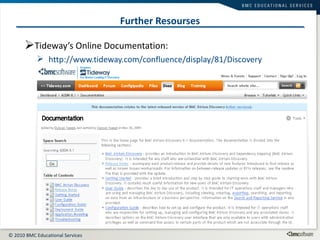
Further Resourses Tideway’s Online Documentation: http://www.tideway.com/confluence/display/81/Discovery Tideway Foundation Version 7.2 Documentation Title

Addmi 16.5-discovery troubleshooting

  • 1.
    Discovery Troubleshooting Understandingthe Discovery Access Page
  • 2.
    Outline Monitoring DiscoveryCurrent/Recent Runs Discovery Dashboard Credential/Slave usage feedback Troubleshooting Discovery Metadata page Specific Reports Additional Discovery Reference Material Appendix A Appendix B
  • 3.
    Introduction Keeping Foundationsaccess to your environment in tip top shape is important for the best quality data This module covers how to monitor Foundation’s Access and how to troubleshoot problems
  • 4.
    Discovery Troubleshooting Understandingthe Discovery Access Page
  • 5.
    Understanding the DiscoveryAccess view The Discovery Access view is the key page for troubleshooting discovery It provides a summary view of the Directly Discovered Data for this access Device Type Session Results Methods and Scripts used Script Failure Feedback
  • 6.
    Terminology – UNIXScripts Method / Script
  • 7.
    Terminology – WindowsScripts Method / Script
  • 8.
    Discovery Access PageData is summarised into collapsible sections
  • 9.
    Endpoint section Showsdata about when and why an endpoint was accessed Links to related Host nodes Device Summary field to improve context Next and Previous Accesses
  • 10.
    Device Summary Field- Examples Example Device Summary fields from a range of device types
  • 11.
    Status section Showsdata about the state of the Discovery Access Session Results only appear if there have been failures establishing a session
  • 12.
    Status section -Examples Example Status sections from a variety of scenarios
  • 13.
    Status section –Detail on UNIX Click on the link to see the session results in sequence
  • 14.
    Status section –Detail on Windows Click on the link to see the session results in sequence
  • 15.
    Discovery Details sectionShows the credential/slave used if for successful discovery Also shows if the data came from a scanning appliance or from scanner files
  • 16.
    Standard Discovery sectionShows the outcome of “Standard Discovery” That is the discovery we do automatically for a Host even without patterns loaded
  • 17.
    Standard Discovery –Details (1) Click through to see discovery results
  • 18.
    Standard Discovery –Details (2) Status shows the overall status
  • 19.
    Standard Discovery –Details (3) Shows the script that succeeded
  • 20.
    Standard Discovery –Details (4) Summarises up any script failure reports
  • 21.
    Standard Discovery –Details (5) Shows successful access route
  • 22.
    Standard Discovery –Details (6) The increased detail is needed to reflect the complexity of Windows discovery More Scripts Multiple access routes during the same scan
  • 23.
    Additional Discovery sectionRecords discovery done by patterns Slightly different as these methods can be called multiple times by many different patterns
  • 24.
    Integrations section Integrations(SQL Discovery currently) has a dedicated section
  • 25.
    Mapping to PlatformPage The information on the Discovery Access page has been arranged to allow you to find the commands on the Platform Pages.
  • 26.
    Mapping to PlatformPage First use the device summary to find the right platform
  • 27.
    Mapping to PlatformPage The use the Method
  • 28.
    Mapping to PlatformPage The use the Method, Access
  • 29.
    Mapping to PlatformPage The use the Method, Access, Script
  • 30.
    Mapping to PlatformPage For WMI there is an extra page showing the script
  • 31.
    Mapping to PlatformPage For WMI there is an extra page showing the script
  • 32.
    Mapping to PlatformPage For WMI there is an extra page showing the script
  • 33.
    Mapping to PlatformPage First use the device summary to find the right platform
  • 34.
    Mapping to PlatformPage For UNIX the scripts are common across ssh/telnet/rlogin
  • 35.
    Understanding Script FailuresAny script that fails to return useful output will be logged as a Script Failure Sometimes this is normal behaviour as in methods with more than one script scripts are tried in priority order
  • 36.
    Script Failures –Details (1) Script name
  • 37.
    Script Failures –Details (1) Access
  • 38.
    Script Failures –Details (1) Slave Used
  • 39.
    Script Failures –Details (1) Error Message
  • 40.
  • 41.
    Discovery Conditions Lookfor specific conditions where action can be taken to improve data quality Links to vendor patches and additional detail on the Tideway website
  • 42.
    Discovery Conditions –Locations (1) In the Discovery Tab
  • 43.
    Discovery Conditions –Locations (2) On the Discovery Dashboard
  • 44.
    Discovery Conditions –Locations (3) On impacted Hosts
  • 45.
    Possible Process ToPort Issues A frequent area of discovery troubleshooting is gather Process to Port connections This data assist in understanding network dependencies and improves the detail of the Automatic Grouping There is a specific report available to assist We will also cover how to instrument UNIX scripts for further troubleshooting
  • 46.
    Port to Process– Locations (1) In the Discovery Tab
  • 47.
    Port to Process–Locations (2) On the Discovery Dashboard
  • 48.
    Port to Process–Locations (3) Contextual reports on the Discovery Run
  • 49.
    Instrumenting UNIX ScriptEdit the script to add instrumentation Doesn’t happen out of the box Precede the command with tw_capture tw_capture <name> <command> [<args>..] <name> needs to be a unique identifier within that script tw_capture will record the exit code and stderr This will result in a CommandFailure node being created and linked to the discovery result But ONLY if the command fails
  • 50.
    CommandFailure Details tw_capturecan be used in a pipeline or subprocess (e.g. backticks) The /tmp directory must be writeable for the feature to be enabled Otherwise you will get a CommandFailure with the message “Unable to write to /tmp” tw_capture can also be used in scripts run from TPL patterns
  • 51.
    CommandFailure attributes command_nameThe name given to tw_capture status The exit code (integer) error Any text written to stderr
  • 52.
    CommandFailure: Enable tw_capture<name> <command> [<args>..] <name> needs to be a unique identifier within that script If used with PRIV_XXXX the tw_capture must go first tw_capture lsof_i PRIV_LSOF lsof -l -n -P -F ptPTn -i 2>/dev/null
  • 53.
  • 54.
  • 55.
    Other useful discoveryreports (1) Which Host IPs didn’t update last access? “ Host Endpoints Not Updating” report Filters just to Host devices Which Host IPs had session establishment issues last access? “ Host Endpoints With Session Issues” report Filters out first access to any IP to remove initial noise on deployment
  • 56.
    Other useful discoveryreports (2) What Hosts were scanned but not accessed at last access? “ Possible Endpoint Host Devices (Detailed)” report Includes both the raw OS estimate list and the discovery refined classification What other devices have been scanned? “ Possible Endpoint Non Host Devices” report Includes both the raw OS estimate list and the discovery refined classification INCLUDES ‘Other’, ‘Embedded’ and ‘Unknown’ OS Classes Handy for displaying the non Host device discovery Also handy for checking for heavily firewalled Hosts!
  • 57.
    Other useful discoveryreports (3) What other IPs should be scanned? “ Seen but unscanned IPs” report “ Seen but unscanned IPs with Ports” report More detail for investigation but start with summary Shows a count of the IPs that the system has seen connections to but has not accessed
  • 58.
    Further Resourses Tideway’sOnline Documentation: http://www.tideway.com/confluence/display/81/Discovery Tideway Foundation Version 7.2 Documentation Title

Editor's Notes

  • #7 A quick revision of the terminology: A Method is an overall logical method to achieve discovery of a related set of information. Within each method there is one or more Script that contains the knowledge of how to recover this information. In the case of UNIX these are actual shell scripts. The shell scripts can recover a number of properties and adapt to the slight differences between platforms.
  • #8 Windows discovery is very slightly different. Rather than using the facility of a scripting shell the Methods contain several atomic scripts to recover elements of information needed by each method.
  • #10 Device summary field behaves slightly differently depending what was found so that the best summary information is given for full discovery, probe discovery and across device types. All data is recovered from the DDD below
  • #11 Device summary field behaves slightly differently depending what was found so that the best summary information is given for full discovery, probe discovery and across device types. All data is recovered from the DDD below
  • #12 It will be normal behaviour on initial scans as Foundation works out what credentials and slaves to use that there will be session results. Session Results are logged sequentially – the hidden timeindex field can be used to reconstruct this sequence. Normally the successful session does not create a Session Result to save storage, but if there have been failures it will
  • #15 Note that we always try UNIX login ahead of Windows if our cached results do not work – UNIX fails a lot quicker so this is more efficient
  • #16 Notice that the credential from the scanner appliance is not a link – the credential is local to the scanning appliance so cannot be resolved on the consolidation appliance.
  • #19 The status column is driven by the failure_reason attributes and is the legacy technique of feedback retained as a summary.
  • #20 The script can be looked up on the Platforms page in Administration. If no script is recorded then none succeeded, the exception being geNames as a DNS query is so simple it doesn’t have a script!
  • #23 There are considerably more scripts on Windows. This reflects the evolving proprietary methods across Windows versions but also the difference between the UNIX scripts trying several techniques internally. Neither is better or worse, they’re just different. Note that even using the preferred WMI access we still have to use other techniques to gather network connection details as these are not available via WMI.
  • #24 Additional discovery is summarised by rolling up in the status column (driven by failure_reason) Script failure reports are reflect upwards and summarised.
  • #46 On most platforms need to add specific privilege elevation Some platforms need additional software (lsof) UNIX scripts can be instrumented as they are *all* shell scripts and we have a function that can capture stdin/stdout. Windows scripts cannot be instrumented as there is no equivalent and they use a variety of techniques. This is partially mitigated as the Windows scripts tend to be much more atomic than the Unix ones.
  • #50 UNIX scripts only. Use sparingly and in general do not leave on in production – if large amounts of data are captured from standard error it can impact the system due to increase load on storage.
  • #54 After editing the discovery script and scanning the host we have now captured the command failure Click on the link to view result details
  • #55 LSOF is not installed on this host in a place that the user we used could find