






ADBMS UNIT 3
By : Joshua Costa (SMIT2223013)
CONTENTS
Joins
• Introduction, Reason,
Condition
• Example of Joins
• Types of Joins
Sorting
• Sorting according to One
Column.
• Sorting according to Multiple
Columns.
• Sorting by Column Number.
Distributed Database System
• Introduction
• Types of DDS
• Distributed Data Storage
• Replication
• Fragmentation
• Advantages of DDS
• Applications of DDS
JOINS
• Introduction :
• Joins is covered in Relational Algebra as well as in Sequel Algebra.
• Relational Algebra  Mathematical Expressions
• Sequel algebra  SQL Commands.
• Why Joins are used?
• The name ‘Joins’ itself says that we are going to join two things.
• In case of ADBMS we use Joins to join two tables.
• Simply to work with datas of two different tables.
• Condition to be noted
• Both the tables must at least have one common attribute.
EXAMPLE OF JOINS
E_No E_Name Address
1 Tony New York
2 Steeve Manhattan
3 Chadwick California
4 Peter Queens
5 Joshua India
Dep_No Name E_No
1 Technology 1
2 HR 2
3 Finance 4
4 IT 5
Q. Find out the department name to which Peter
belongs.
Ans. Finance
Employee Department
TYPES OF JOINS
• SQL Join statement is used to combine data or rows from two or more
tables based on a common field between them.
• Different types of Joins are as follows:
• INNER JOIN
• LEFT JOIN
• RIGHT JOIN
• FULL JOIN
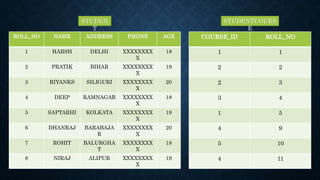
ROLL_NO NAME ADDRESS PHONE AGE
1 HARSH DELHI XXXXXXXX
X
18
2 PRATIK BIHAR XXXXXXXX
X
19
3 RIYANKS SILIGURI XXXXXXXX
X
20
4 DEEP RAMNAGAR XXXXXXXX
X
18
5 SAPTARHI KOLKATA XXXXXXXX
X
19
6 DHANRAJ BARABAJA
R
XXXXXXXX
X
20
7 ROHIT BALURGHA
T
XXXXXXXX
X
18
8 NIRAJ ALIPUR XXXXXXXX
X
19
COURSE_ID ROLL_NO
1 1
2 2
2 3
3 4
1 5
4 9
5 10
4 11
STUDEN
T
STUDENTCOURS
E
INNER JOIN
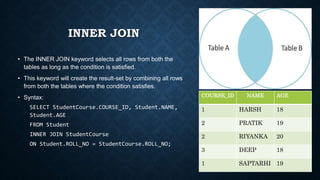
• The INNER JOIN keyword selects all rows from both the
tables as long as the condition is satisfied.
• This keyword will create the result-set by combining all rows
from both the tables where the condition satisfies.
• Syntax:
SELECT StudentCourse.COURSE_ID, Student.NAME,
Student.AGE
FROM Student
INNER JOIN StudentCourse
ON Student.ROLL_NO = StudentCourse.ROLL_NO;
COURSE_ID NAME AGE
1 HARSH 18
2 PRATIK 19
2 RIYANKA 20
3 DEEP 18
1 SAPTARHI 19
LEFT JOIN
• This join returns all the rows of the table on the left side of the
join and matches rows for the table on the right side of the join.
• For the rows for which there is no matching row on the right
side, the result-set will contain null.
• LEFT JOIN is also known as LEFT OUTER JOIN.
• Syntax:
SELECT Student.NAME,StudentCourse.COURSE_ID
FROM Student
LEFT JOIN StudentCourse
ON StudentCourse.ROLL_NO = Student.ROLL_NO;
NAME COURSE_ID
HARSH 1
PRATIK 2
RIYANKA 2
DEEP 3
SAPTARHI 1
DHANRAJ NULL
ROHIT NULL
NIRAJ NULL
RIGHT JOIN
• RIGHT JOIN is similar to LEFT JOIN.
• This join returns all the rows of the table on the right side of the
join and matching rows for the table on the left side of the join.
• For the rows for which there is no matching row on the left
side, the result-set will contain null.
• RIGHT JOIN is also known as RIGHT OUTER JOIN.
• Syntax:
SELECT Student.NAME,StudentCourse.COURSE_ID
FROM Student
RIGHT JOIN StudentCourse
ON StudentCourse.ROLL_NO = Student.ROLL_NO;
NAME COURSE_ID
HARSH 1
PRATIK 2
RIYANKA 2
DEEP 3
SAPTARHI 1
NULL 4
NULL 5
NULL 4
FULL JOIN
• FULL JOIN creates the result-set by combining results of both
LEFT JOIN and RIGHT JOIN.
• The result-set will contain all the rows from both tables.
• For the rows for which there is no matching, the result-set will
contain NULL values.
• Syntax:
SELECT Student.NAME,StudentCourse.COURSE_ID
FROM Student
FULL JOIN StudentCourse
ON StudentCourse.ROLL_NO = Student.ROLL_NO;
NAME COURSE_ID
HARSH 1
PRATIK 2
RIYANKA 2
DEEP 3
SAPTARHI 1
DHANRAJ NULL
ROHIT NULL
NIRAJ NULL
NULL 4
NULL 5
NULL 4
SORTING
• Sorting is simply re-arranging our query
results in a specified way.
• Sorting can be performed on a single
column or on more than one column.
• The ORDER BY statement in SQL is used
to sort the fetched data in either ascending
or descending according to one or more
columns.
• By default ORDER BY sorts the data in
ascending order.
• We can use the keyword DESC to sort
the data in descending order and the
keyword ASC to sort in ascending order.
SORT ACCORDING TO ONE COLUMN
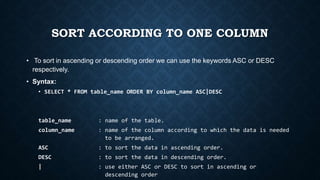
• To sort in ascending or descending order we can use the keywords ASC or DESC
respectively.
• Syntax:
• SELECT * FROM table_name ORDER BY column_name ASC|DESC
table_name : name of the table.
column_name : name of the column according to which the data is needed
to be arranged.
ASC : to sort the data in ascending order.
DESC : to sort the data in descending order.
| : use either ASC or DESC to sort in ascending or
descending order
SORT ACCORDING
TO ONE COLUMN –
EXAMPLE
ROLL_NO NAME ADDRESS PHONE AGE
1 HARSH DELHI XXXXXXXX
X
18
2 PRATIK BIHAR XXXXXXXX
X
19
3 RIYANKA SILIGURI XXXXXXXX
X
20
4 DEEP RAMNAGAR XXXXXXXX
X
18
5 SAPTARHI KOLKATA XXXXXXXX
X
19
6 DHANRAJ BARABAJA
R
XXXXXXXX
X
20
7 ROHIT BALURGHA XXXXXXXX 18
STUDEN
T
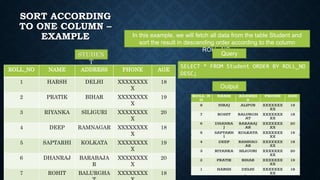
In this example, we will fetch all data from the table Student and
sort the result in descending order according to the column
ROLL_NO.
Query
SELECT * FROM Student ORDER BY ROLL_NO
DESC;
Output
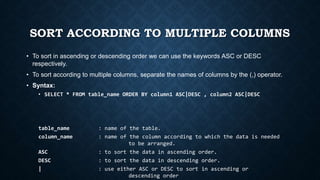
SORT ACCORDING TO MULTIPLE COLUMNS
• To sort in ascending or descending order we can use the keywords ASC or DESC
respectively.
• To sort according to multiple columns, separate the names of columns by the (,) operator.
• Syntax:
• SELECT * FROM table_name ORDER BY column1 ASC|DESC , column2 ASC|DESC
table_name : name of the table.
column_name : name of the column according to which the data is needed
to be arranged.
ASC : to sort the data in ascending order.
DESC : to sort the data in descending order.
| : use either ASC or DESC to sort in ascending or
descending order
SORT ACCORDING TO
MULTIPLE COLUMNS
– EXAMPLE
ROLL_NO NAME ADDRESS PHONE Age
7 ROHIT BALURGHAT XXXXXXXXXX 18
4 DEEP RAMNAGAR XXXXXXXXXX 18
1 HARSH DELHI XXXXXXXXXX 18
8 NIRAJ ALIPUR XXXXXXXXXX 19
5 SAPTARHI KOLKATA XXXXXXXXXX 19
2 PRATIK BIHAR XXXXXXXXXX 19
6 DHANRAJ BARABAJAR XXXXXXXXXX 20
3 RIYANKA SILIGURI XXXXXXXXXX 20
STUDEN
T
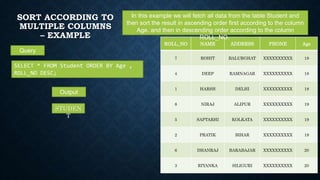
In this example we will fetch all data from the table Student and
then sort the result in ascending order first according to the column
Age. and then in descending order according to the column
ROLL_NO.
Query
SELECT * FROM Student ORDER BY Age ,
ROLL_NO DESC;
Output
SORTING BY
COLUMN NUMBER
• An integer that identifies the
number of the column in
the SelectItems in the underlying
query of the SELECT statement.
• Column number must be greater
than 0 and not greater than the
number of columns in the result
table.
• The rule checks for ORDER BY
clauses that reference select
list columns using the column
number instead of the column
name.
ROLL_NO NAME ADDRESS PHONE Age
7 ROHIT BALURGHAT XXXXXXXXXX 18
4 DEEP RAMNAGAR XXXXXXXXXX 18
1 HARSH DELHI XXXXXXXXXX 18
8 NIRAJ ALIPUR XXXXXXXXXX 19
ROLL_NO NAME ADDRESS PHONE Age
1 HARSH DELHI XXXXXXXXXX 18
4 DEEP RAMNAGAR XXXXXXXXXX 18
7 ROHIT BALURGHAT XXXXXXXXXX 18
8 NIRAJ ALIPUR XXXXXXXXXX 19
SELECT Name, Address FROM STUDENT ORDER BY 1
Syntax : Order by Column_Number asc/desc
Output:
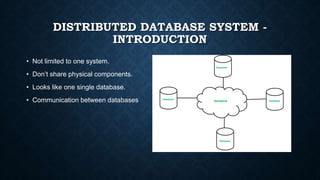
DISTRIBUTED DATABASE SYSTEM -
INTRODUCTION
• Not limited to one system.
• Don’t share physical components.
• Looks like one single database.
• Communication between databases
TYPES OF DISTRIBUTED DATABASE
SYSTEMS.
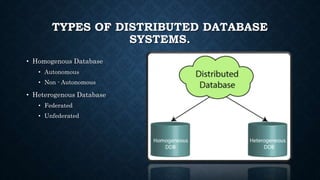
• Homogenous Database
• Autonomous
• Non - Autonomous
• Heterogenous Database
• Federated
• Unfederated
DISTRIBUTED DATABASE STORAGE
• There are 2 ways in which data can be stored on different sites.
• These are:
• Replication
• In this approach, the entire relationship is stored redundantly at 2 or more sites.
• If the entire database is available at all sites, it is a fully redundant database. Hence, in replication, systems
maintain copies of data.
• Fragmentation
• In this approach, the relations are fragmented (i.e., they’re divided into smaller parts) and each of the
fragments is stored in different sites where they’re required.
• It must be made sure that the fragments are such that they can be used to reconstruct the original relation
(i.e, there isn’t any loss of data).
• Fragmentation is advantageous as it doesn’t create copies of data, consistency is not a problem.
• Fragmentation of relations can be done in two ways:
• Horizontal fragmentation – Splitting by rows –
The relation is fragmented into groups of tuples so that each tuple is assigned to at least one fragment.
• Vertical fragmentation – Splitting by columns –
The schema of the relation is divided into smaller schemas. Each fragment must contain a common candidate key so
as to ensure a lossless join.
ADVANTAGES OF DISTRIBUTED DATABASE
SYSTEMS
• Distributed databases basically provide us the advantages of distributed computing to the
database management domain.
• Basically, we can define a Distributed database as a collection of multiple interrelated
databases distributed over a computer network and a distributed database management
system as a software system that basically manages a distributed database while making
the distribution transparent to the user.
• Distributed database management basically proposed for the various reason from
organizational decentralization and economical processing to greater autonomy. Some of
these advantages are as follows:
• Management of data with different level of transparency
• Network transparency
• Replication transparencies
• Fragmentation transparency
• Increased Reliability and availability
• Easier Expansion
• Improved Performance
APPLICATIONS OF DISTRIBUTED DATABASE
SYSTEMS
• It is used in Corporate Management Information System.
• It is used in multimedia applications.
• Used in Military’s control system, Hotel chains etc.
• It is also used in manufacturing control system.
THANKS FOR YOUR
PATIENCE

ADBMS - Joins , Sorting , Distributed Database Systems

  • 1.
    ADBMS UNIT 3 By: Joshua Costa (SMIT2223013)
  • 2.
    CONTENTS Joins • Introduction, Reason, Condition •Example of Joins • Types of Joins Sorting • Sorting according to One Column. • Sorting according to Multiple Columns. • Sorting by Column Number. Distributed Database System • Introduction • Types of DDS • Distributed Data Storage • Replication • Fragmentation • Advantages of DDS • Applications of DDS
  • 4.
    JOINS • Introduction : •Joins is covered in Relational Algebra as well as in Sequel Algebra. • Relational Algebra  Mathematical Expressions • Sequel algebra  SQL Commands. • Why Joins are used? • The name ‘Joins’ itself says that we are going to join two things. • In case of ADBMS we use Joins to join two tables. • Simply to work with datas of two different tables. • Condition to be noted • Both the tables must at least have one common attribute.
  • 5.
    EXAMPLE OF JOINS E_NoE_Name Address 1 Tony New York 2 Steeve Manhattan 3 Chadwick California 4 Peter Queens 5 Joshua India Dep_No Name E_No 1 Technology 1 2 HR 2 3 Finance 4 4 IT 5 Q. Find out the department name to which Peter belongs. Ans. Finance Employee Department
  • 6.
    TYPES OF JOINS •SQL Join statement is used to combine data or rows from two or more tables based on a common field between them. • Different types of Joins are as follows: • INNER JOIN • LEFT JOIN • RIGHT JOIN • FULL JOIN
  • 7.
    ROLL_NO NAME ADDRESSPHONE AGE 1 HARSH DELHI XXXXXXXX X 18 2 PRATIK BIHAR XXXXXXXX X 19 3 RIYANKS SILIGURI XXXXXXXX X 20 4 DEEP RAMNAGAR XXXXXXXX X 18 5 SAPTARHI KOLKATA XXXXXXXX X 19 6 DHANRAJ BARABAJA R XXXXXXXX X 20 7 ROHIT BALURGHA T XXXXXXXX X 18 8 NIRAJ ALIPUR XXXXXXXX X 19 COURSE_ID ROLL_NO 1 1 2 2 2 3 3 4 1 5 4 9 5 10 4 11 STUDEN T STUDENTCOURS E
  • 8.
    INNER JOIN • TheINNER JOIN keyword selects all rows from both the tables as long as the condition is satisfied. • This keyword will create the result-set by combining all rows from both the tables where the condition satisfies. • Syntax: SELECT StudentCourse.COURSE_ID, Student.NAME, Student.AGE FROM Student INNER JOIN StudentCourse ON Student.ROLL_NO = StudentCourse.ROLL_NO; COURSE_ID NAME AGE 1 HARSH 18 2 PRATIK 19 2 RIYANKA 20 3 DEEP 18 1 SAPTARHI 19
  • 9.
    LEFT JOIN • Thisjoin returns all the rows of the table on the left side of the join and matches rows for the table on the right side of the join. • For the rows for which there is no matching row on the right side, the result-set will contain null. • LEFT JOIN is also known as LEFT OUTER JOIN. • Syntax: SELECT Student.NAME,StudentCourse.COURSE_ID FROM Student LEFT JOIN StudentCourse ON StudentCourse.ROLL_NO = Student.ROLL_NO; NAME COURSE_ID HARSH 1 PRATIK 2 RIYANKA 2 DEEP 3 SAPTARHI 1 DHANRAJ NULL ROHIT NULL NIRAJ NULL
  • 10.
    RIGHT JOIN • RIGHTJOIN is similar to LEFT JOIN. • This join returns all the rows of the table on the right side of the join and matching rows for the table on the left side of the join. • For the rows for which there is no matching row on the left side, the result-set will contain null. • RIGHT JOIN is also known as RIGHT OUTER JOIN. • Syntax: SELECT Student.NAME,StudentCourse.COURSE_ID FROM Student RIGHT JOIN StudentCourse ON StudentCourse.ROLL_NO = Student.ROLL_NO; NAME COURSE_ID HARSH 1 PRATIK 2 RIYANKA 2 DEEP 3 SAPTARHI 1 NULL 4 NULL 5 NULL 4
  • 11.
    FULL JOIN • FULLJOIN creates the result-set by combining results of both LEFT JOIN and RIGHT JOIN. • The result-set will contain all the rows from both tables. • For the rows for which there is no matching, the result-set will contain NULL values. • Syntax: SELECT Student.NAME,StudentCourse.COURSE_ID FROM Student FULL JOIN StudentCourse ON StudentCourse.ROLL_NO = Student.ROLL_NO; NAME COURSE_ID HARSH 1 PRATIK 2 RIYANKA 2 DEEP 3 SAPTARHI 1 DHANRAJ NULL ROHIT NULL NIRAJ NULL NULL 4 NULL 5 NULL 4
  • 13.
    SORTING • Sorting issimply re-arranging our query results in a specified way. • Sorting can be performed on a single column or on more than one column. • The ORDER BY statement in SQL is used to sort the fetched data in either ascending or descending according to one or more columns. • By default ORDER BY sorts the data in ascending order. • We can use the keyword DESC to sort the data in descending order and the keyword ASC to sort in ascending order.
  • 14.
    SORT ACCORDING TOONE COLUMN • To sort in ascending or descending order we can use the keywords ASC or DESC respectively. • Syntax: • SELECT * FROM table_name ORDER BY column_name ASC|DESC table_name : name of the table. column_name : name of the column according to which the data is needed to be arranged. ASC : to sort the data in ascending order. DESC : to sort the data in descending order. | : use either ASC or DESC to sort in ascending or descending order
  • 15.
    SORT ACCORDING TO ONECOLUMN – EXAMPLE ROLL_NO NAME ADDRESS PHONE AGE 1 HARSH DELHI XXXXXXXX X 18 2 PRATIK BIHAR XXXXXXXX X 19 3 RIYANKA SILIGURI XXXXXXXX X 20 4 DEEP RAMNAGAR XXXXXXXX X 18 5 SAPTARHI KOLKATA XXXXXXXX X 19 6 DHANRAJ BARABAJA R XXXXXXXX X 20 7 ROHIT BALURGHA XXXXXXXX 18 STUDEN T In this example, we will fetch all data from the table Student and sort the result in descending order according to the column ROLL_NO. Query SELECT * FROM Student ORDER BY ROLL_NO DESC; Output
  • 16.
    SORT ACCORDING TOMULTIPLE COLUMNS • To sort in ascending or descending order we can use the keywords ASC or DESC respectively. • To sort according to multiple columns, separate the names of columns by the (,) operator. • Syntax: • SELECT * FROM table_name ORDER BY column1 ASC|DESC , column2 ASC|DESC table_name : name of the table. column_name : name of the column according to which the data is needed to be arranged. ASC : to sort the data in ascending order. DESC : to sort the data in descending order. | : use either ASC or DESC to sort in ascending or descending order
  • 17.
    SORT ACCORDING TO MULTIPLECOLUMNS – EXAMPLE ROLL_NO NAME ADDRESS PHONE Age 7 ROHIT BALURGHAT XXXXXXXXXX 18 4 DEEP RAMNAGAR XXXXXXXXXX 18 1 HARSH DELHI XXXXXXXXXX 18 8 NIRAJ ALIPUR XXXXXXXXXX 19 5 SAPTARHI KOLKATA XXXXXXXXXX 19 2 PRATIK BIHAR XXXXXXXXXX 19 6 DHANRAJ BARABAJAR XXXXXXXXXX 20 3 RIYANKA SILIGURI XXXXXXXXXX 20 STUDEN T In this example we will fetch all data from the table Student and then sort the result in ascending order first according to the column Age. and then in descending order according to the column ROLL_NO. Query SELECT * FROM Student ORDER BY Age , ROLL_NO DESC; Output
  • 18.
    SORTING BY COLUMN NUMBER •An integer that identifies the number of the column in the SelectItems in the underlying query of the SELECT statement. • Column number must be greater than 0 and not greater than the number of columns in the result table. • The rule checks for ORDER BY clauses that reference select list columns using the column number instead of the column name. ROLL_NO NAME ADDRESS PHONE Age 7 ROHIT BALURGHAT XXXXXXXXXX 18 4 DEEP RAMNAGAR XXXXXXXXXX 18 1 HARSH DELHI XXXXXXXXXX 18 8 NIRAJ ALIPUR XXXXXXXXXX 19 ROLL_NO NAME ADDRESS PHONE Age 1 HARSH DELHI XXXXXXXXXX 18 4 DEEP RAMNAGAR XXXXXXXXXX 18 7 ROHIT BALURGHAT XXXXXXXXXX 18 8 NIRAJ ALIPUR XXXXXXXXXX 19 SELECT Name, Address FROM STUDENT ORDER BY 1 Syntax : Order by Column_Number asc/desc Output:
  • 20.
    DISTRIBUTED DATABASE SYSTEM- INTRODUCTION • Not limited to one system. • Don’t share physical components. • Looks like one single database. • Communication between databases
  • 21.
    TYPES OF DISTRIBUTEDDATABASE SYSTEMS. • Homogenous Database • Autonomous • Non - Autonomous • Heterogenous Database • Federated • Unfederated
  • 22.
    DISTRIBUTED DATABASE STORAGE •There are 2 ways in which data can be stored on different sites. • These are: • Replication • In this approach, the entire relationship is stored redundantly at 2 or more sites. • If the entire database is available at all sites, it is a fully redundant database. Hence, in replication, systems maintain copies of data. • Fragmentation • In this approach, the relations are fragmented (i.e., they’re divided into smaller parts) and each of the fragments is stored in different sites where they’re required. • It must be made sure that the fragments are such that they can be used to reconstruct the original relation (i.e, there isn’t any loss of data). • Fragmentation is advantageous as it doesn’t create copies of data, consistency is not a problem. • Fragmentation of relations can be done in two ways: • Horizontal fragmentation – Splitting by rows – The relation is fragmented into groups of tuples so that each tuple is assigned to at least one fragment. • Vertical fragmentation – Splitting by columns – The schema of the relation is divided into smaller schemas. Each fragment must contain a common candidate key so as to ensure a lossless join.
  • 23.
    ADVANTAGES OF DISTRIBUTEDDATABASE SYSTEMS • Distributed databases basically provide us the advantages of distributed computing to the database management domain. • Basically, we can define a Distributed database as a collection of multiple interrelated databases distributed over a computer network and a distributed database management system as a software system that basically manages a distributed database while making the distribution transparent to the user. • Distributed database management basically proposed for the various reason from organizational decentralization and economical processing to greater autonomy. Some of these advantages are as follows: • Management of data with different level of transparency • Network transparency • Replication transparencies • Fragmentation transparency • Increased Reliability and availability • Easier Expansion • Improved Performance
  • 24.
    APPLICATIONS OF DISTRIBUTEDDATABASE SYSTEMS • It is used in Corporate Management Information System. • It is used in multimedia applications. • Used in Military’s control system, Hotel chains etc. • It is also used in manufacturing control system.
  • 25.